bulb Seat Ibiza ST 2011 User Guide
[x] Cancel search | Manufacturer: SEAT, Model Year: 2011, Model line: Ibiza ST, Model: Seat Ibiza ST 2011Pages: 280, PDF Size: 4.01 MB
Page 238 of 280
236If and when
–Move the loop ⇒ fig. 153 1
in the direction of the arrow and
remove the cover.
– Remove the bulb holder 4
⇒ fig. 155 outwards.
– Replace the bulb by pulling it out and inserting the replace-
ment.
– Installation is done in the reverse order.
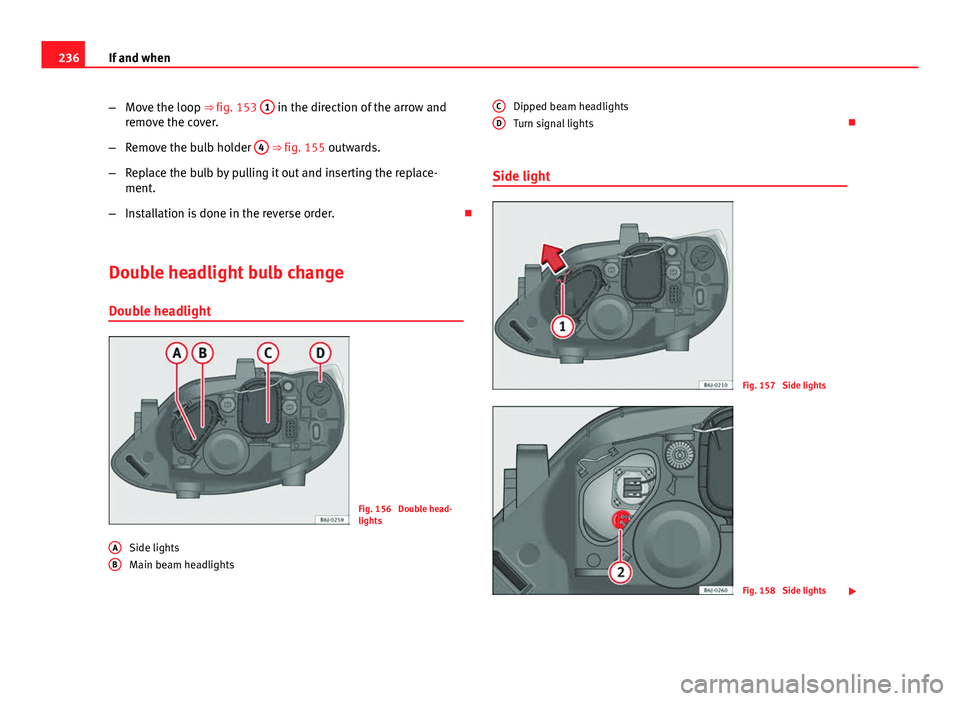
Double headlight bulb change Double headlight
Fig. 156 Double head-
lights
Side lights
Main beam headlights
A
B
Dipped beam headlights
Turn signal lights
Side light
Fig. 157 Side lights
Fig. 158 Side lights
C
D
Page 239 of 280
237
If and when
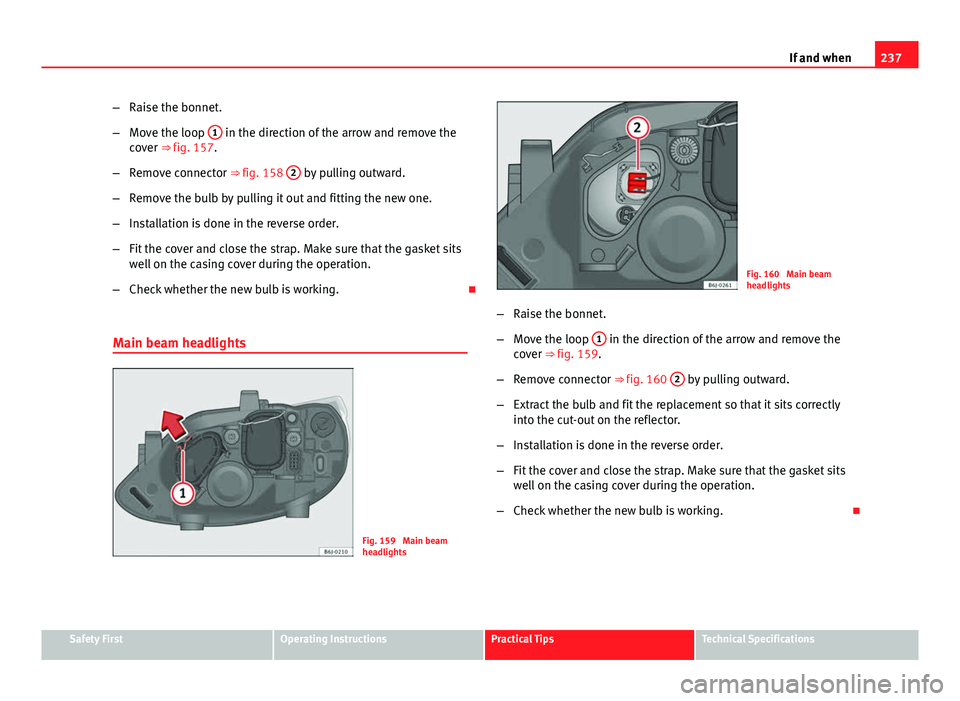
– Raise the bonnet.
– Move the loop 1
in the direction of the arrow and remove the
cover ⇒ fig. 157.
– Remove connector ⇒ fig. 158 2
by pulling outward.
– Remove the bulb by pulling it out and fitting the new one.
– Installation is done in the reverse order.
– Fit the cover and close the strap. Make sure that the gasket sits
well on the casing cover during the operation.
– Check whether the new bulb is working.
Main beam headlights
Fig. 159 Main beam
headlights
Fig. 160 Main beam
headlights
– Raise the bonnet.
– Move the loop 1
in the direction of the arrow and remove the
cover ⇒ fig. 159.
– Remove connector ⇒ fig. 160 2
by pulling outward.
– Extract the bulb and fit the replacement so that it sits correctly
into the cut-out on the reflector.
– Installation is done in the reverse order.
– Fit the cover and close the strap. Make sure that the gasket sits
well on the casing cover during the operation.
– Check whether the new bulb is working.
Safety FirstOperating InstructionsPractical TipsTechnical Specifications
Page 240 of 280
238If and when
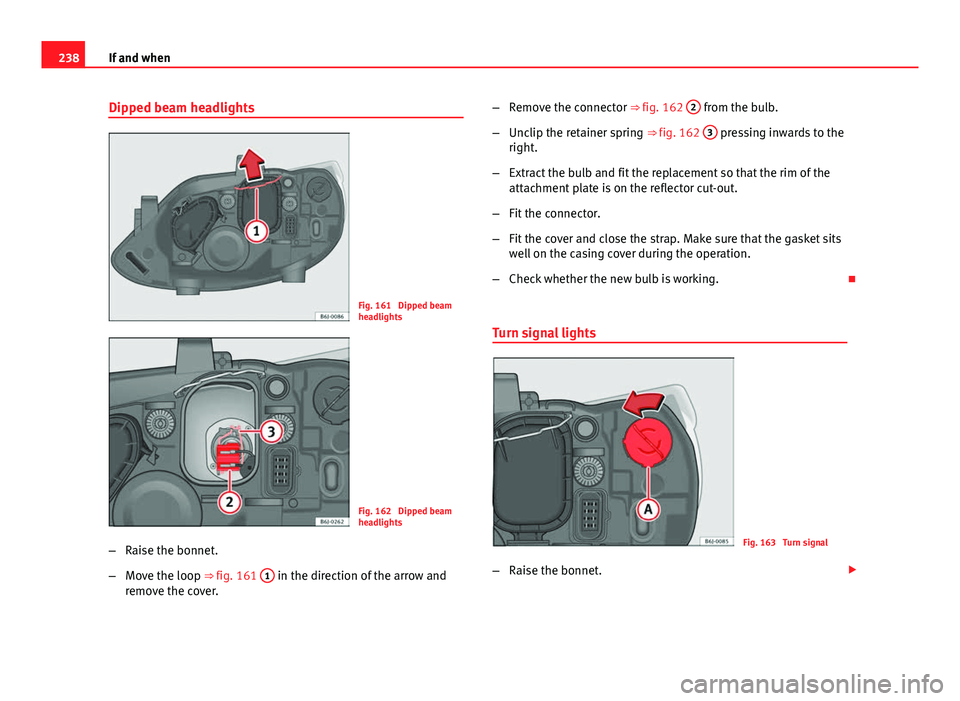
Dipped beam headlights
Fig. 161 Dipped beam
headlights
Fig. 162 Dipped beam
headlights
– Raise the bonnet.
– Move the loop ⇒ fig. 161 1
in the direction of the arrow and
remove the cover. –
Remove the connector ⇒ fig. 162 2
from the bulb.
– Unclip the retainer spring ⇒ fig. 162 3
pressing inwards to the
right.
– Extract the bulb and fit the replacement so that the rim of the
attachment plate is on the reflector cut-out.
– Fit the connector.
– Fit the cover and close the strap. Make sure that the gasket sits
well on the casing cover during the operation.
– Check whether the new bulb is working.
Turn signal lights
Fig. 163 Turn signal
– Raise the bonnet.
Page 241 of 280
239
If and when
– Rotate the bulb holder ⇒ fig. 163 A
to the left and pull.
– Remove the bulb by pressing on the bulb holder and rotating at
the same time to the left.
– Installation is done in the reverse order.
Safety FirstOperating InstructionsPractical TipsTechnical Specifications
Page 242 of 280
240If and when
Changing the bulbs of AFS headlights
AFS headlight bulbs
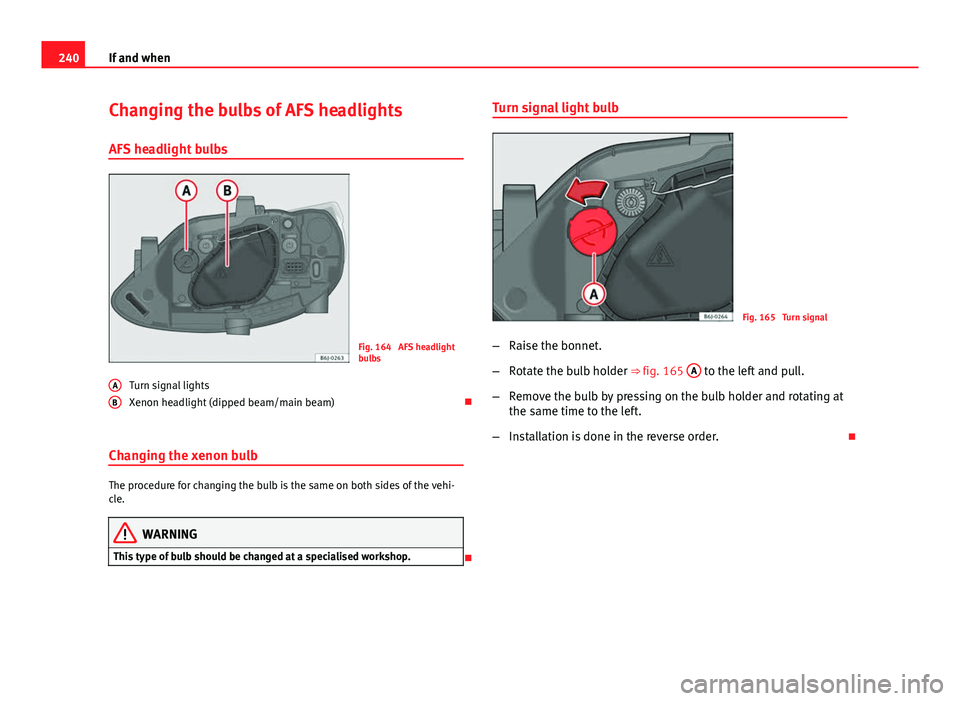
Fig. 164 AFS headlight
bulbs
Turn signal lights
Xenon headlight (dipped beam/main beam)
Changing the xenon bulb
The procedure for changing the bulb is the same on both sides of the vehi-
cle.
WARNING
This type of bulb should be changed at a specialised workshop.
A
B
Turn signal light bulb
Fig. 165 Turn signal
– Raise the bonnet.
– Rotate the bulb holder ⇒ fig. 165 A
to the left and pull.
– Remove the bulb by pressing on the bulb holder and rotating at
the same time to the left.
– Installation is done in the reverse order.
Page 243 of 280
241
If and when
Changing the fog light bulbs
Fog lights bulb
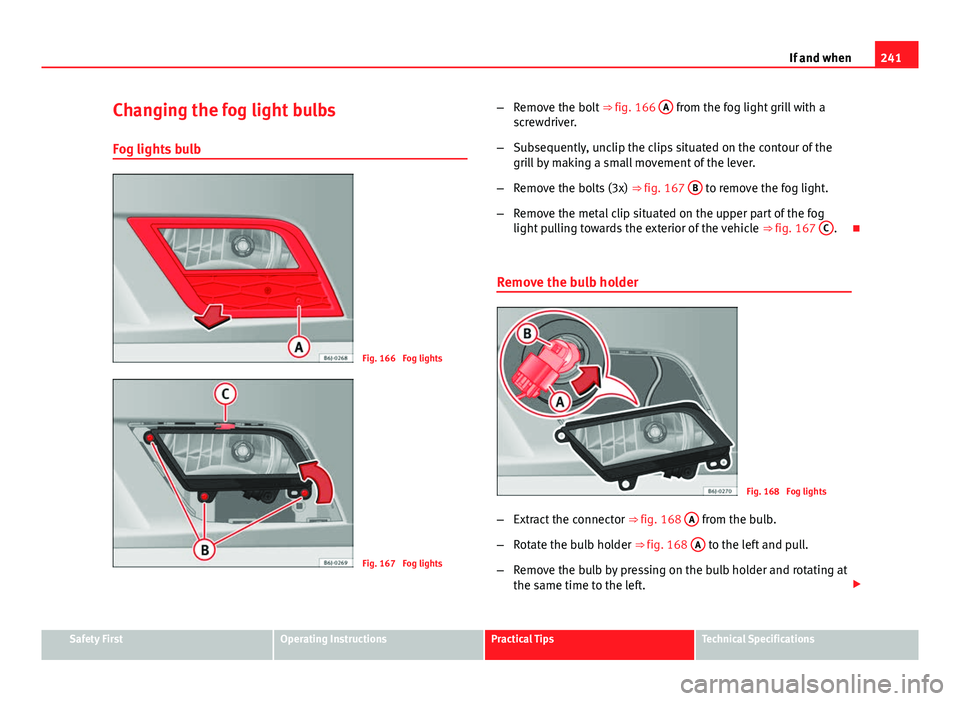
Fig. 166 Fog lights
Fig. 167 Fog lights –
Remove the bolt ⇒ fig. 166 A
from the fog light grill with a
screwdriver.
– Subsequently, unclip the clips situated on the contour of the
grill by making a small movement of the lever.
– Remove the bolts (3x) ⇒ fig. 167 B
to remove the fog light.
– Remove the metal clip situated on the upper part of the fog
light pulling towards the exterior of the vehicle ⇒ fig. 167 C
.
Remove the bulb holder
Fig. 168 Fog lights
– Extract the connector ⇒ fig. 168 A
from the bulb.
– Rotate the bulb holder ⇒ fig. 168 A
to the left and pull.
– Remove the bulb by pressing on the bulb holder and rotating at
the same time to the left.
Safety FirstOperating InstructionsPractical TipsTechnical Specifications
Page 244 of 280
242If and when
–Installation is done in the reverse order.
– Check that the bulb functions.
Changing the rear lights (on the wing) Overview of tail lights
Tail lights on side panel
● Brake lights
● Side lights
● Turn signal
Accessing the side light bulbs
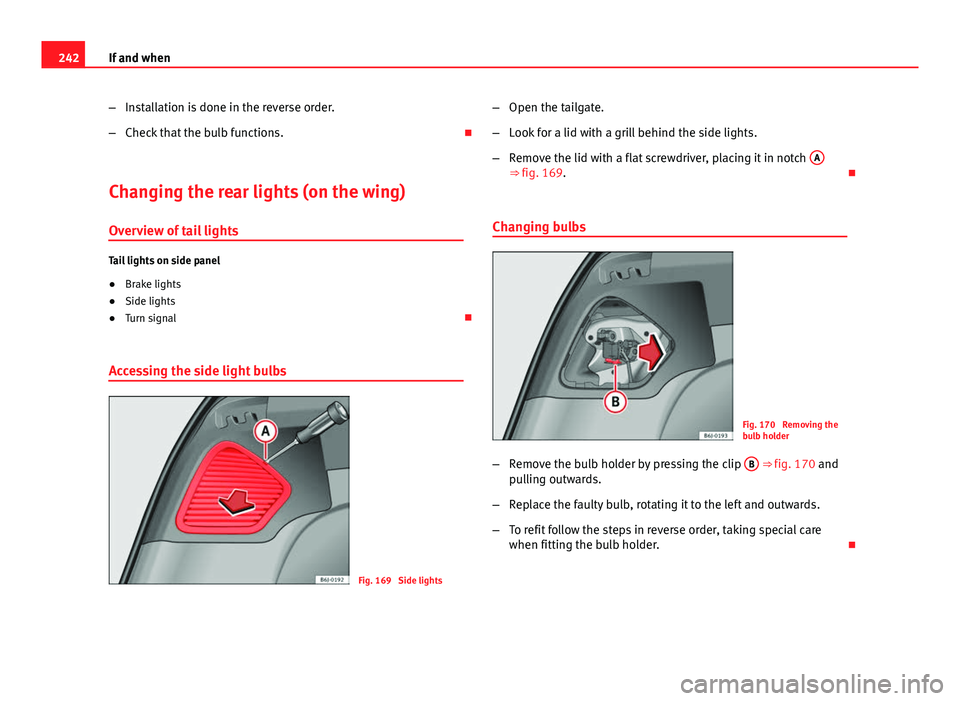
Fig. 169 Side lights –
Open the tailgate.
– Look for a lid with a grill behind the side lights.
– Remove the lid with a flat screwdriver, placing it in notch A
⇒ fig. 169.
Changing bulbs
Fig. 170 Removing the
bulb holder
– Remove the bulb holder by pressing the clip B
⇒ fig. 170 and
pulling outwards.
– Replace the faulty bulb, rotating it to the left and outwards.
– To refit follow the steps in reverse order, taking special care
when fitting the bulb holder.
Page 245 of 280
243
If and when
Changing the rear lights (on the tailgate) Overview of tail lights
Lights on the tailgate
● Reverse lights
● Side lights
● Fog lights
Accessing the tailgate lights
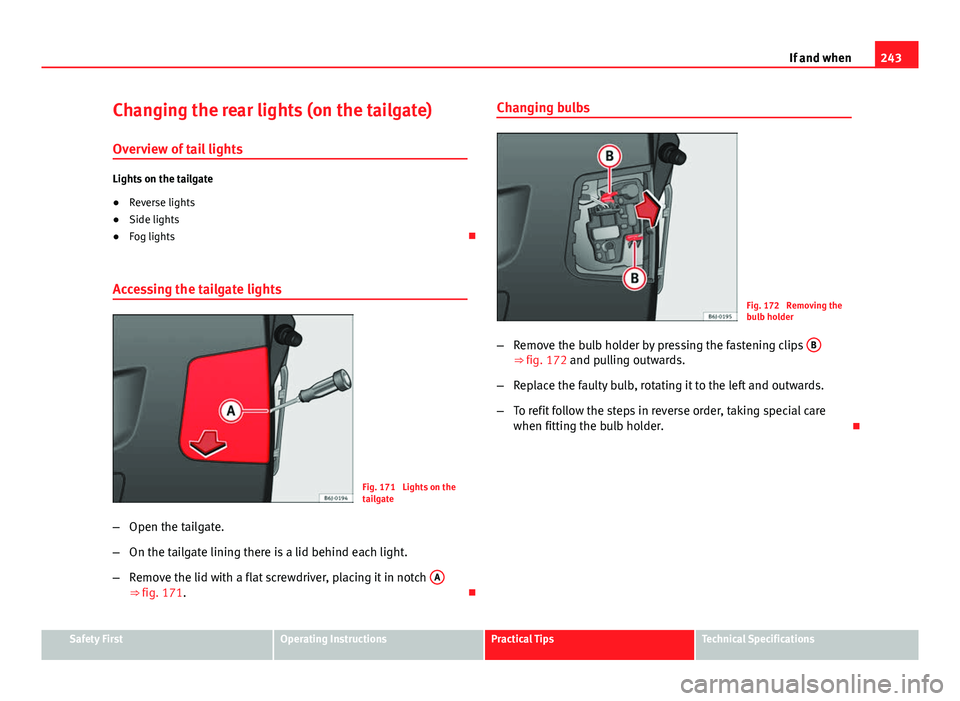
Fig. 171 Lights on the
tailgate
– Open the tailgate.
– On the tailgate lining there is a lid behind each light.
– Remove the lid with a flat screwdriver, placing it in notch A
⇒ fig. 171. Changing bulbs
Fig. 172 Removing the
bulb holder
– Remove the bulb holder by pressing the fastening clips B
⇒ fig. 172 and pulling outwards.
– Replace the faulty bulb, rotating it to the left and outwards.
– To refit follow the steps in reverse order, taking special care
when fitting the bulb holder.
Safety FirstOperating InstructionsPractical TipsTechnical Specifications
Page 246 of 280
244If and when
Side turn signal bulbs
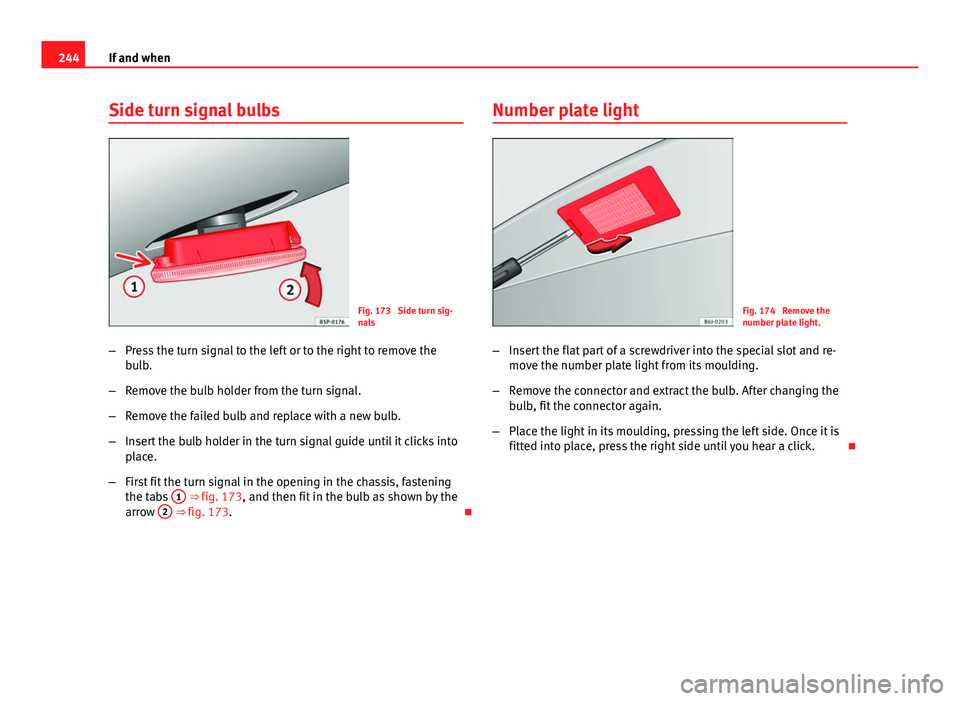
Fig. 173 Side turn sig-
nals
– Press the turn signal to the left or to the right to remove the
bulb.
– Remove the bulb holder from the turn signal.
– Remove the failed bulb and replace with a new bulb.
– Insert the bulb holder in the turn signal guide until it clicks into
place.
– First fit the turn signal in the opening in the chassis, fastening
the tabs 1
⇒ fig. 173, and then fit in the bulb as shown by the
arrow 2 ⇒ fig. 173. Number plate light
Fig. 174 Remove the
number plate light.
– Insert the flat part of a screwdriver into the special slot and re-
move the number plate light from its moulding.
– Remove the connector and extract the bulb. After changing the
bulb, fit the connector again.
– Place the light in its moulding, pressing the left side. Once it is
fitted into place, press the right side until you hear a click.
Page 247 of 280
245
If and when
Interior light and front reading lights
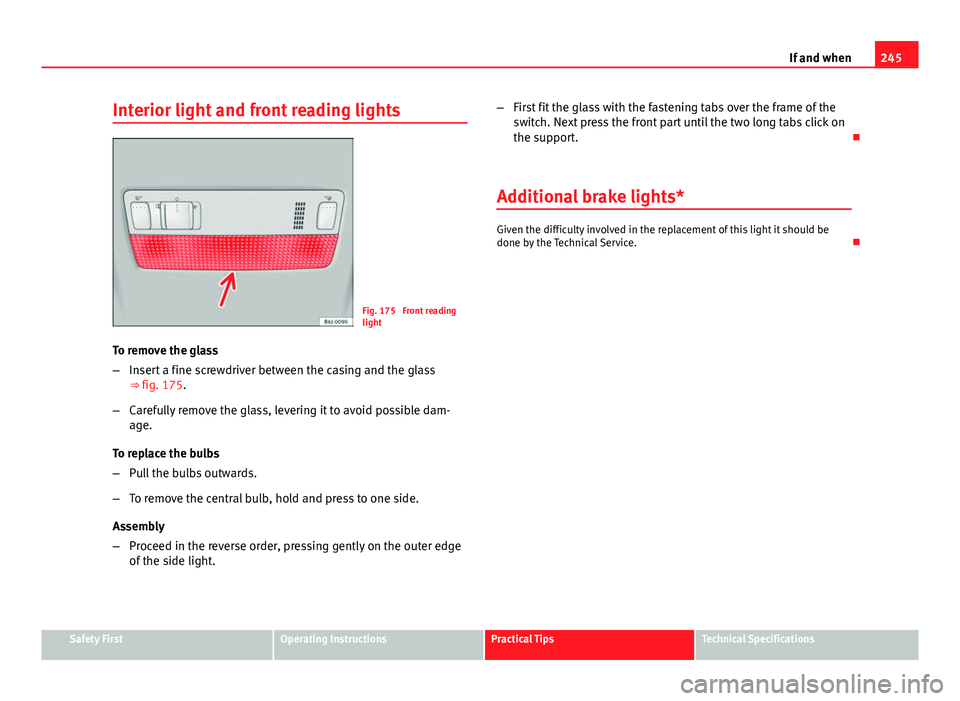
Fig. 175 Front reading
light
To remove the glass
– Insert a fine screwdriver between the casing and the glass
⇒ fig. 175.
– Carefully remove the glass, levering it to avoid possible dam-
age.
To replace the bulbs
– Pull the bulbs outwards.
– To remove the central bulb, hold and press to one side.
Assembly
– Proceed in the reverse order, pressing gently on the outer edge
of the side light. –
First fit the glass with the fastening tabs over the frame of the
switch. Next press the front part until the two long tabs click on
the support.
Additional brake lights*
Given the difficulty involved in the replacement of this light it should be
done by the Technical Service.
Safety FirstOperating InstructionsPractical TipsTechnical Specifications