key Seat Ibiza ST 2013 Owner's Guide
[x] Cancel search | Manufacturer: SEAT, Model Year: 2013, Model line: Ibiza ST, Model: Seat Ibiza ST 2013Pages: 294, PDF Size: 4.05 MB
Page 97 of 294
95
Opening and closing
There is a groove in the luggage compartment allowing access to
the emergency opening mechanism.
Opening the rear lid from inside the luggage compartment
– Insert the key in the groove and unlock the locking system, turn-
ing the key from right to left, as shown by the arrow ⇒ Fig. 50,
⇒ Fig. 51.
Safety FirstOperating instructionsPractical TipsTechnical Specifications
Page 98 of 294
96Opening and closing
Windows
Opening or closing the windows electrically*
The front and rear electric windows can be operated by us-
ing the controls on the driver door. The other doors each
have a switch for their own window.
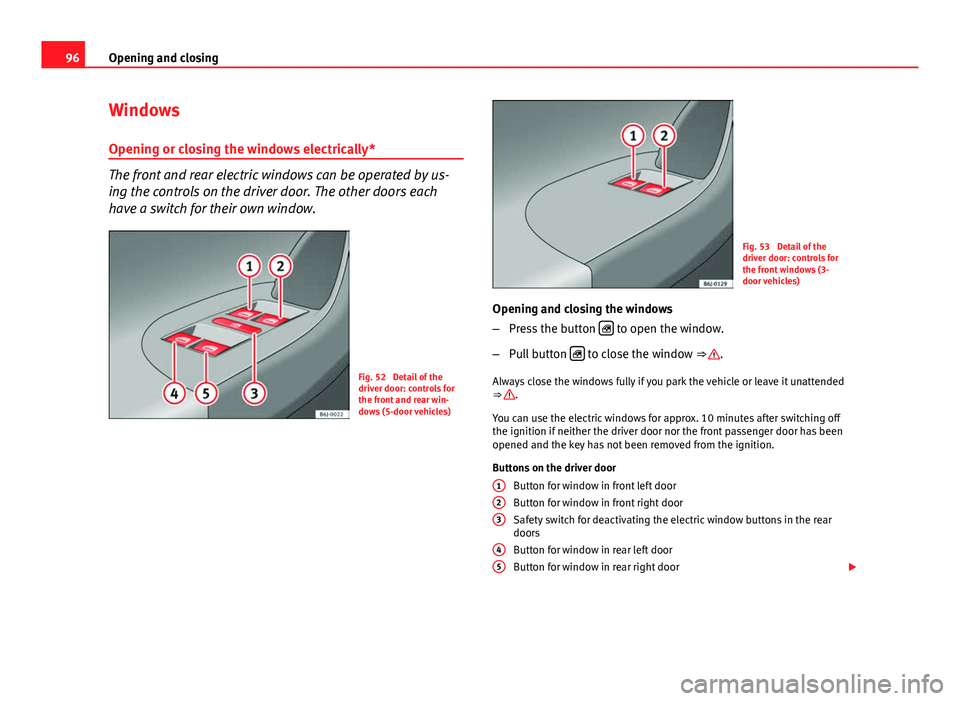
Fig. 52 Detail of the
driver door: controls for
the front and rear win-
dows (5-door vehicles)
Fig. 53 Detail of the
driver door: controls for
the front windows (3-
door vehicles)
Opening and closing the windows
– Press the button
to open the window.
– Pull button
to close the window ⇒ .
Always close the windows fully if you park the vehicle or leave it unattended
⇒
.
You can use the electric windows for approx. 10 minutes after switching off
the ignition if neither the driver door nor the front passenger door has been
opened and the key has not been removed from the ignition.
Buttons on the driver door Button for window in front left door
Button for window in front right door
Safety switch for deactivating the electric window buttons in the rear
doors
Button for window in rear left door
Button for window in rear right door
1
23
45
Page 99 of 294
97
Opening and closing
Safety switch * (only in 5-door vehicles)
Safety switch 3
on the driver door can be used to disable the electric win-
dow buttons in the rear doors.
Safety switch not pressed: buttons on rear doors are activated.
Safety switch pressed: buttons on rear doors are deactivated.
WARNING
● Incorrect use of the electric windows can result in injury.
● Never close the rear lid without observing and ensuring it is clear, to
do otherwise could cause serious injury to you and third parties. Make
sure that no one is in the path of a window.
● Always take the vehicle key with you when you leave the vehicle.
● Never leave children or disabled persons in the vehicle, particularly if
they have access to the keys. The misuse of the keys, for example, by
children, may result in serious injury and accident.
● The engine may accidentally be started and be out of control.
● If the ignition is switched on, the electric equipment could be activa-
ted with risk of injury, for example, in the electric windows.
● The doors can be locked using the remote control key. This could be-
come an obstacle for assistance in an emergency situation.
● Always take the key with you when you leave the vehicle.
● The electric windows will work until the ignition has been switched
off and one of the front doors has been opened.
● If necessary, use the safety switch to disable the rear electric win-
dows. Make sure that they have been disabled.
Note
If the window is not able to close because it is stiff or because of an ob-
struction, the window will automatically open again ⇒ page 98. If this
happens, check why the window could not be closed before attempting to
close it again. One-touch opening and closing*
One-touch opening and closing means you do not have to
hold down the button.
Buttons ⇒ Fig. 52 1
, 2, 4 and 5 have two positions for open-
ing windows and two for closing them. This makes it easier to open
and close windows to the desired position.
One-touch closing
– Pull up the window button briefly up to the second position. The
window closes fully.
One-touch opening
– Push down the window button briefly up to the second position.
The window opens fully.
Restoring one-touch opening and closing
– The automatic open and close function will not work if the bat-
tery has been temporarily disconnected. The function can be re-
stored as follows:
– Close the window as far as it will go by lifting and holding the
electric window switch.
– Release the switch and then lift it again for one second. This
will re-enable the automatic function.
If you push (or pull) a button to the first stage, the window will open (or
close) until you release the button. If you push or lift the button briefly to
the second stage, the window will open (one-touch opening) or close (one-
touch closing) automatically. If you operate the button while the window is
opening or closing, it stops at this position.
Safety FirstOperating instructionsPractical TipsTechnical Specifications
Page 100 of 294
98Opening and closing
The one-touch opening and closing function will not function once the igni-
tion has been switched off.
The one-touch function and roll-back function will not work if there is a mal-
function in the electric windows. Contact a specialised workshop.
Roll-back function
The roll-back function reduces the risk of injury when the
electric windows close.
● If a window is obstructed when closing automatically, the window stops
at this point and lowers immediately ⇒
.
● Next, check why the window does not close before attempting it again.
● If you try within the following 10 seconds and the window closes again
with difficulty or there is an obstruction, the automatic closing will stop
working for 10 seconds.
● If the window is still obstructed, the window will stop at this point.
● If there is no obvious reason why the window cannot be closed, try to
close it again by pulling the tab within ten seconds. The window closes with
maximum force. The roll-back function is now deactivated.
If more than 10 seconds pass, the window will open fully when you operate
one of the buttons. One-touch closing is reactivated.
The one-touch function and roll-back function will not work if there is a mal-
function in the electric windows. Contact a specialised workshop.
WARNING
● Incorrect use of the electric windows can result in injury.
● Always take the ignition key with you when leaving the vehicle, even
if you only intend to be gone for a short time. Please ensure that children
are never left alone inside the vehicle.
● The electric windows will work until the ignition has been switched
off and one of the front doors has been opened.
● Closing the windows without observing and ensuring it is clear could
cause serious injury to you and third parties. Make sure that no one is in
the path of a window.
● Never allow people to remain in the vehicle when you close the vehi-
cle from the outside. The windows cannot be opened even in an emergen-
cy.
● The roll-back function does not prevent fingers or other parts of the
body getting pinched against the window frame. Risk of accident.
Convenience opening and closing*
Using the door lock*
– Hold the key in the door lock of the driver door in either the
locking or the unlocking position until all windows are either
opened or closed.
– Release the key to interrupt this function.
Using the remote control
– Keep the locking/unlocking button pressed for the electric win-
dow risers to open/close; if you stop pressing the button, the
window raising/lowering function is stopped.
Page 102 of 294
100Opening and closing
WARNING
● Incorrect use of the tilting sunroof can result in injury.
● Never close the tilting sunroof without first checking that there are no
obstructions. Risk of serious injury to you or others. Make sure that no
one is in the path of the tilting sunroof.
● Always take the vehicle key with you when you leave the vehicle.
● Never leave children or disabled persons in the vehicle, particularly if
they have access to the keys. Unsupervised use of a key could mean that
the engine is started or that electrical equipment is used (e.g. electric
tilting sunroof) with a risk of accident. The doors can be locked using the
remote control key. This could become an obstacle for assistance in an
emergency situation.
● The tilting sunroof continues to function until one of the front doors is
opened and the key removed from the ignition.
● Ensure that no object and/or end is between the glass and the sun-
roof when the one-touch opening/closing function is reset.
Convenience closing*
Using the door lock
– Hold the key in the door lock of the driver door in the locking
position until the tilting sunroof is closed.
– Release the key to interrupt this function.
Using the remote control
– Push the lock button on the remote control for about 3 seconds.
The tilting sunroof closes.
– Press the unlock button to interrupt the function. Roll-back function of the panoramic/tilting sunroof*
The panoramic/tilting sunroof has a
roll-back function which prevents larger
objects getting trapped when the roof is closed. The roll-back function does
not prevent fingers getting pinched against the roof opening. The tilting
sunroof stops and opens again immediately if it is obstructed when closing.
Operation in case of breakdown
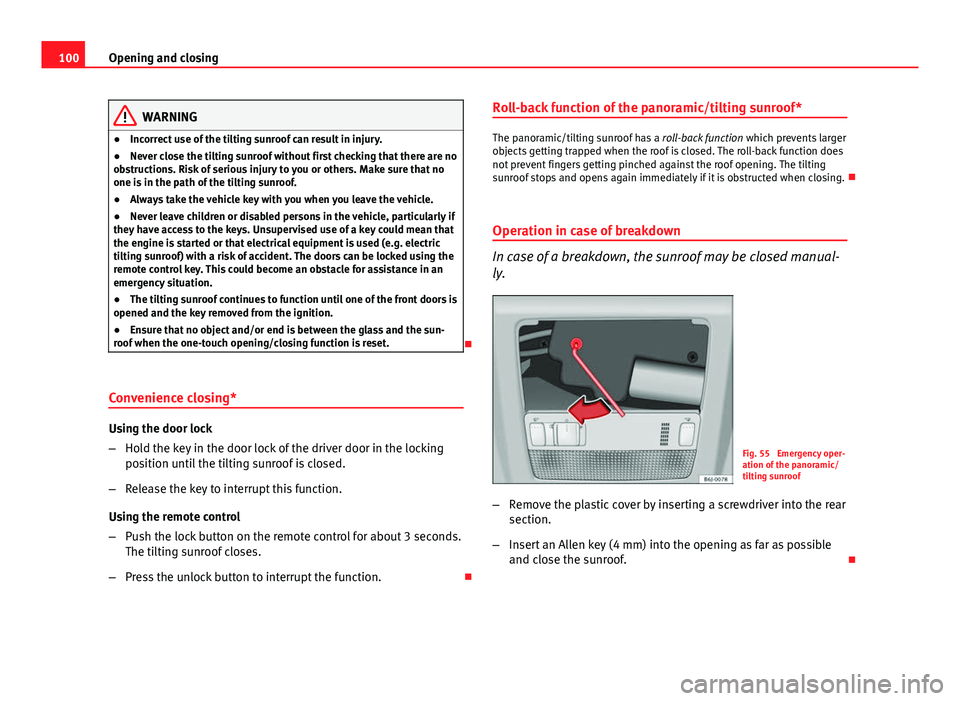
In case of a breakdown, the sunroof may be closed manual-
ly.
Fig. 55 Emergency oper-
ation of the panoramic/
tilting sunroof
– Remove the plastic cover by inserting a screwdriver into the rear
section.
– Insert an Allen key (4 mm) into the opening as far as possible
and close the sunroof.
Page 103 of 294
101
Lights and visibility
Lights and visibility
Lights Switching lights on and off
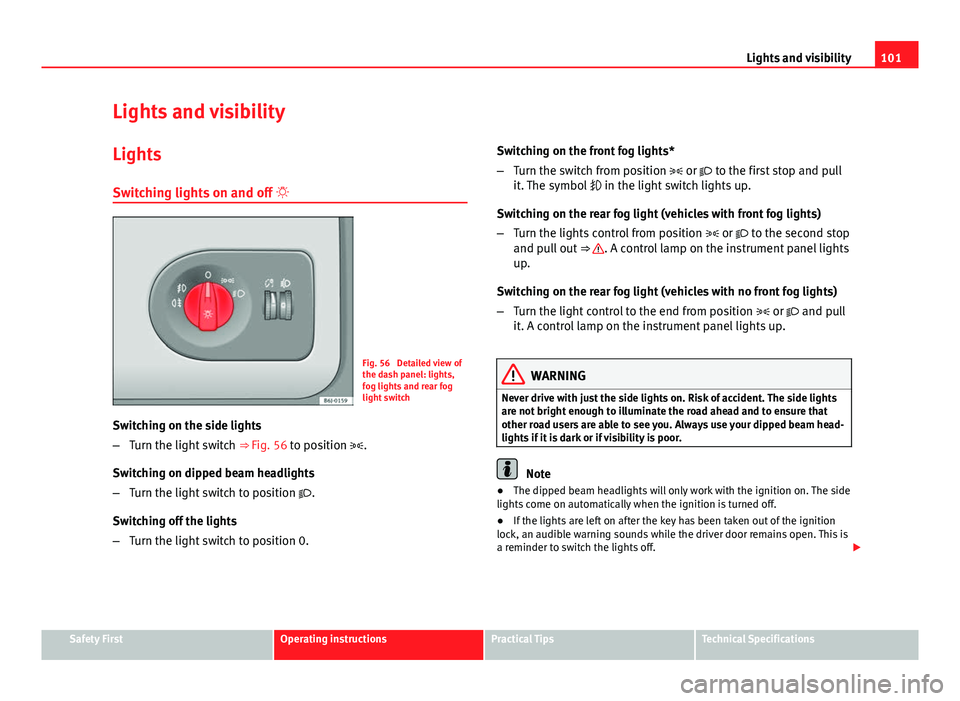
Fig. 56 Detailed view of
the dash panel: lights,
fog lights and rear fog
light switch
Switching on the side lights
– Turn the light switch ⇒ Fig. 56 to position .
Switching on dipped beam headlights
– Turn the light switch to position .
Switching off the lights
– Turn the light switch to position 0. Switching on the front fog lights*
–
Turn the switch from position or to the first stop and pull
it. The symbol in the light switch lights up.
Switching on the rear fog light (vehicles with front fog lights)
– Turn the lights control from position or to the second stop
and pull out ⇒
. A control lamp on the instrument panel lights
up.
Switching on the rear fog light (vehicles with no front fog lights)
– Turn the light control to the end from position or and pull
it. A control lamp on the instrument panel lights up.
WARNING
Never drive with just the side lights on. Risk of accident. The side lights
are not bright enough to illuminate the road ahead and to ensure that
other road users are able to see you. Always use your dipped beam head-
lights if it is dark or if visibility is poor.
Note
● The dipped beam headlights will only work with the ignition on. The side
lights come on automatically when the ignition is turned off.
● If the lights are left on after the key has been taken out of the ignition
lock, an audible warning sounds while the driver door remains open. This is
a reminder to switch the lights off.
Safety FirstOperating instructionsPractical TipsTechnical Specifications
Page 104 of 294
102Lights and visibility
● The rear fog light is so bright that it can dazzle drivers behind you. You
should use the rear fog light only when visibility is very poor.
● The use of the lighting described here is subject to the relevant statutory
requirements.
Automatic lighting*
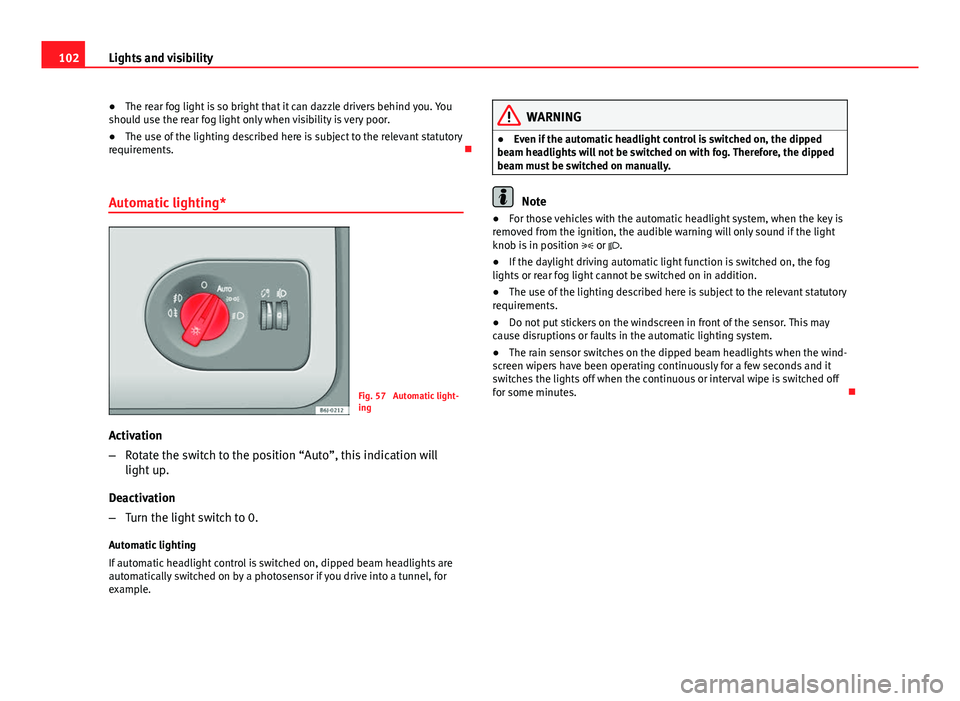
Fig. 57 Automatic light-
ing
Activation
– Rotate the switch to the position “Auto”, this indication will
light up.
Deactivation
– Turn the light switch to 0.
Automatic lighting
If automatic headlight control is switched on, dipped beam headlights are
automatically switched on by a photosensor if you drive into a tunnel, for
example.
WARNING
● Even if the automatic headlight control is switched on, the dipped
beam headlights will not be switched on with fog. Therefore, the dipped
beam must be switched on manually.
Note
● For those vehicles with the automatic headlight system, when the key is
removed from the ignition, the audible warning will only sound if the light
knob is in position or .
● If the daylight driving automatic light function is switched on, the fog
lights or rear fog light cannot be switched on in addition.
● The use of the lighting described here is subject to the relevant statutory
requirements.
● Do not put stickers on the windscreen in front of the sensor. This may
cause disruptions or faults in the automatic lighting system.
● The rain sensor switches on the dipped beam headlights when the wind-
screen wipers have been operating continuously for a few seconds and it
switches the lights off when the continuous or interval wipe is switched off
for some minutes.
Page 105 of 294
103
Lights and visibility
Instrument and switch lighting / Headlight range control
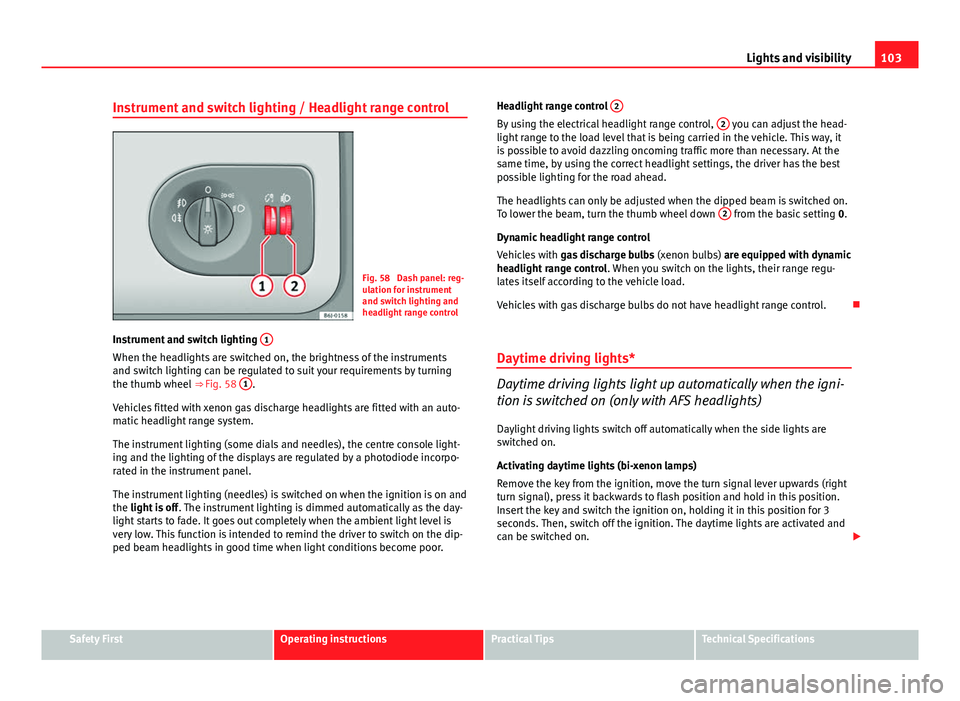
Fig. 58 Dash panel: reg-
ulation for instrument
and switch lighting and
headlight range control
Instrument and switch lighting 1
When the headlights are switched on, the brightness of the instruments
and switch lighting can be regulated to suit your requirements by turning
the thumb wheel
⇒ Fig. 58 1
.
Vehicles fitted with xenon gas discharge headlights are fitted with an auto-
matic headlight range system.
The instrument lighting (some dials and needles), the centre console light-
ing and the lighting of the displays are regulated by a photodiode incorpo-
rated in the instrument panel.
The instrument lighting (needles) is switched on when the ignition is on and
the light is off . The instrument lighting is dimmed automatically as the day-
light starts to fade. It goes out completely when the ambient light level is
very low. This function is intended to remind the driver to switch on the dip-
ped beam headlights in good time when light conditions become poor. Headlight range control
2
By using the electrical headlight range control, 2 you can adjust the head-
light range to the load level that is being carried in the vehicle. This way, it
is possible to avoid dazzling oncoming traffic more than necessary. At the
same time, by using the correct headlight settings, the driver has the best
possible lighting for the road ahead.
The headlights can only be adjusted when the dipped beam is switched on.
To lower the beam, turn the thumb wheel down 2
from the basic setting
0.
Dynamic headlight range control
Vehicles with gas discharge bulbs (xenon bulbs) are equipped with dynamic
headlight range control . When you switch on the lights, their range regu-
lates itself according to the vehicle load.
Vehicles with gas discharge bulbs do not have headlight range control.
Daytime driving lights*
Daytime driving lights light up automatically when the igni-
tion is switched on (only with AFS headlights)
Daylight driving lights switch off automatically when the side lights are
switched on.
Activating daytime lights (bi-xenon lamps)
Remove the key from the ignition, move the turn signal lever upwards (right
turn signal), press it backwards to flash position and hold in this position.
Insert the key and switch the ignition on, holding it in this position for 3
seconds. Then, switch off the ignition. The daytime lights are activated and
can be switched on.
Safety FirstOperating instructionsPractical TipsTechnical Specifications
Page 106 of 294
104Lights and visibility
Switching daytime lights off (bi-xenon lamps)
Remove the key from the ignition, move the turn signal lever downwards
(left turn signal), press it backwards to flash position and hold it in this po-
sition. Insert the key and switch the ignition on, holding it in this position
for 3 seconds. Then, switch off the ignition. The daytime lights are deactiva-
ted and cannot be switched on.
Note
See legal requirements for each country.
Nordic country solution 1)
The so-called “Nordic country solution” is an alternative solution to daytime
running lights in vehicles without this function. It consists of simultaneous-
ly connecting the dimmed dipped beams, the sidelights and the licence
plate lights.
Said lights come on each time the ignition is turned on if the light switch is
in position 0 or . Depending upon the model, the control lamp
on the
light control switch or the lighting up of the instrument panel will indicate
that the lighting is on.
Activation of the Nordic country solution
● Remove the key from the ignition, move the turn signal lever upwards
(right turn signal), press it backwards to flash position and hold it in this po-
sition.
● Insert the key and switch the ignition on, holding it in this position for 3
seconds. Then, switch off the ignition. The Nordic country solution is now
activated and the corresponding lights may come on. Deactivation of the Nordic country solution
●
Remove the key from the ignition, move the turn signal lever downwards
(left turn signal), press it backwards to flash position and hold it in this po-
sition.
● Insert the key and switch the ignition on, holding it in this position for 3
seconds. Then, switch off the ignition. The Nordic country solution is now
deactivated and the corresponding lights will not come on.
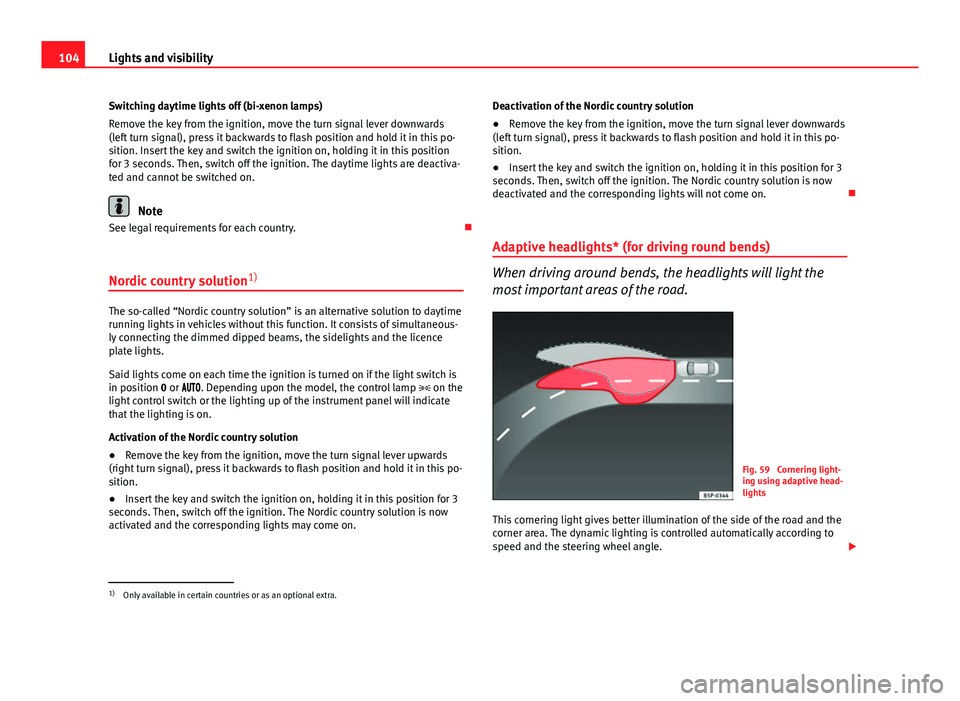
Adaptive headlights* (for driving round bends)
When driving around bends, the headlights will light the
most important areas of the road.
Fig. 59 Cornering light-
ing using adaptive head-
lights
This cornering light gives better illumination of the side of the road and the
corner area. The dynamic lighting is controlled automatically according to
speed and the steering wheel angle.
1)
Only available in certain countries or as an optional extra.
Page 108 of 294
106Lights and visibility
● If the light switch is turned to position .
● If the ignition is switched on.
Note
● To activate the coming/leaving home function, the rotary light switch
must be in position and the light sensor must detect darkness.
● If the ignition key is removed while the lights are on, and the lights are
flashed briefly and the driver door opened, no audible warning is heard, as
when the Coming Home function is on, the lights are automatically switched
off after a period of time (except when the light switch is in position or
.
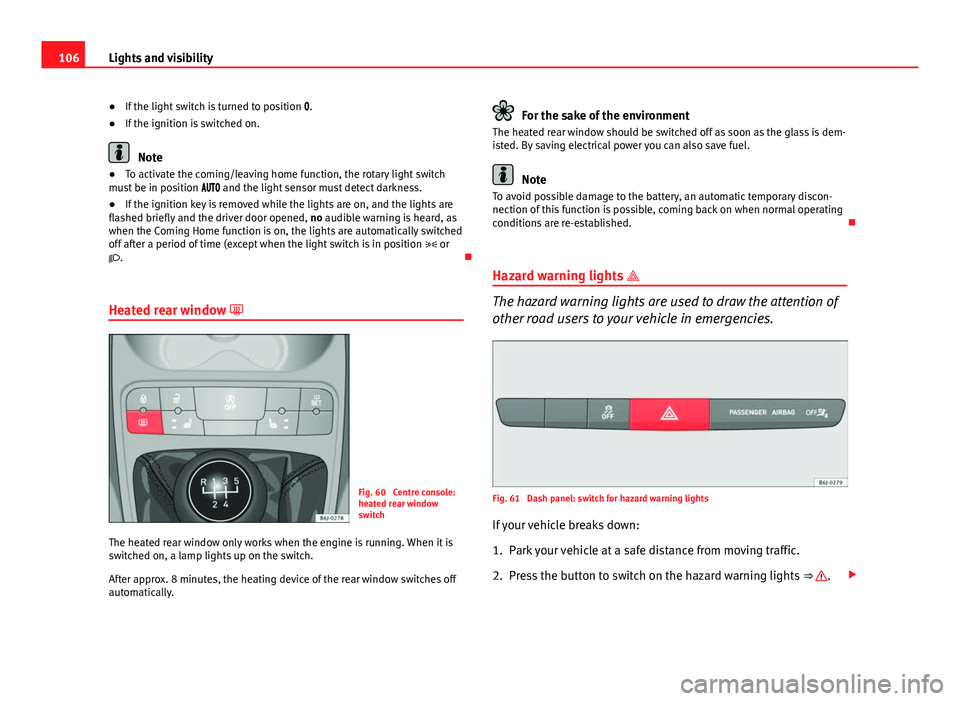
Heated rear window
Fig. 60 Centre console:
heated rear window
switch
The heated rear window only works when the engine is running. When it is
switched on, a lamp lights up on the switch.
After approx. 8 minutes, the heating device of the rear window switches off
automatically.
For the sake of the environment
The heated rear window should be switched off as soon as the glass is dem-
isted. By saving electrical power you can also save fuel.
Note
To avoid possible damage to the battery, an automatic temporary discon-
nection of this function is possible, coming back on when normal operating
conditions are re-established.
Hazard warning lights
The hazard warning lights are used to draw the attention of
other road users to your vehicle in emergencies.
Fig. 61 Dash panel: switch for hazard warning lights
If your vehicle breaks down:
1. Park your vehicle at a safe distance from moving traffic.
2. Press the button to switch on the hazard warning lights ⇒
.