warning Seat Ibiza ST 2014 Owners Manual
[x] Cancel search | Manufacturer: SEAT, Model Year: 2014, Model line: Ibiza ST, Model: Seat Ibiza ST 2014Pages: 240, PDF Size: 4.89 MB
Page 137 of 240
Driving
WARNING
● At first, new tyres do not give maximum
grip, and require running-in. This may cause
an accident. Drive particularly carefully in the
first 500 km.
● New brake pads must be “run in” and do
not have the correct friction properties during
the first 200 km. However, the reduced brak-
ing capacity may be compensated by press-
ing on the brake pedal a little harder. Environmental friendliness
Environmental protection is a top priority in
the design, choice of materials and manufac-
ture of your new SEAT.
Constructive measures to encourage
recycling
● Joints and connections designed for easy
dismantling
● Modular construction to facilitate disman-
tling
● Increased use of single-grade materials.
● Plastic parts and elastomers are marked in
accordance with ISO 1043, ISO 11469 and
ISO 1629.
Choice of materials
● Use of recycled materials. ●
Use of compatible plastics in the same part
if its components are not easily separated.
● Use of recycled materials and/or materials
originating from renewable sources.
● Reduction of volatile components, includ-
ing odour, in plastic materials.
● Use of CFC-free coolants.
Ban on heavy metals, with the exceptions
dictated by law (Annex II of ELV Directive
2000/53/EC): cadmium, lead, mercury, hexa-
v al
ent chromium.
Manufacturing methods
● Reduction of the quantity of thinner in the
protective wax for cavities.
● Use of plastic film as protection during ve-
hicle transport.
● Use of solvent-free adhesives.
● Use of CFC-free coolants in cooling sys-
tems.
● Recycling and energy recovery from resi-
dues (RDF).
● Improvement in the quality of waste water.
● Use of systems for the recovery of residual
heat (thermal recovery, enthalpy wheels,
etc.).
● The use of water-soluble paints. Catalytic converter To maintain the useful life of the catalytic
converter
– Use only unleaded petrol with petrol en-
gines, as lead damages the catalytic con-
verter.
– Do not let the fuel get too low in the tank.
– For engine oil changes, do not replenish
with too much engine oil ››› page 170, Top-
ping up engine oil .
– Nev er t
ow the vehicle to start it, use jump
leads if necessary ›››
page 188.
If you notice misfiring, uneven running or
loss of power when the vehicle is moving, re-
duce speed immediately and have the vehi-
cle inspected at the nearest specialised
workshop. In general, the exhaust warning
lamp will light up when any of the described
symptoms occur ›››
page 57. If this happens,
unburnt fuel can enter the exhaust system
and escape into the environment. The cata-
lytic converter can also be damaged by over-
heating. WARNING
The catalytic converter reaches very high
temperatures! Risk of fire!
● Never park where the catalytic converter
could come into contact with dry grass or
flammable materials under the vehicle. » 135
Technical specifications
Advice
Operation
Safety
The essentials
Page 138 of 240
Operation
●
Do not apply additional underseal or anti-
corrosion coatings to the exhaust pipes, cata-
lytic converter or the heat shields on the ex-
haust system. These materials could catch
fire when the vehicle is being driven. CAUTION
Never run the fuel tank completely dry be-
cause the irregularity of the fuel supply may
cause ignition problems. This allows unburnt
fuel to enter the exhaust system, which could
cause overheating and damage the catalytic
converter. For the sake of the environment
Even when the emission control system is
working perfectly, there may be a smell of
sulphur from the exhaust gas under some
conditions. This depends on the sulphur con-
tent of the fuel used. Quite often the problem
can be solved by changing to another brand
of fuel. Diesel engine particulate filter*
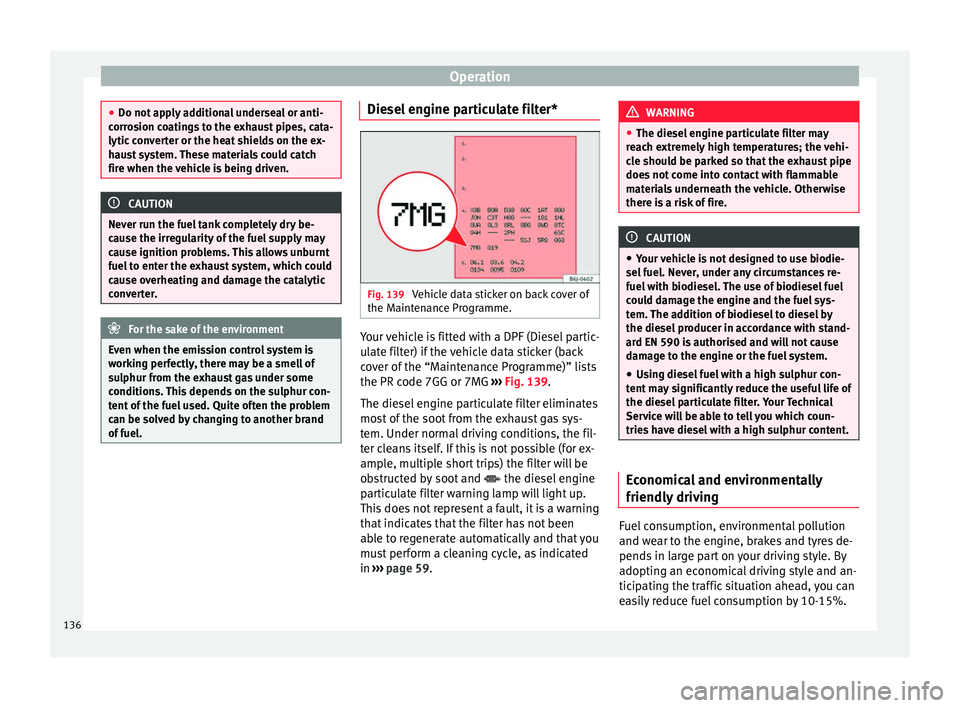
Fig. 139
Vehicle data sticker on back cover of
the Maintenance Programme. Your vehicle is fitted with a DPF (Diesel partic-
ulate filter) if the vehicle data sticker (back
cover of the “Maintenance Programme)” lists
the PR code 7GG or 7MG
››› Fig. 139 .
The die sel
engine particulate filter eliminates
most of the soot from the exhaust gas sys-
tem. Under normal driving conditions, the fil-
ter cleans itself. If this is not possible (for ex-
ample, multiple short trips) the filter will be
obstructed by soot and the diesel engine
particulate filter warning lamp will light up.
This does not represent a fault, it is a warning
that indicates that the filter has not been
able to regenerate automatically and that you
must perform a cleaning cycle, as indicated
in ››› page 59
. WARNING
● The diesel engine particulate filter may
reach extremely high temperatures; the vehi-
cle should be parked so that the exhaust pipe
does not come into contact with flammable
materials underneath the vehicle. Otherwise
there is a risk of fire. CAUTION
● Your vehicle is not designed to use biodie-
sel fuel. Never, under any circumstances re-
fuel with biodiesel. The use of biodiesel fuel
could damage the engine and the fuel sys-
tem. The addition of biodiesel to diesel by
the diesel producer in accordance with stand-
ard EN 590 is authorised and will not cause
damage to the engine or the fuel system.
● Using diesel fuel with a high sulphur con-
tent may significantly reduce the useful life of
the diesel particulate filter. Your Technical
Service will be able to tell you which coun-
tries have diesel with a high sulphur content. Economical and environmentally
friendly driving
Fuel consumption, environmental pollution
and wear to the engine, brakes and tyres de-
pends in large part on your driving style. By
adopting an economical driving style and an-
ticipating the traffic situation ahead, you can
easily reduce fuel consumption by 10-15%.
136
Page 141 of 240
Driver assistance systems
Driver assistance systems
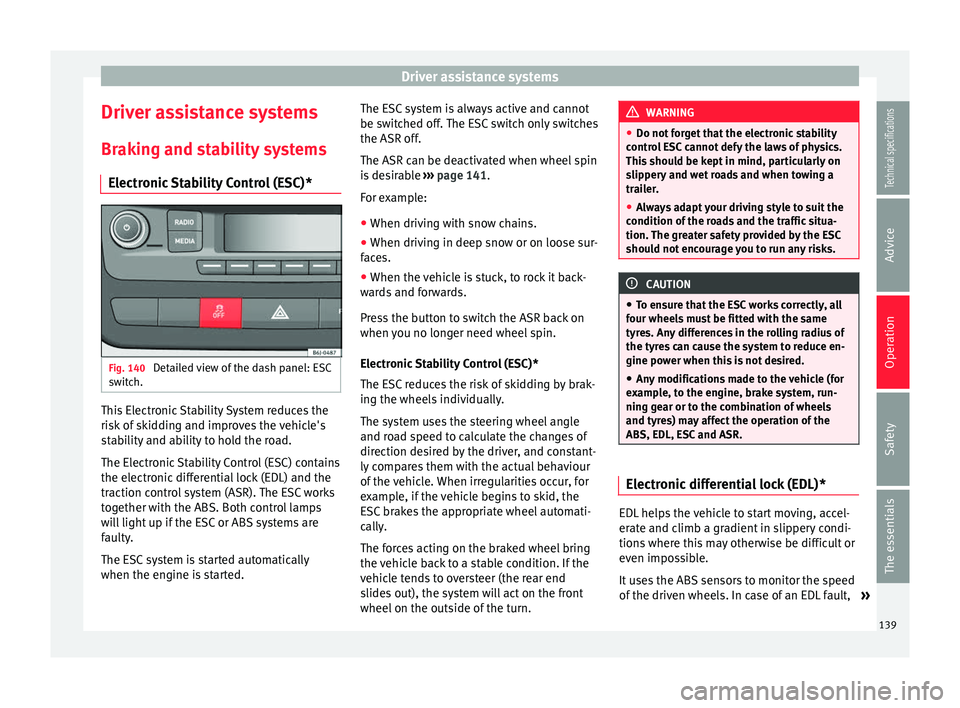
Braking and stability systems Electronic Stability Control (ESC)* Fig. 140
Detailed view of the dash panel: ESC
switch. This Electronic Stability System reduces the
risk of skidding and improves the vehicle's
stability and ability to hold the road.
The Electronic Stability Control (ESC) contains
the electronic differential lock (EDL) and the
traction control system (ASR). The ESC works
together with the ABS. Both control lamps
will light up if the ESC or ABS systems are
faulty.
The ESC system is started automatically
when the engine is started. The ESC system is always active and cannot
be switched off. The ESC switch only switches
the ASR off.
The ASR can be deactivated when wheel spin
is desirable
››› page 141 .
F or e
xample:
● When driving with snow chains.
● When driving in deep snow or on loose sur-
faces.
● When the vehicle is stuck, to rock it back-
wards and forwards.
Press the button to switch the ASR back on
when you no longer need wheel spin.
Electronic Stability Control (ESC)*
The ESC reduces the risk of skidding by brak-
ing the wheels individually.
The system uses the steering wheel angle
and road speed to calculate the changes of
direction desired by the driver, and constant-
ly compares them with the actual behaviour
of the vehicle. When irregularities occur, for
example, if the vehicle begins to skid, the
ESC brakes the appropriate wheel automati-
cally.
The forces acting on the braked wheel bring
the vehicle back to a stable condition. If the
vehicle tends to oversteer (the rear end
slides out), the system will act on the front
wheel on the outside of the turn. WARNING
● Do not forget that the electronic stability
control ESC cannot defy the laws of physics.
This should be kept in mind, particularly on
slippery and wet roads and when towing a
trailer.
● Always adapt your driving style to suit the
condition of the roads and the traffic situa-
tion. The greater safety provided by the ESC
should not encourage you to run any risks. CAUTION
● To ensure that the ESC works correctly, all
four wheels must be fitted with the same
tyres. Any differences in the rolling radius of
the tyres can cause the system to reduce en-
gine power when this is not desired.
● Any modifications made to the vehicle (for
example, to the engine, brake system, run-
ning gear or to the combination of wheels
and tyres) may affect the operation of the
ABS, EDL, ESC and ASR. Electronic differential lock (EDL)*
EDL helps the vehicle to start moving, accel-
erate and climb a gradient in slippery condi-
tions where this may otherwise be difficult or
even impossible.
It uses the ABS sensors to monitor the speed
of the driven wheels. In case of an EDL fault,
»
139Technical specifications
Advice
Operation
Safety
The essentials
Page 142 of 240
Operation
the warning light for ABS lights up
››› page 59 .
At s
peeds of up to approximately 80 km/h
(50 mph), it is able to balance out differences
in the speed of the driven wheels of approxi-
mately 100 rpm/min caused by a partially
slippery road surface. It does this by braking
the wheel which has lost traction and distrib-
uting more driving force to the other driven
wheel via the differential.
To prevent the disc brake of the braking
wheel from overheating, the EDL cuts out au-
tomatically if subjected to excessive loads.
The vehicle will continue to function normally
without EDL. For this reason, the driver is not
informed that the EDL has been switched off.
The EDL will switch on again automatically
when the brake has cooled down. WARNING
● When accelerating on a slippery surface,
for example on ice and snow, press the accel-
erator carefully. Despite EDL, the driven
wheels may start to spin. This could impair
the vehicle's stability.
● Always adapt your driving style to suit road
conditions and the traffic situation. Do not let
the extra safety afforded by EDL tempt you in-
to taking any risks when driving, this can
cause accidents. CAUTION
Modifications to the vehicle (e.g. to the en-
gine, the brake system, running gear or any
components affecting the wheels and tyres)
could affect the efficiency of the EDL
››› page 155. Hydraulic Brake Assist (HBA)*
The function (Hydraulic Brake Assist HBA) is
only included in vehicles with ESC.
In an emergency, most drivers brake in time,
but not with maximum force. This results in
unnecessarily long braking distances.
This is when the brake assist system comes
into action. When pressing the brake pedal
rapidly, the assistant interprets it as an emer-
gency. It very quickly builds up the full brake
pressure so that the ABS can be activated
more quickly and efficiently, thus reducing
braking distance.
Do not reduce the pressure on the brake ped-
al, since the brake assist system switches off
automatically as soon as you release the
brake.
Automatic hazard warning lights activation
The brake lights flash automatically to indi-
cate that the vehicle is braking suddenly or in
an emergency situation. If the emergency
braking continues until the vehicle comes toa standstill, the hazard warning lights will
then come on and the brake lights will re-
main on permanently from that moment. The
warning lights will automatically switch off
when the vehicle begins to move again or
when the "warning" light button is pressed.
WARNING
● The risk of accident is higher if you drive
too fast, if you do not keep your distance from
the vehicle in front, and when the road sur-
face is slippery or wet. The increased acci-
dent risk cannot be reduced by the brake as-
sist system.
● The brake assist system cannot defy the
laws of physics. Slippery and wet roads are
dangerous even with the brake assist system!
Therefore, it is essential that you adjust your
speed to suit the road and traffic conditions.
Do not let the extra safety features tempt you
into taking any risks when driving. Anti-lock brake system (ABS)
The anti-lock brake (ABS) system prevents
the wheels from locking during braking and
is an important part of the vehicle's active
safety system.
How the ABS works
If one of the wheels turns too slowly in rela-
tion to the vehicle's speed, and is close to
locking, the system will reduce the braking
140
Page 143 of 240
Driver assistance systems
pressure to this wheel. The driver is made
aware of this control process by a pulsating
of the brake pedal and audible noise. This is
a deliberate warning to the driver that one or
more of the wheels is tending to lock and the
ABS control function has intervened. In this
situation it is important to keep the brake
pedal fully depressed so the ABS can regu-
late the brake application. Do not “pump”.
If you brake hard on a slippery road surface,
the best possible control is retained as the
wheels do not lock.
However, ABS will not necessarily guarantee
shorter braking distances in all conditions.
Br ak
ing distance could even be further if you
brake on gravel or on fresh snow on a slip-
pery surface. WARNING
● The anti-lock brake system cannot defy the
laws of physics. Slippery and wet roads are
dangerous even with ABS! If you notice that
the ABS is working (to counteract locked
wheels under braking), you should reduce
speed immediately to suit the road and traffic
conditions. Do not let the extra safety fea-
tures tempt you into taking any risks when
driving.
● The effectiveness of ABS is also determined
by the tyres fitted ››› page 176.
● If the ru
nning gear or brake system is modi-
fied, the effectiveness of the ABS could be se-
verely limited. Traction control system (ASR)*
The traction control system prevents the driv-
en wheels from spinning when the vehicle is
accelerating. This system always includes
ABS.
Description and operation of the traction
control system during acceleration (ASR
On front-wheel drive vehicles, the ASR sys-
tem intervenes, reducing engine power and
preventing the driven wheels from slipping
during acceleration. The system works in the
entire speed range in conjunction with ABS.
If a failure occurs in the ABS, the ASR will al-
so stop working.
TCS helps the car to start moving, accelerate
and climb a gradient in slippery conditions
where this may otherwise be difficult or even
impossible.
The ASR automatically switches on when the
engine is started. If necessary, it may be
turned on or off by briefly pressing the ESC
button on the centre console.
When the ASR is off, the warning lamp lights
up . The ASR should normally be left on.
Only in exceptional circumstances, when
wheel spin is required, can they be turned off
using the ESC button, for example:
●
With compact temporary spare wheel.
● When using the snow chains. ●
When driving in deep snow or on soft ter-
rain.
● When the vehicle is bogged-down, to free it
“by rocking it.”
The ASR should be switched on again as
soon as possible. WARNING
● Remember that not even the ASR can defy
the laws of physics. This should be kept in
mind, particularly on slippery and wet roads
and when towing a trailer.
● Always adapt your driving style to suit the
condition of the roads and the traffic situa-
tion. The greater safety provided by the ASR
should not encourage you to run any risks. CAUTION
● To ensure that the ASR works correctly,
identical tyres should be fitted on all four
wheels. Any differences in the rolling radius
of the tyres can cause the system to reduce
engine power when this is not desired.
● Any modifications made to the vehicle (for
example, to the engine, brake system, run-
ning gear or to the combination of wheels
and tyres) may affect the operation of the
ABS and ASR. 141
Technical specifications
Advice
Operation
Safety
The essentials
Page 144 of 240
Operation
XDS* When taking a curve, the driveshaft differen-
tial mechanism allows the outer wheel to turn
at a higher speed than the inner wheel. In
this way, the wheel that is turning faster (out-
er wheel) receives less drive torque than the
inner wheel. This may mean that in certain
situations the torque delivered to the inner
wheel is too high, causing the wheels to
spin. On the other hand, the outer wheel is
receiving a lower drive torque than it could
transmit. This causes an overall loss of lateral
grip on the front axle, resulting in understeer
or “lengthening” of the trajectory.
The XDS system can detect and correct this
effect via the sensors and signals of the ESC.
Via the ESC, the XDS will brake the inside
wheel and counter the excess driving torque
of that wheel. This means that the driver's
desired trajectory is much more precise,
The XDS system works in combination with
the ESC and is always active, even when ASR
traction control is disconnected.
Brake servo The brake servo increases the pressure you
apply to the brake pedal. It works
only when
the engine is running . If the brake servo is not functioning, e.g. due
to a malfunction, or if the vehicle is being
towed, you will have to press the brake pedal
considerably harder to make up for the lack
of servo assistance.
WARNING
The braking distance can also be affected by
external factors.
● Never let the vehicle coast with the engine
switched off. Failure to follow this instruction
could result in an accident. The braking dis-
tance is increased considerably when the
brake servo is not active.
● If the brake servo is not working, for exam-
ple when the vehicle is being towed, you will
have to press the brake pedal considerably
harder than normal. Start-Stop System*
Description and operation The Start-Stop function stops the engine
when the vehicle is stopped and starts it au-
tomatically when required.
– When the vehicle is stopped, put it in neu-
tral and release the clutch pedal. The en-
gine will stop.
– When the clutch pedal is pressed, the en-
gine starts again. –
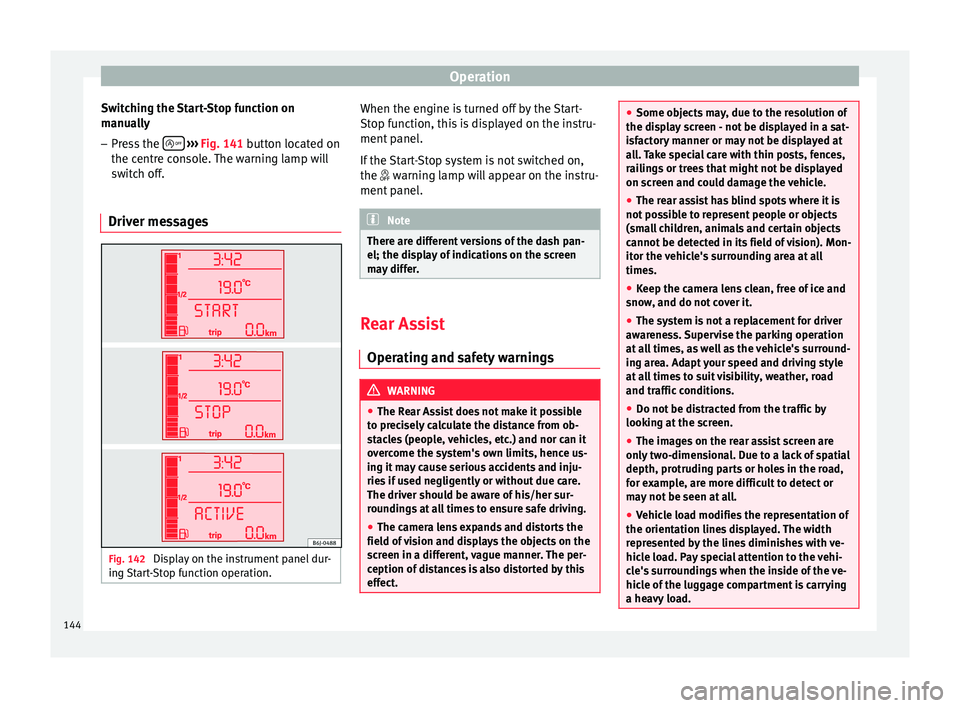
The instrument panel display shows infor-
mation about the status of the Start-Stop
function ››› Fig. 142 .
St ar
t-Stop function conditions
● The driver seat belt must be buckled.
● The bonnet must be closed.
● The engine must be at operating tempera-
ture.
● The steering wheel must be straight.
● The vehicle must be on flat ground.
● The vehicle must not be in reverse.
● A trailer must not be connected.
● The temperature of the interior must be
within the comfort limits ( A/C button should
be selected).
● The windscreen de-mist function must be
off.
● If in an increase in airflow is not requested.
● The t emper
ature must not be set to HI or
LO.
● The driver door must be closed.
● The diesel particulate filter must not be in
regeneration mode, for diesel engines.
● The battery charge must not be low for the
next start.
● Battery temperature must be between -1 °C
(+30 °F) and +55 °C (+131 °F).
142
Page 145 of 240
Driver assistance systems
Start-Stop function interruption
In the following situations, the Start-Stop
function will be interrupted and the engine
will automatically start:
● The vehicle starts moving.
● The brake pedal is pressed several times in
a row.
● The battery has been discharged excessive-
ly.
● The Start-Stop System is manually deacti-
vated.
● The windscreen de-mist function is turned
on.
● The temperature of the interior exceeds the
comfort limits ( A/C button).
● If the airflow is increased by more than 3
presses.
● Temperature setting HI or LO is selected.
● The engine coolant temperature is insuffi-
cient.
● The alternator is faulty, for example the V-
belt has ruptured.
● If any of the conditions described in the
previous section are not fulfilled. WARNING
Never allow the vehicle to move with the en-
gine off for any reason. You could lose control
of your vehicle. This could cause an accident
and serious injury. ●
The brake servo does not work with the en-
gine off. You need more force to stop the vehi-
cle.
● Power steering does not work when the en-
gine is not running. That is why it is much
more difficult to turn the steering wheel.
● Turn off the Start-Stop system when driving
through water (fording streams, etc.). Note
● For vehicles with the Start-Stop function
and a manual gearbox, when the engine is
started, the clutch must be pressed.
● When the conditions for the Start-Stop
function are not fulfilled, the instrument pan-
el displays the Start-Stop indicator dimmed.
● If the steering wheel is turned more than
270°, it will not be possible to start the vehi-
cle again. To start the vehicle, straighten the
steering wheel so that it is turned less than
270°. Activating and deactivating the Start-
Stop function
Fig. 141
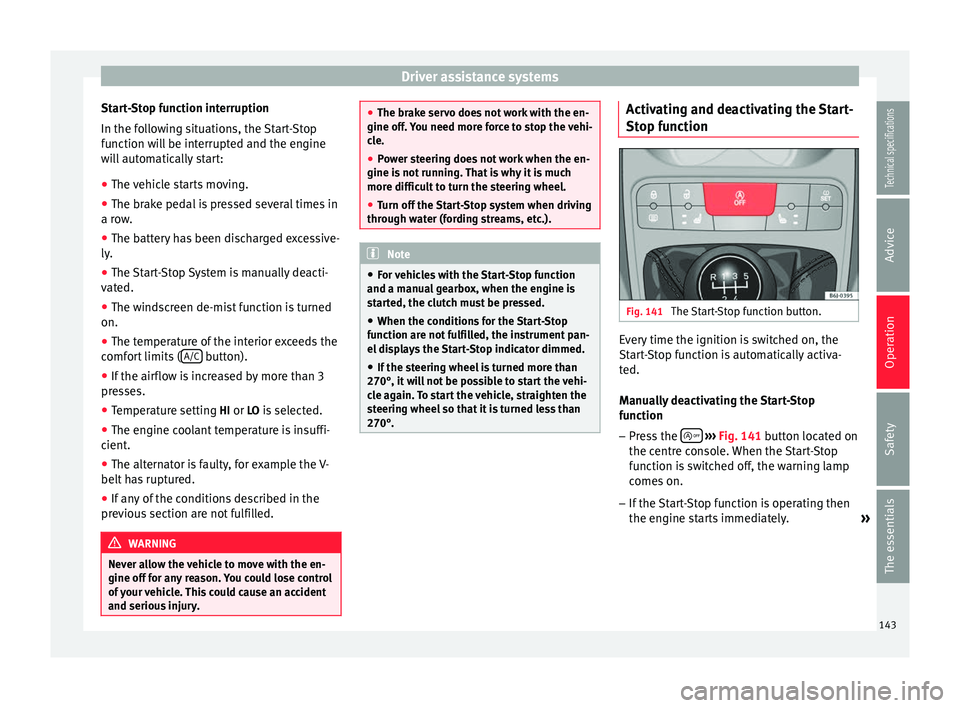
The Start-Stop function button. Every time the ignition is switched on, the
Start-Stop function is automatically activa-
ted.
Manually deactivating the Start-Stop
function
– Press the
››› Fig. 141 button located on
the c entr
e console. When the Start-Stop
function is switched off, the warning lamp
comes on.
– If the Start-Stop function is operating then
the engine starts immediately.
»
143
Technical specifications
Advice
Operation
Safety
The essentials
Page 146 of 240
Operation
Switching the Start-Stop function on
manually – Press the
››› Fig. 141 button located on
the c entr
e console. The warning lamp will
switch off.
Driver messages Fig. 142
Display on the instrument panel dur-
ing Start-Stop function operation. When the engine is turned off by the Start-
Stop function, this is displayed on the instru-
ment panel.
If the Start-Stop system is not switched on,
the
warning lamp will appear on the instru-
ment
panel. Note
There are different versions of the dash pan-
el; the display of indications on the screen
may differ. Rear Assist
Operating and safety warnings WARNING
● The Rear Assist does not make it possible
to precisely calculate the distance from ob-
stacles (people, vehicles, etc.) and nor can it
overcome the system's own limits, hence us-
ing it may cause serious accidents and inju-
ries if used negligently or without due care.
The driver should be aware of his/her sur-
roundings at all times to ensure safe driving.
● The camera lens expands and distorts the
field of vision and displays the objects on the
screen in a different, vague manner. The per-
ception of distances is also distorted by this
effect. ●
Some objects may, due to the resolution of
the display screen - not be displayed in a sat-
isfactory manner or may not be displayed at
all. Take special care with thin posts, fences,
railings or trees that might not be displayed
on screen and could damage the vehicle.
● The rear assist has blind spots where it is
not possible to represent people or objects
(small children, animals and certain objects
cannot be detected in its field of vision). Mon-
itor the vehicle's surrounding area at all
times.
● Keep the camera lens clean, free of ice and
snow, and do not cover it.
● The system is not a replacement for driver
awareness. Supervise the parking operation
at all times, as well as the vehicle's surround-
ing area. Adapt your speed and driving style
at all times to suit visibility, weather, road
and traffic conditions.
● Do not be distracted from the traffic by
looking at the screen.
● The images on the rear assist screen are
only two-dimensional. Due to a lack of spatial
depth, protruding parts or holes in the road,
for example, are more difficult to detect or
may not be seen at all.
● Vehicle load modifies the representation of
the orientation lines displayed. The width
represented by the lines diminishes with ve-
hicle load. Pay special attention to the vehi-
cle's surroundings when the inside of the ve-
hicle of the luggage compartment is carrying
a heavy load. 144
Page 148 of 240
Operation
Parking and manoeuvring with the
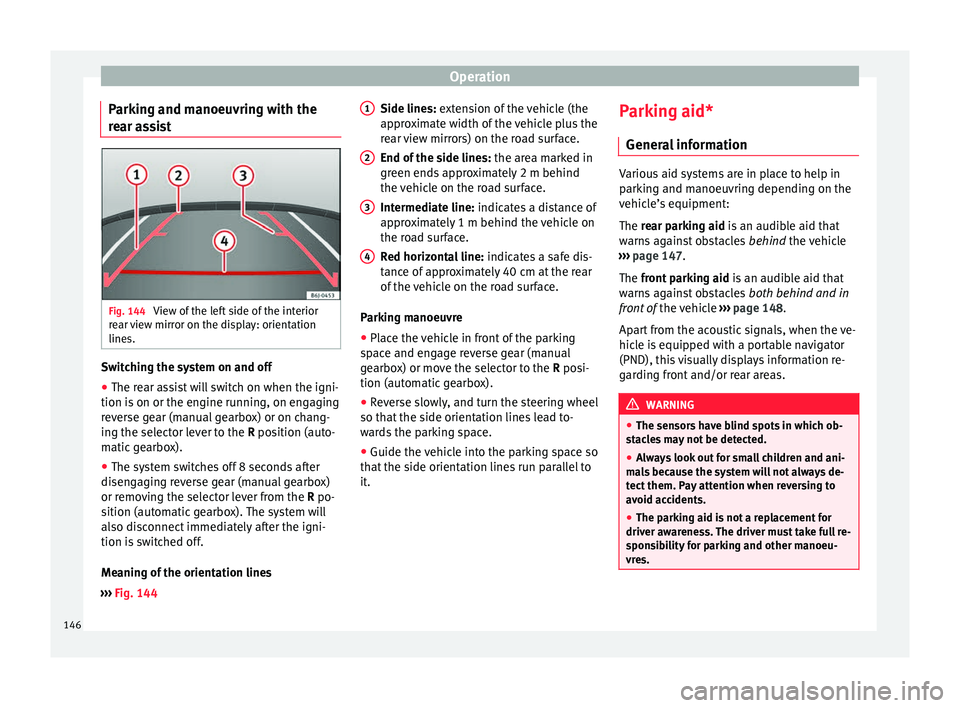
rear assist Fig. 144
View of the left side of the interior
rear view mirror on the display: orientation
lines. Switching the system on and off
● The rear assist will switch on when the igni-
tion is on or the engine running, on engaging
reverse gear (manual gearbox) or on chang-
ing the selector lever to the R position (auto-
m atic
gearbox).
● The system switches off 8 seconds after
disengaging reverse gear (manual gearbox)
or removing the selector lever from the R po-
sition (automatic gearbox). The system will
also disconnect immediately after the igni-
tion is switched off.
Meaning of the orientation lines
››› Fig. 144 Side lines: extension of the vehicle (the
approximate width of the vehicle plus the
rear view mirrors) on the road surface.
End of the side lines:
the area marked in
green ends approximately 2 m behind
the vehicle on the road surface.
Intermediate line: indicates a distance of
approximately 1 m behind the vehicle on
the road surface.
Red horizontal line: indicates a safe dis-
tance of approximately 40 cm at the rear
of the vehicle on the road surface.
Parking manoeuvre
● Place the vehicle in front of the parking
space and engage reverse gear (manual
gearbox) or move the selector to the R posi-
tion (automatic gearbox).
● Reverse slowly, and turn the steering wheel
so that the side orientation lines lead to-
wards the parking space.
● Guide the vehicle into the parking space so
that the side orientation lines run parallel to
it. 1 2
3
4 Parking aid*
General information Various aid systems are in place to help in
parking and manoeuvring depending on the
vehicle’s equipment:
The rear parking aid
is an audible aid that
w
arns against obstacles behind the vehicle
››› page 147.
The front parking aid i
s an audible aid that
warns against obstacles both behind and in
front of the vehicle ›››
page 148.
Apart from the acoustic signals, when the ve-
hicle is equipped with a portable navigator
(PND), this visually displays information re-
garding front and/or rear areas. WARNING
● The sensors have blind spots in which ob-
stacles may not be detected.
● Always look out for small children and ani-
mals because the system will not always de-
tect them. Pay attention when reversing to
avoid accidents.
● The parking aid is not a replacement for
driver awareness. The driver must take full re-
sponsibility for parking and other manoeu-
vres. 146
Page 149 of 240
Driver assistance systems
Rear parking aid The parking aid system will use an audible
warning to indicate of the approach of any
object towards the rear of the vehicle.
Description
The acoustic parking aid system will measure
the distance between the rear of the vehicle
and any possible obstacle using four ultra-
sonic sensors located on the rear bumper.
The measuring range of the sensors starts
approximately and depending on the nature
of the obstacle
at a distance of:
● side of the rear bumper: 0.6 m
● middle of the rear bumper: 1.6 m
Activation
The system is activated by engagement of
the reverse gear. A brief audible warning con-
firms the activation and correct function of
the system.
Reverse gear
The distance warning will begin as soon as
an obstacle is detected by the system. The
frequency of the bleeps emitted by the sys-
tem will increase rapidly as the vehicle ap-
proaches the obstacle. After a distance lower
than approximately 30 cm, a continuous sig-
nal sounds (stop signal). The driver should
not reverse any further. Models with a factory-fitted towing bracket:
when the vehicle is less than 0.35 m away
the warning tone will sound continuously.
The driver should then not reverse any fur-
ther.
The warning tone volume decreases by 30%
3 seconds after it the system is triggered
if
the detected obstacle stays at a constant dis-
tance from the vehicle .
Provided that it is not in continuous mode,
the tone on the parking aid system stops
when it detects a wall parallel to the vehicle.
Trailer towing
For vehicles factory-fitted with a towing bar,
the parking aid system will not be activated
by the engagement of the reverse gear when
pulling a trailer, as the trailer's electric con-
nector will be plugged into the vehicle.
Possible faults
If a continuous beep sounds for some sec-
onds when the reverse gear is engaged, this
indicates that there is a fault in the parking
aid system. If the fault continues until the ig-
nition is turned off, the audible warning of
the fault will not be emitted every time the
system is reactivated (by engaging the re-
verse gear). Thus, the system ready indica-
tion will not sound either. Have the fault re-
paired by technical services as soon as possi-
ble. If there is no ready signal or no acoustic
warning signal, then the parking aid loud-
speaker is faulty and may not warn of obsta-
cles. To ensure that the system works proper-
ly, the sensors must be kept clean and free of
ice and snow.
CAUTION
● Please note that low obstacles detected by
the system may no longer be registered by
the sensors as the car moves closer, so the
system will not give any further warning. Cer-
tain kinds of obstacles, such as wire fences,
chains, thin posts or trailer draw bars, high
kerbs or painted railings, etc., may not al-
ways be detected by the system, so there is a
risk of damaging the vehicle in such cases.
● In some case, obstacles with edges and
bumps may not be detected immediately by
the system due to their geometry. Take spe-
cial care with this type of obstacle (corners,
rectangular objects, etc.), as they can cause
damage to the vehicle.
● Be especially careful when manoeuvring in-
to a corner between two perpendicular walls.
Pay special attention to the side distance
from the wall using the mirrors.
● The parking aid system does not replace
use of the mirrors for manoeuvres.
● External ultra-sonic sources (pneumatic
drills, construction machinery, other vehicles
with PDC) may interfere with the operation of
the system. » 147Technical specifications
Advice
Operation
Safety
The essentials