service Seat Ibiza ST 2014 User Guide
[x] Cancel search | Manufacturer: SEAT, Model Year: 2014, Model line: Ibiza ST, Model: Seat Ibiza ST 2014Pages: 240, PDF Size: 4.89 MB
Page 60 of 240
Operation
Priority 2 warning messages will not be
shown until all Priority 1 warning messages
have been dealt with!
Examples of priority 2 warning reports
(yellow):*
● Fuel warning light with the information text
PLEASE REFUEL .
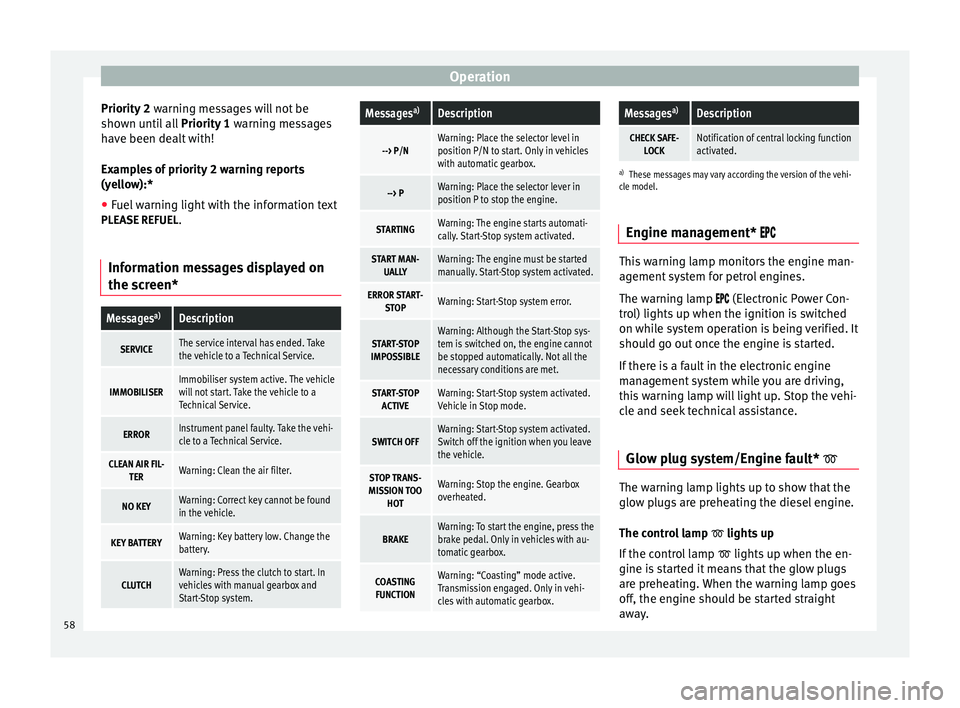
Information messages displayed on
the screen*Messages a)Description
SERVICEThe service interval has ended. Take
the vehicle to a Technical Service.
IMMOBILISERImmobiliser system active. The vehicle
will not start. Take the vehicle to a
Technical Service.
ERRORInstrument panel faulty. Take the vehi-
cle to a Technical Service.
CLEAN AIR FIL-
TERWarning: Clean the air filter.
NO KEYWarning: Correct key cannot be found
in the vehicle.
KEY BATTERYWarning: Key battery low. Change the
battery.
CLUTCHWarning: Press the clutch to start. In
vehicles with manual gearbox and
Start-Stop system.
Messages a)Description
--> P/NWarning: Place the selector level in
position P/N to start. Only in vehicles
with automatic gearbox.
--> PWarning: Place the selector lever in
position P to stop the engine.
STARTINGWarning: The engine starts automati-
cally. Start-Stop system activated.
START MAN-
UALLYWarning: The engine must be started
manually. Start-Stop system activated.
ERROR START- STOPWarning: Start-Stop system error.
START-STOP
IMPOSSIBLEWarning: Although the Start-Stop sys-
tem is switched on, the engine cannot
be stopped automatically. Not all the
necessary conditions are met.
START-STOP ACTIVEWarning: Start-Stop system activated.
Vehicle in Stop mode.
SWITCH OFFWarning: Start-Stop system activated.
Switch off the ignition when you leave
the vehicle.
STOP TRANS-
MISSION TOO HOTWarning: Stop the engine. Gearbox
overheated.
BRAKEWarning: To start the engine, press the
brake pedal. Only in vehicles with au-
tomatic gearbox.
COASTINGFUNCTIONWarning: “Coasting” mode active.
Transmission engaged. Only in vehi-
cles with automatic gearbox.
Messages a)Description
CHECK SAFE-
LOCKNotification of central locking function
activated.
a)These messages may vary according the version of the vehi-
cle model.
Engine management* This warning lamp monitors the engine man-
agement system for petrol engines.
The warning lamp (Electronic Power Con-
trol) lights up when the ignition is switched
on while system operation is being verified. It
should go out once the engine is started.
If there is a fault in the electronic engine
management system while you are driving,
this warning lamp will light up. Stop the vehi-
cle and seek technical assistance.
Glow plug system/Engine fault* The warning lamp lights up to show that the
glow plugs are preheating the diesel engine.
The control lamp
lights up
If the control lamp lights up when the en-
gine is started it means that the glow plugs
are preheating. When the warning lamp goes
off, the engine should be started straight
away.
58
Page 64 of 240
Operation
Tyre pressure adjustment
On adjusting tyre pressure or changing one
or more wheels, the ››› Fig. 71 button must be
k ept
pressed down, with the ignition on, until
an acoustic signal is heard.
If the wheels are under excessive load (for ex-
ample, driving with a trailer or heavy load),
the tyre pressure must be increased to the
recommended value for a full load (see the
sticker on the inside of the fuel flap). If the
tyre monitor system button is pressed down,
the new tyre pressures are confirmed.
The tyre pressure control lamp lights up
If the tyre pressure of a wheel is much lower
than the value set by the driver, then the tyre
pressure control lamp ››› will light up.
WARNING
● When the tyre pressure control lamp lights
up, reduce speed immediately and avoid any
sudden turning or braking manoeuvre. Stop
when possible, and check the tyre pressure
and status.
● The driver is responsible for maintaining
correct tyre pressures. For this reason, tyre
pressure must be regularly checked.
● Under certain circumstances (e.g. when
driving in a sporty manner, in winter condi-
tions or on a dirt track) the tyre control lamp
may light up belatedly or may function incor-
rectly. Note
If the battery is disconnected, the yellow
warning lamp lights up after turning the
ignition on.
This should turn off after a brief
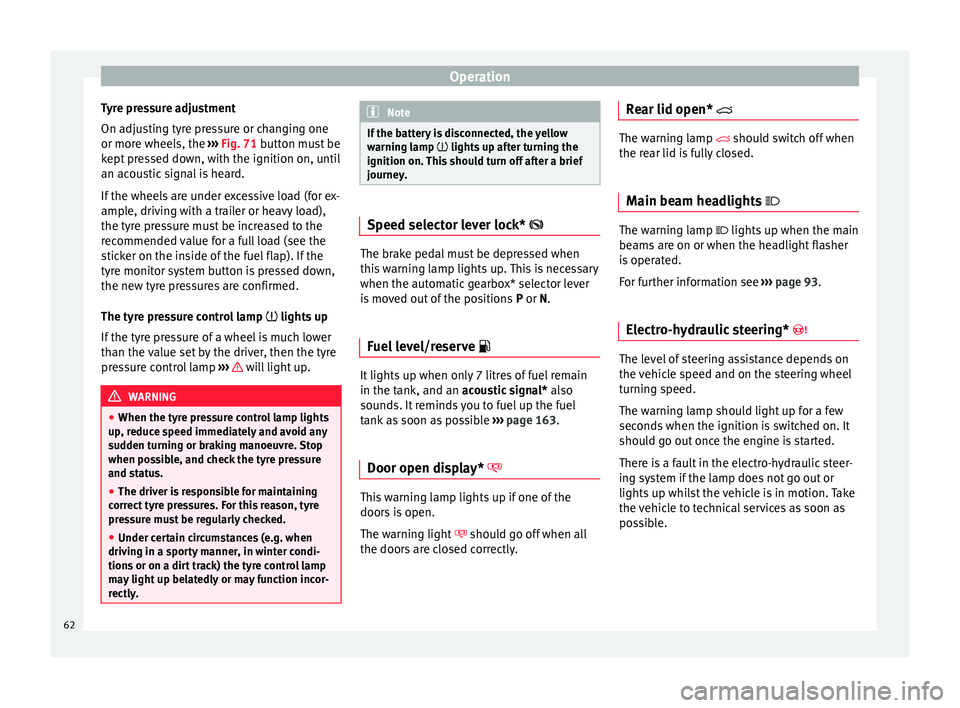
journey. Speed selector lever lock*
The brake pedal must be depressed when
this warning lamp lights up. This is necessary
when the automatic gearbox* selector lever
is moved out of the positions
P
or N
.
Fuel level/reserve It lights up when only 7 litres of fuel remain
in the tank, and an
acoustic signal*
al
so
sou
nds. It reminds you to fuel up the fuel
tank as soon as possible ›››
page 163.
Door open display* This warning lamp lights up if one of the
doors is open.
The warning light
should go off when all
the doors are closed correctly. Rear lid open* The warning lamp
should switch off when
the r
ear lid is fully closed.
Main beam headlights The warning lamp lights up when the main
beams are on or when the headlight flasher
is operated.
For further information see
››› page 93.
Electro-hydraulic steering* The level of steering assistance depends on
the vehicle speed and on the steering wheel
turning speed.
The warning lamp should light up for a few
seconds when the ignition is switched on. It
should go out once the engine is started.
There is a fault in the electro-hydraulic steer-
ing system if the lamp does not go out or
lights up whilst the vehicle is in motion. Take
the vehicle to technical services as soon as
possible.
62
Page 65 of 240
Dash panel
Note
When towing the vehicle with the engine
stopped or due to a fault in the power steer-
ing, this will not operate. The vehicle can still
be steered, but it will require greater force to
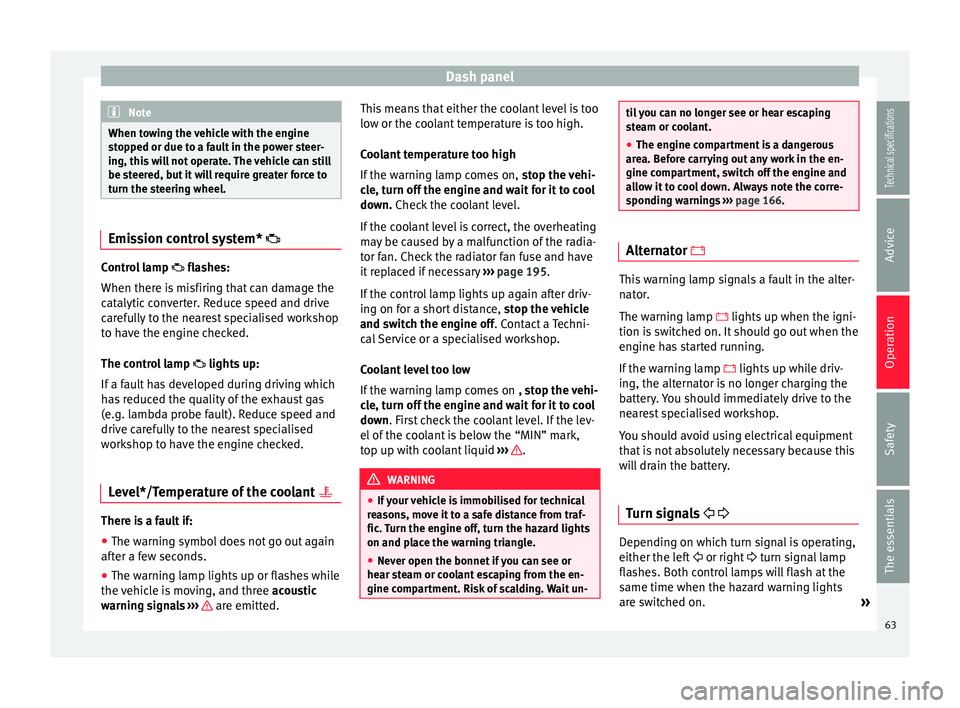
turn the steering wheel. Emission control system*
Control lamp
flashes:
When ther e i
s misfiring that can damage the
catalytic converter. Reduce speed and drive
carefully to the nearest specialised workshop
to have the engine checked.
The control lamp lights up:
If a fault has developed during driving which
has reduced the quality of the exhaust gas
(e.g. lambda probe fault). Reduce speed and
drive carefully to the nearest specialised
workshop to have the engine checked.
Level*/Temperature of the coolant There is a fault if:
● The warning symbol does not go out again
after a few seconds.
● The warning lamp lights up or flashes while
the vehicle is moving, and three acoustic
warning signals ›
›
› are emitted.This means that either the coolant level is too
low or the coolant temperature is too high.
Coolant temperature too high
If the warning lamp comes on,
stop the vehi-
cle, turn off the engine and wait for it to cool
down. Check the coolant level.
If the c
oolant level is correct, the overheating
may be caused by a malfunction of the radia-
tor fan. Check the radiator fan fuse and have
it replaced if necessary ››› page 195.
If the control lamp lights up again after driv-
ing on for a short distance, stop the vehicle
and switch the engine off
. Contact a Techni-
cal Service or a specialised workshop.
Coolant level too low
If the warning lamp comes on , stop the vehi-
cle, turn off the engine and wait for it to cool
down
. First check the coolant level. If the lev-
el of the coolant is below the “MIN” mark,
top up with coolant liquid ››› .
WARNING
● If your vehicle is immobilised for technical
reasons, move it to a safe distance from traf-
fic. Turn the engine off, turn the hazard lights
on and place the warning triangle.
● Never open the bonnet if you can see or
hear steam or coolant escaping from the en-
gine compartment. Risk of scalding. Wait un- til you can no longer see or hear escaping
steam or coolant.
●
The engine compartment is a dangerous
area. Before carrying out any work in the en-
gine compartment, switch off the engine and
allow it to cool down. Always note the corre-
sponding warnings ››› page 166. Alternator
This warning lamp signals a fault in the alter-
nator.
The warning lamp lights up when the igni-
tion is switched on. It should go out when the
engine has started running.
If the warning lamp
lights up while driv-
ing, the alternator is no longer charging the
battery. You should immediately drive to the
nearest specialised workshop.
You should avoid using electrical equipment
that is not absolutely necessary because this
will drain the battery.
Turn signals Depending on which turn signal is operating,
either the left
or right turn signal lamp
flashes. Both control lamps will flash at the
same time when the hazard warning lights
are switched on. »
63
Technical specifications
Advice
Operation
Safety
The essentials
Page 69 of 240
Dash panel
The position of the automatic selector lever
will be shown on the display ››› page 129.
Odometer The upper counter in the display registers the
total mileage covered by the vehicle.
The lower counter registers the short jour-
neys. The last digit indicates 100-metre sec-
tions. The trip recorder counter may be reset
by pressing the reset button
››› Fig. 70 5 .
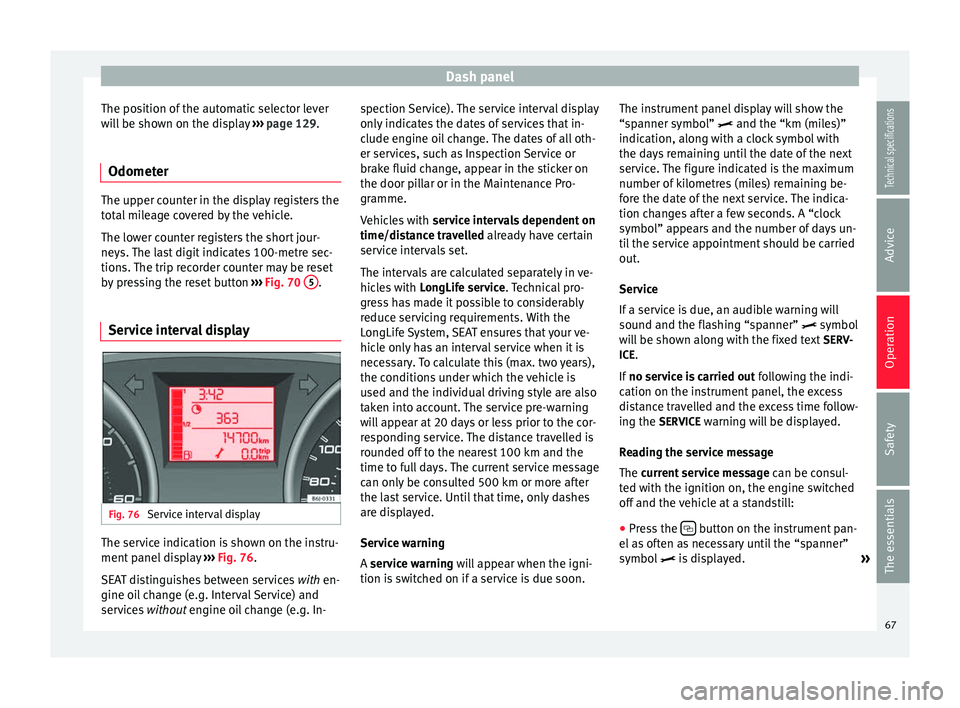
Service interval display Fig. 76
Service interval display The service indication is shown on the instru-
ment panel display
››› Fig. 76 .
S EA
T distinguishes between services with
en-
gine oil change (e.g. Interval Service) and
services without
engine oil change (e.g. In- spection Service). The service interval display
only indicates the dates of services that in-
clude engine oil change. The dates of all oth-
er services, such as Inspection Service or
brake fluid change, appear in the sticker on
the door pillar or in the Maintenance Pro-
gramme.
Vehicles with
service intervals dependent on
time/distance travelled already have certain
service intervals set.
The intervals are calculated separately in ve-
hicles with LongLife service. Technical pro-
gre
ss has made it possible to considerably
reduce servicing requirements. With the
LongLife System, SEAT ensures that your ve-
hicle only has an interval service when it is
necessary. To calculate this (max. two years),
the conditions under which the vehicle is
used and the individual driving style are also
taken into account. The service pre-warning
will appear at 20 days or less prior to the cor-
responding service. The distance travelled is
rounded off to the nearest 100 km and the
time to full days. The current service message
can only be consulted 500 km or more after
the last service. Until that time, only dashes
are displayed.
Service warning
A service warning will appear when the igni-
tion i
s switched on if a service is due soon. The instrument panel display will show the
“spanner symbol”
and the “km (miles)”
indication, along with a clock symbol with
the days remaining until the date of the next
service. The figure indicated is the maximum
number of kilometres (miles) remaining be-
fore the date of the next service. The indica-
tion changes after a few seconds. A “clock
symbol” appears and the number of days un-
til the service appointment should be carried
out.
Service
If a service is due, an audible warning will
sound and the flashing “spanner” symbol
will be shown along with the fixed text SERV-
ICE.
If no service is carried out following the indi-
cation on the instrument panel, the excess
distance travelled and the excess time follow-
ing the SERVICE warning will be displayed.
Reading the service message
The current service message can be c
onsul-
ted with the ignition on, the engine switched
off and the vehicle at a standstill:
● Press the button on the instrument pan-
el as often as necessary until the “spanner”
symbol is displayed.
»
67
Technical specifications
Advice
Operation
Safety
The essentials
Page 70 of 240
Operation
An overdue service
is indicated by a minus
s
ign in front of the mileage or day informa-
tion.
Resetting service interval display
If the service was not performed by a SEAT
dealership, the display must be reset as fol-
lows:
● Switch the ignition off.
● Press and hold the 0.0 / SET button.
● Switch ignition back on.
● Release the 0.0 / SET button and press the
button within 20 seconds.
Do not
reset the display between service in-
t
ervals, as the display will otherwise be incor-
rect.
If the display is reset manually, the next serv-
ice interval will be indicated after 15,000 km
or one year and will not be calculated individ-
ually. Note
In LongLife Service vehicles, if the battery is
disconnected for a long period, the days re-
maining until the next service cannot be cal-
culated. Therefore, the service message indi-
cations may be incorrect. In this case, bear in
mind the maximum service intervals permit-
ted in the ››› Booklet Maintenance Pro-
gramme. 68
Page 75 of 240
Communications and multimedia
Some Bluetooth mobile phones are detected
and connected automatically when the igni-
tion is switched on. For this to take place the
telephone must be switched on and its Blue-
tooth function activated, and there must be
no active Bluetooth connection from other
devices.
Bluetooth connections are free.
Bluetooth ®
is a registered trademark of Blue-
tooth ®
SIG, Inc.
Declaration of conformity
S1nn GmbH & Co. KG certifies that the UHV
High unit complies with the basic require-
ments and the r
est of the relevant provisions
of the Directive 1999/5/CE. A copy of the
declaration of conformity can be found at
http://www.s1nn.de/certifications/uhv-high-
manual
.
Exchange of information between the mobile
phone and the Bluetooth system
The mobile phone system sends the data and
the requests via Bluetooth to the mobile
phone that is connected. If the connected
mobile phone is temporarily “overloaded”, it
may not respond to the requests from the
Bluetooth system.
In this case, wait for the mobile phone to re-
act or make a new call. WARNING
● Before starting the trip, you should famili-
arise yourself with the different functions of
the Bluetooth system. Bluetooth system set-
tings should adjusted when the car is stop-
ped or by a passenger.
● Please concentrate on driving. As the driv-
er, you are also responsible for road safety.
For this reason, you should only use the func-
tions when the traffic situation allows so and
in a manner that allows you to maintain con-
trol of the vehicle. Otherwise, you run the risk
of causing an accident.
● The speech system must not be used in ca-
ses of emergency, since the voice changes in
stressful situations. This could result in a
failed or delayed telephone connection. Al-
ways dial emergency numbers manually!
● Always observe applicable legislation.
● Adjust the volume so that external warning
sounds (e.g. emergency vehicles, etc.) are al-
ways audible. Note
● The voice control system is only available
in the following languages: Spanish, Mexican
Spanish, German, English, French, Canadian
French, Italian, Portuguese, Czech, Russian
and Dutch. For other languages, the prede-
fined language for the voice instructions is
English. Please take the vehicle to technical
services if you wish to change the language. ●
There may be restrictions on the use of
Bluetooth devices in some countries. Infor-
mation is available from the local authorities.
● If you connect the mobile phone Bluetooth
system to a Bluetooth device, consult the
safety warnings in its instruction manual. Use
compatible Bluetooth products only.
● If a call is received or made using the Blue-
tooth system when the radio is switched off,
this will always automatically turn on provid-
ing that the ignition is switched on. The mes-
sage Phone will appear on the radio display
when a c a
ll is received.
● If a call is received or made, the sound of
the radio programme or other audio source
that is currently being listened to will be mut-
ed in order for the telephone conversation to
be carried out without unpleasant back-
ground noise.
● Adjust the volume of the conversation on
the mobile phone to “maximum” and modify
the volume on the radio volume control. Compatibility with mobile phones
New models of mobile phones are being re-
leased constantly by the different brands,
with different operating systems and differ-
ent ways of operating. For this reason there
are some mobile phones that do not perform
some of the functions correctly or are even
totally incompatible. To help you when
»
73
Technical specifications
Advice
Operation
Safety
The essentials
Page 84 of 240
Operation
Childproof lock 3 Valid for vehicles: 5-door versions
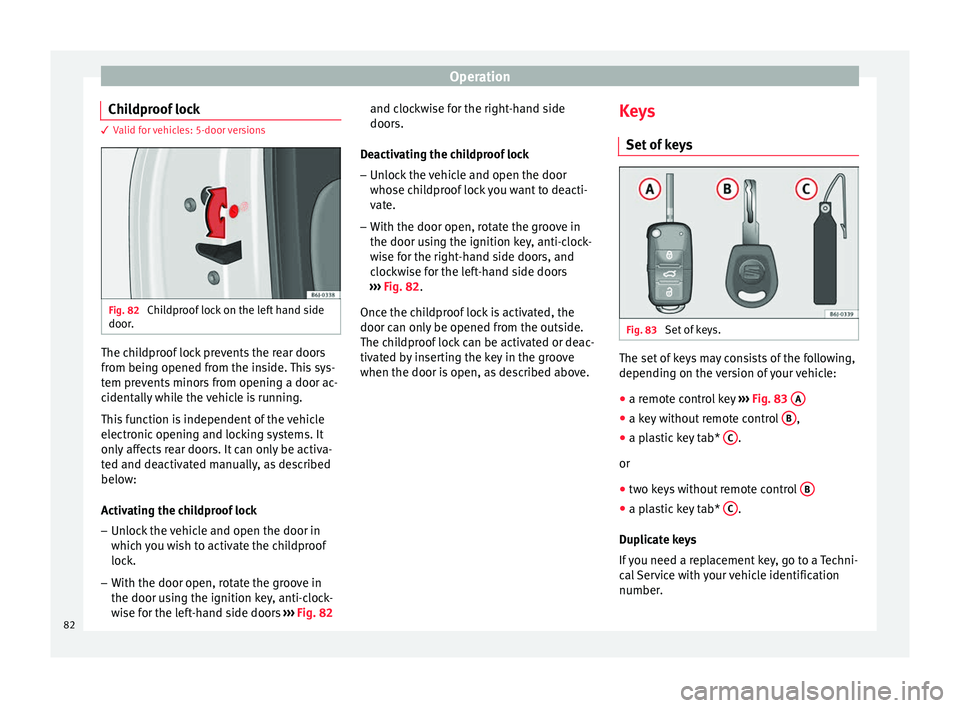
Fig. 82
Childproof lock on the left hand side
door. The childproof lock prevents the rear doors
from being opened from the inside. This sys-
tem prevents minors from opening a door ac-
cidentally while the vehicle is running.
This function is independent of the vehicle
electronic opening and locking systems. It
only affects rear doors. It can only be activa-
ted and deactivated manually, as described
below:
Activating the childproof lock
– Unlock the vehicle and open the door in
which you wish to activate the childproof
lock.
– With the door open, rotate the groove in
the door using the ignition key, anti-clock-
wise for the left-hand side doors ››› Fig. 82 and clockwise for the right-hand side
doors.
Deactivating the childproof lock – Unlock the vehicle and open the door
whose childproof lock you want to deacti-
vate.
– With the door open, rotate the groove in
the door using the ignition key, anti-clock-
wise for the right-hand side doors, and
clockwise for the left-hand side doors
››› Fig. 82 .
Onc e the c
hildproof lock is activated, the
door can only be opened from the outside.
The childproof lock can be activated or deac-
tivated by inserting the key in the groove
when the door is open, as described above. Keys
Set of keys Fig. 83
Set of keys. The set of keys may consists of the following,
depending on the version of your vehicle:
● a remote control key ››› Fig. 83 A ●
a key without remote control B ,
● a plastic key tab* C .
or
● two keys without remote control B ●
a plastic key tab* C .
Duplicate keys
If you need a replacement key, go to a Techni-
cal Service with your vehicle identification
number.
82
Page 86 of 240
Operation
●
If the vehicle cannot be unlocked or locked
by using the radio frequency remote control,
the remote control key will have to be re-
synchronised. For this, go to your technical
services. Changing the battery
If the battery indicator does not flash when
the buttons are pushed, the battery must be
replaced.
CAUTION
The use of inappropriate batteries may dam-
age the radio frequency remote control. For
this reason, always replace the dead battery
with another of the same size and power. For the sake of the environment
Used batteries must be disposed of at an ap-
propriate waste facility or through an author-
ised service, given that their components can
affect the environment. Synchronising the remote control key
If it is not possible to unlock or lock the door
with the remote control, it should be re-
synchronised. While the vehicle is open:
– Press the button
2
››› Fig. 84 on the re-
mot e c
ontrol.
– Then close the vehicle using the key shaft
within one minute.
Whil
e the vehicle is closed:
– Press the button
1
››› Fig. 84 on the re-
mot e c
ontrol.
– Then close the vehicle using the key shaft
within one minute.
It i
s possible that the vehicle could no longer
be opened and closed with the remote con-
trol if the button is repeatedly pressed
outside of the effective range of the radio fre-
quency remote control. The remote control
key will have to be resynchronised.
Spare remote control keys are available at
your Technical Service, where they must be
matched to the locking system.
Up to five remote control keys can be used.
Anti-theft alarm system* Description of anti-theft alarm
system* The anti-theft alarm makes it more difficult to
break into the vehicle or steal it. The systemwill initiate acoustic and optical warning sig-
nals when your vehicle is tried to be forced.
The anti-theft alarm system is automatically
switched on when locking the vehicle. The
system is immediately activated and the turn
signal light located on the driver door will
flash along with the turn signals, indicating
that the alarm and the locking security sys-
tem (double lock) have been turned on.
If any of the doors or the bonnet are open,
they will not be included in the protection
zones of the vehicle when the alarm is con-
nected. If the door or the bonnet are subse-
quently closed, they will be automatically in-
cluded in the protection areas of the vehicle
and the turn signals will flash accordingly
when the doors close.
● The turn signal light will flash twice on
opening and deactivating the alarm.
● The turn signal light will flash once on clos-
ing and activating the alarm.
When does the system trigger an alarm?
The system triggers an alarm, if the following
unauthorised actions are carried out when
the vehicle is locked:
● Mechanical opening of the vehicle with the
vehicle key without switching on the ignition
in the next 15 seconds (in certain markets,
such as the Netherlands, the alarm is activa-
ted immediately).
84
Page 107 of 240
Transport and practical equipment
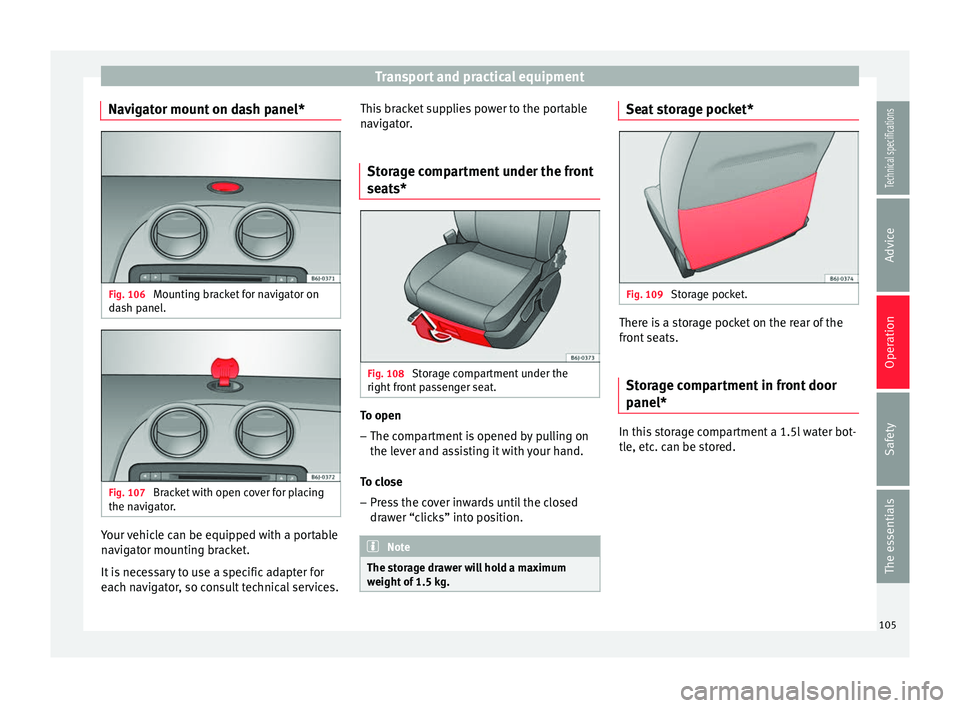
Navigator mount on dash panel* Fig. 106
Mounting bracket for navigator on
dash panel. Fig. 107
Bracket with open cover for placing
the navigator. Your vehicle can be equipped with a portable
navigator mounting bracket.
It is necessary to use a specific adapter for
each navigator, so consult technical services. This bracket supplies power to the portable
navigator.
Storage compartment under the front
seats* Fig. 108
Storage compartment under the
right front passenger seat. To open
– The compartment is opened by pulling on
the lever and assisting it with your hand.
To close – Press the cover inwards until the closed
drawer “clicks” into position. Note
The storage drawer will hold a maximum
weight of 1.5 kg. Seat storage pocket*
Fig. 109
Storage pocket. There is a storage pocket on the rear of the
front seats.
Storage compartment in front door
panel* In this storage compartment a 1.5l water bot-
tle, etc. can be stored.
105Technical specifications
Advice
Operation
Safety
The essentials
Page 115 of 240
Air conditioning
Note
Always read the assembly instructions that
come with the crossbars and the roof carrier
system carefully and keep them in the vehi-
cle. Air conditioning
General notes The pollution filter
The pollution filter (a combined particulate
filter and active carbon filter) serves as a bar-
rier against impurities in the outside air, in-
cluding dust and pollen.
For the climate control system to work with
maximum efficiency, the pollution filter must
be replaced at the specified intervals in the
Maintenance Programme.
If the filter loses efficiency prematurely due
to use in areas reaching very high pollution
levels, the pollen filter must be changed
more frequently than stated in the Service
Schedule.
CAUTION
● If you suspect that the air conditioner is
damaged, switch it off with the A/C button to
prevent further damage and have it checked
by a specialised workshop.
● Repairs to the air conditioner require spe-
cialist knowledge and special tools. There-
fore, we recommend you to take the vehicle
to a specialised workshop. Note
● If the humidity and temperature outside the
vehicle are high, condensation can drip off
the evaporator in the cooling system and
form a pool underneath the vehicle. This is
normal and does not indicate a leak.
● Keep the air intake slots in front of the
windscreen free of snow, ice and leaves to en-
sure heating and cooling are not impaired,
and to prevent the windows from misting
over.
● The air from the vents flows through the ve-
hicle interior and is extracted by slots in the
luggage compartment designed for this pur-
pose. Therefore, you should avoid obstruct-
ing these slots with any kind of object.
● The air conditioner operates most effective-
ly with the windows and the sliding/tilting
sunroof* closed. However, if the temperature
inside the vehicle is excessive because of the
sun, the air inside can be cooled faster by
opening the windows for a short time.
● Do not smoke while air recirculation mode
is on, as smoke drawn into the air condition-
ing system leaves residue on the evaporator,
producing a permanent unpleasant odour.
● At low outside temperatures, the compres-
sor switches off automatically and cannot be
switched on even with the AUTO button.
● It is advisable to turn on the air condition-
ing at least once a month, to lubricate the
system gaskets and prevent leaks. If a de-
crease in the cooling capacity is detected, a » 113Technical specifications
Advice
Operation
Safety
The essentials