engine Seat Ibiza ST 2014 Workshop Manual
[x] Cancel search | Manufacturer: SEAT, Model Year: 2014, Model line: Ibiza ST, Model: Seat Ibiza ST 2014Pages: 240, PDF Size: 4.89 MB
Page 141 of 240
Driver assistance systems
Driver assistance systems
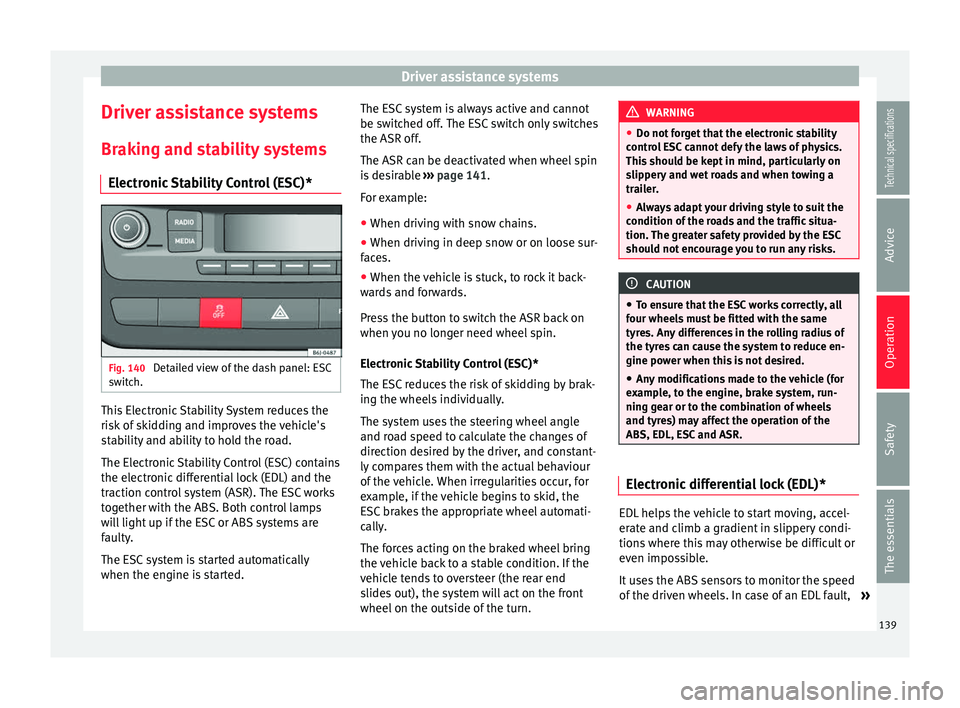
Braking and stability systems Electronic Stability Control (ESC)* Fig. 140
Detailed view of the dash panel: ESC
switch. This Electronic Stability System reduces the
risk of skidding and improves the vehicle's
stability and ability to hold the road.
The Electronic Stability Control (ESC) contains
the electronic differential lock (EDL) and the
traction control system (ASR). The ESC works
together with the ABS. Both control lamps
will light up if the ESC or ABS systems are
faulty.
The ESC system is started automatically
when the engine is started. The ESC system is always active and cannot
be switched off. The ESC switch only switches
the ASR off.
The ASR can be deactivated when wheel spin
is desirable
››› page 141 .
F or e
xample:
● When driving with snow chains.
● When driving in deep snow or on loose sur-
faces.
● When the vehicle is stuck, to rock it back-
wards and forwards.
Press the button to switch the ASR back on
when you no longer need wheel spin.
Electronic Stability Control (ESC)*
The ESC reduces the risk of skidding by brak-
ing the wheels individually.
The system uses the steering wheel angle
and road speed to calculate the changes of
direction desired by the driver, and constant-
ly compares them with the actual behaviour
of the vehicle. When irregularities occur, for
example, if the vehicle begins to skid, the
ESC brakes the appropriate wheel automati-
cally.
The forces acting on the braked wheel bring
the vehicle back to a stable condition. If the
vehicle tends to oversteer (the rear end
slides out), the system will act on the front
wheel on the outside of the turn. WARNING
● Do not forget that the electronic stability
control ESC cannot defy the laws of physics.
This should be kept in mind, particularly on
slippery and wet roads and when towing a
trailer.
● Always adapt your driving style to suit the
condition of the roads and the traffic situa-
tion. The greater safety provided by the ESC
should not encourage you to run any risks. CAUTION
● To ensure that the ESC works correctly, all
four wheels must be fitted with the same
tyres. Any differences in the rolling radius of
the tyres can cause the system to reduce en-
gine power when this is not desired.
● Any modifications made to the vehicle (for
example, to the engine, brake system, run-
ning gear or to the combination of wheels
and tyres) may affect the operation of the
ABS, EDL, ESC and ASR. Electronic differential lock (EDL)*
EDL helps the vehicle to start moving, accel-
erate and climb a gradient in slippery condi-
tions where this may otherwise be difficult or
even impossible.
It uses the ABS sensors to monitor the speed
of the driven wheels. In case of an EDL fault,
»
139Technical specifications
Advice
Operation
Safety
The essentials
Page 143 of 240
Driver assistance systems
pressure to this wheel. The driver is made
aware of this control process by a pulsating
of the brake pedal and audible noise. This is
a deliberate warning to the driver that one or
more of the wheels is tending to lock and the
ABS control function has intervened. In this
situation it is important to keep the brake
pedal fully depressed so the ABS can regu-
late the brake application. Do not “pump”.
If you brake hard on a slippery road surface,
the best possible control is retained as the
wheels do not lock.
However, ABS will not necessarily guarantee
shorter braking distances in all conditions.
Br ak
ing distance could even be further if you
brake on gravel or on fresh snow on a slip-
pery surface. WARNING
● The anti-lock brake system cannot defy the
laws of physics. Slippery and wet roads are
dangerous even with ABS! If you notice that
the ABS is working (to counteract locked
wheels under braking), you should reduce
speed immediately to suit the road and traffic
conditions. Do not let the extra safety fea-
tures tempt you into taking any risks when
driving.
● The effectiveness of ABS is also determined
by the tyres fitted ››› page 176.
● If the ru
nning gear or brake system is modi-
fied, the effectiveness of the ABS could be se-
verely limited. Traction control system (ASR)*
The traction control system prevents the driv-
en wheels from spinning when the vehicle is
accelerating. This system always includes
ABS.
Description and operation of the traction
control system during acceleration (ASR
On front-wheel drive vehicles, the ASR sys-
tem intervenes, reducing engine power and
preventing the driven wheels from slipping
during acceleration. The system works in the
entire speed range in conjunction with ABS.
If a failure occurs in the ABS, the ASR will al-
so stop working.
TCS helps the car to start moving, accelerate
and climb a gradient in slippery conditions
where this may otherwise be difficult or even
impossible.
The ASR automatically switches on when the
engine is started. If necessary, it may be
turned on or off by briefly pressing the ESC
button on the centre console.
When the ASR is off, the warning lamp lights
up . The ASR should normally be left on.
Only in exceptional circumstances, when
wheel spin is required, can they be turned off
using the ESC button, for example:
●
With compact temporary spare wheel.
● When using the snow chains. ●
When driving in deep snow or on soft ter-
rain.
● When the vehicle is bogged-down, to free it
“by rocking it.”
The ASR should be switched on again as
soon as possible. WARNING
● Remember that not even the ASR can defy
the laws of physics. This should be kept in
mind, particularly on slippery and wet roads
and when towing a trailer.
● Always adapt your driving style to suit the
condition of the roads and the traffic situa-
tion. The greater safety provided by the ASR
should not encourage you to run any risks. CAUTION
● To ensure that the ASR works correctly,
identical tyres should be fitted on all four
wheels. Any differences in the rolling radius
of the tyres can cause the system to reduce
engine power when this is not desired.
● Any modifications made to the vehicle (for
example, to the engine, brake system, run-
ning gear or to the combination of wheels
and tyres) may affect the operation of the
ABS and ASR. 141
Technical specifications
Advice
Operation
Safety
The essentials
Page 144 of 240
Operation
XDS* When taking a curve, the driveshaft differen-
tial mechanism allows the outer wheel to turn
at a higher speed than the inner wheel. In
this way, the wheel that is turning faster (out-
er wheel) receives less drive torque than the
inner wheel. This may mean that in certain
situations the torque delivered to the inner
wheel is too high, causing the wheels to
spin. On the other hand, the outer wheel is
receiving a lower drive torque than it could
transmit. This causes an overall loss of lateral
grip on the front axle, resulting in understeer
or “lengthening” of the trajectory.
The XDS system can detect and correct this
effect via the sensors and signals of the ESC.
Via the ESC, the XDS will brake the inside
wheel and counter the excess driving torque
of that wheel. This means that the driver's
desired trajectory is much more precise,
The XDS system works in combination with
the ESC and is always active, even when ASR
traction control is disconnected.
Brake servo The brake servo increases the pressure you
apply to the brake pedal. It works
only when
the engine is running . If the brake servo is not functioning, e.g. due
to a malfunction, or if the vehicle is being
towed, you will have to press the brake pedal
considerably harder to make up for the lack
of servo assistance.
WARNING
The braking distance can also be affected by
external factors.
● Never let the vehicle coast with the engine
switched off. Failure to follow this instruction
could result in an accident. The braking dis-
tance is increased considerably when the
brake servo is not active.
● If the brake servo is not working, for exam-
ple when the vehicle is being towed, you will
have to press the brake pedal considerably
harder than normal. Start-Stop System*
Description and operation The Start-Stop function stops the engine
when the vehicle is stopped and starts it au-
tomatically when required.
– When the vehicle is stopped, put it in neu-
tral and release the clutch pedal. The en-
gine will stop.
– When the clutch pedal is pressed, the en-
gine starts again. –
The instrument panel display shows infor-
mation about the status of the Start-Stop
function ››› Fig. 142 .
St ar
t-Stop function conditions
● The driver seat belt must be buckled.
● The bonnet must be closed.
● The engine must be at operating tempera-
ture.
● The steering wheel must be straight.
● The vehicle must be on flat ground.
● The vehicle must not be in reverse.
● A trailer must not be connected.
● The temperature of the interior must be
within the comfort limits ( A/C button should
be selected).
● The windscreen de-mist function must be
off.
● If in an increase in airflow is not requested.
● The t emper
ature must not be set to HI or
LO.
● The driver door must be closed.
● The diesel particulate filter must not be in
regeneration mode, for diesel engines.
● The battery charge must not be low for the
next start.
● Battery temperature must be between -1 °C
(+30 °F) and +55 °C (+131 °F).
142
Page 145 of 240
Driver assistance systems
Start-Stop function interruption
In the following situations, the Start-Stop
function will be interrupted and the engine
will automatically start:
● The vehicle starts moving.
● The brake pedal is pressed several times in
a row.
● The battery has been discharged excessive-
ly.
● The Start-Stop System is manually deacti-
vated.
● The windscreen de-mist function is turned
on.
● The temperature of the interior exceeds the
comfort limits ( A/C button).
● If the airflow is increased by more than 3
presses.
● Temperature setting HI or LO is selected.
● The engine coolant temperature is insuffi-
cient.
● The alternator is faulty, for example the V-
belt has ruptured.
● If any of the conditions described in the
previous section are not fulfilled. WARNING
Never allow the vehicle to move with the en-
gine off for any reason. You could lose control
of your vehicle. This could cause an accident
and serious injury. ●
The brake servo does not work with the en-
gine off. You need more force to stop the vehi-
cle.
● Power steering does not work when the en-
gine is not running. That is why it is much
more difficult to turn the steering wheel.
● Turn off the Start-Stop system when driving
through water (fording streams, etc.). Note
● For vehicles with the Start-Stop function
and a manual gearbox, when the engine is
started, the clutch must be pressed.
● When the conditions for the Start-Stop
function are not fulfilled, the instrument pan-
el displays the Start-Stop indicator dimmed.
● If the steering wheel is turned more than
270°, it will not be possible to start the vehi-
cle again. To start the vehicle, straighten the
steering wheel so that it is turned less than
270°. Activating and deactivating the Start-
Stop function
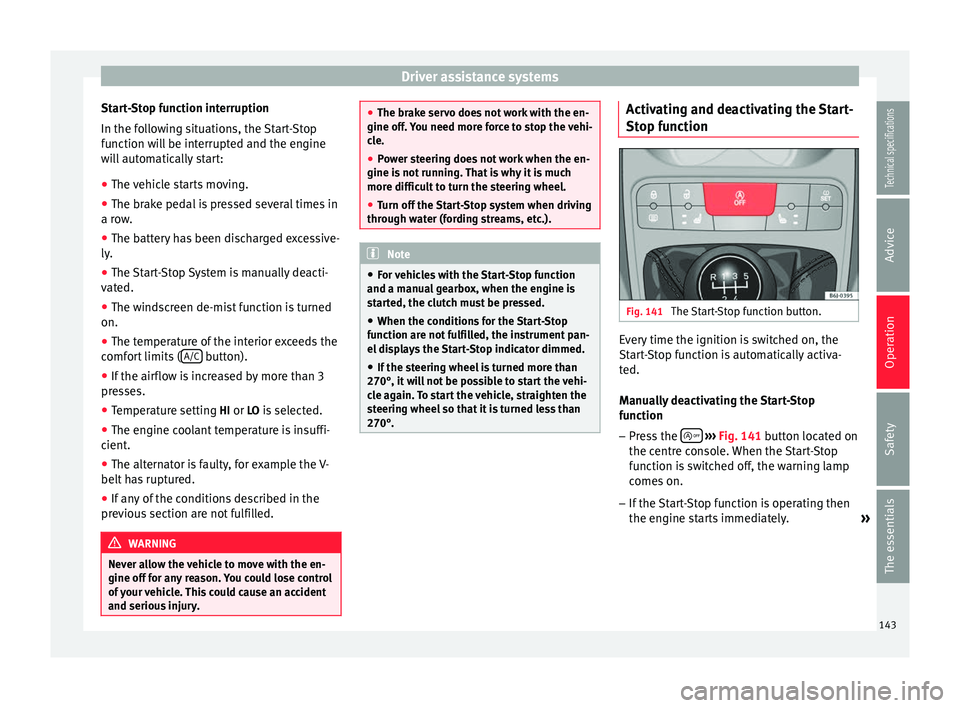
Fig. 141
The Start-Stop function button. Every time the ignition is switched on, the
Start-Stop function is automatically activa-
ted.
Manually deactivating the Start-Stop
function
– Press the
››› Fig. 141 button located on
the c entr
e console. When the Start-Stop
function is switched off, the warning lamp
comes on.
– If the Start-Stop function is operating then
the engine starts immediately.
»
143
Technical specifications
Advice
Operation
Safety
The essentials
Page 146 of 240
Operation
Switching the Start-Stop function on
manually – Press the
››› Fig. 141 button located on
the c entr
e console. The warning lamp will
switch off.
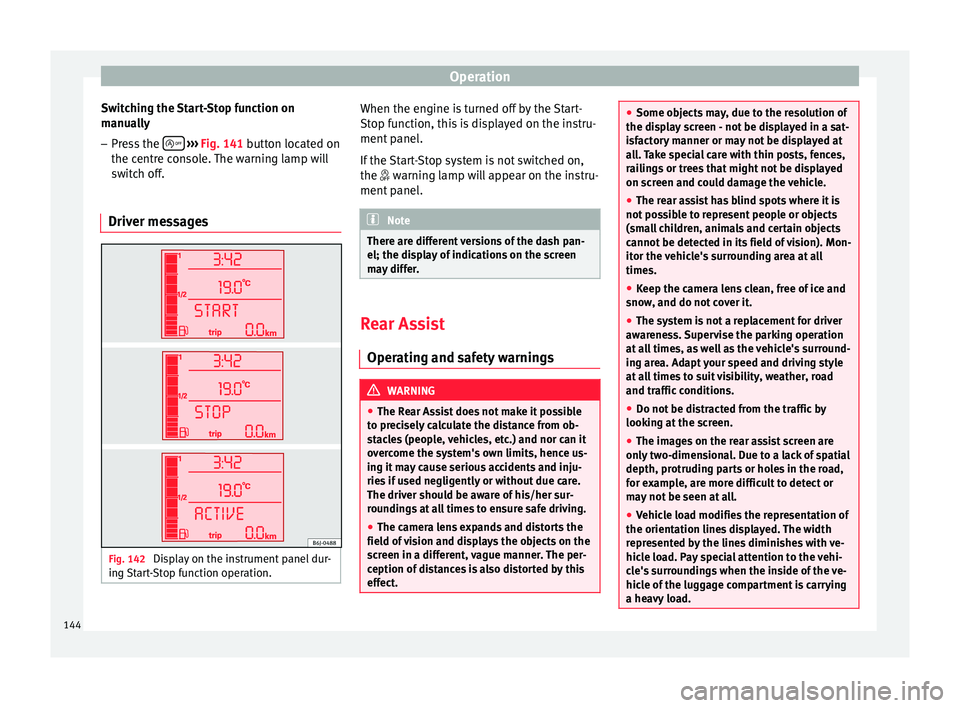
Driver messages Fig. 142
Display on the instrument panel dur-
ing Start-Stop function operation. When the engine is turned off by the Start-
Stop function, this is displayed on the instru-
ment panel.
If the Start-Stop system is not switched on,
the
warning lamp will appear on the instru-
ment
panel. Note
There are different versions of the dash pan-
el; the display of indications on the screen
may differ. Rear Assist
Operating and safety warnings WARNING
● The Rear Assist does not make it possible
to precisely calculate the distance from ob-
stacles (people, vehicles, etc.) and nor can it
overcome the system's own limits, hence us-
ing it may cause serious accidents and inju-
ries if used negligently or without due care.
The driver should be aware of his/her sur-
roundings at all times to ensure safe driving.
● The camera lens expands and distorts the
field of vision and displays the objects on the
screen in a different, vague manner. The per-
ception of distances is also distorted by this
effect. ●
Some objects may, due to the resolution of
the display screen - not be displayed in a sat-
isfactory manner or may not be displayed at
all. Take special care with thin posts, fences,
railings or trees that might not be displayed
on screen and could damage the vehicle.
● The rear assist has blind spots where it is
not possible to represent people or objects
(small children, animals and certain objects
cannot be detected in its field of vision). Mon-
itor the vehicle's surrounding area at all
times.
● Keep the camera lens clean, free of ice and
snow, and do not cover it.
● The system is not a replacement for driver
awareness. Supervise the parking operation
at all times, as well as the vehicle's surround-
ing area. Adapt your speed and driving style
at all times to suit visibility, weather, road
and traffic conditions.
● Do not be distracted from the traffic by
looking at the screen.
● The images on the rear assist screen are
only two-dimensional. Due to a lack of spatial
depth, protruding parts or holes in the road,
for example, are more difficult to detect or
may not be seen at all.
● Vehicle load modifies the representation of
the orientation lines displayed. The width
represented by the lines diminishes with ve-
hicle load. Pay special attention to the vehi-
cle's surroundings when the inside of the ve-
hicle of the luggage compartment is carrying
a heavy load. 144
Page 148 of 240
Operation
Parking and manoeuvring with the
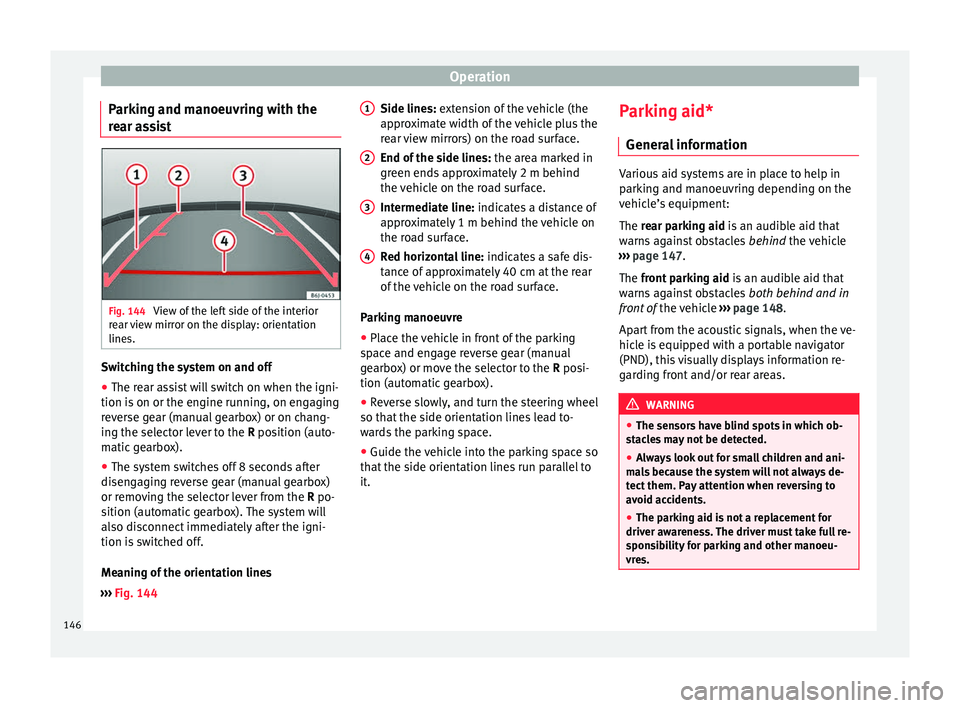
rear assist Fig. 144
View of the left side of the interior
rear view mirror on the display: orientation
lines. Switching the system on and off
● The rear assist will switch on when the igni-
tion is on or the engine running, on engaging
reverse gear (manual gearbox) or on chang-
ing the selector lever to the R position (auto-
m atic
gearbox).
● The system switches off 8 seconds after
disengaging reverse gear (manual gearbox)
or removing the selector lever from the R po-
sition (automatic gearbox). The system will
also disconnect immediately after the igni-
tion is switched off.
Meaning of the orientation lines
››› Fig. 144 Side lines: extension of the vehicle (the
approximate width of the vehicle plus the
rear view mirrors) on the road surface.
End of the side lines:
the area marked in
green ends approximately 2 m behind
the vehicle on the road surface.
Intermediate line: indicates a distance of
approximately 1 m behind the vehicle on
the road surface.
Red horizontal line: indicates a safe dis-
tance of approximately 40 cm at the rear
of the vehicle on the road surface.
Parking manoeuvre
● Place the vehicle in front of the parking
space and engage reverse gear (manual
gearbox) or move the selector to the R posi-
tion (automatic gearbox).
● Reverse slowly, and turn the steering wheel
so that the side orientation lines lead to-
wards the parking space.
● Guide the vehicle into the parking space so
that the side orientation lines run parallel to
it. 1 2
3
4 Parking aid*
General information Various aid systems are in place to help in
parking and manoeuvring depending on the
vehicle’s equipment:
The rear parking aid
is an audible aid that
w
arns against obstacles behind the vehicle
››› page 147.
The front parking aid i
s an audible aid that
warns against obstacles both behind and in
front of the vehicle ›››
page 148.
Apart from the acoustic signals, when the ve-
hicle is equipped with a portable navigator
(PND), this visually displays information re-
garding front and/or rear areas. WARNING
● The sensors have blind spots in which ob-
stacles may not be detected.
● Always look out for small children and ani-
mals because the system will not always de-
tect them. Pay attention when reversing to
avoid accidents.
● The parking aid is not a replacement for
driver awareness. The driver must take full re-
sponsibility for parking and other manoeu-
vres. 146
Page 154 of 240
Operation
Towing bracket device
Trailer towing What do you need to bear in mind
when towing a trailer? Your vehicle may be used to tow a trailer
when fitted with the correct equipment.
If the car is supplied with a
factory-fitted tow-
in g br
acket it will already have the necessary
technical modifications and meet the statuto-
ry requirements for towing a trailer. If you
wish to retrofit a towing bracket, consult
›
›› page 153.
Connect
ors
Your vehicle is fitted with a 12-pin connector
for the electrical connection between the
trailer and the vehicle.
If the trailer has a 7-pin plug you will need to
use an a
dapter cable. It is available at any
Technical Service.
Trailer weight/drawbar load
Never exceed the authorised trailer weight. If
you do not load the trailer up to the maxi-
mum permitted trailer weight, you can then
climb correspondingly steeper slopes.
The maximum trailer weights listed are only applicable for
altitudes up to 1000 m above sea level. With increasing altitude the engine
power and therefore the vehicle climbing
ability are impaired because of the reduced
air density. The maximum trailer weight has
to be reduced accordingly. The weight of the
vehicle and trailer combination must be re-
duced by 10% for every further 1000 m (or
part thereof). The gross combination weight
is the actual weight of the laden vehicle plus
the actual weight of the laden trailer. When
possible, operate the trailer with the maxi-
mum permitted drawbar load on the ball joint
of the t
owing bracket, but do not exceed the
specified limit.
The figures for trailer weights
and drawbar
loads that are given on the data plate of the
towing bracket are for certification purposes
only. The correct figures for your specific
model, which may be lower than these fig-
ures for the towing bracket, are given in the
vehicle documentation or in ››› chapter Tech-
nical Data .
Distributing the load
Distribute loads in the trailer so that heavy
objects are as near to the axle as possible.
Loads carried in the trailer must be secured
to prevent them moving.
Tyre pressure
Set tyre pressure to the maximum permissi-
ble pressure shown on the sticker on the in-
side of the fuel tank flap. Set the tyre pres- sure of the trailer tyres in accordance with the
trailer manufacturer's recommendations.
Exterior mirrors
Check whether you can see enough of the
road behind the trailer with the standard rear
vision mirrors. If this is not the case, you
should have additional exterior mirrors fitted.
Both exterior mirrors should be mounted on
hinged extension brackets. Adjust the mirrors
to give sufficient vision to the rear.
WARNING
Never transport people in a trailer. This could
result in fatal accidents. Note
● Towing a trailer places additional demands
on the vehicle. We recommend additional
services between the normal inspection inter-
vals if the vehicle is used frequently for tow-
ing a trailer.
● Find out whether special regulations apply
to towing a trailer in your country. Ball coupling of towing bracket*
The ball coupling is provided with instruc-
tions on fitting and removing the ball cou-
pling of the towing bracket.
152
Page 155 of 240
Towing bracket device
WARNING
The towing bracket ball coupling must be
stored securely in the luggage compartment
to prevent them being flung through the vehi-
cle and causing injury. Note
● By law, the ball coupling must be removed
if a trailer is not being towed if it obscures
the number plate. Driving tips
Driving with a trailer always requires extra
care.
Weight distribution
The weight distribution of a loaded trailer
with an unladen vehicle is very unfavourable.
However, if this cannot be avoided, drive ex-
tra slowly to allow for the unbalanced weight
distribution.
Speed
The stability of the vehicle and trailer is re-
duced with increasing speed. For this reason,
it is advisable not to drive at the maximum
permissible speed in an unfavourable road,
weather or wind conditions. This applies es-
pecially when driving downhill. You should always reduce speed immediately
if the trailer shows the slightest sign of
snak-
ing . Never try to stop the “snaking” by in-
c r
easing speed.
Always brake in due course. If the trailer has
an
overrun brake, apply the brakes gently at
first and then, firmly. This will prevent the
jerking that can be caused by locking of trail-
er wheels. Select a low gear in due course
before going down a steep downhill. This en-
ables you to use the engine braking to slow
down the vehicle.
Reheating
At very high temperatures and during pro-
longed slopes, driving with a low gear and
high engine speed; always monitor whether
the excessive coolant temperature gauge is
activated ››› page 63
.
Electronic Stability Control*
The ESC* system helps to stabilise the trailer
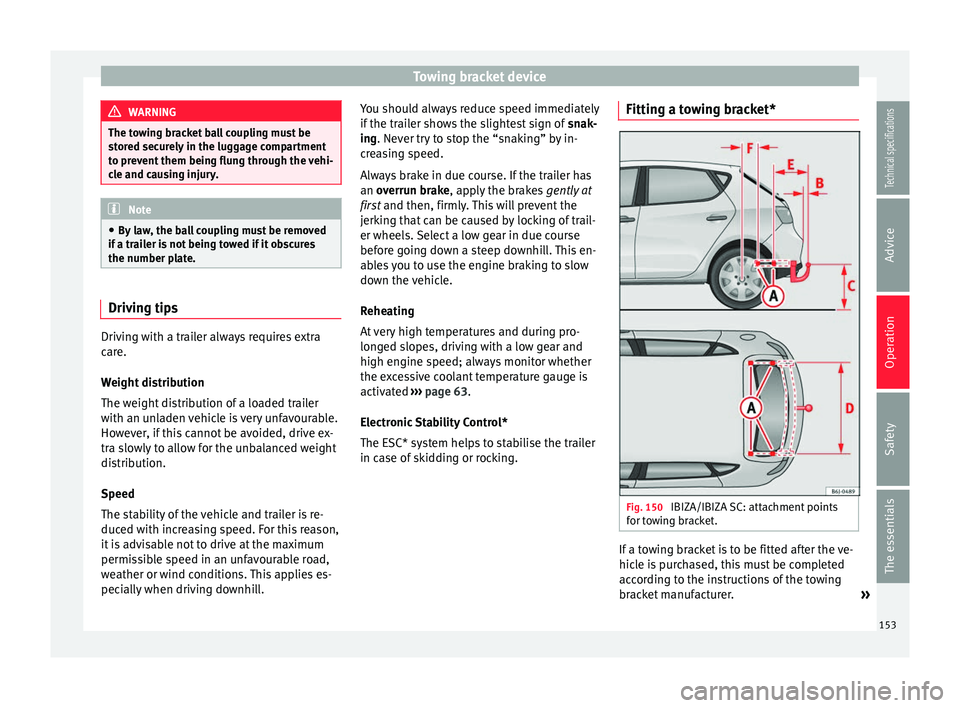
in case of skidding or rocking. Fitting a towing bracket*
Fig. 150
IBIZA/IBIZA SC: attachment points
for towing bracket. If a towing bracket is to be fitted after the ve-
hicle is purchased, this must be completed
according to the instructions of the towing
bracket manufacturer.
»
153
Technical specifications
Advice
Operation
Safety
The essentials
Page 159 of 240
Care and maintenance
Products for vehicle maintenance
Car-care products are available in your Tech-
nical Services. Keep the product instructions
until you have used them up. WARNING
● Car-care products can be toxic. Because of
this, they must always be kept closed in their
original container. Keep them out of the reach
of children. Failure to comply could result in
poisoning.
● Always read and observe the instructions
and warnings on the package before using
car-care products. Improper use could cause
health problems or damage the vehicle. The
use of certain products may produce noxious
vapours; they should be used in well ventila-
ted areas.
● Never use fuel, turpentine, engine oil, nail
varnish remover or other volatile fluids.
These are toxic and highly flammable. Risk of
fire and explosion.
● Before washing your vehicle, or carrying
out any maintenance, switch the engine off,
apply the handbrake firmly and remove the
key from the ignition. CAUTION
Never attempt to remove dirt, mud or dust if
the surface of the vehicle is dry. Never use a
dry cloth or sponge for cleaning purposes.
This could damage the paintwork or the win-
dows of your vehicle. Soak dirt, mud or dust
with plenty of water. For the sake of the environment
● When purchasing products for your vehicle
maintenance, select the ones which are not
harmful to the environment.
● The waste from car-care products should
not be disposed of with ordinary household
waste. Observe the disposal information on
the package. Care of the vehicle exterior
Automatic car washing tunnel The vehicle paintwork is so durable that the
vehicle can normally be washed without
problems in an automatic car wash tunnel.
However, the paintwork wear depends to a
large extent on the kind of the car wash tun-
nel, the brushes used, its water filtering and
the type of cleaning and preservative prod-
ucts.
Before going through a car wash, be sure to
take the usual precautions such as closing
the windows and sunroof. There is nothing to
note apart from that.
If the vehicle has special accessories such as
spoilers or a roof rack or two-way radio aerial,
etc., it is advisable to consult the car wash
tunnel operator first.After washing, the brakes could take some
time to respond as the brake discs and pads
could be wet, or even frozen in winter. “Dry”
the brakes by braking several times. WARNING
Water, ice and salt on the brake system can
reduce braking effectiveness. Risk of acci-
dent. CAUTION
Before putting the vehicle through the car
wash, do not tighten the aerial if it is folded
because it can be damaged. Washing by hand
Vehicle washing
– First soften the dirt and rinse it off with wa-
ter.
– Clean your vehicle from top to bottom with
a soft sponge, a glove or a brush. Use very
light pressure.
– Rinse the sponge or glove often with clean
water.
– Special car shampoo should only be used
for very stubborn dirt.
– Leave the wheels, sill panels etc. until last,
using a different sponge or glove.
»
157Technical specifications
Advice
Operation
Safety
The essentials
Page 163 of 240
Care and maintenance
Alloy wheels require regular attention to pre-
serve their appearance. If road salt and brake
dust are not often removed, the aluminium
finish will be impaired.
Always use an acid-free detergent for alloy
wheel rims.
Car polish or other abrasive agents should
not be used for maintaining the rims. If the
protective coating is damaged, e.g. by flying
stones, the damaged area should be re-
paired immediately. WARNING
Observe the safety warnings ››› in Steel
wheel rims on page 160. Underbody protection
The vehicle underbody is coated to protect it
from chemical and mechanical damage.
The protective coating can be damaged when
driving. We recommend that you check the
protective coating under the body and on the
running gear, and retouch it if necessary, be-
fore and after the winter season.
We recommend that you go to your Technical
Service to carry out repair work and addition-
al anti-corrosion work. WARNING
Do not apply underseal or anti-corrosion
coatings to the exhaust pipes, catalytic con-
verter or the heat shields on the exhaust sys-
tem. The heat of the exhaust system or the
engine could cause them to ignite. Risk of
fire. Cleaning the engine compartment
Take special care when cleaning the engine
compartment.
Anti-corrosion treatment
The engine compartment and the surface of
the power unit are given anti-corrosion treat-
ment at the factory.
Good corrosion protection is particularly im-
portant in winter when the vehicle is fre-
quently driven on salted roads. To prevent
the salt corroding the vehicle, the entire en-
gine compartment should be thoroughly
cleaned before and after winter.
Technical Services
have the proper products
for cleaning and preservation as well as the
necessary workshop equipment. For this rea-
son, we recommend having this work per-
formed by them.
The anti-corrosion protection is usually re-
moved if the engine compartment is cleaned
with grease removing solutions, or if you have the engine cleaned. On commissioning
this work, ensure that all surfaces, seams,
joints and components in the engine com-
partment are given anti-corrosion treatment.
WARNING
● When working in the engine compartment,
always observe the safety warnings
››› page 166.
● Bef
ore opening the bonnet, switch the en-
gine off, apply the handbrake firmly and al-
ways remove the key from the ignition.
● Allow the engine to cool before you clean
the engine compartment.
● Do not clean, for example, the vehicle un-
derbody, wheel arches or wheel trims without
protecting your hands and arms. You may cut
yourself on sharp-edged metal parts. Failure
to comply could result in injury.
● Moisture, ice and salt on the brake system
may affect braking effectiveness. Risk of acci-
dent. Directly after washing, avoid sudden
and sharp braking.
● Never touch the radiator fan. It is tempera-
ture-controlled and could start automatically,
even when the key is removed from the igni-
tion! For the sake of the environment
Fuel, grease and oil deposits can be removed
when the engine is washed. The polluted wa-
ter must be cleaned in an oil separator. For
this reason, engine washing should be » 161
Technical specifications
Advice
Operation
Safety
The essentials