bonnet Seat Ibiza ST 2016 User Guide
[x] Cancel search | Manufacturer: SEAT, Model Year: 2016, Model line: Ibiza ST, Model: Seat Ibiza ST 2016Pages: 252, PDF Size: 5.56 MB
Page 88 of 252
Emergencies
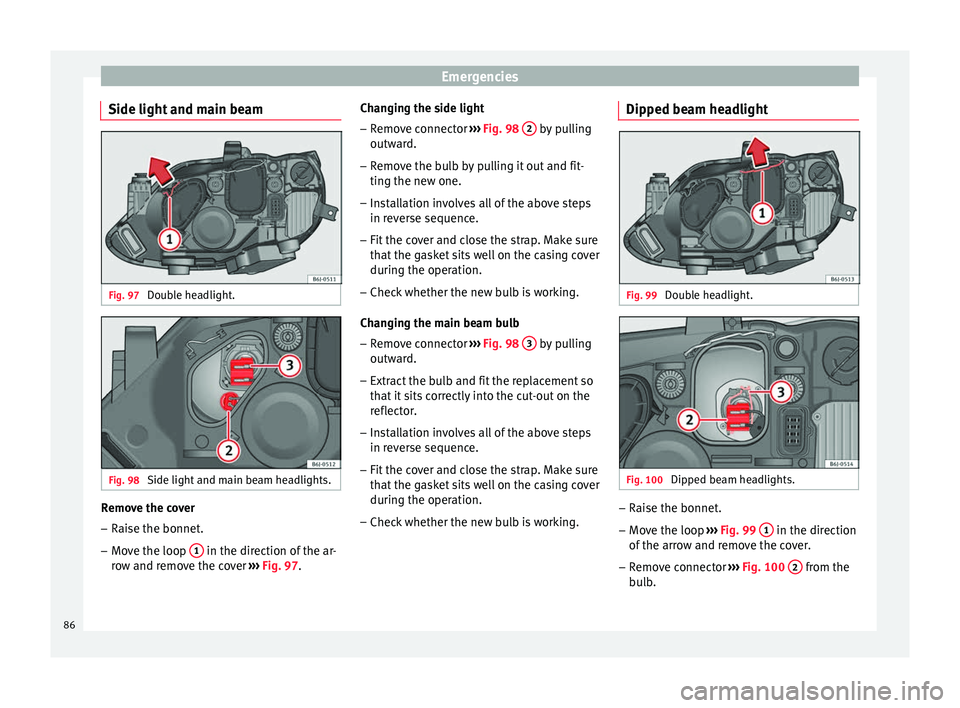
Side light and main beam Fig. 97
Double headlight. Fig. 98
Side light and main beam headlights. Remove the cover
– Raise the bonnet.
– Move the loop 1 in the direction of the ar-
r o
w and r emo
ve the cover ››› Fig. 97. Changing the side light
– Remove connector ››› Fig. 98
2 by pulling
outw ar
d.
– Remo
ve the bulb by pulling it out and fit-
ting the new one.
– Inst
allation involves all of the above steps
in reverse sequenc
e.
– Fit the cover and close the strap. Make sure
that the ga
sket sits well on the casing cover
during the operation.
– Check whether the new bulb is working.
Changing the m
ain beam bulb
– Remove connector ››› Fig. 98
3 by pulling
outw ar
d.
– Extr act
the bulb and fit the replacement so
that it s
its correctly into the cut-out on the
reflector.
– Installation involves all of the above steps
in reverse sequenc
e.
– Fit the cover and close the strap. Make sure
that the ga
sket sits well on the casing cover
during the operation.
– Check whether the new bulb is working. Dipped beam headlight
Fig. 99
Double headlight. Fig. 100
Dipped beam headlights. –
Raise the bonnet.
– Move the loop ››
›
Fig. 99
1 in the direction
of the arr
ow and r
emove the cover.
– Remove connector ››› Fig. 100
2 from the
b u
lb
.
86
Page 89 of 252
Fuses and bulbs
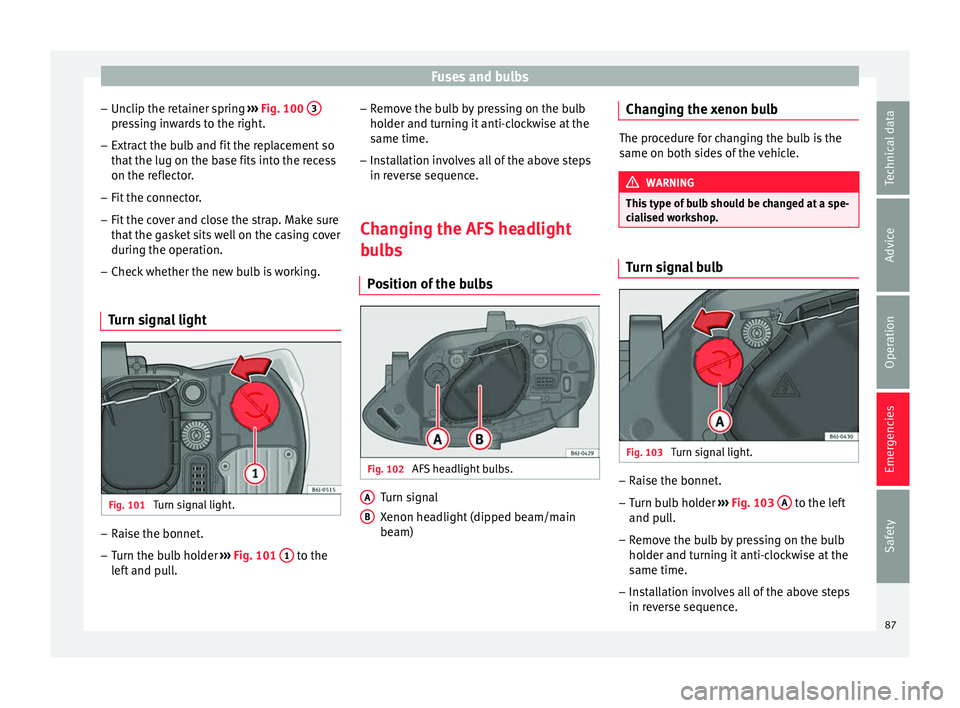
– Unc lip the r
etainer s
pring ››› Fig. 100 3 pressing inwards to the right.
– Extract the bulb and fit the replacement so
th at
the lug on the b a
se fits into the recess
on the reflector.
– Fit the connector.
– Fit the cover and close the strap. Make sure
that the ga
sket sits well on the casing cover
during the operation.
– Check whether the new bulb is working.
Turn signal light Fig. 101
Turn signal light. –
Raise the bonnet.
– Turn the bulb holder ››
›
Fig. 101
1 to the
l ef t
and p
ull. –
Remove the b
ulb by pressing on the bulb
holder and turning it anti-clockwise at the
same time.
– Installation involves all of the above steps
in reverse sequenc
e.
Changing the AFS headlight
bulb
s
Position of the bulbs Fig. 102
AFS headlight bulbs. Turn signal
X
enon he
adlight
(dipped beam/main
beam)
A B Changing the xenon bulb
The procedure for changing the bulb is the
same on both side
s
of the vehicle. WARNING
This type of bulb should be changed at a spe-
cia li
sed workshop. Turn signal bulb
Fig. 103
Turn signal light. –
Raise the bonnet.
– Turn bulb holder ››
›
Fig. 103
A to the left
and p u
ll
.
– Remove the bulb by pressing on the bulb
holder and turnin
g it anti-clockwise at the
same time.
– Installation involves all of the above steps
in reverse sequenc
e.
87
Technical data
Advice
Operation
Emergencies
Safety
Page 97 of 252
Controls and displays
Operation
C ontr
ol
s and displays
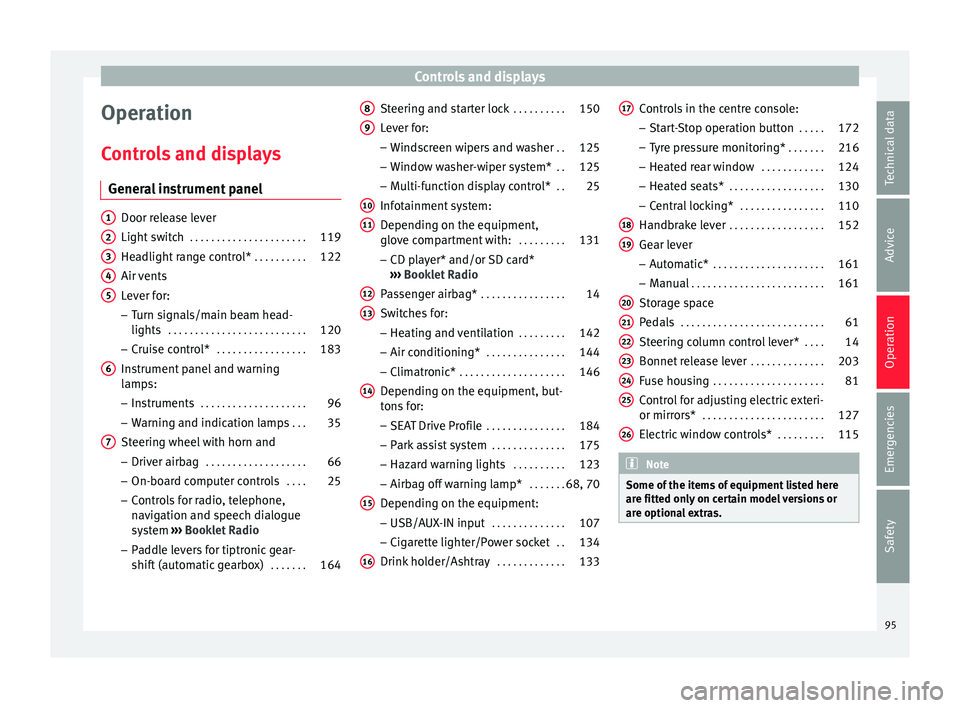
General instrument panel Door release lever
Light swit
c
h . . . . . . . . . . . . . . . . . . . . . . 119
Headlight range control* . . . . . . . . . .122
Air vents
Lever for:
– T
urn signals/main beam head-
lights . . . . . . . . . . . . . . . . . . . . . . . . . . 120
– Cruise c ontr
ol* . . . . . . . . . . . . . . . . . 183
Instrument panel and warning
lamps:
– Ins
truments . . . . . . . . . . . . . . . . . . . . 96
– Warning and indic ation l
amps . . . 35
Steering wheel with horn and – Driver airbag . . . . . . . . . . . . . . . . . . . 66
– On-board comp
uter controls . . . .25
– Control
s for radio, telephone,
navigation and speech dialogue
system ›››
Booklet Radio
– Paddle levers for tiptronic gear-
shift (automatic gearbox) . . . . . . .164
1 2
3
4
5
6
7 Steering and starter lock
. . . . . . . . . .150
Lever for: – Wind
sc
reen wipers and washer . .125
– Window wa
sher-wiper system* . .125
– Multi-fu
nction display control* . .25
Infotainment system:
Depending on the equipment,
glov
e compartment with: . . . . . . . . .131
– CD play
er* and/or SD card*
››› Booklet Radio
Passenger airbag* . . . . . . . . . . . . . . . . 14
Switches for:
– Heating and v
entilation . . . . . . . . . 142
– Air conditioning* . . . . . . . . . . . . . . . 144
– Clim
atronic* . . . . . . . . . . . . . . . . . . . . 146
D
epending on the equipment, but-
tons f
or:
– SEAT Drive Profile . . . . . . . . . . . . . . . 184
– Park a s
sist system . . . . . . . . . . . . . . 175
– Hazard warnin
g lights . . . . . . . . . . 123
– Airbag off warnin
g lamp* . . . . . . .68, 70
Depending on the equipment:
– USB/AUX-IN inp ut . . . . . . . . . . . . . . 107
– C
igar ett
e lighter/Power socket . .134
Drink holder/Ashtray . . . . . . . . . . . . .133
8 9
10
11
12
13
14
15
16 Controls in the centre console:
– St ar
t-
Stop operation button . . . . .172
– Tyre pr
essure monitoring* . . . . . . .216
– Heated re
ar window . . . . . . . . . . . . 124
– Heated seats* . . . . . . . . . . . . . . . . . . 130
– C
entral loc
king* . . . . . . . . . . . . . . . . 110
Handbrake lever . . . . . . . . . . . . . . . . . . 152
Gear lever – Automatic* . . . . . . . . . . . . . . . . . . . . . 161
– Manual . . . . . . . . . . . . . . . . . . . . . . . . . 161
St
orag
e space
Pedals . . . . . . . . . . . . . . . . . . . . . . . . . . . 61
St
eering column control lever* . . . .14
Bonnet release lever . . . . . . . . . . . . . .203
Fuse housing . . . . . . . . . . . . . . . . . . . . . 81
Control for adjusting electric exteri-
or mirrors* . . . . . . . . . . . . . . . . . . . . . . . 127
Electric
window controls* . . . . . . . . .115 Note
Some of the items of equipment listed here
are fitted on ly
on certain model versions or
are optional extras. 17
18
19
20
21
22
23
24
25
26
95
Technical data
Advice
Operation
Emergencies
Safety
Page 99 of 252
Instruments and warning/control lamps
CAUTION
● To prev ent
damage to the engine, the rev
counter needle should only remain in the red
zone for a short period of time.
● When the engine is cold, avoid high revs
and heavy acc
eleration and do not make the
engine work hard. For the sake of the environment
Changing up a gear in time reduces fuel con-
sumption and noise. Rev counter
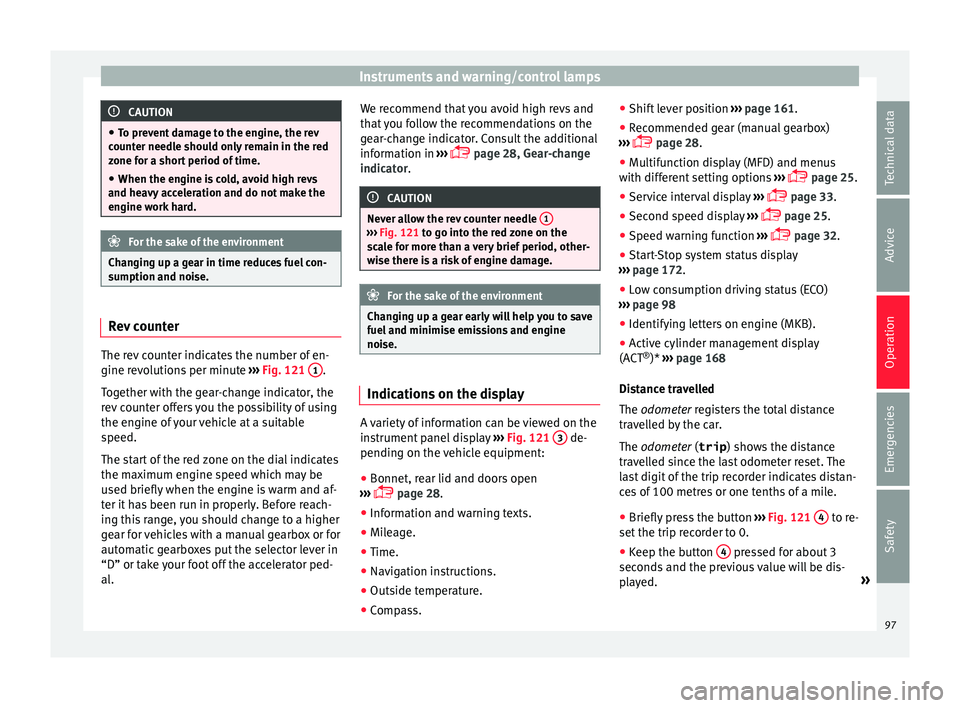
The rev counter indicates the number of en-
gine r
ev
olution
s per minute ›››
Fig. 121 1 .
T og
ether w ith the g
ear-change indicator, the
rev counter offers you the possibility of using
the engine of your vehicle at a suitable
speed.
The start of the red zone on the dial indicates
the maximum engine speed which may be
used briefly when the engine is warm and af-
ter it has been run in properly. Before reach-
ing this range, you should change to a higher
gear for vehicles with a manual gearbox or for
automatic gearboxes put the selector lever in
“D” or take your foot off the accelerator ped-
al. We recommend that you avoid high revs and
that y
ou follow the recommendations on the
gear-change indicator. Consult the additional
information in ›››
page 28, Gear-change
indicator. CAUTION
Never allow the rev counter needle 1 ›››
Fig. 121 to go int o the r
ed zone on the
scale for more than a very brief period, other-
wise there is a risk of engine damage. For the sake of the environment
Changing up a gear early will help you to save
fuel and minimi se emi
ssions and engine
noise. Indications on the display
A variety of information can be viewed on the
in
s
trument p
anel display ›››
Fig. 121 3 de-
pendin g on the
vehic
le equipment:
● Bonnet, rear lid and doors open
››› p
age 28.
● Information and warning texts.
● Mileage.
● Time.
● Navigation instructions.
● Outside temperature.
● Compass. ●
Shift lev
er position ››› page 161.
● Recommended gear (manual gearbox)
››› p
age 28.
● Multifunction display (MFD) and menus
with different
setting options ›››
page 25.
● Service interval display ›››
p
age 33.
● Second speed display ›››
p
age 25.
● Speed warning function ›››
p
age 32.
● Start-Stop system status display
››› p
age 172.
● Low consumption driving status (ECO)
››› p
age 98
● Identifying letters on engine (MKB).
● Active cylinder management display
(ACT ®
)* ›››
page 168
Distance travelled
The odometer registers the total distance
travelled by the car.
The odometer (trip ) shows the distance
travelled since the last odometer reset. The
last digit of the trip recorder indicates distan-
ces of 100 metres or one tenths of a mile.
● Briefly press the button ››› Fig. 121
4 to re-
set the trip r
ecor
der to 0.
● Keep the button 4 pressed for about 3
sec ond
s and the pr
evious value will be dis-
played. »
97
Technical data
Advice
Operation
Emergencies
Safety
Page 103 of 252
Introduction to the Easy Connect system*
Priority 2 warning messages will not be
sho wn u nti
l all Priority 1 warning messages
have been dealt with!
Examples of priority 2 warning reports (yel-
low):*
● Fuel warning light with the information text
PLEASE REFUEL .WARNING
If the warning lamps and messages are ignor-
ed, the vehic l
e may stall in traffic, or may
cause accidents and severe injuries.
● Never ignore the warning lamps or text
messag
es.
● Stop the vehicle safely as soon as possible.
● Park the vehicle away from traffic and en-
sure that
there are no highly flammable ma-
terials under the vehicle that could come into
contact with the exhaust system (e.g. dry
grass, fuel).
● A faulty vehicle represents a risk of acci-
dent for the driver and f
or other road users. If
necessary, switch on the hazard warning
lamps and put out the warning triangle to ad-
vise other drivers.
● Before opening the bonnet, switch off the
engine and allo
w it to cool.
● In any vehicle, the engine compartment is a
hazardou
s area and could cause severe inju-
ries ››› page 201. CAUTION
Failure to heed the control lamps and text
mess ag
es when they appear may result in
faults in the vehicle. Introduction to the Easy
C
onnect
sys
tem*
System settings (CAR)* CAR menu (Setup) Read the additional information carefully
›››
p
age 24
To select the settings menus, press the Easy
Connect button and the
Set
up function
b utt
on.
The act ual
number of menus available and
the name of the various options in these me-
nus will depend on the vehicle’s electronics
and equipment.
Pressing the menu button will always take
you to the last menu used.
When the function button check box is activa-
ted , the function is active.
Pressing the menu button will always take
y ou t
o the l a
st menu used.
Any changes made using the settings menus
are automatically saved on closing those me-
nus. »
101
Technical data
Advice
Operation
Emergencies
Safety
Page 115 of 252
Opening and closing
While the vehicle is open:
– Press the button
2
› ››
Fig. 130
on the
r emot
e control.
– Then close the vehicle using the key shaft
within one minute.
Whil
e the vehicle is closed:
– Press the button
1
› ››
Fig. 130
on the
r emot
e control.
– Then close the vehicle using the key shaft
within one minute.
It i
s possible that the vehicle could no longer
be opened and closed with the remote con-
trol if the button is repeatedly pressed
outs ide of
the eff ectiv
e range of the radio fre-
quency remote control. The remote control
key will have to be resynchronised.
Spare remote control keys are available at
your Technical Service, where they must be
matched to the locking system.
Up to five remote control keys can be used. Anti-theft alarm*
Desc
ription of anti-theft alarm sys-
tem* The anti-theft alarm makes it more difficult to
break
int
o the vehicle or steal it. The system
will initiate acoustic and optical warning sig-
nals when your vehicle is tried to be forced.
The anti-theft alarm system is automatically
switched on when locking the vehicle. The
system is immediately activated and the turn
signal light located on the driver door will
flash along with the turn signals, indicating
that the alarm and the locking security sys-
tem (double lock) have been turned on.
If any of the doors or the bonnet are open,
they will not be included in the protection
zones of the vehicle when the alarm is con-
nected. If the door or the bonnet are subse-
quently closed, they will be automatically in-
cluded in the protection areas of the vehicle
and the turn signals will flash accordingly
when the doors close.
● The turn signal light will flash twice on
opening and deactiv atin
g the alarm.
● The turn signal light will flash once on clos-
ing and activating the al
arm. When does the system trigger an alarm?
The system trig
gers an alarm, if the following
unauthorised actions are carried out when
the vehicle is locked:
● Mechanical opening of the vehicle with the
vehicle k
ey without switching on the ignition
in the next 15 seconds (in certain markets,
such as the Netherlands, the alarm is activa-
ted immediately).
● A door is opened.
● Opening the bonnet.
● The rear lid is opened.
● Ignition switched on with a non-validated
key.
● Mov
ements in the driving compartment
(vehicle
s with a volume sensor).
● Towing of the vehicle 1)
.
● Vehicle tilt angle 1)
.
● Undue manipulation of the alarm.
● Battery handling.
In this ca
se, the acoustic signals will go off
and the turn signal will flash for approximate-
ly 30 seconds. This cycle may be repeated up
to 10 times depending on the country. »1)
With vehicles fitted with a tow-away protection
113
Technical data
Advice
Operation
Emergencies
Safety
Page 127 of 252
Lights and visibility
Windscreen wiper and rear win-
do w w
iper sy s
tems
Control lamp*
It lights up
Windscreen wiper fluid level too low
This serves as a reminder to fill up the reser-
voir at the e
arlie
st opportunity ››› page 210.
Windscreen wipers Read the additional information carefully
› ›
›
p
age 23 WARNING
● Worn and dirty w
iper blades reduce visibili-
ty and safety levels while driving.
● In cold conditions you should not use the
wash/wipe sy
stem unless you have warmed
the windscreen with the heating and ventila-
tion system. The windscreen washer fluid
could otherwise freeze on the windscreen and
obscure your view of the road.
● Always note the corresponding warnings
››› p
age 54. WARNING
The rain sensor* may not detect enough rain
to swit c
h on the wipers.
● If necessary, switch on the wipers manually
when water on the wind
screen obstructs visi-
bility. CAUTION
In icy conditions, always check that the wiper
bla de
s are not frozen to the glass before us-
ing the wipers for the first time. If you switch
on the windscreen wipers when the wiper
blades are frozen to the windscreen, you
could damage both the wiper blades and the
wiper motor. Note
● The winds c
reen wipers will only work when
the ignition is switched on.
● The heat output of the heated jets* is con-
troll
ed automatically when the ignition is
switched on, depending upon the outside
temperature.
● In certain versions of vehicles with alarms,
the windsc
reen wiper will only work in inter-
val/rain sensor mode when the ignition is on
and the bonnet closed.
● When the interval wipe function is on, the
interva
ls are directly proportional to the
speed. This way, the higher the vehicle speed
the shorter the intervals. ●
If y ou s
top the vehicle with the windscreen
wiper in position 1 or 2, it will automatically
change to a lower position speed. The set
speed will be resumed when the vehicle pulls
away.
● The windscreen will be wiped again after
approx
imately five seconds once the “auto-
matic wash/wipe system” has been activa-
ted, provided the vehicle is moving (drip func-
tion). If you activate the wipers less than 3
seconds after the drip function, a new wash
sequence will begin without performing the
last wipe. For the “drip” function to work
again, you have to turn the ignition off and
then on again.
● Do not put stickers on the windscreen in
front of the
rain sensor*. This may cause sen-
sor disruption or faults. Rear window wiper
Fig. 138
Windscreen wiper lever: rear window
w iper
. » 125
Technical data
Advice
Operation
Emergencies
Safety
Page 161 of 252
Driving
How the ABS works
If one of
the wheel s
turns too slowly in rela-
tion to the vehicle's speed, and is close to
locking, the system will reduce the braking
pressure to this wheel. The driver is made
aware of this control process by a pulsating
of the brake pedal and audible noise. This is
a deliberate warning to the driver that one or
more of the wheels is tending to lock and the
ABS control function has intervened. In this
situation it is important to keep the brake
pedal fully depressed so the ABS can regu-
late the brake application. Do not “pump”.
If you brake hard on a slippery road surface,
the best possible control is retained as the
wheels do not lock.
However, ABS will not necessarily guarantee
shorter braking distances in all conditions.
Braking distance could even be further if you
brake on gravel or on fresh snow on a slip-
pery surface.
Control lamp
The control lamp lights up for a few sec-
onds when the ignition is switched on. It
goes out again after the system has run
through an automatic test sequence.
There is a fault in the ABS if:
● The control lamp does not light
up when
the ignition is switched on. ●
The control
lamp does not go out again af-
ter a few seconds.
● The control lamp lights up when the vehicle
is mov
ing.
The vehicle can still be braked in the normal
way, without the ABS function. Take the vehi-
cle to a specialised workshop as soon as
possible.
If there is a fault in the ABS, the ESC* and the
tyre pressure control lamp will also light up.
Brake system fault
If the ABS warning lamp lights up together
with the brake warning lamp , there is a
fault in the ABS function and in the brake
system ››› .
WARNING
● The anti-lock br ak
e system cannot defy the
laws of physics. Slippery and wet roads are
dangerous even with ABS! If you notice that
the ABS is working (to counteract locked
wheels under braking), you should reduce
speed immediately to suit the road and traffic
conditions. Do not let the extra safety fea-
tures tempt you into taking any risks when
driving.
● The effectiveness of ABS is also determined
by the tyr
es fitted ››› page 213.
● If the running gear or brake system is modi-
fied, the effectivenes
s of the ABS could be se-
verely limited. WARNING
● Befor e openin
g the bonnet, read and ob-
serve the warnings ››› page 201, Working in
the engine compartment.
● If the brake system warning lamp should
light up t
ogether with the ABS warning lamp
, stop the vehicle immediately and check
the brake fluid level in the reservoir
››› page 209, Brake fluid. If the brake fluid
level has dropped below the “MIN” mark you
must not drive on. Risk of accident. Obtain
technical assistance.
● If the brake fluid level is correct, the fault in
the brake sys
tem may have been caused by a
failure of the ABS system. This could cause
the rear wheels to lock quickly when you
brake. This could cause the rear to break
away. Risk of skidding. Stop the vehicle and
seek technical assistance. Electronic differential lock (XDS)*
When taking a curve, the driveshaft differen-
ti
al
mec h
anism allows the outer wheel to turn
at a higher speed than the inner wheel. In
this way, the wheel that is turning faster (out-
er wheel) receives less drive torque than the
inner wheel. This may mean that in certain
situations the torque delivered to the inner
wheel is too high, causing the wheels to
spin. On the other hand, the outer wheel is
receiving a lower drive torque than it could
transmit. This causes an overall loss of lateral »
159
Technical data
Advice
Operation
Emergencies
Safety
Page 175 of 252
Driver assistance systems
Start-Stop function conditions
● The driver seat belt must be buckled.
● The bonnet must be closed.
● The engine must be at operating tempera-
t ur
e.
● The s t
eering wheel must be straight.
● The vehicle must be on flat ground.
● The vehicle must not be in reverse.
● A trailer must not be connected.
● The temperature of the interior must be
within the comfor
t limits (A/C button should
be sel ect
ed).
● The w ind
screen de-mist function must be
off.
● If in an incr
ease in airflow is not request
ed.
● The temperature must not be set to HI or
LO .
● The driver door must be closed.
● The diesel particulate filter must not be in
regener
ation mode, for diesel engines.
● The battery charge must not be low for the
next st
art.
● Battery temperature must be between -1 °C
(+30 °F) and +55 °C (+131 °F).
Star
t-Stop function interruption
In the following situations, the Start-Stop
function will be interrupted and the engine
will automatically start: ●
The vehicl
e starts moving.
● The brake pedal is pressed several times in
a row.
● The b
attery has been discharged excessive-
ly.
● The Star
t-Stop System is manually deacti-
vated.
● The wind
screen de-mist function is turned
on.
● The temperature of the interior exceeds the
comfort
limits ( A/C button).
● If the airflow is increased by more than 3
pr e
sse
s.
● Temperature setting HI or LO is select
ed.
● The engine coolant temperature is insuffi-
cient.
● The altern
ator is faulty, for example the V-
belt has
ruptured.
● If any of the conditions described in the
previous
section are not fulfilled.
When the engine is turned off by the Start-
Stop function, this is displayed on the instru-
ment panel.
If the Start-Stop system is not switched on,
the warning lamp will appear on the instru-
ment panel. WARNING
Never allow the vehicle to move with the en-
gine off for an y
reason. You could lose control
of your vehicle. This could cause an accident
and serious injury.
● The brake servo does not work with the en-
gine off. You need mor
e force to stop the vehi-
cle.
● Power steering does not work when the en-
gine is not ru
nning. That is why it is much
more difficult to turn the steering wheel.
● Turn off the Start-Stop system when driving
through water (f
ording streams, etc.). Note
● For v ehic
les with the Start-Stop function
and a manual gearbox, when the engine is
started, the clutch must be pressed.
● When the conditions for the Start-Stop
function are not
fulfilled, the instrument pan-
el displays the Start-Stop indicator dimmed.
● If the steering wheel is turned more than
270°, it wil
l not be possible to start the vehi-
cle again. To start the vehicle, straighten the
steering wheel so that it is turned less than
270°.
● There are different versions of the dash
panel; the disp
lay of indications on the
screen may differ. 173
Technical data
Advice
Operation
Emergencies
Safety
Page 199 of 252
Care and maintenance
●
Befor e openin
g the bonnet, switch the en-
gine off, apply the handbrake firmly and al-
ways remove the key from the ignition.
● Allow the engine to cool before you clean
the engine compar
tment.
● Do not clean, for example, the vehicle un-
derbody, wheel arc
hes or wheel trims without
protecting your hands and arms. You may cut
yourself on sharp-edged metal parts. Failure
to comply could result in injury.
● Moisture, ice and salt on the brake system
may aff
ect braking effectiveness. Risk of acci-
dent. Directly after washing, avoid sudden
and sharp braking.
● Never touch the radiator fan. It is tempera-
ture-contr
olled and could start automatically,
even when the key is removed from the igni-
tion! For the sake of the environment
Fuel, grease and oil deposits can be removed
when the engine is w
ashed. The polluted wa-
ter must be cleaned in an oil separator. For
this reason, engine washing should be car-
ried out only by a specialised workshop or a
petrol station. Caring for the vehicle interior
C l
e anin
g plastic parts and the dash
panel –
Use a clean, damp cloth to clean plastic
parts and the d
ash panel.
– If this does not provide satisfactory results,
use a speci
al solvent-free plastic cleaning
product. WARNING
Never clean the dash panel and the airbag
module s ur
face with cleaners containing sol-
vents. Solvents cause the surface to become
porous. If the airbag triggered, plastic parts
could become detached and cause injuries. CAUTION
Cleaning products which contain solvents will
damag e the m
aterial. Cleaning wooden trim*
–
Clean the wooden trim with a water-mois-
tened c
le
an cloth.
– If this does not provide satisfactory results,
use a gentle
soap solution. CAUTION
Cleaning products which contain solvents will
damag e the m
aterial. Cleaning upholstery and fabric trim
Cloth seat covers and fabric trim on the
doors, hea
dlinin
g etc. can be cleaned with a
special interior cleaner or with dry foam and
a soft brush.
Cleaning the radio and climate con-
trol s To clean the radio and/or climate controls,
u
se a sof
t d
amp cloth. For more resistant dirt,
a neutral soap solution may be used.
Cleaning leather* Normal cleaning
–
Moisten a cotton or woollen cloth with wa-
ter and w
ipe ov
er the leather surfaces.
Cleaning stubborn stains – More stubborn dirt can be removed using a
mild soap so
lution (pure liquid soap; two
tablespoons diluted in one litre of water)
and a cloth. »
197
Technical data
Advice
Operation
Emergencies
Safety