service Seat Ibiza ST 2016 Owner's Guide
[x] Cancel search | Manufacturer: SEAT, Model Year: 2016, Model line: Ibiza ST, Model: Seat Ibiza ST 2016Pages: 252, PDF Size: 5.56 MB
Page 94 of 252
Emergencies
Number plate light 3 Applies to the model: IBIZA/IBIZA SC
– Inser t
the flat part of a screwdriver into the
special
slot and remove the bulb.
– Remove the bulb holder, by turning it until
it is fr
ee.
– Change the bulb.
– Replace the bulb holder, by turning it until
it fits fu
lly.
– Fit the light into the space and press until
you hear a “c lic
k”.
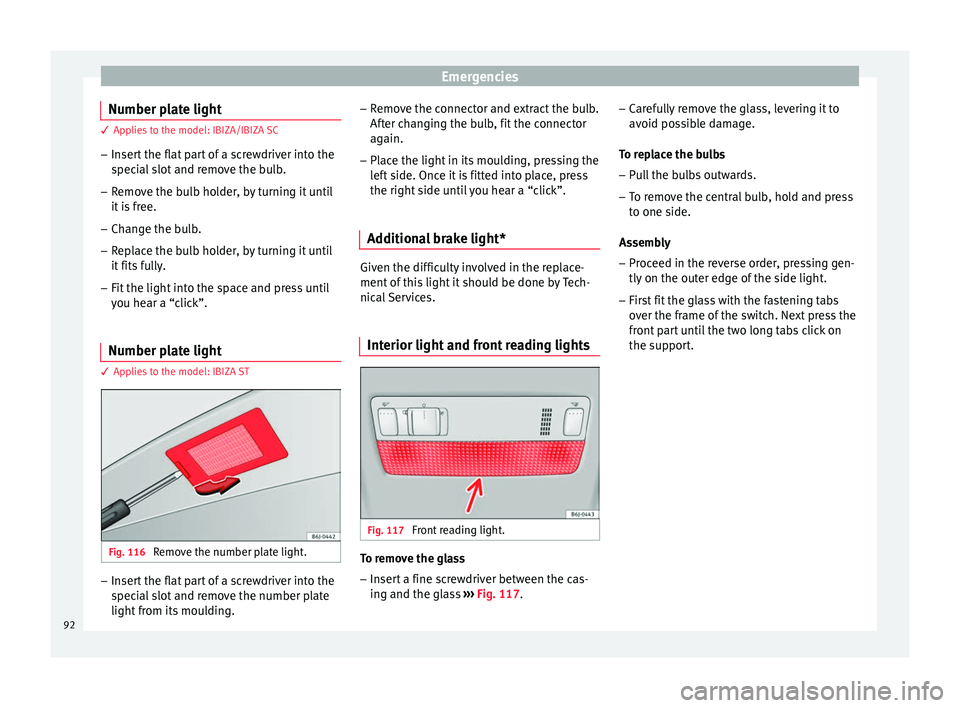
Number plate light 3 Applies to the model: IBIZA ST
Fig. 116
Remove the number plate light. –
Insert the flat part of a screwdriver into the
spec
ial
slot and remove the number plate
light from its moulding. –
Remove the c
onnector and extract the bulb.
After changing the bulb, fit the connector
again.
– Place the light in its moulding, pressing the
left s
ide. Once it is fitted into place, press
the right side until you hear a “click”.
Additional brake light* Given the difficulty involved in the replace-
ment of thi
s
light it should be done by Tech-
nical Services.
Interior light and front reading lights Fig. 117
Front reading light. To remove the glass
– Insert a fine screwdriver between the cas-
ing and the gl
as
s ››› Fig. 117. –
Carefu
lly remove the glass, levering it to
avoid possible damage.
To replace the bulbs
– Pull the bulbs outwards.
– To remove the central bulb, hold and press
to one side.
Assemb
ly
– Proceed in the reverse order, pressing gen-
tly on the outer edge of
the side light.
– First fit the glass with the fastening tabs
over the frame of
the switch. Next press the
front part until the two long tabs click on
the support.
92
Page 99 of 252
Instruments and warning/control lamps
CAUTION
● To prev ent
damage to the engine, the rev
counter needle should only remain in the red
zone for a short period of time.
● When the engine is cold, avoid high revs
and heavy acc
eleration and do not make the
engine work hard. For the sake of the environment
Changing up a gear in time reduces fuel con-
sumption and noise. Rev counter
The rev counter indicates the number of en-
gine r
ev
olution
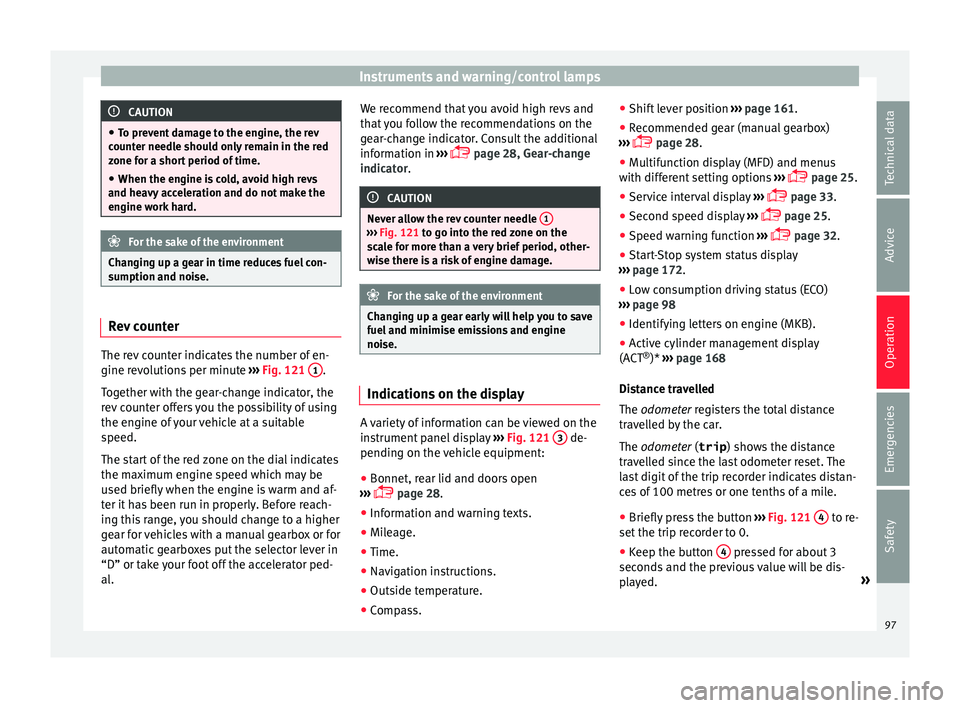
s per minute ›››
Fig. 121 1 .
T og
ether w ith the g
ear-change indicator, the
rev counter offers you the possibility of using
the engine of your vehicle at a suitable
speed.
The start of the red zone on the dial indicates
the maximum engine speed which may be
used briefly when the engine is warm and af-
ter it has been run in properly. Before reach-
ing this range, you should change to a higher
gear for vehicles with a manual gearbox or for
automatic gearboxes put the selector lever in
“D” or take your foot off the accelerator ped-
al. We recommend that you avoid high revs and
that y
ou follow the recommendations on the
gear-change indicator. Consult the additional
information in ›››
page 28, Gear-change
indicator. CAUTION
Never allow the rev counter needle 1 ›››
Fig. 121 to go int o the r
ed zone on the
scale for more than a very brief period, other-
wise there is a risk of engine damage. For the sake of the environment
Changing up a gear early will help you to save
fuel and minimi se emi
ssions and engine
noise. Indications on the display
A variety of information can be viewed on the
in
s
trument p
anel display ›››
Fig. 121 3 de-
pendin g on the
vehic
le equipment:
● Bonnet, rear lid and doors open
››› p
age 28.
● Information and warning texts.
● Mileage.
● Time.
● Navigation instructions.
● Outside temperature.
● Compass. ●
Shift lev
er position ››› page 161.
● Recommended gear (manual gearbox)
››› p
age 28.
● Multifunction display (MFD) and menus
with different
setting options ›››
page 25.
● Service interval display ›››
p
age 33.
● Second speed display ›››
p
age 25.
● Speed warning function ›››
p
age 32.
● Start-Stop system status display
››› p
age 172.
● Low consumption driving status (ECO)
››› p
age 98
● Identifying letters on engine (MKB).
● Active cylinder management display
(ACT ®
)* ›››
page 168
Distance travelled
The odometer registers the total distance
travelled by the car.
The odometer (trip ) shows the distance
travelled since the last odometer reset. The
last digit of the trip recorder indicates distan-
ces of 100 metres or one tenths of a mile.
● Briefly press the button ››› Fig. 121
4 to re-
set the trip r
ecor
der to 0.
● Keep the button 4 pressed for about 3
sec ond
s and the pr
evious value will be dis-
played. »
97
Technical data
Advice
Operation
Emergencies
Safety
Page 104 of 252
OperationFunction buttons in the
vehicle settings
menuPage
ESC system››› page 155
Tyres››› page 216
Driver assistance››› table on page 24
Parking and manoeuvring››› page 175
Vehicle lights››› table on page 24
Mirrors and windscreen wipers››› table on page 24
Opening and closing››› table on page 24
Multifunction display››› table on page 24
Date and time››› table on page 24
Units››› table on page 24
Service››› page 97
Factory settings››› table on page 24 WARNING
Any distraction may lead to an accident, with
the risk of injur
y. Operating the Easy Connect
system while driving could distract you from
traffic. 102
Page 113 of 252
Opening and closing
and clockwise for the right-hand side
door s.
D eactiv
ating the childproof lock
– Unlock the vehicle and open the door
whose chil
dproof lock you want to deacti-
vate.
– With the door open, rotate the groove in
the door using the ignition k
ey, anti-clock-
wise for the right-hand side doors, and
clockwise for the left-hand side doors
››› Fig. 128.
Once the childproof lock is activated, the
door can only be opened from the outside.
The childproof lock can be activated or deac-
tivated by inserting the key in the groove
when the door is open, as described above. Keys
Set of key
s Fig. 129
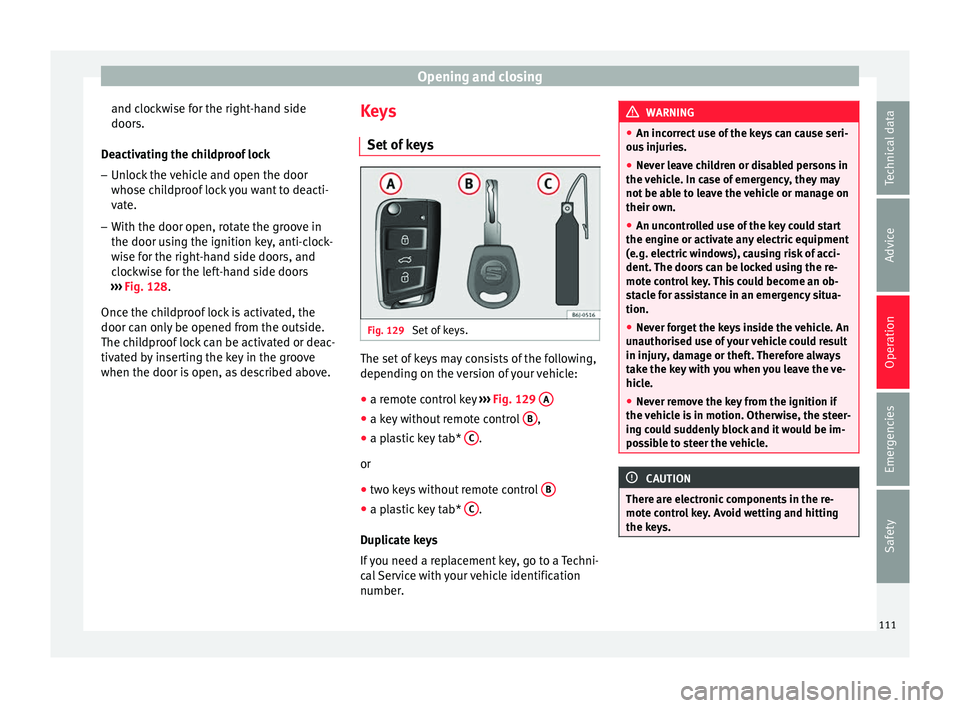
Set of keys. The set of keys may consists of the following,
dependin
g on the
ver
sion of your vehicle:
● a remote control key ››› Fig. 129
A ●
a key without remote control B ,
● a plastic key tab* C .
or
● two keys without remote control B ●
a plastic key tab* C .
D up
licat
e keys
If you need a replacement key, go to a Techni-
cal Service with your vehicle identification
number. WARNING
● An incorrect u
se of the keys can cause seri-
ous injuries.
● Never leave children or disabled persons in
the vehicl
e. In case of emergency, they may
not be able to leave the vehicle or manage on
their own.
● An uncontrolled use of the key could start
the engine or activate an
y electric equipment
(e.g. electric windows), causing risk of acci-
dent. The doors can be locked using the re-
mote control key. This could become an ob-
stacle for assistance in an emergency situa-
tion.
● Never forget the keys inside the vehicle. An
unauthorised u
se of your vehicle could result
in injury, damage or theft. Therefore always
take the key with you when you leave the ve-
hicle.
● Never remove the key from the ignition if
the vehicl
e is in motion. Otherwise, the steer-
ing could suddenly block and it would be im-
possible to steer the vehicle. CAUTION
There are electronic components in the re-
mote contr o
l key. Avoid wetting and hitting
the keys. 111
Technical data
Advice
Operation
Emergencies
Safety
Page 114 of 252
Operation
Radio frequency remote con-
tr o
l*
Un loc
king and locking the vehicle Fig. 130
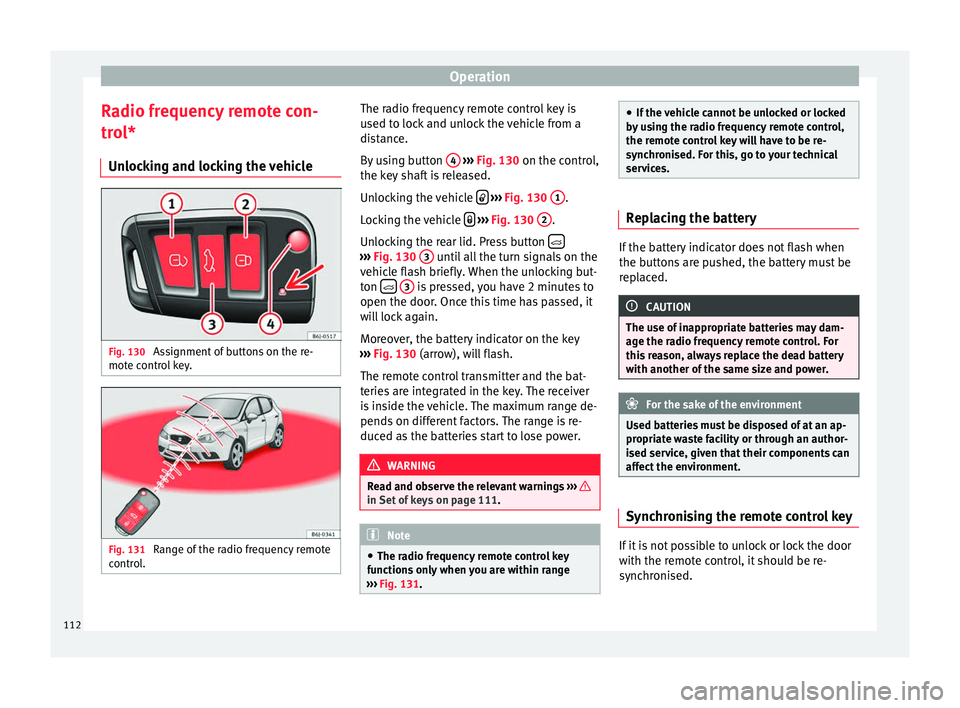
Assignment of buttons on the re-
mot e c
ontr o
l key. Fig. 131
Range of the radio frequency remote
c ontr
ol
. The radio frequency remote control key is
u
sed t
o lock
and unlock the vehicle from a
distance.
By using button 4
› ››
Fig. 130
on the c ontr
ol,
the key shaft is released.
Unlocking the vehicle
› ››
Fig. 130
1 .
L oc
kin
g the vehicle
› ››
Fig. 130
2 .
Un loc
kin
g the rear lid. Press button ›››
Fig. 130 3 until all the turn signals on the
v ehic
le fl
ash briefly. When the unlocking but-
ton
3 is pressed, you have 2 minutes to
open the door . Onc
e this
time has passed, it
will lock again.
Moreover, the battery indicator on the key
››› Fig. 130 (arrow), will flash.
The remote control transmitter and the bat-
teries are integrated in the key. The receiver
is inside the vehicle. The maximum range de-
pends on different factors. The range is re-
duced as the batteries start to lose power. WARNING
Read and observe the relevant warnings ››› in Set of keys on page 111.
Note
● The radio fr equency
remote control key
functions only when you are within range
››› Fig. 131. ●
If the v ehic
le cannot be unlocked or locked
by using the radio frequency remote control,
the remote control key will have to be re-
synchronised. For this, go to your technical
services. Replacing the battery
If the battery indicator does not flash when
the button
s
are pushed, the battery must be
replaced. CAUTION
The use of inappropriate batteries may dam-
age the ra dio fr
equency remote control. For
this reason, always replace the dead battery
with another of the same size and power. For the sake of the environment
Used batteries must be disposed of at an ap-
propriat e w
aste facility or through an author-
ised service, given that their components can
affect the environment. Synchronising the remote control key
If it is not possible to unlock or lock the door
w
ith the r
emote c
ontrol, it should be re-
synchronised.
112
Page 115 of 252
Opening and closing
While the vehicle is open:
– Press the button
2
› ››
Fig. 130
on the
r emot
e control.
– Then close the vehicle using the key shaft
within one minute.
Whil
e the vehicle is closed:
– Press the button
1
› ››
Fig. 130
on the
r emot
e control.
– Then close the vehicle using the key shaft
within one minute.
It i
s possible that the vehicle could no longer
be opened and closed with the remote con-
trol if the button is repeatedly pressed
outs ide of
the eff ectiv
e range of the radio fre-
quency remote control. The remote control
key will have to be resynchronised.
Spare remote control keys are available at
your Technical Service, where they must be
matched to the locking system.
Up to five remote control keys can be used. Anti-theft alarm*
Desc
ription of anti-theft alarm sys-
tem* The anti-theft alarm makes it more difficult to
break
int
o the vehicle or steal it. The system
will initiate acoustic and optical warning sig-
nals when your vehicle is tried to be forced.
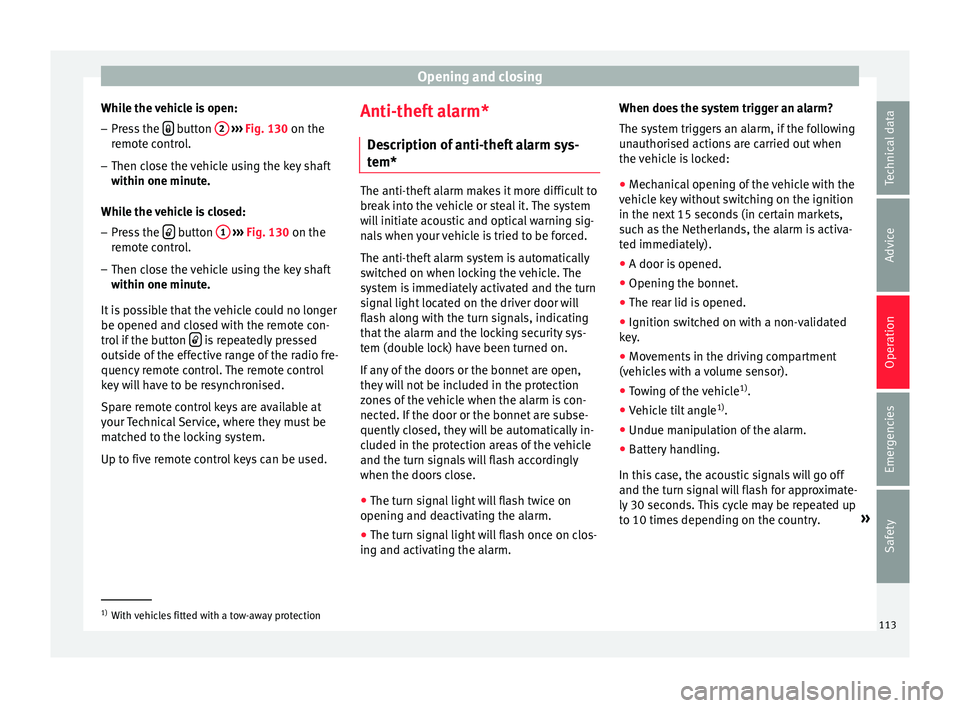
The anti-theft alarm system is automatically
switched on when locking the vehicle. The
system is immediately activated and the turn
signal light located on the driver door will
flash along with the turn signals, indicating
that the alarm and the locking security sys-
tem (double lock) have been turned on.
If any of the doors or the bonnet are open,
they will not be included in the protection
zones of the vehicle when the alarm is con-
nected. If the door or the bonnet are subse-
quently closed, they will be automatically in-
cluded in the protection areas of the vehicle
and the turn signals will flash accordingly
when the doors close.
● The turn signal light will flash twice on
opening and deactiv atin
g the alarm.
● The turn signal light will flash once on clos-
ing and activating the al
arm. When does the system trigger an alarm?
The system trig
gers an alarm, if the following
unauthorised actions are carried out when
the vehicle is locked:
● Mechanical opening of the vehicle with the
vehicle k
ey without switching on the ignition
in the next 15 seconds (in certain markets,
such as the Netherlands, the alarm is activa-
ted immediately).
● A door is opened.
● Opening the bonnet.
● The rear lid is opened.
● Ignition switched on with a non-validated
key.
● Mov
ements in the driving compartment
(vehicle
s with a volume sensor).
● Towing of the vehicle 1)
.
● Vehicle tilt angle 1)
.
● Undue manipulation of the alarm.
● Battery handling.
In this ca
se, the acoustic signals will go off
and the turn signal will flash for approximate-
ly 30 seconds. This cycle may be repeated up
to 10 times depending on the country. »1)
With vehicles fitted with a tow-away protection
113
Technical data
Advice
Operation
Emergencies
Safety
Page 142 of 252
Operation
Air conditioning
He atin
g, v
entilation and cool-
ing
General notes Read the additional information carefully
›››
p
age 39
Pollution filter
The pollution filter (a combined particulate
filter and active carbon filter) serves as a bar-
rier against impurities in the outside air, in-
cluding dust and pollen.
For the climate control system to work with
maximum efficiency, the pollution filter must
be replaced at the specified intervals in the
Maintenance Programme.
If the filter loses efficiency prematurely due
to use in areas reaching very high pollution
levels, the pollen filter must be changed
more frequently than stated in the Service
Schedule. WARNING
Reduced visibility through the windows in-
cre a
ses the risk of serious accidents.
● Always ensure that all windows are free of
ice and snow
, and that they are not fogged, so as to maintain good visibility of everything
outside.
●
The m ax
imum heat output required to de-
frost
windows as quickly as possible is only
available when the engine has reached its
normal running temperature. Only drive when
you have good visibility.
● Always ensure that you use the heating
system, fr
esh air system, air conditioner and
the heated rear window to maintain good visi-
bility to the outside.
● Never leave the air recirculation on for a
long period of time. If the c
ooling system is
switched off and air recirculation mode
switched on, the windows can mist over very
quickly, considerably limiting visibility.
● Switch air recirculation mode off when it is
not required. WARNING
Stuffy or used air will increase fatigue and re-
duce driver c onc
entration possibly resulting
in a serious accident.
● Never leave the fresh air fan turned off or
use the air recir
culation for long periods of
time; the air in the vehicle interior will not be
refreshed. CAUTION
● If y ou s
uspect that the air conditioner is
damaged, switch it off with the A/C button to prevent further damage and have it checked
by a s
pec
ialised workshop.
● Repairs to the air conditioner require spe-
ciali
st knowledge and special tools. There-
fore, we recommend you to take the vehicle
to a specialised workshop. Note
● If the humidity and t emper
ature outside the
vehicle are high, condensation can drip off
the evaporator in the cooling system and
form a pool underneath the vehicle. This is
normal and does not indicate a leak.
● Keep the air intake slots in front of the
windsc
reen free of snow, ice and leaves to en-
sure heating and cooling are not impaired,
and to prevent the windows from misting
over.
● The air from the vents flows through the ve-
hicle interior and i
s extracted by slots in the
luggage compartment designed for this pur-
pose. Therefore, you should avoid obstruct-
ing these slots with any kind of object.
● The air conditioner operates most effective-
ly with the windo
ws and the sliding/tilting
sunroof* closed. However, if the temperature
inside the vehicle is excessive because of the
sun, the air inside can be cooled faster by
opening the windows for a short time.
● Do not smoke while air recirculation mode
is on, as
smoke drawn into the air condition-
ing system leaves residue on the evaporator,
producing a permanent unpleasant odour. 140
Page 143 of 252
Air conditioning
●
At low out s
ide temperatures, the compres-
sor switches off automatically and cannot be
switched on even with the AUTO button.
● It is advisable to turn on the air condition-
ing at l e
ast once a month, to lubricate the
system gaskets and prevent leaks. If a de-
crease in the cooling capacity is detected, a
Technical Service should be consulted to
check the system.
● To ensure correct operation, the grilles on
both sides of
the screen must not be obstruc-
ted ●
When the engine is u
nder extreme strain,
switch off the compressor for a moment. Economic use of the air conditioning
When the air conditioning is switched on, the
compre
s
sor consumes engine power and has
influence on fuel consumption. Consider the
following points in order to have the system
operating in the minimum possible time. ●
If the v ehic
le interior has overheated due to
an excessive solar radiation, it is best to
open the windows or doors to allow the hot
air to escape.
● While in motion, the air conditioning
should not be sw
itched on if the windows or
the sunroof* are open.
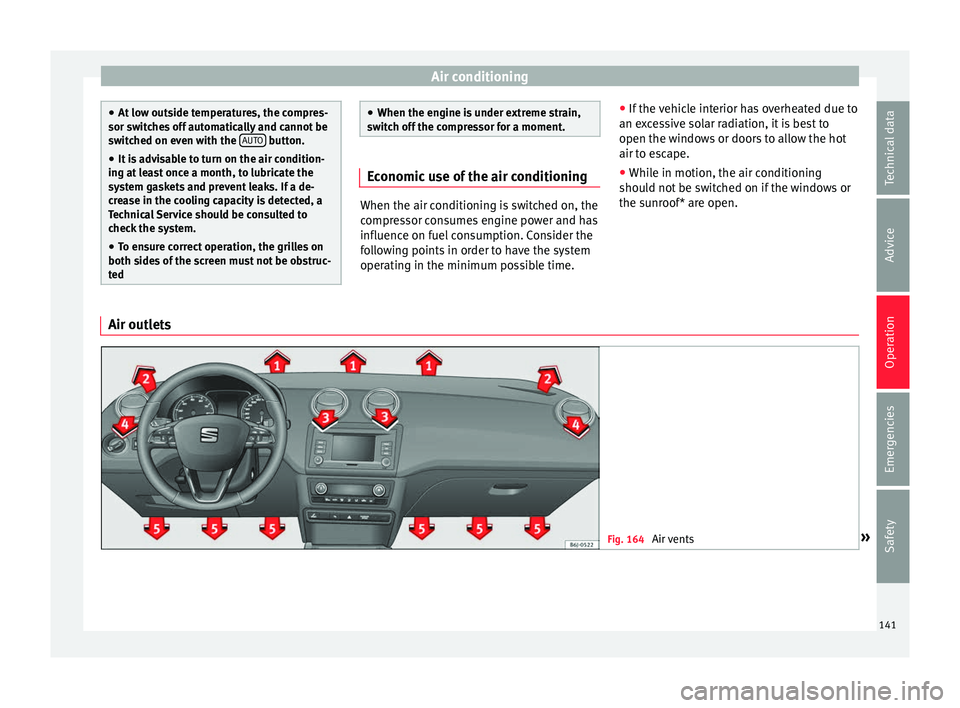
Air outlets Fig. 164
Air vents » 141Technical data
Advice
Operation
Emergencies
Safety
Page 149 of 252
Air conditioning
● Pr e
ss
the AUTO button
13
› ››
Fig. 167
.
● Adju s
t vents 3 and 4 ››› p
age 141 so that
the air flow is directed slightly upwards.
Change between degrees Centigrade and de-
grees Fahrenheit
Keep the AUTO and
A/C
› ››
Fig. 167
butt
ons
held down for 2 seconds at the same time.
The data is displayed on the screen in the
units required. Note
● A vi s
it to the specialised service once a
year is recommended to clean the Climatronic
system.
● The interior temperature sensor 11›››
Fig. 167 is at the bott
om. Do not cover it
with stickers or the like, as this could have a
negative effect on Climatronic operations. Automatic mode
Automatic mode is used to maintain a con-
s
t
ant t
emperature and demist the windows
inside the vehicle.
Switching on automatic mode
● Set the interior temperature between
+16 °C (+64 °F) and +29 °C (+84
°F).
● Adjust vents 3 and 4 ›››
p
age 141 so that
the air flow is directed slightly upwards. ●
Press
the AUTO button
13
› ››
Fig. 167
and
AUTO dis
played on the screen.
Automatic mode is switched off by pressing
the air distribution buttons or increasing or
decreasing the blower speed. However, the
temperature remains regulated.
Adjusting the temperature ●
When you switch on the ignition, control 1 ›››
Fig. 167 can be used t o set
the required in-
terior temperature.
It is possible to select interior temperatures
from +16 °C (+64 °F) to +29 °C (+84 °F). In
this range the temperature is regulated auto-
matically. If a temperature below +16 °C
(+64 °F) is selected, “LO” is displayed on the
screen. If a temperature above +29 °C
(+84 °F) is selected, “HI” is displayed on the
screen. At both extremes, Climatronic works
at maximum cooling or heating power, re-
spectively. The temperature is not regulated.
In the event of prolonged, irregular distribu-
tion of the air flow from the outlets (particu-
larly the footwells) and significant differen-
ces in temperature, e.g. on leaving the vehi-
cle, sensitive people may catch cold. Air recirculation Air recirculation prevents unpleasant smells,
e.g. when pa
s
sing through a tunnel or in
queuing traffic, from entering the interior.
Switching on air recirculation mode
● Press button
17
››› Fig. 167 and the
symbo
l is displayed on the screen.
Switching off air recirculation mode
● Press button
17
› ›
› Fig. 167 and the
symbol disappears from the screen. WARNING
Read and observe the safety warnings ››› in
General not
es on page 140. Note
If air recirculation mode remains on for 15 mi-
nutes, the
symbol will start to flash on
the screen to indicate prolonged air recircula-
tion. If air recirculation is not switched off,
the symbol will continue to flash for about 5
minutes. Blower selection
Climatronic automatically regulates blower
s
peed ac
cor
ding to the interior temperature. »
147
Technical data
Advice
Operation
Emergencies
Safety
Page 162 of 252
Operation
grip on the front axle, resulting in understeer
or “l en
gthenin
g” of the trajectory.
The XDS system can detect and correct this
effect via the sensors and signals of the ESC.
Via the ESC, the XDS will brake the inside
wheel and counter the excess driving torque
of that wheel. This means that the driver's
desired trajectory is much more precise.
The XDS system works in combination with
the ESC and is always active, even when ASR
traction control is disconnected or the ESC is
in Sport mode.
Brake servo The brake servo increases the pressure you
ap
p
ly t
o the brake pedal. It works only when
the engine is running .
If the brake servo is not functioning, e.g. due
to a malfunction, or if the vehicle is being
towed, you will have to press the brake pedal
considerably harder to make up for the lack
of servo assistance. WARNING
The braking distance can also be affected by
extern a
l factors.
● Never let the vehicle coast with the engine
switched off
. Failure to follow this instruction
could result in an accident. The braking dis- tance is increased considerably when the
brake ser
v
o is not active.
● If the brake servo is not working, for exam-
ple when the v
ehicle is being towed, you will
have to press the brake pedal considerably
harder than normal. Hill driving assistant*
This function is only included in vehicles with
ESC.
The hil l
driving assistant helps the driver to
move off and upward on a hill when the vehi-
cle is stationary.
The system maintains brake pressure for ap-
proximately two seconds after the driver
takes his foot off the brake pedal to prevent
the vehicle from lurching backward when it is
started. During these 2 seconds, the driver
has enough time to release the clutch pedal
and accelerate without the vehicle moving
and without having to use the handbrake,
making start-up easier, more comfortable
and safer.
These are the basic operation conditions:
● being on a ramp or hill/slope,
● doors closed,
● vehicle completely stationary,
● engine running and foot on the brake, ●
beside s
having a gear engaged or being in
neutral for manual gear change and with the
selector lever at position S, D or R for an au-
tomatic gearbox.
This system is also active when reversing up-
hill. WARNING
● If y ou do not
start the vehicle immediately
after taking your foot off the brake pedal, the
vehicle may start to roll back under certain
conditions. Depress the brake pedal or use
the hand brake immediately.
● If the engine stalls, depress the brake ped-
al or use the h
and brake immediately.
● When following a line of traffic uphill, if you
want to pr
event the vehicle from rolling back
accidentally when starting off, hold the brake
pedal down for a few seconds before starting
off. Note
The Official Service or a specialist workshop
can tel l
you if your vehicle is equipped with
this system. 160