stop start Seat Ibiza ST 2016 Owner's Guide
[x] Cancel search | Manufacturer: SEAT, Model Year: 2016, Model line: Ibiza ST, Model: Seat Ibiza ST 2016Pages: 252, PDF Size: 5.56 MB
Page 158 of 252
Operation
CAUTION
● To ens ur
e that the ESC works correctly, all
four wheels must be fitted with the same
tyres. Any differences in the rolling radius of
the tyres can cause the system to reduce en-
gine power when this is not desired.
● Any modifications made to the vehicle (for
exampl
e, to the engine, brake system, run-
ning gear or to the combination of wheels
and tyres) may affect the operation of the
ABS, EDL, ESC and ASR. Traction control system (ASR)*
The traction control system prevents the driv-
en wheel
s
fr om s
pinning when the vehicle is
accelerating. This system always includes
ABS.
Description and operation of the traction
control system during acceleration (ASR)
On front-wheel drive vehicles, the ASR sys-
tem intervenes, reducing engine power and
preventing the driven wheels from slipping
during acceleration. The system works in the
entire speed range in conjunction with ABS.
If a failure occurs in the ABS, the ASR will al-
so stop working.
TCS helps the car to start moving, accelerate
and climb a gradient in slippery conditions
where this may otherwise be difficult or even
impossible. The ASR automatically switches on when the
engine is s
tarted. If necessary, it could be
connected or disconnected by means of the
Easy Connect system.
When the ASR is off, the warning lamp lights
up . The ASR should normally be left on.
Only in exceptional circumstances, when
wheel spin is required, can they be turned off
using the ESC button, for example:
● With compact temporary spare wheel.
● When using the snow chains.
● When driving in deep snow or on soft ter-
rain.
● When the vehic
le is bogged-down, to free it
“by roc
king it.”
The ASR should be switched on again as
soon as possible.
Control lamp
There are two control lamps for the traction
control system: and . Both control lamps
light up together when the ignition is switch-
ed on and should turn off after approximately
2 seconds. This is the time taken for the func-
tion check.
The lamp has the following function:
● It flashes when the ASR is working if the ve-
hicle is
moving. If the system is deactivated or if it has any
fault, the warnin
g lamp will remain lit. The
warning lamp will also light up if a fault
should occur in the ABS because the ASR op-
erates in conjunction with the ABS. For fur-
ther information, see ››› page 156.
The lamp provides information about the
disconnection status of the system:
● It stays lit when the ASR is disconnected
via Ea
sy Connect.
By means of Easy Connect, the ASR function
is reactivated and the warning lamp switched
off. WARNING
● Remember that not
even the ASR can defy
the laws of physics. This should be kept in
mind, particularly on slippery and wet roads
and when towing a trailer.
● Always adapt your driving style to suit the
condition of the ro
ads and the traffic situa-
tion. The greater safety provided by the ASR
should not encourage you to run any risks. CAUTION
● To ens ur
e that the ASR works correctly,
identical tyres should be fitted on all four
wheels. Any differences in the rolling radius
of the tyres can cause the system to reduce
engine power when this is not desired. 156
Page 165 of 252
Driving
press the brake pedal to change the selector
l ev
er fr om po
sition N to position D.
S - Standard driving position (Sport pro-
gramme)
When the selector lever is in position S, it will
automatically change up into a higher gear
later, and change down into a low gear, if
compared with position D. This way, it is pos-
sible to take full advantage of the engine re-
serve power, depending on the engine de-
mand, driving style and speed. The braking
effect of the engine when driving downhill is
very limited. On the instrument panel display
the selected gear is shown as well as the se-
lector lever to position S.
To select gear range S, press the lock button
on the selector lever. WARNING
● As a driver ,
you should never leave your ve-
hicle if the engine is running and a gear range
is engaged. If you have to leave your vehicle
while the engine is running, you must apply
the parking brake and put the selector lever
in position P.
● If the engine is running and if D or R is en-
gaged, y
ou will need to hold the car on the
foot brake. The car will creep forward as the
power transmission is not fully interrupted
even when the engine is idling.
● Never accelerate when moving the selector
lever or y
ou may cause an accident. ●
Never mov e the sel
ector lever to R or P
when driving. Risk of accident!
● Before driving down a long, steep slope, it
is adv
isable to reduce speed and change into
a lower gear.
● If you stop the vehicle up hill, always hold
the foot brak
e strongly depressed down to
stop it from rolling back.
● Never allow the brake to rub and do not use
the brake peda
l too often or for long periods.
Constant braking will cause the brakes to
overheat and will considerably reduce the
brake effect. This increases the braking dis-
tance and could cause the brake system to
fail.
● Never allow the car to roll down a gradient
with the gear in neutr
al N, or in selector lever
position D, even if the engine is not running.
● If the vehicle moves with no control, an ac-
cident and serious
injury may occur. WARNING
Never switch the engine off until the vehicle
is s t
ationary. You could lose control of your
vehicle. This could cause an accident and se-
rious injury.
● The airbags and belt tensioners do not
work when the ignition is
switched off.
● The brake servo does not work with the en-
gine off. You need mor
e force to stop the vehi-
cle. ●
Pow er s
teering does not work when the en-
gine is not running. That is why it is much
more difficult to turn the steering wheel.
● Never remove the key from the ignition if
the vehicl
e is in motion. The steering lock
could suddenly engage, and you would not be
able to steer the vehicle. CAUTION
If you allow the vehicle to move when the en-
gine i s swit
ched off or with the selector lever
in position “N”, take your foot off the acceler-
ator and wait until the engine starts idling
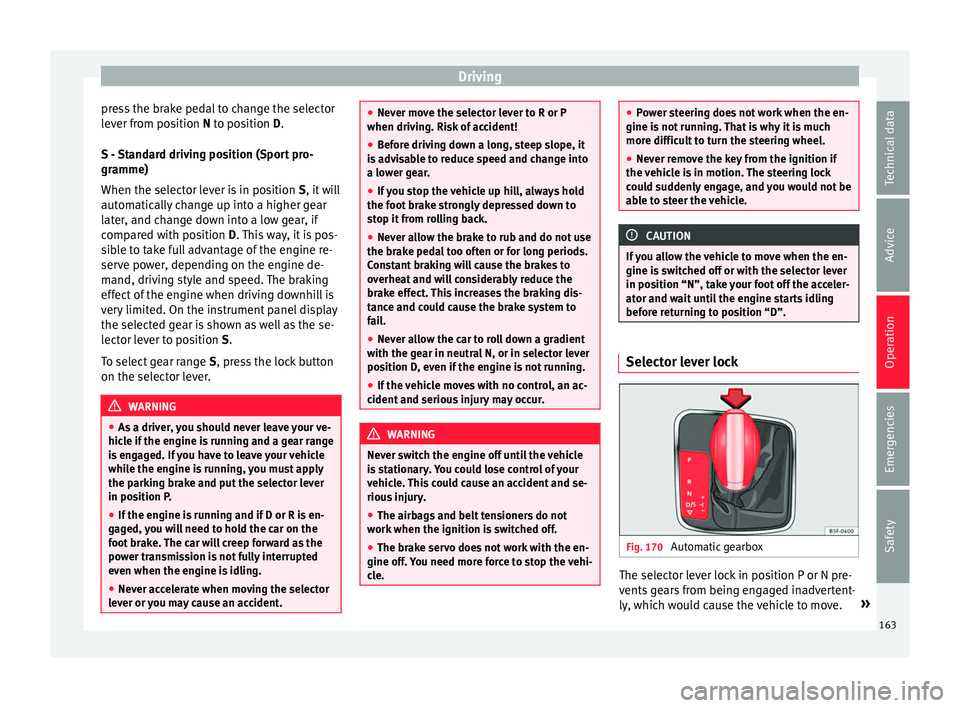
before returning to position “D”. Selector lever lock
Fig. 170
Automatic gearbox The selector lever lock in position P or N pre-
v
ents
ge
ars from being engaged inadvertent-
ly, which would cause the vehicle to move. »
163
Technical data
Advice
Operation
Emergencies
Safety
Page 167 of 252
Driving
If “tiptronic” is selected whilst the vehicle is
in motion and the aut om
atic g
earbox / DSG
automatic gearbox is in third gear and selec-
tor lever position D, “tiptronic” mode will
then also be in third gear.
Changing gears in the normal or sport pro-
gramme using the steering wheel paddle lev-
ers
If the paddle levers ››› Fig. 172 are used in
the normal or sport programme, the system
switches temporarily to “tiptronic” mode. To
exit “Tiptronic” mode again, press the right
paddle lever + towards the steering wheel
f or ap
pro
ximately one second. You will also
leave “tiptronic” mode if the paddle levers
are not moved for a certain time. Note
● The gear p a
ddle levers on the steering
wheel can be operated with the selector lever
in any position and with the vehicle in mo-
tion. Driving tips
The gearbox changes gear ratios automatical-
ly
a
s the
vehicle moves.
Starting
– Start the engine with the selector lever in
position P
or N. Driving
– Press and hold the brake pedal.
– Holding down the lock button (button on
the selector lev
er), select R or D.
– Release the lever and wait a little for the
gearbox
to engage the gear (a slight move-
ment can be felt).
– Release the brake and press the accelerator
››› in Selector lever positions on
p ag
e 163 .
St
opping briefly
– If stopping for a short time, keep the vehi-
cle st
ationary by pressing the foot brake
hard to prevent the vehicle moving back-
wards on a slope or “creeping” forwards,
e.g. at traffic lights. The selector lever does
not need to be put into the positions P or N
for this.
– Do not press the accelerator.
Parking
– Pr
ess and hold the brake pedal until the ve-
hicle come
s to a standstill ››› in Selector
l ev
er po s
itions on page 163.
– Apply the handbrake.
– By pressing the lock button down, move
the selector lev
er to P and release the lock
button. Driving up and down hills
–
Press the selector lever from position “D”
to the right into the tiptr
onic selector gate.
– Lightly press the selector lever back to
chang
e down.
Holding the car on a hill
– The brake must be always pressed down to
prevent the
vehicle from “rolling back-
wards” ››› in Selector lever positions on
p ag
e 163 . Do not
try to prevent the vehicle
from “rolling backwards” by increasing the
engine speed while a range of gears is se-
lected.
Starting the vehicle up hills
– Apply the handbrake.
– With a selected gear, accelerate slowly and
at the same time, rel
ease the handbrake.
The steeper the slope, the lower the needed
gear. This increases the braking effect of the
engine. For example, when driving down a
very steep slope in third gear. If the engine
brake effect is not enough, the vehicle will
speed up. The automatic gearbox automati-
cally changes up to prevent the engine over-
revving. Use the foot brake to reduce speed
and change into 3rd gear using Tiptronic*
››› in Selector lever positions on page 163.
Y our
vehic
le has an automatic interlock
which prevents the selector lever from being »
165
Technical data
Advice
Operation
Emergencies
Safety
Page 171 of 252
Driving
Avoid short journeys
T o r
educ e the c
onsumption and emission of
polluting exhaust gases, the engine and the
exhaust gas filtration systems should reach
the optimum operating temperature.
With the engine cold, fuel consumption is
proportionally higher. The engine does not
warm up and fuel consumption does not nor-
malise until having driven approximately four
kilometres (2.5 miles). This is why we recom-
mend avoiding short trips whenever possi-
ble.
Maintain the correct tyre pressures
Bear in mind that keeping the tyres at an ad-
equate pressure saves fuel. If the tyre pres-
sure is just one bar (14.5 psi/100 kPa) too
low, fuel consumption can increase by as
much as 5%. Due to the greater rolling resist-
ance, under-inflation also increases tyre wear
wear and impairs handling.
The tyre pressures should always be checked
when the tyres are cold.
Do not use winter tyres all year round as they
increase fuel consumption by up to 10%.
Avoid unnecessary weight
Given that every kilo of extra weight will in-
crease the fuel consumption, it is advisable
to always check the luggage compartment to
make sure that no unnecessary loads are be-
ing transported. A roof rack is often left in place for the sake
of conv
enience, even when it is no longer
needed. At a speed of 100 km/h (62 mph)
and 120 km/h (75 mph) your vehicle will use
about 12% more fuel as a result of the extra
wind resistance caused by the roof rack even
when it is not in use.
Save electricity
The engine activates the alternator, which
produces electricity. With the need for elec-
tricity, fuel consumption also increases. Be-
cause of this, always turn off electrical devi-
ces when you do not need them. Examples of
devices that use a lot of electricity are: the
blower at high speeds, the rear window heat-
ing or the seat heaters*. Note
● If y our
vehicle has Start-Stop, it is not rec-
ommended that you switch this function off.
● It is recommended that you close the win-
do
ws when driving at more than 60 km/h
(37 mph)
● Do not drive with your foot resting on the
clutch pe
dal, as the pressure can make the
plate spin, more fuel will be used and it can
burn the clutch plate lining, causing a serious
fault.
● Do not hold the car on a hill with the clutch,
use the foot br
ake or hand brake, using the
latter to start. The fuel consumption will be lower and you will prevent the clutch plate
from being d
am
aged.
● On descents, use the engine brake, chang-
ing to the ge
ar that is more suitable for the
slope. Fuel consumption will be “zero” and
the brakes will not suffer. Engine management and ex-
haus
t
gas purification system
Introduction WARNING
● Becau se of
the high temperatures which
can occur in the exhaust purification system
(catalytic converter or diesel particulate fil-
ter), do not park the vehicle where the ex-
haust can come into contact with flammable
materials under the car (e.g. on grass or at
the forest edge). Fire hazard!
● Do not apply wax underneath the vehicle
around the are
a of the exhaust system: Fire
hazard! Note
While the control lamps , , or re-
main lit, ther e m
ay be engine problems, fuel
consumption may increase and the engine
may lose power. 169
Technical data
Advice
Operation
Emergencies
Safety
Page 174 of 252
Operation
To prevent dazzling, you must apply stickers
t o c
ert
ain parts of the headlight lenses. Fur-
ther information is available at any Technical
Service.
In vehicles with adaptive headlights, the ro-
tation system must previously be disconnec-
ted. To do this, please go to a specialised
workshop.
Driving on flooded roads To prevent damage to the vehicle when driv-
in
g thr
ough w at
er, for example, along a floo-
ded road, please observe the following:
● The water should never come above the
lower edge of
the bodywork.
● Drive at pedestrian speed. WARNING
After driving through water, mud, sludge,
etc., the br ak
ing effect can be delayed slight-
ly due to moisture build-up on the discs and
brake pads. Applying the brakes carefully
several times will remove the moisture and
restore the full braking effect. CAUTION
● Driving thr ough flooded ar
eas may severely
damage vehicle components such as the en-
gine, transmission, running gear or electrical
system. ●
Whenever drivin g thr
ough water, the Start-
Stop system* must be switched off
››› page 172. Note
● Chec k the depth of the w
ater before enter-
ing the flooded zone.
● Do not stop in the water, drive in reverse, or
stop the engine in an
y situation.
● Note that vehicles travelling in the opposite
direction may
splash water that could exceed
the maximum permitted water height for your
vehicle.
● Avoid driving through salt water (corro-
sion). Driver assistance systems
St ar
t-
Stop System*
Description and operation The Start-Stop function stops the engine
when the vehic
l
e is stopped and starts it au-
tomatically when required.
Vehicles with a manual gearbox
– When the vehicle is stopped, put it into
neutral and r el
ease the clutch pedal. The
engine will switch off. The warning lamp
will appear on the instrument panel dis-
play.
– When the clutch pedal is pressed the en-
gine will
start up again. The warning lamp
will switch off.
Vehicles with an automatic gearbox
– Use the foot brake to bring the vehicle to a
stop and keep the br
ake pedal pressed
down with your foot. The engine will switch
off. The warning lamp will appear in the
display.
– When you take your foot off the brake pedal
the engine wil
l start up again. The warning
lamp will switch off.
172
Page 175 of 252
Driver assistance systems
Start-Stop function conditions
● The driver seat belt must be buckled.
● The bonnet must be closed.
● The engine must be at operating tempera-
t ur
e.
● The s t
eering wheel must be straight.
● The vehicle must be on flat ground.
● The vehicle must not be in reverse.
● A trailer must not be connected.
● The temperature of the interior must be
within the comfor
t limits (A/C button should
be sel ect
ed).
● The w ind
screen de-mist function must be
off.
● If in an incr
ease in airflow is not request
ed.
● The temperature must not be set to HI or
LO .
● The driver door must be closed.
● The diesel particulate filter must not be in
regener
ation mode, for diesel engines.
● The battery charge must not be low for the
next st
art.
● Battery temperature must be between -1 °C
(+30 °F) and +55 °C (+131 °F).
Star
t-Stop function interruption
In the following situations, the Start-Stop
function will be interrupted and the engine
will automatically start: ●
The vehicl
e starts moving.
● The brake pedal is pressed several times in
a row.
● The b
attery has been discharged excessive-
ly.
● The Star
t-Stop System is manually deacti-
vated.
● The wind
screen de-mist function is turned
on.
● The temperature of the interior exceeds the
comfort
limits ( A/C button).
● If the airflow is increased by more than 3
pr e
sse
s.
● Temperature setting HI or LO is select
ed.
● The engine coolant temperature is insuffi-
cient.
● The altern
ator is faulty, for example the V-
belt has
ruptured.
● If any of the conditions described in the
previous
section are not fulfilled.
When the engine is turned off by the Start-
Stop function, this is displayed on the instru-
ment panel.
If the Start-Stop system is not switched on,
the warning lamp will appear on the instru-
ment panel. WARNING
Never allow the vehicle to move with the en-
gine off for an y
reason. You could lose control
of your vehicle. This could cause an accident
and serious injury.
● The brake servo does not work with the en-
gine off. You need mor
e force to stop the vehi-
cle.
● Power steering does not work when the en-
gine is not ru
nning. That is why it is much
more difficult to turn the steering wheel.
● Turn off the Start-Stop system when driving
through water (f
ording streams, etc.). Note
● For v ehic
les with the Start-Stop function
and a manual gearbox, when the engine is
started, the clutch must be pressed.
● When the conditions for the Start-Stop
function are not
fulfilled, the instrument pan-
el displays the Start-Stop indicator dimmed.
● If the steering wheel is turned more than
270°, it wil
l not be possible to start the vehi-
cle again. To start the vehicle, straighten the
steering wheel so that it is turned less than
270°.
● There are different versions of the dash
panel; the disp
lay of indications on the
screen may differ. 173
Technical data
Advice
Operation
Emergencies
Safety
Page 176 of 252
Operation
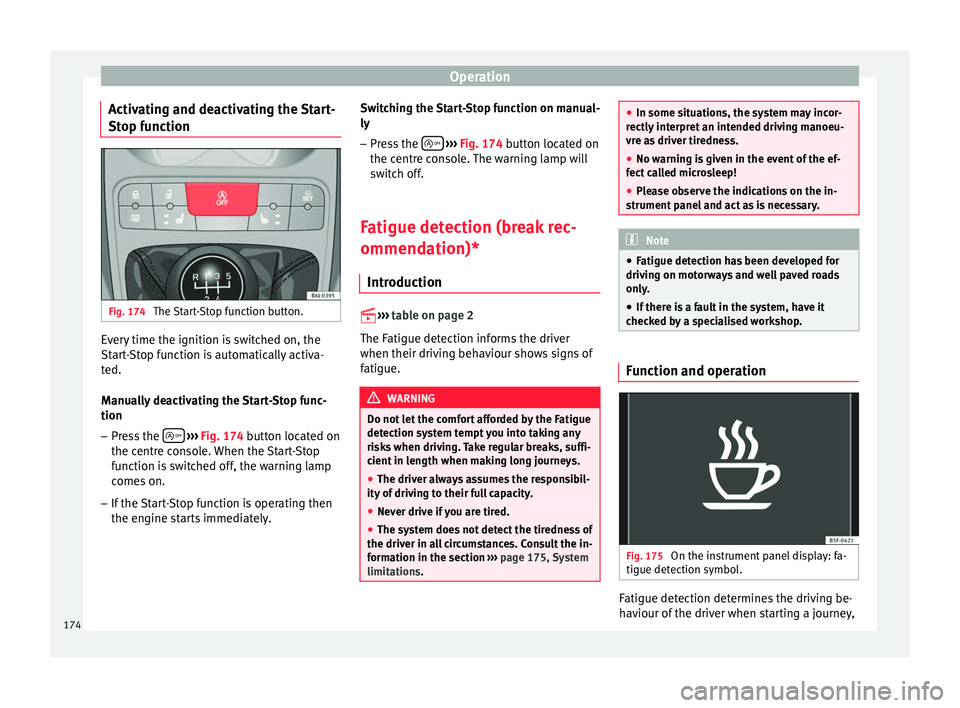
Activating and deactivating the Start-
St op f
unction Fig. 174
The Start-Stop function button. Every time the ignition is switched on, the
St
ar
t-
Stop function is automatically activa-
ted.
Manually deactivating the Start-Stop func-
tion
– Press the
› ›
› Fig. 174 b
utton located on
the centre console. When the Start-Stop
function is switched off, the warning lamp
comes on.
– If the Start-Stop function is operating then
the engine star
ts immediately. Switching the Start-Stop function on manual-
ly
– Press the
› ››
Fig. 174
butt
on located on
the centre console. The warning lamp will
switch off.
Fatigue detection (break rec-
ommendation)* Introduction
››› t
able on page 2
The Fatigue detection informs the driver
when their driving behaviour shows signs of
fatigue. WARNING
Do not let the comfort afforded by the Fatigue
detection sys t
em tempt you into taking any
risks when driving. Take regular breaks, suffi-
cient in length when making long journeys.
● The driver always assumes the responsibil-
ity of drivin
g to their full capacity.
● Never drive if you are tired.
● The system does not detect the tiredness of
the driver in all
circumstances. Consult the in-
formation in the section ››› page 175, System
limitations. ●
In some situation s, the sy
stem may incor-
rectly interpret an intended driving manoeu-
vre as driver tiredness.
● No warning is given in the event of the ef-
fect ca
lled microsleep!
● Please observe the indications on the in-
strument panel
and act as is necessary. Note
● Fatigue detection h a
s been developed for
driving on motorways and well paved roads
only.
● If there is a fault in the system, have it
checked b
y a specialised workshop. Function and operation
Fig. 175
On the instrument panel display: fa-
tigue det ection symbo
l. Fatigue detection determines the driving be-
h
av
iour of the driv
er when starting a journey,
174
Page 187 of 252
Driver assistance systems
The “SEAT Drive Profile” system modifies the
s u
spen
sion system's characteristics and
power steering behaviour.
you can choose between 2 different settings
with different characteristics.
CONVEN-
IENCEBalanced setting, suitable, e.g. for day-to-
day use.
SPORTThis gives the vehicle sporty characteristics
and is suitable for a sporty driving style. Settings can be changed when the vehicle is
station
ar
y or in movement. When a “SEAT
Drive Profile” setting is changed it is activa-
ted immediately.
Selecting the system setting
● If necessary, switch on the ignition.
● To select SPORT mode, press the
›››
Fig. 183 button u nti
l it lights up.
The CONVENIENCE mode is active when the button is not lit. The set mode remains
sel ect
ed af t
er the ignition is switched off.
CUPRA vehicle version
The modes of operation for the CUPRA are
Normal and Sport rather than Comfort and
Sport. The vehicle always starts up in Nor-
mal. The last selection does not remain once
the vehicle is turned off. WARNING
Adjusting the “SEAT Drive Profile” modifies
driving pr oper
ties. The “SEAT Drive Profile”
system should never encourage you to take
risks.
● Adapt your speed and driving style at all
times to s
uit visibility, weather, road and traf-
fic conditions. WARNING
If the warning lamps and the corresponding
mess ag
es are ignored when they light up, the
vehicle may stall in traffic and cause acci-
dents and severe injuries.
● Never ignore the warning lamps or messag-
es.
● Stop the v
ehicle at the next opportunity
and in a safe pl
ace. CAUTION
Failure to heed the control lamps and corre-
sponding t e
xt messages when they light up
may result in damage to the vehicle. Note
If the “SEAT Drive Profile” system presents a
fault, the
symbol appears on the instrument
panel, with the message Fault: Damping
setting . Indication on the display and warning
l
amp
There is a fault in the “SEAT Drive Pro-
file” suspension.
See a specialised workshop immediately and have the
“SEAT Drive Profile” suspension checked.
If the yellow warning lamp does not light up again after
the engine is restarted and the vehicle has travelled a
short distance, you do not need to take it to a special-
ised workshop. Some warning and control lamps will light up
briefly
when the ignition i
s sw
itched on to
check certain functions. They will switch off
after a few seconds. WARNING
If the warning lamps and the corresponding
mess ag
es are ignored when they light up, the
vehicle may stall in traffic and cause acci-
dents and severe injuries.
● Never ignore the warning lamps or messag-
es. WARNING
Changing the “SEAT Drive Profile” settings
while the v
ehicle is in motion can distract you
from the road and lead to accidents. » 185
Technical data
Advice
Operation
Emergencies
Safety
Page 204 of 252
Advice
are under constant development. SEAT pro-
v ide
s a c
onstant flow of information to Tech-
nical Services concerning modifications. For
this reason, we recommend you have service
fluids and consumables replaced by a Techni-
cal Service. Please observe the relevant in-
structions ››› page 190. The engine compart-
ment of the vehicle is a hazardous area ››› .
WARNING
All work on the engine or in the engine com-
partment, e. g. c
hecking and refilling fluids,
involves the danger of injury and burns, acci-
dents and even fire.
● Never open the bonnet if you see steam,
smoke or cool
ant escaping from the engine
compartment. Otherwise, there is a risk of
sustaining burns. Wait until no more steam or
coolant is emitted, then allow the engine to
cool before carefully opening the bonnet.
● Switch off the engine and remove the key
from the ignition.
● Apply
the handbrake and move the gear
lever to neutr
al or selector lever to position P.
● Keep children away from the vehicle.
● Never touch hot engine parts. There is a
risk of b
urns.
● Never spill liquids on a hot engine or on a
hot exhau
st gas system. This is a fire hazard.
● Avoid causing short-circuits in the electri-
cal sy
stem, particularly at the points where
the jump leads are attached ›››
page 52.
The battery could explode. ●
Never touc h the r
adiator fan. It is tempera-
ture controlled and could start automatically,
even when the engine has been switched off
and the key removed from the ignition!
● Never cover the engine with additional in-
sulatin
g materials such as a blanket. Risk of
fire!
● Do not unscrew the cap on the coolant ex-
pansion t
ank when the engine is hot. If the
coolant is hot, the cooling system will be
pressurised!
● Protect face, hands and arms by covering
the cap with a lar
ge, thick cloth to protect
against escaping coolant and steam.
● Always make sure you have not left any ob-
jects, suc
h as cleaning cloths or tools, in the
engine compartment.
● If you have to work underneath the vehicle,
you must
use suitable stands additionally to
support the vehicle, there is a risk of acci-
dent!. A hydraulic jack is insufficient for se-
curing the vehicle and there is a risk of injury.
● If any work has to be performed when the
engine is s
tarted or with the engine running,
there is an additional, potentially fatal, safety
risk from the rotating parts, such as the drive
belts, alternator, radiator fan, etc., and from
the high-voltage ignition system. You should
also observe the following:
– Never touch the electrical wiring of the
ignition system.
– Ensure that jewellery, loose clothing and
long hair do not get trapped in rotating
engine parts. Danger of death. Before starting any work remove jewellery, tie
back
and c
over hair, and wear tight-fit-
ting clothes.
– Never accelerate with a gear engaged
without taking the necessary precau-
tions. The vehicle could move, even if the
handbrake is applied. Danger of death.
● If work has to be carried out on the fuel
system or on el
ectrical components, you
must observe the following safety notes in
addition to the above warnings:
– Always disconnect the battery from the
on-board network. The vehicle must be
unlocked when this is done, otherwise
the alarm will be triggered.
– Do not smoke.
– Never work near naked flames.
– Always have a fire extinguisher on hand. WARNING
If the bonnet is not correctly closed, it could
sudden ly
open while driving leaving the driv-
er without visibility. This could result in a se-
rious accident.
● After closing the bonnet, always check that
it is pr
operly secured by the locking mecha-
nism in the lock carrier piece. The bonnet
must be flush with the surrounding body pan-
els.
● While driving, if you notice that the bonnet
is not c
orrectly closed then stop immediately
and close it correctly. 202
Page 208 of 252
Advice
If this warning symbol starts to flash, and is
ac c
omp anied b
y three audible warnings,
switch off the engine and check the oil level.
If necessary, add more oil ››› page 206.
If the warning lamp flashes although the oil
level is correct, stop driving. Do not even run
the engine at idle speed! Obtain technical as-
sistance.
Checking oil level
If the warning lamp is yellow the engine
oil level should be checked as soon as possi-
ble. Top up the oil at the next opportunity
››› page 206.
Oil level sensor faulty*
If the yellow warning lamp flashes, take
the vehicle to a specialised workshop to have
the oil level sensor checked. Until then it is
advisable to check the oil level every time
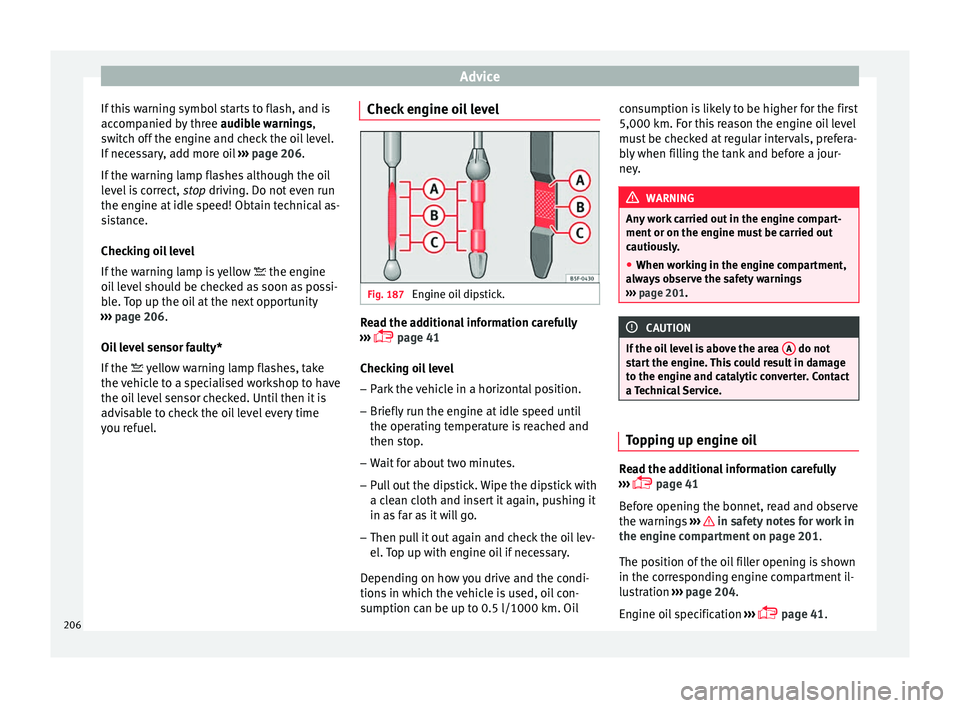
you refuel. Check engine oil level Fig. 187
Engine oil dipstick. Read the additional information carefully
› ›
›
p
age 41
Checking oil level
– Park the vehicle in a horizontal position.
– Briefly run the engine at idle speed until
the operating temper
ature is reached and
then stop.
– Wait for about two minutes.
– Pull out the dipstick. Wipe the dipstick with
a clean c
loth and insert it again, pushing it
in as far as it will go.
– Then pull it out again and check the oil lev-
el. Top up w
ith engine oil if necessary.
Depending on how you drive and the condi-
tions in which the vehicle is used, oil con-
sumption can be up to 0.5 l/1000 km. Oil consumption is likely to be higher for the first
5,000 km. For this r
eason the engine oil level
must be checked at regular intervals, prefera-
bly when filling the tank and before a jour-
ney. WARNING
Any work carried out in the engine compart-
ment or on the engine mu s
t be carried out
cautiously.
● When working in the engine compartment,
alway
s observe the safety warnings
››› page 201. CAUTION
If the oil level is above the area A do not
star t
the engine. This could result in damage
to the engine and catalytic converter. Contact
a Technical Service. Topping up engine oil
Read the additional information carefully
› ›
›
p
age 41
Before opening the bonnet, read and observe
the warnings ››› in safety notes for work in
the en gine c
ompar
tment on page 201.
The position of the oil filler opening is shown
in the corresponding engine compartment il-
lustration ›››
page 204.
Engine oil specification ›››
page 41.
206