wipers Seat Ibiza ST 2016 Owner's manual
[x] Cancel search | Manufacturer: SEAT, Model Year: 2016, Model line: Ibiza ST, Model: Seat Ibiza ST 2016Pages: 252, PDF Size: 5.56 MB
Page 25 of 252
The essentials
Interior lights Fig. 33
Detail of headliner: front interior light-
in g.KnobFunction
Switches interior lights off.
Switches interior lights on.
Switches door contact control on (central po-
sition).
The interior lights come on automatically
when the vehicle is unlocked, a door is
opened or the key is removed from the igni-
tion.
The lights go off a few seconds after all the
doors are closed, the vehicle is locked or the
ignition is switched on.
KnobFunction
Turning the reading light on and off
›››
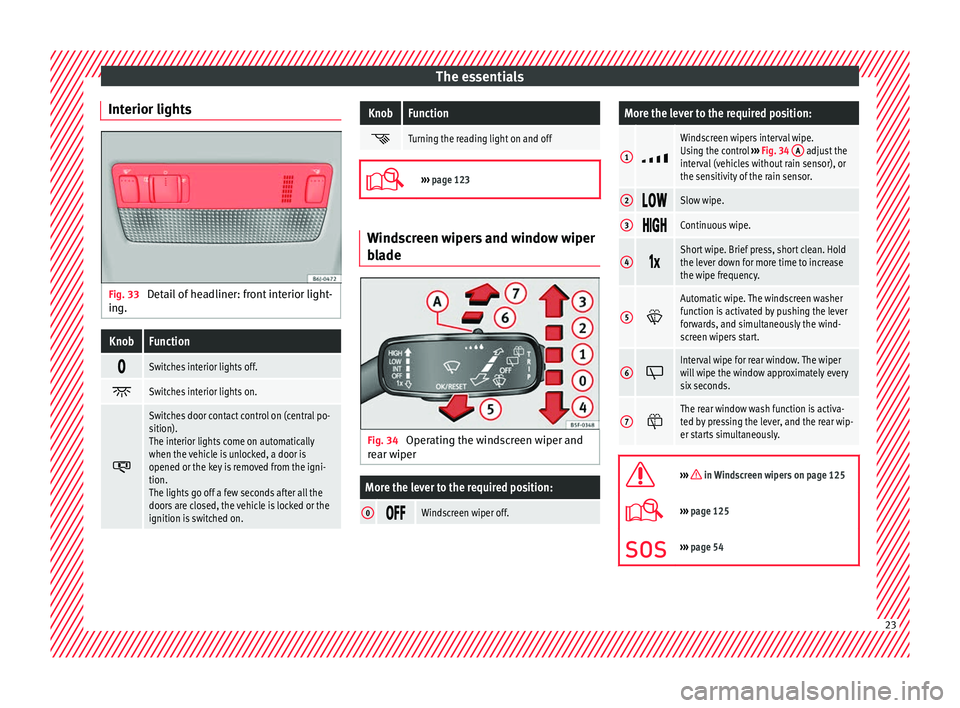
page 123 Windscreen wipers and window wiper
bla
de Fig. 34
Operating the windscreen wiper and
r e
ar w iper
More the lever to the required position:
0 Windscreen wiper off.
More the lever to the required position:
1
Windscreen wipers interval wipe.
Using the control
››› Fig. 34 A adjust the
interval (vehicles without rain sensor), or
the sensitivity of the rain sensor.
2 Slow wipe.
3
Continuous wipe.
4
Short wipe. Brief press, short clean. Hold
the lever down for more time to increase
the wipe frequency.
5
Automatic wipe. The windscreen washer
function is activated by pushing the lever
forwards, and simultaneously the wind-
screen wipers start.
6
Interval wipe for rear window. The wiper
will wipe the window approximately every
six seconds.
7
The rear window wash function is activa-
ted by pressing the lever, and the rear wip-
er starts simultaneously.
››› in Windscreen wipers on page 125
›››
page 125
››› page 54 23
Page 27 of 252
The essentialsMenuSubmenuPossible settingDescription
Driver assistanceFatigue detectionActivation/deactivation›››
page 174
Parking and ma-
noeuvringParkPilotAutomatically activate, front volume, front sound settings, rear volume, rear sound settings,
adjust volume››› page 175
Vehicle lights
Vehicle interior lightingInstrument and switch lighting, footrest lighting››› page 123
Coming home/Leaving home
functionStart time for “Coming home” function, start time for “Leaving home” function››› page 121
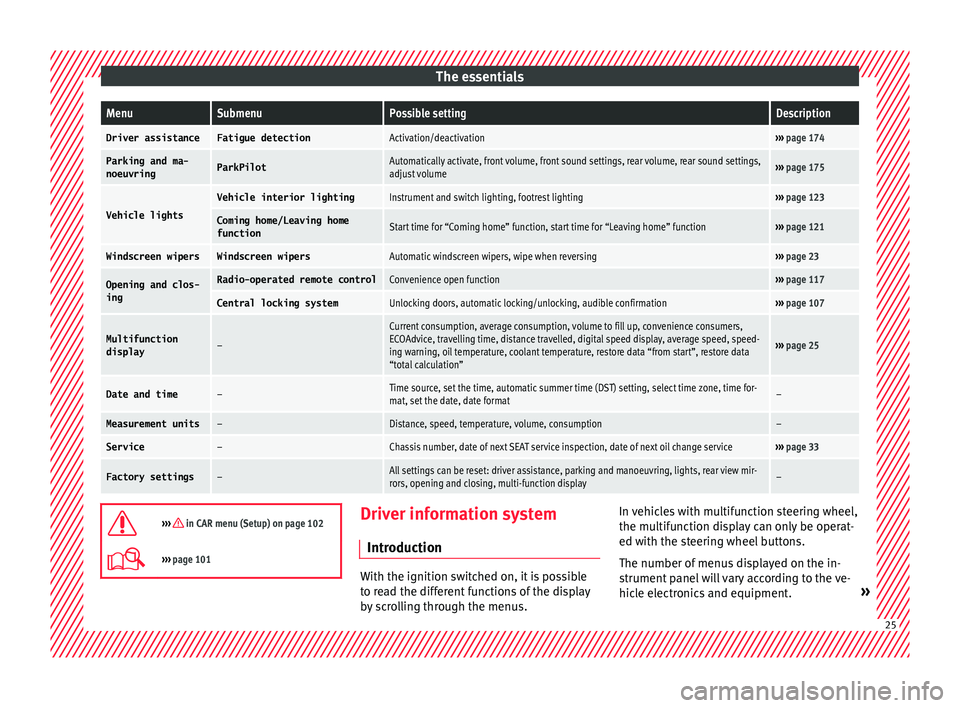
Windscreen wipersWindscreen wipersAutomatic windscreen wipers, wipe when reversing››› page 23
Opening and clos-
ingRadio-operated remote controlConvenience open function››› page 117
Central locking systemUnlocking doors, automatic locking/unlocking, audible confirmation››› page 107
Multifunction
display–
Current consumption, average consumption, volume to fill up, convenience consumers,
ECOAdvice, travelling time, distance travelled, digital speed display, average speed, speed-
ing warning, oil temperature, coolant temperature, restore data “from start”, restore data
“total calculation”
››› page 25
Date and time–Time source, set the time, automatic summer time (DST) setting, select time zone, time for-
mat, set the date, date format–
Measurement units–Distance, speed, temperature, volume, consumption–
Service–Chassis number, date of next SEAT service inspection, date of next oil change service››› page 33
Factory settings–All settings can be reset: driver assistance, parking and manoeuvring, lights, rear view mir-
rors, opening and closing, multi-function display–
››› in CAR menu (Setup) on page 102
›››
page 101 Driver information system
Intr oduction With the ignition switched on, it is possible
to re
a
d the different functions of the display
by scrolling through the menus. In vehicles with multifunction steering wheel,
the multifu
nction di
splay can only be operat-
ed with the steering wheel buttons.
The number of menus displayed on the in-
strument panel will vary according to the ve-
hicle electronics and equipment. » 25
Page 53 of 252
The essentials
Emergency towing of the vehi-
c l
e
T o
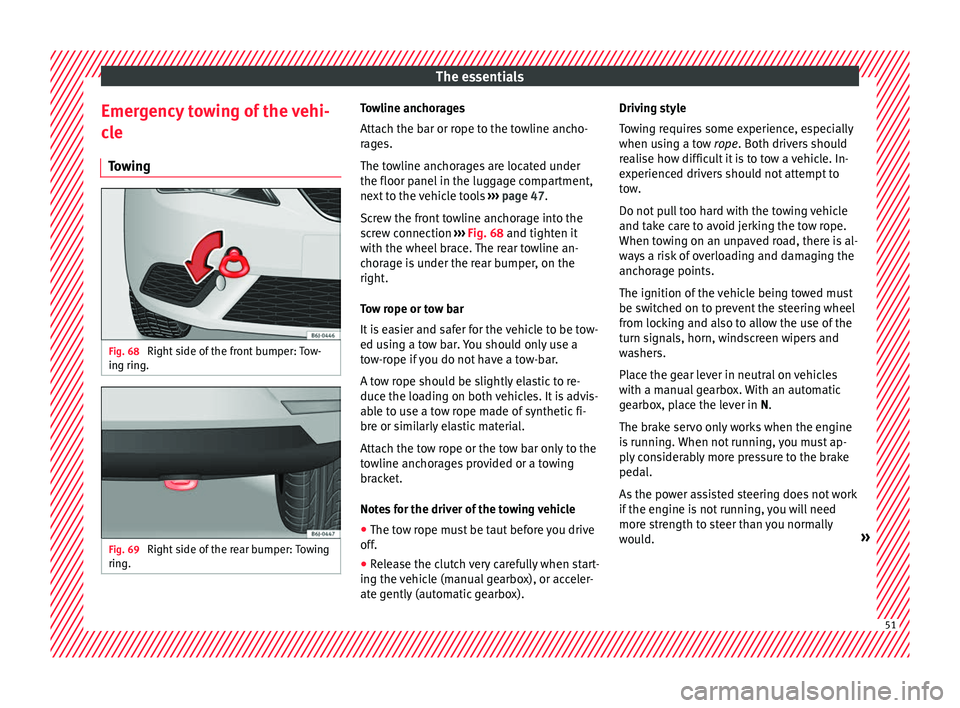
wing Fig. 68
Right side of the front bumper: Tow-
in g rin
g. Fig. 69
Right side of the rear bumper: Towing
rin g. Towline anchorages
Att
ac
h the b ar or r
ope to the towline ancho-
rages.
The towline anchorages are located under
the floor panel in the luggage compartment,
next to the vehicle tools ››› page 47.
Screw the front towline anchorage into the
screw connection ››› Fig. 68 and tighten it
with the wheel brace. The rear towline an-
chorage is under the rear bumper, on the
right.
Tow rope or tow bar
It is easier and safer for the vehicle to be tow-
ed using a tow bar. You should only use a
tow-rope if you do not have a tow-bar.
A tow rope should be slightly elastic to re-
duce the loading on both vehicles. It is advis-
able to use a tow rope made of synthetic fi-
bre or similarly elastic material.
Attach the tow rope or the tow bar only to the
towline anchorages provided or a towing
bracket.
Notes for the driver of the towing vehicle
● The tow rope must be taut before you drive
off.
● Rele
ase the clutch very carefully when start-
ing the vehic
le (manual gearbox), or acceler-
ate gently (automatic gearbox). Driving style
Towin
g requires some experience, especially
when using a tow rope. Both drivers should
realise how difficult it is to tow a vehicle. In-
experienced drivers should not attempt to
tow.
Do not pull too hard with the towing vehicle
and take care to avoid jerking the tow rope.
When towing on an unpaved road, there is al-
ways a risk of overloading and damaging the
anchorage points.
The ignition of the vehicle being towed must
be switched on to prevent the steering wheel
from locking and also to allow the use of the
turn signals, horn, windscreen wipers and
washers.
Place the gear lever in neutral on vehicles
with a manual gearbox. With an automatic
gearbox, place the lever in N.
The brake servo only works when the engine
is running. When not running, you must ap-
ply considerably more pressure to the brake
pedal.
As the power assisted steering does not work
if the engine is not running, you will need
more strength to steer than you normally
would. » 51
Page 56 of 252
The essentials
Note
The vehicles must not touch each other, oth-
erwi se el
ectricity could flow as soon as the
positive terminals are connected. Changing the windscreen wiper
bla
de
s
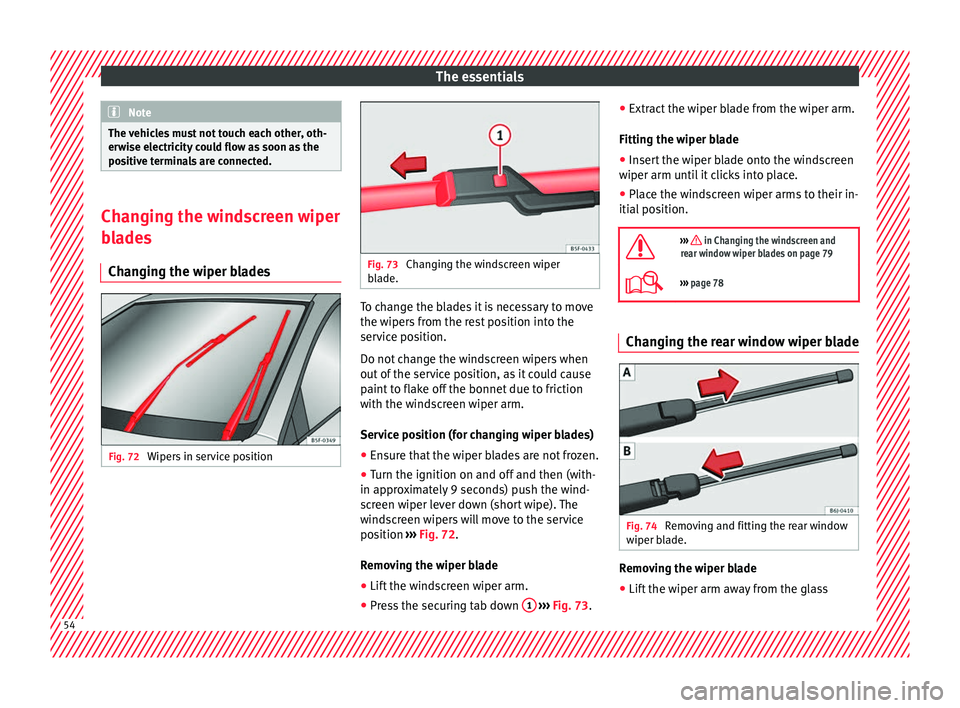
Changing the wiper blades Fig. 72
Wipers in service position Fig. 73
Changing the windscreen wiper
bla de. To change the blades it is necessary to move
the w
iper
s fr
om the rest position into the
service position.
Do not change the windscreen wipers when
out of the service position, as it could cause
paint to flake off the bonnet due to friction
with the windscreen wiper arm.
Service position (for changing wiper blades)
● Ensure that the wiper blades are not frozen.
● Turn the ignition on and off and then (with-
in approx
imately 9 seconds) push the wind-
screen wiper lever down (short wipe). The
windscreen wipers will move to the service
position ››› Fig. 72.
Removing the wiper blade
● Lift the windscreen wiper arm.
● Press the securing tab down 1
› ›
› Fig. 73 .●
Extr
act the wiper b
lade from the wiper arm.
Fitting the wiper blade ● Insert the wiper blade onto the windscreen
wiper arm until
it clicks into place.
● Place the windscreen wiper arms to their in-
itial pos
ition.
››› in Changing the windscreen and
rear window wiper blades on page 79
››› page 78 Changing the rear window wiper blade
Fig. 74
Removing and fitting the rear window
w iper b
la
de. Removing the wiper blade
● Lift the wiper arm away from the glass 54
Page 81 of 252
Self-help
Check the condition of the wiper blades regu-
l arly
. If
the wipers scrape across the glass ,
they should be changed if they are damaged,
or cleaned if they are dirty ››› .
If thi
s doe
s not produce the desired results,
the setting angle of the windscreen wiper
arms might be incorrect. They should be
checked by a specialised workshop and cor-
rected if necessary. WARNING
Do not drive unless you have good visibility
through al l
windows!
● Clean the windscreen wiper blades and all
windows
regularly.
● The wiper blades should be changed once
or twice a y
ear. CAUTION
● Damaged or dir ty
windscreen wipers could
scratch the glass.
● Never use fuel, nail varnish remover, paint
thinner or similar pr
oducts to clean the win-
dows. This could damage the windscreen
wiper blades.
● Never move any windscreen wiper by hand.
This cou
ld cause damage.
● To prevent damage to the bonnet and the
windsc
reen wiper arms, the latter should only
be lifted off the windscreen when in service
position. Note
● The winds c
reen wiper arms can be moved
to the service position only when the bonnet
is properly closed.
● You can also use the service position, for
exampl
e, if you want to fix a cover over the
windscreen in the winter to keep it clear of
ice. Towing or tow-starting
Notes Read the additional information carefully
› ›
›
p
age 51
Please observe the following points if you
use a tow rope:
Notes for the driver of the towing vehicle
– Move the vehicle slowly until the cable is
taut. Then ac
celerate gradually.
– Begin and change gears cautiously. If you
are driving an aut
omatic vehicle, accelerate
gently.
– Remember that the brake servo and power
steering ar
e not working in the vehicle you
are towing. Brake sooner than normal and
pressing the pedal gently. Notes for the driver of the towed vehicle
– Ensure that the tow rope remains taut at all
times when to
wing.
Towing vehicles with an automatic gearbox
● Put the selector lever into position “N”.
● Do not drive faster than 50 km/h (31 mph).
● Do not tow further than 50 km.
● If a breakdown vehicle is used, the vehicle
must be t
owed with the front wheels raised. WARNING
If the vehicle has no electrical power, the
brake light s, t
urn signals and all other lights
will no longer function. Do not have the vehi-
cle towed away. Failure to follow this instruc-
tion could result in an accident. WARNING
Vehicle handling and braking capacity
chan g
e considerably during towing. Please
observe the following instructions to mini-
mise the risk of serious accidents and injury:
● As the driver of the vehicle being towed:
– You should depr
ess the brake much hard-
er as the brake servo does not operate.
Pay the utmost attention to avoid crash-
ing into the towing vehicle.
– More strength is required at the steering
wheel as the power steering does not op-
erate when the engine is switched off. » 79
Technical data
Advice
Operation
Emergencies
Safety
Page 85 of 252
Fuses and bulbs
Fuse arrangement in engine compart-
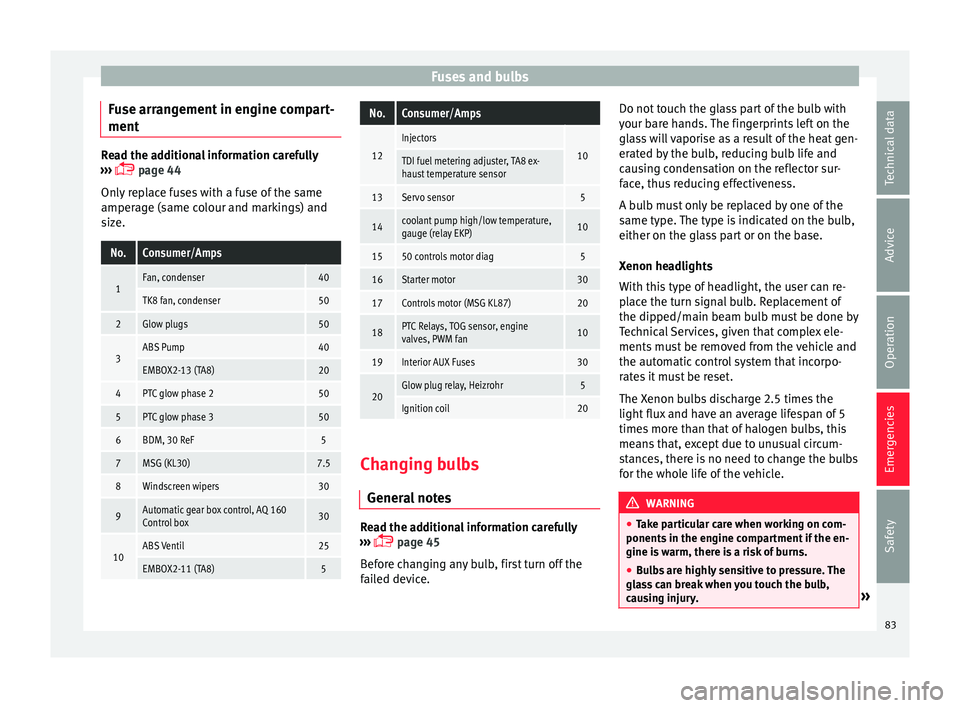
ment Read the additional information carefully
›››
p
age 44
Only replace fuses with a fuse of the same
amperage (same colour and markings) and
size.
No.Consumer/Amps
1Fan, condenser40
TK8 fan, condenser50
2Glow plugs50
3ABS Pump40
EMBOX2-13 (TA8)20
4PTC glow phase 250
5PTC glow phase 350
6BDM, 30 ReF5
7MSG (KL30)7.5
8Windscreen wipers30
9Automatic gear box control, AQ 160
Control box30
10ABS Ventil25
EMBOX2-11 (TA8)5
No.Consumer/Amps
12
Injectors
10TDI fuel metering adjuster, TA8 ex-
haust temperature sensor
13Servo sensor5
14coolant pump high/low temperature,
gauge (relay EKP)10
1550 controls motor diag5
16Starter motor30
17Controls motor (MSG KL87)20
18PTC Relays, TOG sensor, engine
valves, PWM fan10
19Interior AUX Fuses30
20Glow plug relay, Heizrohr5
Ignition coil20 Changing bulbs
Gener al
not
es Read the additional information carefully
› ›
›
p
age 45
Before changing any bulb, first turn off the
failed device. Do not touch the glass part of the bulb with
your bare h
ands. The fingerprints left on the
glass will vaporise as a result of the heat gen-
erated by the bulb, reducing bulb life and
causing condensation on the reflector sur-
face, thus reducing effectiveness.
A bulb must only be replaced by one of the
same type. The type is indicated on the bulb,
either on the glass part or on the base.
Xenon headlights
With this type of headlight, the user can re-
place the turn signal bulb. Replacement of
the dipped/main beam bulb must be done by
Technical Services, given that complex ele-
ments must be removed from the vehicle and
the automatic control system that incorpo-
rates it must be reset.
The Xenon bulbs discharge 2.5 times the
light flux and have an average lifespan of 5
times more than that of halogen bulbs, this
means that, except due to unusual circum-
stances, there is no need to change the bulbs
for the whole life of the vehicle. WARNING
● Take p ar
ticular care when working on com-
ponents in the engine compartment if the en-
gine is warm, there is a risk of burns.
● Bulbs are highly sensitive to pressure. The
glass
can break when you touch the bulb,
causing injury. » 83
Technical data
Advice
Operation
Emergencies
Safety
Page 97 of 252
Controls and displays
Operation
C ontr
ol
s and displays
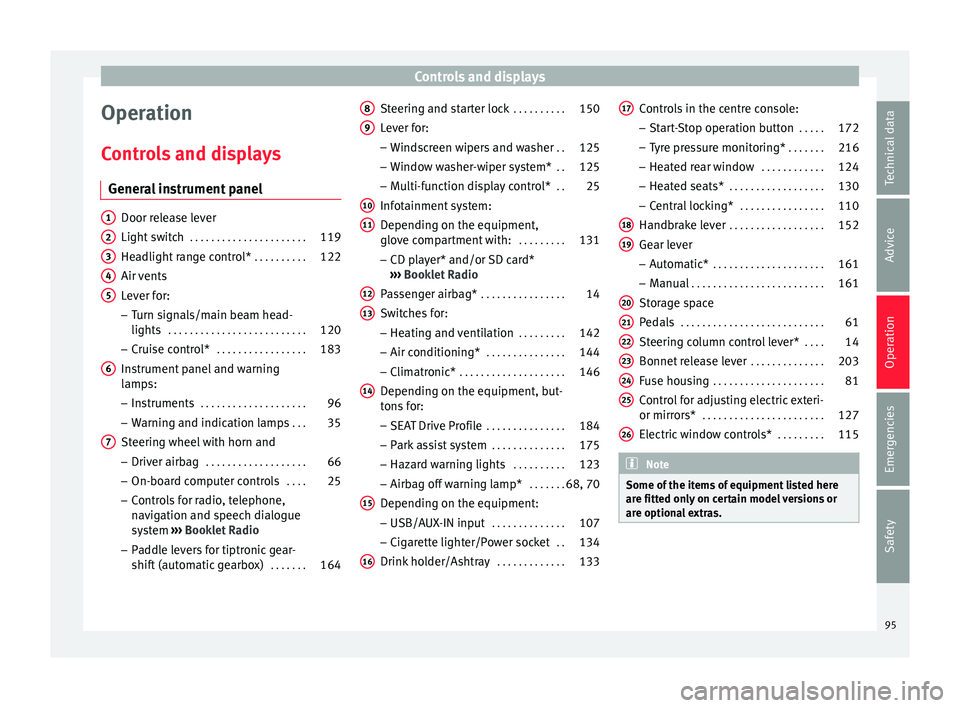
General instrument panel Door release lever
Light swit
c
h . . . . . . . . . . . . . . . . . . . . . . 119
Headlight range control* . . . . . . . . . .122
Air vents
Lever for:
– T
urn signals/main beam head-
lights . . . . . . . . . . . . . . . . . . . . . . . . . . 120
– Cruise c ontr
ol* . . . . . . . . . . . . . . . . . 183
Instrument panel and warning
lamps:
– Ins
truments . . . . . . . . . . . . . . . . . . . . 96
– Warning and indic ation l
amps . . . 35
Steering wheel with horn and – Driver airbag . . . . . . . . . . . . . . . . . . . 66
– On-board comp
uter controls . . . .25
– Control
s for radio, telephone,
navigation and speech dialogue
system ›››
Booklet Radio
– Paddle levers for tiptronic gear-
shift (automatic gearbox) . . . . . . .164
1 2
3
4
5
6
7 Steering and starter lock
. . . . . . . . . .150
Lever for: – Wind
sc
reen wipers and washer . .125
– Window wa
sher-wiper system* . .125
– Multi-fu
nction display control* . .25
Infotainment system:
Depending on the equipment,
glov
e compartment with: . . . . . . . . .131
– CD play
er* and/or SD card*
››› Booklet Radio
Passenger airbag* . . . . . . . . . . . . . . . . 14
Switches for:
– Heating and v
entilation . . . . . . . . . 142
– Air conditioning* . . . . . . . . . . . . . . . 144
– Clim
atronic* . . . . . . . . . . . . . . . . . . . . 146
D
epending on the equipment, but-
tons f
or:
– SEAT Drive Profile . . . . . . . . . . . . . . . 184
– Park a s
sist system . . . . . . . . . . . . . . 175
– Hazard warnin
g lights . . . . . . . . . . 123
– Airbag off warnin
g lamp* . . . . . . .68, 70
Depending on the equipment:
– USB/AUX-IN inp ut . . . . . . . . . . . . . . 107
– C
igar ett
e lighter/Power socket . .134
Drink holder/Ashtray . . . . . . . . . . . . .133
8 9
10
11
12
13
14
15
16 Controls in the centre console:
– St ar
t-
Stop operation button . . . . .172
– Tyre pr
essure monitoring* . . . . . . .216
– Heated re
ar window . . . . . . . . . . . . 124
– Heated seats* . . . . . . . . . . . . . . . . . . 130
– C
entral loc
king* . . . . . . . . . . . . . . . . 110
Handbrake lever . . . . . . . . . . . . . . . . . . 152
Gear lever – Automatic* . . . . . . . . . . . . . . . . . . . . . 161
– Manual . . . . . . . . . . . . . . . . . . . . . . . . . 161
St
orag
e space
Pedals . . . . . . . . . . . . . . . . . . . . . . . . . . . 61
St
eering column control lever* . . . .14
Bonnet release lever . . . . . . . . . . . . . .203
Fuse housing . . . . . . . . . . . . . . . . . . . . . 81
Control for adjusting electric exteri-
or mirrors* . . . . . . . . . . . . . . . . . . . . . . . 127
Electric
window controls* . . . . . . . . .115 Note
Some of the items of equipment listed here
are fitted on ly
on certain model versions or
are optional extras. 17
18
19
20
21
22
23
24
25
26
95
Technical data
Advice
Operation
Emergencies
Safety
Page 104 of 252
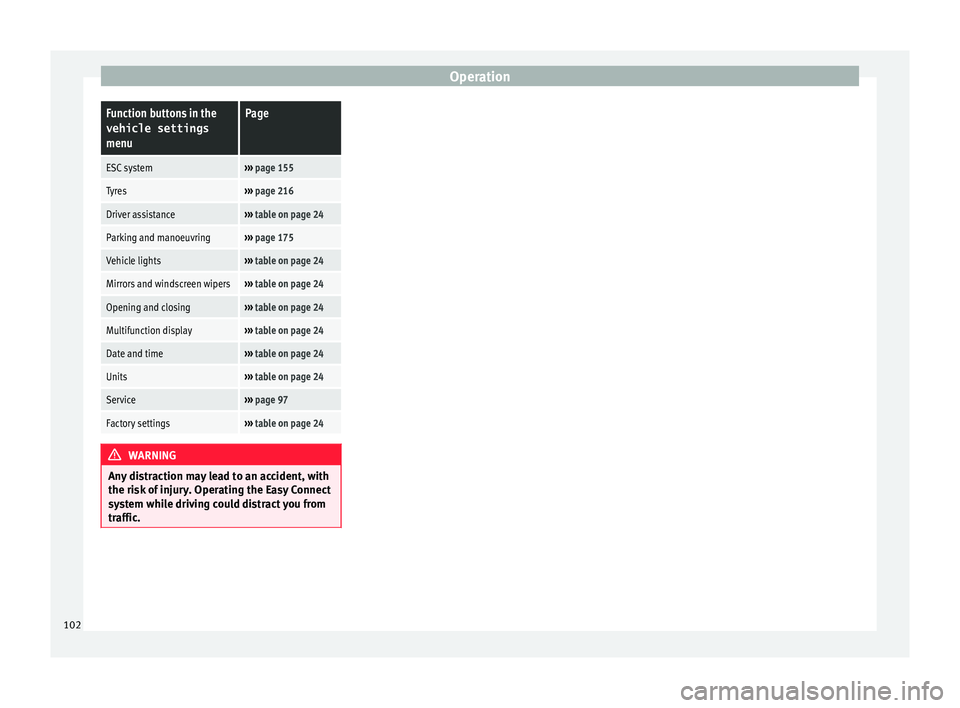
OperationFunction buttons in the
vehicle settings
menuPage
ESC system››› page 155
Tyres››› page 216
Driver assistance››› table on page 24
Parking and manoeuvring››› page 175
Vehicle lights››› table on page 24
Mirrors and windscreen wipers››› table on page 24
Opening and closing››› table on page 24
Multifunction display››› table on page 24
Date and time››› table on page 24
Units››› table on page 24
Service››› page 97
Factory settings››› table on page 24 WARNING
Any distraction may lead to an accident, with
the risk of injur
y. Operating the Easy Connect
system while driving could distract you from
traffic. 102
Page 121 of 252
Lights and visibility
Switching lights on and off Read the additional information carefully
›››
p
age 21
The legal requirements regarding the use of
vehicle lights in each country must be ob-
served.
The driver is personally responsible for the
correct use and adjustment of the lights in all
situations. WARNING
Never drive with just the side lights on, there
is a ri sk
of accident. The side lights are not
bright enough to illuminate the road ahead
and to ensure that other road users are able
to see you. Always use your dipped beam
headlights if it is dark or if visibility is poor. Note
● The dipped beam he a
dlights will only work
with the ignition on. The side lights come on
automatically when the ignition is turned off.
● If the lights are left on after the key has
been taken out of
the ignition lock, an audi-
ble warning sounds while the driver door re-
mains open. This is a reminder to switch the
lights off.
● The rear fog light is so bright that it can
dazzle driv
ers behind you. You should use
the rear fog light only when visibility is very
poor. ●
The use of the lightin g de
scribed here is
subject to the relevant statutory require-
ments. Automatic lighting*
Activation
– Rotate the switch to the po s
ition, this
indication will light up.
Deactivation
– Turn the light switch to .
Automatic lightin
g
If automatic headlight control is switched on,
dipped beam headlights are automatically
switched on by a photosensor if you drive in-
to a tunnel, for example. WARNING
● Even if the aut
omatic headlight control is
switched on, the dipped beam headlights will
not be switched on with fog. Therefore, the
dipped beam must be switched on manually. Note
● For those v
ehicles with the automatic head-
light system, when the key is removed from
the ignition, the audible warning will only
sound if the light knob is in position or . ●
If the da ylight
driving automatic light func-
tion is switched on, the front fog lights or
rear fog light cannot be switched on in addi-
tion.
● The use of the lighting described here is
subject
to the relevant statutory require-
ments.
● Do not put stickers on the windscreen in
front of the sen
sor. This may cause disrup-
tions or faults in the automatic lighting sys-
tem.
● The rain sensor switches on the dipped
beam headlight
s when the windscreen wipers
have been operating continuously for a few
seconds and it switches the lights off when
the continuous or interval wipe is switched
off for some minutes. Daytime running lights
››› t
able on page 2
The daytime running lights are enabled auto-
matically when the ignition is switched on.
Daytime running lights are signalling devices
for improving road safety. The lights are built
into the headlights and come on each time
the ignition is turned on if the light switch is
in position 0 or . It is automatically
switched off when the dipped beam lights
are turned on. »
119
Technical data
Advice
Operation
Emergencies
Safety
Page 127 of 252
Lights and visibility
Windscreen wiper and rear win-
do w w
iper sy s
tems
Control lamp*
It lights up
Windscreen wiper fluid level too low
This serves as a reminder to fill up the reser-
voir at the e
arlie
st opportunity ››› page 210.
Windscreen wipers Read the additional information carefully
› ›
›
p
age 23 WARNING
● Worn and dirty w
iper blades reduce visibili-
ty and safety levels while driving.
● In cold conditions you should not use the
wash/wipe sy
stem unless you have warmed
the windscreen with the heating and ventila-
tion system. The windscreen washer fluid
could otherwise freeze on the windscreen and
obscure your view of the road.
● Always note the corresponding warnings
››› p
age 54. WARNING
The rain sensor* may not detect enough rain
to swit c
h on the wipers.
● If necessary, switch on the wipers manually
when water on the wind
screen obstructs visi-
bility. CAUTION
In icy conditions, always check that the wiper
bla de
s are not frozen to the glass before us-
ing the wipers for the first time. If you switch
on the windscreen wipers when the wiper
blades are frozen to the windscreen, you
could damage both the wiper blades and the
wiper motor. Note
● The winds c
reen wipers will only work when
the ignition is switched on.
● The heat output of the heated jets* is con-
troll
ed automatically when the ignition is
switched on, depending upon the outside
temperature.
● In certain versions of vehicles with alarms,
the windsc
reen wiper will only work in inter-
val/rain sensor mode when the ignition is on
and the bonnet closed.
● When the interval wipe function is on, the
interva
ls are directly proportional to the
speed. This way, the higher the vehicle speed
the shorter the intervals. ●
If y ou s
top the vehicle with the windscreen
wiper in position 1 or 2, it will automatically
change to a lower position speed. The set
speed will be resumed when the vehicle pulls
away.
● The windscreen will be wiped again after
approx
imately five seconds once the “auto-
matic wash/wipe system” has been activa-
ted, provided the vehicle is moving (drip func-
tion). If you activate the wipers less than 3
seconds after the drip function, a new wash
sequence will begin without performing the
last wipe. For the “drip” function to work
again, you have to turn the ignition off and
then on again.
● Do not put stickers on the windscreen in
front of the
rain sensor*. This may cause sen-
sor disruption or faults. Rear window wiper
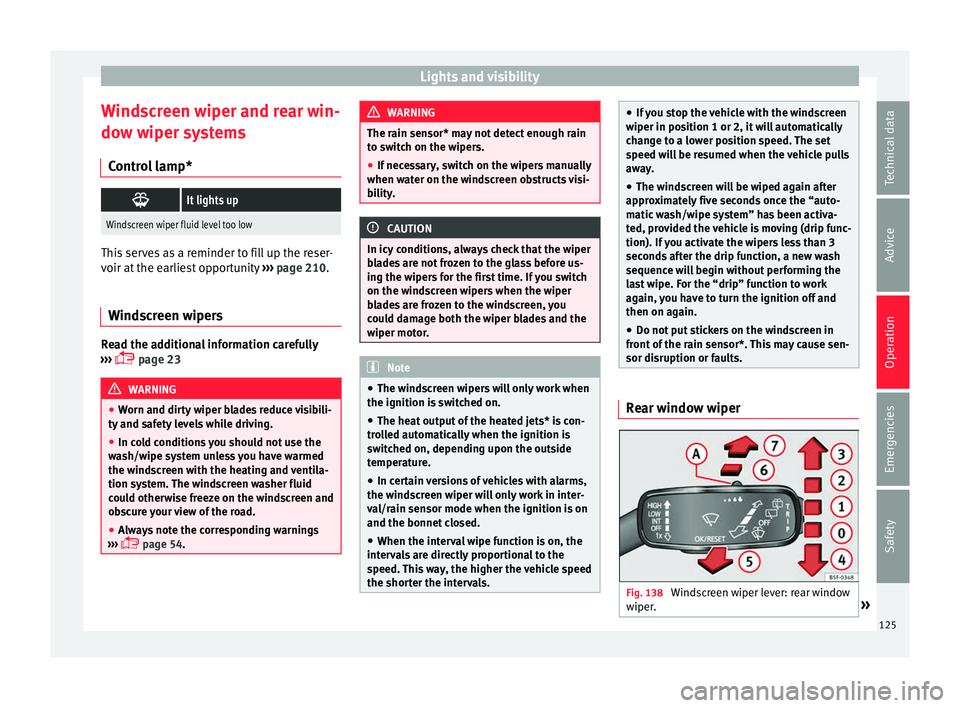
Fig. 138
Windscreen wiper lever: rear window
w iper
. » 125
Technical data
Advice
Operation
Emergencies
Safety