towing SEAT IBIZA ST 2017 User Guide
[x] Cancel search | Manufacturer: SEAT, Model Year: 2017, Model line: IBIZA ST, Model: SEAT IBIZA ST 2017Pages: 248, PDF Size: 5.24 MB
Page 154 of 248
Operation
Braking and stability systems El ectr
onic
Stability Control (ESC)*This Electronic Stability System reduces the
risk
of
skidding and improves the vehicle's
stability and ability to hold the road.
The Electronic Stability Control (ESC) contains
the electronic differential lock (EDL) and the
traction control system (ASR). The ESC works
together with the ABS. Both control lamps
will light up if the ESC or ABS systems are
faulty.
The ESC system is started automatically
when the engine is started.
The ESC system is always active and cannot
be switched off. With the Easy Connect sys-
tem it is only possible to deactivate the ASR
or else select Sport mode.
The ASR can be deactivated when wheel spin
is desirable ›››
page 153.
For example:
● When driving with snow chains.
● When driving in deep snow or on loose sur-
fac e
s.
● When the vehicle is stuck, to rock it back-
ward
s and forwards.
Press the button to switch the ASR back on
when you no longer need wheel spin. Electronic Stability Control (ESC)*
The ESC r
educes the risk of skidding by brak-
ing the wheels individually.
The system uses the steering wheel angle
and road speed to calculate the changes of
direction desired by the driver, and constant-
ly compares them with the actual behaviour
of the vehicle. When irregularities occur, for
example, if the vehicle begins to skid, the
ESC brakes the appropriate wheel automati-
cally.
The forces acting on the braked wheel bring
the vehicle back to a stable condition. If the
vehicle tends to oversteer (the rear end
slides out), the system will act on the front
wheel on the outside of the turn.
Control lamp
There are two control lamps for the electronic
stability control. The lamp provides infor-
mation concerning function and disconnec-
tion status.
Both control lamps light up together when
the ignition is switched on and should turn
off after approximately 2 seconds. This is the
time taken for the function check.
This programme includes the ABS, EDL and
ASR. It also includes emergency braking as-
sistance (BAS). The control lamp
has the following func-
tions:
● It flashes whilst driving when the ASR/ESC
is activ
ated.
● It will light up if there is a fault in the ESC.
● As the ESC operates in conjunction with the
ABS, the ESC light
will also come on if a fault
should occur in the ABS.
If the ESC control lamp lights up and stays
on after the engine is started, this may mean
that the control system has temporarily
switched off the ESC. In this case the ESC can
be reactivated by switching the ignition off
and then on again. If the control lamp goes
out, this means the system is fully functional.
The lamp provides information about the
disconnection status of the system:
● It stays lit when the ASR is disconnected on
pres
sing the switch or if we select ESC
Sport mode, only by means of Easy Connect. WARNING
● Do not f or
get that the electronic stability
control ESC cannot defy the laws of physics.
This should be kept in mind, particularly on
slippery and wet roads and when towing a
trailer.
● Always adapt your driving style to suit the
condition of the r
oads and the traffic situa-
tion. The greater safety provided by the ESC
should not encourage you to run any risks. 152
Page 155 of 248
Driving
CAUTION
● To en s
ure that the ESC works correctly, all
four wheels must be fitted with the same
tyres. Any differences in the rolling radius of
the tyres can cause the system to reduce en-
gine power when this is not desired.
● Any modifications made to the vehicle (for
examp
le, to the engine, brake system, run-
ning gear or to the combination of wheels
and tyres) may affect the operation of the
ABS, EDL, ESC and ASR. Traction control system (ASR)*
The traction control system prevents the driv-
en wheel
s
fr
om spinning when the vehicle is
accelerating. This system always includes
ABS.
Description and operation of the traction
control system during acceleration (ASR)
On front-wheel drive vehicles, the ASR sys-
tem intervenes, reducing engine power and
preventing the driven wheels from slipping
during acceleration. The system works in the
entire speed range in conjunction with ABS.
If a failure occurs in the ABS, the ASR will al-
so stop working.
TCS helps the car to start moving, accelerate
and climb a gradient in slippery conditions
where this may otherwise be difficult or even
impossible. The ASR automatically switches on when the
engine is
started. If necessary, it could be
connected or disconnected by means of the
Easy Connect system.
When the ASR is off, the warning lamp lights
up . The ASR should normally be left on.
Only in exceptional circumstances, when
wheel spin is required, can they be turned off
using the ESC button, for example:
● With compact temporary spare wheel.
● When using the snow chains.
● When driving in deep snow or on soft ter-
rain.
● When the v
ehicle is bogged-down, to free it
“by r
ocking it.”
The ASR should be switched on again as
soon as possible.
Control lamp
There are two control lamps for the traction
control system: and . Both control lamps
light up together when the ignition is switch-
ed on and should turn off after approximately
2 seconds. This is the time taken for the func-
tion check.
The lamp has the following function:
● It flashes when the ASR is working if the ve-
hicle i
s moving. If the system is deactivated or if it has any
fault, the w
arning lamp will remain lit. The
warning lamp will also light up if a fault
should occur in the ABS because the ASR op-
erates in conjunction with the ABS. For fur-
ther information, see ››› page 153.
The lamp provides information about the
disconnection status of the system:
● It stays lit when the ASR is disconnected
via E
asy Connect.
By means of Easy Connect, the ASR function
is reactivated and the warning lamp switched
off. WARNING
● Remember th at
not even the ASR can defy
the laws of physics. This should be kept in
mind, particularly on slippery and wet roads
and when towing a trailer.
● Always adapt your driving style to suit the
condition of the r
oads and the traffic situa-
tion. The greater safety provided by the ASR
should not encourage you to run any risks. CAUTION
● To en s
ure that the ASR works correctly,
identical tyres should be fitted on all four
wheels. Any differences in the rolling radius
of the tyres can cause the system to reduce
engine power when this is not desired. » 153
Technical data
Advice
Operation
Emergencies
Safety
Page 160 of 248
Operation
Manual gearbox Driv in
g w
ith manual gearboxRead the additional information carefully
›› ›
page 37
Certain versions of the model may include a
6-speed manual gearbox, and its diagram is
shown on the gearbox lever.
The reverse gear can only be engaged when
the car is stationary. When the engine is run-
ning and before engaging this gear, wait
about 6 seconds with the clutch pressed
down thoroughly in order to protect the gear-
box.
The reverse lights switch on when the reverse
gear is selected and the ignition is on. WARNING
● When the engine i s
running, the vehicle
will start to move as soon as a gear is engag-
ed and the clutch released.
● Never select the reverse gear when the ve-
hicle i
s in motion. Risk of accident. Note
● Do not r e
st your hand on the gear lever
while driving. The pressure of your hand
could cause premature wear on the selector
forks in the gearbox. ●
When ch an
ging gear, you should always
depress the clutch fully to avoid unnecessary
wear and damage.
● Do not “slip” the clutch to hold the vehicle
on a hill
. This causes premature wear and
damage to the clutch.
● Do not leave your foot on the clutch pedal;
although the pre
ssure may seem insignifi-
cant, it can cause the premature wear of the
clutch plate. Use the foot rest when you do
not need to change gear. Gear-change indicator
3 V
alid for vehicles: with a manual gearbox
The r
ecommended gear for saving fuel is in-
dicated on the dash screen of certain vehi-
cles during driving.
DisplayMeaning
The optimal gear is selected.
Changing to a higher gear is recommended.
Changing to a lower gear is recommended.
Information regarding the “cleanliness” of
the die
sel
p
articulate filter
The exhaust system manager detects that the
diesel particulate filter is nearly saturated
and contributes to self-cleaning by recom-
mending the optimal gear. For this purpose, it might be necessary to drive momentarily
with a high rpm
››
› page 167. WARNING
The gear change indicator is only an auxiliary
fu nction and in no c
ase should be a substi-
tute for careful driving.
● The responsibility of choosing the correct
gear dependin
g on the situation (e.g. over-
taking, driving up or down a slope or towing a
trailer) lies with the driver. For the sake of the environment
Selecting the correct gear can help to save
fuel . Note
The recommended gear display is switched
off when the c lut
ch pedal is pressed. Automatic gearbox*
Driv ing pr
ogrammes Read the additional information carefully
› ›
›
page 38
The automatic gearbox has got two gearbox
programmes.
158
Page 176 of 248
Operation
it directly only very briefly and always from a
dis
t
ance of more than 10 cm.
● Retrofitting of accessories to the vehicle,
such a
s a bicycle rack, may interfere with the
operation of the Parking Aid.
● In order to familiarise yourself with the sys-
tem, it i
s advised that you practice parking in
an area or car park that is free from traffic.
There must be good weather and light condi-
tions.
● The volume and tone of the warnings can
be modified, in addition t
o the indications
››› page 177.
● In vehicles without a driv
er information
system, these parameters can be modified in
a SEAT Official Service or in a specialised
workshop.
● Please observe information on towing a
trail
er ››› page 177.
● The display on the Easy Connect screen
shows
a slight time delay. Rear parking aid*
The rear Parking Aid assists the driver in
p
ark
in
g by means of audible warning
sounds.
Description
There are sensors integrated in the rear
bumper. When the sensors detect an obsta-
cle, you are alerted by audible warnings. Make particularly sure that the sensors are
not co
vered by adhesives, residues and the
like, as this could affect the system's opera-
tion. Cleaning instructions ››› page 191.
The approximate measurement range of the
rear sensors is:
side area0.60 m
central area1.60 m As you approach the obstacle, the time inter-
val
betw
een the audible warnings will be re-
duced. When you reach around 0.30 m the
warning will be constant: Do not continue to
move forward (or backward) ››› in General
inf orm
ation on p
age 173, ››› in General in-
f orm
ation on p
age 173 !
If you maintain separation from the obstacle,
the volume of the warning begins to reduce
after four seconds (does not affect the tone
of the constant warning).
Activating/Deactivating
When engaging reverse gear, the parking aid
is automatically switched on. This is con-
firmed with a short warning.
On disengaging reverse gear, the Parking Aid
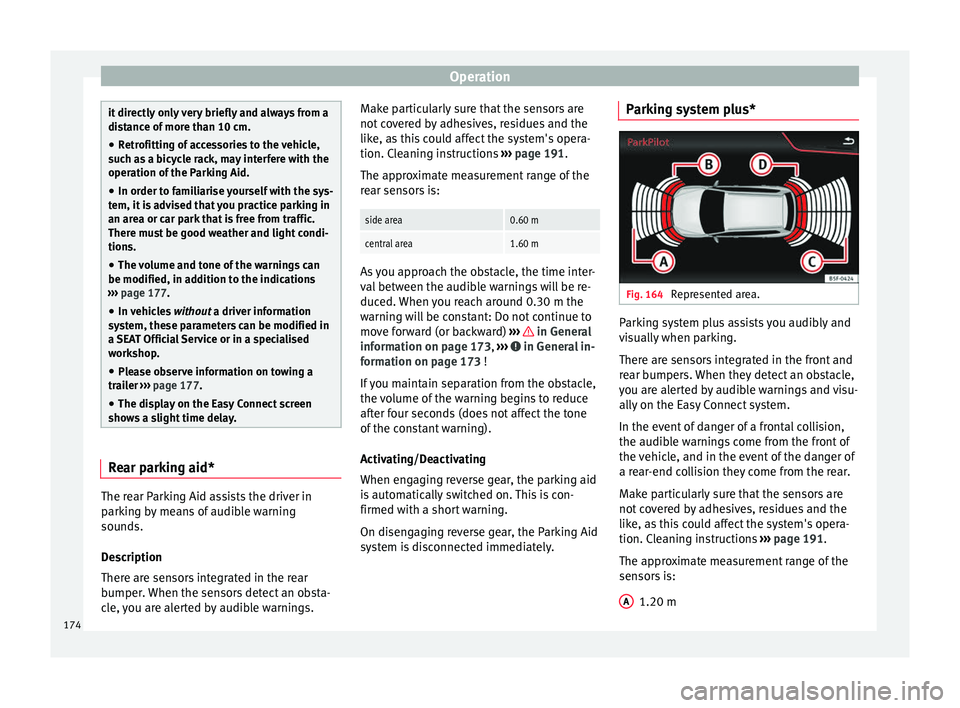
system is disconnected immediately. Parking system plus*
Fig. 164
Represented area. Parking system plus assists you audibly and
v
i
s
ually when parking.
There are sensors integrated in the front and
rear bumpers. When they detect an obstacle,
you are alerted by audible warnings and visu-
ally on the Easy Connect system.
In the event of danger of a frontal collision,
the audible warnings come from the front of
the vehicle, and in the event of the danger of
a rear-end collision they come from the rear.
Make particularly sure that the sensors are
not covered by adhesives, residues and the
like, as this could affect the system's opera-
tion. Cleaning instructions ››› page 191.
The approximate measurement range of the
sensors is:
1.20 m
A 174
Page 179 of 248
Driver assistance systems
Adjusting the display and audible
w arnin
g
s The settings for the display and audible
warnin
g
s are controlled via the Easy Con-
nect*.
Automatic activation
on – activates the Automatic activa-
tion option ››› page 175.
off – deactivates the Automatic ac-
tivation option ››› page 175.
Front volume*
Volume in the front and rear area.
Front sound settings/sharpness*
Frequency (tone) of the sound in the front
area.
Rear volume*
Volume in the rear area.
Rear sound settings/sharpness*
Frequency (tone) of the sound in the rear
area.
Adjust volume
With the parking aid switched on, the active
audio/video source volume will be reduced
to the intensity of the selected setting. Error messages When the Parking Aid is activated or when it
is
sw
itched on, if a message reporting a Park-
ing aid error is displayed on the instrument
panel, there is a fault in the system.
If the fault doesn't disappear before discon-
necting the ignition, next time that parking
aid is engaged in reverse, it will not be indi-
cated.
Parking System Plus*
If there is a fault in the parking aid system a
message will appear on the instrument panel
indicating the error. In addition the key
LED will blink.
If there is a fault in a sensor, the symbol is
displayed on the Easy Connect display in
front of/behind the vehicle. If a rear sensor is
faulty, only the obstacles in the areas A and
B are displayed
››
›
Fig. 164. If a front sensor
is faulty, only the obstacles in the areas C and
D are displayed.
Hav e the f
au
lt corrected by a specialised
workshop without delay.
Towing bracket In vehicles equipped with a towing bracket
dev
ic
e fr
om the factory, when the trailer is
connected electrically, the Parking Aid rear sensors will not be activated when reverse
gear i
s engaged, when the selector lever is
turned to position R or when the button is
pressed.
Parking System Plus
The distance to possible obstacles at the rear
of the vehicle will not be displayed on the
screen and nor will it be indicated by means
of audible sound signals.
The Easy Connect system screen will only dis-
play objects detected at the front, and the ve-
hicle's trajectory will be hidden.
Rear Assist “Rear View Cam-
era”*
Operatin
g and safety warnings WARNING
● The Re ar As
sist does not make it possible
to precisely calculate the distance from ob-
stacles (people, vehicles, etc.) and nor can it
overcome the system's own limits, hence us-
ing it may cause serious accidents and inju-
ries if used negligently or without due care.
The driver should be aware of his/her sur-
roundings at all times to ensure safe driving.
● The camera lens expands and distorts the
field of
vision and displays the objects on the » 177
Technical data
Advice
Operation
Emergencies
Safety
Page 185 of 248
Towing bracket device and trailer
●
Stop the v
ehicle at the next opportunity
and in a safe place. CAUTION
Failure to heed the control lamps and corre-
s pondin g t
ext messages when they light up
may result in damage to the vehicle. Note
If the “SEAT Drive Profile” system presents a
fau lt, the
symbol appears on the instrument
panel, with the message Fault: Damping
setting . Indication on the display and warning
l
amp
There is a fault in the “SEAT Drive Pro-
file” suspension.
See a specialised workshop immediately and have the
“SEAT Drive Profile” suspension checked.
If the yellow warning lamp does not light up again after
the engine is restarted and the vehicle has travelled a
short distance, you do not need to take it to a special-
ised workshop. Some warning and control lamps will light up
briefly
when the ignition i
s
switched on to
check certain functions. They will switch off
after a few seconds. WARNING
If the warning lamps and the corresponding
mes s
ages are ignored when they light up, the
vehicle may stall in traffic and cause acci-
dents and severe injuries.
● Never ignore the warning lamps or messag-
es. WARNING
Changing the “SEAT Drive Profile” settings
whil e the
vehicle is in motion can distract you
from the road and lead to accidents. CAUTION
Failure to heed the control lamps when they
light up and the c orr
esponding messages
may result in damage to the vehicle. Note
If the “SEAT Drive Profile” system does not
work a
s described in this chapter, have it
checked immediately by a specialised work-
shop. Towing bracket device and
tr
ai
l
er
Trailer mode What do you need to bear in mind
when towing a trailer? Your vehicle may be used to tow a trailer
when fitted w
ith the c
orrect equipment.
If the car is supplied with a factory-fitted tow-
ing bracket it will already have the necessary
technical modifications and meet the statuto-
ry requirements for towing a trailer. If you
wish to retrofit a towing bracket, consult
››› page 185.
Connectors
Your vehicle is fitted with a 12-pin connector
for the electrical connection between the
trailer and the vehicle.
If the trailer has a 7-pin plug you will need to
use an adapter cable. It is available at any
Technical Service.
Trailer weight/drawbar load
Never exceed the authorised trailer weight. If
you do not load the trailer up to the maxi-
mum permitted trailer weight, you can then
climb correspondingly steeper slopes. »
183
Technical data
Advice
Operation
Emergencies
Safety
Page 186 of 248
Operation
The maximum trailer weights listed are only
ap p
lic
able for altitudes up to 1000 m above
sea level. With increasing altitude the engine
power and therefore the vehicle climbing
ability are impaired because of the reduced
air density. The maximum trailer weight has
to be reduced accordingly. The weight of the
vehicle and trailer combination must be re-
duced by 10% for every further 1000 m (or
part thereof). The gross combination weight
is the actual weight of the laden vehicle plus
the actual weight of the laden trailer. When
possible, operate the trailer with the maxi-
mum permitted drawbar load on the ball joint
of the towing bracket, but do not exceed the
specified limit.
The figures for trailer weights and drawbar
loads that are given on the data plate of the
towing bracket are for certification purposes
only. The correct figures for your specific
model, which may be lower than these fig-
ures for the towing bracket, are given in the
vehicle documentation or in ››› chapter Tech-
nical Data .
Distributing the load
Distribute loads in the trailer so that heavy
objects are as near to the axle as possible.
Loads carried in the trailer must be secured
to prevent them moving. Tyre pressure
Set tyr
e pressure to the maximum permissi-
ble pressure shown on the sticker on the in-
side of the fuel tank flap. Set the tyre pres-
sure of the trailer tyres in accordance with the
trailer manufacturer's recommendations.
Exterior mirrors
Check whether you can see enough of the
road behind the trailer with the standard rear
vision mirrors. If this is not the case, you
should have additional exterior mirrors fitted.
Both exterior mirrors should be mounted on
hinged extension brackets. Adjust the mirrors
to give sufficient vision to the rear. WARNING
Never transport people in a trailer. This could
re s
ult in fatal accidents. Note
● To w
ing a trailer places additional demands
on the vehicle. We recommend additional
services between the normal inspection inter-
vals if the vehicle is used frequently for tow-
ing a trailer.
● Find out whether special regulations apply
to to
wing a trailer in your country. Ball coupling of towing bracket*
The ball coupling is provided with instruc-
tions
on fittin
g and removing the ball cou-
pling of the towing bracket. WARNING
The towing bracket ball coupling must be
st or
ed securely in the luggage compartment
to prevent them being flung through the vehi-
cle and causing injury. Note
● By l
aw, the ball coupling must be removed
if a trailer is not being towed if it obscures
the number plate. Driving tips
Driving with a trailer always requires extra
c
ar
e.
W
eight distribution
The weight distribution of a loaded trailer
with an unladen vehicle is very unfavourable.
However, if this cannot be avoided, drive ex-
tra slowly to allow for the unbalanced weight
distribution.
184
Page 187 of 248
Towing bracket device and trailer
Speed
The s t
ab
ility of the vehicle and trailer is re-
duced with increasing speed. For this reason,
it is advisable not to drive at the maximum
permissible speed in an unfavourable road,
weather or wind conditions. This applies es-
pecially when driving downhill.
You should always reduce speed immediately
if the trailer shows the slightest sign of snak-
ing. Never try to stop the “snaking” by in-
creasing speed.
Always brake in due course. If the trailer has
an overrun brake, apply the brakes gently at
first and then, firmly. This will prevent the
jerking that can be caused by locking of trail-
er wheels. Select a low gear in due course
before going down a steep downhill. This en-
ables you to use the engine braking to slow
down the vehicle.
Reheating
At very high temperatures and during pro-
longed slopes, driving with a low gear and
high engine speed; always monitor whether
the excessive coolant temperature gauge is
activated ››› page 204. Retrofitting a towing bracket*
Fig. 172
IBIZA/IBIZA SC: attachment points
f or t
o
wing bracket. If a towing bracket is to be fitted after the ve-
hic
l
e i
s purchased, this must be completed
according to the instructions of the towing
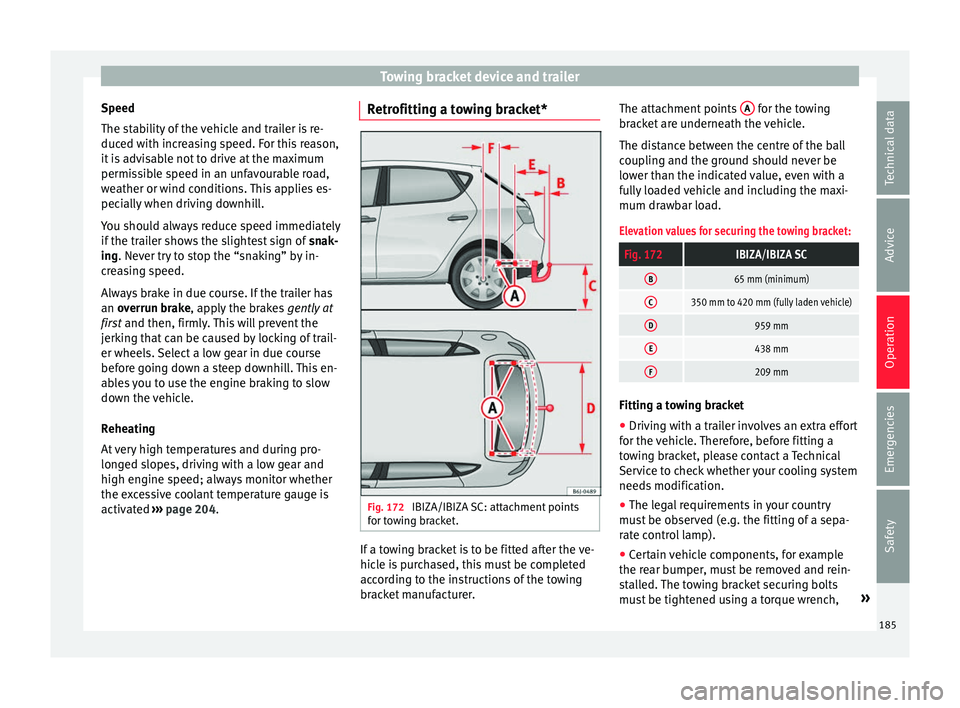
bracket manufacturer. The attachment points
A for the towing
br ac
k
et are underneath the vehicle.
The distance between the centre of the ball
coupling and the ground should never be
lower than the indicated value, even with a
fully loaded vehicle and including the maxi-
mum drawbar load.
Elevation values for securing the towing bracket:
Fig. 172IBIZA/IBIZA SC
B65 mm (minimum)
C350 mm to 420 mm (fully laden vehicle)
D959 mm
E438 mm
F209 mm Fitting a towing bracket
●
Driving with a trailer involves an extra effort
f or the
v
ehicle. Therefore, before fitting a
towing bracket, please contact a Technical
Service to check whether your cooling system
needs modification.
● The legal requirements in your country
must
be observed (e.g. the fitting of a sepa-
rate control lamp).
● Certain vehicle components, for example
the rear b
umper, must be removed and rein-
stalled. The towing bracket securing bolts
must be tightened using a torque wrench, »
185
Technical data
Advice
Operation
Emergencies
Safety
Page 188 of 248
Operation
and a power socket must be connected to the
v ehic
l
e electrical system. This requires speci-
alised knowledge and tools.
● Figures in the illustration show the eleva-
tion value and the att
achment points which
must be considered if you are retrofitting a
towing bracket. WARNING
The towing brackets should be fitted at a spe-
ci a
lised workshop.
● If the towing bracket is incorrectly instal-
led, there i
s a serious danger of accident.
● For your own safety, please observe the tow
brack
et manufacturer's instructions. CAUTION
● If the po w
er socket is incorrectly installed,
this could cause damage to the vehicle elec-
trical system. Note
● SEA T r
ecommends that the towing hooks
be fitted at a specialised workshop. In certain
versions this may entail fitting a heat insulat-
ing plate, which is why it is recommended
that you go to a SEAT Dealer. In the event that
the plate is not installed correctly, SEAT is ex-
empt from any liability.
● Due to the specific design of the exhaust,
the fitting of a c
onventional towing hook is not recommended for some sportier versions.
Ple
a
se consult your Technical Service.186
Page 220 of 248
Technical data
Drawbar loads
The maximum permitt ed dr
a
wbar load on the
ball joint of the towing bracket must not ex-
ceed 75 kg.
In the interest of road safety, we recommend
that you always tow approaching the maxi-
mum drawbar load. The response of the trail-
er on the road will be poor, if the drawbar
load is too small.
If the maximum permissible drawbar load
cannot be met (e.g. with small, empty and
light-weight single axle trailers or tandem
axle trailers with a wheelbase of less than 1
metre), a minimum of 4% of the actual trailer
weight is legally required for the drawbar
load. WARNING
● For s af
ety reasons, you should not drive at
speeds above 80 km/h (50 mph) when towing
a trailer. This also applies in countries where
higher speeds are permitted.
● Never exceed the maximum trailer weights
or the drawb
ar load. If the permissible axle
load or the permissible total weight is excee-
ded, the driving characteristics of the vehicle
may change, leading to accidents, injuries
and damage to the vehicle. Wheels
Ty
r
e pressure, snow chains, wheel
bolts Tyre pressures
The stic
k
er with the tyre pressure values can
be found on the inside of the fuel tank flap.
The tyre pressure values given there are for
cold tyres. Do not reduce the slightly raised
pressures of warm tyres ››› .
The pre s
sure for winter tyres is 0.2 bar higher
than that of summer tyres (2.9 psi / 20 kPa).
Snow chains
Snow chains may be fitted only to the front
wheels, and only for the following tyres:
175/70R14
185/60R15Chains with links not exceeding 15 mm
(including the chain closure)
215/45R16Chains with links not exceeding 9 mm
(including the chain closure)
215/40R17Chains with links not exceeding 7 mm
(including the chain closure) Wheel bolts
Af
t
er the wheel
s have been changed, the
tightening torque of the wheel bolts should
be checked as soon as possible with a torque
wrench ››› . The tightening torque for steel
and al lo
y
wheels is 120 Nm. WARNING
● Check the ty
re pressure at least once per
month. Checking the tyre pressure is very im-
portant. If the tyre pressure is too high or too
low, there is an increased danger of accidents
- particularly at high speeds.
● If the tightening torque of the wheel bolts
is t
oo low, they could loosen while the vehi-
cle is in motion. Risk of accident! If the tight-
ening torque is too high, the wheel bolts and
threads can be damaged. Note
We recommend that you ask your Technical
Serv ic
e for information about appropriate
wheel, tyre and snow chain size. 218