phone Seat Leon 5D 2007 COMMUNICATION SYSTEM
[x] Cancel search | Manufacturer: SEAT, Model Year: 2007, Model line: Leon 5D, Model: Seat Leon 5D 2007Pages: 26, PDF Size: 1.18 MB
Page 16 of 26

Communication
14A running dialogue can be cancelled at any time with a press of the talk
button .
Note
•
If the telephone number has more than 20 digits, the s ystem will decline
and give the cue
•
A Plus (+) can also be placed ahead of the 20 digits.
•
Say the command Delete or Back to delete or correct the corresponding
block of digits.
•
Say Repeat to have all the digits that have been recognised up to that
point repeated.
•
If two or more names sound alike, it is better to save the names including
the first name or some other distinguishing entry .
•
A running dialogue can be cancelled at any time with a press of the talk
button .
•
The telephone book works only in conjunction with the h ands-free speech
control system; the entries are not stored on the phone's SIM card.COMPANY XYZ
Dialogue
ZERO, ONE, TWO, THREE
Dialogue
FOUR, FIVE, SIX
Dialogue
If no command is specified, the system responds after about 5 seconds with the next cue.No command
digits>
Dialogue
STORE
Dialogue - The name COMPANY XYZ
with the telephone number 0123456
will be storedEnd of dialogue
Sist Comunicacion_ing Seite 14 Dienstag, 13. März 2007 5:30 17
Page 17 of 26

Communication15
Controls and equipment
Calling a name in the phone book– Press the talk button
– After the tone, say the command SELECT NAME
After the system has recognised this command, you m ay select a stored entry
from the telephone book to call the required number . The system best recog-
nises names spoken by the person who stored the name.
Example for selecting a name from the internal telephone book
A running dialogue can be cancelled at any time wi th a press of the talk
button .
Speech command
Condition
System cue
Effect
SELECT NAME
Phone is switched on, telephone book
contains entries.
Dialogue
COMPANY XYZ
Dialogue
If no command is specified, the system responds afte r about 5 seconds with the next cue.No command
Dialogue
DIAL
Dialogue - The telephone number for
Company XYZ is being dialledEnd of dialogue
Sist Comunicacion_ing Seite 15 Dienstag, 13. März 2007 5:30 17
Page 18 of 26
Communication
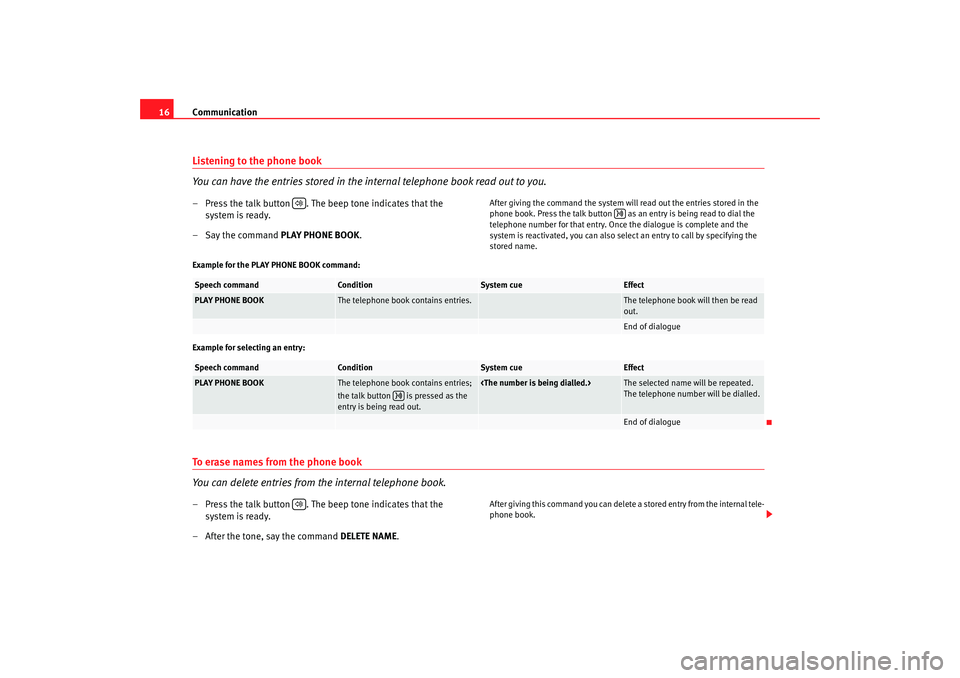
16Listening to the phone book
You can have the entries stored in the internal telephone book read out to you.– Press the talk button . The beep tone indicates that the
system is ready.
–Say the command PLAY PHONE BOOK.
After giving the command the system will read out the entries stored in the
phone book. Press the talk button as an entry is being read to dial the
telephone number for that entry. Once the dialogue is complete and the
system is reactivated, you can also select an entry to call by specifying the
stored name.
Example for the PLAY PHONE BOOK command:
Example for selecting an entry:
To erase names from the phone book
You can delete entries from the internal telephone book.– Press the talk button . The beep tone indicates that the system is ready.
– After the tone, say the command DELETE NAME.
After giving this command you can delete a stored ent ry from the internal tele-
phone book.
Speech command
Condition
System cue
Effect
PLAY PHONE BOOK
The telephone book contains entries.
The telephone book will then be read
out.End of dialogue
Speech command
Condition
System cue
Effect
PLAY PHONE BOOK
The telephone book contains entries;
the talk button is pressed as the
entry is being read out.
The selected name will be repeated.
The telephone number will be dialled.End of dialogue
Sist Comunicacion_ing Seite 16 Dienstag, 13. Mä rz 2007 5:30 17
Page 19 of 26

Communication17
Controls and equipmentExample for deleting single names from the internal
telephone book:
A running dialogue can be cancelled at any time with a p ress of the talk
button .
Note
•
Say the command Repeat, if you would like to have the specified name
repeated by the system.
•
If you then say No, the system will answer with
will be ended.
To erase the phone book
You can delete the entire phone book or single entries.– Press the talk button .
– After the tone, say the command DELETE PHONE BOOK .After giving this command you can delete the entire internal phone book or
single entries as desired.Speech command
Condition
System cue
Effect
DELETE NAME
The telephone book contains entries.
Dialogue
COMPANY XYZ
Dialogue
If no command is specified, the system responds afte r about 5 seconds with the next cue.
Dialogue
No command
Dialogue
YES
DialogueEnd of dialogue
Sist Comunicacion_ing Seite 17 Dienstag, 13. März 2007 5:30 17
Page 20 of 26

Communication
18Example for deleting the entire internal telephone book:
Example for deleting single names from the internal telephone book:Speech command
Condition
System cue
Effect
DELETE PHONE BOOK
The telephone book contains entries.
Dialogue
If no command is specified, the system responds afte r about 5 seconds with the next cue.
Dialogue
No command
Dialogue
YES
Dialogue
If no command is specified, the system responds after about 5 seconds with the next cue.
Dialogue
No command
Dialogue
YES
All entries in the phone book will be
deleted.End of dialogue
Speech command
Condition
System cue
Effect
DELETE PHONE BOOK
The telephone book contains entries.
Dialogue
If no command is specified, the system responds after about 5 seconds with the next cue.
Dialogue
No command
Dialogue
NO
The telephone book will then be read
out.
No command
Talk button pressed as the entry to
be deleted is read out.
Dialogue
If no command is specified, the system responds after about 5 seconds with the next cue.
Dialogue
Sist Comunicacion_ing Seite 18 Dienstag, 13. März 2007 5:30 17
Page 21 of 26

Communication19
Controls and equipment
Notes on the phone book
Take note of these tips and suggestions when using the
phone book.•
It is important that names stored in the phone book h ave a noticeable
acoustic difference between them so the system can re cognise the entries.
•
In the event that an telephone book entry is not recognised (e.g. if
someone else tries to call-up a name), the phone book entrie s can be read out
by giving the command PLAY PHONE BOOK.
•
The numbers 0 to 9 are recognised by the system. Say the number s clearly
so that the system can recognise them easily. Should the system say
hands-free system as follows.
•
Is the phone switched on?
•
Has the PIN code been entered?
WARNING
The speech system must not be used in cases of emer gency, since the voice
changes in stressful situations. This could result in a failed or delayed tele-
phone connection. For this reason, always enter emer gency numbers
manually.
International calls
Country and area codes can be entered as follows.Notes on entering telephone numbers for calls abroa d:•
When making a call abroad, you can say Plus (+) before specifying the
digits.
•
After the Plus (+) the country code must be specified. The countr y code
follows the conventional format (e.g. 49 for Germany or 44 for Great Britain.
•
After the country code, the 0 should be left out before the area code.No command
Dialogue
YES
The entry will be deleted and the
remaining entries will be read out.
All entries are read out.
End of dialogue
Sist Comunicacion_ing Seite 19 Dienstag, 13. Mä rz 2007 5:30 17
Page 22 of 26

Communication
20Example for making a call to Great Britain:Bluetooth®
Bluetooth technology enables wireless connections between
mobile and fixed devices without the need for cables.Mobile communication and information is gaining ever gr eater importance
for personal use as well as in today's modern business world.
Information transfer between mobile devices up until recently was only
possible through wired and infrared connections.
These non-standardised connections greatly limited the r ange of use and
were very complicated to operate.
For this reason, the introduction of the Bluetooth® tech nology represents a
great change, allowing the establishment of a stan dardised remote connec-
tion between mobile devices from different manufacturers .
WARNING
The Bluetooth function must be switched off during air travel (please refer
to the phone manual).
Note
Certain software version of some mobile telephones contain errors or limited
functions (for example “Download phone book”). These errors may give rise
to faulty operation of the vehicle hands-free system. In th is case, consult the
Authorised Service Centre for your mobile telephone .Bluetooth® configuration
Before using the functionality of the Bluetooth connection
between the mobile telephone and the hands-free system for
the first time configuration of the connection is required.It will be necessary that the hands-free system and the mobile telephone
recognise each other. To proceed, first the Bluetooth function on the mobile
telephone must be activated. Then, after turning on th e ignition, select the
option on the telephone to search for other Bluetooth communication devices
within range, in other words, the hands-free syst em of the vehicle
(SEAT_UHV). The next step is to select this hands-free system. The complete
Speech command
Condition
System cue
Effect
DIAL NUMBER
Phone is switched on.
Dialogue
PLUS, FOUR, FOUR
Dialogue
SEVEN, THREE, ONE
Dialogue
THREE, NINE, TWO
Dialogue
DIAL
DialogueEnd of dialogue
Sist Comunicacion_ing Seite 20 Dienstag, 13. Mä rz 2007 5:30 17
Page 23 of 26

Communication21
Controls and equipmentinstructions for completing this operat
ion should be found in the instruction
manual for the telephone.
The final step for establishing the connection is the introduction of the PIN
code into the hands-free system (initial ly 1234). If you would like to change
the PIN code for the SEAT_UHV system then contact an official SEAT work-
shop. Once the PIN code is input then the connection is es tablished and the
system can be used with the Bluetoot h system. The moment that the connec-
tion is established, the hands-free kit will emit an acute sou nd.
Once the initial configuration process is finished, ea ch time the telephone is
within range of establishing a Bluet ooth connection with the hands-free
system this will be done automatically as long as the ignition i s on and
without any need to configure the connection further .
The connection between the telephone an d the hands-free system will not be
established if this system is already communica ting with another phone.
If there are two or more Bluetooth telephones within c ommunication range of
the hands-free system then the system will connect with the one that was
most recently connected.
WARNING
•
When your mobile phone establishe s a connection with the hands-free
system, it emits both a visual and audible signal.
•
It should be noted that when drivin g at night with the radio off, the
visual signal involves the screen lighting up for appro ximately 3 seconds.Note
It is important to personalise the device PIN code using a personal 4 digit
code. Consult an official SEAT workshop.
Radiophones and business equipmentRadiophones and fixed installation business equipmentRadiophones
Any retrofit installations of radiophones in the veh icle require prior approval.
SEAT generally authorises in-vehicle installations of appro ved types of radio-
phones provided that:•
the aerial is installed correctly,
•
the aerial is installed on the exterior of the vehicle (and sh ielded cables
are used together with non-reflective aerial trimming),
•
the effective transmitting power does not exceed 10 Watts at the aerial
base.
Your Authorised Service Centre will be able to inform y ou about options for
installing and operating radiophones with a higher transmitting power.
Business equipment
The retrofit of domestic and business equipment is permitted provided that
these do not have an effect on the concentration of the driv er and that they
are CE approved. Equipment retrofitted to the vehicle th at may have an effect
on the concentration of the driver must come with a s pecific licence for this
type of vehicle and with the symbol CENote
•
The posterior fitting of electric and el ectronic equipment in this vehicle
affects its licence type and could lead to the with drawal of the vehicle regis-
tration document under certain circumstances.
•
We would request that you pay special attention to th e instructions
regarding the use of mobile telephones and radio tran smitters.
Sist Comunicacion_ing Seite 21 Dienstag, 13. März 2007 5:30 17
Page 25 of 26

Index23
Index
BBasic functions . . . . . . . . . . . . . . . . . . . . . . . . . . . 5
Bluetooth® . . . . . . . . . . . . . . . . . . . . . . . . . . . . . 20
Bluetooth® configuration . . . . . . . . . . . . . . . . . . 20CCalling a name in the phone book . . . . . . . . . . . 15
Control commands . . . . . . . . . . . . . . . . . . . . . . . 11
Controlling hands-free sy stem from the steering
wheel and multi-function lever . . . . . . . . . . 6
Controlling the hands-free unit by voice . . . . . . 10DDial number . . . . . . . . . . . . . . . . . . . . . . . . . . . . . 11
Dialogue . . . . . . . . . . . . . . . . . . . . . . . . . . . . . . . . . 9IInformation on the instrument panel display . . . 8
International calls . . . . . . . . . . . . . . . . . . . . . . . . 19LLast calls / received calls . . . . . . . . . . . . . . . . . . . 7
Listening to the phone book . . . . . . . . . . . . . . . . 16
NNotes on the phone book . . . . . . . . . . . . . . . . . . 19RRadiophones and fixed installation business
equipment . . . . . . . . . . . . . . . . . . . . . . . . . . 21
Redial . . . . . . . . . . . . . . . . . . . . . . . . . . . . . . . . . . 13TTo erase names from the phone book . . . . . . . . 16
To erase the phone book . . . . . . . . . . . . . . . . . . 17
To record names in the phone book . . . . . . . . . . 13
Sist Comunicacion_ing Seite 23 Dienstag, 13. Mä rz 2007 5:30 17