ABS Seat Leon 5D 2007 User Guide
[x] Cancel search | Manufacturer: SEAT, Model Year: 2007, Model line: Leon 5D, Model: Seat Leon 5D 2007Pages: 302, PDF Size: 9.14 MB
Page 118 of 302

Lights and visibility
116
NoteThe system operates from a speed of about 10 km/h.Hazard warning lights
The hazard warning lights are used to draw the attention of
other road users to your vehicle in emergencies.
If your vehicle breaks down:
1. Park your vehicle at a safe distance from moving traffic.
2. Press the button to switch on the hazard warning lights ⇒.
3. Switch the engine off.
4. Apply the handbrake. 5. On a manual gearbox engage 1st gear, and for an automatic
move the selector lever to P.
6. Use the warning triangle to draw the attention of other road users
to your vehicle.
7. Always take the vehicle key with you when you leave the vehicle.
You should switch on the hazard warning lights to warn other road users, for
instance when:•
reaching the tail end of a traffic jam
•
there is an emergency
•
your vehicle breaks down due to a technical defect
•
you are towing another vehicle or your vehicle is being towed.
All turn signals flash simultaneously when the hazard warning lights are
switched on. That is that the two turn signal indicator lamps
and the
indicator lamp in the switch
will flash at the same time. The hazard
warning lights also work when the ignition is switched off.
Turning on the emergency indicators
The emergency indicators turn on auto matically when braking sharply at a
speed of over 60km/h, or if the ABS works for a prolonged period, in order to
alert the vehicles behind. If you accele rate, or continue at over 40km/h, the
emergency indicators turn off automatically.
WARNING
•
The risk of an accident increases if your vehicle breaks down. Always
use the hazard warning lights and a warning triangle to draw the attention
of other road users to your stationary vehicle.
•
Never park where the catalytic convert er could come into contact with
inflammable materials under the vehicle, for example dry grass or spilt
petrol. This could start a fire!
Fig. 76 Instrument panel:
switch for hazard warning
lights
leon ingles.book Seite 116 Dienst ag, 11. September 2007 1:47 13
Page 155 of 302

Driving153
Safety First
Operating instructions
Tips and Maintenance
Te c h n i c a l D a t a
•
Adjust the driver seat or steering wheel so that there is a distance of at
least 25 cm between the steering wheel and your breast bone ⇒page 152,
fig. 114 . If you fail to observe the minimum distance, the airbag will not
protect you. Risk of fatal injury.
•
If your physical constitution prevents you from maintaining the
minimum distance of 25 cm, contact an Authorised Service Centre. The
Authorised Service Centre will help you decide if special specific modifica-
tions are necessary.
•
If you adjust the steering wheel so th at it points towards your face, the
driver airbag will not protect you prop erly in the event of an accident. Make
sure that the steering wheel points towards your chest.
•
When driving, always hold the steering wheel with both hands on the
outside of the ring at the 9 o'clock and 3 o'clock positions. Never hold the
steering wheel at the 12 o'clock position, or in any other manner (e.g. in
the centre of the steering wheel, or on the inside of the rim). In such cases,
you could receive severe injuries to the arms, hands and head.
SafetyElectronic stabilisation programme (ESP)*
ESP helps make driving safer in certain situations.The Electronic Stabilisation Program (ESP ) contains the electronic differential
lock (EDL) and the traction control system (TCS). The ESP function works in
conjunction with the ABS. Both warning la mps will light up if the ESP or ABS
systems are faulty.
The ESP is started automatically when the engine is started.
In specific circumstances where you requ ire less traction, you can switch off
the ESP by pressing button ⇒fig. 115 .
For example:•
When driving with snow chains,
•
when driving in deep snow or on loose surfaces,
WARNING (continued)
Fig. 115 Detail of the
centre console: ESP
button
leon ingles.book Seite 153 Dienst ag, 11. September 2007 1:47 13
Page 173 of 302

Intelligent technology171
Safety First
Operating instructions
Tips and Maintenance
Te c h n i c a l D a t a
Tips and MaintenanceIntelligent technologyBrakesBrake servoThe brake servo amplifies the pressure you apply to the brake pedal. It works
only when the engine is running .
If the brake servo is not functioning due to a malfunction, or if the vehicle has
to be towed, you will have to press the brake pedal considerably harder to
make up for the lack of servo assistance.
WARNING
The braking distance can also be affected by external factors.•
Never let the vehicle coast with the engine switched off. Failure to do so
could result in an accident. The braking distance is increased considerably
as the brake servo does not function.
•
If the brake servo is not functioning, for example if the vehicle is being
towed, you will have to press the brake pedal considerably harder than
normal.
Brake assist system (BAS)*In an emergency, most drivers brake in time, but not with maximum force.
This results in unnecessarily long braking distances. The brake assist system intervenes here, if you press the brake pedal very
quickly, the brake assist system registers an emergency situation. It then very
quickly builds up the full brake pressure so that the ABS can be activated
more quickly and efficiently, thus reducing the braking distance.
Do not reduce the pressure on the br
ake pedal. The brake assist system
switches off automatically as soon as you release the brake.
WARNING
•
The risk of accident is higher if yo u drive too fast, if you do not keep
your distance to the vehicle in front, and when the road surface is slippery
or wet. The increased accident risk cannot be reduced by the brake assist
system.
•
The brake assist system cannot defy the laws of physics. Slippery and
wet roads are dangerous even with the brake assist system! Therefore, it is
essential that you adjust your speed to suit the road and traffic conditions.
Do not let the extra safety features tempt you into taking any risks when
driving.
leon ingles.book Seite 171 Dienst ag, 11. September 2007 1:47 13
Page 174 of 302
Intelligent technology
172Anti-lock brake system and traction control
M-ABS (ABS and TCS)Anti-lock brake system (ABS)
The anti-lock brake system prevents the wheels locking
during braking.The anti-lock brake system (ABS) is an important part of the vehicle's active
safety system.
How the ABS works
If one of the wheels is turns too slowly in relation to the road speed, and is
close to locking, the system will reduce the braking pressure for this wheel.
The driver is made aware of this control process by a pulsating of the brake
pedal and audible noise. This is a deliberate warning to the driver that one or
more of the wheels is tending to lock and the ABS control function has inter-
vened. In this situation it is important to keep the brake pedal fully depressed
so the ABS can regulate the brake application. Do not “pump”.
If you brake hard on a slippery road surface, the best possible control is
retained as the wheels do not lock.
However, ABS will not necessarily guarantee shorter braking distances in all
conditions. The braking distance could even be longer if you brake on gravel
or on fresh snow covering a slippery surface.
WARNING
•
The anti-lock brake system cannot defy the laws of physics. Slippery
and wet roads are dangerous even with ABS! If you notice that the ABS is
working (to counteract locked wheels under braking), you should reduce
speed immediately to suit the road and traffic conditions. Do not let the
extra safety features tempt you into taking any risks when driving.
•
The effectiveness of ABS is also determined by the tyres fitted
⇒ page 221.
•
If the running gear or brakes are mo dified, the effectiveness of the ABS
could be severely limited.
Traction control system (TCS)
The traction control system prevents the drive wheels from
spinning when the car is accelerating.Description and operation of the traction control system during acceleration
(TCS)
TCS reduces engine power to help prevent the drive wheels of front-wheel
drive vehicles losing traction during acceleration. The system works in the
entire speed range in conjunction with ABS. If a malfunction should occur in
the ABS, the TCS will also be out of action.
TCS helps the vehicle to start moving, accelerate and climb a gradient in slip-
pery conditions where this may otherwise be difficult or even impossible.
The TCS is switched on automatically when the engine is started. If necessary,
it may be turned on or off pushing the button on the centre console.
When the TCS is off, the warning lamp is lit. The TCS should normally be left
switched on at all times. Only in exceptional circumstances, when slipping of
the wheels is required, should it be disconnected for example•
With compact temporary spare wheel.
•
When using the snow chains.
•
When driving in deep snow or on loose surfaces
•
When the vehicle is bogged-down, to free it by “rocking.”WARNING (continued)
leon ingles.book Seite 172 Dienst ag, 11. September 2007 1:47 13
Page 175 of 302
Intelligent technology173
Safety First
Operating instructions
Tips and Maintenance
Te c h n i c a l D a t a
The TCS should be switched on again afterwards as soon as possible.
WARNING
•
It must be remembered that TCS cann
ot defy the laws of physics. This
should be kept in mind, particular ly on slippery and wet roads and when
towing a trailer.
•
Always adapt your driving style to suit the condition of the roads and
the traffic situation. Do not let the extra safety afforded by TCS tempt you
into taking any risks when driving, this can cause accidents.Caution
•
In order to ensure that TCS function correctly, all four wheels must be
fitted with the same tyres. Any differences in the rolling radius of the tyres can
cause the system to reduce engine power when this is not desired.
•
Modifications to the vehicle (e.g. to the engine, the brake system, running
gear or any components affecting the wh eels and tyres) could affect the effi-
ciency of the ABS and TCS.
Electronic stabilisation programme (ESP)*General notes
The electronic stabilisation programme increases the
vehicle's stability on the road.The electronic stabilisation programme helps to reduce the danger of skid-
ding.
The electronic stabilisation programme (ESP) consists of ABS, EDL and TCS. Electronic Stabilising Program (ESP)*
ESP reduces the danger of skidding by braking the wheels individually.
The system uses the steering wheel angle and road speed to calculate the
changes of direction desired by the driver, and constantly compares them
with the actual behaviour of the vehi
cle. If the desired course is not being
maintained (for instance, if the car is starting to skid), then the ESP compen-
sates automatically by braking the appropriate wheel.
The forces acting on the braked wheel bring the vehicle back to a stable
condition. If the vehicle tends to oversteer, the system will act on the front
wheel on the outside of the turn.
WARNING
•
It must be remembered that ESP cann ot defy the laws of physics. This
should be kept in mind, particularly on slippery and wet roads and when
towing a trailer.
•
Always adapt your driving style to suit the condition of the roads and
the traffic situation. Do not let the extra safety afforded by ESP tempt you
into taking any risks when driving, this can cause accidents.Caution
•
In order to ensure that ESP functions correctly, all four wheels must be
fitted with the same tyres. Any differences in the rolling radius of the tyres can
cause the system to reduce engine power when this is not desired.
•
Modifications to the vehicle (e.g. to the engine, the brake system, running
gear or any components affecting the wheels and tyres) could affect the effi-
ciency of the ABS, EDL, ESP and TCS.Note
To disconnect using the ESP button ⇒page 153.
leon ingles.book Seite 173 Dienst ag, 11. September 2007 1:47 13
Page 176 of 302

Intelligent technology
174Anti-lock brake system (ABS)The anti-lock brake system prevents the wheels locking during braking
⇒ page 172.Electronic differential lock (EDL)*
The electronic differential lock helps prevent the loss of trac-
tion caused if one of the driven wheels starts spinning.EDL helps the vehicle to start moving, accelerate and climb a gradient in slip-
pery conditions where this may otherwise be difficult or even impossible.
The system will control the revolutions of the drive wheels using the ABS
sensors (in case of an EDL fault the warning lamp for ABS lights up)
⇒page 78.
At speeds of up to approximately 80 km/h, it is able to balance out differ-
ences in the speed of the driven wheel s of approximately 100 rpm caused by
a slippery road surface on one side of the vehicle. It does this by braking the
wheel which has lost traction and distributing more driving force to the other
driven wheel via the differential.
To prevent the disc brake of the braked wheel from overheating, the EDL cuts
out automatically if subjected to excessive loads. The vehicle will continue to
function normally without EDL. For this reason, the driver is not informed that
the EDL has been switched off.
The EDL will switch on again automatically when the brake has cooled down.
WARNING
•
When accelerating on a slippery surface, for example on ice and snow,
press the accelerator carefully. Despite EDL, the driven wheels may start to
spin. This could impair the vehicle's stability.
•
Always adapt your driving style to suit road conditions and the traffic
situation. Do not let the extra safety afforded by EDL tempt you into taking
any risks when driving, this can cause accidents.Caution
Modifications to the vehi cle (e.g. to the engine, the brake system, running
gear or any components affecting the wheels and tyres) could affect the effi-
ciency of the EDL ⇒page 199.The traction control system (TCS)The traction control system prevents the drive wheels from spinning when the
car is accelerating ⇒page 172.Brakes
What factors can have a negative effect on the brakes?New brake pads
New brake pads do not provide optimal performance during the first 400 km,
they must be “run in”. However, the reduced braking capacity may be
compensated by pressing on the brake pedal a little harder. Avoid over-
loading the brakes during run-in.
Wear
The rate of wear on the brake pads depends a great deal on how you drive and
the conditions in which the vehicle is operated. Negative factors are, for
WARNING (continued)
leon ingles.book Seite 174 Dienst ag, 11. September 2007 1:47 13
Page 208 of 302

Checking and refilling levels
206
− Do not smoke.
− Never work near naked flames.
− Always have a fire extinguisher on hand.Caution
When changing or topping up service fluids, make absolutely certain that you
fill the fluids into the correct reservoirs. Failure to observe this point will result
in serious malfunctions and engine damage!
For the sake of the environment
Service fluids leaks are harmful to the environment. For this reason you
should make regular checks on the gr ound underneath your vehicle. If you
find spots of oil or other fluids, have your vehicle inspected in a qualified
workshop.
Opening the bonnet
The bonnet is released from inside the vehicle.
WARNING (continued)
Fig. 141 Detail of foot-
well area on driver's side:
lever for unlocking the
bonnet.Fig. 142 Arrester hook
for bonnet.
leon ingles.book Seite 206 Dienst ag, 11. September 2007 1:47 13
Page 217 of 302
Checking and refilling levels215
Safety First
Operating instructions
Tips and Maintenance
Te c h n i c a l D a t a
Changing the front windscreen wiper blades
If the windscreen wiper blades are in perfect condition, you
will benefit from an improved visibility. Damaged wiper
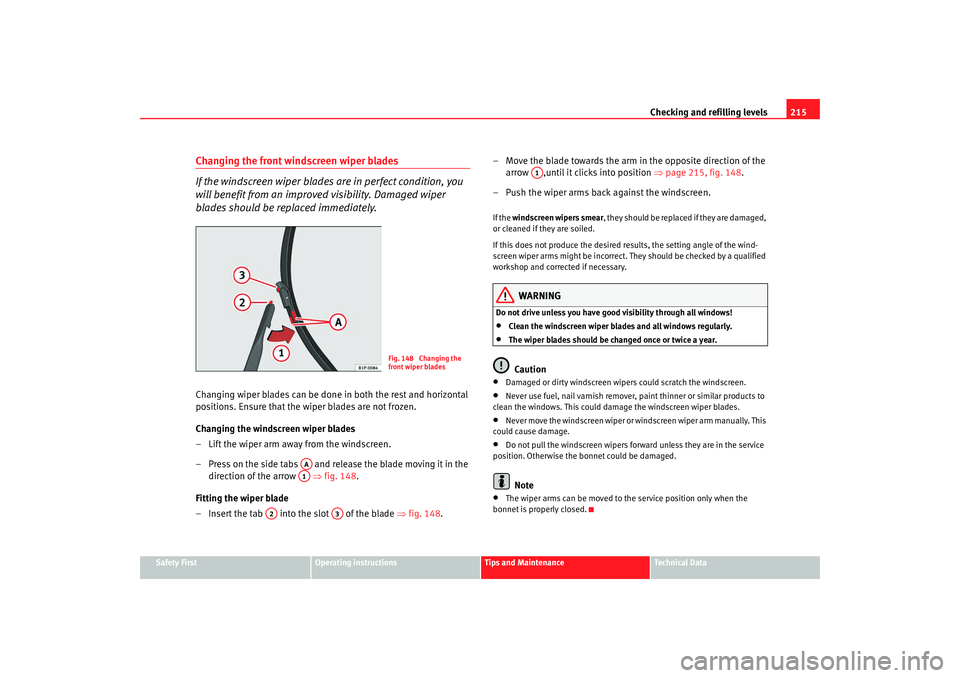
blades should be replaced immediately.Changing wiper blades can be done in both the rest and horizontal
positions. Ensure that the wiper blades are not frozen.
Changing the windscreen wiper blades
– Lift the wiper arm away from the windscreen.
– Press on the side tabs and release the blade moving it in the direction of the arrow ⇒ fig. 148.
Fitting the wiper blade
– Insert the tab into the slot of the blade ⇒fig. 148. – Move the blade towards the arm in the opposite direction of the
arrow ,until it clicks into position ⇒page 215, fig. 148 .
– Push the wiper arms back against the windscreen.
If the windscreen wipers smear , they should be replaced if they are damaged,
or cleaned if they are soiled.
If this does not produce the desired results, the setting angle of the wind-
screen wiper arms might be incorrect. Th ey should be checked by a qualified
workshop and corrected if necessary.
WARNING
Do not drive unless you have good visibility through all windows!•
Clean the windscreen wiper blades and all windows regularly.
•
The wiper blades should be changed once or twice a year.Caution
•
Damaged or dirty windscreen wipers could scratch the windscreen.
•
Never use fuel, nail varnish remover, paint thinner or similar products to
clean the windows. This could damage the windscreen wiper blades.
•
Never move the windscreen wiper or wi ndscreen wiper arm manually. This
could cause damage.
•
Do not pull the windscreen wipers forw ard unless they are in the service
position. Otherwise the bonnet could be damaged.Note
•
The wiper arms can be moved to the service position only when the
bonnet is properly closed.
Fig. 148 Changing the
front wiper blades
AAA1
A2
A3
A1
leon ingles.book Seite 215 Dienst ag, 11. September 2007 1:47 13
Page 219 of 302
Checking and refilling levels217
Safety First
Operating instructions
Tips and Maintenance
Te c h n i c a l D a t a
Brake fluidChecking the brake fluid level
The brake fluid is checked at the intervals given in the service
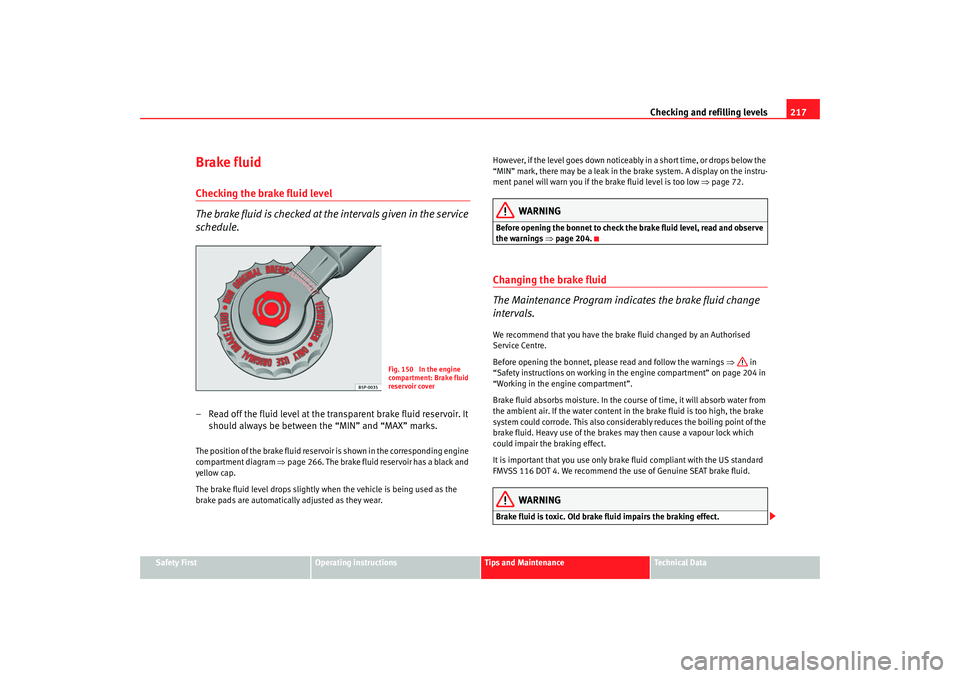
schedule.– Read off the fluid level at the transparent brake fluid reservoir. It
should always be between the “MIN” and “MAX” marks.The position of the brake fluid reservoir is shown in the corresponding engine
compartment diagram ⇒page 266. The brake fluid reservoir has a black and
yellow cap.
The brake fluid level drops slightly when the vehicle is being used as the
brake pads are automatically adjusted as they wear. However, if the level goes down noticeably in a short time, or drops below the
“MIN” mark, there may be a leak in the brake system. A display on the instru-
ment panel will warn you if the brake fluid level is too low
⇒page 72.
WARNING
Before opening the bonnet to check the brake fluid level, read and observe
the warnings ⇒ page 204.Changing the brake fluid
The Maintenance Program indicates the brake fluid change
intervals.We recommend that you have the brake fluid changed by an Authorised
Service Centre.
Before opening the bonnet, please read and follow the warnings ⇒ in
“Safety instructions on working in the engine compartment” on page 204 in
“Working in the engine compartment”.
Brake fluid absorbs moisture. In the course of time, it will absorb water from
the ambient air. If the water content in the brake fluid is too high, the brake
system could corrode. This also considerably reduces the boiling point of the
brake fluid. Heavy use of the brakes may then cause a vapour lock which
could impair the braking effect.
It is important that you use only brake fluid compliant with the US standard
FMVSS 116 DOT 4. We recommend the use of Genuine SEAT brake fluid.
WARNING
Brake fluid is toxic. Old brake fluid impairs the braking effect.
Fig. 150 In the engine
compartment: Brake fluid
reservoir cover
leon ingles.book Seite 217 Dienst ag, 11. September 2007 1:47 13
Page 241 of 302

If and when239
Safety First
Operating instructions
Tips and Maintenance
Te c h n i c a l D a t a
Note
The compressor should never be allowed to run for longer than 6 minutes.FusesChanging a fuse
If a fuse has blown it must be replaced
Fuse cover underneath the steering wheel
– Switch off the ignition and the component concerned.
– Identify the fuse for the failed component ⇒page 241.
– Take the plastic clip from inside the fuse cover, fit it onto the
blown fuse and pull the fuse out.
– Replace the blown fuse (which will have a melted metal strip) with a new fuse of the same ampere rating.
Fuse cover in engine compartment
– Switch off the ignition and the component concerned.
– Prise off the fuse cover in the engine compartment by pressing the tabs towards the centre of the cover ⇒fig. 161.
– Identify the fuse for the failed component ⇒page 241.
Fig. 160 Left side of dash
panel: Fuse box cover
Fig. 161 Fuse box cover
in engine compartment
leon ingles.book Seite 239 Dienst ag, 11. September 2007 1:47 13