maintenance Seat Leon 5D 2007 Workshop Manual
[x] Cancel search | Manufacturer: SEAT, Model Year: 2007, Model line: Leon 5D, Model: Seat Leon 5D 2007Pages: 302, PDF Size: 9.14 MB
Page 103 of 302

Unlocking and locking101
Safety First
Operating instructions
Tips and Maintenance
Te c h n i c a l D a t a
Press the button twice to unlock all doors.
WARNING
•
Incorrect use of the key can result in critical injuries.
•
Never leave children or disabled persons in the vehicle; in case of emer-
gency they may not be able to leave the vehicle or look after themselves.
•
Never leave any of the vehicle keys in the vehicle. This could result in
serious injuries, accidents or the theft of your vehicle. Always take the key
with you when you leave the vehicle.
•
Unsupervised use of a key could me an that the engine is started or that
electrical equipment is used (e.g. elec tric windows). Risk of accident. The
vehicle can be locked using the remote control key. This could result in
people being trapped in the vehicle in an emergency.Note
•
The radio-frequency remote control ca n also be programmed so that only
the driver's door is unlocked the first time that the unlocking button on the
radio frequency remote control key is pressed. When the button is pressed
once more, all doors and the tailgate will be unlocked.
•
The remote control functions only when you are in range ⇒page 100,
fig. 64 (red area).
•
If the vehicle is unlocked using th e button, the vehicle will be
locked again automatically if any of the doors or the tailgate are not opened
within 30 seconds of unlocking the vehicle. This function prevents the vehicle
from remaining unlocked if the unlocking button is pressed by mistake.
•
If the vehicle cannot be opened and closed using the remote control, the
remote control key will have to be re-synchronised ⇒page 101.
Changing the batteryIf the battery indicator does not flash when the buttons are pushed, the
battery must be replaced.
Caution
Use of inappropriate batteries may damage the radio frequency remote
control. For this reason, always replac e the dead battery with another of the
same size and power.
For the sake of the environment
The flat batteries must be disposed of in accordance with regulations
governing the protection of the environment.Synchronising the remote control keySynchronising the remote control key
– Use both keys that have been delivered with the vehicle ⇒page 99, fig. 62 , the key fitted with the remote control and
the normal key .
– Unlock the vehicle from the driver side door using the key without the remote.
– Turn the ignition ON using the key without the remote control.
– Lock the vehicle using the driver side door lock with the remote
control key ⇒page 100, fig. 63 .
– In a time of maximum 30 seconds the following operations must
be carried out:
A1
A1
AA
AB
leon ingles.book Seite 101 Dienst ag, 11. September 2007 1:47 13
Page 105 of 302
Unlocking and locking103
Safety First
Operating instructions
Tips and Maintenance
Te c h n i c a l D a t a
Note
•
If, after the alarm goes off, access is gained to a second secured zone
(e.g. the tailgate is opened after a door has been opened), the warning signal
is triggered again.
•
Vehicle monitoring remains active even if the battery is disconnected or
not working for any reason.
•
The alarm is triggered immediately if one of the battery cables is discon-
nected while the alarm system is active.
Volumetric sensor*
Monitoring or control function incorporated in the anti-theft
alarm*, that detects unauthorized vehicle entry using ultra-
sound.The system consists of 3 sensors, 2 emitters and a receptor.
Activation
– It is automatically turned on with the anti-theft alarm, when the
vehicle is locked mechanically with the key and when the button on the remote control is used.
Deactivation
– Press the button on the remote control twice. Only the volu- metric sensor is deactivated. The alarm system remains acti-
vated.
WARNING
•
The “safe” security system remains deactivated if the volumetric
sensor is deactivated.
•
For those vehicles in which a separate sunblind is fitted in the
passenger compartment, the alarm will not function correctly due to inter-
ference with the sensor.Note
•
If the alarm has been triggered by the volumetric sensor, this will be indi-
cated by a flashing of the indicator on th e driver's door. This flashing will be
different to that for an activated alarm.
leon ingles.book Seite 103 Dienst ag, 11. September 2007 1:47 13
Page 107 of 302
Unlocking and locking105
Safety First
Operating instructions
Tips and Maintenance
Te c h n i c a l D a t a
WARNING
•
Always close the tailgate properly. Risk of accident or injury.
•
The tailgate must not be opened when the reverse or rear fog lights are
lit. This may damage the lighting units.
•
Do not close the tailgate by pushin g it down with your hand on the
window. The glass could shatter. Risk of injury!
•
Ensure the tailgate is locked after closing. If not, it may open unexpect-
edly while driving.
•
Never allow children to play in or ar ound the vehicle. A locked vehicle
can be subjected to extremely high and low temperatures, depending on
the time of year. This could cause serious injuries/illness. It could even
have fatal consequences. Close and lock both the tailgate and all the other
doors when you are not using the vehicle.
•
Never close the tailgate without observing and ensuring it is clear, to do
otherwise could cause serious injury to you and others. Make sure that no
one is in the path of the tailgate.
•
Never drive with the tailgate open or half-closed, exhaust gasses may
penetrate into the interior of th e vehicle. Danger of poisoning!
•
If only the boot is opened then do not leave the key inside. The vehicle
may not be opened if the key is left inside.
Emergency opening
This allows the vehicle to be opened if the central locking
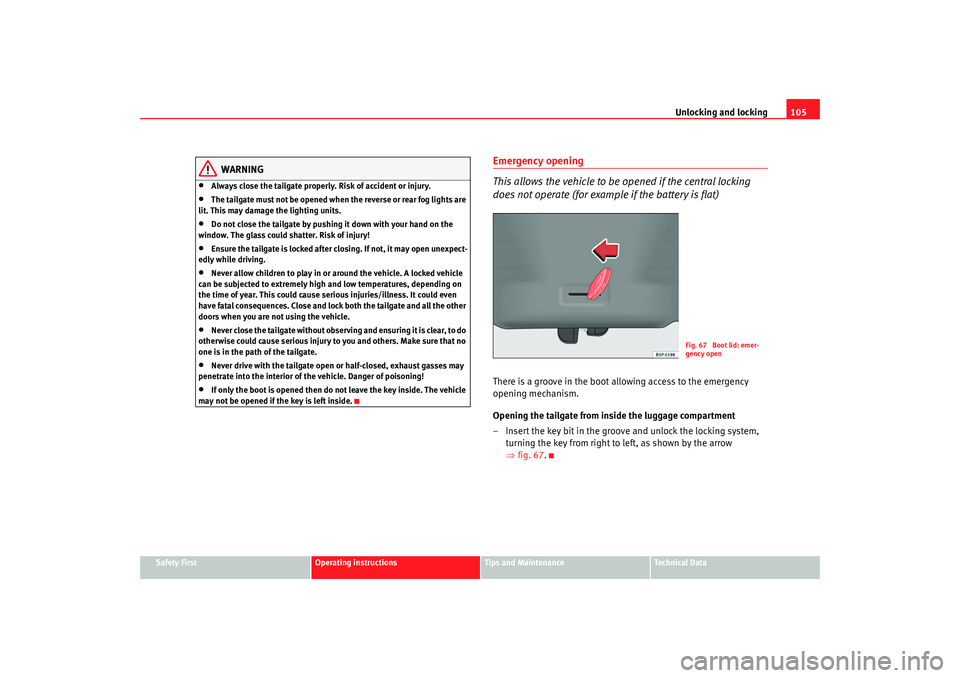
does not operate (for example if the battery is flat)There is a groove in the boot allowing access to the emergency
opening mechanism.
Opening the tailgate from inside the luggage compartment
– Insert the key bit in the groove and unlock the locking system, turning the key from right to left, as shown by the arrow
⇒fig. 67 .
Fig. 67 Boot lid: emer-
gency open
leon ingles.book Seite 105 Dienst ag, 11. September 2007 1:47 13
Page 109 of 302

Unlocking and locking107
Safety First
Operating instructions
Tips and Maintenance
Te c h n i c a l D a t a
•
If necessary, use the safety switch to disable the rear electric windows.
Make sure that they have been disabled.Note
If the window is not able to close because it is stiff or because of an obstruc-
tion, the window will automatically open again ⇒page 107. If this happens,
check why the window could not be clos ed before attempting to close it
again.One-touch opening and closing
One-touch opening and closing means you do not have to
hold down the button.One-touch closing
– Pull up the button for the window briefly to the second position. The window closes fully.
One-touch opening
– Push down the button for the window briefly to the second posi- tion. The window opens fully.
Reset the automatic closing function for the front side windows and
the automatic opening for all windows
– Close all windows. – Use the key to lock the vehicle from outside and hold the key in
the lock position for at least one second. The one-touch function
is now ready for operation.
The buttons ⇒page 106, fig. 68 and have two levels for opening the
window and two for closing it. This makes it easier to open or close windows
to the desired position.
One-touch closing does not work when the ignition has been switched off,
even if the key is in the ignition.
The automatic open and close function wi ll not work if the battery has been
temporarily disconnected, or if the battery is flat. The function then has to be
reactivated.
The one-touch function and roll-back function will not work if there is a
malfunction in the electric windows. Contact an Authorised Service Centre.Roll-back function
The windows have a roll-back function. This reduces the risk
of injuries when the windows are closing.•
If a window is obstructed when closing automatically, the window stops
at this point and lowers immediately ⇒.
•
If this happens, check immediately (within 10 seconds) why the window
could not be closed before attempting to close it again. After 10 seconds the
normal automatic function resumes.
•
If the window is still obstructed , the window stops at this point.
•
If there is no obvious reason why the window cannot be closed, try to
close it again within five seconds.
If you wait longer than 5 - 10 seconds, the window will open fully when you
operate one of the buttons. One-touch closing is reactivated.
WARNING (continued)
A1
A2
leon ingles.book Seite 107 Dienst ag, 11. September 2007 1:47 13
Page 111 of 302

Unlocking and locking109
Safety First
Operating instructions
Tips and Maintenance
Te c h n i c a l D a t a
Sliding/tilting roof*Opening and closing the sliding/tilting roof
The sliding/tilting sunroof is opened and closed using the
rotary button when the ignition is switched on.Closing the sliding/tilting sunroof
– Turn the rotary button to position ⇒page 109, fig. 69 ⇒ .
Opening/tilting the sliding/tilting sunroof
– Turn the rotary button to position . The sunroof opens to the convenience position where wind noise is reduced.
– To open the roof further, turn the switch to position and hold the switch in this position until the roof opens to the desired
position. Tilting the sliding/tilting sunroof
– Turn the rotary button to position .
Always close the sliding/tilting roof fully if you park the vehicle or leave it
unattended
⇒.
The sliding/tilting sunroof can be operat ed for up to about ten minutes after
the ignition has been switched off, pr ovided the driver door and the front
passenger door are not opened.
Sunshade
The sunroof blind is opened together with the sliding/tilting roof. If required,
it can be closed by hand when the sunroof is closed.
WARNING
•
Incorrect use of the sliding/tilting sunroof can result in injury.
•
Never close the sliding/tilting sunr oof without observing and ensuring
it is clear, to do otherwise could cause serious injury to you and others.
Make sure that no one is in the path of the sliding/tilting sunroof.
•
Always take the vehicle key with you when you leave the vehicle.
•
Never leave children or disabled persons in the vehicle, particularly if
they have access to the keys. Unsupervised use of a key could mean that
the engine is started or that electrical equipment is used (e.g. electric
sliding/tilting sunroof). Risk of accide nt! The doors can be locked using the
remote control key. This could result in people being trapped in the vehicle
in an emergency.
•
The sliding/tilting sunroof continues to function until one of the front
doors is opened and the key removed from the ignition.
Fig. 69 Roof lining
description: rotary sun
roof control
AAAB
AC
AD
leon ingles.book Seite 109 Dienst ag, 11. September 2007 1:47 13
Page 113 of 302

Unlocking and locking111
Safety First
Operating instructions
Tips and Maintenance
Te c h n i c a l D a t a
The sliding/tilting roof has a roll-back function
which prevents larger objects
getting trapped when the roof is clo sed. The roll-back function does not
prevent fingers getting pinched against the roof opening. The sliding/tilting
sunroof stops and opens again immediat ely if it is obstructed when closing.
If the sliding/tilting roof has been opened again by the roll-back function, it
can be closed only by pressing the rotary button at the front in position
⇒ fig. 70 until the sliding/tilting roof has closed fully. Please note that the
sunroof will now close without the roll-back function.
Operation in the event of a breakdown
In the event of a breakdown, the sunroof may be closed manually.
•
Remove the plastic cover by inserting a screwdriver in the rear section.
•
Remove the lever from the cover fastening, insert it in the opening as far
as possible (pushing against the spring) and close the sliding roof.
•
Fit the lever back into position.
AA
leon ingles.book Seite 111 Dienst ag, 11. September 2007 1:47 13
Page 115 of 302
Lights and visibility113
Safety First
Operating instructions
Tips and Maintenance
Te c h n i c a l D a t a
•
If the coming home* feature is activated, the acoustic signal for the
dipped beam headlights will not sound, it will sound if the position lights are
activated.
•
The rear fog light is so bright that it can dazzle drivers behind you. You
should use the rear fog light only when visibility is very poor.
•
If you are towing a trailer equipped with a rear fog light on a vehicle with
a factory-fitted towing bracket, the rear fog light on the car will automatically
be switched off.
•
The use of the lighting described here is subject to the relevant statutory
requirements.
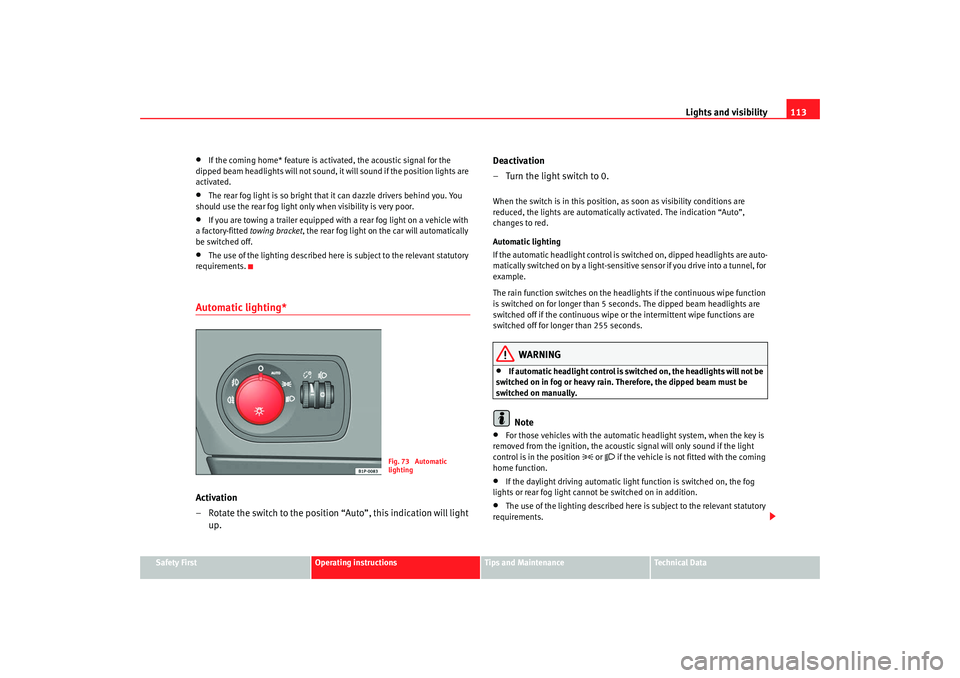
Automatic lighting*Activation
– Rotate the switch to the position “Auto”, this indication will light up. Deactivation
– Turn the light switch to 0.
When the switch is in this position, as soon as visibility conditions are
reduced, the lights are automaticall
y activated. The indication “Auto”,
changes to red.
Automatic lighting
If the automatic headlight control is switched on, dipped headlights are auto-
matically switched on by a light-sensitive sensor if you drive into a tunnel, for
example.
The rain function switches on the headlights if the continuous wipe function
is switched on for longer than 5 sec onds. The dipped beam headlights are
switched off if the continuous wipe or the intermittent wipe functions are
switched off for longer than 255 seconds.
WARNING
•
If automatic headlight control is switched on, the headlights will not be
switched on in fog or heavy rain. Therefore, the dipped beam must be
switched on manually.Note
•
For those vehicles with the automatic headlight system, when the key is
removed from the ignition, the acoustic signal will only sound if the light
control is in the position
or if the vehicle is not fitted with the coming
home function.
•
If the daylight driving automatic light function is switched on, the fog
lights or rear fog light cannot be switched on in addition.
•
The use of the lighting described here is subject to the relevant statutory
requirements.
Fig. 73 Automatic
lighting
leon ingles.book Seite 113 Dienst ag, 11. September 2007 1:47 13
Page 117 of 302

Lights and visibility115
Safety First
Operating instructions
Tips and Maintenance
Te c h n i c a l D a t a
Instrument and switch lighting / Headlight range controlInstrument and switch lighting
When the headlights are switched on, the brightness of the instruments and
switch lighting can be regulated to suit your requirements by turning the
thumb wheel ⇒fig. 74 .
Those vehicles fitted with xenon gas discharge headlights are fitted with an
automatic headlight range system.
Headlight range control
Using the electrical headlight range control, you can adjust the headlight
range to the load level that is being carried in the vehicle. In this way it is
possible to avoid dazzling oncoming traffi c more than necessary. At the same
time, the driver has the best possible lighting for the road ahead using the
correct headlight settings.
The headlights can only be adjusted when the dipped beam is switched on.
To lower the beam, turn the thumb wh eel down from the basic setting 0.Dynamic headlight range control
Vehicles with
gas discharge lamps (“xenon lamps”) are equipped with
dynamic headlight range control . This means that the headlights will be
adjusted to suit the load level of the vehicle and “nodding movements” when
pulling off and braking are automatically compensated for.
Vehicles with gas discharge lamps do not have headlight range control.
Self directional headlights*
When driving around bends the headlights will light the most
important areas of the road.This cornering light gives better illumina tion of the side of the road when
driving through a corner. The dynamic lighting is controlled automatically
according to speed and the steering wheel angle.
The two main headlights move at different angles to avoid that the front of the
vehicle is left completely in the dark.
Fig. 74 Instrument panel:
regulation for instrument
and switch illumination
and headlight range
control
A1
A1A2
A2A2
Fig. 75 Cornering
lighting using directional
headlights
leon ingles.book Seite 115 Dienst ag, 11. September 2007 1:47 13
Page 119 of 302

Lights and visibility117
Safety First
Operating instructions
Tips and Maintenance
Te c h n i c a l D a t a
Note
•
The battery will run down if the hazard warning lights are left on for a long
time, even if the ignition is switched off.
•
The use of the hazard warning lights d escribed here is subject to the rele-
vant statutory requirements.
Indicator and main beam headlight lever
The turn signal and main beam lever also operates the
parking lights and the headlight flasher.The turn signal and main beam headlight lever has the following
functions: Switching on the turn signals
– Move the lever all the way up
⇒fig. 77 to indicate right, and
all the way down to indicate left.
Signalling a lane change
– Push the lever up or down to the point where you incur resistance and then release the lever. The turn signal will flash
several times. The corresponding warning lamp will also flash.
Switching main beam on and off
– Turn the light switch to position
.
– Press the lever forward ⇒fig. 77 to switch on the main
beams.
– Pull the lever back towards you to switch the main beam head- lights off again.
Headlight flasher
– Pull the lever towards the steering wheel to operate the flasher.
Switching on parking lights
– Switch off the ignition and remove the key from the lock.
– Move the lever up or down to turn on the right or left-hand parking lights respectively.
Fig. 77 Turn signal and
main beam headlight
lever
A1
A2A1
A2A3
A4
leon ingles.book Seite 117 Dienst ag, 11. September 2007 1:47 13
Page 121 of 302

Lights and visibility119
Safety First
Operating instructions
Tips and Maintenance
Te c h n i c a l D a t a
Note
If not all the vehicle doors are closed, the interior lights will be switched off
after approx. 10 minutes, providing the key has been removed and the cour-
tesy light position selected. This prevents the battery discharging.Front reading lights Switching on the reading light
Press the button to switch on the reading light.
Switching off the reading lights
Press the button to switch off the reading light.
Rear interior and reading lights* The switch ⇒fig. 80 is used to select the following positions:
Interior light switched off 0
In switch position ⇒fig. 80 , the interior and reading lights are switched
off.
Switching on the reading light
Turn the switch to position (left reading light) or to position (right
reading light).
Courtesy light position
Turn the control to position . The interior lights are automatically switched
on when the vehicle is unlocked or the key removed from the ignition lock The
light turns off about 20 seconds after th e closure of the doors. The interior
lights are switched off when the vehicle is locked or when the ignition is
switched on.
Fig. 79 Interior roof trim:
front lights
ABAB
Fig. 80 Interior roof trim:
rear interior lights and
reading lights.
AC
A1A2
A4
A3
leon ingles.book Seite 119 Dienst ag, 11. September 2007 1:47 13