phone Seat Leon 5D 2013 MEDIA SYSTEM TOUCH - COLOUR
[x] Cancel search | Manufacturer: SEAT, Model Year: 2013, Model line: Leon 5D, Model: Seat Leon 5D 2013Pages: 56, PDF Size: 2.47 MB
Page 2 of 56
Table of ContentsGeneral information . . . . . . . . . . . . . . . .2
Important Information . . . . . . . . . . . . . .
3
Introduction . . . . . . . . . . . . . . . . . . . . . . . . . .
4
Before using the unit for the first time . . . . . .
4
Safety notes . . . . . . . . . . . . . . . . . . . . . . . . . . . . . .
4
Unit overview . . . . . . . . . . . . . . . . . . . . . . . . . . . . .
6
General information on operating the unit . .
8
Audio mode . . . . . . . . . . . . . . . . . . . . . . . . . . .
12
Radio mode . . . . . . . . . . . . . . . . . . . . . . . . . . . . . . .
12
Media mode . . . . . . . . . . . . . . . . . . . . . . . . . . . . . .
20
USB/AUX-IN multimedia interface* . . . . . . . . .
28
PHONE mode* . . . . . . . . . . . . . . . . . . . . . . . .
31
Introduction to telephone management . . . . .
31
Places with special regulations . . . . . . . . . . . . .
32
Linking and connecting your mobile phone tothe infotainment system . . . . . . . . . . . . . . . . . . .
32
General information . . . . . . . . . . . . . . . . . . . . . . .
34
Bluetooth® . . . . . . . . . . . . . . . . . . . . . . . . . . . . . . .
34
Description of the telephone manager . . . . . .
34
PHONE main menu . . . . . . . . . . . . . . . . . . . . . . . .
35
Phone management function buttons . . . . . . .
36
Active call . . . . . . . . . . . . . . . . . . . . . . . . . . . . . . . . .
36
Enter Telephone number menu . . . . . . . . . . . . .
37Phonebook (contacts) menu . . . . . . . . . . . . . . .38
Call lists menu . . . . . . . . . . . . . . . . . . . . . . . . . . . .
38
Phonebook shortcut keys . . . . . . . . . . . . . . . . . .
39
Telephone setup . . . . . . . . . . . . . . . . . . . . . . . . . .
39
Bluetooth setup . . . . . . . . . . . . . . . . . . . . . . . . . . .
40
User profile setup . . . . . . . . . . . . . . . . . . . . . . . . .
40
CAR menu . . . . . . . . . . . . . . . . . . . . . . . . . . . . .
41
Introduction to managing the CAR menu . . . .
41
Air Conditioning Menu . . . . . . . . . . . . .
44
Air conditioning . . . . . . . . . . . . . . . . . . . . . . . . . . .
44
Setup . . . . . . . . . . . . . . . . . . . . . . . . . . . . . . . . . . .
45
System setup Menu (SETUP) . . . . . . . . . . . . . . .
45
Sound and volume setup . . . . . . . . . . . . . . . . . .
47
Abbreviations . . . . . . . . . . . . . . . . . . . . . . . .
49
Abbreviations . . . . . . . . . . . . . . . . . . . . . . . . . . . . .
49
Index . . . . . . . . . . . . . . . . . . . . . . . . . . . . . . . . . . .
511Table of Contents
Page 8 of 56
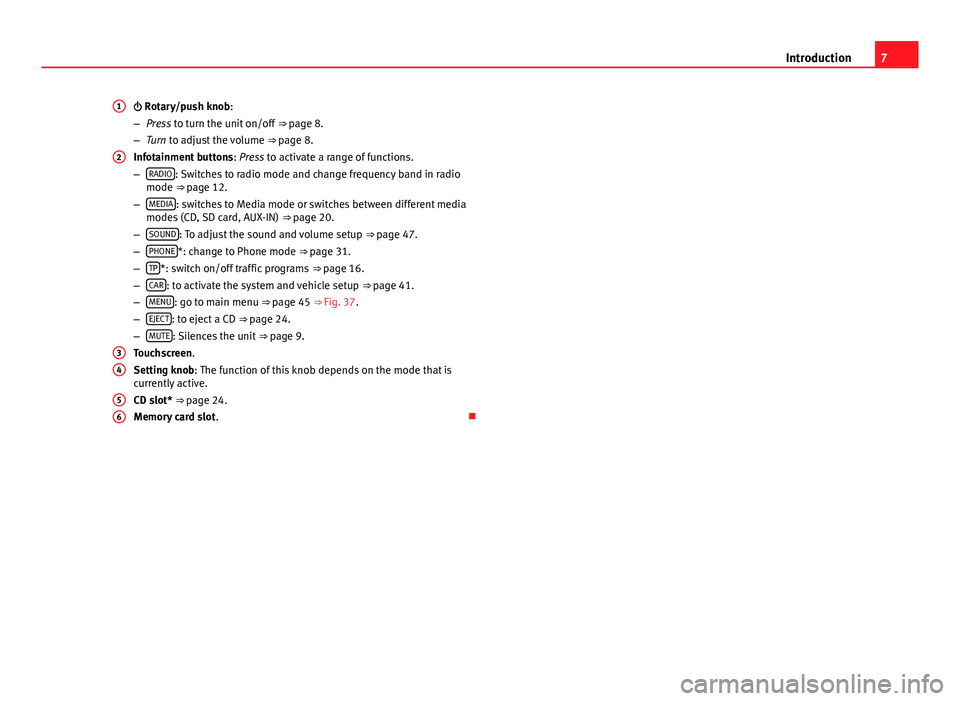
7Introduction Rotary/push knob:
–Press to turn the unit on/off ⇒ page 8.
–Turn to adjust the volume ⇒ page 8.
Infotainment buttons: Press to activate a range of functions.
–RADIO: Switches to radio mode and change frequency band in radiomode ⇒ page 12.
–MEDIA: switches to Media mode or switches between different mediamodes (CD, SD card, AUX-IN) ⇒ page 20.
–SOUND: To adjust the sound and volume setup ⇒ page 47.
–PHONE*: change to Phone mode ⇒ page 31.
–TP*: switch on/off traffic programs ⇒ page 16.
–CAR: to activate the system and vehicle setup ⇒ page 41.
–MENU: go to main menu ⇒ page 45 ⇒ Fig. 37.
–EJECT: to eject a CD ⇒ page 24.
–MUTE: Silences the unit ⇒ page 9.
Touchscreen.
Setting knob: The function of this knob depends on the mode that iscurrently active.
CD slot* ⇒ page 24.
Memory card slot.
123456
Page 9 of 56
8IntroductionGeneral information on operating the unit
Introduction
Note
●Lightly pressing the buttons or briefly pressing the touchscreen is suffi-cient to operate the unit.●
It is possible that not all the functions and function buttons are availa-ble as the software of the unit responds to the specific characteristics ofeach market. A missing function button on the screen is not the result of anerror in the unit.
●
Due to country-specific legislation, certain functions cannot be selectedon the screen when the vehicle is travelling above a certain speed.
●
Using a mobile phone inside the vehicle can cause noise in the speak-ers.
●
There may be restrictions on the use of Bluetooth devices in some coun-tries. Information is available from the local authorities.
●
In some vehicles equipped with a parking distance warning system, thevolume of the audio source is automatically lowered when the gear is en-gaged.
●
If the steering wheel includes the voice control button, this function isnot viable with this radio model, hence it has no functionality whatsoever.
Rotary push knobs and buttons
Rotary/push knobs
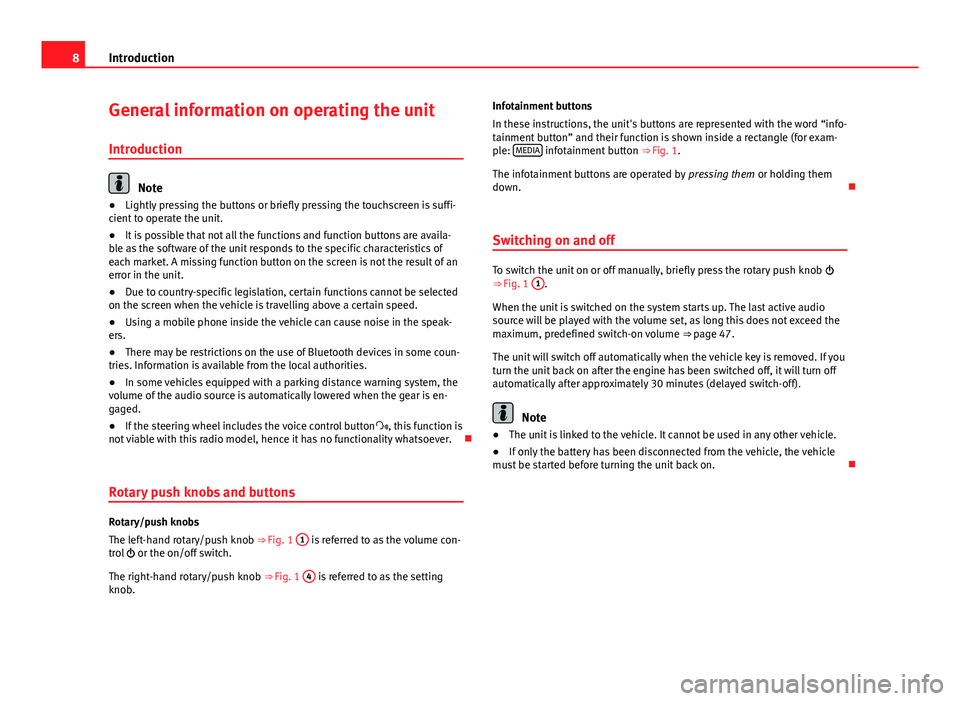
The left-hand rotary/push knob ⇒ Fig. 1
1
is referred to as the volume con-trol or the on/off switch.
The right-hand rotary/push knob ⇒ Fig. 1
4
is referred to as the settingknob.
Infotainment buttons
In these instructions, the unit's buttons are represented with the word “info-tainment button” and their function is shown inside a rectangle (for exam-ple: MEDIA infotainment button ⇒ Fig. 1.
The infotainment buttons are operated by pressing them or holding themdown.
Switching on and off
To switch the unit on or off manually, briefly press the rotary push knob ⇒ Fig. 1
1
.
When the unit is switched on the system starts up. The last active audiosource will be played with the volume set, as long this does not exceed themaximum, predefined switch-on volume ⇒ page 47.
The unit will switch off automatically when the vehicle key is removed. If youturn the unit back on after the engine has been switched off, it will turn offautomatically after approximately 30 minutes (delayed switch-off).
Note
●The unit is linked to the vehicle. It cannot be used in any other vehicle.●
If only the battery has been disconnected from the vehicle, the vehiclemust be started before turning the unit back on.
Page 26 of 56
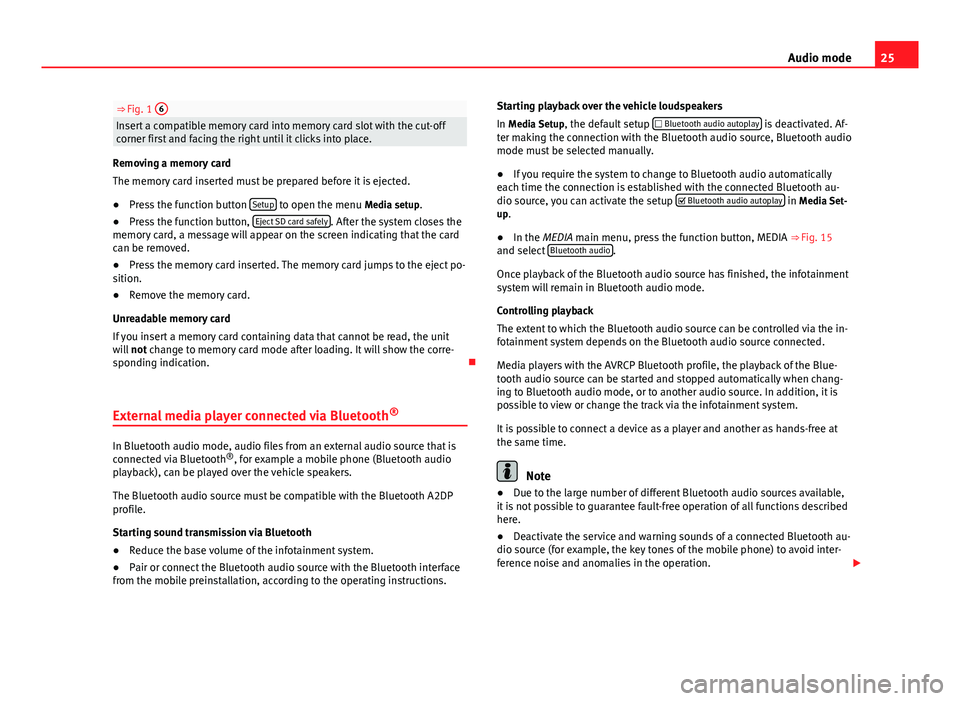
25Audio mode⇒ Fig. 1 6Insert a compatible memory card into memory card slot with the cut-offcorner first and facing the right until it clicks into place.
Removing a memory card
The memory card inserted must be prepared before it is ejected.
●
Press the function button Setup to open the menu Media setup.
●
Press the function button, Eject SD card safely. After the system closes thememory card, a message will appear on the screen indicating that the cardcan be removed.
●
Press the memory card inserted. The memory card jumps to the eject po-sition.
●
Remove the memory card.
Unreadable memory card
If you insert a memory card containing data that cannot be read, the unitwill not change to memory card mode after loading. It will show the corre-sponding indication.
External media player connected via Bluetooth®
In Bluetooth audio mode, audio files from an external audio source that isconnected via Bluetooth®, for example a mobile phone (Bluetooth audioplayback), can be played over the vehicle speakers.
The Bluetooth audio source must be compatible with the Bluetooth A2DPprofile.
Starting sound transmission via Bluetooth
●
Reduce the base volume of the infotainment system.
●
Pair or connect the Bluetooth audio source with the Bluetooth interfacefrom the mobile preinstallation, according to the operating instructions.
Starting playback over the vehicle loudspeakers
In Media Setup, the default setup Bluetooth audio autoplay is deactivated. Af-ter making the connection with the Bluetooth audio source, Bluetooth audiomode must be selected manually.
●
If you require the system to change to Bluetooth audio automaticallyeach time the connection is established with the connected Bluetooth au-dio source, you can activate the setup Bluetooth audio autoplay in Media Set-up.
●
In the MEDIA main menu, press the function button, MEDIA ⇒ Fig. 15and select Bluetooth audio.
Once playback of the Bluetooth audio source has finished, the infotainmentsystem will remain in Bluetooth audio mode.
Controlling playback
The extent to which the Bluetooth audio source can be controlled via the in-fotainment system depends on the Bluetooth audio source connected.
Media players with the AVRCP Bluetooth profile, the playback of the Blue-tooth audio source can be started and stopped automatically when chang-ing to Bluetooth audio mode, or to another audio source. In addition, it ispossible to view or change the track via the infotainment system.
It is possible to connect a device as a player and another as hands-free atthe same time.
Note
●Due to the large number of different Bluetooth audio sources available,it is not possible to guarantee fault-free operation of all functions describedhere.
●
Deactivate the service and warning sounds of a connected Bluetooth au-dio source (for example, the key tones of the mobile phone) to avoid inter-ference noise and anomalies in the operation.
Page 32 of 56
31PHONE mode*PHONE mode*Introduction to telephone management
The telephone functions described below can be managed through the info-tainment system provided a mobile phone is paired and connected to theinfotainment system.
●
Linking and connecting a mobile phone to the infotainment system.
The requirement for establishing a connection between a mobile phone andthe infotainment system is that the mobile phone has Bluetooth®.
When there is no mobile phone linked to the infotainment system, tele-phone management is not available.
Please refer to the notes on how to use mobile telephones in vehicles with-out connection to the exterior antenna ⇒ Booklet Instruction Manual, chap-ter Accessories and technical modifications.
WARNINGMaking calls and managing the preinstallation for mobile phones whiledriving can distract you from the traffic and cause an accident.●
Always stay alert and drive responsibly.
●
Select volume settings that allow you to easily hear signals from out-side the vehicle at all times (e.g. emergency service sirens).
●
In areas with no or poor network coverage, under certain circumstan-ces in tunnels, garages and underpasses, telephone conversations maycut out or it may be impossible to make calls, even in an emergency.
WARNINGA loose or incorrectly secured mobile phone could be thrown inside thevehicle and cause injury in the event of sudden manoeuvres, braking oraccidents.
●
While driving, the mobile phone must always be correctly secured,outside of the working radius of the airbag.
WARNINGIf you carry a mobile phone that is switched on directly over a pacemaker,this may cause interference in its functioning.●
Between the antenna of the mobile phone and the pacemaker theremust be a minimum distance of 20 centimetres for the mobile phone notto affect the functioning of the pacemaker.
●
Do not carry your mobile phone in your breast pocket, directly overthe pacemaker, when it is switched on.
●
If you suspect your mobile phone is causing interference, switch it offimmediately.
Note
●Telephone conversations inside the vehicle can be affected by highspeed, poor atmospheric conditions and the road surface, as well as by thequality of the network.
●
The instructions that appear on the screen related to the menu of eachphone depend on the mobile phone used. There may be differences.
●
Take into account the instruction manuals of the mobile phone and thesupplier of the accessories, and any instructions for using the headset.
●
In areas with poor coverage there may be anomalies in the receptionand calls may be interrupted.
Page 33 of 56
32PHONE mode*●Consult the compatibility list to ensure your mobile phone will workproperly.●
If you detect any strange behaviour between your mobile phone and theradio, restart your mobile by switching it off and on again.
●
Most electronic devices are shielded against high-frequency radio sig-nals. On certain occasions, nevertheless, electronic equipment might notbe protected against the radio frequency signals of the telephone manage-ment (Phone). This may produce interference.
Places with special regulations
Switch off the mobile phone and the preinstallation for mobile telephonesin places with risk of explosion. These areas are common but are not alwaysclearly marked ⇒ in Introduction to telephone management on page 31.They include, for example:
●
Areas with piping and reservoirs containing chemical products.
●
Below deck, on boats and ferries.
●
Near vehicles that run on liquefied gas (such as propane or butane).
●
In places where there are chemical substances or particles such as flour,dust or metal chips in the air.
●
In any other place where you must turn off the engine of your vehicle.
WARNINGSwitch off your mobile phone in places with risk of explosion! Your mo-bile phone will automatically connect to the mobile phone network assoon as the Bluetooth connection is cut from the mobile preinstallation.
NoteIn areas with special requirements and where the use of mobile phones isprohibited, you must keep the mobile phone and its preinstallation switch-ed off at all times. The radiation emitted by mobile phones when switchedon can cause interference in sensitive technical and medical equipment,which could damage this equipment or cause it to stop working properly.
Linking and connecting your mobile phone to
the infotainment system
To operate a mobile phone through the infotainment system, you need tolink both devices one time only.
For your safety, we recommend you carry out this connection when the vehi-cle is stationary. In some countries you cannot perform the pairing with thevehicle running.
You must guarantee the following setup in the mobile phone and the info-tainment system:
●
The Bluetooth® function must be active and visible on the mobile phoneand infotainment system, respectively.
●
The keypad lock of the mobile phone must be disconnected.
●
The notification and key tones of your mobile phone must be disconnec-ted.
In some countries, after switching the ignition on, the Bluetooth® functionof the infotainment system must be activated or remain visible for around 3minutes.
During the linking process you must enter data using your mobile phone'skeypad. To do so, you must have your mobile phone to hand.
Page 34 of 56
33PHONE mode*Once the link has been made, the schedule and call lists stored in your mo-bile phone will be loaded. The duration of the loading process depends onthe amount of data stored on your mobile phone. When the loading processis complete, the data will be available to the infotainment system.
Starting the link from the system
Make sure the mobile device is active and visible.
●
Press the PHONE unit button.
●
Press the function button Find.
OR:
●
Press the PHONE unit button.
●
Press the Setup function button.
●
Press the function button Select phone and then Find.
The search process can take up to 1 minute. On the screen the system willdynamically update the names of the Bluetooth devices found.
●
Select the mobile phone to which you want to pair from the list of Blue-tooth devices found.
Select the profile you want to connect:Connect all profiles: will connect all the profiles available by mobile andcompatible with the systemHands-free: will connect the hands-free profileBluetooth audio: will connect the Bluetooth audio profile
The infotainment system and the mobile phone will now be connected toeach other. In certain circumstances, it is possible that to finish the connec-tion between the two devices, you must enter additional data in the mobilephone and infotainment system.
●If necessary, confirm the pairing request in the mobile phone.●
Use your mobile phone to enter and confirm your PIN code, as indicatedin the display of the infotainment system.
●
OR: Compare the PIN code shown in the display of the infotainment sys-tem with the PIN code that appears on the mobile phone. If they coincide,you must confirm it on both devices.
Once pairing is complete, the PHONE main menu will be shown.
Linking and connecting mobile telephones
You can pair up to 20 mobile phones to the infotainment system, but onlyone mobile phone can be connected as hands-free, and another device as aBluetooth audio profile.
When you turn on the infotainment system the connection is automaticallyestablished with the mobile phone that was last connected. If it cannot es-tablish a connection with that mobile phone, the phone manager will auto-matically try to establish a connection with the next mobile phone that ap-pears on the list of linked devices.
The working radius of the Bluetooth connection is a maximum of 10 metres.If this working radius is exceeded, the connection established through Blue-tooth will be interrupted. The connection is automatically re-established assoon as this device comes back into the Bluetooth working radius.
If the maximum number of linked devices is reached and you wish to linkanother one to the system, it will automatically replace the one that has re-cently been used the least. If you wish to replace it with another one, theuser must erase it beforehand. To do so:
●
Press the unit button Setup within the telephone context.
●
Press the function button Bluetooth setup.
●
Press the function button My devices.
●
In the list of paired devices, press the function button remove after themobile phone to be deleted and then press Delete to confirm the process.
Page 35 of 56
34PHONE mode*Note●The behaviour may vary depending on the device connected.●
For some android mobile devices you must accept the request to accessthe PBAP phonebook after linking, to be able to access the phonebook. It isrecommended to activate the option “always” so as not to have to accept itevery time you connect.
General information
Please refer to the notes on using a mobile phone in the vehicle withoutconnection to exterior antenna ⇒ Booklet Instruction Manual, chapter Ac-cessories and technical modifications.
Only use devices that support Bluetooth. At your SEAT dealership, or on theInternet, you will find information about products that support Bluetooth.
Take into account the instruction manual of the mobile phone and of themanufacturer of the accessories. In areas with poor coverage there may beanomalies in the reception and calls may be interrupted.
Most electronic devices are shielded against radio frequency signals (high-frequency). On some occasions, nevertheless, electronic devices cannot beprotected against the radio frequency signals from the telephone manager.This may produce interference.
Note
●There may be restrictions on the use of Bluetooth devices in some coun-tries. Information is available from the local authorities.●
To connect the phone manager to a device via Bluetooth technology,read the corresponding instruction manual for the particular safety instruc-tions. Only use products that support Bluetooth.
Bluetooth®
Bluetooth®
Bluetooth technology is used to connect a mobile phone to the vehicle'sphone manager. To use the phone manager with a mobile phone with Blue-tooth, the pairing process must be performed once.
If a connection has already been established, some mobile phones withBluetooth are recognised and a connection is established with them auto-matically when the ignition is switched on. For this purpose, the mobilephone and its Bluetooth must be switched on, and all the live Bluetoothconnections with other devices must be closed.
The Bluetooth wireless connection is free.
Bluetooth® is a registered trademark of Bluetooth® SIG, Inc.
Bluetooth profiles®
When you connect a mobile phone to the phone manager, the data ex-change is through one of the 2 Bluetooth profiles.
●
Hands-free Bluetooth profile (HFP): If a mobile phone is connected tothe telephone manager through the HFP, calls can be made wirelesslythrough the hands-free device.
●
Advanced audio profile (A2DP): Bluetooth profile for transmitting audiosignals with stereo quality.
Description of the telephone manager
Some functions and settings can only be carried out when the vehicle is sta-tionary, and are not compatible with all mobile telephones.
Page 36 of 56
35PHONE mode*Description1)
The telephone manager described in these instructions is approved for useon the following networks: GSM 850, GSM 900, GSM 1800 and GSM 1900.
With the help of the telephone manager, up to 2 mobile telephones can beconnected to the infotainment system via the Bluetooth profiles (for exam-ple, one used as a Bluetooth-audio player and another as a hands-free tele-phone).
Note
●Using a mobile phone inside the vehicle may provoke noise in thespeakers.●
It is possible that some networks may not offer the characters of all lan-guages, nor certain services.
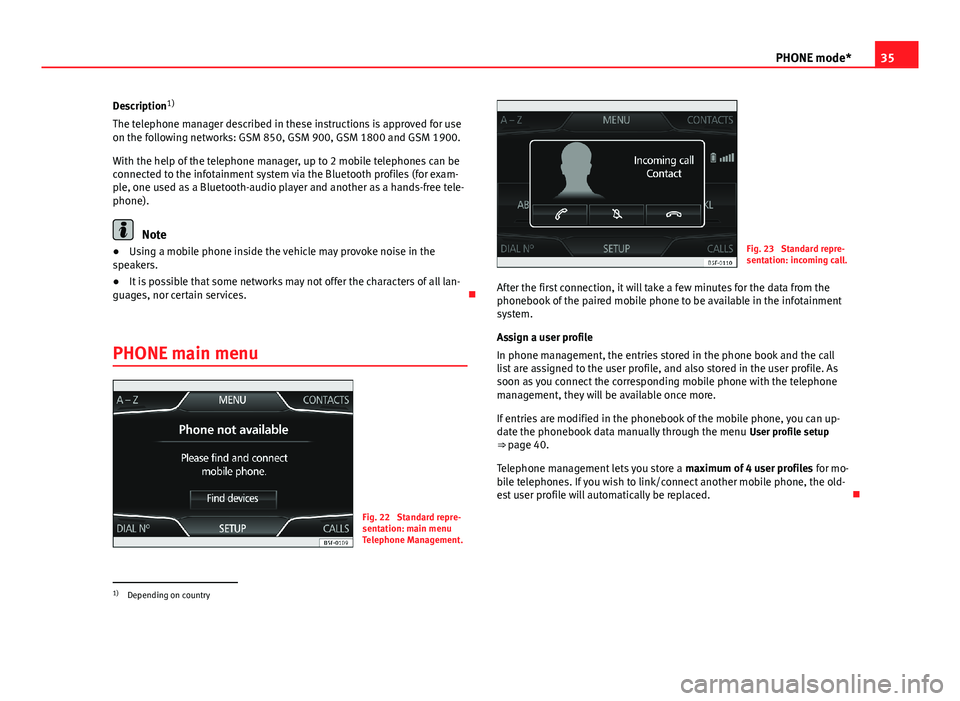
PHONE main menu
Fig. 22
Standard repre-sentation: main menuTelephone Management.
Fig. 23
Standard repre-sentation: incoming call.
After the first connection, it will take a few minutes for the data from thephonebook of the paired mobile phone to be available in the infotainmentsystem.
Assign a user profile
In phone management, the entries stored in the phone book and the calllist are assigned to the user profile, and also stored in the user profile. Assoon as you connect the corresponding mobile phone with the telephonemanagement, they will be available once more.
If entries are modified in the phonebook of the mobile phone, you can up-date the phonebook data manually through the menu User profile setup⇒ page 40.
Telephone management lets you store a maximum of 4 user profiles for mo-bile telephones. If you wish to link/connect another mobile phone, the old-est user profile will automatically be replaced.
1)
Depending on country
Page 37 of 56
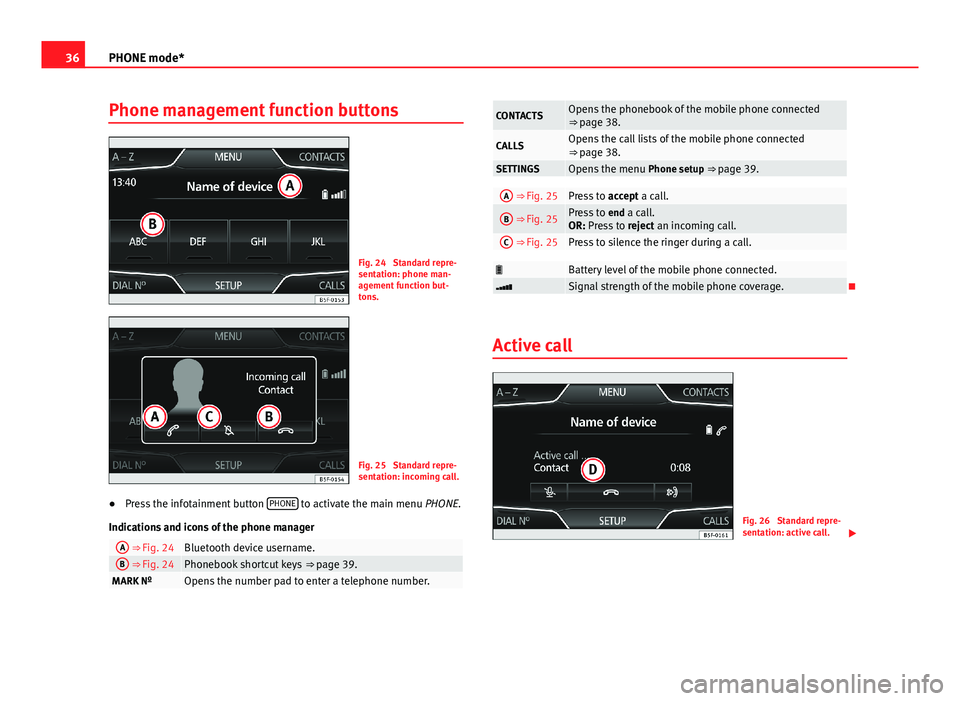
36PHONE mode*Phone management function buttonsFig. 24
Standard repre-sentation: phone man-agement function but-tons.
Fig. 25
Standard repre-sentation: incoming call.
●
Press the infotainment button PHONE to activate the main menu PHONE.
Indications and icons of the phone manager
A ⇒ Fig. 24Bluetooth device username.B ⇒ Fig. 24Phonebook shortcut keys ⇒ page 39.MARK NºOpens the number pad to enter a telephone number.CONTACTSOpens the phonebook of the mobile phone connected⇒ page 38.CALLSOpens the call lists of the mobile phone connected⇒ page 38.SETTINGSOpens the menu Phone setup ⇒ page 39.A ⇒ Fig. 25Press to accept a call.B ⇒ Fig. 25Press to end a call.OR: Press to reject an incoming call.
C ⇒ Fig. 25Press to silence the ringer during a call.Battery level of the mobile phone connected.Signal strength of the mobile phone coverage.
Active call
Fig. 26
Standard repre-sentation: active call.