clutch Seat Leon 5D 2013 User Guide
[x] Cancel search | Manufacturer: SEAT, Model Year: 2013, Model line: Leon 5D, Model: Seat Leon 5D 2013Pages: 339, PDF Size: 4.8 MB
Page 183 of 339
181
Driving
– Select Eco mode ⇒ page 211 once in SEAT Drive Mode*.
– Take your foot off the accelerator.
The driver message Inertia will be displayed. At speeds higher
than 20 km/h (12 mph), the gearbox will automatically disengage
and the vehicle will roll freely, without the effect of the engine
brake. While the vehicle rolls, the engine runs at idling speed.
Stopping inertia mode
– Press the brake or the accelerator pedal.
To make use of the braking force and switch off the engine again,
simply press the brake pedal briefly.
Applying both the inertia mode (= prolonged section with less energy) and
the switching off using inertia (= shorter section without the need for fuel)
facilitates improved fuel consumption and emission balance.
WARNING
● If the inertia mode has been switched on, take into account, when ap-
proaching an obstacle and releasing the accelerator pedal, that the vehi-
cle will not decelerate in the usual manner: risk of accident!
● When using inertia mode while travelling down hills, the vehicle can
increase speed: risk of accident!
● If other users drive your vehicle, warn them about inertia mode.
Note
● Inertia mode is only available in eco driving mode (SEAT Drive Mode*).
● The driver message Inertia is only displayed with the current consump-
tion. In inertia mode the gear will no longer be displayed (for example: “E”
will appear in place of “E7”).
● On downhill sections with gradients above 15 %, the inertia mode will
automatically be switched off temporarily.
Backup programme
A backup programme is in place if a fault should occur in the
control system.
If all the positions of the selector lever are shown over a light background
on the instrument panel display, there is a system fault and the automatic
gearbox will operate in with the backup programme. When the backup pro-
gramme is activated, it is possible to drive the vehicle, however, at low
speeds and within a selected range of gears. In some cases driving in re-
verse gear may not be possible .
CAUTION
If the gearbox operates with the backup programme, take the vehicle to a
specialised workshop and have the fault repaired without delay.
Clutch
Clutch overheated! Stop the vehicle!
The clutch has overheated and could be damaged. In order to prevent the
temperature from increasing again and so that the clutch is cooled, stop the
Safety FirstOperating instructionsPractical TipsTechnical specifications
Page 184 of 339
182Driving
vehicle and wait for the gearbox to cool down with the selector lever in posi-
tion P and the engine running at idling speed. If the warning does not
switch off, do not continue driving. Seek specialist assistance. Failure to do
so could cause considerable damage to the gearbox. When the warning
switches off, the fault should be corrected by a specialised workshop with-
out delay.
Faults in the gearbox
Gearbox: Fault! Stop the vehicle and place the lever in the position P.
There is a fault in the gearbox. Stop the vehicle in a safe place and do not
continue driving. Seek specialist assistance. Overheated clutch! Stop the vehicle!
The clutch has overheated and could be damaged. Stop the vehicle and
wait for the gearbox to cool with the engine at idling speed and the selector
lever in position P. When the warning lamp and the driver message switch
off, have the fault corrected by a specialised workshop without delay. If the
warning lamp and the driver message do not switch off, do not continue
driving. Seek specialist assistance. Gearbox: System fault! You may continue driving.
Have the fault corrected by a specialised workshop without delay. Gearbox: System fault! You can continue driving with restrictions. Re-
verse gear disabled.
Take the vehicle to a specialised workshop and have the fault repaired with-
out delay. Gearbox: System fault! You can continue driving in D until switching off
the engine Stop the vehicle in a safe place well away from moving traffic. Seek special-
ist assistance.
Gearbox: too hot. Adapt your driving accordingly
Continue driving at moderate speeds. When the warning lamp switches off,
you can continue driving in a normal manner. Gearbox: press the brake and engage a gear again.
If the fault was caused by a gearbox with a high temperature, this driver
message will be displayed when the gearbox has cooled again.
Manual release of the selector lever
The selector lever can be released manually if the electrical
power supply should fail.
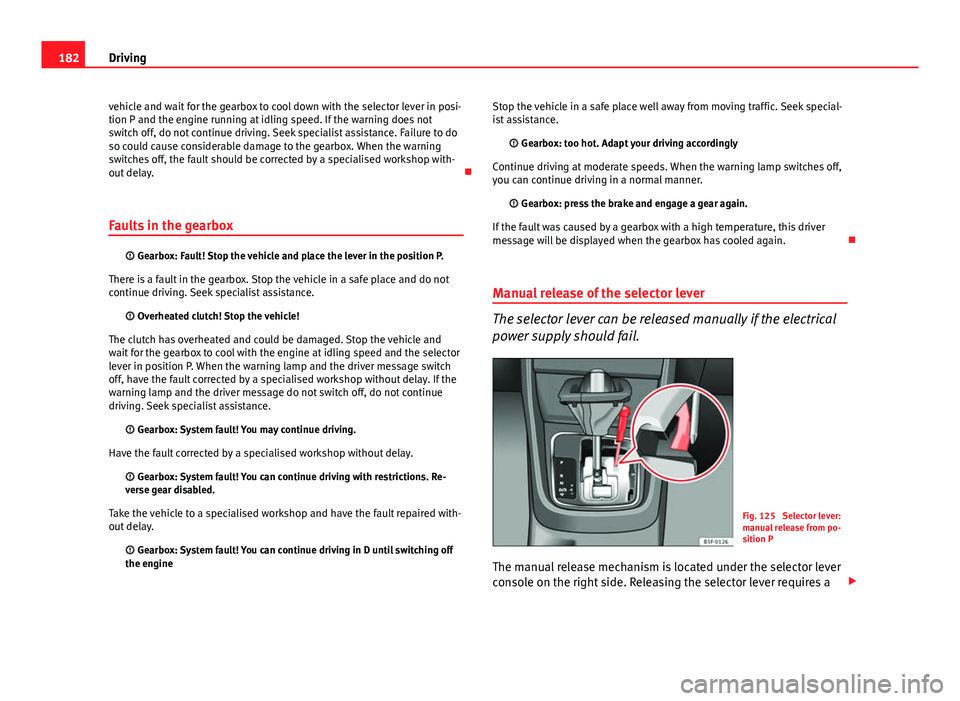
Fig. 125 Selector lever:
manual release from po-
sition P
The manual release mechanism is located under the selector lever
console on the right side. Releasing the selector lever requires a
Page 189 of 339
187
Driver assistance systems
effectPosition of the switch, operating the switch on the turn signal lever ⇒ Fig. 127, or
by using the third lever ⇒ Fig. 128Action
Increasing the stored
speed (during CCS setting)
Depending on equipment fitted:
– briefly press the button 3 on the turn signal lever in the
RES
zone– or briefly move the third lever to the RESUME position to increase speed by
1 km/h (1 mph)
– or move the third lever upwards with SPEED+ to increase the speed by 10 km/h
(10 mph) and store it
– or continuously press the button 3
on the turn signal lever in the
RES
zone– or move the third lever upwards with SPEED+ continuously
– or move the third lever to the RESUME position and hold it to continuously in-
crease the speed and store it.
The vehicle accelerates actively until it rea-
ches the new stored speed.
Increasing the stored
speedWhen the CCS is in the ON position, but DEACTIVATED, the speed setting can be
increased with SPEED+ by 10 km/h (10 mph).The vehicle accelerates actively until it rea-
ches the new stored speed.
Reducing the stored speed
(during CCS setting)
Depending on equipment fitted:
– briefly press the button 3 on the turn signal lever in the
SET zone to reduce
speed by 1km/h (1mph)
– or briefly move the third lever to the SET position to reduce the speed by 1 km/h
(1 mph)
– or move the third lever downwards with SPEED– to reduce the speed by 10 km/
h (10 mph) and store it
– or continuously press the button 3
on the turn signals lever in the
SET
zone– or press and hold the button SET on the third lever to reduce speed contin-
uously
– or move the third lever downwards ( SPEED–) continuously and store it.
Speed is reduced without braking, by inter-
rupting the accelerator until reaching the
new stored speed.
Setting a lower speedWhen the CCS is in the ON position, but DEACTIVATED, the speed setting can be
reduced with SPEED– by 10 km/h (10 mph).The system is switched off. The stored speed
is deleted.
Switching off the CCSMove the switch 1 to the OFF position.
OR: move the third lever to the OFF position.Speed is reduced without intervening in the
braking system, by interrupting the accelera-
tor until reaching the new stored speed.
The value indicated in the table in brackets (in mph, miles per hour) only
refers to instrument panels with indications in miles. Changing gear in CCS mode
The CCS decelerates as soon as the clutch pedal is pressed, intervening
again automatically after a gear is engaged.
Safety FirstOperating instructionsPractical TipsTechnical specifications
Page 199 of 339
197
Driver assistance systems
Message texts
ACC not available
The system cannot continue to guarantee safe vehicle detection so it is
switched off. The sensor has lost its setting or is damaged. Take the vehicle
to a specialised workshop to have the fault repaired.
ACC: not available at the moment. Sensor without visibility
ACC and Front Assist: not available at the moment. Sensor without
visibility
This message for the driver is displayed if the visibility of the radar's sensor
is impaired, e.g., by leaves, snow, heavy mist or dirt. Clean the sensor.
ACC: not available at the moment. Gradient too steep
The maximum slope has been exceeded, hence it cannot be guaranteed
that the adaptive cruise control will operate safely. The adaptive cruise con-
trol cannot be activated
ACC: only available in D, S or M
Select the position of the selector lever D/S or M.
ACC: parking brake applied
The adaptive cruise control is deactivated if the parking brake is applied.
The adaptive cruise control is available again if the parking brake is re-
leased.
ACC: not available at the moment. Stabilisation control intervention
The message for the driver is shown when the electronic stabilisation con-
trol (ESC) intervenes. In this case, the adaptive cruise control will automati-
cally be switched off.
ACC: Intervene!
The message for the driver is shown if, when you start up on a gentle slope,
the vehicle moves backwards even although the ACC is switched on. Step on the brake pedal to prevent the vehicle from moving/crashing into anoth-
er vehicle.
ACC: speed limit
The message for the driver is shown in vehicles with manual gearbox if the
current speed is too low for ACC mode.
The speed you wish to store must be at least 30 km/h. The cruise control
system switches off if the speed falls below 20 km/h.
ACC: available as of the 2nd gear
The adaptive cruise control is operational as of the 2nd gear (manual gear-
box).
ACC: engine speed
The message for the driver is shown if, when the adaptive cruise control ac-
celerates or brakes, the driver does not go up or down a gear in time, which
would mean either exceeding or not reaching the admissible rpm. The adap-
tive cruise control will then be switched off. A warning buzzer goes off.
ACC: clutch pressed down
Vehicles with a manual gearbox: press the clutch pedal for longer to exit
control.
Three white dots appear if a setting made with the control lever cannot be
executed. For example, the adaptive cruise control cannot be switched on in
a stationary vehicle when the driver's seatbelt is not fastened.
Door open
Vehicles with automatic gearbox: the adaptive cruise control cannot be
switched on in a stationary vehicle with the door open.
Safety FirstOperating instructionsPractical TipsTechnical specifications
Page 205 of 339
203
Driver assistance systems
WARNING (Continued)
● In complex driving conditions, the Front Assist may unnecessarily
warn and act unintentionally on the brakes, such as, for example, in the
case of traffic islands.
● If the operation of the Front Assist is impaired, for example, because
of dirt or because the radar sensor has lost its setting, the system may
issue unnecessary warnings and act inappropriately on the brakes.
● The ACC does not react during driving to people or animals or vehi-
cles changing lane or approaching in the opposite direction in the same
lane.
● The driver must always be ready to take control of the vehicle again.
Note
● When the Front Assist causes a braking, the brake pedal is “harder”.
● Automatic interventions in the Front Assist braking may be interrupted
by pressing the clutch pedal, accelerator or moving the steering wheel.
● If the Front Assist does not work as described in this chapter (e.g. if it
intervenes several times unnecessarily), switch it off. Have the system
checked by a specialised workshop. SEAT recommends visiting a SEAT deal-
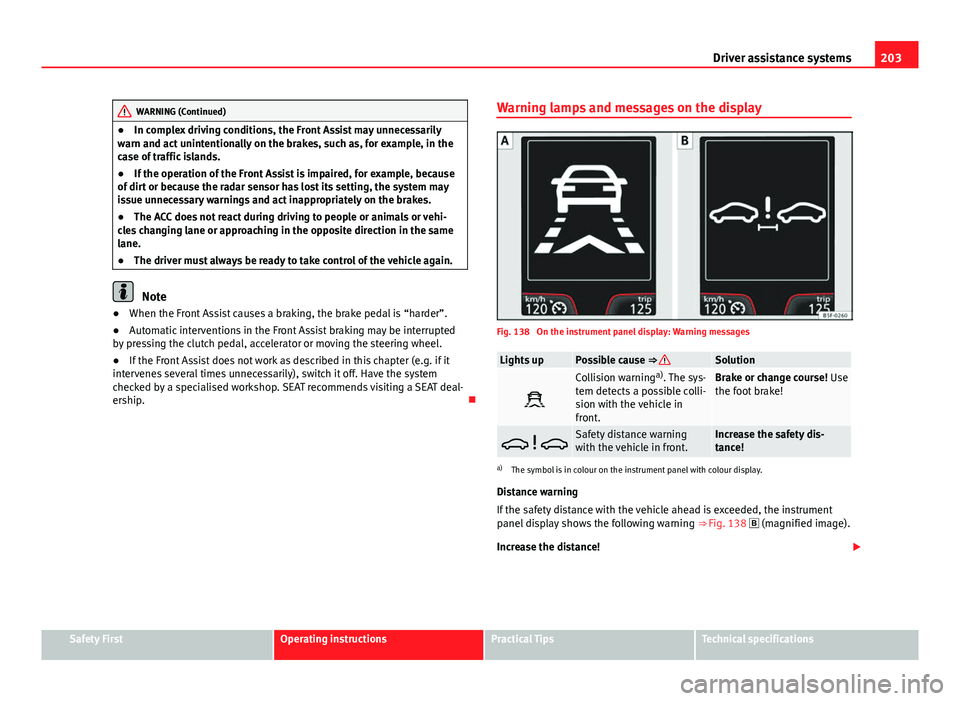
ership. Warning lamps and messages on the display
Fig. 138 On the instrument panel display: Warning messages
Lights upPossible cause ⇒ Solution
Collision warning
a)
. The sys-
tem detects a possible colli-
sion with the vehicle in
front.Brake or change course! Use
the foot brake!
Safety distance warning
with the vehicle in front.Increase the safety dis-
tance!
a) The symbol is in colour on the instrument panel with colour display.
Distance warning
If the safety distance with the vehicle ahead is exceeded, the instrument
panel display shows the following warning ⇒ Fig. 138
(magnified image).
Increase the distance!
Safety FirstOperating instructionsPractical TipsTechnical specifications
Page 209 of 339
207
Driver assistance systems
If the driver does not react to a collision hazard, the system can automati-
cally brake the vehicle by progressively increasing braking pressure to re-
duce speed in the event of a collision. The system can thus help to reduce
the consequences of an accident.
Status display
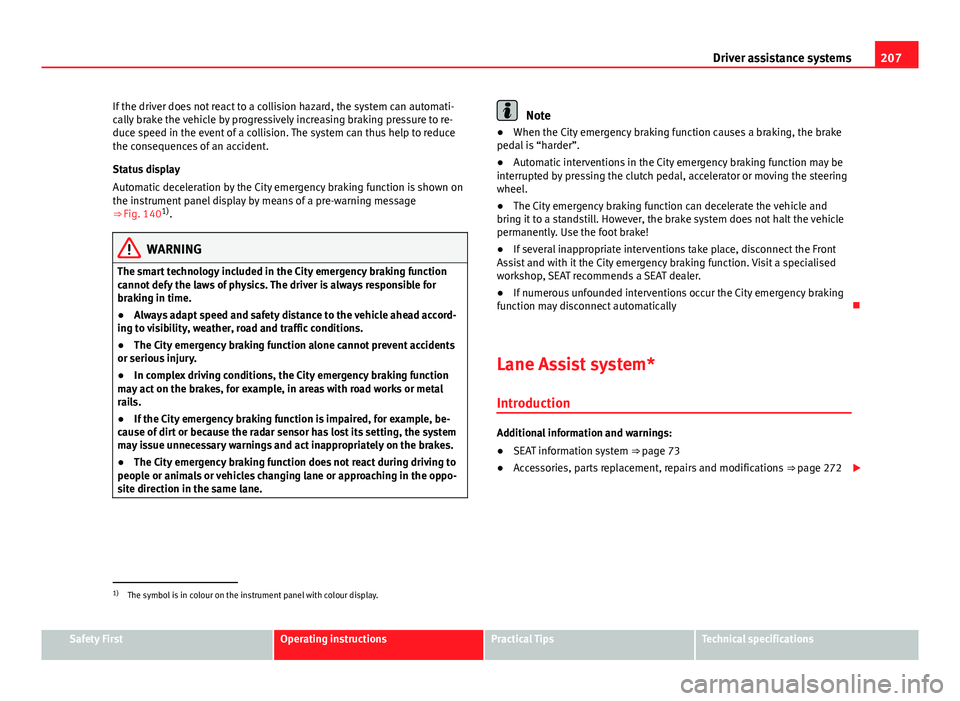
Automatic deceleration by the City emergency braking function is shown on
the instrument panel display by means of a pre-warning message
⇒ Fig. 140 1)
.
WARNING
The smart technology included in the City emergency braking function
cannot defy the laws of physics. The driver is always responsible for
braking in time.
● Always adapt speed and safety distance to the vehicle ahead accord-
ing to visibility, weather, road and traffic conditions.
● The City emergency braking function alone cannot prevent accidents
or serious injury.
● In complex driving conditions, the City emergency braking function
may act on the brakes, for example, in areas with road works or metal
rails.
● If the City emergency braking function is impaired, for example, be-
cause of dirt or because the radar sensor has lost its setting, the system
may issue unnecessary warnings and act inappropriately on the brakes.
● The City emergency braking function does not react during driving to
people or animals or vehicles changing lane or approaching in the oppo-
site direction in the same lane.
Note
● When the City emergency braking function causes a braking, the brake
pedal is “harder”.
● Automatic interventions in the City emergency braking function may be
interrupted by pressing the clutch pedal, accelerator or moving the steering
wheel.
● The City emergency braking function can decelerate the vehicle and
bring it to a standstill. However, the brake system does not halt the vehicle
permanently. Use the foot brake!
● If several inappropriate interventions take place, disconnect the Front
Assist and with it the City emergency braking function. Visit a specialised
workshop, SEAT recommends a SEAT dealer.
● If numerous unfounded interventions occur the City emergency braking
function may disconnect automatically
Lane Assist system* Introduction
Additional information and warnings:
● SEAT information system ⇒ page 73
● Accessories, parts replacement, repairs and modifications ⇒ page 272
1)
The symbol is in colour on the instrument panel with colour display.
Safety FirstOperating instructionsPractical TipsTechnical specifications
Page 288 of 339
286Emergencies
Towing and tow-starting the vehicle
General information
Points to observe when tow-starting or towing away If you use a tow rope:
Notes for the driver of the towing vehicle
– The tow rope must be taut before you drive off.
– Release the clutch very carefully when starting the vehicle
(manual gearbox), or accelerate gently (automatic gearbox).
Notes for the driver of the towed vehicle
– The ignition should be switched on so that the turn signals,
windscreen wipers and washers can be used. Please ensure
that the steering wheel is unlocked when you switch on the ig-
nition, and that it moves freely.
– Put the gearbox lever in neutral (manual gearbox) or move the
selector lever to position N (automatic gearbox).
– The brake servo only works when the engine is running. Consid-
erably more effort is required on the brake pedal when the en-
gine is switched off.
– Remember that the power steering only works when the ignition
is switched on and the vehicle is moving 1)
. Otherwise, consider-
ably more strength than usual will be required when steering. –
Ensure that the tow rope remains taut at all times.
Tow rope or tow bar
It is easier and safer to tow a vehicle with a tow bar. You should only use a
tow rope if you do not have a tow bar.
A tow rope should be slightly elastic to avoid damage to both vehicles. It is
advisable to use a tow rope made of synthetic fibre or similarly elastic mate-
rial.
Only attach the tow rope or the tow bar to the towing rings ⇒ page 287.
Driving style
Towing requires some experience, especially when using a tow rope. Both
drivers should be familiar with the technique required for towing. Inexper-
ienced drivers should not attempt to tow.
Do not pull too hard with the towing vehicle and take care to avoid jerking
the tow rope. When towing on an unpaved road, there is always a risk of
overloading and damaging the anchorage points.
WARNING
If the vehicle has no electrical power, the brake lights, turn signals and
all other lights will no longer function. Do not have the vehicle towed
away. Failure to do so could result in an accident.
CAUTION
If there is no oil in the gearbox or no lubricant in the automatic transmission
the car may only be towed with the driven wheels lifted clear of the road, or
transported on a special car transporter or trailer.
1)
Important: the battery must be correctly charged.
Page 291 of 339
289
Emergencies
Tow-starting
As a general rule, tow-starting is not recommended.
– Engage 2nd or 3rd gear before moving off.
– Press the clutch and hold the pedal down.
– Switch the ignition on.
– Once both vehicles are moving, release the clutch.
– As soon as the engine starts: press the clutch and put the gear
lever in neutral.
If the engine will not start, it is best to try starting it using the battery of an-
other vehicle ⇒ page 283 before attempting to tow start. You should only try
to tow-start the engine if jump starting is not successful. Tow-starting is an
attempt to start the engine via the movement of the wheels.
When tow-starting a vehicle with a petrol engine, do not tow it more than a
short distance, otherwise unburned fuel can enter the catalytic converter
and cause damage.
WARNING
The risk of accidents is high when tow-starting, as the towed vehicle can
easily be driven into the towing vehicle.
CAUTION
Do not tow vehicles for more than 50 m. Risk of damage to the catalytic con-
verter. Towing vehicles with a manual gearbox
Towing is relatively straightforward.
Please observe the relevant instructions ⇒ page 286.
The vehicle can be towed using a tow bar or tow rope in the normal way,
with all four wheels on the road; it can also be towed with either the front or
rear wheels lifted off the road. The maximum towing speed is 50 km/h (30
mph).
Towing a vehicle equipped with automatic gearbox
Certain restrictions must be observed when towing your ve-
hicle. Please observe the relevant instructions ⇒ page 286.
The vehicle can be towed with a tow bar or tow rope in the normal way, with
all four wheels on the ground. When doing so, please note the following
points:
● Make sure the selector lever is in the N position.
● The vehicle must not be towed faster than 50 km/h (30 mph).
● The vehicle must not be towed further than 50 km (30 miles). Reason:
when the engine is not running, the gearbox oil pump does not work and
the gearbox is not adequately lubricated for higher speeds or longer distan-
ces.
If the vehicle has to be towed with a breakdown truck, it must only be sus-
pended at the front wheels. Reason: the drive shafts are located on the front
wheels. If the car is towed with the rear wheels lifted off the road (I.e. travel-
ling backwards), the drive shafts also turn backwards. The planetary gears
in the automatic gearbox then turn at such high speeds that the gearbox
will be severely damaged in a short time.
Safety FirstOperating instructionsPractical TipsTechnical specifications
Page 329 of 339
Clutch (warning lamp) . . . . . . . . . . . . . . . . . . . 181
Coming Home . . . . . . . . . . . . . . . . . . . . . . . . . . 116
Consumption (fuel) . . . . . . . . . . . . . . . . . . . . . 305
Control lampAirbag system . . . . . . . . . . . . . . . . . . . . . . . . 34
Cruise control . . . . . . . . . . . . . . . . . . . . . . . 184
Tyre monitor indicator warning lamp . . . . 215
Tyre monitoring systems . . . . . . . . . . . . . . 215
Windscreen wiper fluid level . . . . . . . . . . . 120
Control lamps adaptive cruise control . . . . . . . . . . . . . . . 190
applying the brake . . . . . . . . . . . . . . . . . . . 162
Lights . . . . . . . . . . . . . . . . . . . . . . . . . . . . . 109
Control of function Rain sensor . . . . . . . . . . . . . . . . . . . . . . . . . 123
Controls and displays (overview) . . . . . . . . . . . 59
Control Units . . . . . . . . . . . . . . . . . . . . . . . . . . . 228
Convenience closing Panoramic sliding sunroof . . . . . . . . . . . . . 107
Convenience opening Panoramic sliding sunroof . . . . . . . . . . . . . 107
Convenience opening/closing . . . . . . . . . . . . 103
Cooling system Checking the coolant . . . . . . . . . . . . . . . . . 258
Coolant temperature gauge . . . . . . . . . . . . . 68
Topping up coolant . . . . . . . . . . . . . . . . . . 258
Cornering lights . . . . . . . . . . . . . . . . . . . . . . . . 112
Correct adjustment of front seat head re- straints . . . . . . . . . . . . . . . . . . . . . . . . . . . . . . . 14
Correct adjustment of rear seat head restraints In-use and non-use positions . . . . . . . . . . . 15 Correct sitting position
front passenger . . . . . . . . . . . . . . . . . . . . . . 12
Incorrect sitting position . . . . . . . . . . . . . . . 15
passenger . . . . . . . . . . . . . . . . . . . . . . . . . . . 13
Cruise control . . . . . . . . . . . . . . . . . . . . . . . . . . 184 Control lamp . . . . . . . . . . . . . . . . . . . . . . . . 184
Operation . . . . . . . . . . . . . . . . . . . . . . . . . . 186
Warning lamp . . . . . . . . . . . . . . . . . . . . . . . 184
Cruise control system . . . . . . . . . . . . . . . . . . . . 184
Curtain airbags . . . . . . . . . . . . . . . . . . . . . . . . . . 43 Description . . . . . . . . . . . . . . . . . . . . . . . . . . 43
Operation . . . . . . . . . . . . . . . . . . . . . . . . . . . 43
Safety notes . . . . . . . . . . . . . . . . . . . . . . . . . 44
D Danger of fitting a child seat on the front pas- senger seat . . . . . . . . . . . . . . . . . . . . . . . . . . . 32
Data recorder . . . . . . . . . . . . . . . . . . . . . . . . . . 228
Daytime driving light . . . . . . . . . . . . . . . . . . . . 112
DEF (instrument panel) . . . . . . . . . . . . . . . . . . . 67
Depth of tread . . . . . . . . . . . . . . . . . . . . . . . . . . 267
Diagnostic connection . . . . . . . . . . . . . . . . . . . 228
Diesel Engine oil . . . . . . . . . . . . . . . . . . . . . . . . . . 253
Particulate filter Diesel . . . . . . . . . . . . . . . . 230
Preheating . . . . . . . . . . . . . . . . . . . . . . . . . 163
Digital clock . . . . . . . . . . . . . . . . . . . . . . . . . . . . 61
Dimensions . . . . . . . . . . . . . . . . . . . . . . . . . . . . 323
Dipped beam headlight . . . . . . . . . . . . . . . . . . 111
Direction of rotation (tyres) . . . . . . . . . . . . . . . 281
Disabling the airbag . . . . . . . . . . . . . . . . . . . . . . 45 Display . . . . . . . . . . . . . . . . . . . . . . . . . . . . . 61, 62
Display/Easy Connect control panel: Cleaning . .242
Disposal
Airbags . . . . . . . . . . . . . . . . . . . . . . . . . . . . . 34
Seat belt tensioners . . . . . . . . . . . . . . . . . . . 30
Distance control see adaptive cruise control . . . . . . . . . . . . 189
Door/rear lid warning . . . . . . . . . . . . . . . . . . . . . 73
Doors Childproof locks . . . . . . . . . . . . . . . . . . . . . . 95
Downhill speed control . . . . . . . . . . . . . . . . . . 178
Drawer . . . . . . . . . . . . . . . . . . . . . . . . . . . . . . . . 133
Drink holders . . . . . . . . . . . . . . . . . . . . . . . . . . 134
Driver see Correct sitting position . . . . . . . 11, 12, 13
Driver information system CD/radio display . . . . . . . . . . . . . . . . . . . . . 73
Door/rear lid warning . . . . . . . . . . . . . . . . . . 73
Engine oil temperature display . . . . . . . . . . 77
Operation via the windscreen wiper lever . 73
Outside temperature display . . . . . . . . . . . . 73
Driving With a trailer . . . . . . . . . . . . . . . . . . . . 234, 235
Driving abroad Headlights . . . . . . . . . . . . . . . . . . . . . . . . . 115
Driving safety . . . . . . . . . . . . . . . . . . . . . . . . . . . . 8
Driving through water . . . . . . . . . . . . . . . . . . . 230
Dynamic headlight range control . . . . . . . . . . 117
327
Index