ignition Seat Leon 5D 2013 User Guide
[x] Cancel search | Manufacturer: SEAT, Model Year: 2013, Model line: Leon 5D, Model: Seat Leon 5D 2013Pages: 339, PDF Size: 4.8 MB
Page 64 of 339
62Instruments and warning/control lamps
CAUTION
● To prevent damage to the engine, the rev counter needle should only re-
main in the red zone for a short period of time.
● When the engine is cold, avoid high revs and heavy acceleration and do
not make the engine work hard.
For the sake of the environment
Changing up a gear in time reduces fuel consumption and noise.
Displays on screen
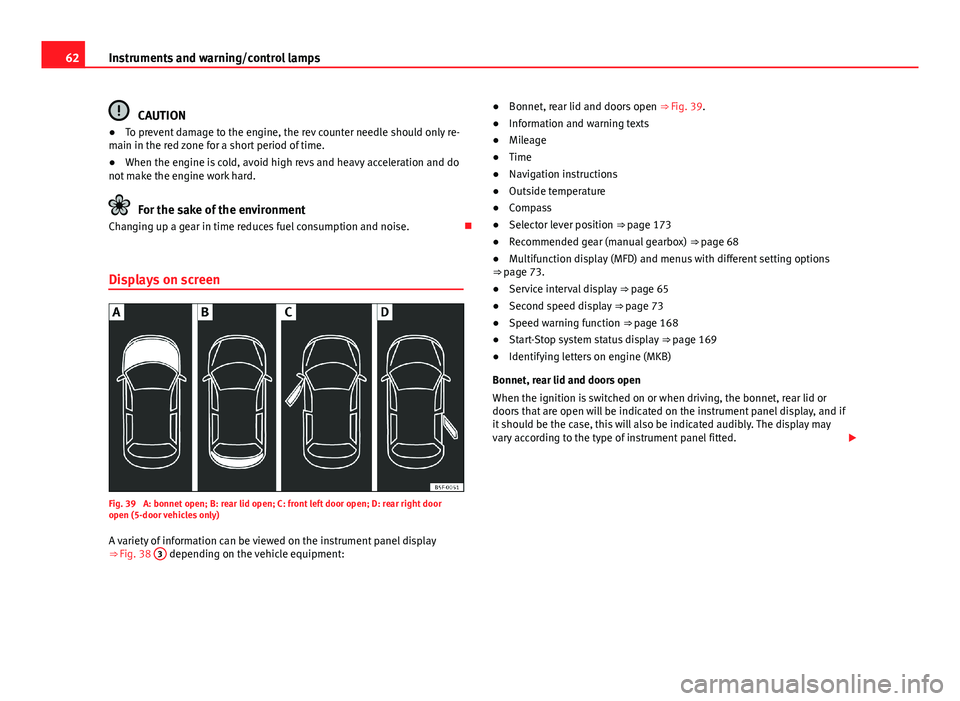
Fig. 39 A: bonnet open; B: rear lid open; C: front left door open; D: rear right door
open (5-door vehicles only)
A variety of information can be viewed on the instrument panel display
⇒ Fig. 38 3
depending on the vehicle equipment: ●
Bonnet, rear lid and doors open ⇒ Fig. 39.
● Information and warning texts
● Mileage
● Time
● Navigation instructions
● Outside temperature
● Compass
● Selector lever position ⇒ page 173
● Recommended gear (manual gearbox) ⇒ page 68
● Multifunction display (MFD) and menus with different setting options
⇒ page 73.
● Service interval display ⇒ page 65
● Second speed display ⇒ page 73
● Speed warning function ⇒ page 168
● Start-Stop system status display ⇒ page 169
● Identifying letters on engine (MKB)
Bonnet, rear lid and doors open
When the ignition is switched on or when driving, the bonnet, rear lid or
doors that are open will be indicated on the instrument panel display, and if
it should be the case, this will also be indicated audibly. The display may
vary according to the type of instrument panel fitted.
Page 66 of 339

64Instruments and warning/control lamps
The time can also be set via the
key and Setup function button in the
Easy Connect system ⇒ page 79.
Outside temperature display
When the outside temperature is below +4 °C (+39 °F), the symbol “ice crys-
tal” (warning of risk of freezing) is also displayed next to the temperature.
At first this symbol flashes and then it remains lit until the outside tempera-
ture rises above +6 °C (+43 °F) ⇒
.
When the vehicle is at a standstill or when travelling at very low speeds, the
temperature displayed may be higher than the true outside temperature as
a result of the heat produced by the engine.
The temperatures measured range from -40 °C to +50 °C (-40 °F to +122 °F).
Compass
With the ignition on and the navigation system on, the cardinal point corre-
sponding to the direction of travel of the vehicle is displayed on the instru-
ment panel.
Selector lever positions
The selected gear is displayed on the side of the selector lever and on the
instrument panel display. In positions D and S, and with the Tiptronic, the
corresponding gear is also displayed.
Recommended gear (manual gearbox)
The recommended gear in order to save fuel is displayed on the instrument
panel while you are driving ⇒ page 68.
Second speed display (mph or km/h)
In addition to the speedometer, the speed can also be displayed in a differ-
ent unit of measurement (in miles or in km per hour).
This option cannot be deactivated in models destined for countries in which
the second speed must always be visible.
The second speed display can be adjusted in the Easy Connect system via
the
key and the Setup function button ⇒ page 79. Speed warning
When the speed setting is exceeded, this will be indicated on the instru-
ment panel display. This is very useful, for example when using winter tyres
that are not designed for driving at the maximum speed of the vehicle
⇒
page 168.
The speed warning settings can be adjusted in the Easy Connect system via
the
key and the Setup function button ⇒
page 79.
Start/Stop operating display
Updated information relating to the status is displayed on the instrument
panel ⇒ page 169.
Identifying letters on engine (MKB)
Hold the button ⇒ Fig. 38 4
down for more than 15 seconds to display the
identifying letters of the vehicle engine (MKB). To do this, the ignition must
be switched on and the engine switched off.
WARNING
If the warning lamps and messages are ignored, the vehicle may stall in
traffic, or may cause accidents and severe injuries.
● Never ignore the warning lamps or text messages.
● Stop the vehicle safely as soon as possible.
● A faulty vehicle represents a risk of accident for the driver and for oth-
er road users. If necessary, switch on the hazard warning lamps and put
out the warning triangle to advise other drivers.
● Park the vehicle away from the traffic, ensuring that there are no easi-
ly inflammable materials under the vehicle which could come into contact
with the exhaust system (e.g. dry grass, fuel).
Page 67 of 339
65
Instruments and warning/control lamps
WARNING
Although the outside temperature is above freezing, some roads and
bridges may be frozen.
● At an outside temperature of above +4 °C (+39 °F), even when the
“ice crystal” is not visible, there may still be ice on the road.
● Never rely on the outside temperature indicator!
CAUTION
Failure to heed the control lamps and text messages when they appear may
result in faults in the vehicle.
Note
● Different versions of the instrument panel are available and therefore
the versions and instructions on the display may vary. In the case of dis-
plays without warning or information texts, faults are indicated exclusively
by the warning lamps.
● Depending on the equipment, some settings and instructions can also
be carried out in the Easy Connect system.
● When several warnings are active at the same time, the symbols are
shown successively for a few seconds. The symbols will stay on until the
fault is rectified.
Service interval display
The service interval indication appears on the instrument panel display
⇒ Fig. 38 3.
SEAT distinguishes between services with engine oil change (e.g. Oil
change service) and services without engine oil change (e.g. Inspection). In vehicles with
Services established by time or mileage , the service inter-
vals are already pre-defined.
In vehicles with LongLife Service , the intervals are determined individually.
Technical progress has made it possible to considerably reduce servicing re-
quirements. The technology used by SEAT ensures that your vehicle only
has an Oil Change Service when it is necessary. To establish when the Oil
Change Service is due (max. 2 years), the vehicle's conditions of use and
individual driving styles are considered. The service pre-warning first ap-
pears 20 days before the date established for the corresponding service.
The kilometres remaining until the next service are always rounded up to
the nearest 100 km (miles) and the remaining time is given in complete
days. The current service message cannot be viewed until 500 km (miles)
after the last service. Prior to this only lines are visible on the display.
Inspection reminder
When the Service date is approaching, when the ignition is switched on a
Service reminder is displayed.
In vehicles without text messages , a spanner is displayed on the instrument
panel with a figure given in km. The number of kilometres shown is the
maximum number that may be driven until the next service. After a few sec-
onds, the display mode changes. A clock symbol appears and the number
of days until the next service appointment is due.
In vehicles with text messages , Service in --- km (miles) or --- days is dis-
played on the instrument panel.
Service due
After the service date, an audible warning is given when the ignition is
switched on and the spanner displayed on the screen flashes for a few sec-
onds . In vehicles with text messages , Service in --- km or --- days is dis-
played on the instrument panel.
Reading a service notification
With the ignition switched on, the engine off and the vehicle at a standstill,
the current service notification can be read:
Safety FirstOperating instructionsPractical TipsTechnical specifications
Page 68 of 339
66Instruments and warning/control lamps
Press and hold the button ⇒ Fig. 38 4
for more than 5 seconds to consult
the service message.
When the service date has past , a minus sign is displayed in front of the
number of kilometres or days. In vehicles with text messages the following
is displayed: Service --- km (miles) or --- days ago .
The time can also be set via the
key and Setup function button in the
Easy Connect system ⇒ page 79.
The service interval display is reset
If the service was not carried out by a SEAT dealership, the display can be
reset as follows:
● To reset the service interval display, turn the ignition off and press and
hold the button ⇒ Fig. 38 4
.
● Switch the ignition back on.
● Release the button 4
and press the button 4 again for the next 20
seconds.
Note
● The service message disappears after a few seconds, when the engine is
started or when OK/RESET
is pressed on the windscreen wiper lever, or OKon the multifunction steering wheel.
●
In vehicles with the LongLife system in which the battery has been dis-
connected for a long period of time, it is not possible to calculate the date
of the next service. Therefore the service interval display may not be correct.
In this case, please check the maximum permitted service intervals ⇒ Book-
let Maintenance Programme. Rev counter
The rev counter indicates the number of engine revolutions
per minute.
Together with the gear-change indicator, the rev counter offers you the pos-
sibility of using the engine of your vehicle at a suitable speed.
The start of the red zone on the dial indicates the maximum engine speed
which may be used briefly when the engine is warm and after it has been
run in properly. Before reaching this range, you should change to a higher
gear for vehicles with a manual gearbox or for automatic gearboxes put the
selector lever in “D” or take your foot off the accelerator pedal.
We recommend that you avoid high revs and that you follow the recommen-
dations on the gear-change indicator. Consult the additional information in
⇒ page 68, Gear-change indicator.
CAUTION
Never allow the rev counter needle 1 ⇒ Fig. 38 to go into the red zone on
the scale for more than a very brief period, otherwise, there is a risk of en-
gine damage.
For the sake of the environment
Changing up a gear early will help you to save fuel and minimise engine
noise.
Page 69 of 339

67
Instruments and warning/control lamps
Trip recorder
Fig. 40 Instrument pan-
el: Odometer and reset
button
The distance covered is displayed in “kilometres” or miles “m”. It is possi-
ble to change the measurement units (kilometres “km”/miles “m”) in the
radio/Easy Connect*. Please refer to the Easy Connect* Instruction Manual
for more details.
Odometer/trip recorder
The odometer shows the total distance covered by the vehicle.
The trip recorder shows the distance that has been travelled since it was
last reset. It is used to measure short trips. The last digit of the trip recorder
indicates distances of 100 metres or tenths of a mile.
The trip recorder can be set to zero by pressing 0.0/SET
⇒ Fig. 40.
Fault display
If there is a fault in the instrument panel, the letters DEF will appear in the
trip recorder display. Have the fault repaired immediately, as far as is possi-
ble. Fuel level
The display
6 ⇒ Fig. 38 only works when the ignition is switched on. When
the display reaches the reserve mark, the lower diode lights up in red and
the control lamp appears ⇒ page 248. When the fuel level is very low,
the lower diode flashes in red.
The distance to empty fuel level is displayed on the instrument panel 3
⇒ Fig. 38.
The capacity of the fuel tank of your vehicle is given in the Technical data
section ⇒ page 323.
In natural gas engines
The yellow warning lamp
lights up when both fuel types (petrol and natu-
ral gas) have reached reserve level.
The green control lamp comes on when the vehicle is working with natural
gas.
The green control lamp switches off when the natural gas is exhausted.
The engine changes to operate with petrol.
Thing to note: If the vehicle is left parked for a long time immediately after
refuelling, the natural gas level indicator may not accurately indicate the
same level shown after refuelling when the vehicle is started up again. This
is not due to a leak in the system, but to a drop in pressure in the gas tank
for technical reasons after a cooling phase immediately after refuelling.
CAUTION
Never run the fuel tank completely dry. An irregular fuel supply could cause
misfiring. In this way the unburned fuel can reach the exhaust system,
which could cause the catalytic converter to overheat resulting in damage.
Safety FirstOperating instructionsPractical TipsTechnical specifications
Page 70 of 339
68Instruments and warning/control lamps
Coolant temperature gauge
For vehicles with no coolant temperature gauge, a control lamp appears for
high coolant temperatures ⇒ page 257. Take into account the ⇒ .
The coolant temperature gauge 2
⇒ Fig. 38 only works when the ignition is
switched on. In order to avoid engine damage, please read the following
notes for the different temperature ranges.
Engine cold
If only the diodes in the lower part of the scale light up, this indicates that
the engine has not yet reached operating temperature. Avoid high revs and
heavy acceleration and do not make the engine work hard.
Normal temperature
If in normal operations, the diodes light up until the central zone, it means
that the engine has reached operating temperature. At high outside temper-
atures and when making the engine work hard, the diodes may continue
lighting up and reach the upper zone. This is no cause for concern, provided
the control lamp does not light up on the instrument panel digital dis-
play.
Heat range
When the diodes light up in the upper area of the display and the control
lamp appears on the instrument panel display, the coolant temperature
is excessive ⇒ page 257.
CAUTION
● To ensure a long useful life for the engine, avoid high revs, driving at
high speed and making the engine work hard for approx. the first 15 mi-
nutes when the engine is cold. The phase until the engine is warm also de-
pends on the outside temperature. If necessary, use the engine oil tempera-
ture* as a guide ⇒ page 77
● Additional lights and other accessories in front of the air inlet reduce the
cooling effect of the coolant. At high outside temperatures and high engine
loads, there is a risk of the engine overheating.
● The front spoiler also ensures proper distribution of the cooling air when
the vehicle is moving. If the spoiler is damaged this can reduce the cooling
effect, which could cause the engine to overheat. Seek specialist assis-
tance.
Gear-change indicator
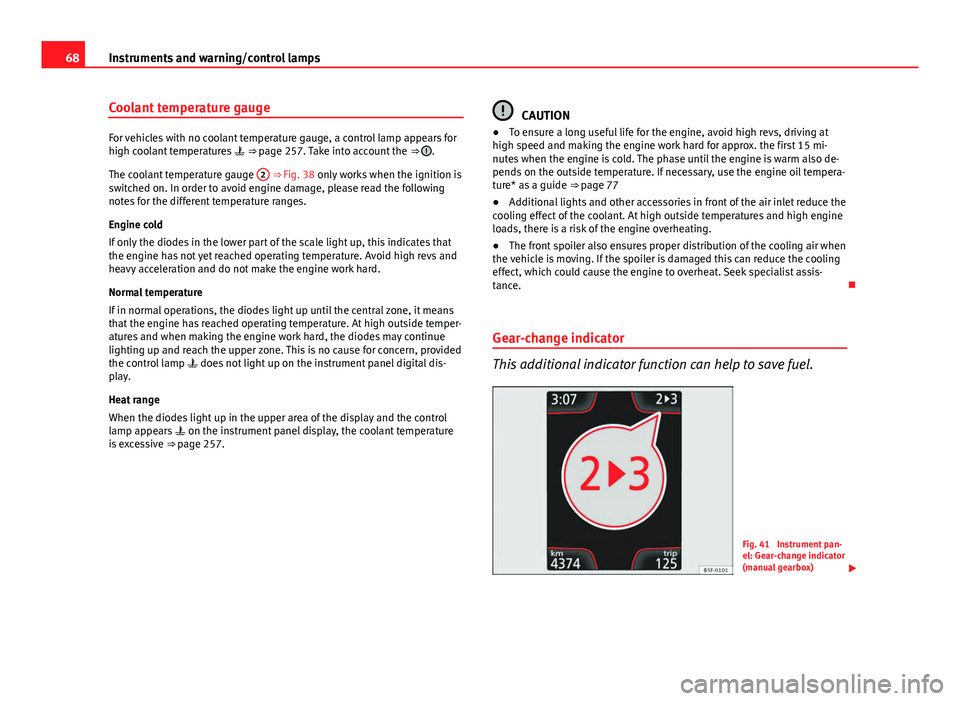
This additional indicator function can help to save fuel.
Fig. 41 Instrument pan-
el: Gear-change indicator
(manual gearbox)
Page 72 of 339
70Instruments and warning/control lamps
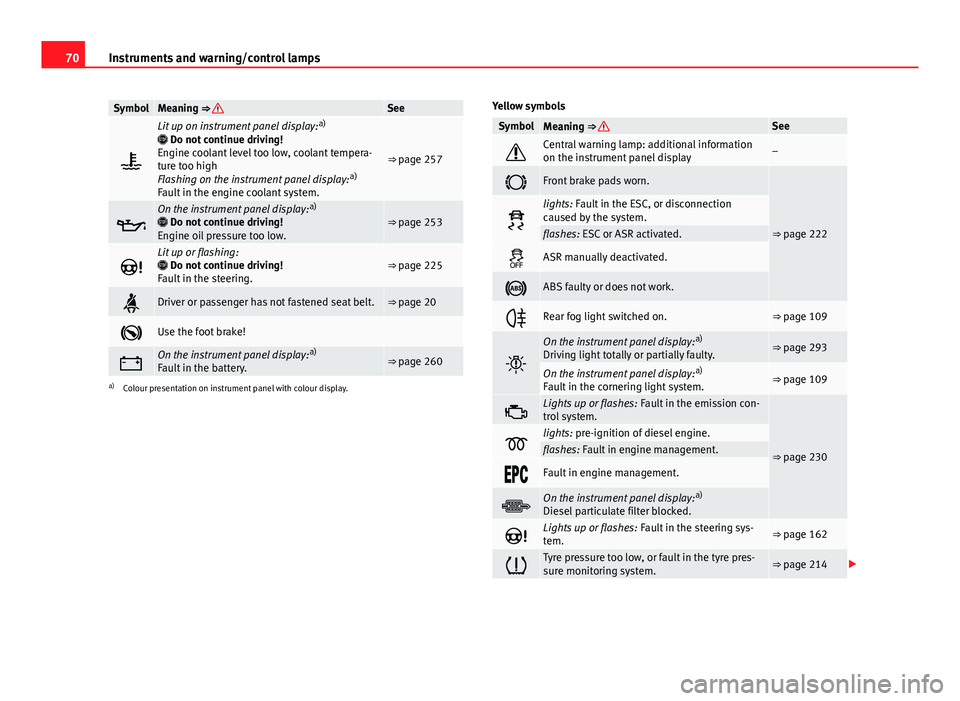
SymbolMeaning ⇒ See
Lit up on instrument panel display: a)
Do not continue driving!
Engine coolant level too low, coolant tempera-
ture too high
Flashing on the instrument panel display: a)
Fault in the engine coolant system.
⇒ page 257
On the instrument panel display: a)
Do not continue driving!
Engine oil pressure too low.⇒ page 253
Lit up or flashing:
Do not continue driving!
Fault in the steering.⇒ page 225
Driver or passenger has not fastened seat belt.⇒ page 20
Use the foot brake!
On the instrument panel display: a)
Fault in the battery.⇒ page 260
a) Colour presentation on instrument panel with colour display. Yellow symbols
SymbolMeaning ⇒ See
Central warning lamp: additional information
on the instrument panel display–
Front brake pads worn.
⇒ page 222
lights: Fault in the ESC, or disconnection
caused by the system.
flashes: ESC or ASR activated.
ASR manually deactivated.
ABS faulty or does not work.
Rear fog light switched on.⇒ page 109
On the instrument panel display:
a)
Driving light totally or partially faulty.⇒ page 293
On the instrument panel display: a)
Fault in the cornering light system.⇒ page 109
Lights up or flashes: Fault in the emission con-
trol system.
⇒ page 230lights: pre-ignition of diesel engine.flashes: Fault in engine management.
Fault in engine management.
On the instrument panel display: a)
Diesel particulate filter blocked.
Lights up or flashes: Fault in the steering sys-
tem.⇒ page 162
Tyre pressure too low, or fault in the tyre pres-
sure monitoring system.⇒ page 214
Page 75 of 339

73
Driver information system
Driver information system Information system
Introduction
With the ignition switched on, it is possible to read the different functions of
the display by scrolling through the menus.
In vehicles with multifunction steering wheel, the multifunction display can
only be operated with the multifunction steering wheel buttons.
The number of menus displayed on the instrument panel will vary according
to the vehicle electronics and equipment.
A specialised workshop will be able to programme or modify additional
functions, according to the vehicle equipment. SEAT recommends visiting a
SEAT Official Service.
Some menu options can only be read when the vehicle is at a standstill.
As long as a priority 1 warning is displayed, it will not be possible to read
the menus. Some warning messages can be confirmed and made to disap-
pear with the windscreen wiper lever button or the multifunction steering
wheel button.
Additional information and warnings:
● Easy Connect system ⇒ page 79
● Driver assistance systems ⇒ page 184
● Radio or navigation system ⇒ Booklet Radio or ⇒ Booklet Navigation
system
WARNING
Any distraction may lead to an accident, with the risk of injury.
● Do not read the instrument panel display menus when driving.
Overview of the menu structure
Driving data ⇒ page 75
■ Vehicle status
■ MFD from departure
■ MFD from refuelling
■ MFD total calculation
Assist systems ⇒ table on page 75
■ Activate/deactivate Lane Assist
■ Reverse (optional)
Navigation ⇒ Booklet Navigation system Audio ⇒ Booklet Radio or ⇒ Booklet Navigation systemTelephone ⇒ Booklet Bluetooth systemVehicle ⇒ table on page 75
Safety FirstOperating instructionsPractical TipsTechnical specifications
Page 76 of 339
74Driver information system
Operating the instrument panel menus
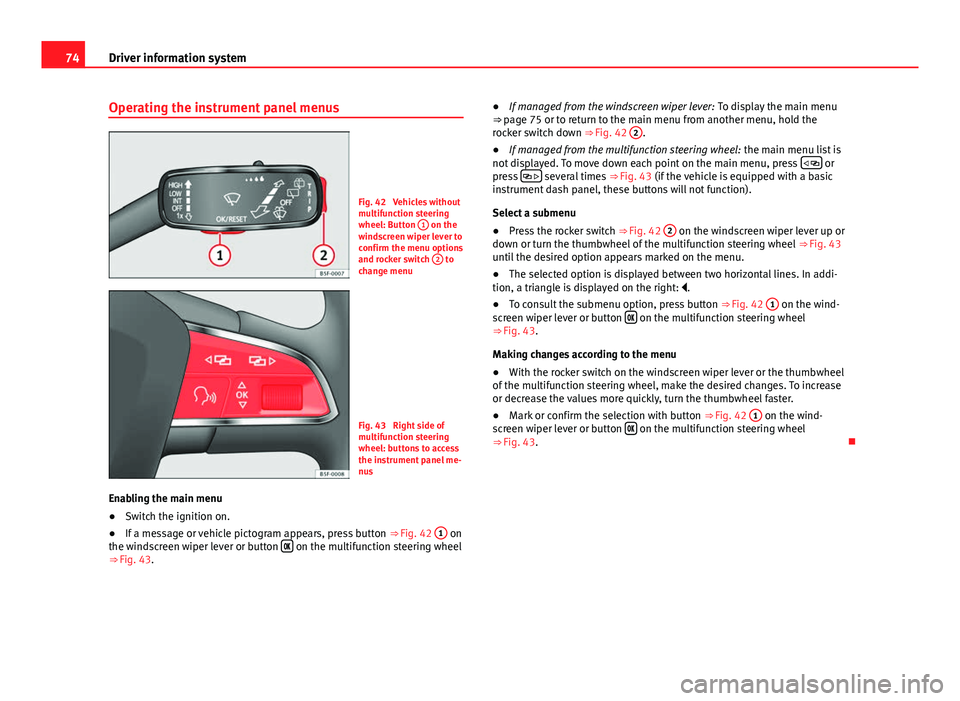
Fig. 42 Vehicles without
multifunction steering
wheel: Button 1
on the
windscreen wiper lever to
confirm the menu options
and rocker switch 2
to
change menu
Fig. 43 Right side of
multifunction steering
wheel: buttons to access
the instrument panel me-
nus
Enabling the main menu
● Switch the ignition on.
● If a message or vehicle pictogram appears, press button ⇒ Fig. 42 1
on
the windscreen wiper lever or button on the multifunction steering wheel
⇒ Fig. 43. ●
If managed from the windscreen wiper lever: To display the main menu
⇒ page 75 or to return to the main menu from another menu, hold the
rocker switch down ⇒ Fig. 42 2
.
● If managed from the multifunction steering wheel: the main menu list is
not displayed. To move down each point on the main menu, press
or
press several times
⇒ Fig. 43 (if the vehicle is equipped with a basic
instrument dash panel, these buttons will not function).
Select a submenu
● Press the rocker switch ⇒ Fig. 42 2
on the windscreen wiper lever up or
down or turn the thumbwheel of the multifunction steering wheel ⇒ Fig. 43
until the desired option appears marked on the menu.
● The selected option is displayed between two horizontal lines. In addi-
tion, a triangle is displayed on the right: .
● To consult the submenu option, press button ⇒ Fig. 42 1
on the wind-
screen wiper lever or button on the multifunction steering wheel
⇒ Fig. 43.
Making changes according to the menu
● With the rocker switch on the windscreen wiper lever or the thumbwheel
of the multifunction steering wheel, make the desired changes. To increase
or decrease the values more quickly, turn the thumbwheel faster.
● Mark or confirm the selection with button ⇒ Fig. 42 1
on the wind-
screen wiper lever or button on the multifunction steering wheel
⇒ Fig. 43.
Page 78 of 339

76Driver information system
Multifunction display memory
The multifunction display is equipped with three memories that work auto-
matically: MFD from departure, MFD from refuelling, MFD total calculation.
On the screen display, you can read which memory is currently displayed.
To change between memories with the ignition on and the memory shown,
press the button
on the windscreen wiper lever or you can also
change between memories using the button on the multifunction steer-
ing wheel.
Menueffect
MFD from de-
parture
Display and storage of the values for the journey and the
consumption from when the ignition is switched on to
when it is switched off.
If the journey is continued in less than 2 hours after the ig-
nition is switched off, the new data is added to the data al-
ready stored in the memory. The memory will automatically
be deleted if the journey is interrupted for more than two
hours.
MFD from re-
fuellingDisplay and storage of the values for the journey and the
consumption. By refuelling, the memory will be erased au-
tomatically.
MFD total cal-
culation
The memory records the values for a specific number of
partial trips, up to a total of 19 hours and 59 minutes or 99
hours and 59 minutes, or 1999.9 km (or miles) or 9999 km
(or miles), depending on the model of instrument panel.
On reaching either of these limits a)
, the memory is auto-
matically erased and starts to count from 0 again.
a) It varies according to the type of instrument panel fitted.
Erasing a memory manually
● Select the memory that you wish to erase.
● Press and hold the button
on the windscreen wiper lever or the
button on the multifunction steering wheel for about 2 seconds. Personalising the displays
In the Easy Connect system you can adjust which of the possible displays of
the MFD can be shown on the instrument panel display with the button
and the function button Setup ⇒ page 79.
DisplaysMenueffect
Current fuel con-
sumptionThe current fuel consumption display operates through-
out the journey, in litres/100 km; and with the engine
running and the vehicle stopped, in litres/hour.
Average fuel con-
sumption
After turning on the ignition, average fuel consumption
in litres/100 km will be shown after travelling approxi-
mately 100 metres. Otherwise horizontal lines are dis-
played. The value shown is updated approximately ev-
ery 5 seconds.
Operating range
Approximate distance in km that can still be travelled
with the fuel remaining in the tank, assuming the same
style of driving is maintained. This is calculated using
the current fuel consumption.
Journey durationThis indicates the hours (h) and minutes (min) since
the ignition was switched on.
Distance coveredDistance covered in km (m) after switching on the igni-
tion.
CNG quality
Whenever you refuel, an automatic check is run on the
quality of the natural gas and is displayed after the ig-
nition is switched on. The indication is given as a per-
centage of between 70 % and 100 %. The greater the
percentage, the lower the consumption.
Average speed
The average speed will be shown after a distance of ap-
proximately 100 metres has been travelled. Otherwise
horizontal lines are displayed. The value shown is up-
dated approximately every 5 seconds.
Digital display of
speedCurrent speed displayed in digital format.