turn signal Seat Leon 5D 2013 User Guide
[x] Cancel search | Manufacturer: SEAT, Model Year: 2013, Model line: Leon 5D, Model: Seat Leon 5D 2013Pages: 339, PDF Size: 4.8 MB
Page 112 of 339
110Lights and visibility
WARNING
If the warning lamps and messages are ignored, the vehicle may stall in
traffic, or may cause accidents and severe injuries.
● Never ignore the warning lamps or text messages.
● Stop the vehicle safely as soon as possible.
● Park the vehicle at a suitable distance away from the traffic ensuring
that the exhaust system is not in contact with inflammable material, for
example, dry grass, fuel, oil, etc.
● A faulty vehicle represents a risk of accident for the driver and for oth-
er road users. If necessary, switch on the hazard warning lamps and put
out the warning triangle to advise other drivers.
CAUTION
Failure to heed the control lamps and text messages when they appear may
result in faults in the vehicle.
Turn signal and main beam lever*
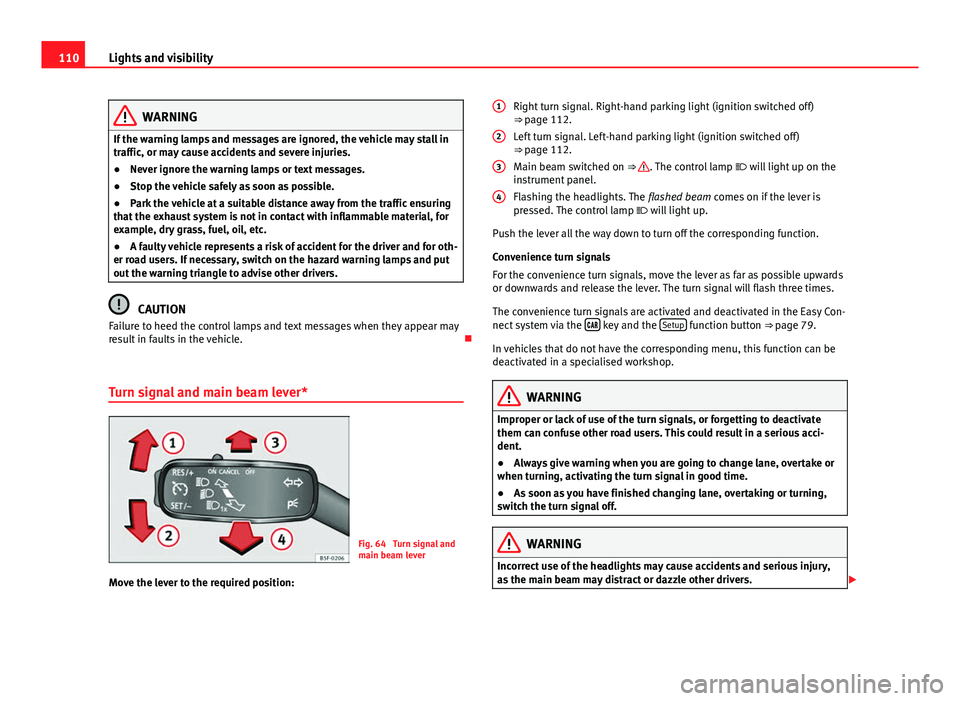
Fig. 64 Turn signal and
main beam lever
Move the lever to the required position: Right turn signal. Right-hand parking light (ignition switched off)
⇒ page 112.
Left turn signal. Left-hand parking light (ignition switched off)
⇒ page 112.
Main beam switched on ⇒
. The control lamp
will light up on the
instrument panel.
Flashing the headlights. The flashed beam comes on if the lever is
pressed. The control lamp will light up.
Push the lever all the way down to turn off the corresponding function.
Convenience turn signals
For the convenience turn signals, move the lever as far as possible upwards
or downwards and release the lever. The turn signal will flash three times.
The convenience turn signals are activated and deactivated in the Easy Con-
nect system via the
key and the Setup function button ⇒ page 79.
In vehicles that do not have the corresponding menu, this function can be
deactivated in a specialised workshop.
WARNING
Improper or lack of use of the turn signals, or forgetting to deactivate
them can confuse other road users. This could result in a serious acci-
dent.
● Always give warning when you are going to change lane, overtake or
when turning, activating the turn signal in good time.
● As soon as you have finished changing lane, overtaking or turning,
switch the turn signal off.
WARNING
Incorrect use of the headlights may cause accidents and serious injury,
as the main beam may distract or dazzle other drivers.
1
2
3
4
Page 113 of 339
111
Lights and visibility
Note
● The turn signal only works when the ignition is switched on. The hazard
warning lights also work when the ignition is switched off.
● If a trailer turn signal malfunctions, the control lamp will stop flashing
(trailer turn signals) and the vehicle turn signal will flash at double speed.
● The main beam headlights can only be switched on if the dipped beam
headlights are already on.
Turning lights on and off
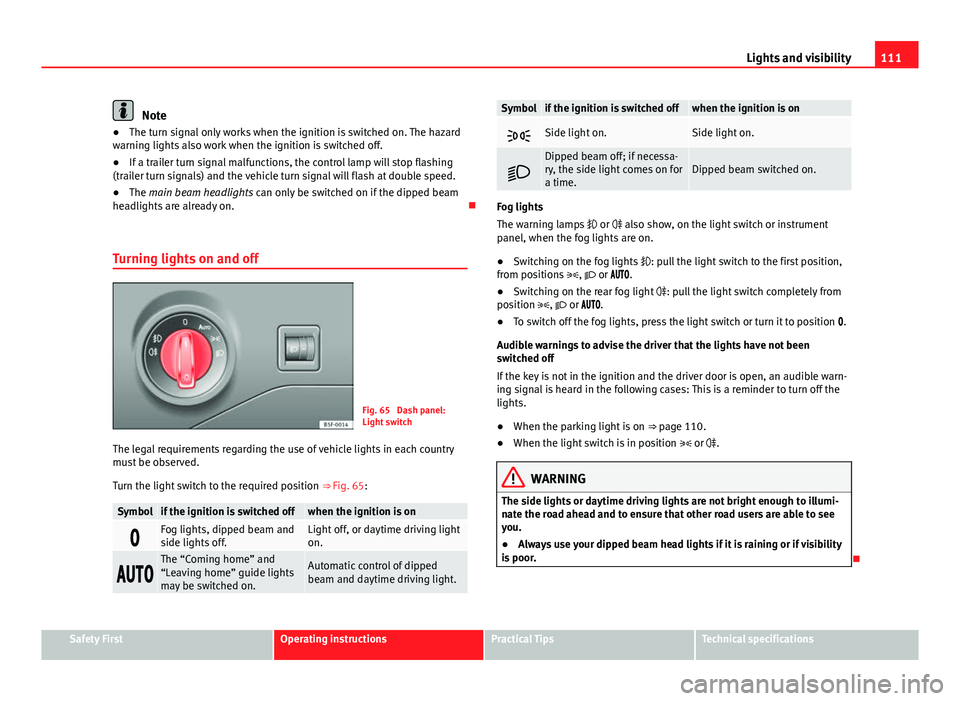
Fig. 65 Dash panel:
Light switch
The legal requirements regarding the use of vehicle lights in each country
must be observed.
Turn the light switch to the required position ⇒ Fig. 65:
Symbolif the ignition is switched offwhen the ignition is on
Fog lights, dipped beam and
side lights off.Light off, or daytime driving light
on.
The “Coming home” and
“Leaving home” guide lights
may be switched on.Automatic control of dipped
beam and daytime driving light.
Symbolif the ignition is switched offwhen the ignition is on
Side light on.Side light on.
Dipped beam off; if necessa-
ry, the side light comes on for
a time.Dipped beam switched on.
Fog lights
The warning lamps
or also show, on the light switch or instrument
panel, when the fog lights are on.
● Switching on the fog lights : pull the light switch to the first position,
from positions , or .
● Switching on the rear fog light : pull the light switch completely from
position , or .
● To switch off the fog lights, press the light switch or turn it to position .
Audible warnings to advise the driver that the lights have not been
switched off
If the key is not in the ignition and the driver door is open, an audible warn-
ing signal is heard in the following cases: This is a reminder to turn off the
lights.
● When the parking light is on ⇒ page 110.
● When the light switch is in position or .
WARNING
The side lights or daytime driving lights are not bright enough to illumi-
nate the road ahead and to ensure that other road users are able to see
you.
● Always use your dipped beam head lights if it is raining or if visibility
is poor.
Safety FirstOperating instructionsPractical TipsTechnical specifications
Page 114 of 339
112Lights and visibility
Lights and visibility: functions
Parking light
When the parking light is switched on, (right or left turn signal), the front
side light and the rear light on the corresponding side of the vehicle stay lit.
The parking lights can only be activated with the ignition switched off and
the turn signal and main beam lever in the central position, before being
triggered.
Parking light on both sides
With the ignition switched off and the light switch in position , when lock-
ing the vehicle from the outside, the parking lights on both sides of the ve-
hicle light up. In doing so, only the side lights of both headlights light up,
and additionally the tail lights will do so partially.
Daytime driving light*
The daytime driving lights consist of individual lights, integrated in the front
headlights. With the daylight driving lights on, only these lights switch on
⇒
.
The daytime driving lights switch on every time the ignition is switched on,
if the switch is in positions or , according to the level of exterior light-
ing.
When the light switch is in position , a light sensor automatically
switches dipped beam on and off (including the control and instrument
lighting) or the daytime driving lights depending on the level of exterior
lighting.
Automatic dipped beam control
The automatic dipped beam control is merely intended as an aid and is not
able to recognise all driving situations. When the light switch is in position
, the vehicle lights and the instru-
ment panel and switch lighting switch on and off automatically in the fol-
lowing situations ⇒
:
Automatic switching on:Automatic switching off:The photo sensor detects darkness,
for example, when driving through a
tunnel.When adequate lighting is detected.
The rain sensor detects rain and ac-
tivates the windscreen wipers.When the windscreen wipers have
been inactive for a few minutes.
Cornering lights* 1)
When turning slowly or on very tight bends, the cornering lights are activa-
ted automatically. The cornering lights may be integrated in the fog lights
and are switched on only at speeds of less than 40 km/h (25 mph).
When reverse gear is engaged, the cornering lights on both sides of the ve-
hicle switch on, in order to better illuminate the area for parking.
Motorway lights*
The motorway light is available on vehicles equipped with full-LED lights.
The function is connected/disconnected via the corresponding Easy Con-
nect system menu.
● Activation: When going above 110 km/h (75 mph) for more than 30 sec-
onds, the dipped beam raises slightly to increase the distance of visibility of
the driver.
● Deactivation: When reducing the speed of the car below 100 km/h, the
dipped beam returns to its normal position.
1)
This function is not available on vehicles equipped with full-LED headlights.
Page 116 of 339
114Lights and visibility
7. Always take the vehicle key with you when you leave the vehi-
cle.
Switch on the hazard warning lights to warn other road users, for example:
● reaching the tail end of a traffic jam,
● there is an emergency
● your vehicle breaks down due to a technical fault,
● you are towing another vehicle or your vehicle is being towed.
All turn signals flash simultaneously when the hazard warning lights are
switched on. The two turn signal turn signal lamps and the turn signal
lamp in the switch will flash at the same time. The hazard warning lights
also work when the ignition is switched off.
Emergency braking warning
If the vehicle is braked suddenly and continuously at a speed of more than
80 km/h (50 mph), the brake light flashes several times per second to warn
vehicles driving behind. If you continue braking, the hazard warning lights
will come on automatically when the vehicle comes to a standstill. They
switch off automatically when the vehicle starts to move again.
WARNING
● The risk of an accident increases if your vehicle breaks down. Always
use the hazard warning lights and a warning triangle to draw the atten-
tion of other road users to your stationary vehicle.
● Never park where the catalytic converter could come into contact with
inflammable materials under the vehicle, for example dry grass or spilt
petrol. This could start a fire!
Note
● The battery will run down if the hazard warning lights are left on for a
long time, even if the ignition is switched off.
● The use of the hazard warning lights described here is subject to the rel-
evant statutory requirements.
Main beam assist*
Main beam assist (Light Assist)
The main beam assist begins operating (within the limits of the system and
depending on the environmental and traffic conditions) starting at a speed
of 60 km/h (37 mph), when it switches on automatically, and then deacti-
vates again below 30 km/h (18 mph) ⇒
. This is managed via a camera
situated on the base of the interior mirror.
The main beam assist generally detects illuminated areas and deactivates
the main beam when passing through a town, for example.
Page 117 of 339
115
Lights and visibility
Switching the main beam assist on and off
effectuse
Activate:
– Switch the ignition on and turn the light switch to position
.
– From the base position, move the main beam and turn signal
lever forwards ⇒ page 110. When the warning lamp is dis-
played on the instrument panel display, the main beam assist is
switched on.
To
switch
system off:
– Switch off the ignition.
– OR: Turn the light switch to a different position to
⇒ page 111.
– OR: with main beam on, move the main beam and turn signal
lever backwards.
– OR: Move the main beam and turn signal lever forwards to
manually switch main beam on. The main beam assist will then
be deactivated.
Malfunctions
The following conditions may prevent the main beam headlight control from
turning off the headlights in time or from turning off altogether:
● In poorly lit towns with highly reflective signs.
● Other insufficiently lit road users (such as pedestrians or cyclists).
● On tight bends and steep slopes (bumps) and when oncoming vehicles
are partially obscured.
● When the drivers of other oncoming vehicles (such as a truck) can see
over a guard rail in the centre of the road.
● If the camera is damaged or the power supply is cut off.
● In fog, snow and heavy rain.
● With dust and sand turbulence.
● With loose gravel in the field of vision of the camera.
● When the field of vision of the camera is misted up, dirty or covered by
stickers, snow, ice...
WARNING
The convenience features of the main beam assist should not encourage
the taking of risks. The system is not a replacement for driver concentra-
tion.
● You are always in control of the main beam and adapting it to the
light, visibility and traffic conditions.
● It is possible that the main beam headlight control does not recog-
nise all driving situations and is limited under certain circumstances.
● When the field of vision of the camera is dirty, covered or damaged,
operation of the main beam control may be affected. This also applies
when changes are made to the vehicle lighting system, for example, if
additional headlights are installed.
CAUTION
To avoid affecting the operation of the system, take the following points in-
to consideration:
● Clean the field of vision of the camera regularly and make sure it is free
of snow and ice.
● Do not cover the field of vision of the camera.
● Check that the windscreen is not damaged in the area of the field of vi-
sion of the camera.
Note
Main beam and headlight flasher can be turned on and off manually at any
time with the turn signal and main beam lever ⇒ page 110.
Adjusting the headlights
The light beam of the dipped beam lights is asymmetric: the side of the
road on which you are driving is lit more intensely.
Safety FirstOperating instructionsPractical TipsTechnical specifications
Page 188 of 339
186Driver assistance systems
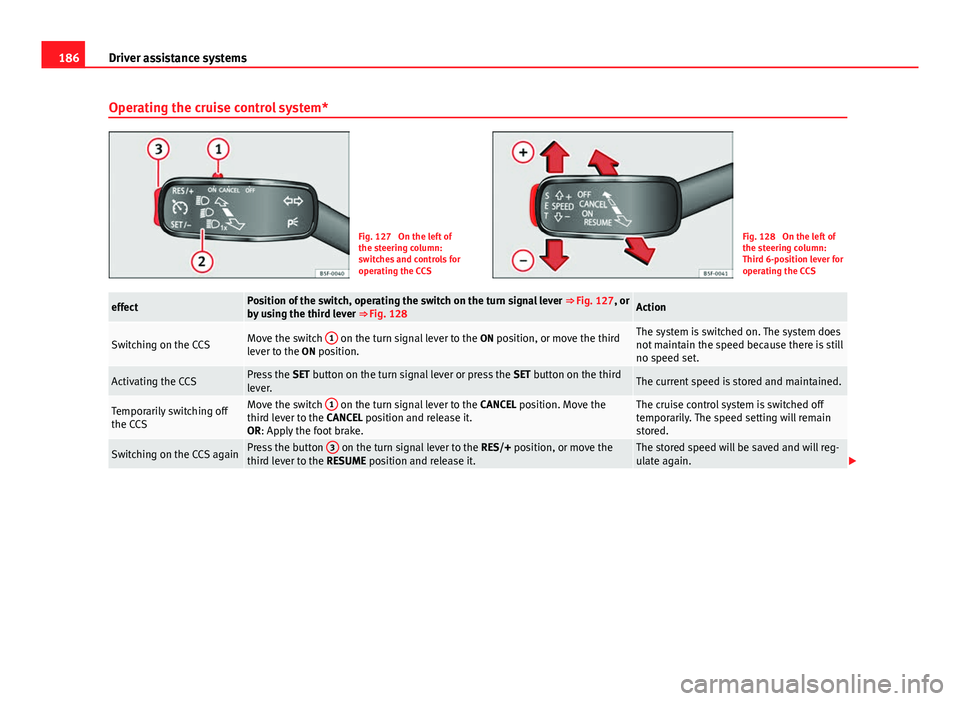
Operating the cruise control system*
Fig. 127 On the left of
the steering column:
switches and controls for
operating the CCSFig. 128 On the left of
the steering column:
Third 6-position lever for
operating the CCS
effectPosition of the switch, operating the switch on the turn signal lever ⇒ Fig. 127, or
by using the third lever ⇒ Fig. 128Action
Switching on the CCSMove the switch 1 on the turn signal lever to the
ON position, or move the third
lever to the ON position.The system is switched on. The system does
not maintain the speed because there is still
no speed set.
Activating the CCSPress the SET button on the turn signal lever or press the SET button on the third
lever.The current speed is stored and maintained.
Temporarily switching off
the CCSMove the switch 1 on the turn signal lever to the
CANCEL position. Move the
third lever to the CANCEL position and release it.
OR: Apply the foot brake.The cruise control system is switched off
temporarily. The speed setting will remain
stored.
Switching on the CCS againPress the button 3 on the turn signal lever to the
RES/+ position, or move the
third lever to the RESUME position and release it.The stored speed will be saved and will reg-
ulate again.
Page 189 of 339
187
Driver assistance systems
effectPosition of the switch, operating the switch on the turn signal lever ⇒ Fig. 127, or
by using the third lever ⇒ Fig. 128Action
Increasing the stored
speed (during CCS setting)
Depending on equipment fitted:
– briefly press the button 3 on the turn signal lever in the
RES
zone– or briefly move the third lever to the RESUME position to increase speed by
1 km/h (1 mph)
– or move the third lever upwards with SPEED+ to increase the speed by 10 km/h
(10 mph) and store it
– or continuously press the button 3
on the turn signal lever in the
RES
zone– or move the third lever upwards with SPEED+ continuously
– or move the third lever to the RESUME position and hold it to continuously in-
crease the speed and store it.
The vehicle accelerates actively until it rea-
ches the new stored speed.
Increasing the stored
speedWhen the CCS is in the ON position, but DEACTIVATED, the speed setting can be
increased with SPEED+ by 10 km/h (10 mph).The vehicle accelerates actively until it rea-
ches the new stored speed.
Reducing the stored speed
(during CCS setting)
Depending on equipment fitted:
– briefly press the button 3 on the turn signal lever in the
SET zone to reduce
speed by 1km/h (1mph)
– or briefly move the third lever to the SET position to reduce the speed by 1 km/h
(1 mph)
– or move the third lever downwards with SPEED– to reduce the speed by 10 km/
h (10 mph) and store it
– or continuously press the button 3
on the turn signals lever in the
SET
zone– or press and hold the button SET on the third lever to reduce speed contin-
uously
– or move the third lever downwards ( SPEED–) continuously and store it.
Speed is reduced without braking, by inter-
rupting the accelerator until reaching the
new stored speed.
Setting a lower speedWhen the CCS is in the ON position, but DEACTIVATED, the speed setting can be
reduced with SPEED– by 10 km/h (10 mph).The system is switched off. The stored speed
is deleted.
Switching off the CCSMove the switch 1 to the OFF position.
OR: move the third lever to the OFF position.Speed is reduced without intervening in the
braking system, by interrupting the accelera-
tor until reaching the new stored speed.
The value indicated in the table in brackets (in mph, miles per hour) only
refers to instrument panels with indications in miles. Changing gear in CCS mode
The CCS decelerates as soon as the clutch pedal is pressed, intervening
again automatically after a gear is engaged.
Safety FirstOperating instructionsPractical TipsTechnical specifications
Page 202 of 339
200Driver assistance systems
Overtaking
When the turn signal comes on before overtaking, the ACC accelerates the
vehicle automatically and thus reduces the distance between it and the ve-
hicle ahead.
When you move into the overtaking lane, if the ACC does not detect any ve-
hicle in front it accelerates until it reaches the stored speed and keeps it
constant.
The acceleration can be interrupted at any time by stepping on the brake
pedal or pulling back on the lever ⇒ page 193.
Driving through a bend
On entering or coming out of a bend, the radar sensor may no longer detect
the vehicle ahead of it or may react before a vehicle in the adjacent lane
⇒ Fig. 136 A. In such situations the vehicle may brake unnecessarily or may
cease to react with regard to the vehicle ahead. In this case, the driver has
to act by accelerating or interrupting the braking process by stepping on the
brake pedal or pulling the third lever backwards ⇒ page 193.
Driving in tunnels
When going through tunnels, the radar sensor function may be limited.
Switch off the ACC in tunnels.
Narrow vehicles or vehicles not driving straight
The radar sensor can only detect narrow vehicles or those that are not driv-
ing straight within its range ⇒ Fig. 136 B. This is particularly applicable to
narrow vehicles such as motorbikes. In these cases, brake yourself as nec-
essary.
Vehicles with loads and special accessories
The load and special accessories of other vehicles that jut out over the side,
backwards or forward may be outside the range of the ACC.
Switch off the ACC when driving behind vehicles with loads or special acces-
sories, as well as when overtaking these vehicles. In these cases, brake
yourself as necessary. Other vehicles changing lanes
Vehicles changing lanes not far away from the vehicle can only be detected
when they fall within the range of the sensors. Consequently, the ACC will
take longer to react
⇒ Fig. 137 C. In these cases, brake yourself if necessary.
Stationary vehicles
During driving, the ACC does not detect stationary objects, such as the end
of a jam or damaged vehicles.
If a vehicle detected by ACC turns or moves over and there is another sta-
tionary vehicle in front of it, the ACC will not react ⇒ Fig. 137 D. In these ca-
ses, brake yourself if necessary.
Vehicles travelling in the opposite direction and vehicles changing lanes
The ACC does not react to vehicles approaching in the opposite direction or
vehicles changing lanes.
Metal objects
Metal objects, e.g. rails on the road or the panels used on work sites, may
confuse the radar sensor and cause wrong reactions in the ACC.
Factors that may affect the operation of the radar sensor
If the operation of the radar sensor were affected by heavy rain, water mist,
snow or mud, the ACC is switched off temporarily. The relevant message ap-
pears on the instrument panel display. If necessary, clean the radar sensor.
When the radar sensor works properly again, the ACC will be automatically
available again. The message on the instrument panel display will go off
and the ACC can be switched on again.
In the event of a heavy reverse reflection of the radar signal, for example, in
a closed parking, ACC operation may be affected.
Trailer towing
When driving with a trailer, the ACC controls less dynamically.
Page 212 of 339
210Driver assistance systems
Note
Failure to heed the control lamps and text messages when they appear may
result in faults in the vehicle.
Operating mode
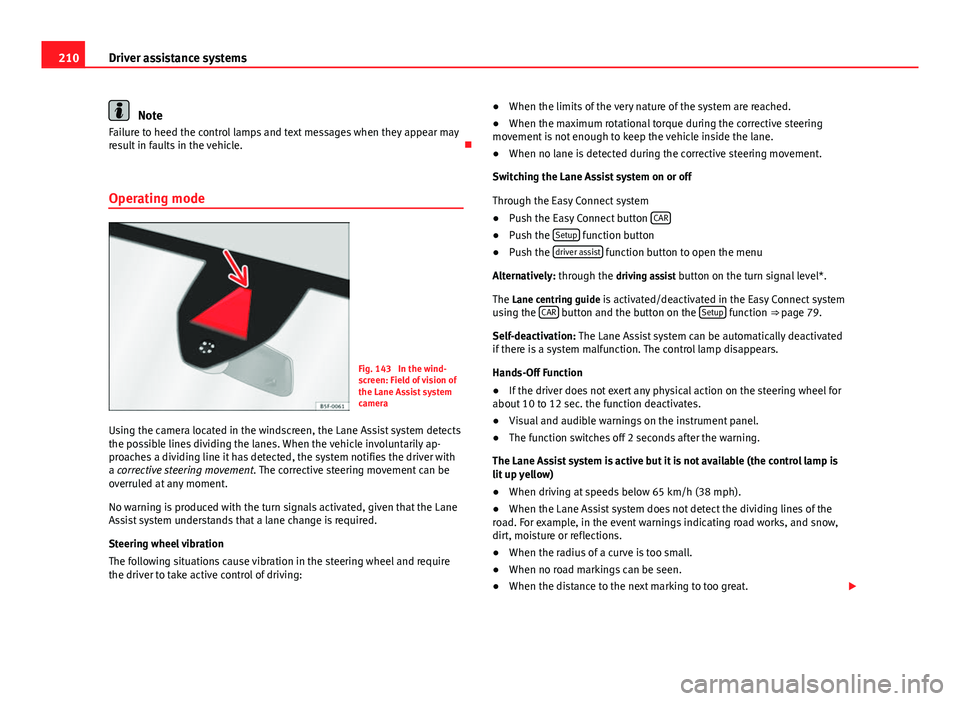
Fig. 143 In the wind-
screen: Field of vision of
the Lane Assist system
camera
Using the camera located in the windscreen, the Lane Assist system detects
the possible lines dividing the lanes. When the vehicle involuntarily ap-
proaches a dividing line it has detected, the system notifies the driver with
a corrective steering movement . The corrective steering movement can be
overruled at any moment.
No warning is produced with the turn signals activated, given that the Lane
Assist system understands that a lane change is required.
Steering wheel vibration
The following situations cause vibration in the steering wheel and require
the driver to take active control of driving: ●
When the limits of the very nature of the system are reached.
● When the maximum rotational torque during the corrective steering
movement is not enough to keep the vehicle inside the lane.
● When no lane is detected during the corrective steering movement.
Switching the Lane Assist system on or off
Through the Easy Connect system
● Push the Easy Connect button CAR
●
Push the Setup function button
● Push the driver assist function button to open the menu
Alternatively: through the driving assist button on the turn signal level*. The Lane centring guide is activated/deactivated in the Easy Connect system
using the CAR
button and the button on the Setup function ⇒ page 79.
Self-deactivation: The Lane Assist system can be automatically deactivated
if there is a system malfunction. The control lamp disappears.
Hands-Off Function
● If the driver does not exert any physical action on the steering wheel for
about 10 to 12 sec. the function deactivates.
● Visual and audible warnings on the instrument panel.
● The function switches off 2 seconds after the warning.
The Lane Assist system is active but it is not available (the control lamp is
lit up yellow)
● When driving at speeds below 65 km/h (38 mph).
● When the Lane Assist system does not detect the dividing lines of the
road. For example, in the event warnings indicating road works, and snow,
dirt, moisture or reflections.
● When the radius of a curve is too small.
● When no road markings can be seen.
● When the distance to the next marking to too great.
Page 213 of 339
211
Driver assistance systems
● When the system does not detect any clear and active steering move-
ment during a long period of time.
● Temporarily, in the event of very dynamic driving styles.
● If a turn signal is activated.
● With the stability control system ESC in Sport mode.
Note
● Before starting a journey, verify that the field of vision of the camera is
not covered ⇒ Fig. 143.
● Always keep the field of vision of the camera clean.
Switching off the Lane Assist system in the following
situations
Due to the limits of the Lane Assist system, switch it off in the following sit-
uations:
● When more attention is required of the driver
● When driving in a sporty style
● In unfavourable weather conditions
● On roads in poor condition
● In areas of road works
Note
The Lane Assist system deactivates when driving below 60 km/h (40 mph). SEAT Drive Modes*
Introduction
SEAT Drive Mode enables the driver to choose between four profiles or
modes, normal, sport, eco and individual , that modify the behaviour of vari-
ous vehicle functions, providing different driving experiences.
The profiles, normal, sport and eco are fixed. Individual can be configured
according to personal preferences.
Description
Depending on the equipment fitted in the vehicle, SEAT Drive Mode can op-
erate on the following functions:
Engine
Depending on the profile selected, the engine responds more spontaneous-
ly or more in harmony with the movements of the accelerator. Additionally,
when eco mode is selected, the Start-stop function is automatically activa-
ted.
In vehicles with DQ transmission, the gear change points are modified to
position them in lower engine speed ranges ( eco) or higher (sport). Addi-
tionally, eco mode activates the Inertia function, enabling the consumption
to be further reduced.
In manual vehicles, eco mode causes the gear recommendation indications
that appear on the instrument panel to vary, facilitating more efficient driv-
ing.
Dynamic chassis control (DCC)
The DCC adapts the suspension continually during driving to the character-
istics of the road and to the driving situation according to the presettings.
Safety FirstOperating instructionsPractical TipsTechnical specifications