fuel Seat Leon 5D 2013 Owner's Guide
[x] Cancel search | Manufacturer: SEAT, Model Year: 2013, Model line: Leon 5D, Model: Seat Leon 5D 2013Pages: 339, PDF Size: 4.8 MB
Page 169 of 339
167
Driving
Always apply the handbrake as far as it will go in order to prevent yourself
from driving with the handbrake applied by mistake ⇒
.
The handbrake warning lamp lights up when the handbrake is applied
and the ignition switched on. The warning lamp turns off when the hand-
brake is released.
If you drive faster than 6 km/h (4 mph) with the handbrake on, the following
message* will appear on the instrument panel display: HANDBRAKE ON. You
will also hear an audible warning.
WARNING
● Never use the handbrake to stop the vehicle when it is in motion. The
braking distance is considerably longer, because braking is only applied
to the rear wheels. Risk of accident!
● If the handbrake is only partially released, this will cause the rear
brakes to overheat, which can impair the function of the brake system
and could lead to an accident. This also causes premature wear on the
rear brake pads.
CAUTION
Always apply the handbrake before you leave the vehicle. The first gear
should also be selected.
Parking
The handbrake should always be firmly applied when the
vehicle is parked.
Always note the following points when parking the vehicle:
– Use the brake pedal to stop the vehicle. –
Apply the handbrake.
– Select first gear.
– Switch the engine off and remove the key from the ignition. Turn
the steering wheel slightly to engage the steering lock.
– Always take you keys with you when you leave the vehicle ⇒
.
Additional notes on parking the vehicle on gradients:
Turn the steering wheel so that the vehicle rolls against the kerb if it started
to roll.
● If the vehicle is parked facing downhill, turn the front wheels so that
they point towards the kerb .
● If the vehicle is parked facing uphill, turn the front wheels so that they
point away from the kerb .
● Secure the vehicle as normal by applying the handbrake firmly and se-
lecting first gear.
WARNING
● Take measures to reduce the risk of injury when you leave your vehi-
cle unattended.
● Never park where the hot exhaust system could ignite inflammable
materials, such as dry grass, low bushes, spilt fuel etc.
● Never allow vehicle occupants to remain in the vehicle when it is
locked. They would be unable to open the vehicle from the inside, and
could become trapped in the vehicle in an emergency. In the event of an
emergency, locked doors will delay assistance to vehicle occupants.
● Never leave children alone in the vehicle. They could set the vehicle
in motion, for example, by releasing the handbrake or the gearbox lever.
● Depending on weather conditions, it may become extremely hot or
cold inside the vehicle. This can be fatal.
Safety FirstOperating instructionsPractical TipsTechnical specifications
Page 171 of 339
169
Driving
countries with general speed limits, or if a particular speed should not be
exceeded when winter tyres are fitted etc.
Note
● Please bear in mind that, even with the speed warning function, it is still
important to keep an eye on the vehicle speed with the speedometer and to
observe the legal speed limits.
● The speed limit warning function in the version for several countries
warns you at a speed of 120 km/h (80 mph). This is a factory-set speed lim-
it.
Setting speed limit warning
You can use the radio or the Easy Connect* to set, alter or
cancel the speed limit warning.
Vehicles with radio
– Select: SETUP
button > control button
Driver assistant > Speed
warning.
Vehicles with Easy Connect
– Select: Systems control button or Vehicle systems > Driver assis-
tant > Speed warning.
The warning limit can be set from 30 to 240 km/h (20 to 150 mph). The ad-
justment is done in 10 km/h (mph) intervals. Start-Stop system*
Description and operation
The Start-Stop system helps save fuel and reduce CO 2 emissions.
In Start-Stop mode, the engine will automatically switch off when the vehi-
cle stops, when stopping at traffic lights for example. The ignition remains
switched on during the stopping phase. The engine automatically switches
back on when required.
As soon as the ignition is switched on, the Start-Stop function is automati-
cally activated.
Basic requirements for the Start-Stop mode
● The driver door must be closed.
● The driver must have their seat belt fastened.
● The bonnet must be closed.
● The vehicle must have travelled at more than 4 km/h since the last stop.
● The vehicle cannot be towing a trailer.
WARNING
● Never switch the engine off until the vehicle is stationary. The brake
servo and power steering functions will not be completely covered under
warranty. More force may also be needed to turn the steering wheel or to
brake. As you cannot steer and brake in the normal manner, there is a
greater risk of accidents and serious injury.
● Never remove the key from the ignition if the vehicle is in motion.
Otherwise, the steering could lock making it impossible to steer the vehi-
cle.
Safety FirstOperating instructionsPractical TipsTechnical specifications
Page 182 of 339
180Driving
flash slowly depending on whether or not the vehicle has a driver
information system* 1)
.
– When the engine is running, switch off the traction control
(ASR) 1)
2)
.
– Move the selector lever to position “S” or tiptronic, or select the
driving mode Sport from the SEAT Drive Mode* ⇒ page 211.
– Press the brake pedal firmly with your left foot and hold it down
for at least one second.
– With your right foot, press the accelerator down to the full throt-
tle or kick-down position. The engine speed will stabilise at ap-
prox. 3200 rpm (petrol engine) or approx. 2000 rpm (diesel en-
gine).
– Take your left foot off the brake pedal.
WARNING
● Always adapt your driving style to the traffic conditions.
● Only use the “Launch control programme” when road and traffic con-
ditions permit, and make sure the way in which you drive and accelerate
the vehicle does not inconvenience or endanger other road users.
WARNING (Continued)
● Make sure that the ESC remains switched on. Please note that when
the ASR and ESC are deactivated, the wheels may start to spin, causing
the vehicle to lose grip. Risk of accident!
● After putting the vehicle into gear, the “sport” mode of the ESC
should be deactivated again by briefly pressing the
OFF
button.
Note
● After using the “Launch control programme”, the gearbox temperature
may have increased considerably. In this case, the programme could be dis-
abled for several minutes. The programme can be used again after the cool-
ing phase.
● Accelerating with the “Launch control programme” places a heavy load
on all parts of the vehicle. This can result in increased wear and tear.
Inertia mode
The inertia mode enables the kinetic energy of the vehicle to be
harnessed enabling certain stretches to be driven without using
the accelerator. This enables fuel to be saved. Use the inertia mode
to “let the vehicle roll” before, for example, arriving in a town.
Switching on inertia mode
Important: selector lever must be in position D, gradients below
12 %.
1)
On vehicles with the driver information system, the ESC lamp lights up permanently and
the corresponding text message Stability control deactivated (temporary) appears on the in-
strument panel to indicate the deactivation status.
2) Vehicles without driver information system: the warning lamp flashes slowly/Vehicles with
driver information system: the warning lamp stays on.
Page 183 of 339
181
Driving
– Select Eco mode ⇒ page 211 once in SEAT Drive Mode*.
– Take your foot off the accelerator.
The driver message Inertia will be displayed. At speeds higher
than 20 km/h (12 mph), the gearbox will automatically disengage
and the vehicle will roll freely, without the effect of the engine
brake. While the vehicle rolls, the engine runs at idling speed.
Stopping inertia mode
– Press the brake or the accelerator pedal.
To make use of the braking force and switch off the engine again,
simply press the brake pedal briefly.
Applying both the inertia mode (= prolonged section with less energy) and
the switching off using inertia (= shorter section without the need for fuel)
facilitates improved fuel consumption and emission balance.
WARNING
● If the inertia mode has been switched on, take into account, when ap-
proaching an obstacle and releasing the accelerator pedal, that the vehi-
cle will not decelerate in the usual manner: risk of accident!
● When using inertia mode while travelling down hills, the vehicle can
increase speed: risk of accident!
● If other users drive your vehicle, warn them about inertia mode.
Note
● Inertia mode is only available in eco driving mode (SEAT Drive Mode*).
● The driver message Inertia is only displayed with the current consump-
tion. In inertia mode the gear will no longer be displayed (for example: “E”
will appear in place of “E7”).
● On downhill sections with gradients above 15 %, the inertia mode will
automatically be switched off temporarily.
Backup programme
A backup programme is in place if a fault should occur in the
control system.
If all the positions of the selector lever are shown over a light background
on the instrument panel display, there is a system fault and the automatic
gearbox will operate in with the backup programme. When the backup pro-
gramme is activated, it is possible to drive the vehicle, however, at low
speeds and within a selected range of gears. In some cases driving in re-
verse gear may not be possible .
CAUTION
If the gearbox operates with the backup programme, take the vehicle to a
specialised workshop and have the fault repaired without delay.
Clutch
Clutch overheated! Stop the vehicle!
The clutch has overheated and could be damaged. In order to prevent the
temperature from increasing again and so that the clutch is cooled, stop the
Safety FirstOperating instructionsPractical TipsTechnical specifications
Page 214 of 339
212Driver assistance systems
If the DCC has a fault, the instrument panel display shows the message
Fault: Damping control.
Steering
Power steering becomes more robust in sport mode to enable a more sporty
driving style.
Air conditioning
In vehicles with Climatronic, this can operate in eco mode, especially re-
stricting fuel consumption.
Ambient lighting
The ambient lighting guides located in the interior front door panels of the
Leon FR change colour from white to red when sport mode is activated.
Setting driving mode
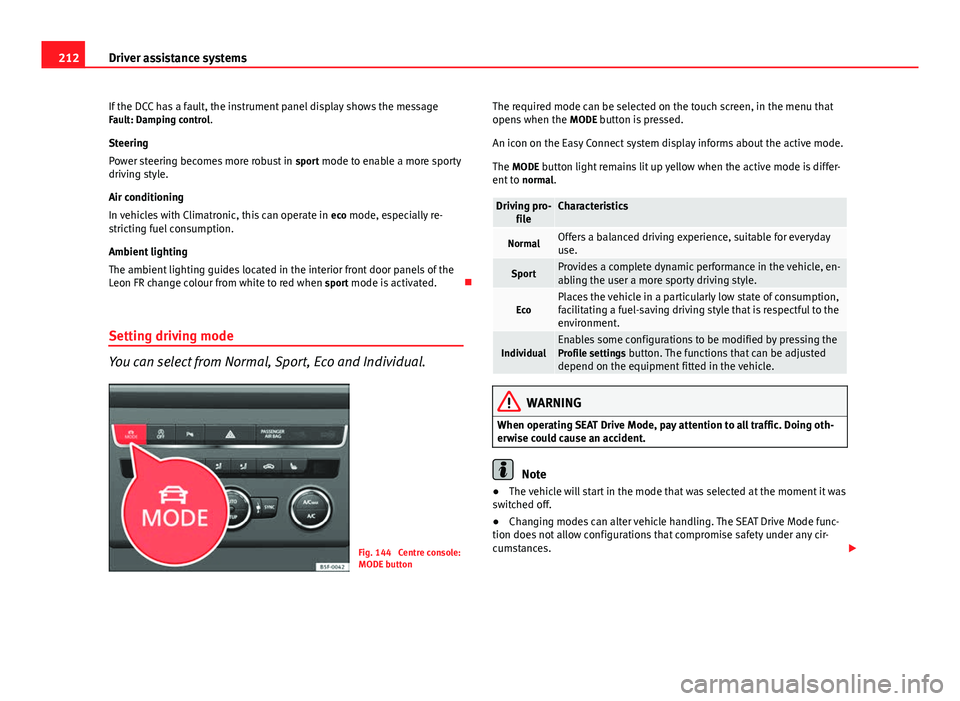
You can select from Normal, Sport, Eco and Individual.
Fig. 144 Centre console:
MODE button The required mode can be selected on the touch screen, in the menu that
opens when the
MODE button is pressed.
An icon on the Easy Connect system display informs about the active mode.
The MODE button light remains lit up yellow when the active mode is differ- ent to normal.
Driving pro-
fileCharacteristics
NormalOffers a balanced driving experience, suitable for everyday
use.
SportProvides a complete dynamic performance in the vehicle, en-
abling the user a more sporty driving style.
EcoPlaces the vehicle in a particularly low state of consumption,
facilitating a fuel-saving driving style that is respectful to the
environment.
IndividualEnables some configurations to be modified by pressing the
Profile settings button. The functions that can be adjusted
depend on the equipment fitted in the vehicle.
WARNING
When operating SEAT Drive Mode, pay attention to all traffic. Doing oth-
erwise could cause an accident.
Note
● The vehicle will start in the mode that was selected at the moment it was
switched off.
● Changing modes can alter vehicle handling. The SEAT Drive Mode func-
tion does not allow configurations that compromise safety under any cir-
cumstances.
Page 217 of 339
215
Driver assistance systems
For the sake of the environment
Under-inflated tyres lead to increased fuel consumption and tyre wear.
Note
● Driving for the first time with new tyres at a high speed can cause them
to slightly expand, which could then produce an air pressure warning.
● Only replace used tyres with those authorised by SEAT for the corre-
sponding type vehicle.
● Do not only rely on the tyre monitoring system. Regularly check your
tyres to ensure that the tyre pressure is correct and that the tyres are not
damaged due to puncture, cuts, tears and impacts/dents. Remove objects
from the tyres only when they have not pierced the tyres.
Tyre monitor indicator warning lamp
lights upPossible causeSolution
The pressure in one or more
tyres has clearly reduced in
comparison to the tyre pres-
sure set by the driver or the
tyre has structural damage.
Additionally, an audible warn-
ing can be heard and a text
message can be seen on the
instrument panel display. Stop the vehicle! Reduce
speed immediately! Stop the
vehicle safely as soon as pos-
sible. Avoid sudden manoeu-
vres and braking! Check all
tyres and pressures. Replace
any damaged tyres.
flashesPossible causeSolution
System malfunction. The con-
trol lamp flashes for about one
minute and then lights up per-
manently.
If the tyre pressure is correct,
switch the ignition off and on
again. If the control lamp re-
mains lit up, the tyre monitor-
ing indicator can be calibra-
ted. Have the system reviewed
by a specialised workshop.
Several warning and control lamps light up for a few seconds when the igni-
tion is switched on while the function is verified. They will switch off after a
few seconds.
WARNING
When the tyres are inflated at different pressures or at a pressure that is
too low then a tyre may be damaged resulting in a loss of control of the
vehicle and a serious or fatal accident.
● If the warning lamp lights up, stop immediately and check the
tyres.
● If the tyres are inflated at different pressures or if a tyre pressure is
too low, this will increase tyre wear, negatively affecting vehicle stability
and increasing braking distances.
● If tyres are inflated at different pressures or a tyre pressure is too low,
a tyre may be damaged and burst resulting in a loss of control of the ve-
hicle.
● The driver is responsible for ensuring that all of the vehicle tyres are
correctly inflated to the right pressure. The recommended tyre pressure
is indicated on the label ⇒ page 307.
● The tyre monitoring system can only operate correctly if all of the
tyres are inflated to the correct pressure when cold.
Safety FirstOperating instructionsPractical TipsTechnical specifications
Page 232 of 339

230Driving and the environment
Driving and the environment
Running in the engine
A new vehicle should be run in over a distance of 1500 km (1000 miles). For
the first 1000 km (600 miles) the engine speed should not exceed 2/3 of
the maximum permissible engine speed. In doing so, do not accelerate at
full throttle and do not drive with a trailer! From 1000 to 1500 km (600 to
1000 miles) you can gradually increase the engine rpm and road speed.
During its first few hours of running, the internal friction in the engine is
greater than later on when all the moving parts have bedded down.
How the vehicle is driven for the first 1500 km (1000 miles) influences the
future engine performance. Subsequently, also drive at a moderate rate, es-
pecially when the engine is still cold: this will lead to less engine wear and
tear and will prolong its useful life.
You should also avoid driving with the engine speed too low. Change down
to a lower gear when the engine no longer runs “smoothly”. If the engine
revs too much, cut fuel injection to protect the engine.
Driving through flooded roads
To prevent damage to the vehicle when driving through water, for example,
along a flooded road, please observe the following:
● The water should never come above the lower edge of the bodywork.
● Drive at pedestrian speed.
WARNING
After driving through water, mud, sludge, etc., the braking effect can be
delayed slightly due to moisture build-up on the discs and brake pads.
Applying the brakes carefully several times will remove the moisture and
restore the full braking effect.
CAUTION
● Driving through flooded areas may severely damage vehicle compo-
nents such as the engine, transmission, running gear or electrical system.
● Whenever driving through water, the Start-Stop system* must be switch-
ed off ⇒ page 169.
Note
● Check the depth of the water before entering the flooded zone.
● Do not stop in the water, drive in reverse, or stop the engine in any sit-
uation.
● Note that vehicles travelling in the opposite direction may splash water
that could exceed the maximum permitted water height for your vehicle.
● Avoid driving through salt water (corrosion).
Installation of exhaust gas filtration systems
Catalytic converter
Applies to vehicles with petrol engine: The vehicle must only be used with
unleaded petrol, otherwise the catalytic converter will be irreparably dam-
aged.
Page 233 of 339
231
Driving and the environment
Never drive until the tank is empty; an irregular supply of fuel can cause
faulty combustion. In these cases, unburned fuel reaches the exhaust sys-
tem, which can overheat and damage the catalytic converter.
Diesel particulate filter
Applies to vehicles with diesel engine: The diesel particulate filter can filter
out almost all soot particles contained in the exhaust gas. In normal driving
conditions the filter is self-cleaning. The Diesel particulate filter is cleaned
automatically without need for indication by the warning lamp . This may
be noticed because the engine idle speed increases and an odour may be
detected.
If automatic filter purification cannot be carried out (because only short
trips are taken, for example), soot will accumulate on the filter and the Die-
sel particulate filter warning lamp will switch on.
Facilitate the automatic filter cleaning process by driving in the following
manner: Drive for approximately 15 minutes at a minimum speed of 60 km/
h (40 mph) in 4th or 5th gear (automatic gearbox: gear S). Maintain the en-
gine speed at approx. 2000 rpm. The rise in temperature causes the soot on
the filter to burn. On completion of the cleaning the warning lamp will
switch off. If the warning lamp does not switch off, go immediately to a spe-
cialised workshop to rectify the problem.
WARNING
● Because of the high temperatures which can occur in the exhaust gas
control system (catalytic converter or diesel particulate filter), do not
park the vehicle where the exhaust can come into contact with flamma-
ble materials under the car (e.g. on grass or at the forest edge). Fire haz-
ard!
● Do not apply wax underneath the vehicle around the area of the ex-
haust system: Fire hazard!
Economic and ecological driving
Fuel consumption, environmental pollution and wear to the engine, brakes
and tyres depends largely on driving style. Fuel consumption can be re-
duced by 10-15% with an economical driving style and proper anticipation
of traffic conditions. The following section gives you some tips on lessening
the impact on the environment and reducing your operating costs at the
same time.
Foresight when driving
Acceleration causes the vehicle to consume more fuel. If you think ahead
when driving, you will need to brake less and thus accelerate less. Wherever
possible, let the car roll slowly to a stop, with a
gear engaged (for instance
when you can see that the next traffic lights are red). This takes advantage
of the engine braking effect, reducing wear on the brakes and tyres. Emis-
sions and fuel consumption will drop to zero due to the overrun fuel cut-off.
Changing gear to save energy
An effective way of saving is to change in advance to a higher gear. Running
the engine at high rpm in the lower gears uses an unnecessary amount of
fuel.
Manual gearbox : shift up from first to second gear as soon as possible. In
any case, we recommend that you change to a higher gear upon reaching
2000 rpm or so. Choosing the right gear enables fuel savings. Select the
highest possible gear appropriate for the driving situation (the engine
should continue functioning with cyclical regularity).
Automatic gearbox : accelerate gradually and without reaching the “kick-
down” position.
Avoid driving at high speed
Avoid travelling at top speed, whenever possible. Fuel consumption, emis-
sion of harmful gases and noise pollution multiply disproportionately as
speed is increased. Driving at moderate speeds will help to save fuel.
Safety FirstOperating instructionsPractical TipsTechnical specifications
Page 234 of 339

232Driving and the environment
Reduce idling time
In vehicles with the Start-Stop system idling is automatically reduced. In ve-
hicles without the Start-Stop system it is worth switching off the engine, for
example, at level crossings and at traffic lights that remain red for long peri-
ods of time. When an engine has reached operating temperature, and de-
pending on the cylinder capacity, keeping it switched off for a minimum of
about 5 seconds already saves more than the amount of fuel necessary for
restarting.
The engine takes a long time to warm up when it is idling. Mechanical wear
and pollutant emissions are also especially high during this initial warm-up
phase. It is therefore best to drive off immediately after starting the engine.
Avoid running the engine at high speed.
Regular maintenance
Regular servicing helps in saving fuel even before the engine is started. A
well-serviced engine gives you the benefit of improved fuel efficiency as
well as maximum reliability and an enhanced resale value. A badly serviced
engine can consume up to 10% more fuel than necessary.
Avoid short journeys
The engine and catalytic converter need to reach their optimal operating
temperature in order to minimise fuel consumption and emissions.
A cold engine consumes a disproportionate amount of fuel. The engine only
reaches its working temperature after about four kilometres (2.5 miles),
when fuel consumption will return to a normal level.
Check tyre pressure
Always make sure the tyres are inflated to the correct pressures
⇒ page 265 to save fuel. If the pressure is below half bar, fuel consumption
may increase by 5%. Due to the greater rolling resistance, under-inflation
also increases tyre wear and impairs handling.
Do not use winter tyres all year round as they increase fuel consumption by
up to 10%. Avoid carrying unnecessary loads
Given that every kilo of
extra weight will increase the fuel consumption, it is
advisable to always check the luggage compartment to make sure that no
unnecessary loads are being transported.
Since the luggage rack increases the aerodynamic drag of the vehicle, you
should remove it when not needed. This will save, at a speed of 100-120
km/h (60-75 mph), approximately 12% of fuel.
Save electrical energy
The engine drives the alternator, thereby generating electricity. This implies
that any increase in power consumption also increases fuel consumption!
For this reason, switch off any unneeded consumption of electricity. Electri-
cal equipment which uses a lot of electricity includes the blower (at a high
setting), the rear window heating and the seat heating*.
Environmental friendliness
Environmental protection is a top priority in the design, choice of materials
and manufacture of your new SEAT.
Constructive measures to encourage recycling
● Joints and connections designed for easy dismantling
● Modular construction to facilitate dismantling
● Increased use of single-grade materials.
● Plastic parts and elastomers are marked in accordance with ISO 1043,
ISO 11469 and ISO 1629.
Choice of materials
● Use of recycled materials.
● Use of compatible plastics in the same part if its components are not
easily separated.
Page 236 of 339
234Trailer
Trailer
Trailer towing What do you need to bear in mind when towing a trailer?
Your vehicle may be used to tow a trailer when fitted with the correct equip-
ment.
If you wish to retrofit a towing bracket, consult ⇒ page 236.
Connectors
Your vehicle is fitted with a 12-pin connector for the electrical connection
between the trailer and the vehicle.
If the trailer has a 7-pin plug you will need to use an adapter cable. This is
available in any Technical Service.
Trailer weight/drawbar load
Never exceed the authorised trailer weight. If you do not load the trailer up
to the maximum permitted trailer weight, you can then climb correspond-
ingly steeper slopes.
The maximum trailer weights listed are only applicable for altitudes up to
1000 m above sea level. With increasing altitude the engine power and
therefore the vehicle climbing ability are impaired because of the reduced
air density. The maximum trailer weight has to be reduced accordingly. The
weight of the vehicle and trailer combination must be reduced by 10% for
every further 1000 m (or part thereof). The gross combination weight is the
actual weight of the laden vehicle plus the actual weight of the laden trailer.
When possible, operate the trailer with the maximum permitted drawbar
load on the ball joint of the towing bracket, but do not exceed the specified
limit. The figures for
trailer weights and drawbar loads that are given on the data
plate of the towing bracket are for certification purposes only. The correct
figures for your specific model, which may be lower than these figures for
the towing bracket, are given in the vehicle documentation or in ⇒ chap-
ter Technical Data.
Distributing the load
Distribute loads in the trailer so that heavy objects are as near to the axle as
possible. Loads carried in the trailer must be secured to prevent them mov-
ing.
Tyre pressure
Set tyre pressure to the maximum permissible pressure shown on the stick-
er on the inside of the fuel tank flap. Set the tyre pressure of the trailer tyres
in accordance with the trailer manufacturer's recommendations.
Exterior mirrors
Check whether you can see enough of the road behind the trailer with the
standard rear vision mirrors. If this is not the case, you should have addi-
tional exterior mirrors fitted. Both exterior mirrors should be mounted on
hinged extension brackets. Adjust the mirrors to give sufficient vision to the
rear.
WARNING
Never transport people in a trailer. This could result in fatal accidents.