instrument panel Seat Leon 5D 2013 Owner's Guide
[x] Cancel search | Manufacturer: SEAT, Model Year: 2013, Model line: Leon 5D, Model: Seat Leon 5D 2013Pages: 339, PDF Size: 4.8 MB
Page 174 of 339
172Driving
Driver messages on the instrument panel display
Start-Stop system deactivated. Start the engine manually
This driver message is displayed when certain conditions are not met during
the stopping phase and the Start-Stop system cannot restart the engine.
The engine must be started manually.
Start-Stop system: Fault! Function not available
There is a fault in the Start-Stop system. Take the vehicle to a workshop to
have the fault repaired.
Manual gearbox
Changing gears
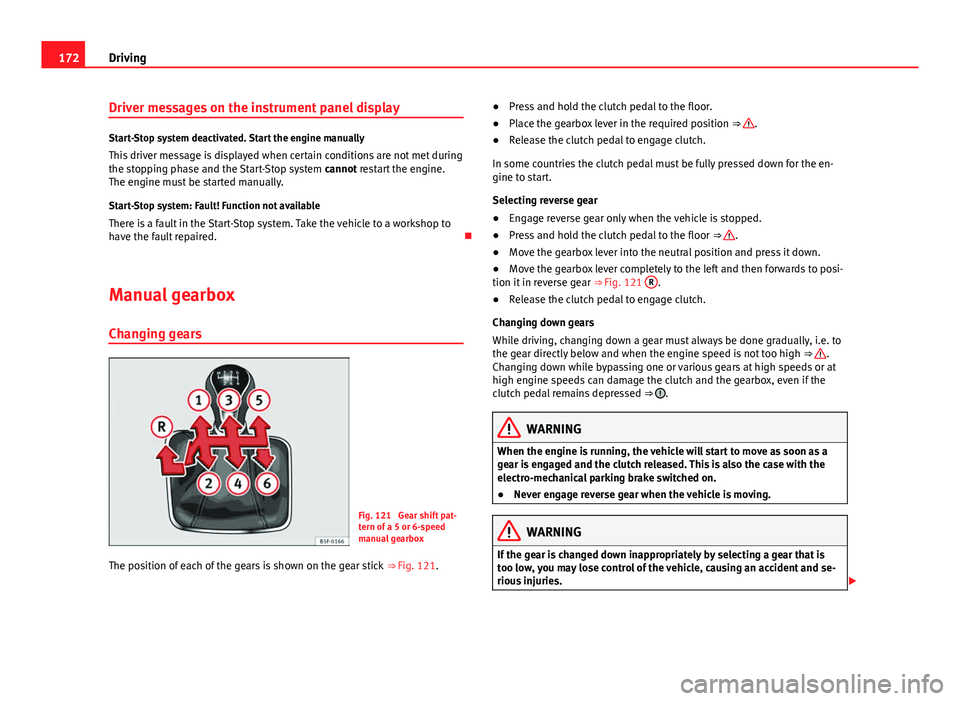
Fig. 121 Gear shift pat-
tern of a 5 or 6-speed
manual gearbox
The position of each of the gears is shown on the gear stick ⇒ Fig. 121. ●
Press and hold the clutch pedal to the floor.
● Place the gearbox lever in the required position ⇒
.
● Release the clutch pedal to engage clutch.
In some countries the clutch pedal must be fully pressed down for the en-
gine to start.
Selecting reverse gear
● Engage reverse gear only when the vehicle is stopped.
● Press and hold the clutch pedal to the floor ⇒
.
● Move the gearbox lever into the neutral position and press it down.
● Move the gearbox lever completely to the left and then forwards to posi-
tion it in reverse gear ⇒ Fig. 121 R
.
● Release the clutch pedal to engage clutch.
Changing down gears
While driving, changing down a gear must always be done gradually, i.e. to
the gear directly below and when the engine speed is not too high ⇒
.
Changing down while bypassing one or various gears at high speeds or at
high engine speeds can damage the clutch and the gearbox, even if the
clutch pedal remains depressed ⇒
.
WARNING
When the engine is running, the vehicle will start to move as soon as a
gear is engaged and the clutch released. This is also the case with the
electro-mechanical parking brake switched on.
● Never engage reverse gear when the vehicle is moving.
WARNING
If the gear is changed down inappropriately by selecting a gear that is
too low, you may lose control of the vehicle, causing an accident and se-
rious injuries.
Page 175 of 339
173
Driving
CAUTION
When travelling at high speeds or at high engine speeds, selecting a gear
that is too low can cause considerable damage to the clutch and the gear-
box. This can also occur if the clutch pedal is pressed and held and it does
not engage.
CAUTION
To prevent damage and avoid premature wear, please observe the follow-
ing:
● Do not rest your hand on the gear lever while driving. The pressure ap-
plied by your hand is transmitted to the gearbox selector forks.
● Always ensure that the vehicle is completely stopped before engaging
the reverse gear.
● Always press the clutch to the floor when changing gears.
● Never hold the vehicle “on the clutch” on hills with the engine on.
Automatic gearbox/DSG automatic gearbox* Introduction
Your vehicle is equipped with an electronically controlled manual gearbox.
Torque between the engine and the gearbox is transmitted via two inde-
pendent clutches. They replace the torque converter found on conventional
automatic gearboxes and allow for smooth, uninterrupted acceleration of
the vehicle.
The tiptronic system allows the driver to change gears manually if desired
⇒ page 178, Changing gears in tiptronic mode*. Selector lever positions
The selector lever position engaged is highlighted on the display in the in-
strument cluster. With the selector lever in the manual gearbox positions G,
D, E and S, the engaged gear is also indicated on the display.
P – Parking lock
When the selector lever is in this position, the driven wheels are locked me-
chanically. The parking lock must be engaged only when the vehicle is
sta-
tionary ⇒
.
The interlock button (the button on the selector lever handle) must be
pressed in and simultaneously the brake pedal must be depressed before
moving the selector lever either in or out of position P.
R – Reverse gear
Reverse gear must be engaged only when the vehicle is stationary and the
engine is idling ⇒
.
To move the selector lever to position R, the interlock button must be press-
ed in and at the same time the brake pedal must be depressed. The reverse
lights come on when the selector lever is in the R position with the ignition
on.
N – Neutral (idling)
With the selector lever in this position, the gear is in neutral.
D/S – Permanent drive (forward) position
The selector lever in the D/S position enables the gears to be controlled in
normal mode (D) or Sport (S). To select Sport mode (S), move the selector
lever backwards. Moving the lever again will select normal mode (D). The
selected driving mode is shown on the instrument panel display.
In normal mode (D), the gearbox automatically selects the best gear ratio.
This depends on the engine load, the road speed and the dynamic gear
control programme (DCP).
Safety FirstOperating instructionsPractical TipsTechnical specifications
Page 181 of 339
179
Driving
– To switch to tiptronic mode, move the selector lever from posi-
tion D/S to the right. As soon as the change is made, the selec-
tor lever will be shown in the position G (i.e. G4 means that 4th
gear is engaged) on the instrument panel display.
– Move the selector lever forwards +
to select a higher gear
⇒ Fig. 123.
– Move the selector lever backwards -
to select a lower gear.
Changing gear manually with the gearshift paddles*
The gearshift paddles can be used when the selector lever is in the
position D/S or G.
– Press the gearshift paddle +
to select a higher gear
⇒ Fig. 124.
– Press the gearshift paddle -
to select a lower gear.
– With the selector lever in position D/S, if no paddle is operated
during a short period of time, the gearbox control system
switches back to automatic mode. To switch to permanent man-
ual gear change using the gearshift paddles, move the selector
lever from position D/S to the right.
When accelerating, the gearbox automatically shifts up into the next gear
shortly before the maximum engine speed is reached.
If you select a lower gear, the automatic gearbox will not shift down until
there is no risk of overrevving the engine.
When the kick-down feature is used, the gearbox shifts down to a lower
gear, depending on road speed and engine speed. Kick-down feature
The kick-down feature allows maximum acceleration to be
reached.
When the accelerator pedal is pressed right down past the point of resist-
ance at full throttle, the gearbox will shift down to a lower gear, depending
on road speed and engine speed. The upshift to the next higher gear is de-
layed until the engine reaches maximum rpm.
WARNING
Please note that if the road surface is slippery or wet, the kick-down fea-
ture could cause the driving wheels to spin, which could result in skid-
ding.
Launch Control Programme 1)
The Launch control programme enables maximum accelera-
tion.
Important: the engine must have reached operating temperature
and the steering wheel must not be turned.
The engine speed for “launch control” is different in petrol and die-
sel engines. To use the launch-control you must disconnect the an-
ti-slip regulation (ASR) through the Easy Connect system in the
menu ⇒ page 79. The warning lamp will stay switched on or will
1)
Valid for vehicles: with Launch Control/6-Speed DSG with diesel engines superior to 125
kW and petrol engines superior to 140 kW.
Safety FirstOperating instructionsPractical TipsTechnical specifications
Page 183 of 339
181
Driving
– Select Eco mode ⇒ page 211 once in SEAT Drive Mode*.
– Take your foot off the accelerator.
The driver message Inertia will be displayed. At speeds higher
than 20 km/h (12 mph), the gearbox will automatically disengage
and the vehicle will roll freely, without the effect of the engine
brake. While the vehicle rolls, the engine runs at idling speed.
Stopping inertia mode
– Press the brake or the accelerator pedal.
To make use of the braking force and switch off the engine again,
simply press the brake pedal briefly.
Applying both the inertia mode (= prolonged section with less energy) and
the switching off using inertia (= shorter section without the need for fuel)
facilitates improved fuel consumption and emission balance.
WARNING
● If the inertia mode has been switched on, take into account, when ap-
proaching an obstacle and releasing the accelerator pedal, that the vehi-
cle will not decelerate in the usual manner: risk of accident!
● When using inertia mode while travelling down hills, the vehicle can
increase speed: risk of accident!
● If other users drive your vehicle, warn them about inertia mode.
Note
● Inertia mode is only available in eco driving mode (SEAT Drive Mode*).
● The driver message Inertia is only displayed with the current consump-
tion. In inertia mode the gear will no longer be displayed (for example: “E”
will appear in place of “E7”).
● On downhill sections with gradients above 15 %, the inertia mode will
automatically be switched off temporarily.
Backup programme
A backup programme is in place if a fault should occur in the
control system.
If all the positions of the selector lever are shown over a light background
on the instrument panel display, there is a system fault and the automatic
gearbox will operate in with the backup programme. When the backup pro-
gramme is activated, it is possible to drive the vehicle, however, at low
speeds and within a selected range of gears. In some cases driving in re-
verse gear may not be possible .
CAUTION
If the gearbox operates with the backup programme, take the vehicle to a
specialised workshop and have the fault repaired without delay.
Clutch
Clutch overheated! Stop the vehicle!
The clutch has overheated and could be damaged. In order to prevent the
temperature from increasing again and so that the clutch is cooled, stop the
Safety FirstOperating instructionsPractical TipsTechnical specifications
Page 186 of 339
184Driver assistance systems
Driver assistance systems
Cruise control system (CCS)*
Introduction
The cruise control system (CCS) is able to maintain the set speed from 20
km/h (15 mph).
A constant speed is maintained using the engine power control or by apply-
ing the active brake ⇒
.
Additional information and warnings:
● Change gear ⇒ page 173.
● Accessories and technical modifications ⇒ page 272.
WARNING
Use of the cruise control could cause accidents and severe injuries if it is
not possible to drive at a constant speed maintaining the safety distance.
● Do not use the cruise control in heavy traffic, if the distance from the
vehicle in front is insufficient, on steep roads, with several bends or in
slippery circumstances (snow, ice, rain or loose gravel), or on flooded
roads.
● Never use the CCS when driving off-road or on unpaved roads.
● Always adapt your speed and the distance to the vehicles ahead in
line with visibility, weather conditions, the condition of the road and the
traffic situation.
● To avoid unexpected operation of the cruise control system, turn it off
every time you finish using it.
WARNING (Continued)
● It is dangerous to use a set speed which is too high for the prevailing
road, traffic or weather conditions.
● When travelling down hills, the CCS cannot maintain a constant
speed. The vehicle tends to accelerate under its own weight. Select a
lower gear or use the foot brake to slow the vehicle.
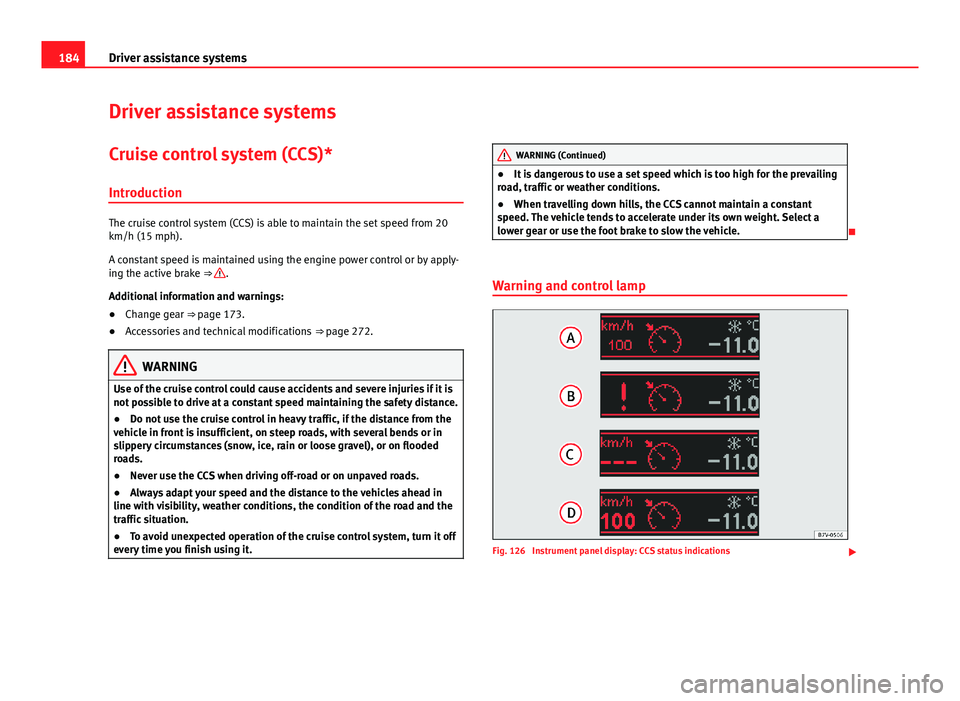
Warning and control lamp
Fig. 126 Instrument panel display: CCS status indications
Page 189 of 339
187
Driver assistance systems
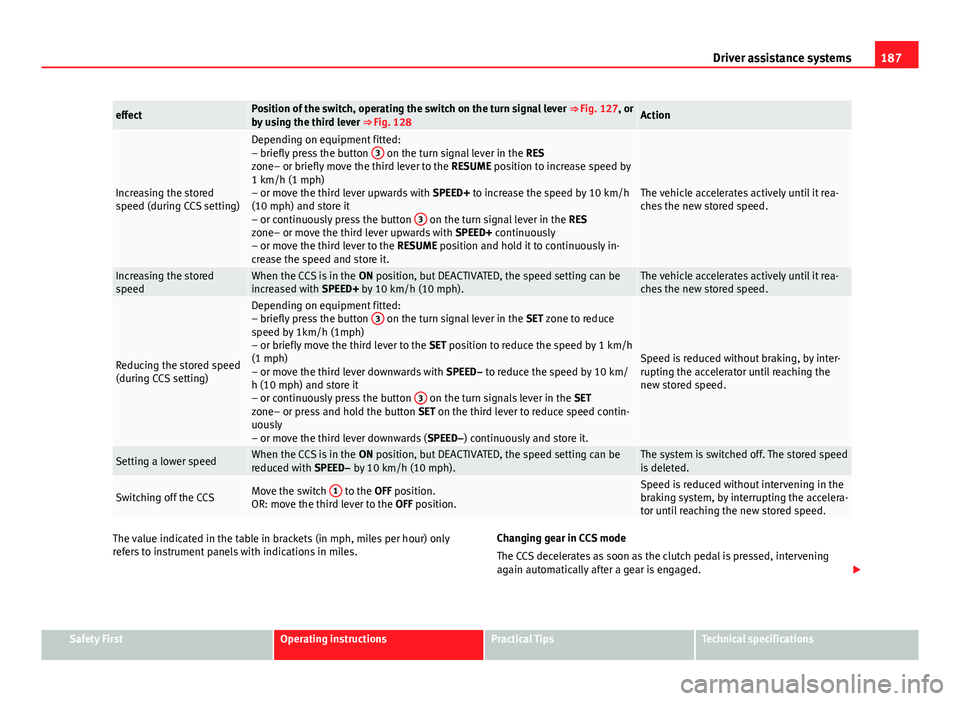
effectPosition of the switch, operating the switch on the turn signal lever ⇒ Fig. 127, or
by using the third lever ⇒ Fig. 128Action
Increasing the stored
speed (during CCS setting)
Depending on equipment fitted:
– briefly press the button 3 on the turn signal lever in the
RES
zone– or briefly move the third lever to the RESUME position to increase speed by
1 km/h (1 mph)
– or move the third lever upwards with SPEED+ to increase the speed by 10 km/h
(10 mph) and store it
– or continuously press the button 3
on the turn signal lever in the
RES
zone– or move the third lever upwards with SPEED+ continuously
– or move the third lever to the RESUME position and hold it to continuously in-
crease the speed and store it.
The vehicle accelerates actively until it rea-
ches the new stored speed.
Increasing the stored
speedWhen the CCS is in the ON position, but DEACTIVATED, the speed setting can be
increased with SPEED+ by 10 km/h (10 mph).The vehicle accelerates actively until it rea-
ches the new stored speed.
Reducing the stored speed
(during CCS setting)
Depending on equipment fitted:
– briefly press the button 3 on the turn signal lever in the
SET zone to reduce
speed by 1km/h (1mph)
– or briefly move the third lever to the SET position to reduce the speed by 1 km/h
(1 mph)
– or move the third lever downwards with SPEED– to reduce the speed by 10 km/
h (10 mph) and store it
– or continuously press the button 3
on the turn signals lever in the
SET
zone– or press and hold the button SET on the third lever to reduce speed contin-
uously
– or move the third lever downwards ( SPEED–) continuously and store it.
Speed is reduced without braking, by inter-
rupting the accelerator until reaching the
new stored speed.
Setting a lower speedWhen the CCS is in the ON position, but DEACTIVATED, the speed setting can be
reduced with SPEED– by 10 km/h (10 mph).The system is switched off. The stored speed
is deleted.
Switching off the CCSMove the switch 1 to the OFF position.
OR: move the third lever to the OFF position.Speed is reduced without intervening in the
braking system, by interrupting the accelera-
tor until reaching the new stored speed.
The value indicated in the table in brackets (in mph, miles per hour) only
refers to instrument panels with indications in miles. Changing gear in CCS mode
The CCS decelerates as soon as the clutch pedal is pressed, intervening
again automatically after a gear is engaged.
Safety FirstOperating instructionsPractical TipsTechnical specifications
Page 191 of 339
189
Driver assistance systems
Adaptive cruise control (ACC)*
Introduction
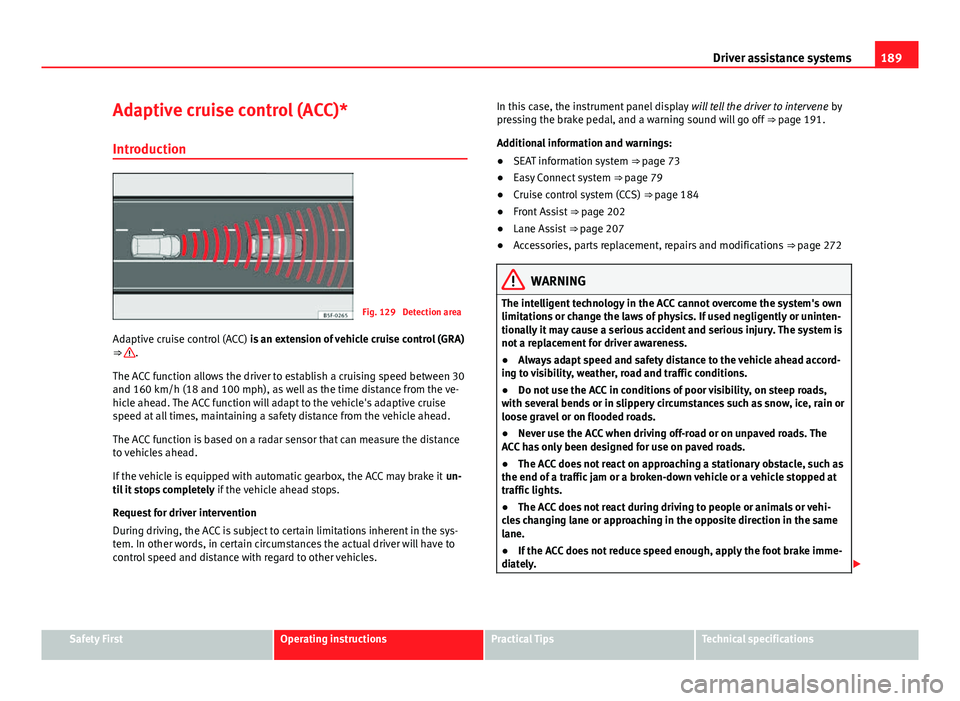
Fig. 129 Detection area
Adaptive cruise control (ACC) is an extension of vehicle cruise control (GRA)
⇒
.
The ACC function allows the driver to establish a cruising speed between 30
and 160 km/h (18 and 100 mph), as well as the time distance from the ve-
hicle ahead. The ACC function will adapt to the vehicle's adaptive cruise
speed at all times, maintaining a safety distance from the vehicle ahead.
The ACC function is based on a radar sensor that can measure the distance
to vehicles ahead.
If the vehicle is equipped with automatic gearbox, the ACC may brake it un-
til it stops completely if the vehicle ahead stops.
Request for driver intervention
During driving, the ACC is subject to certain limitations inherent in the sys-
tem. In other words, in certain circumstances the actual driver will have to
control speed and distance with regard to other vehicles. In this case, the instrument panel display
will tell the driver to intervene by
pressing the brake pedal, and a warning sound will go off ⇒ page 191.
Additional information and warnings:
● SEAT information system ⇒ page 73
● Easy Connect system ⇒ page 79
● Cruise control system (CCS) ⇒ page 184
● Front Assist ⇒ page 202
● Lane Assist ⇒ page 207
● Accessories, parts replacement, repairs and modifications ⇒ page 272
WARNING
The intelligent technology in the ACC cannot overcome the system's own
limitations or change the laws of physics. If used negligently or uninten-
tionally it may cause a serious accident and serious injury. The system is
not a replacement for driver awareness.
● Always adapt speed and safety distance to the vehicle ahead accord-
ing to visibility, weather, road and traffic conditions.
● Do not use the ACC in conditions of poor visibility, on steep roads,
with several bends or in slippery circumstances such as snow, ice, rain or
loose gravel or on flooded roads.
● Never use the ACC when driving off-road or on unpaved roads. The
ACC has only been designed for use on paved roads.
● The ACC does not react on approaching a stationary obstacle, such as
the end of a traffic jam or a broken-down vehicle or a vehicle stopped at
traffic lights.
● The ACC does not react during driving to people or animals or vehi-
cles changing lane or approaching in the opposite direction in the same
lane.
● If the ACC does not reduce speed enough, apply the foot brake imme-
diately.
Safety FirstOperating instructionsPractical TipsTechnical specifications
Page 192 of 339
190Driver assistance systems
WARNING (Continued)
● If the vehicle continues to move following a driver intervention re-
quest, apply the foot brake.
● If the instrument panel display shows a driver intervention request,
adjust the distance yourself.
● The driver must be ready to accelerate or brake by him- or herself at
any time.
CAUTION
If you have the impression that the radar sensor is damaged, disconnect the
ACC. This will prevent possible damage. In this case have it adjusted.
● A radar sensor repair requires specialist knowledge and special tools.
SEAT recommends visiting a SEAT dealership for this.
Note
● If the ACC does not operate as described in this chapter, do not use it
until it has been checked by a specialised workshop. SEAT recommends vis-
iting a SEAT dealership for this.
● The maximum speed with the ACC switched on is limited to 160 km/h
(100 mph).
● When the ACC is switched on, strange noises may be heard during auto-
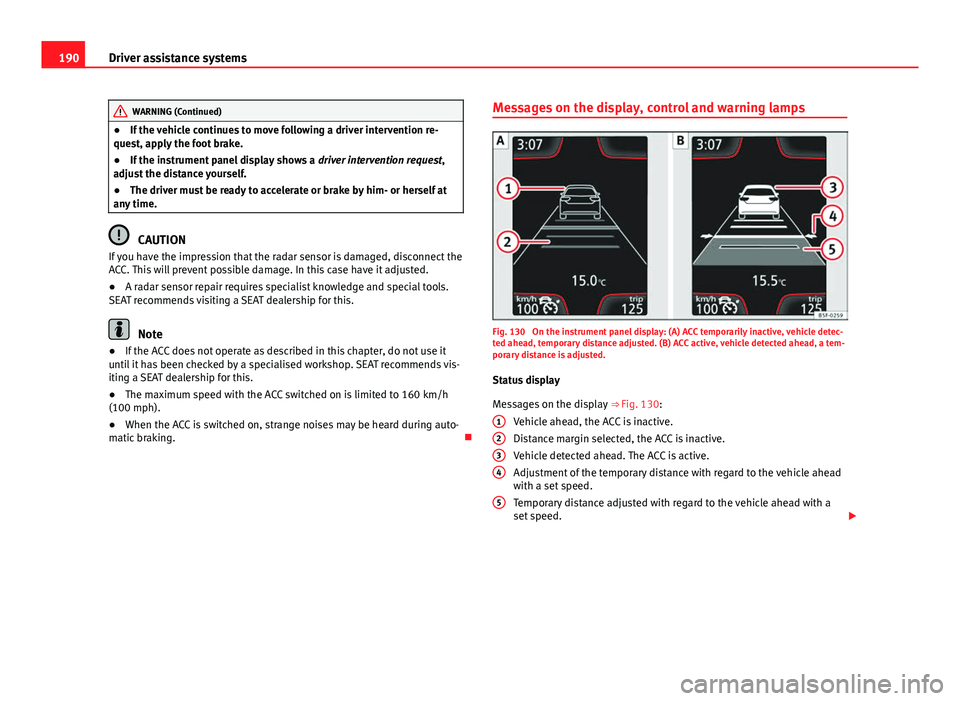
matic braking. Messages on the display, control and warning lampsFig. 130 On the instrument panel display: (A) ACC temporarily inactive, vehicle detec-
ted ahead, temporary distance adjusted. (B) ACC active, vehicle detected ahead, a tem-
porary distance is adjusted.
Status display
Messages on the display ⇒ Fig. 130:
Vehicle ahead, the ACC is inactive.
Distance margin selected, the ACC is inactive.
Vehicle detected ahead. The ACC is active.
Adjustment of the temporary distance with regard to the vehicle ahead
with a set speed.
Temporary distance adjusted with regard to the vehicle ahead with a
set speed.
1
234
5
Page 193 of 339
191
Driver assistance systems
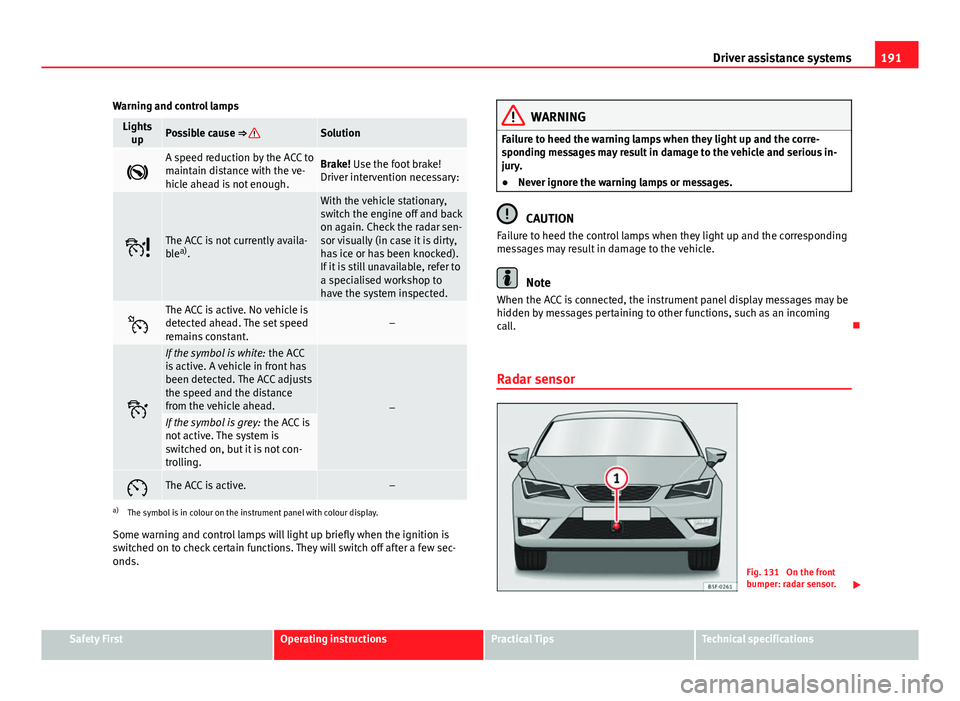
Warning and control lamps
Lights upPossible cause ⇒ Solution
A speed reduction by the ACC to
maintain distance with the ve-
hicle ahead is not enough.Brake! Use the foot brake!
Driver intervention necessary:
The ACC is not currently availa-
blea)
.
With the vehicle stationary,
switch the engine off and back
on again. Check the radar sen-
sor visually (in case it is dirty,
has ice or has been knocked).
If it is still unavailable, refer to
a specialised workshop to
have the system inspected.
The ACC is active. No vehicle is
detected ahead. The set speed
remains constant.–
If the symbol is white: the ACC
is active. A vehicle in front has
been detected. The ACC adjusts
the speed and the distance
from the vehicle ahead.
–If the symbol is grey: the ACC is
not active. The system is
switched on, but it is not con-
trolling.
The ACC is active.–
a) The symbol is in colour on the instrument panel with colour display.
Some warning and control lamps will light up briefly when the ignition is
switched on to check certain functions. They will switch off after a few sec-
onds.
WARNING
Failure to heed the warning lamps when they light up and the corre-
sponding messages may result in damage to the vehicle and serious in-
jury.
● Never ignore the warning lamps or messages.
CAUTION
Failure to heed the control lamps when they light up and the corresponding
messages may result in damage to the vehicle.
Note
When the ACC is connected, the instrument panel display messages may be
hidden by messages pertaining to other functions, such as an incoming
call.
Radar sensor
Fig. 131 On the front
bumper: radar sensor.
Safety FirstOperating instructionsPractical TipsTechnical specifications
Page 194 of 339
192Driver assistance systems
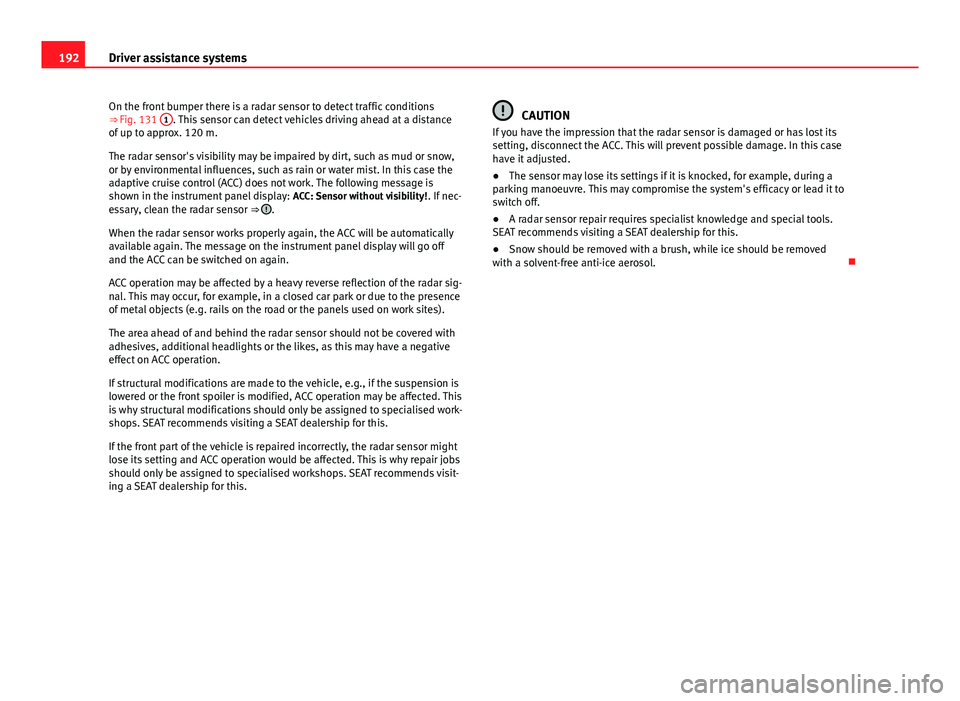
On the front bumper there is a radar sensor to detect traffic conditions
⇒ Fig. 131 1
. This sensor can detect vehicles driving ahead at a distance
of up to approx. 120 m.
The radar sensor's visibility may be impaired by dirt, such as mud or snow,
or by environmental influences, such as rain or water mist. In this case the
adaptive cruise control (ACC) does not work. The following message is
shown in the instrument panel display: ACC: Sensor without visibility!. If nec-
essary, clean the radar sensor ⇒
.
When the radar sensor works properly again, the ACC will be automatically
available again. The message on the instrument panel display will go off
and the ACC can be switched on again.
ACC operation may be affected by a heavy reverse reflection of the radar sig-
nal. This may occur, for example, in a closed car park or due to the presence
of metal objects (e.g. rails on the road or the panels used on work sites).
The area ahead of and behind the radar sensor should not be covered with
adhesives, additional headlights or the likes, as this may have a negative
effect on ACC operation.
If structural modifications are made to the vehicle, e.g., if the suspension is
lowered or the front spoiler is modified, ACC operation may be affected. This
is why structural modifications should only be assigned to specialised work-
shops. SEAT recommends visiting a SEAT dealership for this.
If the front part of the vehicle is repaired incorrectly, the radar sensor might
lose its setting and ACC operation would be affected. This is why repair jobs
should only be assigned to specialised workshops. SEAT recommends visit-
ing a SEAT dealership for this.
CAUTION
If you have the impression that the radar sensor is damaged or has lost its
setting, disconnect the ACC. This will prevent possible damage. In this case
have it adjusted.
● The sensor may lose its settings if it is knocked, for example, during a
parking manoeuvre. This may compromise the system's efficacy or lead it to
switch off.
● A radar sensor repair requires specialist knowledge and special tools.
SEAT recommends visiting a SEAT dealership for this.
● Snow should be removed with a brush, while ice should be removed
with a solvent-free anti-ice aerosol.