key battery Seat Leon 5D 2013 Owner's manual
[x] Cancel search | Manufacturer: SEAT, Model Year: 2013, Model line: Leon 5D, Model: Seat Leon 5D 2013Pages: 339, PDF Size: 4.8 MB
Page 68 of 339
66Instruments and warning/control lamps
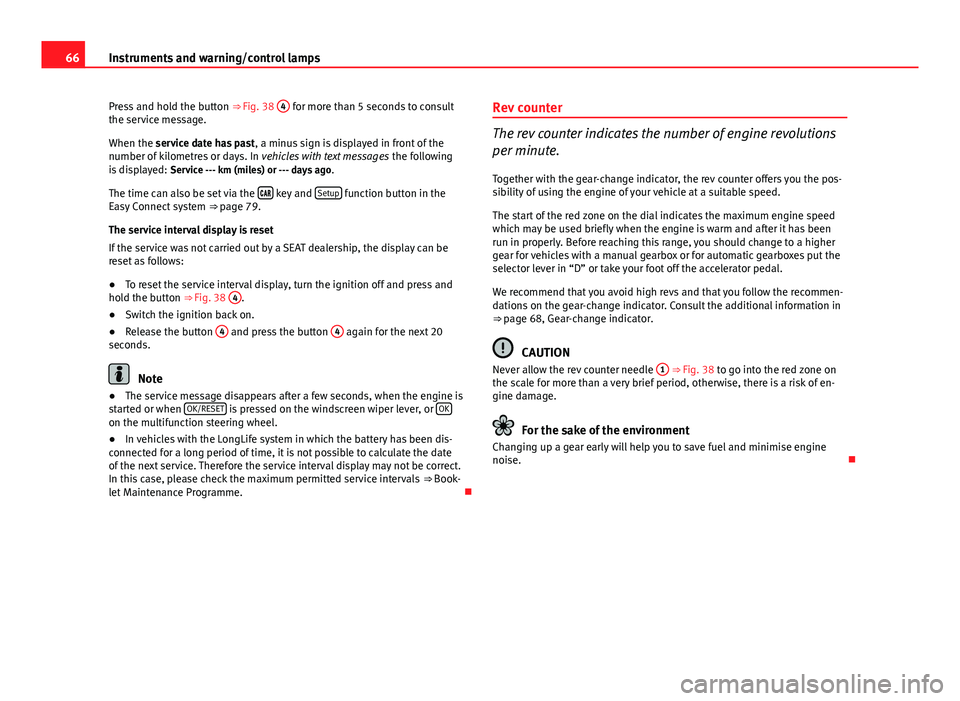
Press and hold the button ⇒ Fig. 38 4
for more than 5 seconds to consult
the service message.
When the service date has past , a minus sign is displayed in front of the
number of kilometres or days. In vehicles with text messages the following
is displayed: Service --- km (miles) or --- days ago .
The time can also be set via the
key and Setup function button in the
Easy Connect system ⇒ page 79.
The service interval display is reset
If the service was not carried out by a SEAT dealership, the display can be
reset as follows:
● To reset the service interval display, turn the ignition off and press and
hold the button ⇒ Fig. 38 4
.
● Switch the ignition back on.
● Release the button 4
and press the button 4 again for the next 20
seconds.
Note
● The service message disappears after a few seconds, when the engine is
started or when OK/RESET
is pressed on the windscreen wiper lever, or OKon the multifunction steering wheel.
●
In vehicles with the LongLife system in which the battery has been dis-
connected for a long period of time, it is not possible to calculate the date
of the next service. Therefore the service interval display may not be correct.
In this case, please check the maximum permitted service intervals ⇒ Book-
let Maintenance Programme. Rev counter
The rev counter indicates the number of engine revolutions
per minute.
Together with the gear-change indicator, the rev counter offers you the pos-
sibility of using the engine of your vehicle at a suitable speed.
The start of the red zone on the dial indicates the maximum engine speed
which may be used briefly when the engine is warm and after it has been
run in properly. Before reaching this range, you should change to a higher
gear for vehicles with a manual gearbox or for automatic gearboxes put the
selector lever in “D” or take your foot off the accelerator pedal.
We recommend that you avoid high revs and that you follow the recommen-
dations on the gear-change indicator. Consult the additional information in
⇒ page 68, Gear-change indicator.
CAUTION
Never allow the rev counter needle 1 ⇒ Fig. 38 to go into the red zone on
the scale for more than a very brief period, otherwise, there is a risk of en-
gine damage.
For the sake of the environment
Changing up a gear early will help you to save fuel and minimise engine
noise.
Page 91 of 339
89
Opening and closing
Vehicle key
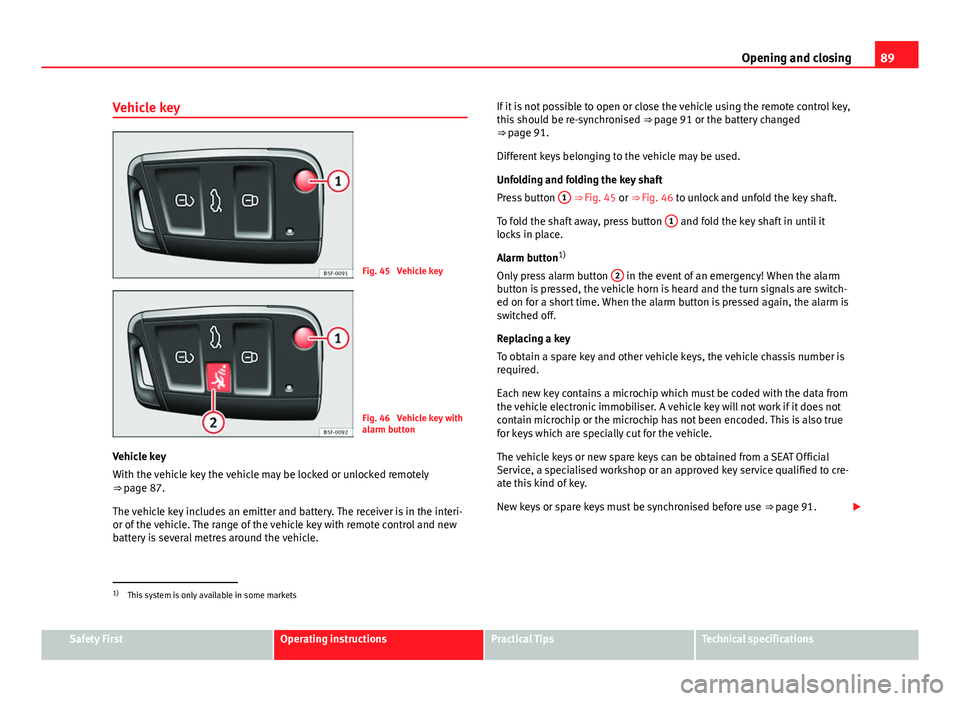
Fig. 45 Vehicle key
Fig. 46 Vehicle key with
alarm button
Vehicle key
With the vehicle key the vehicle may be locked or unlocked remotely
⇒ page 87.
The vehicle key includes an emitter and battery. The receiver is in the interi-
or of the vehicle. The range of the vehicle key with remote control and new
battery is several metres around the vehicle. If it is not possible to open or close the vehicle using the remote control key,
this should be re-synchronised
⇒ page 91 or the battery changed
⇒ page 91.
Different keys belonging to the vehicle may be used.
Unfolding and folding the key shaft
Press button 1
⇒ Fig. 45 or ⇒
Fig. 46 to unlock and unfold the key shaft.
To fold the shaft away, press button 1
and fold the key shaft in until it
locks in place.
Alarm button 1)
Only press alarm button 2
in the event of an emergency! When the alarm
button is pressed, the vehicle horn is heard and the turn signals are switch-
ed on for a short time. When the alarm button is pressed again, the alarm is
switched off.
Replacing a key
To obtain a spare key and other vehicle keys, the vehicle chassis number is
required.
Each new key contains a microchip which must be coded with the data from
the vehicle electronic immobiliser. A vehicle key will not work if it does not
contain microchip or the microchip has not been encoded. This is also true
for keys which are specially cut for the vehicle.
The vehicle keys or new spare keys can be obtained from a SEAT Official
Service, a specialised workshop or an approved key service qualified to cre-
ate this kind of key.
New keys or spare keys must be synchronised before use ⇒ page 91.
1)
This system is only available in some markets
Safety FirstOperating instructionsPractical TipsTechnical specifications
Page 92 of 339
90Opening and closing
CAUTION
All of the vehicle keys contain electronic components. Protect the vehicle
keys from damage, impacts and humidity.
Note
● Only use the key button when you require the corresponding function.
Pushing the button unnecessarily could accidentally unlock the vehicle or
trigger the alarm. It is also possible even when you are outside the radius of
action.
● Key operation can be greatly influenced by overlapping radio signals
close the vehicle working in the same range of frequencies, for example, ra-
dio transmitters, mobile telephones.
● Obstacles between the remote control and the vehicle, bad weather con-
ditions and discharged batteries can considerably reduce the range of the
remote control.
● If buttons ⇒ Fig. 50 or ⇒ Fig. 51 on the vehicle key, or one of the central
locking buttons ⇒ page 94 are pressed repeatedly in short succession,
the central locking is briefly switched off to protect against overloading. The
vehicle is then unlocked. Lock the vehicle if necessary. Control lamp on the vehicle key
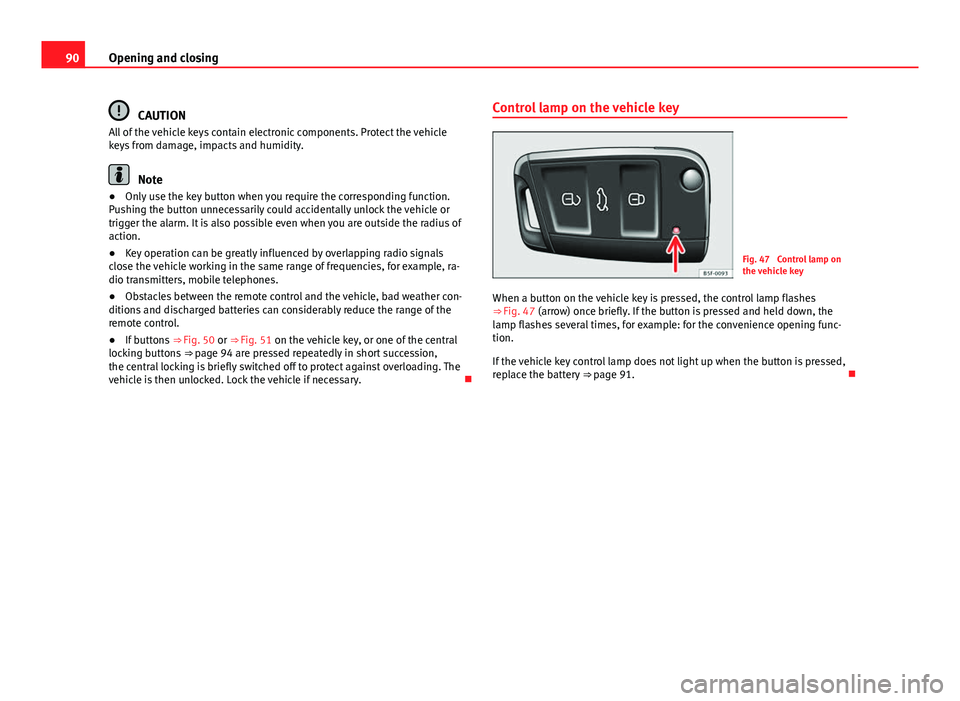
Fig. 47 Control lamp on
the vehicle key
When a button on the vehicle key is pressed, the control lamp flashes
⇒ Fig. 47 (arrow) once briefly. If the button is pressed and held down, the
lamp flashes several times, for example: for the convenience opening func-
tion.
If the vehicle key control lamp does not light up when the button is pressed,
replace the battery ⇒ page 91.
Page 93 of 339
91
Opening and closing
Changing the battery
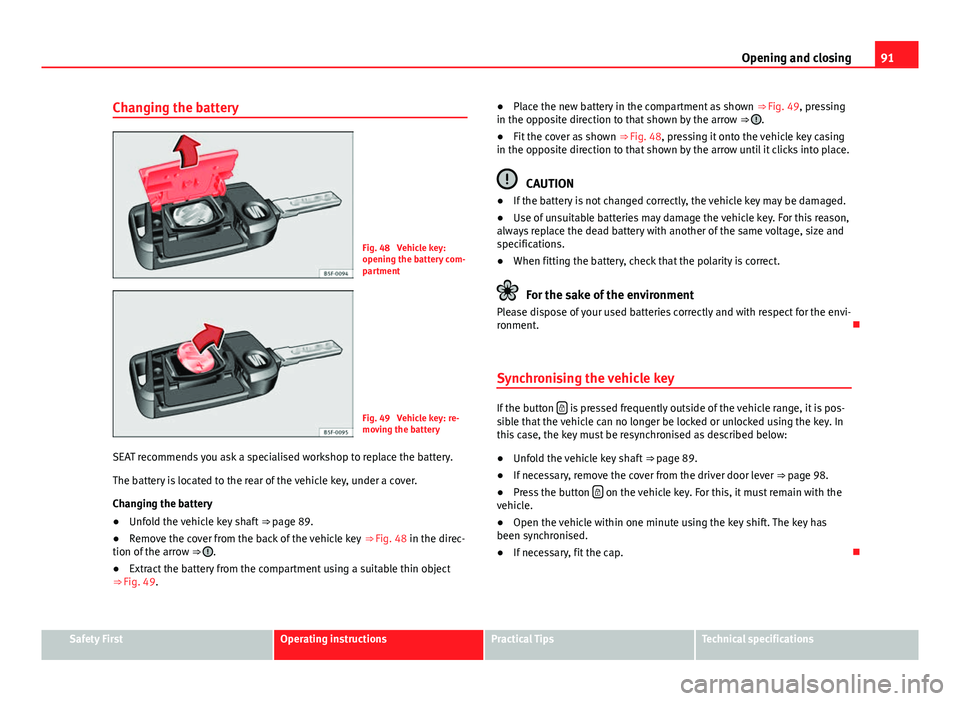
Fig. 48 Vehicle key:
opening the battery com-
partment
Fig. 49 Vehicle key: re-
moving the battery
SEAT recommends you ask a specialised workshop to replace the battery.
The battery is located to the rear of the vehicle key, under a cover.
Changing the battery
● Unfold the vehicle key shaft
⇒ page 89.
● Remove the cover from the back of the vehicle key
⇒ Fig. 48 in the direc-
tion of the arrow ⇒
.
● Extract the battery from the compartment using a suitable thin object
⇒ Fig. 49. ●
Place the new battery in the compartment as shown ⇒ Fig. 49, pressing
in the opposite direction to that shown by the arrow ⇒
.
● Fit the cover as shown ⇒ Fig. 48, pressing it onto the vehicle key casing
in the opposite direction to that shown by the arrow until it clicks into place.
CAUTION
● If the battery is not changed correctly, the vehicle key may be damaged.
● Use of unsuitable batteries may damage the vehicle key. For this reason,
always replace the dead battery with another of the same voltage, size and
specifications.
● When fitting the battery, check that the polarity is correct.
For the sake of the environment
Please dispose of your used batteries correctly and with respect for the envi-
ronment.
Synchronising the vehicle key
If the button is pressed frequently outside of the vehicle range, it is pos-
sible that the vehicle can no longer be locked or unlocked using the key. In
this case, the key must be resynchronised as described below:
● Unfold the vehicle key shaft
⇒ page 89.
● If necessary, remove the cover from the driver door lever
⇒ page 98.
● Press the button
on the vehicle key. For this, it must remain with the
vehicle.
● Open the vehicle within one minute using the key shift. The key has
been synchronised.
● If necessary, fit the cap.
Safety FirstOperating instructionsPractical TipsTechnical specifications
Page 98 of 339
96Opening and closing
● The rear lid is opened.
● When the ignition is switched on with a non-authorised key.
● When the vehicle battery is disconnected.
● Movement inside the vehicle (in vehicles with interior monitoring
⇒ page 97).
● When the vehicle is towed (in vehicles with anti-tow system
⇒ page 97).
● When the vehicle is raised (in vehicles with anti-tow system
⇒ page 97).
● When the vehicle is transported on a ferry or by rail (vehicles with an an-
ti-tow system or vehicle interior monitoring ⇒ page 97).
● When a trailer connected to the anti-theft alarm system is disconnected.
How to turn OFF the alarm
Unlock the vehicle with the unlocking button on the key or turn on the igni-
tion with a valid key.
Note
● The alarm will be triggered once more when anybody enters the same
zone of surveillance or any other zone. If, for example, after opening a door,
the rear lid is also opened.
● The anti-theft alarm
is not activated when the vehicle is locked from
the inside using the central locking button.
● If the driver door is unlocked mechanically with the key, only the driver
door is unlocked, the rest of the doors remain locked. Only when the igni-
tion has been turned on will the other doors be available - but not unlocked
- and the central lock button activated.
● If the vehicle battery is run down or flat then the anti-theft alarm will not
operate correctly. Vehicle interior monitoring and anti-tow system*
Monitoring or control function incorporated in the anti-theft
alarm* which detects unauthorized vehicle entry by means
of ultrasound.
Activation
– It is automatically switched on when the anti-theft alarm is acti-
vated.
Deactivation
– Open the vehicle with the key, either mechanically 1)
or by press-
ing the
button on the remote control.
– Press the button
on the remote control twice. The volumetric
sensor and tilt sensors will be deactivated. The alarm system re-
mains activated.
The vehicle interior monitoring and the anti-tow system are automatically
switched on again next time the vehicle is locked.
The vehicle interior monitoring and anti-tow sensor (tilt sensor) are auto-
matically switched on when the anti-theft alarm is switched on. In order to
activate it, all the doors and the rear lid must be closed.
If you wish to switch off the vehicle interior monitoring and the anti-tow sys-
tem, it must be done each time that the vehicle is locked; if not, they will be
automatically switched on.
The vehicle interior monitoring and the anti-tow system should be switched
off if animals are left inside the locked vehicle (otherwise, their movements
1)
The time period from when the door is opened until the key is inserted in the contact
should not exceed 15 sec., otherwise the alarm will be triggered.
Page 116 of 339
114Lights and visibility
7. Always take the vehicle key with you when you leave the vehi-
cle.
Switch on the hazard warning lights to warn other road users, for example:
● reaching the tail end of a traffic jam,
● there is an emergency
● your vehicle breaks down due to a technical fault,
● you are towing another vehicle or your vehicle is being towed.
All turn signals flash simultaneously when the hazard warning lights are
switched on. The two turn signal turn signal lamps and the turn signal
lamp in the switch will flash at the same time. The hazard warning lights
also work when the ignition is switched off.
Emergency braking warning
If the vehicle is braked suddenly and continuously at a speed of more than
80 km/h (50 mph), the brake light flashes several times per second to warn
vehicles driving behind. If you continue braking, the hazard warning lights
will come on automatically when the vehicle comes to a standstill. They
switch off automatically when the vehicle starts to move again.
WARNING
● The risk of an accident increases if your vehicle breaks down. Always
use the hazard warning lights and a warning triangle to draw the atten-
tion of other road users to your stationary vehicle.
● Never park where the catalytic converter could come into contact with
inflammable materials under the vehicle, for example dry grass or spilt
petrol. This could start a fire!
Note
● The battery will run down if the hazard warning lights are left on for a
long time, even if the ignition is switched off.
● The use of the hazard warning lights described here is subject to the rel-
evant statutory requirements.
Main beam assist*
Main beam assist (Light Assist)
The main beam assist begins operating (within the limits of the system and
depending on the environmental and traffic conditions) starting at a speed
of 60 km/h (37 mph), when it switches on automatically, and then deacti-
vates again below 30 km/h (18 mph) ⇒
. This is managed via a camera
situated on the base of the interior mirror.
The main beam assist generally detects illuminated areas and deactivates
the main beam when passing through a town, for example.
Page 120 of 339
118Lights and visibility
WARNING
Heavy objects in the vehicle may mean that the headlights dazzle and
distract other drivers. This could result in a serious accident.
● Adjust the light beam to the vehicle load status so that it does not
blind other drivers.
Interior and reading lights 1)
Button/
Positioneffect
Switches interior lights off.
Switches interior lights on.
Switches door contact control on (central position).
The interior lights come on automatically when the vehicle is
unlocked, a door is opened or the key is removed from the ig-
nition.
The lights go off a few seconds after all the doors are closed,
the vehicle is locked or the ignition is switched on.
Turning the reading light on and off
Glove compartment and luggage compartment lighting*
When opening and closing the glove compartment on the front passenger
side and the rear lid, the respective light will automatically switch on and
off. Footwell lighting*
The lights in the footwell area below the dash (driver and front passenger
sides) will switch on when the doors are opened and will decrease in inten-
sity while driving. The intensity of these lights can be adjusted using the ra-
dio menu (see Easy Connect > Adjusting Lighting > Interior lighting
⇒ page 82).
Ambient light*
The ambient light in the door panel changes colour (white or red) depend-
ing on the driving mode. The intensity of these lights can be adjusted using
the radio menu (see Easy Connect > Adjusting Lights > Interior lighting
⇒ page 82).
Note
The reading lights switch off when the vehicle is locked using a key or after
several minutes if the key is removed from the ignition. This prevents the
battery from discharging.
Sun protection equipment Introduction
WARNING
Folded sun blinds can reduce visibility.
● Always store sun blinds and visors in their housing when not in use.
1)
Depending on the level of equipment fitted in the vehicle, LEDs can be used for the follow-
ing interior lights: front courtesy light, rear courtesy light, footwell light and sun visor light.
Page 167 of 339
165
Driving
WARNING
● Never run the engine in confined spaces, as the exhaust gases are
poisonous.
● Never remove the key from the ignition if the vehicle is in motion.
Otherwise, the steering could suddenly lock, making it impossible to
steer the vehicle: risk of accident!
● Always take the key with you when you leave the vehicle. This is par-
ticularly important if there are children in the vehicle, as they might oth-
erwise be able to start the engine or use power-operated equipment (e.g.
the electric windows), which could cause injuries.
CAUTION
Avoid high engine speeds, full throttle and extreme load conditions until
the engine has reached its normal operating temperature, otherwise this
can damage the engine.
For the sake of the environment
Do not warm up the engine by running it with the car stationary. You should
drive off as soon as you start the engine. This will help avoid unnecessary
exhaust emissions.
Note
● If it is difficult to turn the ignition key to the position 1, turn the steer-
ing wheel to both sides to release the steering lock.
● When starting from cold, the engine may be a little noisy for the first few
seconds until oil pressure has built up in the hydraulic valve lifters. This is
quite normal, and no cause for concern.
● If the vehicle battery is disconnected and reconnected, the key must re-
main in the position 1
for around 5 seconds before starting up.
● Vehicles with automatic gearbox: After switching off the ignition, you
can only remove the ignition key if the selector lever is in position “P” (park-
ing lock). Next, the selector lever is locked. Switching off the engine with the key
Switching off the engine
–
Stop the vehicle.
– Turn the ignition key to position 1
⇒ Fig. 118.
Engaging the steering wheel lock
Important: selector lever (automatic gearbox*) must be in position
P.
– Remove the key from the ignition in position 1
⇒ Fig. 118
⇒ .
– Turn the steering wheel until you hear it engage.
Possible vehicle theft is prevented with the steering lock engaged.
WARNING
● Never switch the engine off until the vehicle is stationary. The brake
servo and power steering functions will not be completely covered under
warranty. More force may also be needed to turn the steering wheel or to
brake. As you cannot steer and brake in the normal manner, there is a
greater risk of accidents and serious injury.
● Never remove the key from the ignition if the vehicle is in motion.
Otherwise, the steering could lock making it impossible to steer the vehi-
cle.
● Always take the ignition key with you whenever you leave the vehicle,
even temporarily. This is particularly important if there are children in
the vehicle, as they might otherwise be able to start the engine or use
power-operated equipment (e.g. the electric windows), which could
cause injuries.
Safety FirstOperating instructionsPractical TipsTechnical specifications
Page 253 of 339
251
Checking and refilling levels
WARNING
Natural gas is a highly explosive, easily flammable substance. Incorrect
handling of the natural gas can cause accidents serious burns and other
injuries.
● Before refuelling with natural gas, engage the filler neck correctly. If
you smell gas, stop refuelling immediately.
WARNING
The vehicle is not prepared to use liquefied natural gas (LNG) and this
fuel must not be added under any circumstances. Liquefied natural gas
can cause the natural gas tank to explode resulting in serious injury.
Note
● The filling nozzles of all natural gas pumps might not be operated in the
same way. If you do not know, ask a qualified employee at the petrol station
to do the refuelling.
● Noises heard when refuelling are normal and do not indicate the pres-
ence of damage to the system.
● The vehicle natural gas system is prepared both for refuelling with a
small compressor (slow refuel) and a large compressor (fast refuel) in natu-
ral gas service stations. Bonnet
Working on components in the engine compartment
Extra caution is necessary when working on components in
the engine compartment. Always be aware of the danger of injury and scalding as well as the risk of
accident or even fire when working in the engine compartment (e.g. when
checking and refilling fluids). Always observe the warnings listed below
and follow all general safety precautions. The engine compartment of the
vehicle is a potentially hazardous area ⇒
.
WARNING
● Switch the ignition off.
● Remove the ignition key.
● Apply the handbrake.
● If the vehicle has a manual gearbox, place the lever in neutral; if it
has an automatic gearbox, place the selector lever in position P.
● Wait for the engine to cool down.
● Keep children away from the engine compartment.
● Never spill liquids used for vehicle operation on the engine compart-
ment, as these may catch fire (e.g. the antifreeze in coolant).
● Take care not to cause short circuits in the electrical system, especial-
ly when working on the battery.
● If working inside the engine compartment, remember that, even when
the ignition is switched off, the radiator fan may start up automatically,
and therefore there is a risk of injury.
● Do not unscrew the cap on the coolant expansion tank when the en-
gine is hot. The cooling system is under pressure.
Safety FirstOperating instructionsPractical TipsTechnical specifications
Page 262 of 339

260Checking and refilling levels
WARNING
● Brake fluid should be stored in the closed original container in a safe
place out of reach of children. Risk of poisoning!
● If the brake fluid is left in the system for too long and the brakes are
subjected to heavy use, vapour bubbles may form in the brake system.
This would seriously affect the efficiency of the brakes and the safety of
the vehicle. This may cause an accident.
CAUTION
Brake fluid should not come into contact with the vehicle paintwork, as it is
abrasive.
Battery General information
The battery is located in the engine compartment and is almost mainte-
nance-free. It is checked as part of the Inspection Service. Nevertheless,
check the terminals are clean and have the correct tightening torque, espe-
cially in summer and winter.
Disconnecting the battery
The battery should only be disconnected in exceptional cases. When the
battery is disconnected, some of the vehicle's functions are “lost” ( ⇒ table
on page 260). These functions will require resetting after the battery is re-
connected.
Deactivate the anti-theft alarm* before you disconnect the battery Other-
wise the alarm will be triggered.
effectReprogrammingOne-touch function of the electric
windows⇒ page 104, One-touch opening and
closing*
Remote control keyIf the vehicle does not respond to the
key, they should be synchronised
⇒ page 91
Digital clock⇒ page 63
ESC warning lampAfter driving for a few metres, the
warning lamp goes out again.
If the vehicle is not used for long periods
The vehicle has a system for monitoring the current consumption when the
engine is left unused for long periods of time ⇒ page 226. Some functions,
such as the interior lights, or the remote door opening, may be temporarily
disabled to prevent the battery from running flat. These functions will come
back on as soon as the ignition is switched on and the engine started.
Winter conditions
During the winter, the starting power may be reduced, and if necessary, the
battery should be charged ⇒
in Important safety warnings for handling a
vehicle battery on page 261
Important safety warnings for handling a vehicle battery
All work on batteries requires specialist knowledge. Please refer to a SEAT
Official Service or a workshop specialising in batteries: risk of burns or ex-
ploding battery!
The battery must not be opened. Never try to change the fluid level of the
battery. Explosive gas is released from the battery that could cause an ex-
plosion.