service interval Seat Leon 5D 2013 Owner's manual
[x] Cancel search | Manufacturer: SEAT, Model Year: 2013, Model line: Leon 5D, Model: Seat Leon 5D 2013Pages: 339, PDF Size: 4.8 MB
Page 64 of 339
62Instruments and warning/control lamps
CAUTION
● To prevent damage to the engine, the rev counter needle should only re-
main in the red zone for a short period of time.
● When the engine is cold, avoid high revs and heavy acceleration and do
not make the engine work hard.
For the sake of the environment
Changing up a gear in time reduces fuel consumption and noise.
Displays on screen
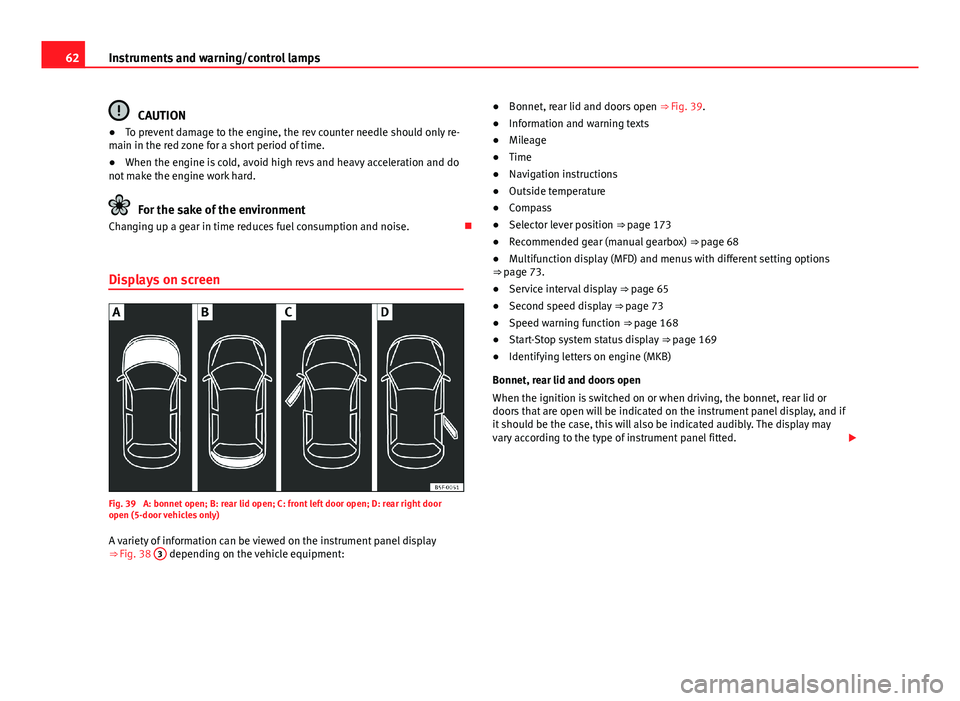
Fig. 39 A: bonnet open; B: rear lid open; C: front left door open; D: rear right door
open (5-door vehicles only)
A variety of information can be viewed on the instrument panel display
⇒ Fig. 38 3
depending on the vehicle equipment: ●
Bonnet, rear lid and doors open ⇒ Fig. 39.
● Information and warning texts
● Mileage
● Time
● Navigation instructions
● Outside temperature
● Compass
● Selector lever position ⇒ page 173
● Recommended gear (manual gearbox) ⇒ page 68
● Multifunction display (MFD) and menus with different setting options
⇒ page 73.
● Service interval display ⇒ page 65
● Second speed display ⇒ page 73
● Speed warning function ⇒ page 168
● Start-Stop system status display ⇒ page 169
● Identifying letters on engine (MKB)
Bonnet, rear lid and doors open
When the ignition is switched on or when driving, the bonnet, rear lid or
doors that are open will be indicated on the instrument panel display, and if
it should be the case, this will also be indicated audibly. The display may
vary according to the type of instrument panel fitted.
Page 67 of 339
65
Instruments and warning/control lamps
WARNING
Although the outside temperature is above freezing, some roads and
bridges may be frozen.
● At an outside temperature of above +4 °C (+39 °F), even when the
“ice crystal” is not visible, there may still be ice on the road.
● Never rely on the outside temperature indicator!
CAUTION
Failure to heed the control lamps and text messages when they appear may
result in faults in the vehicle.
Note
● Different versions of the instrument panel are available and therefore
the versions and instructions on the display may vary. In the case of dis-
plays without warning or information texts, faults are indicated exclusively
by the warning lamps.
● Depending on the equipment, some settings and instructions can also
be carried out in the Easy Connect system.
● When several warnings are active at the same time, the symbols are
shown successively for a few seconds. The symbols will stay on until the
fault is rectified.
Service interval display
The service interval indication appears on the instrument panel display
⇒ Fig. 38 3.
SEAT distinguishes between services with engine oil change (e.g. Oil
change service) and services without engine oil change (e.g. Inspection). In vehicles with
Services established by time or mileage , the service inter-
vals are already pre-defined.
In vehicles with LongLife Service , the intervals are determined individually.
Technical progress has made it possible to considerably reduce servicing re-
quirements. The technology used by SEAT ensures that your vehicle only
has an Oil Change Service when it is necessary. To establish when the Oil
Change Service is due (max. 2 years), the vehicle's conditions of use and
individual driving styles are considered. The service pre-warning first ap-
pears 20 days before the date established for the corresponding service.
The kilometres remaining until the next service are always rounded up to
the nearest 100 km (miles) and the remaining time is given in complete
days. The current service message cannot be viewed until 500 km (miles)
after the last service. Prior to this only lines are visible on the display.
Inspection reminder
When the Service date is approaching, when the ignition is switched on a
Service reminder is displayed.
In vehicles without text messages , a spanner is displayed on the instrument
panel with a figure given in km. The number of kilometres shown is the
maximum number that may be driven until the next service. After a few sec-
onds, the display mode changes. A clock symbol appears and the number
of days until the next service appointment is due.
In vehicles with text messages , Service in --- km (miles) or --- days is dis-
played on the instrument panel.
Service due
After the service date, an audible warning is given when the ignition is
switched on and the spanner displayed on the screen flashes for a few sec-
onds . In vehicles with text messages , Service in --- km or --- days is dis-
played on the instrument panel.
Reading a service notification
With the ignition switched on, the engine off and the vehicle at a standstill,
the current service notification can be read:
Safety FirstOperating instructionsPractical TipsTechnical specifications
Page 68 of 339
66Instruments and warning/control lamps
Press and hold the button ⇒ Fig. 38 4
for more than 5 seconds to consult
the service message.
When the service date has past , a minus sign is displayed in front of the
number of kilometres or days. In vehicles with text messages the following
is displayed: Service --- km (miles) or --- days ago .
The time can also be set via the
key and Setup function button in the
Easy Connect system ⇒ page 79.
The service interval display is reset
If the service was not carried out by a SEAT dealership, the display can be
reset as follows:
● To reset the service interval display, turn the ignition off and press and
hold the button ⇒ Fig. 38 4
.
● Switch the ignition back on.
● Release the button 4
and press the button 4 again for the next 20
seconds.
Note
● The service message disappears after a few seconds, when the engine is
started or when OK/RESET
is pressed on the windscreen wiper lever, or OKon the multifunction steering wheel.
●
In vehicles with the LongLife system in which the battery has been dis-
connected for a long period of time, it is not possible to calculate the date
of the next service. Therefore the service interval display may not be correct.
In this case, please check the maximum permitted service intervals ⇒ Book-
let Maintenance Programme. Rev counter
The rev counter indicates the number of engine revolutions
per minute.
Together with the gear-change indicator, the rev counter offers you the pos-
sibility of using the engine of your vehicle at a suitable speed.
The start of the red zone on the dial indicates the maximum engine speed
which may be used briefly when the engine is warm and after it has been
run in properly. Before reaching this range, you should change to a higher
gear for vehicles with a manual gearbox or for automatic gearboxes put the
selector lever in “D” or take your foot off the accelerator pedal.
We recommend that you avoid high revs and that you follow the recommen-
dations on the gear-change indicator. Consult the additional information in
⇒ page 68, Gear-change indicator.
CAUTION
Never allow the rev counter needle 1 ⇒ Fig. 38 to go into the red zone on
the scale for more than a very brief period, otherwise, there is a risk of en-
gine damage.
For the sake of the environment
Changing up a gear early will help you to save fuel and minimise engine
noise.
Page 73 of 339
71
Instruments and warning/control lamps
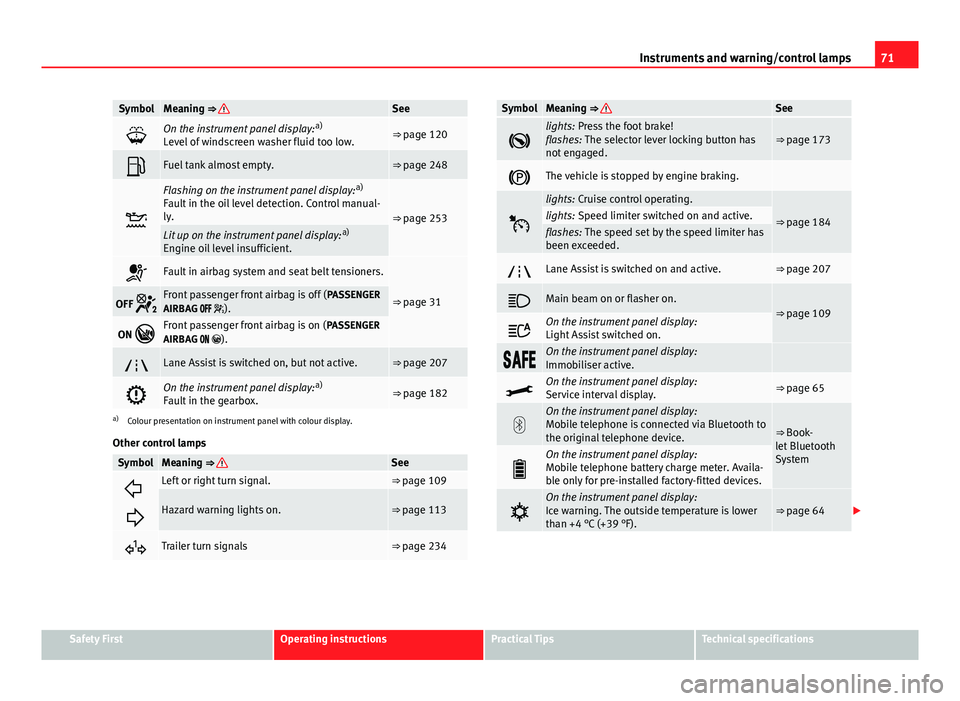
SymbolMeaning ⇒ See
On the instrument panel display: a)
Level of windscreen washer fluid too low.⇒ page 120
Fuel tank almost empty.⇒ page 248
Flashing on the instrument panel display: a)
Fault in the oil level detection. Control manual-
ly.
⇒ page 253Lit up on the instrument panel display: a)
Engine oil level insufficient.
Fault in airbag system and seat belt tensioners.
⇒ page 31OFF Front passenger front airbag is off ( PASSENGER
AIRBAG ).
ON Front passenger front airbag is on ( PASSENGER
AIRBAG ).
Lane Assist is switched on, but not active.⇒ page 207
On the instrument panel display: a)
Fault in the gearbox.⇒ page 182
a) Colour presentation on instrument panel with colour display.
Other control lamps
SymbolMeaning ⇒ See
Left or right turn signal.⇒ page 109
Hazard warning lights on.⇒ page 113
Trailer turn signals⇒ page 234
SymbolMeaning ⇒ See
lights: Press the foot brake!
flashes: The selector lever locking button has
not engaged.⇒ page 173
The vehicle is stopped by engine braking.
lights: Cruise control operating.
⇒ page 184lights: Speed limiter switched on and active.flashes: The speed set by the speed limiter has
been exceeded.
Lane Assist is switched on and active.⇒ page 207
Main beam on or flasher on.⇒ page 109
On the instrument panel display:
Light Assist switched on.
On the instrument panel display:
Immobiliser active.
On the instrument panel display:
Service interval display.⇒ page 65
On the instrument panel display:
Mobile telephone is connected via Bluetooth to
the original telephone device.
⇒ Book-
let Bluetooth
System
On the instrument panel display:
Mobile telephone battery charge meter. Availa-
ble only for pre-installed factory-fitted devices.
On the instrument panel display:
Ice warning. The outside temperature is lower
than +4 °C (+39 °F).⇒ page 64
Safety FirstOperating instructionsPractical TipsTechnical specifications
Page 124 of 339
122Lights and visibility
Windscreen wiper functions
Windscreen wiper performance in different situations:If the vehicle is at a stand-
still:The activated position provisionally changes
to the previous position.
During the automatic wipe:
The air conditioner comes on for approxi-
mately 30 seconds in air recirculation mode
to prevent the smell of the windscreen wash-
er fluid entering the inside the vehicle.
For the interval wipe:The intervals between wipes vary according
to the speed of the vehicle. The higher the
vehicle speed the shorter the intervals.
Heated windscreen washer jets
The heating only thaws the frozen jets, it does not thaw the water in the
washer hoses. The heated windscreen washer jets automatically adjust the
heat depending on the ambient temperature, when the ignition is switched
on.
Headlight wash/wipe system
The headlight washers/wipers clean the headlight lenses.
After the ignition is switched on, the first and every fifth time the wind-
screen washer is switched on, the headlights are also washed. Therefore,
the windscreen wiper lever should be pulled towards the steering wheel
when the dipped beam or main beam are on. Any incrusted dirt (such as in-
sects) should be cleaned regularly (e.g. when refuelling).
To ensure the headlight washers work correctly in winter, any snow which
has got into the bumper jet supports should be cleaned away. If necessary,
remove snow with an anti-icing spray.
Note
The wiper will try to wipe away any obstacles that are on the windscreen.
The wiper will stop moving if the obstacle blocks its path. Remove the ob-
stacle and switch the wiper back on again.
Windscreen wipers service position
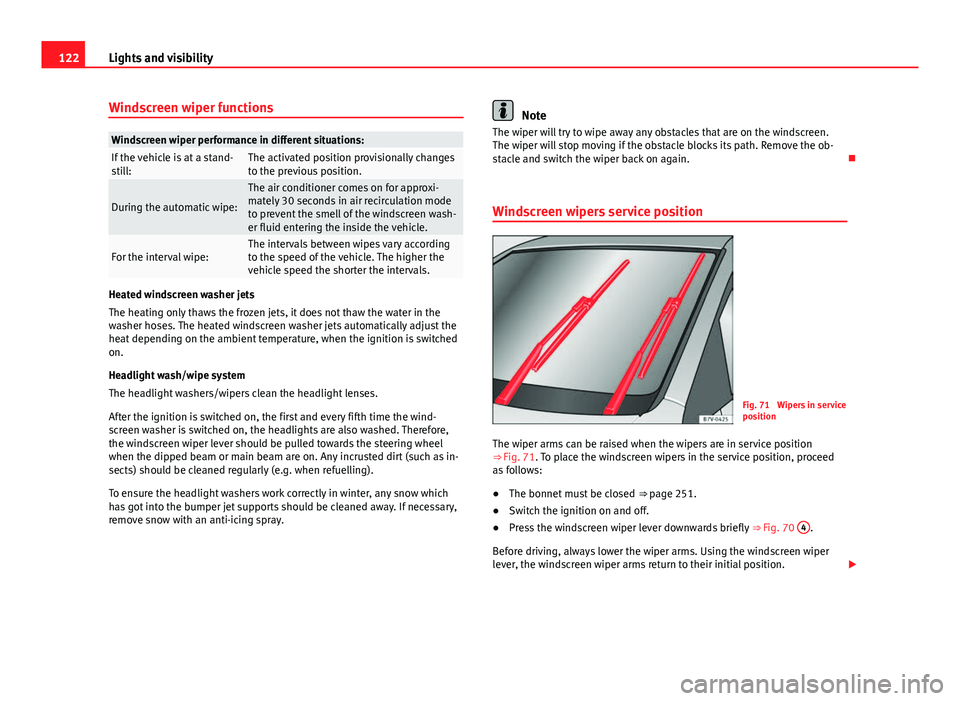
Fig. 71 Wipers in service
position
The wiper arms can be raised when the wipers are in service position
⇒ Fig. 71. To place the windscreen wipers in the service position, proceed
as follows:
● The bonnet must be closed ⇒ page 251.
● Switch the ignition on and off.
● Press the windscreen wiper lever downwards briefly ⇒ Fig. 70 4
.
Before driving, always lower the wiper arms. Using the windscreen wiper
lever, the windscreen wiper arms return to their initial position.
Page 125 of 339
123
Lights and visibility
Lifting and returning windscreen wiper arms
● Place the wiper arms in the service position ⇒
.
● Only hold the wiper arms at the point where the blade is fixed.
CAUTION
● To prevent damage to the bonnet and the wiper arms, only leave them in
the service position.
● Before driving, always lower the wiper arms.
Rain sensor*
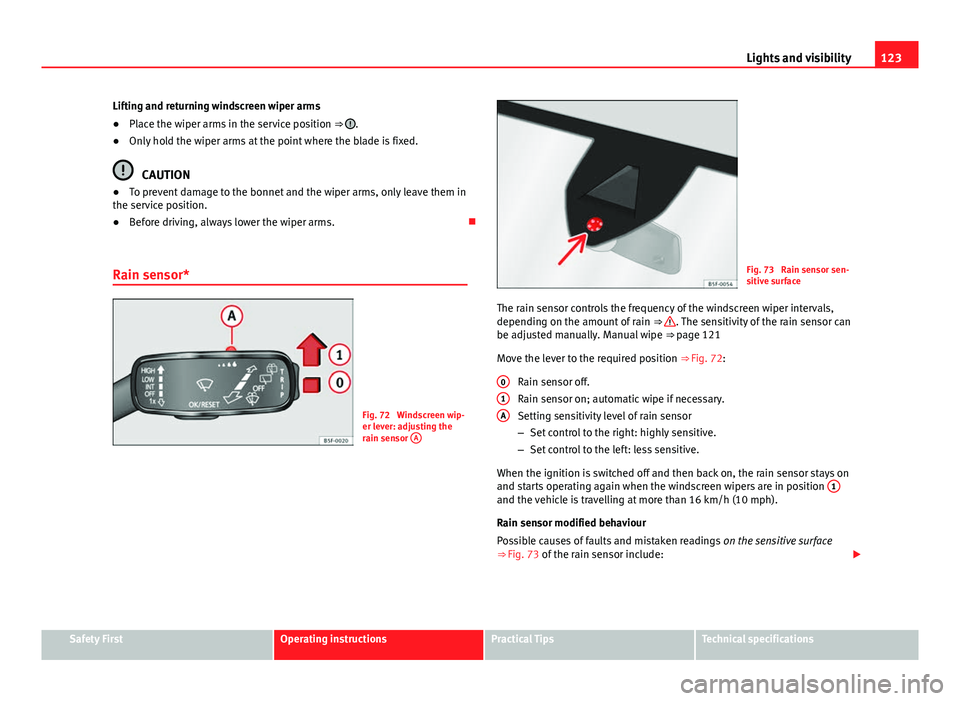
Fig. 72 Windscreen wip-
er lever: adjusting the
rain sensor A
Fig. 73 Rain sensor sen-
sitive surface
The rain sensor controls the frequency of the windscreen wiper intervals,
depending on the amount of rain ⇒
. The sensitivity of the rain sensor can
be adjusted manually. Manual wipe ⇒ page 121
Move the lever to the required position ⇒ Fig. 72:
Rain sensor off.
Rain sensor on; automatic wipe if necessary.
Setting sensitivity level of rain sensor
– Set control to the right: highly sensitive.
– Set control to the left: less sensitive.
When the ignition is switched off and then back on, the rain sensor stays on
and starts operating again when the windscreen wipers are in position 1
and the vehicle is travelling at more than 16 km/h (10 mph).
Rain sensor modified behaviour
Possible causes of faults and mistaken readings
on the sensitive surface
⇒ Fig. 73 of the rain sensor include:
0
1A
Safety FirstOperating instructionsPractical TipsTechnical specifications
Page 237 of 339
235
Trailer
Note
● Towing a trailer places additional demands on the vehicle. We recom-
mend additional services between the normal inspection intervals if the ve-
hicle is used frequently for towing a trailer.
● Find out whether special regulations apply to towing a trailer in your
country.
Ball coupling of towing bracket*
The ball coupling is provided with instructions on fitting and removing the
ball coupling of the towing bracket.
WARNING
The towing bracket ball coupling must be stored securely in the luggage
compartment to prevent them being flung through the vehicle and caus-
ing injury.
Note
● By law, the ball coupling must be removed if a trailer is not being towed
if it obscures the number plate.
Driving tips
Driving with a trailer always requires extra care. Weight distribution
The weight distribution of a loaded trailer with an unladen vehicle is very
unfavourable. However, if this cannot be avoided, drive extra slowly to allow
for the unbalanced weight distribution. Speed
The stability of the vehicle and trailer is reduced with increasing speed. For
this reason, it is advisable not to drive at the maximum permissible speed
in an unfavourable road, weather or wind conditions. This applies especially
when driving downhill.
You should always reduce speed immediately if the trailer shows the slight-
est sign of
snaking. Never try to stop the “snaking” by increasing speed.
Always brake in due course. If the trailer has an overrun brake, apply the
brakes gently at first and then, firmly. This will prevent the jerking that can
be caused by locking of trailer wheels. Select a low gear in due course be-
fore going down a steep downhill. This enables you to use the engine brak-
ing to slow down the vehicle.
Reheating
At very high temperatures and during prolonged slopes, driving in a low
gear and high engine speed, always monitor the coolant temperature gauge
⇒ page 69.
Electronic Stability Control*
The ESC* system helps to stabilise the trailer in case of skidding or rocking.
Safety FirstOperating instructionsPractical TipsTechnical specifications
Page 243 of 339
241
Care and cleaning
Carbon components
The carbon parts on your vehicle have a painted surface. They do not need
any special care and are cleaned just like any other painted part
⇒ page 238.
Paint damage
Minor damage to the paint, such as scratches or stone chips, should be
touched up without delay before the metal starts to corrode. Suitable touch-
up brushes or sprays for your car can be obtained from a SEAT Official Serv-
ice.
The number of the original paint finish on the vehicle is given on the data
sticker ⇒ page 305.
If corrosion is already visible it must be thoroughly removed by a special-
ised workshop.
Windows
Clear vision is an essential safety factor.
The windscreen must not be cleaned with insect remover or wax, otherwise
the windscreen wipers will not function properly (juddering).
Traces of rubber, oil, grease or silicone can be removed with a window
cleaning solution or a silicone remover. Wax residue can only be removed
with a special cleaner. Your SEAT Official Service will be able to provide you
with more detailed information.
The windows should also be cleaned on the inside at regular intervals. Use a separate cloth or chamois to dry the windows. Cloths used for waxing
and polishing contain residues that will cause smears on the glass.
WARNING
Do not use water-repellent coatings on the windscreen. In bad visibility
conditions (e.g. in the rain, dark or with a low sun), these coatings may
cause dazzle: risk of accident! Such coatings can also cause the wind-
screen wiper blades to make noise.
CAUTION
● Remove snow and ice from windows and exterior mirrors with a plastic
scraper only. To avoid scratches caused by dirt on the glass, the scraper
should only be pushed in one direction and not moved to and fro.
● The heating element for the rear window is located on the inner side of
the window. To avoid damaging them, do not apply stickers to the heating
elements.
● Never use warm or hot water to remove snow and ice from windows and
mirrors. This could cause the glass to crack!
Rims
The wheels require regular attention to preserve their appearance. It is im-
portant to remove road salt and brake dust by washing the wheels at regu-
lar intervals, otherwise the finish will be impaired.
After washing, the wheels should only be cleaned with an "acid-free" clean-
ing agent for alloy wheels. This is available from SEAT Official Services and
specialist retailers. Never leave the cleaning agent on the rims for any lon-
ger than specified in the instructions before rinsing it off. If the wheel clean-
er fluid contains acid it can attack the surfaces of the wheel bolts.
Safety FirstOperating instructionsPractical TipsTechnical specifications
Page 244 of 339
242Care and cleaning
Car polish or other abrasive agents should not be used for maintaining the
rims. If the protective coating is damaged, e.g. by stone impact, the dam-
aged area should be touched up immediately.
WARNING
Please note when cleaning the wheels that water, ice and road salt can
impair the effectiveness of the brakes; this can cause an accident.
Exhaust tail pipe
It is important to remove road salt and brake dust by washing the wheels at
regular intervals, otherwise the exhaust tail pipe material could be dam-
aged. To remove impurities, do not use rim, paint or chrome cleaners or oth-
er abrasive products. Clean the exhaust tail pipes with cleaning products
that are suitable for stainless steel.
SEAT Official Services carry stocks of cleaning products that have been tes-
ted and approved for use on your vehicle.
Care of the vehicle interior Radio display/Easy Connect* and control panel*
The display can be cleaned with a soft cloth and a professionally available
“LCD cleaner”. Moisten the cloth with a small amount of the cleaning fluid.
The Easy Connect control panel* should first be cleaned with a brush so
that no dirt goes into the device or between the keys and housing. Next, we
recommend cleaning the Easy Connect control panel* using a cloth damp-
ened with water and washing-up liquid.
CAUTION
● To avoid scratching the screen, do not wipe the display with a dry cloth.
● To avoid damage, ensure that no liquid goes into the Easy Connect con-
trol panel*.
Plastic and leatherette parts
Plastic parts and leatherette can be cleaned with a damp cloth. If this is not
sufficient, plastic parts and leatherette should only be treated with a special
solvent-free plastic cleaner .
Textile covers and trim parts
Textile covers and trim parts (e.g. seats, door trim) should be cleaned regu-
larly with a vacuum cleaner. This will remove surface dirt which could other-
wise be rubbed into the textile material during use. Do not use steam clean-
ers, as the steam could carry the dirt deeper into the textile material.
Normal cleaning
We recommend that you use a soft sponge or a commercially available lint-
free, micro-fibre cloth for normal cleaning. Only use brushes on floor cover-
ings and mats, as other textile surfaces could become damaged.
In the case of normal surface dirt you can use a foam cleaner. Use a sponge
to spread the foam on the textile surface and to work it into the material
lightly. However, make sure that the textile material does not become soak-
ing wet. Then dab off the foam with a dry and absorbent cloth (e.g. a micro-
fibre cloth) and vacuum off any residue once the surface is completely dry.
Cleaning stains
Treat drink stains (such as coffee or fruit juice, etc.) with a cleaning solution
for delicate fabrics. The cleaning product solution should be applied with a
Page 246 of 339
244Care and cleaning
Note
● Use a suitable impregnating cream with ultra-violet protection at regular
intervals and after cleaning. The cream nourishes and moisturises the leath-
er, keeps it supple and able to breathe. It will also form a protective film.
● Clean the leather every 2 to 3 months and remove fresh dirt as soon as
possible.
● Remove stains from fresh ball-pen and other inks, lipstick, shoe cream
and similar stains as soon as possible.
● Preserve the colour of the leather. A special coloured cream will renew
the colour of the leather when required and will eliminate differences in col-
our.
Cleaning and care of leather upholstery
Natural leather requires an extra degree of attention and
care.
Normal cleaning
– Moisten a cotton or woollen cloth with water and wipe over the
leather surfaces.
More stubborn dirt
– More stubborn dirt can be removed using a mild soap solution
(pure liquid soap: two tablespoons dissolved in one litre of wa-
ter).
– Do not let the water soak through the leather or penetrate into
the seams.
– Then wipe off with a soft, dry cloth. Removal of stains
–
Remove fresh water-based stains such as coffee, tea, juices,
blood etc. with an absorbent cloth or kitchen roll, dried-on
stains with the cleaning agent from the care set.
– Remove fresh fat-based stains that have not penetrated the sur-
face such as butter, mayonnaise, chocolate, etc. with an ab-
sorbent cloth or kitchen roll or with the cleaning agent from the
care set.
– Treat fat-based, dried-in stains with grease-dissolving spray.
– Treat less common stains such as ball-pen and other inks, felt-
tip pens, nail polish, dispersion paint, shoe cream etc. with a
special leather stain remover.
Leather maintenance
– The leather should be treated regularly (about twice a year) with
a special leather-care product.
– Apply these products very sparingly.
– Then wipe off with a soft, dry cloth.
Should you have questions regarding the care and cleaning of the leather
upholstery in your vehicle, we recommend that you contact your SEAT Offi-
cial Service. Our representatives will be happy to advise you and tell you
about the product range for leather conservation, for example:
● Cleaning and care set
● Coloured leather-care cream
● Stain remover for ball-pen inks, shoe cream etc.
● Grease dissolving spray
● New products and further developments