phone Seat Leon 5D 2015 NAVI SYSTEM PLUS
[x] Cancel search | Manufacturer: SEAT, Model Year: 2015, Model line: Leon 5D, Model: Seat Leon 5D 2015Pages: 96, PDF Size: 2.48 MB
Page 68 of 96
Telephone management system (PHONE)
To activate private mode:
● Setup menu.
● Uncheck the checkbox: Hand
s-fr
ee .
W ith the priv
at
e mode activated the active
audio and microphone become that of the
mobile phone connected to the hands-free.
When deactivated, the audio reverts to the
vehicle's audio system. This configuration is
only applicable to the active call, so for sub-
sequent calls, the audio will revert by default
to vehicle's audio system. WARNING
Remember that the driver must not operate
the mob i
le telephone while driving. Enter telephone number menu
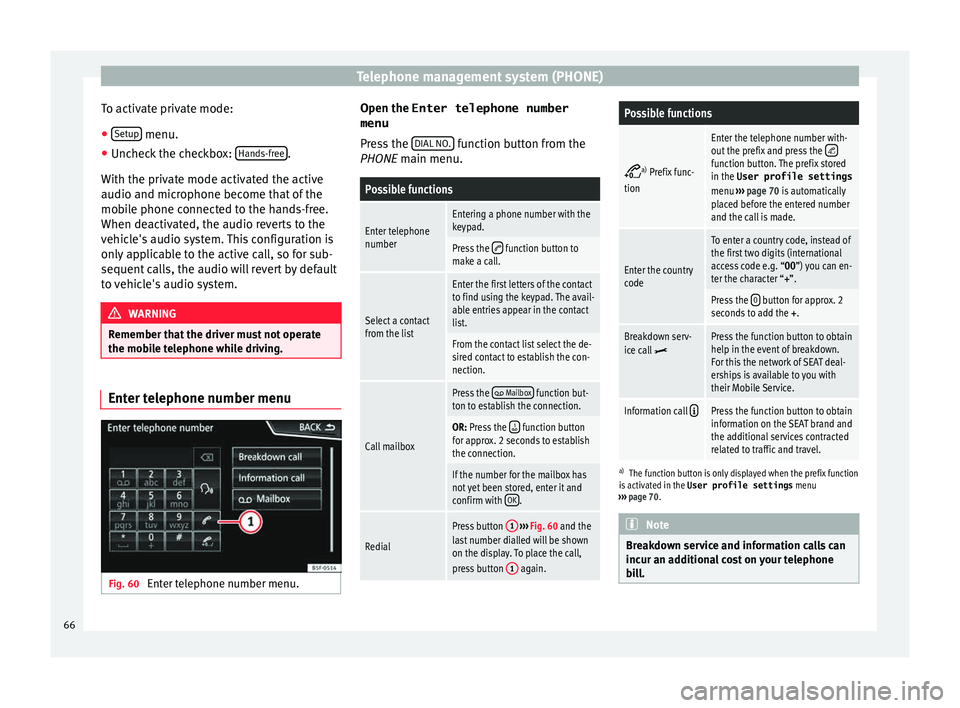
Fig. 60
Enter telephone number menu. Open the
Enter telephone number
menu
Pr es
s the DIAL NO. function button from the
PHONE m ain menu.
Possible functions
Enter telephone
numberEntering a phone number with the
keypad.
Press the function button to
make a call.
Select a contact
from the list
Enter the first letters of the contact
to find using the keypad. The avail-
able entries appear in the contact
list.
From the contact list select the de-
sired contact to establish the con-
nection.
Call mailbox
Press the Mailbox function but-
ton to establish the connection.
OR: Press the function button
for approx. 2 seconds to establish
the connection.
If the number for the mailbox has
not yet been stored, enter it and
confirm with OK
.
Redial
Press button
1
››› Fig. 60 and the
last number dialled will be shown
on the display. To place the call,
press button 1
again.
Possible functions
a)
Prefix func-
tion
Enter the telephone number with-
out the prefix and press the function button. The prefix stored
in the User profile settings
menu ››› page 70 is automatically
placed before the entered number
and the call is made.
Enter the country
code
To enter a country code, instead of
the first two digits (international
access code e.g. “00 ”) you can en-
ter the character “+”.
Press the 0 button for approx. 2
seconds to add the +.
Breakdown serv-
ice call Press the function button to obtain
help in the event of breakdown.
For this the network of SEAT deal-
erships is available to you with
their Mobile Service.
Information call Press the function button to obtain
information on the SEAT brand and
the additional services contracted
related to traffic and travel.
a)
The function button is only displayed when the prefix function
is activated in the User profile settings menu
››› page 70. Note
Breakdown service and information calls can
incur an a d
ditional cost on your telephone
bill. 66
Page 69 of 96
Telephone management system (PHONE)
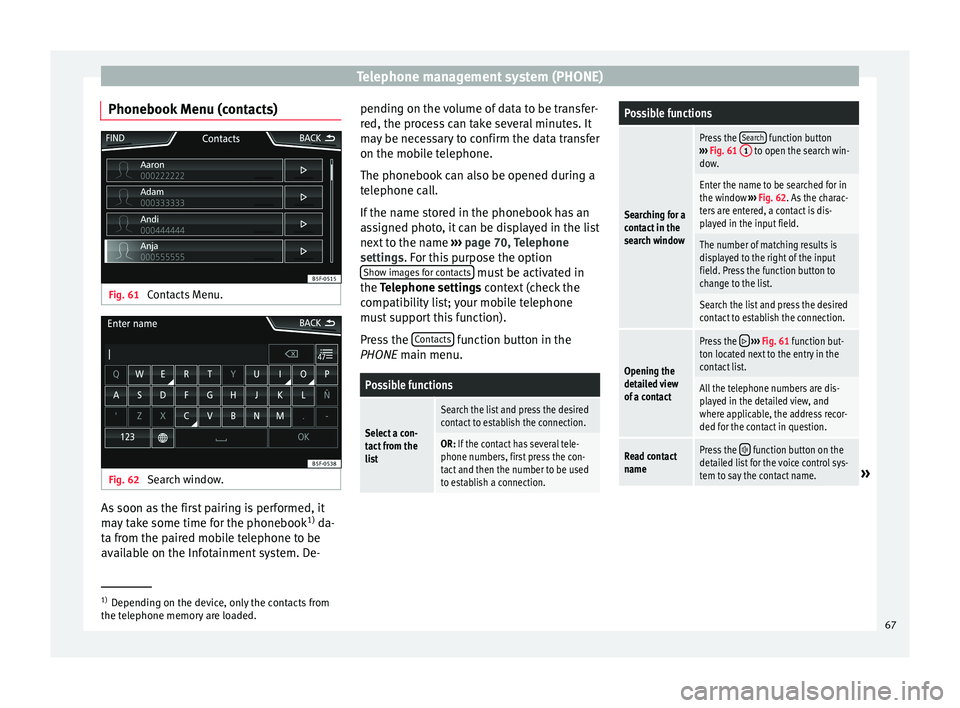
Phonebook Menu (contacts) Fig. 61
Contacts Menu. Fig. 62
Search window. As soon as the first pairing is performed, it
m
a
y
take some time for the phonebook 1)
da-
ta from the paired mobile telephone to be
available on the Infotainment system. De- pending on the volume of data to be transfer-
red, the proc
ess can take several minutes. It
may be necessary to confirm the data transfer
on the mobile telephone.
The phonebook can also be opened during a
telephone call.
If the name stored in the phonebook has an
assigned photo, it can be displayed in the list
next to the name ››› page 70, Telephone
settings. For this purpose the option Show images for contacts must be activated in
the T el
ephone settin
gs context (check the
compatibility list; your mobile telephone
must support this function).
Press the Contacts function button in the
PHONE m ain menu.
Possible functions
Select a con-
tact from the
list
Search the list and press the desired
contact to establish the connection.
OR: If the contact has several tele-
phone numbers, first press the con-
tact and then the number to be used
to establish a connection.
Possible functions
Searching for a
contact in the
search window
Press the Search function button
››› Fig. 61 1 to open the search win-
dow.
Enter the name to be searched for in
the window ››› Fig. 62. As the charac-
ters are entered, a contact is dis-
played in the input field.
The number of matching results is
displayed to the right of the input
field. Press the function button to
change to the list.
Search the list and press the desired
contact to establish the connection.
Opening the
detailed view
of a contact
Press the ››› Fig. 61 function but-
ton located next to the entry in the
contact list.
All the telephone numbers are dis-
played in the detailed view, and
where applicable, the address recor-
ded for the contact in question.
Read contact
namePress the function button on the
detailed list for the voice control sys-
tem to say the contact name.
» 1)
Depending on the device, only the contacts from
the tel ephone memor
y are loaded. 67
Page 70 of 96
Telephone management system (PHONE)Possible functions
Dialling a con-
tact
Press the desired telephone number
on the detailed list to establish the
connection.
Press the (pencil) icon to edit the
number before calling.
Send an SMS
to a contactPress the function button in the
detailed list.
Starting route
guidance to
the address of
a contactIf the address details of a contact
have been stored, route guidance can
be started for the address of the con-
tact. Press the address data on the
detailed view to start route guidance. Note
If you edit the number before calling, this will
only be u
sed for the call and will not be stor-
ed in the phonebook. Short messages menu (SMS)
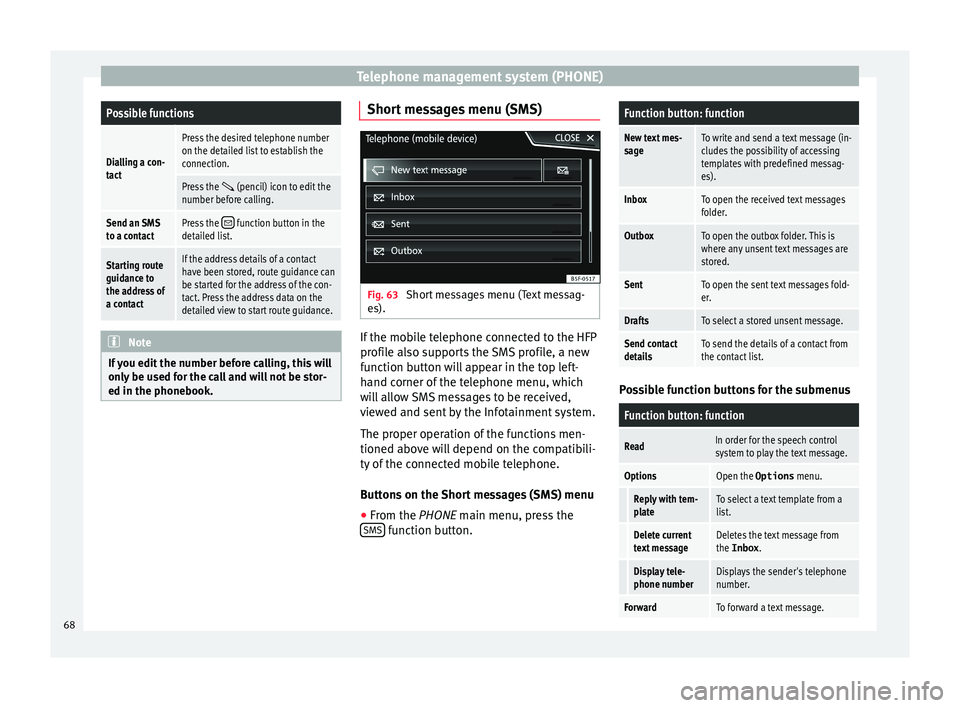
Fig. 63
Short messages menu (Text messag-
e s). If the mobile telephone connected to the HFP
pr
ofi
l
e also supports the SMS profile, a new
function button will appear in the top left-
hand corner of the telephone menu, which
will allow SMS messages to be received,
viewed and sent by the Infotainment system.
The proper operation of the functions men-
tioned above will depend on the compatibili-
ty of the connected mobile telephone.
Buttons on the Short messages (SMS) menu
● From the PHONE main menu, pre
ss the
SMS function button.
Function button: function
New text mes-
sageTo write and send a text message (in-
cludes the possibility of accessing
templates with predefined messag-
es).
InboxTo open the received text messages
folder.
OutboxTo open the outbox folder. This is
where any unsent text messages are
stored.
SentTo open the sent text messages fold-
er.
DraftsTo select a stored unsent message.
Send contact
detailsTo send the details of a contact from
the contact list. Possible function buttons for the submenus
Function button: function
ReadIn order for the speech control
system to play the text message.
OptionsOpen the Options
menu.
Reply with tem-
plateTo select a text template from a
list.
Delete current
text messageDeletes the text message from
the Inbox.
Display tele-
phone numberDisplays the sender's telephone
number.
ForwardTo forward a text message.68
Page 71 of 96
Telephone management system (PHONE)Function button: function
ReplyTo reply to an incoming text mes-
sage.
Enter number
To enter a telephone number or to
select a recipient from the con-
tact list.
Press the
Recipients function but-
ton to select multiple recipients.
RecipientsTo select multiple recipients from
the contact list.
DeleteTo delete a text message. Call Menu (call lists)
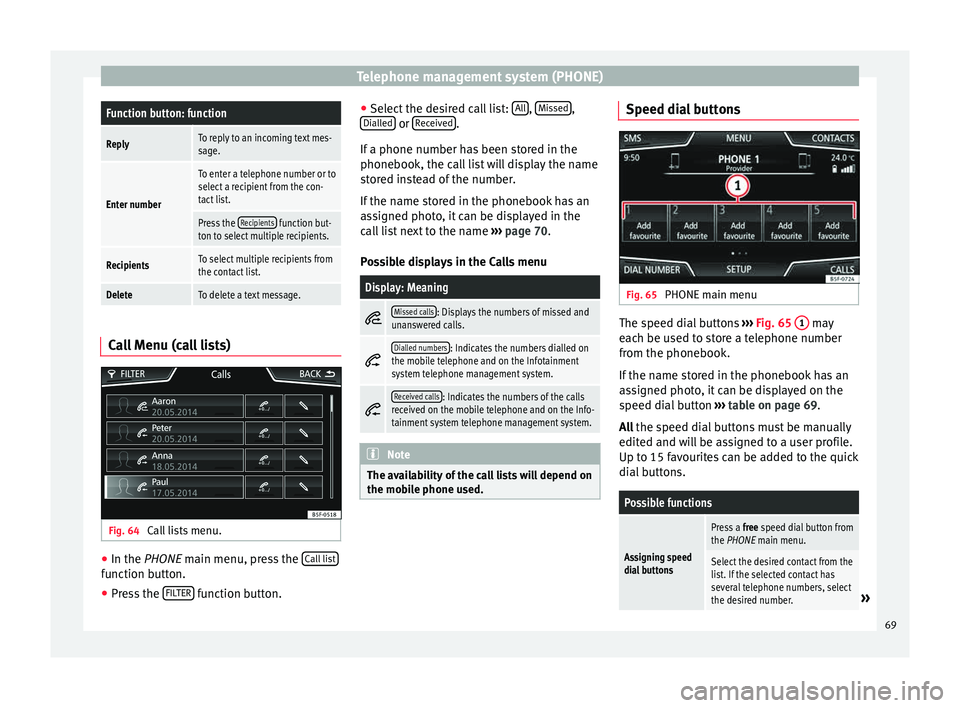
Fig. 64
Call lists menu. ●
In the PHONE m ain menu, pr
e
ss the Call list function button.
● Press the FIL
TER function button. ●
Sel ect
the de
sired call list: All ,
Mi
s
sed ,
Di al
l
ed or
R
ec
eiv ed .
If a phone number h
a
s been stored in the
phonebook, the call list will display the name
stored instead of the number.
If the name stored in the phonebook has an
assigned photo, it can be displayed in the
call list next to the name ››› page 70.
Possible displays in the Calls menu
Display: Meaning
Missed calls: Displays the numbers of missed and
unanswered calls.
Dialled numbers: Indicates the numbers dialled on
the mobile telephone and on the Infotainment
system telephone management system.
Received calls: Indicates the numbers of the calls
received on the mobile telephone and on the Info-
tainment system telephone management system. Note
The availability of the call lists will depend on
the mob i
le phone used. Speed dial buttons
Fig. 65
PHONE main menu The speed dial buttons
››
›
Fig. 65 1 may
e ac
h be u
sed to store a telephone number
from the phonebook.
If the name stored in the phonebook has an
assigned photo, it can be displayed on the
speed dial button ››› table on page 69.
All the speed dial buttons must be manually
edited and will be assigned to a user profile.
Up to 15 favourites can be added to the quick
dial buttons.
Possible functions
Assigning speed
dial buttons
Press a free speed dial button from
the PHONE main menu.
Select the desired contact from the
list. If the selected contact has
several telephone numbers, select
the desired number.
» 69
Page 72 of 96
Telephone management system (PHONE)Possible functions
Editing assigned
speed dial but-
tons
Press and hold
a used speed dial
button in the PHONE main menu
until the Contacts menu opens.
Select the desired contact from the
list. If the selected contact has
several telephone numbers, select
the desired number.
To close the Contacts menu with-
out applying the changes, press
the BACK
function button.
Deleting assigned
speed dial but-
tonsThe telephone numbers stored in
the speed dial buttons can be de-
leted in the User profile set-
tings
> Manage favourites
menu ››› table on page 70.
Dialling with
speed dial but-
tonsBriefly press an assigned speed di-
al button from the PHONE main
menu to call the telephone number
that has been stored on it. Note
The contacts stored on the speed dial buttons
DO NOT upd at
e automatically. If a contact
stored on a speed dial button is modified on
the mobile telephone, the speed dial button
will need to be reassigned. Telephone settings
Press the
S
ETUP function button from the
PHONE m ain menu.
Function button: function
Select phone: Select the mobile telephone to be connec-
ted to the hands-free profile with the Infotainment sys-
tem.
OR: Press Find telephone to connect a new mobile tele-
phone.
Bluetooth: Open the Bluetooth settings menu
››› page 70.
User profile: Open the User profile settings menu
››› page 70. Bluetooth
®
settin g
s In the PHONE m
ain menu, pr
e
ss the SETUP function button and then the
Bluet
ooth func-
tion b utt
on.
Function button: function
Bluetooth: Press to deactivate Bluetooth
®
. Disconnects
all active connections.
Visibility: Connection and disconnection of Bluetooth ®
visibility.
Visible: Bluetooth ®
visibility is active.
Hidden: Bluetooth ®
visibility is deactivated. Blue-
tooth ®
visibility must be active for the external
pairing of a Bluetooth ®
device with the Infotain-
ment system. If you have a Bluetooth audio device
active and playing, the visibility is automatically
set to Hidden .
Function button: function
Name: Viewing and changing the name the Bluetooth ®
of the Infotainment system. This will be the name dis-
played to other Bluetooth ®
devices.
Paired devices: Displays paired devices. To disconnect
and connect Bluetooth ®
devices and Bluetooth ®
pro-
files.
Find devices: Search for visible Bluetooth ®
devices within
the range of the Infotainment system. The maximum
range is approx. 10 metres.
Bluetooth audio (A2DP/AVRCP): This function must be ac-
tive if it is necessary to connect an external audio source
via Bluetooth ®
to the Infotainment system. ››› page 34. User profile settings
In the PHONE m
ain menu, pr
e
ss the SETUP function button and then the
U
ser pr
ofi le func-
tion b utt
on.
Function button: function
Manage favourites: Editing speed dial buttons.
Speed dial button in use : Press to delete the stored
number.
Speed dial button free : Press to assign a number
from the phonebook to the speed dial button in
question.
Mailbox number: To enter or edit the voicemail number. 70
Page 73 of 96
Telephone management system (PHONE)Function button: function
Code: To enter a prefix to be placed before the num-
ber entered ››› page 66.
Sort by: To set the order of appearance of the entries in
the phonebook ( Forename and surname or vice-versa).
Import contacts: Press to import the phonebook of the
connected telephone, or to update the imported phone-
book.
Delete other user profiles: To delete all the inactive user pro-
files or only one of them.
Reminder: remember your mobile phone: If there is already
an active Bluetooth ®
connection with another mobile
telephone when turning off the ignition, the following
message appears: “Remember your mobile
phone ”.
Select ringtonea)
: To select a ringtone from a list of prede-
fined melodies (tones). The selected ringtone is played
and set up when exiting the submenu.
Show pictures for contactsb)
: If phonebook contacts have
been stored with a photograph, it can be displayed on
the speed dial buttons, on the call lists and in the pho-
nebook.
a) Depending on the mobile telephone used, the selected ring
tone, or the one set up on the mobile telephone, is played. This
function will not be displayed if not supported by the mobile tel-
ephone.
b) Depending on the mobile phone. Note
Some telephones need to be restarted to re-
down lo
ad the most recent contacts added. 71
Page 76 of 96

Full Link™*
Requirements for Full Link Fig. 67
Full Link RequirementsAFull Link Activated : If you do not have Full Link in your vehicle you can acquire it as an accessory at your Authorised Service.
BCompatible Phones. Consult the MirrorLink™, Android Auto™ or Apple CarPlay™ websites to confirm that your phone is compatible with the system.
– Check smartphone compatibility: www.mirrorlink.com/phones
– MirrorLink™ 1.1 or higher
– Some of the apps certified by SEAT or the CCC must be installed on the device.
– Check smartphone compatibility. Android Auto™: www.android.com/auto/
– Android 5.0 (Lollipop) or higher
– Install Android Auto™ app
Apple CarPlay– Check smartphone compatibility. Apple CarPlay™: www.apple.com/ios/carplay/
– iPhone 5 or higher and iOS 7.1 or higher
– Turn on the SIRI personal assistant (see phone settings)
CUSB cable connecting car to phone: use the USB cable approved and supplied by the phone's official distributor.
74
Page 77 of 96

Full Link™*
Activation of Full Link Fig. 68
USB connection Fig. 69
Full Link Setup Data connection via Wi-Fi or SIM is not nec-
e
s
s
ary to establish the connection between
the smartphone and Full Link.
Data connection via Wi-Fi or SIM is necessary
to enable all of the app features 1)
.
Proceed as follows to use Full Link:
● Switch on the Infotainment system
● Connect the smartphone to the vehicle's
USB port u
sing a USB cable ››› Fig. 68.
● On the Full Link setup main menu, select
›››
Fig. 69:
Activate data transfer for SEAT apps.
Preferred connection type: Choose be-
tween MirrorLink™ or Android Auto™
(only for Android™ telephones that are
compatible with both technologies). In
the iOS system (Apple™), connection is
automatic if the device is compatible.
Select the device.
Finally, a message will appear stating that
data transfer will commence when the device
is connected. Press OK. Once selected, the
technology compatible with your device can
be used. 1 2
3 Note
Depending on your smartphone, it may have
to be u n
locked for the connection to occur. What should I do if it does not con-
nect?
Restart the mobile device
Check the USB cable visually.
Make sure that the USB cable is not damaged. Check
that both connections (USB/micro USB) are not dam-
aged or worn.
Visually check that
the USB ports are
properly connected.
Check that the vehi-
cle and device USB
connections are not
damaged and/or
worn.Clean the USB ports (device and
vehicle).
Try another compatible mobile
device.
Have the USB port replaced at a
SEAT Authorised Service.
Have the mobile device re-
paired or replace it.
Try another compatible mobile device.
1)
Using the data connection to transfer the smart-
phone app s
to Full Link may involve additional
charges. Please check the charges with your opera-
tor. 75
Page 78 of 96

Full Link™*
Pairing of portable devices supporting
the Mirr orLink™, Andr
oid Aut
o™
and/or Apple CarPlay™ technologies Fig. 70
Full Link™ menu Carousel
When
y
ou ent
er the Full Link™ context for the
first time, the technologies available for pair-
ing the portable device are displayed.
View of the device list
To connect to any of the technologies dis-
played, it is necessary to access the device
list and select the portable device ››› Fig. 70.
Some devices require unlocking in order to
establish the connection. When the connection with a device has been
est
ablished, the icon of the technology for
this session is displayed in the device list.
Some devices support MirrorLink™ and An-
droid Auto™. In this case, in Full Link setup
you can select the technology with which you
wish to use this device. The default value is
MirrorLink™.
iPhone™ devices only support Apple Car-
Play™.
Full Link™ settings
Function button: function
Select device: Press this to select the mobile device to be
connected to the Infotainment system.
Connection type: For those devices that support Mirror-
Link™ and Android Auto™, it is possible to select the
default technology you wish to use to pair the mobile
device to the Infotainment system.
Activate data transfer for SEAT apps: Allows the exchange of
information between the vehicle and external applica-
tions. Last Mode
If
a se
s
sion using one technology ends with-
out the disconnection being made from the
Infotainment system (simply by disconnect-
ing the cable) then when the device is next connected to it, the session will start without
the user being r
equired to take any action 1)
.
Info
Consult the mobile device manual.
Depends on each technology: Availability in a country
Third party applications
For further information:
MirrorLink™:
www.mirrorlink.com
Apple CarPlay™:
www.apple.com/ios/carplay
Android Auto™:
www.android.com/auto Note
In order to use Android Auto™ technology it
is nec
essary to download the Android Auto™
application, located on Google Play™. 1.
2.
1)
Unless the device requires the screen to be un-
lock ed in or
der to establish the connection.
76
Page 80 of 96
Full Link™*Function button: function
Infotainment System keypad prioritised: Allows the Infotain-
ment System keypad to be made available to the user,
rather than the device's own keypad. Apple CarPlay™*
3 Valid for compatible iPhone™ mobile telephones.
A l
so, iPhone™ mobile telephones only support Ap-
ple CarPlay™
Apple CarPlay™ is a protocol which enables
communication between a mobile telephone
and the Infotainment system via USB.
This makes it possible to display and operate
the mobile telephone on the Infotainment
system screen.
Requirements
In order to use Apple CarPlay™, the following
requirements must be met: ● The mobile device must be compatible with
App l
e CarPlay™.
● The mobile device must be connected to
the Infotainment
system via USB.
Initiating the connection
In order to initiate the connection with the
mobile device, it is simply necessary to con-
nect it to the Infotainment system via the
USB connection. ●
A pop-up scr
een will appear, which will re-
quest that you accept the device.
● If you are initiating the session using Apple
CarPla
y™ technology it will not be possible
to pair another device via Bluetooth™. The
following message will appear in the main
PHONE menu.
Please disconnect Apple CarPlay
first, before you can connect
another mobile telephone.
Holding down the steering wheel multifunc-
tion button or the VOICE button of the Info-
t ainment
sy
stem will start the Apple™ “voice
engine”.
To return to the basic contents of the Infotain-
ment system, press the SEAT icon.
Android Auto™* 3 V
alid for compatible mobile telephones
Andr
oid Auto™ is a protocol which enables
communication between a portable device
and the Infotainment system via USB.
This makes it possible to display and operate
the mobile telephone on the Infotainment
system screen.
Requirements
In order to use Android Auto™, the following
requirements must be met: ●
The mob i
le device must be compatible with
Android Auto™.
● The mobile device must be connected to
the Infotainment
system via USB.
● The Android Auto™ application should al-
rea
dy be downloaded and installed on the
mobile device.
Initiating the connection
In order to initiate the connection with the
mobile device, it is simply necessary to con-
nect it to the Infotainment system via the
USB connection, and to be sure to follow the
instructions of the device being paired.
● A pop-up screen will appear, which will re-
quest
that you accept the device.
● When selecting the type of connection,
choose Andr
oid Auto™ in the Full Link™
settings .
● The first connection to Android Auto™
must
be done while the vehicle is stationary.
● If you are initiating the session using
Android Auto™ t
echnology via USB, the mo-
bile telephone connects automatically via
Bluetooth™ to the Infotainment system tele-
phone and it will not be possible to pair an-
other mobile telephone via Bluetooth™.
Holding down the steering wheel multifunc-
tion button or the VOICE button of the Info-
t ainment
sy
stem will start the Android™
voice “engine”.
78