clutch Seat Leon 5D 2015 User Guide
[x] Cancel search | Manufacturer: SEAT, Model Year: 2015, Model line: Leon 5D, Model: Seat Leon 5D 2015Pages: 308, PDF Size: 5.93 MB
Page 184 of 308

Operation
Fault in the brake system
If the br
ak
e pedal travel should ever increase
suddenly, this may mean that one of the two
brake circuits has failed. Drive immediately
to the nearest specialised workshop and
have the fault repaired. Drive there slowly
and remember that you will have to apply
more pressure on the brake pedal and allow
for longer stopping distances.
Low brake fluid level
Malfunctions can occur in the brake system if
the brake fluid level is too low. The brake flu-
id level is monitored electronically.
Brake servo
The brake servo increases the pressure you
apply to the brake pedal. It works only when
the engine is running. WARNING
● App ly
the brakes heavily to clean the brake
system only in a suitable traffic situation. Do
not put other road users in danger: there is
risk of causing an accident.
● Ensure the vehicle does not move while in
neutral, when the en
gine is stopped. Failure
to follow this instruction could result in an
accident.
● If the brake fluid loses its viscosity and is
subj
ected to heavy use, vapour bubbles can
form in the brake system. This reduces the ef-
ficiency of the brakes. CAUTION
● Never l et
the brakes “drag” by leaving your
foot on the pedal when it is not necessary to
brake. This overheats the brakes, resulting in
longer stopping distances and greater wear.
● Before driving down a long, steep gradient,
it is
advisable to reduce speed and select a
lower gear. This makes use of engine braking
and relieves the brakes. If you still have to
use the brakes, it is better to brake firmly at
intervals than to apply the brakes continu-
ously. Note
● If the br ak
e servo is out of action, for exam-
ple when the car is being towed, you will
have to press the brake pedal considerably
harder than normal to make up for the lack of
servo assistance.
● If you wish to equip the vehicle with acces-
sories s
uch as a front spoiler or wheel covers,
it is important that the flow of air to the front
wheels is not obstructed, otherwise the
brakes can overheat. Hill driving assistant*
This function is only included in vehicles with
E
SC.
The hi l
l driving assistant helps the driver to
move off and upward on a hill when the vehi-
cle is stationary. The system maintains brake pressure for ap-
prox
imately two seconds after the driver
takes his foot off the brake pedal to prevent
the vehicle from lurching backward when it is
started. During these 2 seconds, the driver
has enough time to release the clutch pedal
and accelerate without the vehicle moving
and without having to use the handbrake,
making start-up easier, more comfortable
and safer.
These are the basic operation conditions:
● being on a ramp or hill/slope,
● doors closed,
● vehicle completely stationary,
● engine running and foot on the brake,
● besides having a gear engaged or being in
neutral f
or manual gear change and with the
selector lever at position S, D or R for an au-
tomatic gearbox.
This system is also active when reversing up-
hill. WARNING
● If y
ou do not start the vehicle immediately
after taking your foot off the brake pedal, the
vehicle may start to roll back under certain
conditions. Depress the brake pedal or use
the hand brake immediately.
● If the engine stalls, depress the brake ped-
al or u
se the hand brake immediately.182
Page 185 of 308

Driver assistance systems
●
When fo l
lowing a line of traffic uphill, if you
want to prevent the vehicle from rolling back
accidentally when starting off, hold the brake
pedal down for a few seconds before starting
off. Note
The Official Service or a specialist workshop
c an t el
l you if your vehicle is equipped with
this system. Start-Stop system*
D e
s
cription and operation
›› ›
table on page 2
The Start-Stop system helps save fuel and re-
duce CO 2 emissions.
In Start-Stop mode, the engine will automati-
cally switch off when the vehicle stops, when
stopping at traffic lights for example. The ig-
nition remains switched on during the stop-
ping phase. The engine automatically
switches back on when required.
As soon as the ignition is switched on, the
Start-Stop function is automatically activa-
ted.
Basic requirements for the Start-Stop mode ● The driver door must be closed. ●
The driver mu s
t have their seat belt fas-
tened.
● The bonnet must be closed.
● The vehicle must have travelled at more
than 4 km/h (2 mph) sinc
e the last stop.
● The vehicle cannot be towing a trailer. WARNING
● Never sw it
ch the engine off until the vehi-
cle is stationary. The brake servo and power
steering functions will not be completely cov-
ered under warranty. More force may also be
needed to turn the steering wheel or to brake.
As you cannot steer and brake in the normal
manner, there is a greater risk of accidents
and serious injury.
● Never remove the key from the ignition if
the vehic
le is in motion. Otherwise, the steer-
ing could lock making it impossible to steer
the vehicle.
● To avoid injury, make sure that the Start-
Stop sys
tem is switched off when working in
the engine compartment ››› page 185. CAUTION
The Start-Stop system must always be
swit c
hed off when driving through flooded
areas ››› page 185. Stopping/Starting the engine
Vehicles with a manual gearbox
– When the vehicle is stopped, put it into
neutral and r
elease the clutch pedal. The
engine will switch off. The warning lamp
will appear on the instrument panel dis-
play.
– When the clutch pedal is pressed the en-
gine wil
l start up again. The warning lamp
will switch off.
Vehicles with an automatic gearbox
– Use the foot brake to bring the vehicle to a
stop and k
eep the brake pedal pressed
down with your foot. The engine will switch
off. The warning lamp will appear in the
display.
– When you take your foot off the brake pedal
the engine wi
ll start up again. The warning
lamp will switch off.
Additional information related to the auto-
matic gearbox
The engine stops when the selector lever is in
the positions P, D, N and S, in addition to
when in manual mode. With the selector lev-
er in position P, the engine will also remain
switched off when you take your foot off the
brake pedal. In order to start the engine up
again the accelerator must be pressed, or an-
other gear engaged or the brake released. »
183
Technical data
Advice
Operation
Emergencies
Safety
Page 186 of 308

Operation
If the selector lever is placed in position R
durin g the s
t
opping phase, the engine will
start up again.
Change from position D to P to prevent the
engine from accidentally starting when
changing and passing by position R. Note
● You c an c
ontrol whether the engine should
switch off or not by reducing or increasing the
brake force applied. While the vehicle re-
mains stopped, the engine will not stop if the
brake pedal is slightly pressed, in traffic jams
with frequent stopping and starting for exam-
ple. As soon as strong pressure is applied to
the brake pedal, the engine will stop.
● In vehicles with manual gearbox, during
the stop
ping phases the brake pedal must re-
main depressed to prevent the vehicle from
moving.
● If the engine “stalls” in vehicles with man-
ual g
earbox, it can be directly started up
again by immediately pressing the clutch
pedal. General notes
The system can interrupt the Start-Stop mode
fr
equently
f
or different reasons. The engine does not switch off
Befor
e the stopping phase, the system veri-
fies whether certain conditions are met. The
engine does not switch off, in the following
situations for example:
● The engine has not yet reached the mini-
mum required t
emperature for the Start-Stop
mode.
● The interior temperature selected for the air
conditioner ha
s not yet been reached.
● The interior temperature is very high/low.
● Defrost function button activated
›››
page 45.
● The parking aid* is switched on.
● The battery is very low.
● The steering wheel is overly turned or is be-
ing turned.
● If
there is a danger of misting.
● After engaging reverse gear.
● In case of a very steep gradient.
● In the CUPRA version with automatic gear-
box, when it i
s in Tiptronic mode or in its
sports driving position ( S).
The indication is shown on the instrument
panel display, and in addition, the driver in-
formation system* shows, . The engine starts by itself
During a s
topping phase the normal Start-
Stop mode can be interrupted in the follow-
ing situations: The engine restarts by itself
without involvement from the driver.
● The interior temperature differs from the
value select
ed on the air conditioner.
● Defrost function button activated
›››
page 45.
● The brake has been pressed several times
consec
utively.
● The battery is too low.
● High power consumption. Note
In vehicles with an automatic gearbox, if the
select or l
ever is placed in position D, N or S
after engaging reverse gear, the vehicle must
be driven at a speed faster than 10 km/h (5
mph) for the system to return to conditions in
which the engine can be stopped. 184
Page 188 of 308

Operation
Several warning and indication lamps light
up f or a f
ew sec
onds when the ignition is
switched on, signalling that the function is
being verified. They will switch off after a few
seconds.
Displayed on the CCS screen
Status Fig. 192:
CCS temporarily switched off. The set
speed is displayed in small figures.
System error. Contact a specialised work-
shop.
CCS switched on. The speed memory is
empty.
The CCS is switched on. The set speed is
displayed in large figures. WARNING
Use of the cruise control could cause acci-
dents and sev
ere injuries if it is not possible
to drive at a constant speed maintaining the
safety distance.
● Do not use the cruise control in heavy traf-
fic, if the dis
tance from the vehicle in front is
insufficient, on steep roads, with several
bends or in slippery circumstances (snow,
ice, rain or loose gravel), or on flooded roads.
● Never use the CCS when driving off-road or
on unpav
ed roads.
● Always adapt your speed and the distance
to the v
ehicles ahead in line with visibility, A
B
C
D weather conditions, the condition of the road
and the traffic
s
ituation.
● To avoid unexpected operation of the cruise
contro
l system, turn it off every time you fin-
ish using it.
● It is dangerous to use a set speed which is
too high for the pr
evailing road, traffic or
weather conditions.
● When travelling down hills, the CCS cannot
maintain a c
onstant speed. The vehicle tends
to accelerate under its own weight. Select a
lower gear or use the foot brake to slow the
vehicle. WARNING
Observe the safety warnings ›››
in Warning
and indication l amp
s on page 109. Operating the cruise control system*
Read the additional information carefully
› ›
›
page 40
The value indicated in the table in brackets
(in mph, miles per hour) only refers to instru-
ment panels with indications in miles.
Changing gear in CCS mode
The CCS decelerates as soon as the clutch
pedal is pressed, intervening again automati-
cally after a gear is engaged. Travelling down hills with the CCS
When travel
ling down hills the CCS cannot
maintain a constant speed. Slow the vehicle
down using the brake pedal and reduce
gears if required.
Automatic off
The cruise control system (CCS) is switched
off automatically or temporarily:
● If the system detects a fault that could af-
fect the w
orking order of the CCS.
● If you press and maintain the accelerator
pedal f
or a certain time, driving faster than
the stored speed.
● If the dynamic driving control systems in-
terv
ene (e.g. ASR or ESC).
● If the airbag is triggered.
186
Page 196 of 308

Operation
A CC: Take action!
The me s
sage for the driver is displayed if,
when the vehicle starts up on a hill with a
mild slope, the vehicle rolls back even al-
though the ACC is activated. Apply the brake
to stop the vehicle from moving/colliding
with another vehicle.
ACC: speed limit
The message for the driver is displayed if, in
vehicles with manual gearbox, the current
speed is too low for the ACC mode.
The speed to be stored must be at least 30
km/h. The cruise control system switches off
if the speed falls below 20 km/h.
ACC: available as of the 2nd gear
The ACC is operational as of the 2nd gear
(manual gearbox).
ACC: engine speed
The message for the driver is displayed if,
when the AAC accelerates or brakes, the driv-
er does not shift up or down a gear in time,
which means exceeding or not reaching the
permissible engine speed. The AAC switches
itself off. A buzzer warning is heard.
ACC: clutch pressed
Vehicles with a manual gearbox: pressing the
clutch pedal for longer abandons control
mode.
Three white dots
appear if a setting made
with the control lever cannot be performed.
For example, if when the vehicle is stationary
the ACC cannot be activated because the
driver is not wearing the seat belt.
Door open
Vehicles with automatic gearbox: the ACC
cannot be activated with the vehicle station-
ary and the door open.
Deactivating the Adaptive Cruise Con-
trol
ACC temporarily in certain situa-
tions In the following situations the Adaptive
C
rui
se C
ontrol (ACC) should be deactivated
due to the system's limitations ››› :
● When changing lanes, on tight bends and
r ou
nd
abouts, in acceleration and decelera-
tion lanes on motorways or in sections with
road works to prevent involuntary accelera-
tion to reach the programmed speed.
● When going through a tunnel, as operation
coul
d be affected.
● On roads with several lanes, when other ve-
hicle
s are driving more slowly in the overtak-
ing lane. In this case, slower vehicles will be
overtaken on the right. ●
In case of
heavy rain, snow or spray, as the
vehicle in front might not be detected proper-
ly or, in certain circumstances, might not be
detected at all. WARNING
If the ACC does not switch off in the situa-
tions de
scribed, serious accidents and inju-
ries may occur.
● Always switch off the ACC in critical situa-
tions. Note
If you do not switch off the ACC in the afore-
mentioned sit uation
s, you may commit a le-
gal offence. 194
Page 200 of 308
Operation
●
In comp l
ex driving situations, the Front As-
sist may issue unnecessary warnings and in-
tervene unnecessarily in braking, such as in
traffic islands.
● If the operation of the Front Assist is im-
paired, f
or example, by dirt or because the ra-
dar sensor has lost its settings, the system
may issue unnecessary warnings and inter-
vene inopportunely in the braking.
● During driving, the Front Assist does not re-
act to peop
le or animals or vehicles crossing
your path or which approach you head-on in
the same lane.
● The driver must always be ready to take
over the c
ontrol of the vehicle. Note
● When the Front As
sist causes a braking,
the brake pedal is “harder”.
● Automatic interventions by the Front Assist
on the brake
s may be interrupted by pressing
the clutch, accelerator or moving the wheel.
● If the Front Assist does not work as descri-
bed in this c
hapter (e.g. in intervenes several
times unnecessarily), switch it off. Have the
system checked by a specialised workshop.
SEAT recommends visiting a SEAT dealership. On-screen warning lamps and mes-
s
ag
e
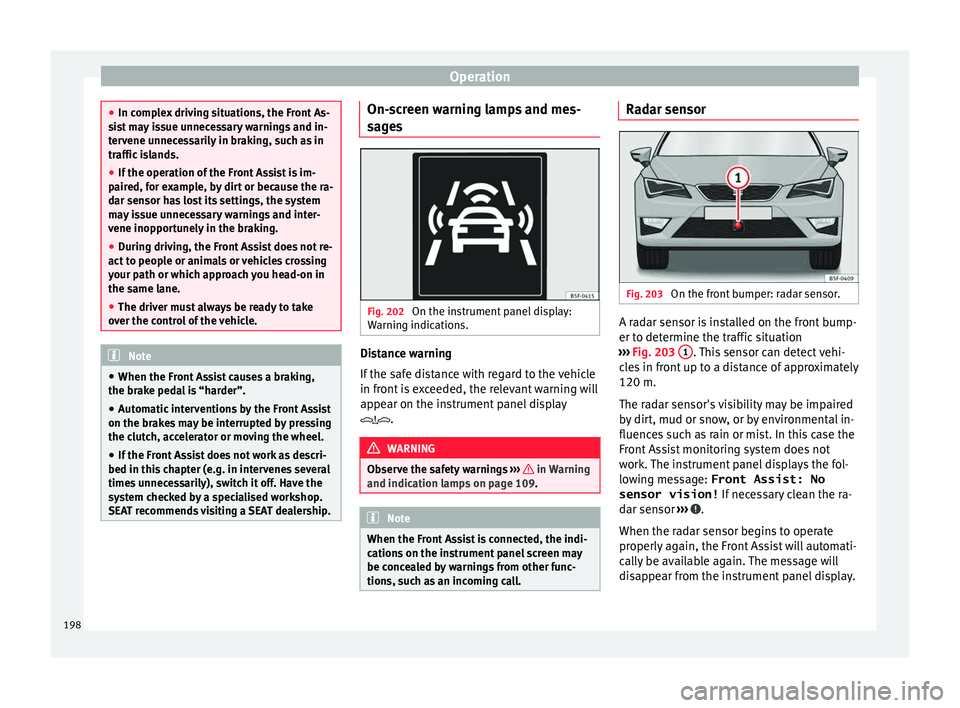
s Fig. 202
On the instrument panel display:
W arnin
g indic
ations. Distance warning
If
the s
af
e distance with regard to the vehicle
in front is exceeded, the relevant warning will
appear on the instrument panel display
. WARNING
Observe the safety warnings ›››
in Warning
and indication l amp
s on page 109. Note
When the Front Assist is connected, the indi-
cation s
on the instrument panel screen may
be concealed by warnings from other func-
tions, such as an incoming call. Radar sensor
Fig. 203
On the front bumper: radar sensor. A radar sensor is installed on the front bump-
er t
o det
ermine the tr
affic situation
››› Fig. 203 1 . This sensor can detect vehi-
c l
e
s in front up to a distance of approximately
120 m.
The radar sensor's visibility may be impaired
by dirt, mud or snow, or by environmental in-
fluences such as rain or mist. In this case the
Front Assist monitoring system does not
work. The instrument panel displays the fol-
lowing message: Front Assist: No sensor vision! If necessary clean the ra-
dar sensor ››› .
When the r a
d
ar sensor begins to operate
properly again, the Front Assist will automati-
cally be available again. The message will
disappear from the instrument panel display.
198
Page 203 of 308

Driver assistance systems
City Emergency braking function Fig. 205
On the instrument panel display:
pr e-w
arnin
g message The City Emergency braking function is part
of
the Fr
ont
Assist monitoring and is active
whenever the system is switched on.
Depending on the equipment, the pre-warn-
ing function can be switched on or off in the
Easy Connect system with the button and
the f u
nction b
uttons and
Driv
er As
s ist›››
pag
e 28.
The C ity Emergency braking function picks
up, at speeds between 5 km/h (3 mph) and
30 km/h (19 mph) approximately, the traffic
situation in front of the vehicle up to a dis-
tance of about 10 m. If the system detects a possible collision with
a v
ehic
le in front of it, the vehicle prepares
for a possible emergency braking ››› .
If the driv
er f
ails to react to a possible colli-
sion, the system may brake the vehicle auto-
matically, by progressively increasing braking
effect driving to reduce speed in the event of
a collision. The system can thus help to re-
duce the consequences of an accident.
Status display
Automatic deceleration by means of the City
Emergency braking function is displayed on
the instrument panel by means of the pre-
warning ››› Fig. 205 1)
. WARNING
The smart technology included in the City
Emerg ency
braking function cannot defy the
laws of physics. The driver is always respon-
sible for braking in time.
● Adapt your speed and safe distance to the
vehicl
e in front of you at all times to suit visi-
bility, weather, road and traffic conditions.
● The City Emergency braking function alone
cannot pr
event accidents or serious injury.
● In complex driving situations, the City
Emergency
braking function may issue unnec-
essary warnings and intervene inopportunely in braking, such as in work areas or if there
are met
a
l rails.
● If the operation of the City Emergency brak-
ing fu
nction is impaired, for example, by dirt
or because the radar sensor has lost its set-
tings, the system may issue unnecessary
warnings and intervene inopportunely in the
braking.
● During driving, the City Emergency braking
function doe
s not react to people or animals
or vehicles crossing your path or which ap-
proach you head-on in the same lane. Note
● When the City Emer
gency braking function
causes a braking, the brake pedal is “hard-
er”.
● Automatic interventions on the brakes by
the City Emer
gency braking function may be
interrupted by pressing the clutch, accelera-
tor or moving the wheel.
● The City Emergency braking function can
brake the
vehicle until it stops completely.
However, the brake system does not halt the
vehicle permanently. Use the foot brake!
● If several inopportune intervenes occur,
switc
h off the Front Assist and with it the City
Emergency braking function. Take it to a spe-
cialised workshop, SEAT recommends visiting
a SEAT dealership. »1)
The symbol on the instrument panels with colour
dis p
lay is in colour. 201
Technical data
Advice
Operation
Emergencies
Safety
Page 296 of 308
Index
Blown bulbs ch
an
ging a bulb . . . . . . . . . . . . . . . . . . . . . . . . . 94
Bonnet . . . . . . . . . . . . . . . . . . . . . . . . . . . . . 13, 246 opening the bonnet . . . . . . . . . . . . . . . . . . . . . 247
Brake assist system . . . . . . . . . . . . . . . . . . . . . . . 178
Brake fluid . . . . . . . . . . . . . . . . . . . . . . . . . . . . . . . 53
Brakes . . . . . . . . . . . . . . . . . . . . . . . . . . . . . . . . . . 181 brake fluid . . . . . . . . . . . . . . . . . . . . . . . . . . . . . 251
Brake servo . . . . . . . . . . . . . . . . . . . . . . . . . . . . 181
new brake pads . . . . . . . . . . . . . . . . . . . . . . . . 181
Braking Brake assist system . . . . . . . . . . . . . . . . . . . . . 178
Moving off on hills . . . . . . . . . . . . . . . . . . . . . . 182
C Camera cleaning . . . . . . . . . . . . . . . . . . . . . . . . . . . . . . 233
cleanliness . . . . . . . . . . . . . . . . . . . . . . . . . . . . 208
Lane Assist . . . . . . . . . . . . . . . . . . . . . . . . . . . . 203
Capacities . . . . . . . . . . . . . . . . . . . . . . . . . . . . . . . . 51 fuel tank . . . . . . . . . . . . . . . . . . . . . . . . . . . . . . 108
natural gas tank . . . . . . . . . . . . . . . . . . . . . . . . 242
windscreen washer water . . . . . . . . . . . . . . . . 252
Car-care products . . . . . . . . . . . . . . . . . . . . . . . . . 231
Catalytic converter . . . . . . . . . . . . . . . . . . . . . . . . 176
CCS . . . . . . . . . . . . . . . . . . . . . . . . . . . . . . . . . . . . . 40
CD-ROM player (navigation) . . . . . . . . . . . . . . . . 146
Central locking system . . . . . . . . . . . . . . . . . . . . . 116 anti-theft alarm . . . . . . . . . . . . . . . . . . . . . . . . . 121
central locking switch . . . . . . . . . . . . . . . . . . . . 119
Electric windows . . . . . . . . . . . . . . . . . . . . . . . . 125
manual locking . . . . . . . . . . . . . . . . . . . . . . . . . . 12
programming . . . . . . . . . . . . . . . . . . . . . . . . . . 119
remote control key . . . . . . . . . . . . . . . . . . . . . . 118
selective unlocking system . . . . . . . . . . . . . . . 118
sliding/tilting sunroof . . . . . . . . . . . . . . . . . . . 125
Cetane number (diesel fuel) . . . . . . . . . . . . . . . . 244 Changing
parts . . . . . . . . . . . . . . . . . . . . . . . . . . . . . . . . . 230
Changing a bulb . . . . . . . . . . . . . . . . . . . . . . . . . . . 94 front fog light bulbs . . . . . . . . . . . . . . . . . . . . . . 96
number plate light . . . . . . . . . . . . . . . . . . . . . . 100
rear light bulb on the rear lid . . . . . . . . . . . . . . . 99
rear light bulbs on the side panel . . . . . . . . . . . 97
Rear light on the side panel . . . . . . . . . . . . . . . . 98
Changing a wheel . . . . . . . . . . . . . . . . . . . . . . . . . 58 subsequent work . . . . . . . . . . . . . . . . . . . . . . . . 60
Changing gear engaging gears (manual gearbox) . . . . . . . . . 167
Changing main headlight bulbs turn signal . . . . . . . . . . . . . . . . . . . . . . . . . . . . . . 95
Changing settings CAR menu . . . . . . . . . . . . . . . . . . . . . . . . . . . . . . 28
Changing the blades . . . . . . . . . . . . . . . . . . . . . . . 88
Changing the main beam headlight bulb main beam headlight . . . . . . . . . . . . . . . . . . . . . 96
Changing the main headlight bulb day light . . . . . . . . . . . . . . . . . . . . . . . . . . . . . . . 95
dipped headlight . . . . . . . . . . . . . . . . . . . . . . . . 95
Changing the wiper blades . . . . . . . . . . . . . . . . . . 64
Charging the battery . . . . . . . . . . . . . . . . . . . . . . 254
Checking levels engine compartment . . . . . . . . . . . . . . . . . . . . 246
Child-proof locking electric windows . . . . . . . . . . . . . . . . . . . . . . . . 124
Child seats . . . . . . . . . . . . . . . . . . . . . . . . . . . . 20, 85 categorisation in groups . . . . . . . . . . . . . . . . . . 85
ISOFIX system . . . . . . . . . . . . . . . . . . . . . . . . . . . 22
safety instructions . . . . . . . . . . . . . . . . . . . . 20, 84
Securing with seat belt . . . . . . . . . . . . . . . . . . . 21Top Tether system . . . . . . . . . . . . . . . . . . . . . 22, 24
City Emergency braking function . . . . . . . . . . . . . 201 Cleaning . . . . . . . . . . . . . . . . . . . . . . . . . . . . . . . . 231
alcantar a . . . . . . . . . . . . . . . . . . . . . . . . . . . . . . 237
carbon parts . . . . . . . . . . . . . . . . . . . . . . . . . . . 234
Easy Connect control panel . . . . . . . . . . . . . . . 235
Exhaust pipe . . . . . . . . . . . . . . . . . . . . . . . . . . . 234
Fabrics . . . . . . . . . . . . . . . . . . . . . . . . . . . . . . . . 235
Leather . . . . . . . . . . . . . . . . . . . . . . . . . . . . . . . 236
natural leather . . . . . . . . . . . . . . . . . . . . . . . . . 236
plastic parts . . . . . . . . . . . . . . . . . . . . . . 233, 235
Radio display . . . . . . . . . . . . . . . . . . . . . . . . . . 235
seat belts . . . . . . . . . . . . . . . . . . . . . . . . . . . . . 237
trims . . . . . . . . . . . . . . . . . . . . . . . . . . . . . . . . . 233
washing the vehicle . . . . . . . . . . . . . . . . . . . . . 231
wheels . . . . . . . . . . . . . . . . . . . . . . . . . . . . . . . . 234
windows . . . . . . . . . . . . . . . . . . . . . . . . . . . . . . 234
Climatronic . . . . . . . . . . . . . . . . . . . . . . . . . . . . . . . 45
Closing . . . . . . . . . . . . . . . . . . . . . . . . . . . . . . . . . 116 bonnet . . . . . . . . . . . . . . . . . . . . . . . . . . . . . . . . 247
Panoramic sliding sunroof . . . . . . . . . . . . . . . . 126
windows . . . . . . . . . . . . . . . . . . . . . . . . . . . . . . 124
Clutch (warning lamp) . . . . . . . . . . . . . . . . . . . . . 174
Coming Home . . . . . . . . . . . . . . . . . . . . . . . . . . . . 132
Controls and displays general instrument panel . . . . . . . . . . . . . . . . . 103
Controls on the steering wheel Operating the audio system . . . . . . . . . . . . . . 112
operating the audio system and telephone . . 113
Convenience closing panoramic sliding sunroof . . . . . . . . . . . . . . . . 127
Convenience opening panoramic sliding sunroof . . . . . . . . . . . . . . . . 127
Coolant checking level . . . . . . . . . . . . . . . . . . . . . . . . . . 250
Cooling system checking coolant . . . . . . . . . . . . . . . . . . . . . . . 250
Coolant temperature gauge . . . . . . . . . . . . . . . 107
topping up coolant . . . . . . . . . . . . . . . . . . . . . . 250
294
Page 300 of 308

Index
Journey data . . . . . . . . . . . . . . . . . . . . . . . . . . . . . . 31 dat
a s
ummary . . . . . . . . . . . . . . . . . . . . . . . . . . . 35
memory . . . . . . . . . . . . . . . . . . . . . . . . . . . . . . . . 35
Jump leads . . . . . . . . . . . . . . . . . . . . . . . . . . . . . . . 62
K Key-operated switch . . . . . . . . . . . . . . . . . . . . . . . . 81
Keys Assign key . . . . . . . . . . . . . . . . . . . . . . . . . . . . . 117
car key . . . . . . . . . . . . . . . . . . . . . . . . . . . . . . . . 117
driver messages (mechanical contact) . . . . . . 164
remote control . . . . . . . . . . . . . . . . . . . . . . . . . 117
replacing the battery . . . . . . . . . . . . . . . . . . . . 120
spare key . . . . . . . . . . . . . . . . . . . . . . . . . . . . . . 117
Synchronising . . . . . . . . . . . . . . . . . . . . . . . . . . 121
unlocking and locking . . . . . . . . . . . . . . . 11, 118
Kick-down automatic gearbox . . . . . . . . . . . . . . . . . . . . . . 172
manual gear change . . . . . . . . . . . . . . . . . . . . . 207
Knee airbags safety information . . . . . . . . . . . . . . . . . . . . . . . 19
L Lane Assist . . . . . . . . . . . . . . . . . . . . . . . . . . . . . . 202 cleaning the camera area . . . . . . . . . . . . . . . . . 233
Lane Assist System see Lane Assist . . . . . . . . . . . . . . . . . . . . . . . . . 202
Launch control programme (automatic gearbox) 172
Leather: care . . . . . . . . . . . . . . . . . . . . . . . . . . . . . 236
Leaving Home . . . . . . . . . . . . . . . . . . . . . . . . . . . . 132
Level control . . . . . . . . . . . . . . . . . . . . . . . . . . . . . . 51
Lifting the vehicle . . . . . . . . . . . . . . . . . . . . . . . . . . 59
Light Assist . . . . . . . . . . . . . . . . . . . . . . . . . . . . . . 130
Lighting of the instrument panel . . . . . . . . . . . . . 134
Lights . . . . . . . . . . . . . . . . . . . . . . . . . . . . . . 25, 128 audible signals . . . . . . . . . . . . . . . . . . . . . . . . . 128
AUTO . . . . . . . . . . . . . . . . . . . . . . . . . . . . . . . . . 130 changing a bulb . . . . . . . . . . . . . . . . . . . . . . . . . 94
coming home
. . . . . . . . . . . . . . . . . . . . . . . . . . 132
cornering lights . . . . . . . . . . . . . . . . . . . . . . . . 131
Daytime running lights . . . . . . . . . . . . . . . . . . . 129
dipped beam headlight . . . . . . . . . . . . . . . . . . 128
Fog light . . . . . . . . . . . . . . . . . . . . . . . . . . . . . . 131
Hazard warning lights . . . . . . . . . . . . . . . . . . . . 26
Headlight range control . . . . . . . . . . . . . . . . . . 134
interior lights . . . . . . . . . . . . . . . . . . . . . . . . . . 135
leaving home . . . . . . . . . . . . . . . . . . . . . . . . . . 132
light control . . . . . . . . . . . . . . . . . . . . . . . . . . . 128
lighting of the instruments . . . . . . . . . . . . . . . 134
lighting of the switches . . . . . . . . . . . . . . . . . . 134
main beam lever . . . . . . . . . . . . . . . . . . . . . . . . 129
main beam lights . . . . . . . . . . . . . . . . . . . . . . . 128
main beams . . . . . . . . . . . . . . . . . . . . . . . . . . . . 26
Motorway light . . . . . . . . . . . . . . . . . . . . . . . . . 134
parking lights . . . . . . . . . . . . . . . . . . . . . . . . . . 133
reading lights . . . . . . . . . . . . . . . . . . . . . . . . . . 135
side lights . . . . . . . . . . . . . . . . . . . . . . . . . . . . . 128
switch . . . . . . . . . . . . . . . . . . . . . . . . . . . . . . . . . 25
turn signal lever . . . . . . . . . . . . . . . . . . . . . . . . 129
Load compartment in the luggage compartment see Loading the luggage compartment . . . . . 148
Loading the luggage compartment . . . . . . . . . . . 148
Loading the vehicle fastening rings . . . . . . . . . . . . . . . . . . . . . . . . . 153
luggage compartment . . . . . . . . . . . . . . . . . . . . 12
roof carrier system . . . . . . . . . . . . . . . . . . . . . . 159
tailboard for transporting long items . . . . . . . 153
Locking and unlocking in the door cylinder . . . . . . . . . . . . . . . . . . . . . . 11
with the central locking switch . . . . . . . . . . . . 119
Luggage . . . . . . . . . . . . . . . . . . . . . . . . . . . . . . . . 148 Luggage compartment . . . . . . . . . . . . . . . . . . . . . . 12
automatic lock . . . . . . . . . . . . . . . . . . . . . . . . . 123
luggage compartment lighting . . . . . . . . . . . . 135
luggage compartment variable floor . . . . . . . . 156
net bag . . . . . . . . . . . . . . . . . . . . . . . . . . . . . . . 155
net partition . . . . . . . . . . . . . . . . . . . . . . 151, 152
rear shelf . . . . . . . . . . . . . . . . . . . . . . . . . . . . . . 148
retractable rear shelf . . . . . . . . . . . . . . . . . . . . 149
storing the rear shelf . . . . . . . . . . . . . . . . . . . . 150
Unlocking manually . . . . . . . . . . . . . . . . . . . . . . 13
see also Loading the luggage compartment . 148
Luggage compartment floor . . . . . . . . . . . . . . . . 156
Luggage compartment variable floor . . . . . . . . . 156
Luggage net luggage compartment . . . . . . . . . . . . . . . . . . . 155
Lumbar support . . . . . . . . . . . . . . . . . . . . . . . . . . 140
M Main beam assist . . . . . . . . . . . . . . . . . . . . . . . . . 130
Main beam lever . . . . . . . . . . . . . . . . . . . . . . . . . . 129
Main panel turn signal and main beam lever . . . . . . . . . . . 129
maintenance intervals . . . . . . . . . . . . . . . . . . . . . 248
Malfunction Adaptive cruise control . . . . . . . . . . . . . . . . . . 188
clutch . . . . . . . . . . . . . . . . . . . . . . . . . . . . . . . . . 174
front assist monitoring system . . . . . . . . . . . . 198
gearbox . . . . . . . . . . . . . . . . . . . . . . . . . . . . . . . 174
Manual air conditioning . . . . . . . . . . . . . . . . . . . . 47
Manual gearbox . . . . . . . . . . . . . . . . . . . . . . . . . . 167
Manual unlocking and locking . . . . . . . . . . . . . . . 88
Mobile . . . . . . . . . . . . . . . . . . . . . . . . . . . . . . . . . . 230
Mobile telephones . . . . . . . . . . . . . . . . . . . . . . . . 230
Model plate . . . . . . . . . . . . . . . . . . . . . . . . . . . . . . 265
Modifications . . . . . . . . . . . . . . . . . . . . . . . . . . . . 230
Moving off Hill driving assistant . . . . . . . . . . . . . . . . . . . . . 182
298