belt Seat Leon 5D 2015 Owner's Guide
[x] Cancel search | Manufacturer: SEAT, Model Year: 2015, Model line: Leon 5D, Model: Seat Leon 5D 2015Pages: 308, PDF Size: 5.93 MB
Page 155 of 308

Transport and practical equipment
Tailboard for transporting long items* Fig. 170
On the rear seat backrest: opening
the t ai
l
board. Fig. 171
In the luggage compartment: open-
in g the t
ai
lboard. On the rear seat, behind the central armrest,
ther
e i
s
a tailboard for transporting long
items in the interior, such as skis. To avoid soiling the interior, dirty objects
should be wr
apped (e.g. in a blanket) before
they are inserted through the tailboard.
When the armrest is down, nobody may trav-
el in the centre rear seat.
Opening the tailboard
● Lower the centre armrest.
● Pull the release lever in the direction of the
arrow and p
ush the tailboard cover
››› Fig. 170 1 down and forwards.
● Open the rear lid.
● Insert the long objects through the gap
fr om the lug
g
age compartment.
● Secure the objects with the seatbelt.
● Close the rear lid.
Clos
ing the tailboard
● Lift the tailboard cover until it engages. The
red mark
on the luggage compartment side
should never be visible.
● Close the rear lid.
● Lift the centre armrest if necessary. Note
The tailboard can also be opened from the
lugg ag
e compartment. To do so, press the re-
lease lever down, in the direction of the ar-
row, and the cover upwards ››› Fig. 171. Fastening rings*
Fig. 172
In the luggage compartment: fasten-
in g rin
g
s (LEON/LEON SC model except ver-
sions with spare wheel and CNG). Fig. 173
In the luggage compartment: fasten-
in g rin
g
s (LEON ST model). In the front and rear part of the luggage com-
p
ar
tment
there are fastening rings to secure
the luggage ››› Fig. 173. »
153
Technical data
Advice
Operation
Emergencies
Safety
Page 156 of 308
Operation
In order to use the fastening rings, they must
be lif t
ed bef
orehand1)
. WARNING
If unsuitable or damaged belts or retaining
str ap
s are used, they could break in the event
of braking or an accident. Objects could then
be launched across the passenger compart-
ment and cause serious or fatal injuries.
● Always use belts or retaining straps that
are suit
able and in a good condition.
● Belts and retaining straps should be se-
curely
fastened to the fastening rings.
● Objects in the luggage compartment that
are un
secured could move suddenly and mod-
ify the handling of the vehicle.
● Secure all objects, little and large.
● Never exceed the maximum tensile load of
the fas
tening ring when securing objects.
● Never secure a child seat to the fastening
rings. Note
● The max imum t
ensile load that the fasten-
ing rings can support is 3.5 kN.
● Belts and securing systems for the appro-
priate lo
ad can be obtained from specialised
dealerships. SEAT recommends visiting a
SEAT dealership for this. ●
The fa s
tening rings are rendered unusable
for versions with spare wheel and CNG. Retaining hooks
Fig. 174
In the luggage compartment: retain-
in g hook
s
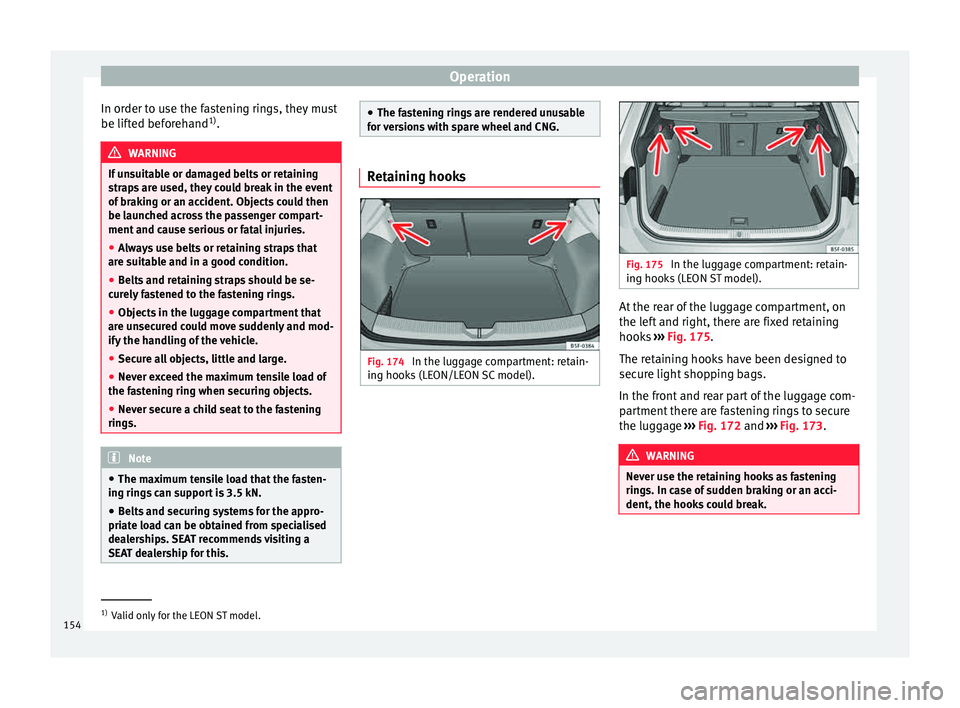
(LEON/LEON SC model). Fig. 175
In the luggage compartment: retain-
ing hook s
(LEON ST model). At the rear of the luggage compartment, on
the l
ef
t
and right, there are fixed retaining
hooks ››› Fig. 175.
The retaining hooks have been designed to
secure light shopping bags.
In the front and rear part of the luggage com-
partment there are fastening rings to secure
the luggage ››› Fig. 172 and ››› Fig. 173. WARNING
Never use the retaining hooks as fastening
ring s. In c
ase of sudden braking or an acci-
dent, the hooks could break. 1)
Valid only for the LEON ST model.
154
Page 159 of 308

Transport and practical equipment
Variable floor in the tilted position
When the v
ari
able floor is tilted you can ac-
cess the spare wheel/anti-puncture kit area.
● Lift the variable floor using handle
›››
Fig. 180 1 and pull it back until the front
of the floor h
a
s fully passed the tilted
grooves ››› Fig. 181 3 .
● Run the floor through these grooves with
the help of h
andl
e 1 as the rear seat back-
r e
s
t and until the floor is resting in the
grooves. WARNING
During a sudden driving or braking manoeu-
vre, or in the ev ent
of an accident, objects
could be flung though the interior and cause
serious or fatal injuries.
● Always secure objects, even when the lug-
gage c
ompartment floor is properly lifted.
● Only objects that do not protrude more
than 2/3 the height of
the floor may be car-
ried between the rear seat and the raised lug-
gage compartment floor.
● Only objects that do not weigh than ap-
prox
imately 7.5 kg may be carried between
the rear seat and the raised luggage compart-
ment floor. CAUTION
● The max imum w
eight that can be loaded on
the luggage compartment variable floor in
the top position is 150 kg. ●
Do not l et
the luggage compartment floor
fall when closing it. Always carefully guide it
downwards in a controlled manner. Other-
wise, the lining and the floor of the luggage
compartment could be damaged. Note
SEAT recommends the use of straps to secure
o b j
ects to retaining rings. Roof carrier
Intr oduction The vehicle roof has been designed to opti-
mi
se aer
ody
namics. For this reason, cross
bars or conventional roof carrier systems can-
not be secured to the roof water drains.
As the roof water drains are integrated in the
roof to reduce air resistance, only SEAT-ap-
proved cross bars and roof carrier systems
can be used.
Cases in which cross bars and the roof carri-
er system should be disassembled.
● When they are not used.
● When the vehicle is washed in a car wash.
● When the vehicle height exceeds the maxi-
mum height, for e x
ample, in some garages. WARNING
When heavy or bulky loads are transported
on the roof c
arrier system, car driving per-
formance is affected, as the centre of gravity
shifts and there is greater wind resistance.
● Always secure the load properly using belts
or retainin
g straps that are suitable and in a
good condition.
● Bulky, heavy, long or flat loads have a neg-
ative effect
on aerodynamics, the centre of
gravity and driving performance.
● Avoid sudden braking and manoeuvres.
● Adapt your speed and driving style at all
times t
o suit visibility, weather, road and traf-
fic conditions. CAUTION
● Remo v
e the cross bars and the roof carrier
system before entering a car wash.
● Vehicle height is increased by the installa-
tion of cr
oss bars or a roof carrier system and
the load secured on them. For this purpose,
check that your vehicle's height does not sur-
pass the headspace limit, for example, for un-
derpasses or for entering garage doors.
● Cross bars, a roof carrier system and the
load sec
ured on them should not interfere
with the roof aerial or hamper the path of the
panoramic sun roof ››› page 126 and the rear
lid.
● On opening the rear lid make sure that it
does not
knock into the roof load. » 157
Technical data
Advice
Operation
Emergencies
Safety
Page 161 of 308

Air conditioning
Note
Always read the assembly instructions that
come w ith the c
rossbars and the roof carrier
system carefully and keep them in the vehi-
cle. Loading the roof carrier system
The load can only be secured if the crossbars
and the roof
c
arrier system are properly in-
stalled ››› .
Max imum authori
sed roof load
The maximum permissible roof load is 75 kg.
This figure comes from the combined weight
of the roof carrier, the cross bars and the load
itself on the roof ››› .
A lw
a
ys check the weight of the roof carrier
system, the cross bars and the weight of the
load to be transported and weigh them if
necessary. Never exceed the maximum au-
thorised roof load.
If you are using cross bars and a roof carrier
with a lower weight rating, you will not be
able to carry the maximum authorised roof
load. In this case, do not exceed the maxi-
mum weight limit for the roof carrier which is
listed in the fitting instructions. Distributing a load
Distrib
ute loads uniformly and secure them
correctly ››› .
Chec k
att
achments
Once the cross bars and roof carrier system
have been installed, check the bolted con-
nections and attachments after a short jour-
ney and subsequently with a certain frequen-
cy. WARNING
Exceeding the maximum authorised roof load
can r e
sult in accidents and considerable vehi-
cle damage.
● Never exceed the maximum authorised
load on the r
oof and on the axles or the vehi-
cle's maximum authorised weight.
● Never exceed the load capacity of the cross
bars
and the roof carrier system, even if the
maximum authorised roof load has not been
reached.
● Secure heavy items as far forward as possi-
ble and di
stribute the vehicle load uniformly. WARNING
If the load is loose or not secured, it could fall
from the r oof
carrier system or cause acci-
dents and injuries.
● Always use belts or retaining straps that
are suit
able and in a good condition.
● Secure the load properly. Air conditioning
He atin
g,
ventilation and cool-
ing
Introduction Read the additional information carefully
›› ›
page 45
Viewing Climatronic information
On the screen of Climatronic control unit and
on the screen of the factory-fitted Easy Con-
nect system, the theoretical values of the
temperature zones are shown.
The unit of temperature measurement can be
changed in the Easy Connect system.
Dust and pollen filter
The dust and pollen filter with its activated
charcoal cartridge serves as a barrier against
impurities in the air taken into the vehicle in-
terior.
The dust and pollen filter must be changed
regularly so that air conditioner performance
is not adversely affected.
If the filter loses efficiency prematurely due
to use in areas with very high levels of air
pollution, the filter must be changed more
frequently than stated in the Service Sched-
ule. »
159
Technical data
Advice
Operation
Emergencies
Safety
Page 185 of 308

Driver assistance systems
●
When fo l
lowing a line of traffic uphill, if you
want to prevent the vehicle from rolling back
accidentally when starting off, hold the brake
pedal down for a few seconds before starting
off. Note
The Official Service or a specialist workshop
c an t el
l you if your vehicle is equipped with
this system. Start-Stop system*
D e
s
cription and operation
›› ›
table on page 2
The Start-Stop system helps save fuel and re-
duce CO 2 emissions.
In Start-Stop mode, the engine will automati-
cally switch off when the vehicle stops, when
stopping at traffic lights for example. The ig-
nition remains switched on during the stop-
ping phase. The engine automatically
switches back on when required.
As soon as the ignition is switched on, the
Start-Stop function is automatically activa-
ted.
Basic requirements for the Start-Stop mode ● The driver door must be closed. ●
The driver mu s
t have their seat belt fas-
tened.
● The bonnet must be closed.
● The vehicle must have travelled at more
than 4 km/h (2 mph) sinc
e the last stop.
● The vehicle cannot be towing a trailer. WARNING
● Never sw it
ch the engine off until the vehi-
cle is stationary. The brake servo and power
steering functions will not be completely cov-
ered under warranty. More force may also be
needed to turn the steering wheel or to brake.
As you cannot steer and brake in the normal
manner, there is a greater risk of accidents
and serious injury.
● Never remove the key from the ignition if
the vehic
le is in motion. Otherwise, the steer-
ing could lock making it impossible to steer
the vehicle.
● To avoid injury, make sure that the Start-
Stop sys
tem is switched off when working in
the engine compartment ››› page 185. CAUTION
The Start-Stop system must always be
swit c
hed off when driving through flooded
areas ››› page 185. Stopping/Starting the engine
Vehicles with a manual gearbox
– When the vehicle is stopped, put it into
neutral and r
elease the clutch pedal. The
engine will switch off. The warning lamp
will appear on the instrument panel dis-
play.
– When the clutch pedal is pressed the en-
gine wil
l start up again. The warning lamp
will switch off.
Vehicles with an automatic gearbox
– Use the foot brake to bring the vehicle to a
stop and k
eep the brake pedal pressed
down with your foot. The engine will switch
off. The warning lamp will appear in the
display.
– When you take your foot off the brake pedal
the engine wi
ll start up again. The warning
lamp will switch off.
Additional information related to the auto-
matic gearbox
The engine stops when the selector lever is in
the positions P, D, N and S, in addition to
when in manual mode. With the selector lev-
er in position P, the engine will also remain
switched off when you take your foot off the
brake pedal. In order to start the engine up
again the accelerator must be pressed, or an-
other gear engaged or the brake released. »
183
Technical data
Advice
Operation
Emergencies
Safety
Page 193 of 308

Driver assistance systems
Programme speed and activate control
● Press the S
ET
› ››
Fig. 197
b utton to pro-
gramme current speed.
● Automatic gearbox: apply the brake pedal
to activat
e control with the vehicle stationary.
Deactivating the ACC
● Move the lever to position 0 until it en-
g ag
e
s. The text ACC: off appears.
Altering speed
● To increase or reduce speed step by step,
pres
s the lever up/down briefly ››› Fig. 197.
Any modification to the programmed speed
is shown on the bottom left part of the instru-
ment panel display.
Adjusting distance level
The distance according to speed with regard
to the vehicle in front can be controlled on
the Easy Connect system on 5 levels
››› page 28.
In wet road conditions, you should always set
a larger distance with regard to the vehicle in
front than when driving in dry conditions.
The following distances can be preselected:
● Very short
● Short
● Media ●
Long
● V
ery long
You can u
se the Easy Connect system to ad-
just the level of distance that should be ad-
justed when the ACC is switched on with the
button and the function buttons
and
Driv er a
s
sistance
› ››
p
age 28.
Adju
sting the driving programme
In vehicles with driving profile selection
(SEAT Drive Profile), the profile selected can
influence acceleration behaviour
››› page 204.
The following driving programmes items can
be selected:
● Normal
● Sport
● Eco
In vehic
les without driving profile selection,
acceleration behaviour can be influenced by
selecting a driving programme on the Easy
Connect system by means of the button and the function buttons
and
Driv er a
s
sistance
› ›
›
page 28.
The following conditions may lead the ACC
not to react:
● If the accelerator is pressed.
● If there is no gear engaged. ●
If the ESC
is controlling.
● If the driver is not wearing his/her seat
belt.
● If sev
eral brake lights of the vehicle or elec-
trically
connected trailer are damaged.
● If the vehicle is reversing.
● Driving faster than 160 km/h (100 mph). WARNING
There is a danger of rear collision when the
minimum dis t
ance to the vehicle in front is
exceeded and the speed difference between
both vehicles is so great that a speed reduc-
tion by the ACC will not suffice. In this case
the brake pedal should be applied immedi-
ately.
● The ACC may not be able to detect all situa-
tions pr
operly.
● “Stepping” on the accelerator may cause
the ACC
not to intervene in braking. Driver
braking will have priority over intervention by
the speed control or adaptive cruise control.
● Always be ready to use the brakes!
● Observe country-specific provisions gov-
erning ob
ligatory minimum distances be-
tween vehicles. Note
● The progr ammed s
peed is erased once the
ignition or the ACC are switched off. » 191
Technical data
Advice
Operation
Emergencies
Safety
Page 196 of 308

Operation
A CC: Take action!
The me s
sage for the driver is displayed if,
when the vehicle starts up on a hill with a
mild slope, the vehicle rolls back even al-
though the ACC is activated. Apply the brake
to stop the vehicle from moving/colliding
with another vehicle.
ACC: speed limit
The message for the driver is displayed if, in
vehicles with manual gearbox, the current
speed is too low for the ACC mode.
The speed to be stored must be at least 30
km/h. The cruise control system switches off
if the speed falls below 20 km/h.
ACC: available as of the 2nd gear
The ACC is operational as of the 2nd gear
(manual gearbox).
ACC: engine speed
The message for the driver is displayed if,
when the AAC accelerates or brakes, the driv-
er does not shift up or down a gear in time,
which means exceeding or not reaching the
permissible engine speed. The AAC switches
itself off. A buzzer warning is heard.
ACC: clutch pressed
Vehicles with a manual gearbox: pressing the
clutch pedal for longer abandons control
mode.
Three white dots
appear if a setting made
with the control lever cannot be performed.
For example, if when the vehicle is stationary
the ACC cannot be activated because the
driver is not wearing the seat belt.
Door open
Vehicles with automatic gearbox: the ACC
cannot be activated with the vehicle station-
ary and the door open.
Deactivating the Adaptive Cruise Con-
trol
ACC temporarily in certain situa-
tions In the following situations the Adaptive
C
rui
se C
ontrol (ACC) should be deactivated
due to the system's limitations ››› :
● When changing lanes, on tight bends and
r ou
nd
abouts, in acceleration and decelera-
tion lanes on motorways or in sections with
road works to prevent involuntary accelera-
tion to reach the programmed speed.
● When going through a tunnel, as operation
coul
d be affected.
● On roads with several lanes, when other ve-
hicle
s are driving more slowly in the overtak-
ing lane. In this case, slower vehicles will be
overtaken on the right. ●
In case of
heavy rain, snow or spray, as the
vehicle in front might not be detected proper-
ly or, in certain circumstances, might not be
detected at all. WARNING
If the ACC does not switch off in the situa-
tions de
scribed, serious accidents and inju-
ries may occur.
● Always switch off the ACC in critical situa-
tions. Note
If you do not switch off the ACC in the afore-
mentioned sit uation
s, you may commit a le-
gal offence. 194
Page 213 of 308

Driver assistance systems
Function and operation Fig. 212
On the instrument panel display:
tir edne
s
s detection symbol. Tiredness detection determines the driving
beh
av
iour of
the driver when starting a jour-
ney, making a calculation of tiredness. This is
constantly compared with the current driving
behaviour. If the system detects that the driv-
er is tired, an audible warning is given with a
sound and an optic warning is shown with a
symbol and complementary message on the
instrument panel display ››› Fig. 212. The
message on the instrument panel display is
shown for approximately 5 seconds, and de-
pending on the case, is repeated. The system
stores the last message displayed.
The message on the instrument panel display
can be switched off by pressing the button on the windscreen wiper lever or the
b
utt
on on the multi function steering
wheel
›
›
› page 31. The message can be recalled to the instru-
ment panel
display using the multifunction
display ›››
page 31.
Conditions of operation
Driving behaviour is only calculated on
speeds above about 65 km/h (40 mph) up to
around 200 km/h (125 mph).
Switching on and off
Tiredness detection can be activated or deac-
tivated in the Easy Connect system with the
button and the function button
›››
pag e 110. A mark indicates that the ad-
ju
stment has been activated.
System limitations
The Tiredness detection has certain limita-
tions inherent to the system. The following
conditions can limit the Tiredness detection
or prevent it from functioning. ● At speeds below 65 km/h (40 mph)
● At speeds above 200 km/h (125 mph)
● When cornering
● On roads in poor condition
● In unfavourable weather conditions
● When a sporty driving style is employed
● In the event of a serious distraction to the
driver Tir
edne
ss detection will be restored when the
vehicl
e is stopped for more than 15 minutes,
when the ignition is switched off or when the
driver has unbuckled their seat belt and
opened the door.
In the event of slow driving during a long pe-
riod of time (below 65 km/h (40 mph) the
system automatically re-establishes the tired-
ness calculation. When driving at a faster
speed the driving behaviour will be recalcula-
ted.
Parking aid
General
information Various systems are available to help you
when p
ark
in
g or manoeuvring in tight
spaces, depending on the equipment fitted
on your vehicle.
The rear parking aid is an audible assistant
that warns about obstacles located behind
the vehicle ›››
page 213.
During parking, Parking System Plus assists
the driver by visually and audibly warning
them about obstacles detected in front and
behind the vehicle ›››
page 213. »
211
Technical data
Advice
Operation
Emergencies
Safety
Page 238 of 308

Advice
Note
Open Velcro fasteners on clothes can damage
the seat upho
lstery. Make sure they are
closed. Natural leather
General information
Our ran
g
e of leathers is large. The main type
used is particularly nappa in various forms,
that is, leather with a smooth surface in dif-
ferent colours.
The amount of dye used determines the ap-
pearance and properties of leather. If the
leather is left in a more natural state, it re-
tains its typical natural napped appearance
and confers excellent all-weather properties
to the seats. Fine veins, healed scars, insect
bites, wrinkles and a subtle variation in shad-
ing remain visible; these are the characteris-
tic features of genuine natural leather.
Natural napped leather does not have a pro-
tective surface coating of dye. It is therefore
somewhat more prone to damage. This
should be borne in mind if children or pets
often travel in the car, or if there are other
factors that could lead to damage.
Types of leather with a coloured surface coat-
ing are likely to be more resistant to damage.
This has a great advantage for day-to-day
use. However, this means that the typical natural characteristics of the surface are less
app
ar
ent, though this does not affect quality.
Cleaning and care
Due to the natural properties of the specially
selected hides employed, the finished leath-
er has a certain sensitivity to grease and dirt,
etc. so a degree of care is required in every-
day use and when looking after the leather.
Dark clothing (especially if damp or incorrect-
ly dyed) may stain leather upholstery on the
seats. Dust and grit in the pores and seams
can scratch and damage the surface. There-
fore leather should be cleaned at regular in-
tervals, depending on the actual amount of
use. When they have been in use for a certain
time, your car seats will acquire a typical and
unmistakable patina. This is characteristic for
leather as a natural product and is a sign of
genuine quality.
To maintain the value of natural leather you
should note the following points: CAUTION
● Av oid e
xposing leather to direct sunlight
for long periods, otherwise it may tend to
lose some of its colour. If the car is left for a
prolonged period in the bright sun, it is best
to cover the leather.
● Sharp-edged objects on clothing, such as
belts, z
ip fasteners, rivets or similar, can also
leave permanent scratches and rough marks
on the surface of the leather. Note
● Use a s uit
able impregnating cream with ul-
tra-violet protection at regular intervals and
after cleaning. The cream nourishes and
moisturises the leather, keeps it supple and
able to breathe. A protective film will also
form.
● Clean the leather every 2 to 3 months and
remov
e fresh dirt as soon as possible.
● Remove stains from fresh ball-pen and oth-
er inks, lips
tick, shoe cream and similar
stains as soon as possible.
● Preserve the colour of the leather. A special
colour
ed cream will renew the colour of the
leather when required and will eliminate dif-
ferences in colour. Cleaning and care of leather uphols-
t
er
y Natural leather requires an extra degree of at-
t
ention and c
ar
e.
Normal cleaning
– Moisten a cotton or woollen cloth with wa-
ter and wipe o
ver the leather surfaces.
More stubborn dirt
– More stubborn dirt can be removed using a
mild so
ap solution (pure liquid soap: two
236
Page 239 of 308

Care and maintenance
tablespoons dissolved in one litre of
w at
er).
– Do not
let the water soak through the leath-
er or penetrate int
o the seams.
– Then wipe off with a soft, dry cloth.
Remov
al of stains
– Remove fresh water
-based stains such as
coffee, tea, juices, blood etc. with an ab-
sorbent cloth or kitchen roll, or use the
cleaning agent from the care set for dried-
on stains.
– Remove fresh grea
se-based stains that
have not penetrated the surface such as
butter, mayonnaise, chocolate, etc. with an
absorbent cloth or kitchen roll or with the
cleaning agent from the care set.
– Treat fat-based, dried-in stains with grease-
dis
solving spray.
– Treat less common stains on le
ather, such
as ball-pen and other inks, felt-tip pens,
nail polish, dispersion paint, shoe cream
etc. with a special leather stain remover.
Leather maintenance
– The leather should be treated regularly
(about twic
e a year) with a special leather-
care product.
– Apply these products very sparingly.
– Then wipe off with a soft, dry cloth. Should you have questions regarding the
care and c
leaning of the leather upholstery in
your vehicle, we recommend that you contact
your SEAT Official Service. Our representa-
tives will be happy to advise you and tell you
about the product range for leather conserva-
tion, for example:
● Cleaning and care set.
● Coloured leather-care cream.
● Stain remover for ball-pen inks, shoe cream
etc.
● Gr
ease dissolving spray.
● New products and further developments CAUTION
On no account use solvents (such as petrol,
turpentine), w ax
polish, shoe cream or simi-
lar materials. Cleaning Alcantara upholstery
Removing dust and dirt
– Moisten a cloth jus t
a lit
tle and wipe down
the seat covers.
Removing stains – Moisten a cloth with lukewarm water or di-
luted whit
e spirits.
– Dab at the stain. Start at the outside and
work in
wards. –
Dry the c
lean area with a soft cloth.
Do not use leather cleaning products on Al-
cantara seat covers.
You may use a suitable soap on dust and dirt.
Dust and grit in the pores and seams can
scratch and damage the surface. If the car is
left standing in the sun for long periods, Al-
cantara leather should be protected against
direct sunlight to prevent it from fading. How-
ever, slight colour variations will arise in nor-
mal use. CAUTION
● Do not u se so
lvents, wax polish, shoe
cream, stain removers, leather cleaning prod-
ucts or any similar products on Alcantara.
● To avoid damage, stubborn stains should
be remov
ed by a specialised workshop.
● On no account use brushes, hard sponges
or simil
ar utensils. Seat belts
–
Keep the seat belts clean.
– For cleaning, use a mild solution of soap
and w at
er
.
– Check the condition of the seat belts at reg-
ular int
ervals. »
237
Technical data
Advice
Operation
Emergencies
Safety