ABS Seat Leon 5D 2016 User Guide
[x] Cancel search | Manufacturer: SEAT, Model Year: 2016, Model line: Leon 5D, Model: Seat Leon 5D 2016Pages: 324, PDF Size: 6.93 MB
Page 178 of 324

Operation
Brake servo
The br ak
e ser
vo increases the pressure you
apply to the brake pedal. It works only when
the engine is running. WARNING
● App ly
the brakes heavily to clean the brake
system only in a suitable traffic situation. Do
not put other road users in danger: there is
risk of causing an accident.
● Ensure the vehicle does not move while in
neutral, when the en
gine is stopped. Failure
to follow this instruction could result in an
accident.
● If the brake fluid loses its viscosity and is
subj
ected to heavy use, vapour bubbles can
form in the brake system. This reduces the ef-
ficiency of the brakes. CAUTION
● Never l et
the brakes “drag” by leaving your
foot on the pedal when it is not necessary to
brake. This overheats the brakes, resulting in
longer stopping distances and greater wear.
● Before driving down a long, steep gradient,
it is
advisable to reduce speed and select a
lower gear. This makes use of engine braking
and relieves the brakes. If you still have to
use the brakes, it is better to brake firmly at
intervals than to apply the brakes continu-
ously. Note
● If the br ak
e servo is out of action, for exam-
ple when the car is being towed, you will
have to press the brake pedal considerably
harder than normal to make up for the lack of
servo assistance.
● If you wish to equip the vehicle with acces-
sories s
uch as a front spoiler or wheel covers,
it is important that the flow of air to the front
wheels is not obstructed, otherwise the
brakes can overheat. Braking and stability systems
El ectr
onic
Stability Control (ESC) The ESC helps to improve safety. It reduces
the t
endency
t
o skid and improves the stabil-
ity and roadholding of the vehicle. The ESC
detects critical handling situations, such as
vehicle understeer or oversteer, or wheelspin
on the driving wheels. It stabilises the vehi-
cle by braking individual wheels or by reduc-
ing the engine torque. The warning lamp will
flash on the instrument panel when the ESC
is intervening .
ESC includes the Anti-lock brake system
(ABS), the brake assist system, the traction
control system (ASR), electronic differential
lock (EDL), electronic self-locking*, selective
torque control* and tractor-trailer sway miti- gation*. ESC also helps stabilise the vehicle
by c
hanging the torque.
Anti-lock brake system (ABS)
ABS prevents the wheels from locking up un-
der braking until the vehicle has reached a
virtual standstill. You can continue to steer
the vehicle even when the brakes are on full.
Keep your foot on the brake pedal and do not
pump the brakes. You will feel the brake ped-
al pulsate while the ABS is working.
Brake assist system
The brake assist system can reduce the re-
quired braking distance. The braking force is
automatically boosted if you press the brake
pedal quickly in an emergency. You must
keep pressing the brake pedal until the dan-
ger has passed.
Traction control system (ASR)
In the event of wheelspin, the traction control
system reduces the engine torque to match
the amount of grip available. This helps the
car to start moving, accelerate or climb a gra-
dient.
Electronic differential lock (EDL)
When the EDL detects wheelspin, it brakes
the spinning wheel and directs the power to
the other driven wheel. This function is active
up to approximately 100 km/h (62 mph).
176
Page 179 of 324

Driving
To prevent the disc brake of the braked wheel
fr om o
v
erheating, the EDL cuts out automati-
cally if subjected to excessive loads. The ve-
hicle can still be driven. The EDL will switch
on again automatically when the brake has
cooled down.
Tractor-trailer sway mitigation*
If the vehicle is pulling a trailer, it will control
the following: Tractor-trailers tend to sway.
When the swaying of the trailer is felt by the
vehicle and detected by the ESC, it will auto-
matically brake the towing vehicle within the
limits of the system and mitigate the sway.
Tractor-trailer sway mitigation is not available
in all countries.
Electronic torque management (XDS)
When taking a curve, the driveshaft differen-
tial mechanism allows the outer wheel to turn
at a higher speed than the inner wheel. In
this way, the wheel that is turning faster (out-
er wheel) receives less drive torque than the
inner wheel. This may mean that in certain
situations the torque delivered to the inner
wheel is too high, causing the wheels to
spin. On the other hand, the outer wheel is
receiving a lower drive torque than it could
transmit. This causes an overall loss of lateral
grip on the front axle, resulting in understeer
or “lengthening” of the trajectory.
The XDS system can detect and correct this
effect via the sensors and signals of the ESC. Via the ESC, the XDS will brake the inside
wheel and cou
nter the excess driving torque
of that wheel. This means that the driver's
desired trajectory is much more precise.
The XDS system works in combination with
the ESC and is always active, even when ASR
traction control is disconnected, or the ESC in
Sport mode or disconnected.
Multi-collision brake
In an accident, the multi-collision brake can
help the driver by braking to avoid the risk of
skidding during the accident, which could
lead to further collisions.
The multi-collision brake works for front, side
or rear accidents, when the airbag control
unit records its activation level and the acci-
dent takes place at a speed of over 10 km/h
(6 mph). The ESC automatically brakes the
vehicle, as long as the accident has not dam-
aged the ESC, the brake hydraulics or the on-
board network
The following actions control automatic brak-
ing during the accident:
● When the driver presses the accelerator,
the automatic
braking does not take place.
● When the braking pressure through press-
ing the brak
e pedal is greater than the sys-
tem’s braking pressure the vehicle will brake
automatically. ●
Multi-c
ollision braking will not be available
if ESC is malfunctioning. WARNING
● The ESC, ABS, ASR, EDL, el ectr
onic self-
locking differential or selective torque control
systems cannot exceed the limits imposed by
the laws of physics. Always bear this in mind,
especially on wet or slippery roads. If you no-
tice the systems cutting in, you should re-
duce your speed immediately to suit the road
and traffic conditions. Do not be encouraged
to take risks by the presence of more safety
systems. If you do, an accident may occur.
● Please remember that the accident risk al-
way
s increases if you drive fast, especially in
corners or on a slippery road, or if you follow
too close behind the vehicle in front of you.
The ESC, ABS, brake assist, EDL, electronic
self-locking and selective torque control sys-
tems cannot prevent accidents: risk of acci-
dents!
● Accelerate with caution on slippery surfa-
ces
(for example, icy or snow-covered). De-
spite the control systems, the driven wheels
could spin, affecting the stability of the vehi-
cle: risk of accident! Note
● The ABS and ASR w i
ll only operate correctly
if the four wheels have identical tyres. Any
differences in the rolling radius of the tyres
can cause the system to reduce engine power
when this is not desired. » 177
Technical data
Advice
Operation
Emergencies
Safety
Page 180 of 324
Operation
●
The re gu
lating processes of the systems
can make noises when they intervene.
● If the warning lamp lights up
, or alter-
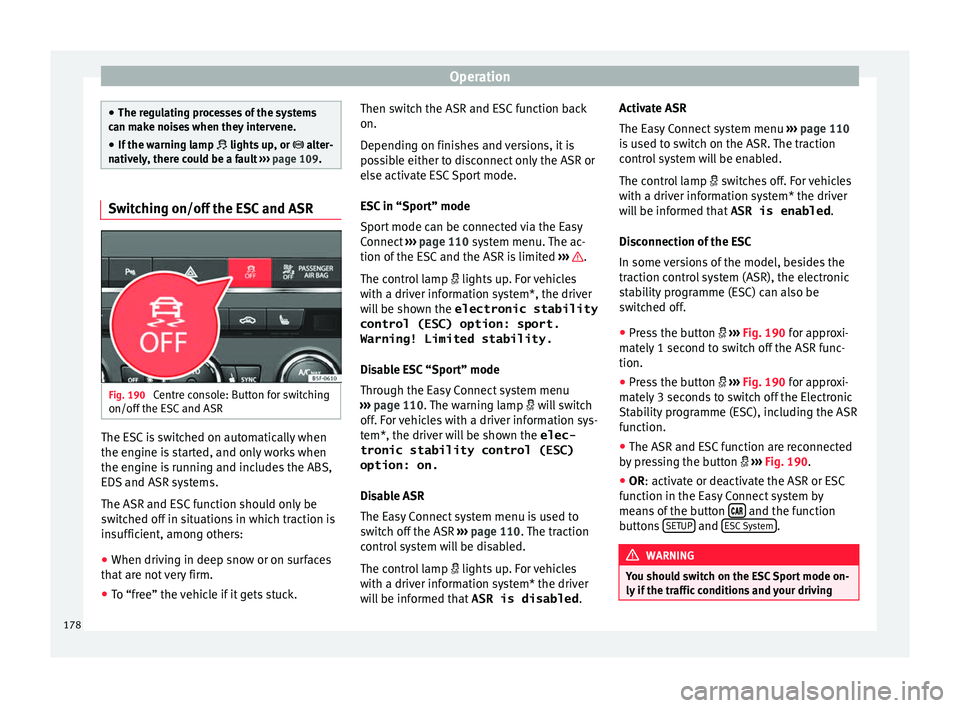
natively, there could be a fault ››› page 109. Switching on/off the ESC and ASR
Fig. 190
Centre console: Button for switching
on/off the E
SC
and ASR The ESC is switched on automatically when
the en
gine i
s
started, and only works when
the engine is running and includes the ABS,
EDS and ASR systems.
The ASR and ESC function should only be
switched off in situations in which traction is
insufficient, among others:
● When driving in deep snow or on surfaces
that ar
e not very firm.
● To “free” the vehicle if it gets stuck. Then switch the ASR and ESC function back
on.
Depending on fini
shes and versions, it is
possible either to disconnect only the ASR or
else activate ESC Sport mode.
ESC in “Sport” mode
Sport mode can be connected via the Easy
Connect ››› page 110 system menu. The ac-
tion of the ESC and the ASR is limited ››› .
The c ontr
o
l lamp lights up. For vehicles
with a driver information system*, the driver
will be shown the electronic stability
control (ESC) option: sport.
Warning! Limited stability.
Disable ESC “Sport” mode
Through the Easy Connect system menu
››› page 110. The warning lamp will switch
off. For vehicles with a driver information sys-
tem*, the driver will be shown the elec-
tronic stability control (ESC)
option: on.
Disable ASR
The Easy Connect system menu is used to
switch off the ASR ››› page 110. The traction
control system will be disabled.
The control lamp lights up. For vehicles
with a driver information system* the driver
will be informed that ASR is disabled.Activate ASR
The Easy
Connect system menu ››› page 110
is used to switch on the ASR. The traction
control system will be enabled.
The control lamp switches off. For vehicles
with a driver information system* the driver
will be informed that ASR is enabled.
Disconnection of the ESC
In some versions of the model, besides the
traction control system (ASR), the electronic
stability programme (ESC) can also be
switched off.
● Press the button ›››
Fig. 190 for approxi-
mately 1 second to switch off the ASR func-
tion.
● Press the button ›››
Fig. 190 for approxi-
mately 3 seconds to switch off the Electronic
Stability programme (ESC), including the ASR
function.
● The ASR and ESC function are reconnected
by pr
essing the button ››› Fig. 190.
● OR: activate or deactivate the ASR or ESC
fu
nction in the Easy Connect system by
means of the button and the function
b utt
on
s SETUP and
E
SC
System .
WARNING
You should switch on the ESC Sport mode on-
ly if the tr
affic conditions and your driving178
Page 217 of 324

Driver assistance systems
Operation Fig. 214
In the windscreen: field of vision of
the Lane As s
i
st system camera. Using the camera located in the windscreen,
the Lane As
s
i
st system detects the possible
lines dividing the lanes. When the vehicle in-
voluntarily approaches a dividing line it has
detected, the system notifies the driver with
a corrective steering movement . This move-
ment can be over-regulated at any time.
No warning is produced with the turn signals
activated, given that the Lane Assist system
understands that a lane change is required.
Steering wheel vibration
The following situations can cause vibration
in the steering wheel and require the driver
to take active control of driving:
● When the limits of the very nature of the
syst
em are reached. ●
When the maximum r
otational torque dur-
ing the corrective steering movement is not
enough to keep the vehicle inside the lane.
● When no lane is detected during the correc-
tive st
eering movement.
Switching the Lane Assist system on or off
Through the Easy Connect system
● Press the Easy Connect button .
● Press the S
ETUP function button.
● Press the function button driv
er a
s
sistance to
open the menu.
OR: thr ough the driving assist
b
utt
on
on the turn signal level*.
The Lane centring guide is activa-
ted/deactivated in the Easy Connect system
using the button and the
S
ETUP function
b utt
on ›
›› page 110.
Self-deactivation: the Lane Assist system can
be automatically deactivated if there is a sys-
tem malfunction. The control lamp disap-
pears.
Hands-Off Function
● In the absence of steering wheel activity
the syst
em alerts the driver with acoustic sig-
nals and a text message on the dash panel
asking to actively take over the steering.
● If the driver does not react to this, the sys-
tem also al
erts the driver with a little shaking motion through the brakes and, if the vehicle
has
it, activates the Emergency Assist func-
tion ››› page 217.
● In vehicles without Emergency Assist, the
adaptiv
e lane guidance function will be disa-
bled after the corresponding warnings to the
driver.
The lane assist system is active but it is not
available (the control lamp is lit up yellow)
● When driving at speeds below 65 km/h (38
mph).
● When the Lane Assist system does not de-
tect the div
iding lines of the road. For exam-
ple, in the event warnings indicating road
works, and snow, dirt, moisture or reflec-
tions.
● When the radius of a curve is too small.
● When no road markings can be seen.
● When the distance to the next marking to
too gre
at.
● When the system does not detect any clear
and active st
eering movement during a long
period of time.
● Temporarily, in the event of very dynamic
driving s
tyles.
● If a turn signal is activated.
● With the stability control system (ESC) in
Sport
mode or switched off. »
215
Technical data
Advice
Operation
Emergencies
Safety
Page 221 of 324

Driver assistance systems
●
If thi s
occurs, the Emergency Assist may
decelerate the vehicle until it comes to a com-
plete stop.
● When the Emergency Assist is activated, it
is on
ly available again after the ignition has
been switched off and back on again. SEAT Drive Profile*
Introduction
›› ›
table on page 2
SEAT Drive Profile enables the driver to
choose between four profiles or modes, Nor-
mal , Sport , Eco and Individual , that
modify the behaviour of various vehicle func-
tions, providing different driving experiences.
In the FR and X-PERIENCE models equipped
with dynamic chassis control, the Comfort
profile is also available.
In the Leon Cupra model the four profiles are Comfort , Sport, Cupra and Individual .
The Individual profile can be configured
according to personal preferences. The other
profiles are fixed. Description Depending on the equipment fitted in the ve-
hicl
e,
SEAT Drive Profile can operate on the
following functions:
Engine
Depending on the profile selected, the en-
gine responds more spontaneously or more
in harmony with the movements of the accel-
erator. Additionally, when Eco mode is selec-
ted, the Start-stop function is automatically
activated.
In vehicles with automatic transmission, the
gear change points are modified to position
them in lower or higher engine speed ranges.
Additionally, the Eco 1)
mode activates the In-
ertia function, enabling consumption to be
further reduced.
In manual gearbox vehicles, Eco1)
mode cau-
ses the gear change recommendation indica-
tions that appear on the instrument panel to
vary, facilitating more efficient driving.
Dynamic chassis control (DCC)
››› table on page 2 DCC continuously adapts the shock absorb-
ers
t
o the condition of the road and current
driving conditions, according to the pre-set
programme.
In the event of a fault in the DCC, the follow-
ing message is displayed on the instrument
screen Fault: damping setting .
Address
Power steering becomes more robust in Sport mode to enable a sportier driving
style. In the Leon Cupra the power steering
becomes more robust in Cupra mode.
Air conditioning
In vehicles with Climatronic, this can operate
in eco 1)
mode, especially restricting fuel con-
sumption.
Adaptive Cruise Control (ACC) 2)
According to the active driving profile, the ac-
celeration gradient of the adaptive cruise
control varies.
Electronic self-locking differential 2)
The self-locking differential adapts its behav-
iour depending on the driving profile chosen. »1)
In the Leon Cupra model, Ec o
mode is selected
through the Individual profile.
2) Applies to the Leon Cupra model.
219
Technical data
Advice
Operation
Emergencies
Safety
Page 243 of 324

Towing bracket device
Trailer maximum electricity consumptionBrake lights (total)84 Watts
Turn signal, on each side42 Watts
Side lights (total)100 Watts
Rear lights (total)42 Watts
Rear fog light42 Watts
Never exceed the values indicated! Note
● If the r e
ar lights of the trailer are not cor-
rectly connected, the vehicle electronics may
be damaged.
● If the trailer absorbs excessive electric cur-
rent, the v
ehicle electronics may be dam-
aged.
● Never connect the trailer's electric system
directly t
o the electrical connections of the
tail lights or any other power sources. Only
use the connections intended for providing
electric current to the trailer. Ball coupling of towing bracket de-
v
ic
e* The ball coupling is provided with instruc-
tions
on fittin
g and removing the ball cou-
pling of the towing bracket. WARNING
The towing bracket ball coupling must be
st or
ed securely in the luggage compartment
to prevent them being flung through the vehi-
cle and causing injury. Note
● By l
aw, the ball coupling must be removed
if a trailer is not being towed if it obscures
the number plate. Driving with a trailer
Fig. 237
Turn the 13-pin connector Before driving
● Grip the 13-pin connector at area A and
r emo
v
e it in the direction of the arrow
››› Fig. 237.
● Remove the protective cover 5
› ›
› Fig. 225
up
wards.
After driving
● Grip the 13-pin connector at area A and
in ser
t
it in the opposite direction to the arrow
››› Fig. 237.
● Fit the protective cover 5
› ›
›
Fig. 225 on
the ball coupling. »
241
Technical data
Advice
Operation
Emergencies
Safety
Page 252 of 324
Advice
WARNING
Please note when cleaning the wheels that
wat er
, ice and road salt can impair the effec-
tiveness of the brakes; this can cause an acci-
dent. Exhaust tail pipe
It is important to remove road salt and brake
dus
t
by washing the wheels at regular inter-
vals, otherwise the exhaust tail pipe material
could be damaged. To remove impurities, do
not use rim, paint or chrome cleaners or oth-
er abrasive products. Clean the exhaust tail
pipes with cleaning products that are suita-
ble for stainless steel.
SEAT Official Services carry stocks of cleaning
products that have been tested and ap-
proved for use on your vehicle.
Caring for the vehicle interior Ra dio di
splay/Easy Connect* and con-
trol panel* The display can be cleaned with a soft cloth
and a pr
of
e
ssionally available “LCD cleaner”.
Moisten the cloth with a small amount of the
cleaning fluid. The Easy Connect control panel* should first
be cle
aned with a brush so that no dirt goes
into the device or between the keys and
housing. Next, we recommend cleaning the
Easy Connect control panel* using a cloth
dampened with water and washing-up liquid. CAUTION
● To av oid s
cratching the screen, do not wipe
the display with a dry cloth.
● To avoid damage, ensure that no liquid
goes
into the Easy Connect control panel*. Plastic and leatherette parts
Plastic parts and leatherette can be cleaned
w
ith a d
amp c
loth. If this is not sufficient,
plastic parts and leatherette should only be
treated with a special solvent-free plastic
cleaner.
Textile covers and trim parts Textile covers and trim parts (e.g. seats, door
trim) shou
l
d be c
leaned regularly with a vac-
uum cleaner. This will remove surface dirt
which could otherwise be rubbed into the
textile material during use. Do not use steam
cleaners, as the steam could carry the dirt
deeper into the textile material. Normal cleaning
We rec
ommend that you use a soft sponge or
a commercially available lint-free, micro-fibre
cloth for normal cleaning. Only use brushes
on floor coverings and mats, as other textile
surfaces could become damaged.
In the case of normal surface dirt you can use
a foam cleaner. Use a sponge to spread the
foam on the textile surface and to work it into
the material lightly. However, make sure that
the textile material does not become soaking
wet. Then dab off the foam with a dry and ab-
sorbent cloth (e.g. a micro-fibre cloth) and
vacuum off any residue once the surface is
completely dry.
Cleaning stains
Treat drink stains (such as coffee or fruit
juice, etc.) with a cleaning solution for deli-
cate fabrics. This solution should be applied
with a sponge. If the stains are difficult to re-
move, a washing paste can be applied direct-
ly onto the stain and worked into the fabric.
The surface will then have to be wiped with
clear water to remove any residue left by the
paste. To do so, use a damp cloth or sponge
and then dab the stain with an absorbent
cloth.
Remove chocolate or make-up stains with a
cleaning paste (for e.g., soft soap). Then re-
move the soap with water (wet sponge).
250
Page 253 of 324

Care and maintenance
A spirit-based cleaner can be used to remove
gr e
a
se, oil, lipstick or ball point pen. Then
dab the dissolved grease or colour particles
off with an absorbent cloth or similar. You
may also have to treat the stain once more
using washing paste and water.
If the covers or textile trim panels are badly
soiled we recommend that you have them
cleaned by a professional cleaning company
with a shampoo and spray. Note
Open Velcro fasteners on clothes can damage
the seat upho
lstery. Make sure they are
closed. Natural leather
General information
Our r
an
g
e of leathers is large. The main type
used is particularly nappa in various forms,
that is, leather with a smooth surface in dif-
ferent colours.
The amount of dye used determines the ap-
pearance and properties of leather. If the
leather is left in a more natural state, it re-
tains its typical natural napped appearance
and confers excellent all-weather properties
to the seats. Fine veins, healed scars, insect
bites, wrinkles and a subtle variation in shad- ing remain visible; these are the characteris-
tic fe
atures of genuine natural leather.
Natural napped leather does not have a pro-
tective surface coating of dye. It is therefore
somewhat more prone to damage. This
should be borne in mind if children or pets
often travel in the car, or if there are other
factors that could lead to damage.
Types of leather with a coloured surface coat-
ing are likely to be more resistant to damage.
This has a great advantage for day-to-day
use. However, this means that the typical
natural characteristics of the surface are less
apparent, though this does not affect quality.
Cleaning and care
Due to the natural properties of the specially
selected hides employed, the finished leath-
er has a certain sensitivity to grease and dirt,
etc. so a degree of care is required in every-
day use and when looking after the leather.
Dark clothing (especially if damp or incorrect-
ly dyed) may stain leather upholstery on the
seats. Dust and grit in the pores and seams
can scratch and damage the surface. There-
fore leather should be cleaned at regular in-
tervals, depending on the actual amount of
use. When they have been in use for a certain
time, your car seats will acquire a typical and
unmistakable patina. This is characteristic for
leather as a natural product and is a sign of
genuine quality. To maintain the value of natural leather you
should not
e the following points: CAUTION
● Av oid e
xposing leather to direct sunlight
for long periods, otherwise it may tend to
lose some of its colour. If the car is left for a
prolonged period in the bright sun, it is best
to cover the leather.
● Sharp-edged objects on clothing, such as
belts, z
ip fasteners, rivets or similar, can also
leave permanent scratches and rough marks
on the surface of the leather. Note
● Use a s uit
able impregnating cream with ul-
tra-violet protection at regular intervals and
after cleaning. The cream nourishes and
moisturises the leather, keeps it supple and
able to breathe. A protective film will also
form.
● Clean the leather every 2 to 3 months and
remov
e fresh dirt as soon as possible.
● Remove stains from fresh ball-pen and oth-
er inks, lips
tick, shoe cream and similar
stains as soon as possible.
● Preserve the colour of the leather. A special
colour
ed cream will renew the colour of the
leather when required and will eliminate dif-
ferences in colour. 251
Technical data
Advice
Operation
Emergencies
Safety
Page 254 of 324
Advice
Cleaning and care of leather uphols-
t er
y Natural leather requires an extra degree of at-
tention and c
ar
e.
Normal cleaning
– Moisten a cotton or woollen cloth with wa-
ter and wipe o
ver the leather surfaces.
More stubborn dirt
– More stubborn dirt can be removed using a
mil d so
ap solution (pure liquid soap: two
tablespoons dissolved in one litre of wa-
ter).
– Do not let the water soak through the leath-
er or penetrate int
o the seams.
– Then wipe off with a soft, dry cloth.
Remov
al of stains
– Remove fresh water
-based stains such as
coffee, tea, juices, blood etc. with an ab-
sorbent cloth or kitchen roll, or use the
cleaning agent from the care set for dried-
on stains.
– Remove fresh grea
se-based stains that
have not penetrated the surface such as
butter, mayonnaise, chocolate, etc. with an
absorbent cloth or kitchen roll or with the
cleaning agent from the care set. –
Tre
at fat-based, dried-in stains with grease-
dissolving spray.
– Treat less common stains on le
ather, such
as ball-pen and other inks, felt-tip pens,
nail polish, dispersion paint, shoe cream
etc. with a special leather stain remover.
Leather maintenance
– The leather should be treated regularly
(about twic
e a year) with a special leather-
care product.
– Apply these products very sparingly.
– Then wipe off with a soft cloth.
Should
you have questions regarding the
care and cleaning of the leather upholstery in
your vehicle, we recommend that you contact
your SEAT Official Service. Our representa-
tives will be happy to advise you and tell you
about the product range for leather conserva-
tion, for example:
● Cleaning and care set.
● Coloured leather-care cream.
● Stain remover for ball-pen inks, shoe cream
etc.
● Gr
ease dissolving spray.
● New products and further developments CAUTION
On no account use solvents (such as petrol,
turpentine), w ax
polish, shoe cream or simi-
lar materials. Cleaning Alcantara upholstery
Removing dust and dirt
– Moisten a cloth just a lit
tle and wipe down
the seat covers.
Removing stains – Moisten a cloth with lukewarm water or di-
luted whit
e spirits.
– Dab at the stain. Start at the outside and
work in
wards.
– Dry the clean area with a soft cloth.
Do not use l
eather cleaning products on Al-
cantara seat covers.
You may use a suitable soap on dust and dirt.
Dust and grit in the pores and seams can
scratch and damage the surface. If the car is
left standing in the sun for long periods, Al-
cantara leather should be protected against
direct sunlight to prevent it from fading. How-
ever, slight colour variations will arise in nor-
mal use.
252
Page 271 of 324

Checking and refilling levels
CAUTION
● Do not mi x
cleaning products recommen-
ded by SEAT with other products. This could
lead to flocculation and may block the wind-
screen washer jets.
● When topping up service fluids, make abso-
lutely c
ertain that you fill the fluids into the
correct reservoirs. Using the wrong fluids
could cause serious malfunctions and engine
damage!
● Not having windscreen wiper fluid reduces
vis
ibility through the windscreen, and leads
to loss of visibility in headlights in models
with headlight washer. Battery
Gener a
l
informationRead the additional information carefully
› ›
›
page 52.
The battery is located in the engine compart-
ment and is almost maintenance-free. It is
checked as part of the Inspection Service.
Nevertheless, check the terminals are clean
and have the correct tightening torque, espe-
cially in summer and winter.
Disconnecting the battery
The battery should only be disconnected in
exceptional cases. When the battery is dis- connected, some of the vehicle's functions
are “los
t” (››› table on page 269). These
functions will require resetting after the bat-
tery is reconnected.
Deactivate the anti-theft alarm* before you
disconnect the battery Otherwise the alarm
will be triggered.
FunctionReprogramming
One-touch function of
the electric windows››› page 128, One-touch
opening and closing*.
Remote control key
If the vehicle does not re-
spond to the key, they
should be synchronised
››› page 123.
Digital clock››› page 106.
ESC warning lampAfter driving for a few me-
tres, the warning lamp goes
out again. If the vehicle is not used for long periods
The
v
ehic
le has a system for monitoring the
current consumption when the engine is left
unused for long periods of time ››› page 255.
Some functions, such as the interior lights, or
the remote door opening, may be temporarily
disabled to prevent the battery from running
flat. These functions will come back on as
soon as the ignition is switched on and the
engine started. Winter conditions
During the w
inter, the starting power may be
reduced, and if necessary, the battery should
be charged ››› in Important safety warn-
in g
s
for handling a vehicle battery on
page 270
Important safety warnings for han-
dling a v
ehicle battery All work on batteries requires specialist
kno
wl
edg
e. Please refer to a SEAT Official
Service or a workshop specialising in batter-
ies: risk of burns or exploding battery!
The battery must not be opened. Never try to
change the fluid level of the battery. Other-
wise explosive gas is released from the bat-
tery that could cause an explosion.
Wear eye protection.
Battery acid is very corrosive and caustic. Wear
protective gloves and eye protection. In the event
of electrolyte splashes, rinse off with plenty of
water.
Fires, sparks, open flames and smoking are pro-
hibited.
The battery should only be charged in a well-ven-
tilated zone. Risk of explosion!
Keep children away from acid and batteries!»
269
Technical data
Advice
Operation
Emergencies
Safety