brake sensor Seat Leon 5D 2016 User Guide
[x] Cancel search | Manufacturer: SEAT, Model Year: 2016, Model line: Leon 5D, Model: Seat Leon 5D 2016Pages: 324, PDF Size: 6.93 MB
Page 208 of 324

Operation
Narrow or misaligned vehicles
The r a
d
ar sensor can only detect narrow or
misaligned vehicles when they are within
range ››› Fig. 205 B. This applies particularly
to narrow vehicles such as motorbikes. In
these cases, you should brake as necessary.
Vehicles with special loads and accessories
Special loads and accessories of other vehi-
cles that jut out over the sides, backwards or
over the top may be out of the ACC's range.
Switch off the ACC when driving behind vehi-
cles with special loads and accessories or
when overtaking them. In these cases, you
should brake as necessary.
Other vehicles changing lanes
Vehicles changing lanes a short distance
away from your own can only be detected
when they are within range of the sensors.
Consequently, the ACC will take longer to re-
act ››› Fig. 206 C. In these cases, you should
brake as necessary.
Stationary vehicles
The ACC does not detect stationary objects
while driving, such as traffic tails or damaged
vehicles.
If a vehicle detected by the ACC turns or
moves over and there is a stationary vehicle
in front of it, the ACC will not react to it ›››
Fig. 206 D. In these ca ses, you should
brake as necessary.
Vehicles driving in the opposite direction
and vehicles crossing your path
The ACC does not react to vehicles approach-
ing from the opposite direction or vehicles
crossing your path.
Metal objects
Metal objects, e.g. rails on the road or sheets
used in road works, can confuse the radar
sensor and cause the ACC to react wrongly.
Factors that may affect how the radar sensor
operates
If laser sensor operation is impaired, due to
heavy rain, spray, snow or mud, the ACC is
deactivated temporarily. The relevant text
message will appear in the dash panel dis-
play. If necessary, clean the radar sensor.
When the radar sensor begins to operate
properly again, the ACC will automatically be
available again. The message on the instru-
ment panel screen will switch off and the ACC
will be reactivated again.
ACC operation may be affected by a strong ra-
dar reverse reflection, for example in a closed
car park. Trailer mode
When driving w
ith trailer the ACC controls
less dynamically.
Overheated brakes
If the brakes overheat, for example after
abrupt braking or in long and steep slopes,
the ACC may be deactivated temporarily. The
relevant text message will appear in the dash
panel display. In this case, adaptive cruise
control cannot be activated.
Adaptive cruise control can be reactivated
once brake temperature has cooled suffi-
ciently. The message will disappear from the
instrument panel display. If the message ACC
not available remains on for quite a long
time it means that there is a fault. Contact a
specialised workshop. SEAT recommends vis-
iting a SEAT dealership. WARNING
If the message ACC ready to start ap-
pear s
on the instrument panel display and
the vehicle in front starts up, the vehicle will
start up automatically. In this case the radar
sensor may not detect obstacles on the road.
This could cause an accident and serious in-
juries.
● Before driving off, check that the road is
cle
ar. If necessary, apply the brake. 206
Page 209 of 324

Driver assistance systems
Front Assist system including
C ity
emer
gency braking and
pedestrian monitoring*
Introduction
›› ›
table on page 2
The Front Assist system including City emer-
gency braking and pedestrian monitoring can
help avoid collisions.
The Front Assist system may warn the driver,
within the constraints of the system, of im-
pending collisions, prepare the vehicle for
emergency braking in case of danger, provide
support during braking and apply automatic
braking.
The City emergency braking and pedestrian
monitoring functions are an integral part of
the Front Assist system.
The Front Assist is not a replacement for
driver awareness.
Distance warning
If the system detects that safety is endan-
gered by the proximity of the vehicle in front,
it may warn the driver by means of a message
on the instrument panel when driving at a
speed of between approximately 60 km/h
(37 mph) and 250 km/h (156 mph)
››› Fig. 207. The warning moment varies depending on
the traffic
s
ituation and driver behaviour.
Advance warning
If the system detects a possible collision with
the vehicle in front, it may warn the driver by
means of an audible warning and an indica-
tion on the instrument panel when driving at
a speed of between approximately 30 km/h
(18 mph) and 250 km/h (156 mph)
››› Fig. 207.
The warning moment varies depending on
the traffic situation and driver behaviour. At
the same time, the vehicle will prepare for a
possible emergency braking ››› .
C ritic
a
l warning
If the driver fails to react to the advance
warning, the system may actively intervene in
the brakes when driving at a speed of be-
tween approximately 30 km/h (18 mph) and
250 km/h (156 mph), generating a brief jolt
to warn of the imminent collision.
Automatic braking
If the driver also fails to react to the advance
warning, the system may brake the vehicle
automatically, by progressively increasing
braking effect driving at a speed of between
approximately 4 km/h (2.5 mph) and
250 km/h (156 mph). By reducing speed in
case of a possible collision, the system may contribute to reducing the consequences of
an accident
.
Front assist
If the Front Assist notices that the driver is
not braking sufficiently in case of a collision
hazard, the system can increase braking ef-
fect and thus avert the collision when driving
at a speed of between approximately 4 km/h
(2.5 mph) and 250 km/h (156 mph). Front
assist only acts while the brake pedal is
pressed down hard. WARNING
The intelligent technology in the Front Assist
cannot c
hange the laws of physics. The driver
is always responsible for braking in time. If
the Front Assist issues a warning, then, de-
pending on the traffic circumstances, you
must brake immediately or dodge the obsta-
cle.
● Adapt your speed and safe distance to the
vehicl
e in front of you at all times to suit visi-
bility, weather, road and traffic conditions.
● The Front Assist alone cannot avoid acci-
dents and seriou
s injuries.
● In complex driving situations, the Front As-
sis
t may issue unnecessary warnings and in-
tervene unnecessarily in braking, such as in
traffic islands.
● If the operation of the Front Assist is im-
paired, f
or example, by dirt or because the ra-
dar sensor has lost its settings, the system » 207
Technical data
Advice
Operation
Emergencies
Safety
Page 210 of 324
Operation
may issue unnecessary warnings and
inter
v
ene inopportunely in the braking.
● During driving, the Front Assist does not re-
act to peop
le or animals or vehicles crossing
your path or which approach you head-on in
the same lane.
● The driver must always be ready to take
over the c
ontrol of the vehicle. Note
● When the Fr ont As
sist causes a braking,
the brake pedal is “harder”.
● Automatic interventions by the Front Assist
on the brake
s may be interrupted by pressing
the clutch, accelerator or moving the wheel.
● If the Front Assist does not work as descri-
bed in this c
hapter (e.g. in intervenes several
times unnecessarily), switch it off. Have the
system checked by a specialised workshop.
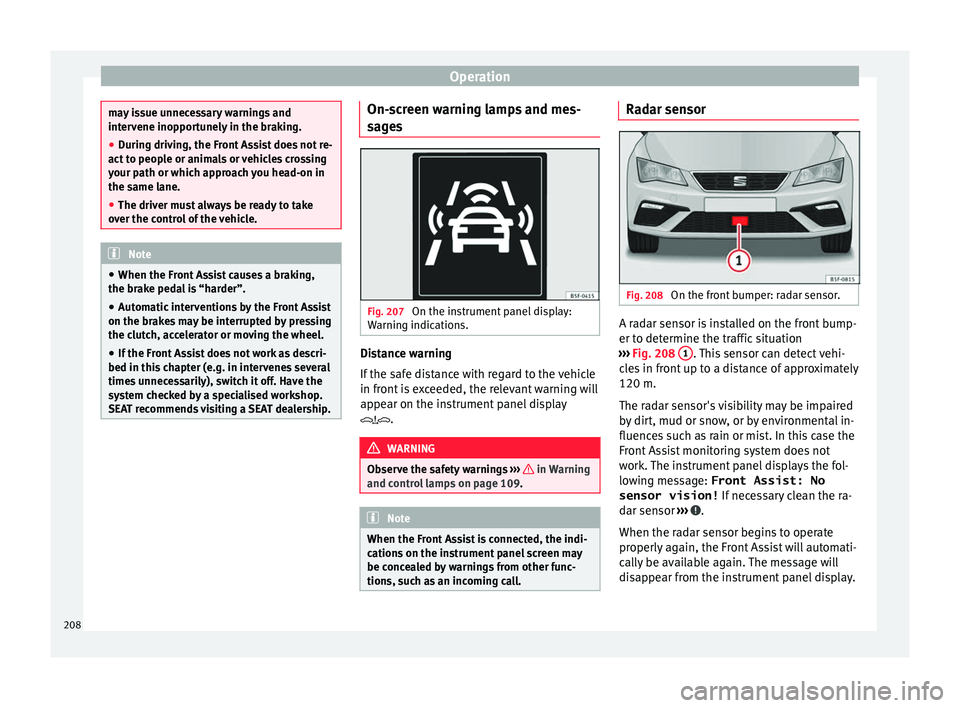
SEAT recommends visiting a SEAT dealership. On-screen warning lamps and mes-
s
ag
e
s Fig. 207
On the instrument panel display:
W arnin
g indic
ations. Distance warning
If
the s
af
e distance with regard to the vehicle
in front is exceeded, the relevant warning will
appear on the instrument panel display
. WARNING
Observe the safety warnings ›››
in Warning
and contr o
l lamps on page 109. Note
When the Front Assist is connected, the indi-
cation s
on the instrument panel screen may
be concealed by warnings from other func-
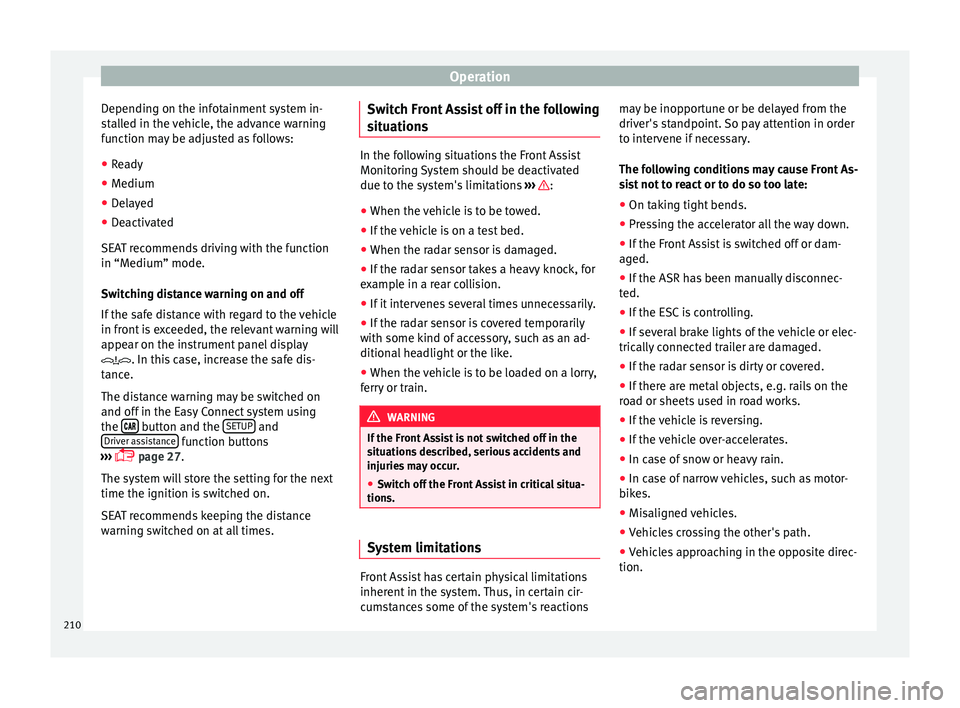
tions, such as an incoming call. Radar sensor
Fig. 208
On the front bumper: radar sensor. A radar sensor is installed on the front bump-
er t
o det
ermine the tr
affic situation
››› Fig. 208 1 . This sensor can detect vehi-
c l
e
s in front up to a distance of approximately
120 m.
The radar sensor's visibility may be impaired
by dirt, mud or snow, or by environmental in-
fluences such as rain or mist. In this case the
Front Assist monitoring system does not
work. The instrument panel displays the fol-
lowing message: Front Assist: No sensor vision! If necessary clean the ra-
dar sensor ››› .
When the r a
d
ar sensor begins to operate
properly again, the Front Assist will automati-
cally be available again. The message will
disappear from the instrument panel display.
208
Page 212 of 324
Operation
Depending on the infotainment system in-
s t
al
led in the vehicle, the advance warning
function may be adjusted as follows:
● Ready
● Medium
● Delayed
● Deactivated
SEAT r
ecommends driving with the function
in “Medium” mode.
Switching distance warning on and off
If the safe distance with regard to the vehicle
in front is exceeded, the relevant warning will
appear on the instrument panel display
. In this case, increase the safe dis-
tance.
The distance warning may be switched on
and off in the Easy Connect system using
the button and the
S
ETUP and
Driv er a
s
sistance function buttons
› ›
›
page 27.
The system will store the setting for the next
time the ignition is switched on.
SEAT recommends keeping the distance
warning switched on at all times. Switch Front Assist off in the following
situation
s In the following situations the Front Assist
Monitorin
g
System should be deactivated
due to the system's limitations ››› :
● When the vehicle is to be towed.
● If the vehicle is on a test bed.
● When the radar sensor is damaged.
● If the radar sensor takes a heavy knock, for
ex amp
le in a rear collision.
● If it intervenes several times unnecessarily.
● If the radar sensor is covered temporarily
with some k ind of
accessory, such as an ad-
ditional headlight or the like.
● When the vehicle is to be loaded on a lorry,
ferry
or train. WARNING
If the Front Assist is not switched off in the
sit uation
s described, serious accidents and
injuries may occur.
● Switch off the Front Assist in critical situa-
tions. System limitations
Front Assist has certain physical limitations
inher
ent in the sy
stem. Thus, in certain cir-
cumstances some of the system's reactions may be inopportune or be delayed from the
driver's s
tandpoint. So pay attention in order
to intervene if necessary.
The following conditions may cause Front As-
sist not to react or to do so too late:
● On taking tight bends.
● Pressing the accelerator all the way down.
● If the Front Assist is switched off or dam-
aged.
● If the ASR h
as been manually disconnec-
ted.
● If the E
SC is controlling.
● If several brake lights of the vehicle or elec-
trically
connected trailer are damaged.
● If the radar sensor is dirty or covered.
● If there are metal objects, e.g. rails on the
roa
d or sheets used in road works.
● If the vehicle is reversing.
● If the vehicle over-accelerates.
● In case of snow or heavy rain.
● In case of narrow vehicles, such as motor-
bike
s.
● Misaligned vehicles.
● Vehicles crossing the other's path.
● Vehicles approaching in the opposite direc-
tion.
210
Page 213 of 324

Driver assistance systems
● Spec
i
al loads and accessories of other ve-
hicles that jut out over the sides, backwards
or over the top.
City Emergency braking function Fig. 210
On the instrument panel display: ad-
v anc
e w
arning message The City emergency braking function is part
of
Fr
ont
Assist and is active whenever the
system is switched on.
Depending on the equipment, the City emer-
gency braking function may be switched on
and off in the Easy Connect system using
the button and the
S
ETUP and
Driv er a
s
sistance function buttons
› ›
›
page 27. The City Emergency braking function picks
up, at s
peeds between approximately 4 km/h
(2.5 mph) and 30 km/h (19 mph), the traffic
situation in front of the vehicle.
If the system detects a possible collision with
a vehicle in front of it, the vehicle prepares
for a possible emergency braking ››› .
If the driv
er f
ails to react to a possible colli-
sion, the system may brake the vehicle auto-
matically, by progressively increasing braking
effect driving to reduce speed in the event of
a collision. The system can thus help to re-
duce the consequences of an accident.
Status display
Automatic deceleration by means of the City
Emergency braking function is displayed on
the instrument panel by means of the ad-
vance warning ››› Fig. 210 1)
. WARNING
The smart technology included in the City
Emerg ency
braking function cannot defy the
laws of physics. The driver is always respon-
sible for braking in time.
● Adapt your speed and safe distance to the
vehicl
e in front of you at all times to suit visi-
bility, weather, road and traffic conditions. ●
The City Emer
gency braking function alone
cannot prevent accidents or serious injury.
● In complex driving situations, the City
Emergency
braking function may issue unnec-
essary warnings and intervene inopportunely
in braking, such as in work areas or if there
are metal rails.
● If the operation of the City Emergency brak-
ing fu
nction is impaired, for example, by dirt
or because the radar sensor has lost its set-
tings, the system may issue unnecessary
warnings and intervene inopportunely in the
braking.
● During driving, the City Emergency braking
function doe
s not react to people or animals
or vehicles crossing your path or which ap-
proach you head-on in the same lane. Note
● When the City Emer
gency braking function
causes a braking, the brake pedal is “hard-
er”.
● Automatic interventions on the brakes by
the City Emer
gency braking function may be
interrupted by pressing the clutch, accelera-
tor or moving the wheel.
● The City Emergency braking function can
brake the
vehicle until it stops completely.
However, the brake system does not halt the
vehicle permanently. Use the foot brake! »1)
The symbol on the instrument panels with colour
dis p
lay is in colour. 211
Technical data
Advice
Operation
Emergencies
Safety
Page 214 of 324

Operation
●
If sev er
al inopportune intervenes occur,
switch off the Front Assist and with it the City
Emergency braking function. Take it to a spe-
cialised workshop, SEAT recommends visiting
a SEAT dealership.
● If numerous unnecessary interventions oc-
cur, the C
ity Emergency braking function may
switch off automatically. Pedestrian Monitoring*
1)Fig. 211
On the instrument panel display:
Adv anc
e w
arning message. Pedestrian
Monitoring deactivated. The pedestrian monitoring system can help
pr
ev
ent
accidents involving pedestrians or
reduce the consequences of an accident. The system warns of danger of collision, pre-
pare
s the vehicle for emergency braking, as-
sists in the braking and brakes automatically.
If the system detects a possible collision with
a pedestrian, it warns the driver with an
acoustic signal and a message on the dash
panel display ››› Fig. 211.
The pedestrian monitoring system, including
the advance warning, is automatically con-
nected when the ignition is switched on
››› page 167.
SEAT recommends always having the pedes-
trian monitoring system connected. The ex-
ceptions set out for the Front Assist system
are equally valid for the pedestrian monitor-
ing system ››› page 210.
Switching the pedestrian monitoring system
on and off
With the ignition on, the pedestrian monitor-
ing system can be switched on and off as fol-
lows:
● Switch the system on and off in the info-
tainment sy
stem using the button and
the S
ETUP and
Driv
er a
s
sistance function but-
t on
s
›››
page 27.
When the pedestrian protection system is
switched off, the dash panel display shows a message indicating this
›››
Fig. 211 . The
pedestrian monitoring system is switched off
with the Front Assist function. WARNING
The technology in the pedestrian monitoring
sys t
em cannot defy the laws of physics and
only works within the system's limits. The
driver is always responsible for braking in
time. If the pedestrian monitoring system is-
sues a warning, brake the vehicle immediate-
ly with the brake pedal or swerve to avoid the
pedestrian, depending on traffic conditions.
● The pedestrian monitoring system alone
cannot av
oid accidents or serious injury.
● In complex driving situations, the pedes-
trian monitorin
g system may issue unneces-
sary warnings and intervene unnecessarily in
braking, such as in main roads with turnings.
● If the operation of the system is impaired,
for ex
ample, because the radar sensor and
camera are covered or have lost their set-
tings, the system may issue unnecessary
warnings and intervene inopportunely in the
braking.
● The driver must always be ready to take
over the c
ontrol of the vehicle. 1)
Depending on the vehicle equipment, pedestrian
monitorin g i
s not available in all countries.
212
Page 220 of 324
Operation
If the driver continues to do nothing, the sys-
t em aut
om
atically takes over the accelerator,
brakes and steering in order to brake the ve-
hicle and keep it in its lane ››› . If the re-
m ainin
g br
aking distance is sufficient, if nec-
essary the system slows down the vehicle un-
til it stops completely and automatically
switches on the electronic parking brake
››› page 172.
When the Emergency Assist is actively adjust-
ing, the hazard warning lights come on
››› page 135 and the vehicle makes slight zig-
zag movements in the lane in order to warn
other drivers.
Switching the Emergency Assist on and off
The Emergency Assist is switched on auto-
matically when the Lane Assist is switched on
››› page 213.
Technical requirements for using the Emer-
gency Assist ● The adaptive cruise control (ACC) must be
switc
hed on ››› page 196.
● The Lane Assist must be switched on
›››
page 213.
● The selector lever must be at the D/S posi-
tion or in the
Tiptronic selection track.
● The system must have detected a lane sep-
aration line on both side
s of the vehicle
››› Fig. 213. The following conditions may cause the
Emergency
Assist not to react or to switch off
automatically:
● If the driver accelerates, brakes or moves
the steerin
g wheel.
● If any of the conditions mentioned in
›››
page 218, Technical requirements for us-
ing the Emergency Assist are not fulfilled.
● If any of the conditions required for opera-
tion of the Lane Ass
ist are not met
››› page 213.
● If any of the conditions necessary for the
adaptiv
e cruise control (ACC) to work are no
longer fulfilled ››› page 196. WARNING
The smart technology incorporated into the
Emerg ency
Assist cannot overcome the limits
imposed by the laws of physics; it only works
within the limits of the system. The driver is
responsible for driving the vehicle.
● Adapt your speed and safe distance to the
vehicl
e in front of you at all times to suit the
visibility, weather, road and traffic condi-
tions.
● Keep your hands on the wheel at all times
to be re
ady to intervene in the steering at any
time.
● The Emergency Assist alone cannot always
avoid acc
idents or serious injuries.
● If the operation of the Emergency Assist is
impaired, f
or example if the radar sensor of the adaptive cruise control (ACC) or the Lane
Ass
i
st camera are covered or have lost their
settings, the system may intervene inoppor-
tunely in braking or in steering.
● The Emergency Assist does not react to
people or anim
al or vehicles crossing your
path or which approach you head-on in the
same lane. WARNING
If the Emergency Assist Intervenes inoppor-
t u nely
, serious accidents and injuries may oc-
cur.
● If the Emergency Assist does not operate
properly, sw
itch off the Lane Assist
››› page 213. Doing so will also switch off the
Emergency Assist.
● Have the system checked by a specialised
workshop
. SEAT recommends visiting a SEAT
dealership for this. Note
● Autom atic
interventions by the Emergency
Assist on the brakes may be interrupted by
pressing the accelerator or brake or by mov-
ing the wheel.
● Hazard warning lights that come on auto-
matica
lly can be switched off by pressing the
accelerator or the break, moving the steering
wheel or pressing the hazard warning light
switch. 218
Page 249 of 324

Care and maintenance
Automatic car washes
B ef
or
e going through a car wash, be sure to
take the usual precautions such as closing
the windows and roof. If the vehicle has spe-
cial accessories such as spoilers or a roof
rack or two-way radio aerial, etc., it is advisa-
ble to consult the car wash tunnel operator.
It is best to use a car wash without revolving
bristles if possible.
Washing the vehicle with a high pressure
cleaner
When washing the vehicle with a high-pres-
sure cleaner, always follow the operating in-
structions for the equipment. This applies
particularly to the operating pressure and the
spraying distance. Do not hold the nozzle too
close to soft materials such as rubber hoses
or seals. The same applies to the parking aid
sensors*, which are located in the rear bump-
er.
Do not use a nozzle that sprays the water out
in a direct stream or one that has a rotating
jet for forcing off dirt.
Stickers attached by the factory
Follow these directions to avoid damaging
the stickers:
● Do not use high pressure cleaners.
● To remove ice or snow from the stickers do
not use w
indow scrapers or ice scrapers. ●
Do not poli
sh the stickers.
● Do not use dirty cloths or sponges.
● Preferably wash using a soft sponge and
soft neutr
al soap.
Washing the car by hand
When washing the car by hand, use plenty of
water to soften the dirt first, and rinse off as
well as possible.
Then clean the vehicle with a soft sponge,
glove or brush using only slight pressure.
You should start on the roof and work down.
Special car soap should only be used for very
persistent dirt.
Rinse the sponge or glove thoroughly and of-
ten.
Wheels, sills and similar should be cleaned
last. Use a second sponge for this. WARNING
● The v ehic
le should only be washed with the
ignition switched off. Failure to follow this in-
struction could result in an accident.
● Do not clean the underside of chassis, the
inside of
wheel arches or wheel trims without
protecting your hands and arms. You may cut
yourself on sharp-edged metal parts. Other-
wise, there is a risk of sustaining cuts.
● When washing the car during the winter
season: w
ater and ice in the brake system
can reduce braking effectiveness: risk of acci-
dent! CAUTION
● Do not w a
sh the vehicle in direct sunlight –
otherwise the paint can be damaged.
● Do not use sponges, abrasive household
spong
es or similar to clean insect remains.
This could damage the surface.
● Clean off stubborn dirt (insects, etc.) from
the headlight
s at regular intervals, for in-
stance when filling the fuel tank. The head-
lights should only be washed with water, do
not wipe them with a dry cloth or sponge. It
is best to use soapy water.
● Never wash tyres with a jet that sprays the
water out
in a direct stream. This could dam-
age the tyres even if the spray is kept at a
distance and only used for a very short time.
● Before washing the vehicle in an automatic
car wa
sh, please make sure to retract the ex-
terior mirrors to prevent them from being
damaged. Electrically retractable exterior
mirrors must not be folded in or out by hand,
always use the electrical power control. CAUTION
● Bef or
e washing the vehicle in an automatic
car wash, please proceed as follows to lock
the wiper arms so that they are not moved to-
wards the top of the windscreen:
–the bonnet must be closed.
– switch the ignition on and off.
– press the windscreen wiper lever forward
briefly (windscreen washer function).
This will lock the wiper arms. » 247
Technical data
Advice
Operation
Emergencies
Safety
Page 309 of 324

Index
Index
A
ABS se
e
Anti-lock brake system . . . . . . . . . . . . . . . 176
ACC . . . . . . . . . . . . . . . . . . . . . . . . . . . . . . . . . . . . 196 radar sensor . . . . . . . . . . . . . . . . . . . . . . . . . . . 199
Accessories . . . . . . . . . . . . . . . . . . . . . . . . . 150, 245
Adaptive cruise control . . . . . . . . . . . . . . . . . . . . 196 function to avoid overtaking on the wrongside . . . . . . . . . . . . . . . . . . . . . . . . . . . . . . . . 204
indications on the display . . . . . . . . . . . . . . . . 198
malfunction . . . . . . . . . . . . . . . . . . . . . . . . . . . . 197
radar sensor . . . . . . . . . . . . . . . . . . . . . . . . . . . 199
special driving situations . . . . . . . . . . . . . . . . . 205
warning and control lamp . . . . . . . . . . . . . . . . 198
Adaptive Cruise Control deactivating temporarily . . . . . . . . . . . . . . . . . 204
operating . . . . . . . . . . . . . . . . . . . . . . . . . . . . . . 200
Additional electrical appliances (efficiency pro- gramme) . . . . . . . . . . . . . . . . . . . . . . . . . . . . . . . 35
Adjusting front head restraints . . . . . . . . . . . . . . . . . . . . . . 69
front seats . . . . . . . . . . . . . . . . . . . . . . . . . . . . . 143
Adjusting the head restraints front head restraints . . . . . . . . . . . . . . . . . . . . . 144
Adjustment CAR menu . . . . . . . . . . . . . . . . . . . . . . . . . . . . . 110
front head restraints . . . . . . . . . . . . . . . . . . . . . 144
lights . . . . . . . . . . . . . . . . . . . . . . . . . . . . . . . . . 137
rear head restraints . . . . . . . . . . . . . . . . . 69, 144
seats . . . . . . . . . . . . . . . . . . . . . . . . . . . . . . . . . . 66
Airbag covers . . . . . . . . . . . . . . . . . . . . . . . . . . . . . 16
Airbags . . . . . . . . . . . . . . . . . . . . . . . . . . . . . . . . . . 76 description . . . . . . . . . . . . . . . . . . . . . . . . . . . . . 77 Airbag system . . . . . . . . . . . . . . . . . . . . . . . . . . 16, 76
activation . . . . . . . . . . . . . . . . . . . . . . . . . . . . . . 77
deactivation of front airbag . . . . . . . . . . . . . . . . 80
description . . . . . . . . . . . . . . . . . . . . . . . . . . . . . 77
front airbags . . . . . . . . . . . . . . . . . . . . . . . . . 16, 78
functioning . . . . . . . . . . . . . . . . . . . . . . . . . . . . . 77
head-protection airbags . . . . . . . . . . . . . . . . . . 18
knee airbag . . . . . . . . . . . . . . . . . . . . . . . . . . . . . 17
side airbags . . . . . . . . . . . . . . . . . . . . . . . . . . . . 18
Air conditioning Climatronic . . . . . . . . . . . . . . . . . . . . . . . . 45, 163
heating and fresh air . . . . . . . . . . . . . . . . . . . . . 48
manual air conditioning . . . . . . . . . . . . . . . . . . . 47
user instructions . . . . . . . . . . . . . . . . . . . . . . . . 165
Air outlets . . . . . . . . . . . . . . . . . . . . . . . . . . . . . . . 166
Air recirculation . . . . . . . . . . . . . . . . . . . . . . . . . . 166
Alcantara: cleaning . . . . . . . . . . . . . . . . . . . . . . . 252
Anchoring the front tow line. . . . . . . . . . . . . . . . . . . . . . . . . 89
Anti-freeze . . . . . . . . . . . . . . . . . . . . . . . . . . . . . . . 51
Anti-lock brake system . . . . . . . . . . . . . . . . . . . . . 176
Anti-puncture . . . . . . . . . . . . . . . . . . . . . . . . . . 56, 85
Anti-puncture kit . . . . . . . . . . . . . . . . . . . . . . . . 56, 85 check after 10 minutes . . . . . . . . . . . . . . . . . . . . 87
Anti-puncture set . . . . . . . . . . . . . . . . . . . . . . . . . . 85
Anti-theft alarm . . . . . . . . . . . . . . . . . . . . . 116, 124 vehicle interior monitoring and anti-tow sys-tem . . . . . . . . . . . . . . . . . . . . . . . . . . . . . . . . . 126
Anti-theft alarm system trailer . . . . . . . . . . . . . . . . . . . . . . . . . . . . . . . . . 242
see also Anti-theft alarm system . . . . . . . . . . . 116
Anti-theft security system . . . . . . . . . . 10, 116, 122
Anti-tow protection . . . . . . . . . . . . . . . . . . . . . . . 126
Aspects to take into account before starting the vehicle . . . . . . . . . . . . . . . . . . . . . . . . . . . . . . . . . 65
ASR see Traction control system . . . . . . . . . . . . . . . 176 Assistance systems
ACC . . . . . . . . . . . . . . . . . . . . . . . . . . . . . . . . . . 196
adaptive cruise control . . . . . . . . . . . . . . . . . . . 196
Auto Hold function . . . . . . . . . . . . . . . . . . . . . . 194
cruise control system . . . . . . . . . . . . . . . . . . . . 195
Emergency Assist . . . . . . . . . . . . . . . . . . . . . . . 217
Front Assist . . . . . . . . . . . . . . . . . . . . . . . . . . . . 207
parking aid . . . . . . . . . . . . . . . . . . . . . . . 225, 227
Pedestrian Monitoring system . . . . . . . . . . . . . 212
Traffic Jam Assist . . . . . . . . . . . . . . . . . . . . . . . . 216
traffic sign detection system . . . . . . . . . . . . . . 222
tyre monitoring . . . . . . . . . . . . . . . . . . . . . . . . . 276
tyre monitoring indicator . . . . . . . . . . . . . . . . . 277
Assistance Systems fatigue detection . . . . . . . . . . . . . . . . . . . . . . . 224
tyre monitoring systems . . . . . . . . . . . . . . . . . 275
Assisted starting . . . . . . . . . . . . . . . . . . . . . . . . . . 61
Audible signal lights . . . . . . . . . . . . . . . . . . . . . . . . . . . . . . . . . 131
Audible warning signal seat belt not fastened . . . . . . . . . . . . . . . . . . . . 71
warning and control lamps . . . . . . . . . . . . . . . 109
Auto Hold . . . . . . . . . . . . . . . . . . . . . . . . . . . . . . . 194
Auto Hold function . . . . . . . . . . . . . . . . . . . . . . . . 194
Auto Lock (central locking) . . . . . . . . . . . . . . . . . 116
Automatic car washes switching the Auto Hold function off . . . . . . . . 195
Automatic dipped beam control . . . . . . . . . . . . . 132
Automatic gear safety interlock for ignition key . . . . . . . . . . . . 167
Automatic gearbox . . . . . . . . . . . . . . . . . . . . . . . . 180 backup programme . . . . . . . . . . . . . . . . . . . . . 186
downhill speed control . . . . . . . . . . . . . . . . . . 185
driving tips . . . . . . . . . . . . . . . . . . . . . . . . . . . . 183
kick-down feature . . . . . . . . . . . . . . . . . . . . . . . 184
launch control programme . . . . . . . . . . . . . . . . 184
manual release of selector lever . . . . . . . . . . . . 43
307
Page 313 of 324
Index
Exterior rear view mirrors ext
erior
. . . . . . . . . . . . . . . . . . . . . . . . . . . . . . . 142
heated . . . . . . . . . . . . . . . . . . . . . . . . . . . . . . . . 142
Exterior view . . . . . . . . . . . . . . . . . . . . . . . . . . . . . 7, 8
External aerial . . . . . . . . . . . . . . . . . . . . . . . . . . . . 245
F Fastening rings . . . . . . . . . . . . . . . . . . . . . . . . . . . 157
Fatigue detection . . . . . . . . . . . . . . . . . . . . . . . . . 224
Filling the tank . . . . . . . . . . . . . . . . . . . . . . . . . . . 256
Floor mats . . . . . . . . . . . . . . . . . . . . . . . . . . . . . . . . 70
Fluid Level control . . . . . . . . . . . . . . . . . . . . . . . . . 50
Fog light bulb . . . . . . . . . . . . . . . . . . . . . . . . . . . . . 96
Folding table . . . . . . . . . . . . . . . . . . . . . . . . . . . . . 148
Four-wheel drive snow chains . . . . . . . . . . . . . . . . . . . . . . . . . . . 254
winter tyres . . . . . . . . . . . . . . . . . . . . . . . . . . . . 254
Four wheel drive . . . . . . . . . . . . . . . . . . . . . . . . . . 254
Front airbags . . . . . . . . . . . . . . . . . . . . . . . . . . 16, 78
Front armrest . . . . . . . . . . . . . . . . . . . . . . . . . . . . 145
Front Assist . . . . . . . . . . . . . . . . . . . . . . . . . . . . . . 207 City Emergency braking function . . . . . . . . . . . 211
malfunction . . . . . . . . . . . . . . . . . . . . . . . . . . . . 208
on-screen messages . . . . . . . . . . . . . . . . . . . . 208
operating . . . . . . . . . . . . . . . . . . . . . . . . . . . . . . 209
radar sensor . . . . . . . . . . . . . . . . . . . . . . . . . . . 208
switching off temporarily . . . . . . . . . . . . . . . . . 210
system limitations . . . . . . . . . . . . . . . . . . . . . . 210
see also Front Assist Monitoring system . . . . . 207
Front Assist monitoring system malfunction . . . . . . . . . . . . . . . . . . . . . . . . . . . . 208
on-screen messages . . . . . . . . . . . . . . . . . . . . 208
operating . . . . . . . . . . . . . . . . . . . . . . . . . . . . . . 209
Front Assist Monitoring system City Emergency braking function . . . . . . . . . . . 211
radar sensor . . . . . . . . . . . . . . . . . . . . . . . . . . . 208 Front Assist Monitoring System
switc hing off temporarily . . . . . . . . . . . . . . . . . 210
system limitations . . . . . . . . . . . . . . . . . . . . . . 210
Front passenger front airbag control lamp . . . . . . . . . . . . . . . . . . . . . . . . . . . . 81
deactivation . . . . . . . . . . . . . . . . . . . . . . . . . 17, 81
Front seat manual adjustment . . . . . . . . . . . . . . . . . . . . . . 14
Fuel . . . . . . . . . . . . . . . . . . . . . . . . . . . . . . . . 50, 258 consumption . . . . . . . . . . . . . . . . . . . . . . . . . . . 282
diesel . . . . . . . . . . . . . . . . . . . . . . . . . . . . . . . . . 259
ethanol . . . . . . . . . . . . . . . . . . . . . . . . . . . . . . . 258
fuel gauge . . . . . . . . . . . . . . . . . . . . . . . . . . . . . 108
natural gas . . . . . . . . . . . . . . . . . . . . . . . . . . . . 260
refuelling . . . . . . . . . . . . . . . . . . . . . . . . . . . . . . 258
saving . . . . . . . . . . . . . . . . . . . . . . . . . . . . . . . . 188
Fuel consumption switching off using inertia . . . . . . . . . . . . . . . . 188
why does fuel consumption increase? . . . . . . 189
Fuel tank cap opening and closing . . . . . . . . . . . . . . . . . . . . . 50
Fuel tank flap opening and closing . . . . . . . . . . . . . . . . . . . . . 50
Full-LED Headlights . . . . . . . . . . . . . . . . . . . . . . . . 93
Function Coming Home . . . . . . . . . . . . . . . . . . . . 134
Function Leaving Home . . . . . . . . . . . . . . . . . . . . 135
Fuses . . . . . . . . . . . . . . . . . . . . . . . . . . . . . . . . . 54, 91 fuse box . . . . . . . . . . . . . . . . . . . . . . . . . . . . . . . . 92
identifying blown fuses . . . . . . . . . . . . . . . . . . . 54
identifying by colours . . . . . . . . . . . . . . . . . . . . . 54
preparation before replacing . . . . . . . . . . . . . . . 54
replacing . . . . . . . . . . . . . . . . . . . . . . . . . . . . . . . 54
G
Gear-change indicator . . . . . . . . . . . . . . . . . . . . . . 32
Gearbox DSG see Automatic gearbox . . . . . . . . . . . . . . . . . . . 180 Gearbox lever . . . . . . . . . . . . . . . . . . . . . . . . . . . . . 42
Gear ch
ange . . . . . . . . . . . . . . . . . . . . . . . . . . . . . . 42
automatic . . . . . . . . . . . . . . . . . . . . . . . . . . . . . . 43
kick-down . . . . . . . . . . . . . . . . . . . . . . . . . . . . . 221
manual gearbox . . . . . . . . . . . . . . . . . . . . . . . . 179
manual gear change . . . . . . . . . . . . . . . . . . . . . . 42
Gear engaged . . . . . . . . . . . . . . . . . . . . . . . . . . . . . 42
Gear recommendation . . . . . . . . . . . . . . . . . . . . . . 32
Gearshift paddles (automatic gearbox) . . . . . . . 182
General instrument panel control lamps . . . . . . . . . . . . . . . . . . . . . . . . . . . 40
controls and displays . . . . . . . . . . . . . . . . . . . . 103
engine compartment . . . . . . . . . . . . . . . . . . . . 262
warning lamps . . . . . . . . . . . . . . . . . . . . . . . . . . 40
Glove compartment . . . . . . . . . . . . . . . . . . . . . . . 149
H
Handbrake . . . . . . . . . . . . . . . . . . . . . . . . . . . . . . 172
Hand brake See Parking brake . . . . . . . . . . . . . . . . . . . . . . 172
Handbrake warning lamp . . . . . . . . . . . . . . . . . . . . . . . . . . 174
Hazard warning lights . . . . . . . . . . . . . . . . . 25, 135
Head-on collisions and the laws of physics . . . . . 73
Head-protection airbags description . . . . . . . . . . . . . . . . . . . . . . . . . . . . . 18
safety instructions . . . . . . . . . . . . . . . . . . . . . . . 79
Headlight range control . . . . . . . . . . . . . . . . . . . . 137
Headlights changing a bulb . . . . . . . . . . . . . . . . . . . . . . . . . 93
driving abroad . . . . . . . . . . . . . . . . . . . . . . . . . 136
headlight washers . . . . . . . . . . . . . . . . . . . . . . 140
Head restraints . . . . . . . . . . . . . . . . . . . . . . . . . . . . 14 adjustment . . . . . . . . . . . . . . . . . . . . . . . . . . . . 144
front head restraints . . . . . . . . . . . . . . . . . . . . . . 69
rear head restraints . . . . . . . . . . . . . . . . . . . . . . 69
311