headlights Seat Leon 5D 2016 User Guide
[x] Cancel search | Manufacturer: SEAT, Model Year: 2016, Model line: Leon 5D, Model: Seat Leon 5D 2016Pages: 324, PDF Size: 6.93 MB
Page 137 of 324

Lights and visibility
● Activ
at
ed for any position of the rotary light
switch.
● When the car door is opened, the “Coming
Home” lighting come
s on. The headlights are
turned off 60 seconds after the vehicle door
is opened.
Deactivation
● If no door has been closed, they go out au-
tomatic
ally after 60 seconds.
● After the last door has been closed, the
headlights
will be switched off after the
“Coming Home” delay (as established in the
radio menu) has elapsed.
● On turning the light switch to position
›››
page 24.
● When the ignition is switched on (when
star
ting the engine).
Function “Leaving Home” The “Leaving Home” function is only availa-
b
l
e f
or vehicles with a light and rain sensor
(rotary light switch in position ).
This function may be connected/disconnec-
ted through the radio menu. The “Leaving
Home” function switch-off delay may also be
set (default: 30 sec).
Vehicle with
halogen
headlightsIn the “Leaving Home” function, the day-
time running lights (DRL), the rear side
lights and the licence plate lights are
switched on.
Vehicle with
full-LED
headlightsIn the “Leaving Home” function, the dip-
ped beams, the daytime running lights
(DRL), the rear side lights and the li-
cence plate lights are switched on. Activation
● When the vehicle is unlocked using the re-
mote c ontr
ol.
● The “Leaving Home” function is only activa-
ted when the r ot
ary light switch is in position
and the light sensor detects darkness.
Deactivation
● When the “Leaving Home” delay period
ends (def
ault: 30 sec).
● When the vehicle is locked using the re-
mote contr
ol.
● When the light control is switched into a
position other th
an .
● With the ignition is switched on. Hazard warning lights
Fig. 139
Dash panel: switch for hazard warn-
in g lights. Read the additional information carefully
› ›
›
page 25
The hazard warning lights are used to draw
the attention of other road users to your vehi-
cle in emergencies.
If your vehicle breaks down:
1. Park your vehicle at a safe distance from movin
g traffic.
2. Press the button to switch on the hazard warning lights
››› .
3. Switch the ignition off.
4. Apply the handbrake.
5. For a manual gearbox, engage 1st gear; for an aut
om
atic gearbox, move the gear
lever to P. »
135
Technical data
Advice
Operation
Emergencies
Safety
Page 138 of 324

Operation
6. Use the warning triangle to draw the atten- tion of other r
o
ad users to your vehicle.
7. Always take the vehicle key with you when you le
ave the vehicle.
All turn signals flash simultaneously when
the hazard warning lights are switched on.
The two turn signal turn signal lamps
and the turn signal lamp in the switch will
flash at the same time. The simultaneous
hazard warning lights also work when the ig-
nition is switched off.
Emergency braking warning
If the vehicle brakes suddenly and continu-
ously at a speed of more than 80 km/h (50
mph), the brake light flashes several times
per second to warn the vehicles driving be-
hind. If you continue braking, the hazard
warning lights will come on automatically
when the vehicle comes to a standstill. They
switch off automatically when the vehicle
starts to move again. WARNING
● The risk of
an accident increases if your ve-
hicle breaks down. Always use the hazard
warning lights and a warning triangle to draw
the attention of other road users to your sta-
tionary vehicle.
● Due to the high temperatures that the cata-
lytic con
verter can reach, never park in an
area where the catalytic converter could come into contact with highly inflammable materi-
al
s, f
or example dry grass or spilt petrol. This
could start a fire. Note
● The b atter
y will run down if the hazard
warning lights are left on for a long time,
even if the ignition is switched off.
● The use of the hazard warning lights de-
scribed her
e is subject to the relevant statu-
tory requirements. Parking lights
When the parking light is switched on, (right
or l
ef
t
turn signal), the front side light and
the rear light on the corresponding side of
the vehicle stay lit. The parking lights can on-
ly be activated with the ignition switched off
and the turn signal and main beam lever in
the central position, before being triggered.
Parking light on both sides With the ignition switched off and the light
sw
it
c
h in position , when locking the vehi-
cle from the outside, the parking lights on
both sides of the vehicle light up. In doing
so, only the side lights of both headlights
light up, and additionally the tail lights will
do so partially. Motorway light* The motorway light is available on vehicles
equipped w
ith f
ull-LED lights.
The function is connected/disconnected via
the corresponding Easy Connect system
menu.
● Activation: when going abo
ve 110 km/h
(68 mph) for more than 30 seconds, the dip-
ped beam raises slightly to increase the driv-
er's visibility distance.
● Deactivation: when reduc in
g the speed of
the car below 100 km/h (62 mph), the dip-
ped beam returns to its normal position.
Driving abroad The light beam of the dipped beam lights is
a
symmetric: the s
ide of
the road on which
you are driving is lit more intensely.
When a car that is manufactured in a country
that drives on the right travels to a country
that drives on the left (or vice versa), it is nor-
mally necessary to cover part of the headlight
bulbs with stickers or to change the adjust-
ment of the headlights to avoid dazzling oth-
er drivers.
In such cases, the regulations specify certain
light values that must be complied with for
designated points of the light distribution.
This is known as “Tourist light”.
136
Page 139 of 324
Lights and visibility
The light distribution that the halogen and
f u
l
l-LED headlights of the SEAT Leon range
have allows the specific “tourist light” values
to be met without the need for stickers or
changes in the settings. Note
“Tourist light” is only allowed temporarily. If
you ar e p
lanning a long stay in a country that
drives on the other side, you should take the
vehicle to an Authorised Technical Service to
change the headlights. Headlight range control, lighting of
the in
s
trument
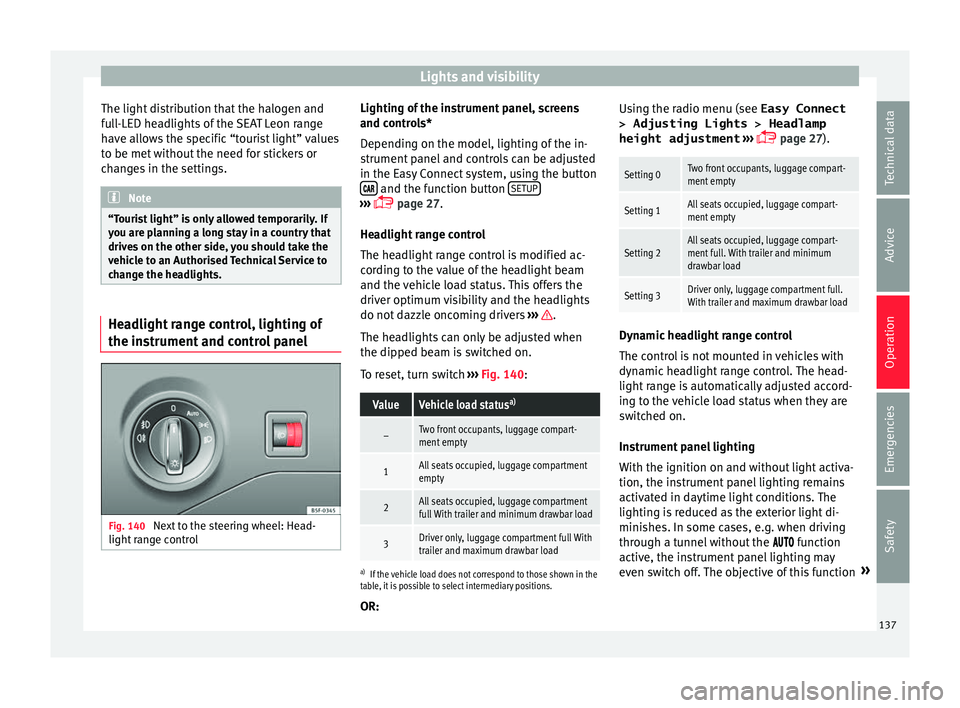
and control panelFig. 140
Next to the steering wheel: Head-
light r
an
ge control Lighting of the instrument panel, screens
and c
ontr
o
ls*
Depending on the model, lighting of the in-
strument panel and controls can be adjusted
in the Easy Connect system, using the button and the function button
S
ETUP ›››
p
age 27.
He a
dlight range control
The headlight range control is modified ac-
cording to the value of the headlight beam
and the vehicle load status. This offers the
driver optimum visibility and the headlights
do not dazzle oncoming drivers ››› .
The he a
dlights
can only be adjusted when
the dipped beam is switched on.
To reset, turn switch ››› Fig. 140:
ValueVehicle load status a)
–Two front occupants, luggage compart-
ment empty
1All seats occupied, luggage compartment
empty
2All seats occupied, luggage compartment
full With trailer and minimum drawbar load
3Driver only, luggage compartment full With
trailer and maximum drawbar load
a)
If the vehicle load does not correspond to those shown in the
table, it is possible to select intermediary positions.
OR: Using the radio menu (see Easy Connect
> Adjusting Lights > Headlamp
height adjustment ›››
page 27).
Setting 0Two front occupants, luggage compart-
ment empty
Setting 1All seats occupied, luggage compart-
ment empty
Setting 2All seats occupied, luggage compart-
ment full. With trailer and minimum
drawbar load
Setting 3Driver only, luggage compartment full.
With trailer and maximum drawbar load Dynamic headlight range control
The c
ontr
o
l is not mounted in vehicles with
dynamic headlight range control. The head-
light range is automatically adjusted accord-
ing to the vehicle load status when they are
switched on.
Instrument panel lighting
With the ignition on and without light activa-
tion, the instrument panel lighting remains
activated in daytime light conditions. The
lighting is reduced as the exterior light di-
minishes. In some cases, e.g. when driving
through a tunnel without the function
active, the instrument panel lighting may
even switch off. The objective of this function »
137
Technical data
Advice
Operation
Emergencies
Safety
Page 142 of 324

Operation
Windscreen wiper functionsWindscreen wiper performance in different sit-
uations
If the vehicle is at a
standstillThe activated position provision-
ally changes to the previous posi-
tion.
During automatic
wipe
The air conditioner comes on for
approximately 30 seconds in air
recirculation mode to prevent the
smell of the windscreen washer
fluid entering the inside the vehi-
cle.
For the interval wipe
Intervals between wipes depend
on the vehicle's speed. The high-
er the vehicle speed the shorter
the intervals. Heated windscreen washer jets
The he
atin
g on
ly thaws the frozen jets, it
does not thaw the water in the washer hoses.
When the ignition is switched on the heated
windscreen washer jets automatically adjust
the heat depending on the ambient tempera-
ture.
Headlight wash/wipe system
The headlight washers/wipers clean the
headlight lenses.
After the ignition is switched on, the first and
every fifth time the windscreen washer is
switched on, the headlights are also washed. Therefore, the windscreen wiper lever should
be pul
led towards the steering wheel when
the dipped beam or main beam are on. Any
incrusted dirt (such as insects) should be
cleaned regularly (e.g. when refuelling).
To ensure the headlight washers work cor-
rectly in winter, any snow which has got into
the bumper jet supports should be cleaned
away. If necessary, remove snow with an anti-
icing spray. Note
The wiper will try to wipe away any obstacles
that ar
e on the windscreen. The wiper will
stop moving if the obstacle blocks its path.
Remove the obstacle and switch the wiper
back on again. Rain sensor*
Fig. 143
Windscreen wiper lever: adjusting
the r ain sen
sor A Fig. 144
Rain sensor sensitive surface The rain sensor controls the frequency of the
w
ind
s
creen wiper intervals, depending on
the amount of rain ››› . The sensitivity of the
r ain sen
sor c
an be adjusted manually. Man-
ual wipe ››› page 139.
Move the lever to the required position
››› Fig. 143:
Rain sensor off.
Rain sensor on; automatic wipe if neces-
sary.
Setting sensitivity level of rain sensor
– Set control to the right: highly sensi-
tive.
– Set control to the left: less sensitive.
When the ignition is switched off and then
back on, the rain sensor stays on and starts
operating again when the windscreen wipers
are in position 1 and the vehicle is travel-
lin g at
mor
e than 16 km/h (10 mph).
0 1
A
140
Page 201 of 324

Driver assistance systems
Radar sensor Fig. 199
On the front bumper: radar sensor. A radar sensor is installed on the front bump-
er t
o det
ermine the tr
affic situation
››› Fig. 199 1 . This sensor can detect vehi-
c l
e
s in front up to a distance of approximately
120 m.
The radar sensor's visibility may be impaired
by dirt, mud or snow, or by environmental in-
fluences such as rain or mist. In this case the
adaptive cruise control (ACC) does not work.
The instrument panel displays the following
message: ACC: No sensor vision! If
necessary clean the radar sensor ››› .
When the r a
d
ar sensor begins to operate
properly again, the ACC will automatically be
available again. The message on the instru-
ment panel screen will switch off and the ACC
will be reactivated again. ACC operation may be affected by a strong ra-
dar rev
erse reflection. This may occur, for ex-
ample, in a closed car park or due to the
presence of metallic objects (e.g. rails on the
road or sheets used in road works).
The area in front of and around the radar sen-
sor should not be covered with adhesives,
additional or similar headlights, as this may
negatively affect ACC operation.
If structural modifications are made to the ve-
hicle, for example, if the suspension is low-
ered or the front spoiler is modified, ACC op-
eration may be affected. So structural modifi-
cations should only be made by specialised
workshops. SEAT recommends visiting a SEAT
dealership for this purpose.
If work is done incorrectly on the front of the
vehicle, the radar sensor could be damaged
or lose its settings, and ACC operation may
be affected. So repair work should only be
made by specialised workshops. SEAT recom-
mends visiting a SEAT dealership for this pur-
pose. CAUTION
If you have the sensation that the radar sen-
sor is d
amaged or has lost its settings, dis-
connect the ACC. This will avoid possible
damage. If this occurs have it adjusted.
● The sensor may become damaged or lose
its settin
gs when knocked, for example, dur- ing a parking manoeuvre. This may compro-
mise the sy
s
tem's efficacy or disconnect it.
● Repairs to the radar sensor require special-
ist
knowledge and special tools. SEAT recom-
mends visiting a SEAT dealership for this pur-
pose.
● Clean away the snow with a brush and the
ice pref
erably with a solvent-free de-icer
spray. 199
Technical data
Advice
Operation
Emergencies
Safety
Page 211 of 324

Driver assistance systems
Front Assist operation may be affected by a
s tr
on
g radar reverse reflection. This may oc-
cur, for example, in a closed car park or due
to the presence of metallic objects (e.g. rails
on the road or sheets used in road works).
The area in front of and around the radar sen-
sor should not be covered with adhesives,
additional or similar headlights, as this may
negatively affect Front Assist operation.
If structural modifications are made to the ve-
hicle, for example, if the suspension is low-
ered or the front spoiler is modified, Front As-
sist operation may be affected. So structural
modifications should only be made by speci-
alised workshops. SEAT recommends visiting
a SEAT dealership for this purpose.
If work is done incorrectly on the front of the
vehicle, the radar sensor could be damaged
or lose its settings, and Front Assist opera-
tion may be affected. So repair work should
only be made by specialised workshops.
SEAT recommends visiting a SEAT dealership
for this purpose. CAUTION
If you have the sensation that the radar sen-
sor is d
amaged or has lost its settings, dis-
connect the Front Assist. This will avoid pos-
sible damage. If this occurs have it adjusted.
● The sensor may become damaged or lose
its settin
gs when knocked, for example, dur- ing a parking manoeuvre. This may compro-
mise the sy
s
tem's efficacy or disconnect it.
● Repairs to the radar sensor require special-
ist
knowledge and special tools. SEAT recom-
mends visiting a SEAT dealership for this pur-
pose.
● Clean away the snow with a brush and the
ice pref
erably with a solvent-free de-icer
spray. Operating the Front Assist monitoring
sys
t
em Fig. 209
On the instrument panel display:
Fr ont
As
sist switched off message. Front Assist is active whenever the ignition is
sw
it
c
hed on.
When the Front Assist is switched off, so too
are the advance warning function (pre warn-
ing) and the distance warning. SEAT recommends leaving the Front Assist al-
way
s switched on. Exceptions ››› page 210,
Switch Front Assist off in the following situa-
tions.
Activating and deactivating Front Assist
With the ignition switched on, the Front As-
sist can be switched on and off as follows:
● Select the corresponding menu option us-
ing the butt
on for the driver assistance sys-
tems ›››
page 31.
● OR: switch the system on and off in Easy
Connect
using the button and the
Set
up and
Driv
er a
s
sistance function buttons
› ›
›
page 27.
When Front Assist is switched off, the instru-
ment panel will inform that it has been
switched off with the following indicator
››› Fig. 209.
Switching the advance warning function on
or off
The advance warning function may be switch-
ed on and off in the Easy Connect system us-
ing the button and the
Set
up and
Driv er a
s
sistance function buttons
› ›
›
page 27.
The system will store the setting for the next
time the ignition is switched on.
SEAT recommends keeping the advance
warning function switched on at all times. »
209
Technical data
Advice
Operation
Emergencies
Safety
Page 244 of 324

Operation
Safety lug
The s af
ety
lug B
› ››
Fig. 237
i
s used to hook
up the trailer's retainer cable.
On hooking it up to the safety lug, the retain-
er cable should have slack in all the trailer
positions with respect to the vehicle (sharp
bends, reverse gear, etc.).
Headlights
The front part of the vehicle may be raised
when the trailer is connected and the light
may dazzle the rest of the traffic.
Adapt the height of the headlights using the
headlight range rotary adjuster 1)
. WARNING
● Never u se the s
afety lug to tow!
● Adjust your speed to suit the road and traf-
fic condition
s.
● All work on the electrical system must be
carried out on
ly by specialised workshops.
● Never connect the trailer's electric system
to the electric
al connections of the rear lights
or any other power sources.
● After hooking up the trailer and connecting
the socket, c
heck that all the trailer's rear
lights are working properly. Note
● If ther e i
s any fault in the trailer's lighting,
check the fuses in the instrument panel fuse
box ›››
page 54.
● The contact between the retainer cable and
the safety
lug may give rise to mechanical
wear in the lug's surface protection. This
wear will not prevent the safety lug from op-
erating properly or cause any fault and is ex-
cluded from the warranty.
● When connecting and disconnecting the
trail
er, the towing vehicle's handbrake
should be applied. Anti-theft alarm system
When the vehicle is locked, the alarm is trig-
g
er
ed when the el
ectrical connection be-
tween vehicle and trailer is interrupted.
Always turn off the anti-theft alarm system
before connecting or disconnecting a trailer
››› page 124.
Conditions for the integration of a trailer in
the anti-theft alarm system.
● The vehicle is factory-equipped with an an-
ti-theft al
arm system and a towing bracket
device. ●
The trail
er is connected electrically to the
towing vehicle by the trailer connector.
● The electrical system of the vehicle and the
trail
er are prepared for operation.
● The vehicle is locked with the ignition key
and the anti-theft al
arm system is activated. CAUTION
For technical reasons, trailers fitted with rear
LED lights ar
e not integrated in the anti-theft
alarm system. Driving tips
Driving with a trailer always requires extra
c
ar
e.
W
eight distribution
The weight distribution of a loaded trailer
with an unladen vehicle is very unfavourable.
However, if this cannot be avoided, drive ex-
tra slowly to allow for the unbalanced weight
distribution.
Speed
The stability of the vehicle and trailer is re-
duced with increasing speed. For this reason,
it is advisable not to drive at the maximum 1)
This does not apply for vehicles with bi-xenon
hea dlights.
242
Page 271 of 324

Checking and refilling levels
CAUTION
● Do not mi x
cleaning products recommen-
ded by SEAT with other products. This could
lead to flocculation and may block the wind-
screen washer jets.
● When topping up service fluids, make abso-
lutely c
ertain that you fill the fluids into the
correct reservoirs. Using the wrong fluids
could cause serious malfunctions and engine
damage!
● Not having windscreen wiper fluid reduces
vis
ibility through the windscreen, and leads
to loss of visibility in headlights in models
with headlight washer. Battery
Gener a
l
informationRead the additional information carefully
› ›
›
page 52.
The battery is located in the engine compart-
ment and is almost maintenance-free. It is
checked as part of the Inspection Service.
Nevertheless, check the terminals are clean
and have the correct tightening torque, espe-
cially in summer and winter.
Disconnecting the battery
The battery should only be disconnected in
exceptional cases. When the battery is dis- connected, some of the vehicle's functions
are “los
t” (››› table on page 269). These
functions will require resetting after the bat-
tery is reconnected.
Deactivate the anti-theft alarm* before you
disconnect the battery Otherwise the alarm
will be triggered.
FunctionReprogramming
One-touch function of
the electric windows››› page 128, One-touch
opening and closing*.
Remote control key
If the vehicle does not re-
spond to the key, they
should be synchronised
››› page 123.
Digital clock››› page 106.
ESC warning lampAfter driving for a few me-
tres, the warning lamp goes
out again. If the vehicle is not used for long periods
The
v
ehic
le has a system for monitoring the
current consumption when the engine is left
unused for long periods of time ››› page 255.
Some functions, such as the interior lights, or
the remote door opening, may be temporarily
disabled to prevent the battery from running
flat. These functions will come back on as
soon as the ignition is switched on and the
engine started. Winter conditions
During the w
inter, the starting power may be
reduced, and if necessary, the battery should
be charged ››› in Important safety warn-
in g
s
for handling a vehicle battery on
page 270
Important safety warnings for han-
dling a v
ehicle battery All work on batteries requires specialist
kno
wl
edg
e. Please refer to a SEAT Official
Service or a workshop specialising in batter-
ies: risk of burns or exploding battery!
The battery must not be opened. Never try to
change the fluid level of the battery. Other-
wise explosive gas is released from the bat-
tery that could cause an explosion.
Wear eye protection.
Battery acid is very corrosive and caustic. Wear
protective gloves and eye protection. In the event
of electrolyte splashes, rinse off with plenty of
water.
Fires, sparks, open flames and smoking are pro-
hibited.
The battery should only be charged in a well-ven-
tilated zone. Risk of explosion!
Keep children away from acid and batteries!»
269
Technical data
Advice
Operation
Emergencies
Safety
Page 311 of 324

Index
Closing . . . . . . . . . . . . . . . . . . . . . . . . . . . . . . . . . 116 bonnet . . . . . . . . . . . . . . . . . . . . . . . . . . . . . . . .
263
p anor
amic sliding sunroof . . . . . . . . . . . . . . . . 129
windows . . . . . . . . . . . . . . . . . . . . . . . . . . . . . . 127
Clutch (warning lamp) . . . . . . . . . . . . . . . . . . . . . 186
Coming Home . . . . . . . . . . . . . . . . . . . . . . . . . . . . 134
Connectivity Box . . . . . . . . . . . . . . . . . . . . . . . . . . 115
Control and warning lamps diesel particulate filter . . . . . . . . . . . . . . . . . . . 189
emission control . . . . . . . . . . . . . . . . . . . . . . . . 190
Controls and displays general instrument panel . . . . . . . . . . . . . . . . . 103
Controls on the steering wheel operating the audio system . . . . . . . . . . . . . . . 112
operating the telephone and audio system . . 113
Convenience closing panoramic sliding sunroof . . . . . . . . . . . . . . . . 130
Convenience opening panoramic sliding sunroof . . . . . . . . . . . . . . . . 130
Coolant checking level . . . . . . . . . . . . . . . . . . . . . . . . . . 266
Cooling system checking coolant . . . . . . . . . . . . . . . . . . . . . . . 266
coolant temperature gauge . . . . . . . . . . . . . . . 107
topping up coolant . . . . . . . . . . . . . . . . . . . . . . 266
Cornering lights . . . . . . . . . . . . . . . . . . . . . . . . . . . . . . . . . 134
Correct position . . . . . . . . . . . . . . . . . . . . . . . . . . . 66
Correct sitting position front passenger . . . . . . . . . . . . . . . . . . . . . . . . . 67
rear seat passengers . . . . . . . . . . . . . . . . . . . . . 68
Cruise control . . . . . . . . . . . . . . . . . . . . . . . . 39, 195 operation . . . . . . . . . . . . . . . . . . . . . . . . . . . . . . 196
Cruise control system . . . . . . . . . . . . . . . . . . . . . . 195 warning and indication lamp . . . . . . . . . . . . . . 195 D
Danger
s in not using the seat belt . . . . . . . . . . . . 73
Dash panel . . . . . . . . . . . . . . . . . . . . . . . . . . . . . . . 40
Data sticker . . . . . . . . . . . . . . . . . . . . . . . . . . . . . . 281
Deactivating the front passenger front airbag . . . 17
Deactivation of front airbag . . . . . . . . . . . . . . . . . . 80
Defective bulbs changing a bulb . . . . . . . . . . . . . . . . . . . . . . . . . 93
Detachable ball assembling . . . . . . . . . . . . . . . . . . . . . . . 236, 237
checking attachment . . . . . . . . . . . . . . . . . . . . 237
placing in standby position . . . . . . . . . . . . . . . 235
removing . . . . . . . . . . . . . . . . . . . . . . . . . . . . . . 238
standby position . . . . . . . . . . . . . . . . . . . . . . . . 236
Diesel diesel particulate filter . . . . . . . . . . . . . . . . . . . 189
engine oil . . . . . . . . . . . . . . . . . . . . . . . . . . . . . 264
preheating . . . . . . . . . . . . . . . . . . . . . . . . . . . . 167
refuelling . . . . . . . . . . . . . . . . . . . . . . . . . . . . . . 259
Diesel particulate filter malfunction . . . . . . . . . . . . . . . . . . . . . . . . . . . . 189
Digital clock . . . . . . . . . . . . . . . . . . . . . . . . . . . . . 104
Dimensions . . . . . . . . . . . . . . . . . . . . . . . . . . . . . . 305
Direction of rotation tyres . . . . . . . . . . . . . . . . . . . . . . . . . . . . . . . . . . . 59
Display . . . . . . . . . . . . . . . . . . . . . . . . . . . . 104, 105
Display of traffic signs on the instrument panel activate . . . . . . . . . . . . . . . . . . . . . . . . . . . . . . . 224
deactivate . . . . . . . . . . . . . . . . . . . . . . . . . . . . . 224
Disposal seat belt tensioners . . . . . . . . . . . . . . . . . . . . . . 75
Distance control see Adaptive cruise control . . . . . . . . . . . . . . . 196
Door cylinder . . . . . . . . . . . . . . . . . . . . . . . . . . . . . 10
Door handle . . . . . . . . . . . . . . . . . . . . . . . . . . . . . . 10
Door lock . . . . . . . . . . . . . . . . . . . . . . . . . . . . . . . . . 10
Door release lever . . . . . . . . . . . . . . . . . . . . . . . . 103 Doors
chil dproof locks . . . . . . . . . . . . . . . . . . . . . . . . 123
opening and closing . . . . . . . . . . . . . . . . . . . . . 10
Downhill speed control . . . . . . . . . . . . . . . . . . . . 185
Downhill speed control function . . . . . . . . . . . . . 185
Drawer . . . . . . . . . . . . . . . . . . . . . . . . . . . . . . . . . . 148
Drink holders . . . . . . . . . . . . . . . . . . . . . . . . . . . . 149
Driver see Correct sitting position . . . . . . . . . 66, 67, 68
Driver information system CD/radio indication . . . . . . . . . . . . . . . . . . . . . . 30
engine oil temperature display . . . . . . . . . . . . . 35
operation with the windscreen wiper lever . . . . 30
Driving driving abroad . . . . . . . . . . . . . . . . . . . . . . . . . 136
with a trailer . . . . . . . . . . . . . . 234, 239, 241, 242
Driving abroad headlights . . . . . . . . . . . . . . . . . . . . . . . . . . . . . 136
Driving data . . . . . . . . . . . . . . . . . . . . . . . . . . . . . . 30 data summary . . . . . . . . . . . . . . . . . . . . . . . . . . . 34
memory . . . . . . . . . . . . . . . . . . . . . . . . . . . . . . . . 34
Driving mode . . . . . . . . . . . . . . . . . . . . . . . . . . . . 220
Driving profile . . . . . . . . . . . . . . . . . . . . . . . . . . . . 220
Driving safety . . . . . . . . . . . . . . . . . . . . . . . . . . . . . 65
Driving through water . . . . . . . . . . . . . . . . . . . . . 191
DSG . . . . . . . . . . . . . . . . . . . . . . . . . . . . . . . . . . . . 180
Duplicate keys . . . . . . . . . . . . . . . . . . . . . . . . . . . 117
Dust and pollen filter . . . . . . . . . . . . . . . . . . . . . . 163
Dynamic headlight range control . . . . . . . . . . . . 137
E E10 see Ethanol (fuel) . . . . . . . . . . . . . . . . . . . . . . . 258
Easy Connect . . . . . . . . . . . . . . . . . . . . . . . . 27, 110
Economical driving . . . . . . . . . . . . . . . . . . . . . . . . . . . . . . . . 188
309
Page 313 of 324
Index
Exterior rear view mirrors ext
erior
. . . . . . . . . . . . . . . . . . . . . . . . . . . . . . . 142
heated . . . . . . . . . . . . . . . . . . . . . . . . . . . . . . . . 142
Exterior view . . . . . . . . . . . . . . . . . . . . . . . . . . . . . 7, 8
External aerial . . . . . . . . . . . . . . . . . . . . . . . . . . . . 245
F Fastening rings . . . . . . . . . . . . . . . . . . . . . . . . . . . 157
Fatigue detection . . . . . . . . . . . . . . . . . . . . . . . . . 224
Filling the tank . . . . . . . . . . . . . . . . . . . . . . . . . . . 256
Floor mats . . . . . . . . . . . . . . . . . . . . . . . . . . . . . . . . 70
Fluid Level control . . . . . . . . . . . . . . . . . . . . . . . . . 50
Fog light bulb . . . . . . . . . . . . . . . . . . . . . . . . . . . . . 96
Folding table . . . . . . . . . . . . . . . . . . . . . . . . . . . . . 148
Four-wheel drive snow chains . . . . . . . . . . . . . . . . . . . . . . . . . . . 254
winter tyres . . . . . . . . . . . . . . . . . . . . . . . . . . . . 254
Four wheel drive . . . . . . . . . . . . . . . . . . . . . . . . . . 254
Front airbags . . . . . . . . . . . . . . . . . . . . . . . . . . 16, 78
Front armrest . . . . . . . . . . . . . . . . . . . . . . . . . . . . 145
Front Assist . . . . . . . . . . . . . . . . . . . . . . . . . . . . . . 207 City Emergency braking function . . . . . . . . . . . 211
malfunction . . . . . . . . . . . . . . . . . . . . . . . . . . . . 208
on-screen messages . . . . . . . . . . . . . . . . . . . . 208
operating . . . . . . . . . . . . . . . . . . . . . . . . . . . . . . 209
radar sensor . . . . . . . . . . . . . . . . . . . . . . . . . . . 208
switching off temporarily . . . . . . . . . . . . . . . . . 210
system limitations . . . . . . . . . . . . . . . . . . . . . . 210
see also Front Assist Monitoring system . . . . . 207
Front Assist monitoring system malfunction . . . . . . . . . . . . . . . . . . . . . . . . . . . . 208
on-screen messages . . . . . . . . . . . . . . . . . . . . 208
operating . . . . . . . . . . . . . . . . . . . . . . . . . . . . . . 209
Front Assist Monitoring system City Emergency braking function . . . . . . . . . . . 211
radar sensor . . . . . . . . . . . . . . . . . . . . . . . . . . . 208 Front Assist Monitoring System
switc hing off temporarily . . . . . . . . . . . . . . . . . 210
system limitations . . . . . . . . . . . . . . . . . . . . . . 210
Front passenger front airbag control lamp . . . . . . . . . . . . . . . . . . . . . . . . . . . . 81
deactivation . . . . . . . . . . . . . . . . . . . . . . . . . 17, 81
Front seat manual adjustment . . . . . . . . . . . . . . . . . . . . . . 14
Fuel . . . . . . . . . . . . . . . . . . . . . . . . . . . . . . . . 50, 258 consumption . . . . . . . . . . . . . . . . . . . . . . . . . . . 282
diesel . . . . . . . . . . . . . . . . . . . . . . . . . . . . . . . . . 259
ethanol . . . . . . . . . . . . . . . . . . . . . . . . . . . . . . . 258
fuel gauge . . . . . . . . . . . . . . . . . . . . . . . . . . . . . 108
natural gas . . . . . . . . . . . . . . . . . . . . . . . . . . . . 260
refuelling . . . . . . . . . . . . . . . . . . . . . . . . . . . . . . 258
saving . . . . . . . . . . . . . . . . . . . . . . . . . . . . . . . . 188
Fuel consumption switching off using inertia . . . . . . . . . . . . . . . . 188
why does fuel consumption increase? . . . . . . 189
Fuel tank cap opening and closing . . . . . . . . . . . . . . . . . . . . . 50
Fuel tank flap opening and closing . . . . . . . . . . . . . . . . . . . . . 50
Full-LED Headlights . . . . . . . . . . . . . . . . . . . . . . . . 93
Function Coming Home . . . . . . . . . . . . . . . . . . . . 134
Function Leaving Home . . . . . . . . . . . . . . . . . . . . 135
Fuses . . . . . . . . . . . . . . . . . . . . . . . . . . . . . . . . . 54, 91 fuse box . . . . . . . . . . . . . . . . . . . . . . . . . . . . . . . . 92
identifying blown fuses . . . . . . . . . . . . . . . . . . . 54
identifying by colours . . . . . . . . . . . . . . . . . . . . . 54
preparation before replacing . . . . . . . . . . . . . . . 54
replacing . . . . . . . . . . . . . . . . . . . . . . . . . . . . . . . 54
G
Gear-change indicator . . . . . . . . . . . . . . . . . . . . . . 32
Gearbox DSG see Automatic gearbox . . . . . . . . . . . . . . . . . . . 180 Gearbox lever . . . . . . . . . . . . . . . . . . . . . . . . . . . . . 42
Gear ch
ange . . . . . . . . . . . . . . . . . . . . . . . . . . . . . . 42
automatic . . . . . . . . . . . . . . . . . . . . . . . . . . . . . . 43
kick-down . . . . . . . . . . . . . . . . . . . . . . . . . . . . . 221
manual gearbox . . . . . . . . . . . . . . . . . . . . . . . . 179
manual gear change . . . . . . . . . . . . . . . . . . . . . . 42
Gear engaged . . . . . . . . . . . . . . . . . . . . . . . . . . . . . 42
Gear recommendation . . . . . . . . . . . . . . . . . . . . . . 32
Gearshift paddles (automatic gearbox) . . . . . . . 182
General instrument panel control lamps . . . . . . . . . . . . . . . . . . . . . . . . . . . 40
controls and displays . . . . . . . . . . . . . . . . . . . . 103
engine compartment . . . . . . . . . . . . . . . . . . . . 262
warning lamps . . . . . . . . . . . . . . . . . . . . . . . . . . 40
Glove compartment . . . . . . . . . . . . . . . . . . . . . . . 149
H
Handbrake . . . . . . . . . . . . . . . . . . . . . . . . . . . . . . 172
Hand brake See Parking brake . . . . . . . . . . . . . . . . . . . . . . 172
Handbrake warning lamp . . . . . . . . . . . . . . . . . . . . . . . . . . 174
Hazard warning lights . . . . . . . . . . . . . . . . . 25, 135
Head-on collisions and the laws of physics . . . . . 73
Head-protection airbags description . . . . . . . . . . . . . . . . . . . . . . . . . . . . . 18
safety instructions . . . . . . . . . . . . . . . . . . . . . . . 79
Headlight range control . . . . . . . . . . . . . . . . . . . . 137
Headlights changing a bulb . . . . . . . . . . . . . . . . . . . . . . . . . 93
driving abroad . . . . . . . . . . . . . . . . . . . . . . . . . 136
headlight washers . . . . . . . . . . . . . . . . . . . . . . 140
Head restraints . . . . . . . . . . . . . . . . . . . . . . . . . . . . 14 adjustment . . . . . . . . . . . . . . . . . . . . . . . . . . . . 144
front head restraints . . . . . . . . . . . . . . . . . . . . . . 69
rear head restraints . . . . . . . . . . . . . . . . . . . . . . 69
311