change time Seat Leon 5D 2016 Owner's Guide
[x] Cancel search | Manufacturer: SEAT, Model Year: 2016, Model line: Leon 5D, Model: Seat Leon 5D 2016Pages: 324, PDF Size: 6.93 MB
Page 134 of 324

Operation
In vehicles that do not have the correspond-
in g menu, thi
s
function can be deactivated in
a specialised workshop. WARNING
Improper or lack of use of the turn signals, or
for g
etting to deactivate them can confuse
other road users. This could result in a seri-
ous accident.
● Always give warning when you are going to
chan
ge lane, overtake or when turning, acti-
vating the turn signal in good time.
● As soon as you have finished changing
lane, ov
ertaking or turning, switch the turn
signal off. WARNING
Incorrect use of the headlights may cause ac-
cident s
and serious injury, as the main beam
may distract or dazzle other drivers. Note
● If the c on
venience turn signals are operat-
ing (three flashes) and the other convenience
turn signals are switched on, the active part
stops flashing and only flashes once in the
new part selected.
● The turn signal only works when the igni-
tion is sw
itched on. The hazard warning
lights also work when the ignition is switch-
ed off. ●
If a tr ai
ler turn signal malfunctions, the
control lamp will stop flashing (trailer turn
signals) and the vehicle turn signal will flash
at double speed.
● The main beam headligh
ts can only be
switched on if the dipped beam headlights
are already on.
● In cold or damp weather conditions, the
headlight
s, tail lights and turn signals may
mist up inside temporarily. This is normal and
in no way effects the useful life of the vehicle
lighting system. Automatic dipped beam control
* The automatic dipped beam control is merely
int
ended a
s
an aid and is not able to recog-
nise all driving situations.
When the light switch is in position , the
vehicle lights and the instrument panel and
switch lighting switch on and off automatical-
ly in the following situations ››› in Daytime
ru nnin
g light
s on page 131:
Automatic switching
onAutomatic switching
off
The photo sensor detects
darkness, for example,
when driving through a
tunnel.When adequate lighting is
detected.
Automatic switching
onAutomatic switching
off
The rain sensor detects
rain and activates the
windscreen wipers.When the windscreen wip-
ers have been inactive for
a few minutes. WARNING
If the road is not well lit and other road users
cannot see the
vehicle well enough or at all,
accidents may occur.
● The automatic dipped beam control ( )
only sw
itches on the dipped beam when
there are no changes in brightness, and not,
for example when it is foggy. Main beam assist*
››
›
table on page 2
Main beam assist (Light Assist)
The main beam assist acts within the limits
of the system and depending on environmen-
tal and traffic conditions. Once switched on,
the system is activated as of a speed of
about 60 km/h (37 mph) and is deactivated
below about 30 km/h (18 mph) ››› .
When the sy s
t
em is activated and the camera
detects other vehicles that may be dazzled,
the main beam is automatically switched off.
Otherwise, the main beam is automatically
switched on.
132
Page 135 of 324

Lights and visibility
The main beam assist generally detects illu-
min at
ed ar
eas and deactivates the main
beam when passing through a town, for ex-
ample.
Switching the main beam assist on and off
Func-
tionUse
Activate:
– Switch the ignition on and turn the light
switch to position .
– From the base position, move the main
beam and turn signal lever forwards
››› page 131. When the warning lamp
is
displayed on the instrument panel display,
the main beam assist is switched on.
To switch system off:
– Switch off the ignition.
– OR: turn the light switch to a different po-
sition to
››› page 131.
– OR: with main beam on, move the main
beam and turn signal lever backwards.
– OR: move the main beam and turn the
signal lever forwards to manually switch
the main beam on. The main beam assist
will then be deactivated. Malfunctions
The f
o
l
lowing conditions may prevent the
main beam headlight control from turning off
the headlights in time or from turning off al-
together:
● In poorly lit towns with highly reflective
signs. ●
Other in
suffic
iently lit road users (such as
pedestrians or cyclists).
● On tight bends and steep slopes (bumps)
and when oncoming
vehicles are partially ob-
scured.
● When the drivers of other oncoming vehi-
cle
s (such as a truck) can see over a guard
rail in the centre of the road.
● If the camera is damaged or the power sup-
ply i
s cut off.
● In fog, snow and heavy rain.
● With dust and sand turbulence.
● With loose gravel in the field of vision of
the camera.
● When the fiel
d of vision of the camera is
mist
ed up, dirty or covered by stickers, snow,
ice, etc. WARNING
The convenience features of the main beam
as s
ist should not encourage the taking of
risks. The system is not a replacement for
driver concentration.
● You are always in control of the main beam
and adaptin
g it to the light, visibility and traf-
fic conditions.
● It is possible that the main beam headlight
contro
l does not recognise all driving situa-
tions and is limited under certain circumstan-
ces. ●
When the field of
vision of the camera is
dirty, covered or damaged, operation of the
main beam control may be affected. This also
applies when changes are made to the vehi-
cle lighting system, for example, if additional
headlights are installed. CAUTION
To avoid affecting the operation of the sys-
t em, t ak
e the following points into considera-
tion:
● Clean the field of vision of the camera regu-
larly and m
ake sure it is free of snow and ice.
● Do not cover the field of vision of the cam-
era.
● Check
that the windscreen is not damaged
in the area of
the field of vision of the camera. Note
Main beam and headlight flasher can be
turned on and off m
anually at any time with
the turn signal and main beam lever
››› page 131. 133
Technical data
Advice
Operation
Emergencies
Safety
Page 138 of 324

Operation
6. Use the warning triangle to draw the atten- tion of other r
o
ad users to your vehicle.
7. Always take the vehicle key with you when you le
ave the vehicle.
All turn signals flash simultaneously when
the hazard warning lights are switched on.
The two turn signal turn signal lamps
and the turn signal lamp in the switch will
flash at the same time. The simultaneous
hazard warning lights also work when the ig-
nition is switched off.
Emergency braking warning
If the vehicle brakes suddenly and continu-
ously at a speed of more than 80 km/h (50
mph), the brake light flashes several times
per second to warn the vehicles driving be-
hind. If you continue braking, the hazard
warning lights will come on automatically
when the vehicle comes to a standstill. They
switch off automatically when the vehicle
starts to move again. WARNING
● The risk of
an accident increases if your ve-
hicle breaks down. Always use the hazard
warning lights and a warning triangle to draw
the attention of other road users to your sta-
tionary vehicle.
● Due to the high temperatures that the cata-
lytic con
verter can reach, never park in an
area where the catalytic converter could come into contact with highly inflammable materi-
al
s, f
or example dry grass or spilt petrol. This
could start a fire. Note
● The b atter
y will run down if the hazard
warning lights are left on for a long time,
even if the ignition is switched off.
● The use of the hazard warning lights de-
scribed her
e is subject to the relevant statu-
tory requirements. Parking lights
When the parking light is switched on, (right
or l
ef
t
turn signal), the front side light and
the rear light on the corresponding side of
the vehicle stay lit. The parking lights can on-
ly be activated with the ignition switched off
and the turn signal and main beam lever in
the central position, before being triggered.
Parking light on both sides With the ignition switched off and the light
sw
it
c
h in position , when locking the vehi-
cle from the outside, the parking lights on
both sides of the vehicle light up. In doing
so, only the side lights of both headlights
light up, and additionally the tail lights will
do so partially. Motorway light* The motorway light is available on vehicles
equipped w
ith f
ull-LED lights.
The function is connected/disconnected via
the corresponding Easy Connect system
menu.
● Activation: when going abo
ve 110 km/h
(68 mph) for more than 30 seconds, the dip-
ped beam raises slightly to increase the driv-
er's visibility distance.
● Deactivation: when reduc in
g the speed of
the car below 100 km/h (62 mph), the dip-
ped beam returns to its normal position.
Driving abroad The light beam of the dipped beam lights is
a
symmetric: the s
ide of
the road on which
you are driving is lit more intensely.
When a car that is manufactured in a country
that drives on the right travels to a country
that drives on the left (or vice versa), it is nor-
mally necessary to cover part of the headlight
bulbs with stickers or to change the adjust-
ment of the headlights to avoid dazzling oth-
er drivers.
In such cases, the regulations specify certain
light values that must be complied with for
designated points of the light distribution.
This is known as “Tourist light”.
136
Page 139 of 324
Lights and visibility
The light distribution that the halogen and
f u
l
l-LED headlights of the SEAT Leon range
have allows the specific “tourist light” values
to be met without the need for stickers or
changes in the settings. Note
“Tourist light” is only allowed temporarily. If
you ar e p
lanning a long stay in a country that
drives on the other side, you should take the
vehicle to an Authorised Technical Service to
change the headlights. Headlight range control, lighting of
the in
s
trument
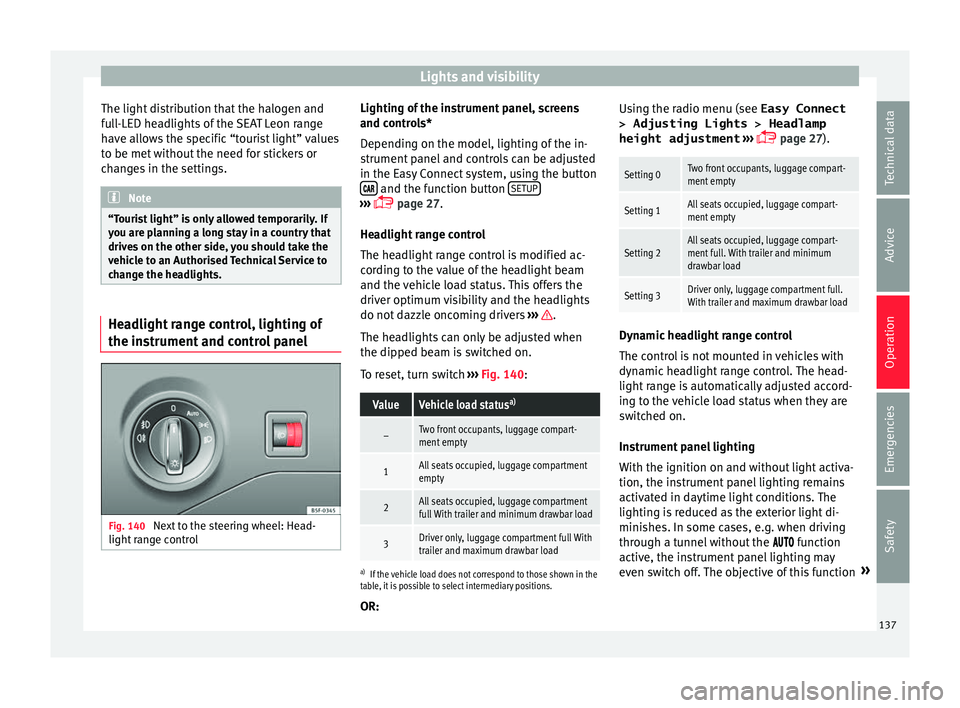
and control panelFig. 140
Next to the steering wheel: Head-
light r
an
ge control Lighting of the instrument panel, screens
and c
ontr
o
ls*
Depending on the model, lighting of the in-
strument panel and controls can be adjusted
in the Easy Connect system, using the button and the function button
S
ETUP ›››
p
age 27.
He a
dlight range control
The headlight range control is modified ac-
cording to the value of the headlight beam
and the vehicle load status. This offers the
driver optimum visibility and the headlights
do not dazzle oncoming drivers ››› .
The he a
dlights
can only be adjusted when
the dipped beam is switched on.
To reset, turn switch ››› Fig. 140:
ValueVehicle load status a)
–Two front occupants, luggage compart-
ment empty
1All seats occupied, luggage compartment
empty
2All seats occupied, luggage compartment
full With trailer and minimum drawbar load
3Driver only, luggage compartment full With
trailer and maximum drawbar load
a)
If the vehicle load does not correspond to those shown in the
table, it is possible to select intermediary positions.
OR: Using the radio menu (see Easy Connect
> Adjusting Lights > Headlamp
height adjustment ›››
page 27).
Setting 0Two front occupants, luggage compart-
ment empty
Setting 1All seats occupied, luggage compart-
ment empty
Setting 2All seats occupied, luggage compart-
ment full. With trailer and minimum
drawbar load
Setting 3Driver only, luggage compartment full.
With trailer and maximum drawbar load Dynamic headlight range control
The c
ontr
o
l is not mounted in vehicles with
dynamic headlight range control. The head-
light range is automatically adjusted accord-
ing to the vehicle load status when they are
switched on.
Instrument panel lighting
With the ignition on and without light activa-
tion, the instrument panel lighting remains
activated in daytime light conditions. The
lighting is reduced as the exterior light di-
minishes. In some cases, e.g. when driving
through a tunnel without the function
active, the instrument panel lighting may
even switch off. The objective of this function »
137
Technical data
Advice
Operation
Emergencies
Safety
Page 142 of 324

Operation
Windscreen wiper functionsWindscreen wiper performance in different sit-
uations
If the vehicle is at a
standstillThe activated position provision-
ally changes to the previous posi-
tion.
During automatic
wipe
The air conditioner comes on for
approximately 30 seconds in air
recirculation mode to prevent the
smell of the windscreen washer
fluid entering the inside the vehi-
cle.
For the interval wipe
Intervals between wipes depend
on the vehicle's speed. The high-
er the vehicle speed the shorter
the intervals. Heated windscreen washer jets
The he
atin
g on
ly thaws the frozen jets, it
does not thaw the water in the washer hoses.
When the ignition is switched on the heated
windscreen washer jets automatically adjust
the heat depending on the ambient tempera-
ture.
Headlight wash/wipe system
The headlight washers/wipers clean the
headlight lenses.
After the ignition is switched on, the first and
every fifth time the windscreen washer is
switched on, the headlights are also washed. Therefore, the windscreen wiper lever should
be pul
led towards the steering wheel when
the dipped beam or main beam are on. Any
incrusted dirt (such as insects) should be
cleaned regularly (e.g. when refuelling).
To ensure the headlight washers work cor-
rectly in winter, any snow which has got into
the bumper jet supports should be cleaned
away. If necessary, remove snow with an anti-
icing spray. Note
The wiper will try to wipe away any obstacles
that ar
e on the windscreen. The wiper will
stop moving if the obstacle blocks its path.
Remove the obstacle and switch the wiper
back on again. Rain sensor*
Fig. 143
Windscreen wiper lever: adjusting
the r ain sen
sor A Fig. 144
Rain sensor sensitive surface The rain sensor controls the frequency of the
w
ind
s
creen wiper intervals, depending on
the amount of rain ››› . The sensitivity of the
r ain sen
sor c
an be adjusted manually. Man-
ual wipe ››› page 139.
Move the lever to the required position
››› Fig. 143:
Rain sensor off.
Rain sensor on; automatic wipe if neces-
sary.
Setting sensitivity level of rain sensor
– Set control to the right: highly sensi-
tive.
– Set control to the left: less sensitive.
When the ignition is switched off and then
back on, the rain sensor stays on and starts
operating again when the windscreen wipers
are in position 1 and the vehicle is travel-
lin g at
mor
e than 16 km/h (10 mph).
0 1
A
140
Page 165 of 324

Air conditioning
Distributing a load
Di s
trib
ute loads uniformly and secure them
correctly ››› .
Chec k
att
achments
Once the cross bars and roof carrier system
have been installed, check the bolted con-
nections and attachments after a short jour-
ney and subsequently with a certain frequen-
cy. WARNING
Exceeding the maximum authorised roof load
can r e
sult in accidents and considerable vehi-
cle damage.
● Never exceed the maximum authorised
load on the r
oof and on the axles or the vehi-
cle's maximum authorised weight.
● Never exceed the load capacity of the cross
bars
and the roof carrier system, even if the
maximum authorised roof load has not been
reached.
● Secure heavy items as far forward as possi-
ble and di
stribute the vehicle load uniformly. WARNING
If the load is loose or not secured, it could fall
from the r oof
carrier system or cause acci-
dents and injuries.
● Always use belts or retaining straps that
are suit
able and in a good condition.
● Secure the load properly. Air conditioning
He atin
g,
ventilation and cool-
ing
Introduction Read the additional information carefully
›› ›
page 45
Viewing Climatronic information
On the screen of Climatronic control unit and
on the screen of the factory-fitted Easy Con-
nect system, the theoretical values of the
temperature zones are shown.
The unit of temperature measurement can be
changed in the Easy Connect system.
Dust and pollen filter
The dust and pollen filter with its activated
charcoal cartridge serves as a barrier against
impurities in the air taken into the vehicle in-
terior.
The dust and pollen filter must be changed
regularly so that air conditioner performance
is not adversely affected.
If the filter loses efficiency prematurely due
to use in areas with very high levels of air
pollution, the filter must be changed more
frequently than stated in the Service Sched-
ule. WARNING
Reduced visibility through the windows in-
cr e
ases the risk of serious accidents.
● Always ensure that all windows are free of
ice and sno
w, and that they are not fogged,
so as to maintain good visibility of everything
outside.
● The maximum heat output required to de-
fros
t windows as quickly as possible is only
available when the engine has reached its
normal running temperature. Only drive when
you have good visibility.
● Always ensure that you use the heating
syst
em, fresh air system, air conditioner and
the heated rear window to maintain good visi-
bility to the outside.
● Never leave the air recirculation on for a
long period of time. If
the cooling system is
switched off and air recirculation mode
switched on, the windows can mist over very
quickly, considerably limiting visibility.
● Switch air recirculation mode off when it is
not requir
ed. WARNING
Stuffy or used air will increase fatigue and re-
duce driv er c
oncentration possibly resulting
in a serious accident.
● Never leave the fresh air fan turned off or
use the air rec
irculation for long periods of
time; the air in the vehicle interior will not be
refreshed. » 163
Technical data
Advice
Operation
Emergencies
Safety
Page 167 of 324

Air conditioning
and for that of passenger. Temperatures up
t o +22 °C
(+72 °F) ar
e shown with blue ar-
rows, and temperatures over +22 °C (+72 °F)
with red arrows.
To switch a function on or off, or to select a
submenu, you must press the corresponding
function button.
Function buttonFunction
Air condi-
tioning pro- fileAdjust the fan level in AUTO mode. You
can choose between low, medium and
high.
OFFClimatronic is switched off.
ONClimatronic is switched on.
SETUP
The air conditioning settings submenu
is opened. It is possible to make the fol-
lowing adjustments:
Function button Air conditioning profile
: to
adjust the level of the fan in AUTO
mode. You can choose between low, me-
dium and high.
Function button Automatic air recirculation
to switch on and off automatic air recir-
culation
››› page 166.
BACK
function button to close the
submenu.
Function
buttonFunction
Automatic
supplemen-
tary heating
Activate/deactivate the automatic acti-
vation of the supplementary heating for
colder countries (only for engines with
supplementary heating). With the option
deactivated, depending on the outside
temperature the heating may need more
time than normal to reach a comfortable
temperature. Air conditioning user instructions
The interior cooling system only works when
the en
gine i
s
running and fan is switched on.
The air conditioner operates most effectively
with the windows and the panoramic sliding
sunroof closed. However, if the vehicle has
heated up after standing in the sun for some
time, the air inside can be cooled more quick-
ly by opening the windows and the panoram-
ic sliding sunroof briefly.
Climatronic: change the temperature unit on
the screen of the radio or on the factory-fit-
ted navigation system
Changing the temperature display from Cel-
sius to Fahrenheit on radio or on the factory-
fitted navigation system is done using the
menu on the instrument panel
››› page 30. The cooling system cannot be activated
If the air conditionin
g system cannot be
switched on, this may be caused by the fol-
lowing:
● The engine is not running.
● The fan is switched off.
● The air conditioner fuse has blown.
● The outside temperature is lower than ap-
prox
imately +3°C (+38°F).
● The air conditioner compressor has been
temporari
ly switched off because the engine
coolant temperature is too high.
● Another fault in the vehicle. Have the air
conditioner chec
ked by a specialised work-
shop.
Special Characteristics
If the humidity and temperature outside the
vehicle are high, condensation can drip off
the evaporator in the cooling system and
form a pool underneath the vehicle. This is
normal and does not indicate a leak! Note
After starting the engine, any residual humid-
ity in the air c onditioner c
ould mist over the
windscreen. Switch on the defrost function as
soon as possible to clear the windscreen of
condensation. 165
Technical data
Advice
Operation
Emergencies
Safety
Page 181 of 324

Driving
ability allow you to do so safely: risk of
skid
din
g!
● With ESC in Sport mode, the stabilising
function w
ill be limited to allow for a sportier
drive. The driving wheels could spin and the
vehicle could “skid”.
● If the ESC/ASR is deactivated, the vehicle
stab
ilisation function is not available. Note
If the ASR is disconnected or the ESC’s Sport
mode i s sel
ected, cruise control* will be
switched off. Hill driving assistant
The hill driving assistant helps the driver to
mo
v
e off
and upward on a hill when the vehi-
cle is stationary.
The system maintains brake pressure for ap-
proximately two seconds after the driver
takes his foot off the brake pedal to prevent
the vehicle from lurching backward when it is
started. During these 2 seconds, the driver
has enough time to release the clutch pedal
and accelerate without the vehicle moving
and without having to use the handbrake,
making start-up easier, more comfortable
and safer.
These are the basic operation conditions: ●
being on a ramp or hi
ll/slope,
● doors closed,
● vehicle completely stationary,
● engine running and foot on the brake,
● besides having a gear engaged or being in
neutral f
or manual gear change and with the
selector lever at position S, D or R for an au-
tomatic gearbox.
This system is also active when reversing up-
hill. WARNING
● If y
ou do not start the vehicle immediately
after taking your foot off the brake pedal, the
vehicle may start to roll back under certain
conditions. Depress the brake pedal or use
the hand brake immediately.
● If the engine stalls, depress the brake ped-
al or u
se the hand brake immediately.
● When following a line of traffic uphill, if you
want t
o prevent the vehicle from rolling back
accidentally when starting off, hold the brake
pedal down for a few seconds before starting
off. Note
The Official Service or a specialist workshop
can t el
l you if your vehicle is equipped with
this system. Manual gearbox
Ch an
gin
g gear Read the additional information carefully
›› ›
page 42
In some countries the clutch pedal must be
fully pressed down for the engine to start.
Selecting reverse gear ● Engage reverse gear only when the vehicle
is s
topped.
Changing down gears
While driving, changing down a gear must al-
ways be done gradually, i.e. to the gear di-
rectly below and when the engine speed is
not too high ››› . Changing down while by-
p a
s
sing one or various gears at high speeds
or at high engine speeds can damage the
clutch and the gearbox, even if the clutch
pedal remains depressed ››› .
WARNING
When the engine is running, the vehicle will
st ar
t to move as soon as a gear is engaged
and the clutch released. This is also the case
with the electronic parking brake switched
on.
● Never engage reverse gear when the vehi-
cle i
s moving. » 179
Technical data
Advice
Operation
Emergencies
Safety
Page 182 of 324
Operation
WARNING
If the gear is changed down inappropriately
by sel
ecting a gear that is too low, you may
lose control of the vehicle, causing an acci-
dent and serious injuries. CAUTION
When travelling at high speeds or at high en-
gine speed s, sel
ecting a gear that is too low
can cause considerable damage to the clutch
and the gearbox. This can also occur if the
clutch pedal is pressed and held and it does
not engage. CAUTION
To prevent damage and avoid premature
we ar
, please observe the following:
● Do not rest your hand on the gear lever
while driv
ing. The pressure applied by your
hand is transmitted to the gearbox selector
forks.
● Always ensure that the vehicle is complete-
ly st
opped before engaging the reverse gear.
● Always press the clutch to the floor when
chan
ging gears.
● Never hold the vehicle “on the clutch” on
hill
s with the engine on. Automatic gearbox/DSG auto-
m
atic
g
earbox*
Introduction
›› ›
table on page 2
Your vehicle is equipped with an electronical-
ly controlled manual gearbox. Torque be-
tween the engine and the gearbox is trans-
mitted via two independent clutches. They re-
place the torque converter found on conven-
tional automatic gearboxes and allow for
smooth, uninterrupted acceleration of the ve-
hicle.
The tiptronic system allows the driver to
change gears manually if desired
››› page 182, Changing gears in tiptronic
mode*.
Selector lever positions Read the additional information carefully
› ›
›
page 43
The selector lever position engaged is high-
lighted on the display in the instrument clus-
ter. With the selector lever in the manual
gearbox positions G, D, E and S, the engaged
gear is also indicated on the display. P – Parking lock
When the selector l
ever is in this position,
the driven wheels are locked mechanically.
The parking lock must be engaged only when
the vehicle is stationary ››› .
The int erloc
k
button (the button on the selec-
tor lever handle) must be pressed in and si-
multaneously the brake pedal must be de-
pressed before moving the selector lever ei-
ther in or out of position P.
R – Reverse gear
Reverse gear must be engaged only when the
vehicle is stationary and the engine is idling
››› .
T o mo
v
e the selector lever to position R, the
interlock button must be pressed in and at
the same time the brake pedal must be de-
pressed. The reverse lights come on when
the selector lever is in the R position with the
ignition on.
N – Neutral (idling)
With the selector lever in this position, the
gear is in neutral.
D/S – Permanent drive (forward) position
The selector lever in the D/S position enables
the gears to be controlled in normal mode (D)
or Sport mode (S). To select Sport mode (S),
move the selector lever backwards. Moving
the lever again will select normal mode (D).
180
Page 185 of 324

Driving
Changing gear manually with the selector
l ev
er
It
is possible to change to tiptronic mode,
both when the vehicle is stopped and while
driving.
– To switch to tiptronic mode, move the se-
lector l
ever from position D/S to the right.
As soon as the change is made the selector
level will be shown in the position M on the
instrument panel display (for example M4
means that the fourth gear is engaged).
– Move the selector lever forwards + to se-
l ect
a higher g
ear ››› Fig. 192.
– Move the selector lever backwards – to
sel ect
a lo
wer gear.
Changing gear manually with the gearshift
paddles*
The gearshift paddles can be used when the
selector lever is in the position D/S or M.
– Press the gearshift paddle + to select a
higher g e
ar ›
›› Fig. 193.
– Press the gearshift paddle – to select a
lo w
er g
ear.
– With the selector lever in position D/S, if no
pad
dle is operated during a short period of
time, the gearbox control system switches
back to automatic mode. To switch to per-
manent manual gear change using the
gearshift paddles, move the selector lever
from position D/S to the right. When accelerating, the gearbox automatical-
ly shifts
up into the next gear shortly before
the maximum engine speed is reached.
If you select a lower gear, the automatic gear-
box will not shift down until there is no risk of
over-revving the engine.
When the kick-down feature is used, the
gearbox shifts down to a lower gear, depend-
ing on road speed and engine speed.
Driving tips The gearbox changes gear ratios automatical-
ly
a
s
the vehicle moves.
The engine can only start with the selector
lever in the position P or N. At low tempera-
tures, below -10°C (50°F), the engine can on-
ly start with the selector lever in the position
P.
Starting the vehicle
– Press and hold the brake pedal.
– Press and hold the interlock button (the
button on the sel
ector lever handle), move
the selector lever to the desired position,
for instance D ›››
page 180, and release the
interlock button.
– Wait for the gearbox to engage the gear (a
slight mo
vement can be felt). –
Rele
ase the brake and press the accelerator
››› .
St op
pin
g briefly
– Apply the foot brake to hold the vehicle
briefly when st
ationary (for instance at traf-
fic lights). Do not press the accelerator.
Stopping/Parking
If the driver door is opened and the selector
lever is not in position P, the vehicle could
move. The driver message will be: Gear
change: selector lever in the
drive position! . Additionally, a buzzer
will sound.
– Press and hold the brake pedal ›››
.
– Apply the handbrake.
– Move the selector lever to position P.
Ho l
din
g the car on a hill
– Always apply the brake pedal firmly to pre-
vent
the vehicle from “moving backwards;
if necessary, apply the handbrake” ››› .
Do not tr y
t
o stop the vehicle “rolling back”
by increasing the engine speed when a
gear is engaged (pressing the accelerator)
››› .
Mo v
in
g off uphill in vehicles without Hill
start assistant*
– Apply the handbrake. »
183
Technical data
Advice
Operation
Emergencies
Safety