light Seat Leon 5D 2016 Owner's manual
[x] Cancel search | Manufacturer: SEAT, Model Year: 2016, Model line: Leon 5D, Model: Seat Leon 5D 2016Pages: 324, PDF Size: 6.93 MB
Page 207 of 324
Driver assistance systems
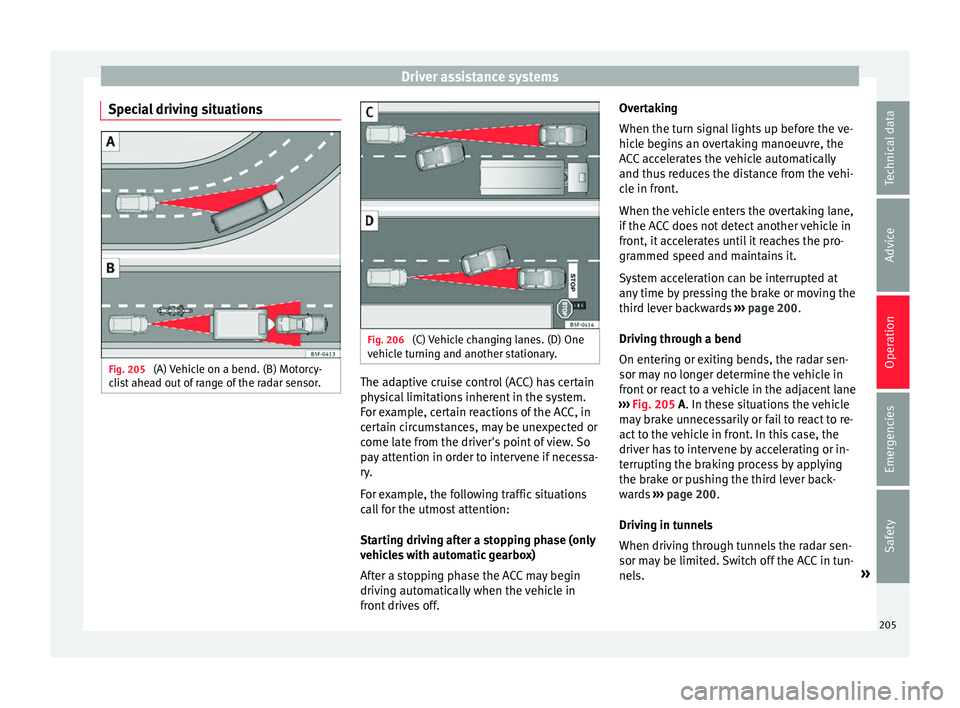
Special driving situations Fig. 205
(A) Vehicle on a bend. (B) Motorcy-
c li
s
t ahead out of range of the radar sensor. Fig. 206
(C) Vehicle changing lanes. (D) One
v ehic
l
e turning and another stationary. The adaptive cruise control (ACC) has certain
ph
y
s
ical limitations inherent in the system.
For example, certain reactions of the ACC, in
certain circumstances, may be unexpected or
come late from the driver's point of view. So
pay attention in order to intervene if necessa-
ry.
For example, the following traffic situations
call for the utmost attention:
Starting driving after a stopping phase (only
vehicles with automatic gearbox)
After a stopping phase the ACC may begin
driving automatically when the vehicle in
front drives off. Overtaking
When the turn sign
al lights up before the ve-
hicle begins an overtaking manoeuvre, the
ACC accelerates the vehicle automatically
and thus reduces the distance from the vehi-
cle in front.
When the vehicle enters the overtaking lane,
if the ACC does not detect another vehicle in
front, it accelerates until it reaches the pro-
grammed speed and maintains it.
System acceleration can be interrupted at
any time by pressing the brake or moving the
third lever backwards ››› page 200.
Driving through a bend
On entering or exiting bends, the radar sen-
sor may no longer determine the vehicle in
front or react to a vehicle in the adjacent lane
››› Fig. 205 A. In these situations the vehicle
may brake unnecessarily or fail to react to re-
act to the vehicle in front. In this case, the
driver has to intervene by accelerating or in-
terrupting the braking process by applying
the brake or pushing the third lever back-
wards ››› page 200.
Driving in tunnels
When driving through tunnels the radar sen-
sor may be limited. Switch off the ACC in tun-
nels. »
205
Technical data
Advice
Operation
Emergencies
Safety
Page 211 of 324

Driver assistance systems
Front Assist operation may be affected by a
s tr
on
g radar reverse reflection. This may oc-
cur, for example, in a closed car park or due
to the presence of metallic objects (e.g. rails
on the road or sheets used in road works).
The area in front of and around the radar sen-
sor should not be covered with adhesives,
additional or similar headlights, as this may
negatively affect Front Assist operation.
If structural modifications are made to the ve-
hicle, for example, if the suspension is low-
ered or the front spoiler is modified, Front As-
sist operation may be affected. So structural
modifications should only be made by speci-
alised workshops. SEAT recommends visiting
a SEAT dealership for this purpose.
If work is done incorrectly on the front of the
vehicle, the radar sensor could be damaged
or lose its settings, and Front Assist opera-
tion may be affected. So repair work should
only be made by specialised workshops.
SEAT recommends visiting a SEAT dealership
for this purpose. CAUTION
If you have the sensation that the radar sen-
sor is d
amaged or has lost its settings, dis-
connect the Front Assist. This will avoid pos-
sible damage. If this occurs have it adjusted.
● The sensor may become damaged or lose
its settin
gs when knocked, for example, dur- ing a parking manoeuvre. This may compro-
mise the sy
s
tem's efficacy or disconnect it.
● Repairs to the radar sensor require special-
ist
knowledge and special tools. SEAT recom-
mends visiting a SEAT dealership for this pur-
pose.
● Clean away the snow with a brush and the
ice pref
erably with a solvent-free de-icer
spray. Operating the Front Assist monitoring
sys
t
em Fig. 209
On the instrument panel display:
Fr ont
As
sist switched off message. Front Assist is active whenever the ignition is
sw
it
c
hed on.
When the Front Assist is switched off, so too
are the advance warning function (pre warn-
ing) and the distance warning. SEAT recommends leaving the Front Assist al-
way
s switched on. Exceptions ››› page 210,
Switch Front Assist off in the following situa-
tions.
Activating and deactivating Front Assist
With the ignition switched on, the Front As-
sist can be switched on and off as follows:
● Select the corresponding menu option us-
ing the butt
on for the driver assistance sys-
tems ›››
page 31.
● OR: switch the system on and off in Easy
Connect
using the button and the
Set
up and
Driv
er a
s
sistance function buttons
› ›
›
page 27.
When Front Assist is switched off, the instru-
ment panel will inform that it has been
switched off with the following indicator
››› Fig. 209.
Switching the advance warning function on
or off
The advance warning function may be switch-
ed on and off in the Easy Connect system us-
ing the button and the
Set
up and
Driv er a
s
sistance function buttons
› ›
›
page 27.
The system will store the setting for the next
time the ignition is switched on.
SEAT recommends keeping the advance
warning function switched on at all times. »
209
Technical data
Advice
Operation
Emergencies
Safety
Page 212 of 324

Operation
Depending on the infotainment system in-
s t
al
led in the vehicle, the advance warning
function may be adjusted as follows:
● Ready
● Medium
● Delayed
● Deactivated
SEAT r
ecommends driving with the function
in “Medium” mode.
Switching distance warning on and off
If the safe distance with regard to the vehicle
in front is exceeded, the relevant warning will
appear on the instrument panel display
. In this case, increase the safe dis-
tance.
The distance warning may be switched on
and off in the Easy Connect system using
the button and the
S
ETUP and
Driv er a
s
sistance function buttons
› ›
›
page 27.
The system will store the setting for the next
time the ignition is switched on.
SEAT recommends keeping the distance
warning switched on at all times. Switch Front Assist off in the following
situation
s In the following situations the Front Assist
Monitorin
g
System should be deactivated
due to the system's limitations ››› :
● When the vehicle is to be towed.
● If the vehicle is on a test bed.
● When the radar sensor is damaged.
● If the radar sensor takes a heavy knock, for
ex amp
le in a rear collision.
● If it intervenes several times unnecessarily.
● If the radar sensor is covered temporarily
with some k ind of
accessory, such as an ad-
ditional headlight or the like.
● When the vehicle is to be loaded on a lorry,
ferry
or train. WARNING
If the Front Assist is not switched off in the
sit uation
s described, serious accidents and
injuries may occur.
● Switch off the Front Assist in critical situa-
tions. System limitations
Front Assist has certain physical limitations
inher
ent in the sy
stem. Thus, in certain cir-
cumstances some of the system's reactions may be inopportune or be delayed from the
driver's s
tandpoint. So pay attention in order
to intervene if necessary.
The following conditions may cause Front As-
sist not to react or to do so too late:
● On taking tight bends.
● Pressing the accelerator all the way down.
● If the Front Assist is switched off or dam-
aged.
● If the ASR h
as been manually disconnec-
ted.
● If the E
SC is controlling.
● If several brake lights of the vehicle or elec-
trically
connected trailer are damaged.
● If the radar sensor is dirty or covered.
● If there are metal objects, e.g. rails on the
roa
d or sheets used in road works.
● If the vehicle is reversing.
● If the vehicle over-accelerates.
● In case of snow or heavy rain.
● In case of narrow vehicles, such as motor-
bike
s.
● Misaligned vehicles.
● Vehicles crossing the other's path.
● Vehicles approaching in the opposite direc-
tion.
210
Page 216 of 324

Operation
Indications on the display and lamps Fig. 212
On the instrument panel display: In-
dic ation on the Lane As
s
ist system display
(example 1). Fig. 213
On the instrument panel display: In-
dic ation on the Lane As
s
ist system display
(example 2). Status display
The sy s
t
em is active, but not available,
either because the minimum speed has
not been reached or because the lane
lines are not recognised ››› Fig. 212 A.
The system is active and available, both
lane lines are recognised. The steering
angle is not being corrected at this mo-
ment ››› Fig. 212 B.
–
– The system is operational, the highligh-
ted line
A indicates that there was a
ri sk
of
involuntarily crossing the lane
line and that the steering is being adjus-
ted to correct the angle ››› Fig. 213 C.
The two lines A light up simultaneously
when both l ane line
s
are recognised and
the Lane Assist function is active
››› Fig. 213 D.
Control lamps
Blinks or lights up yellow: Lane Assist
active but not available.
The system can not accurately recognise the lane.
Please see page 215, the Lane Assist system is not
available (the control lamp is lit up yellow).
Blinks or lights up green:
Lane Assist system active and available.
WARNING
Observe the safety warnings ›››
in Warning
and contr o
l lamps on page 109. –
–
214
Page 218 of 324

Operation
Note
● Bef or
e starting a journey, verify that the
field of vision of the camera is not covered
››› Fig. 214.
● Always keep the field of vision of the cam-
era cl
ean. Switching off the Lane Assist system
in the fo
l
lowing situationsDue to the limits of the Lane Assist system,
sw
it
c
h it off in the following situations:
● When more attention is required of the
driver
● When drivin
g in a sporty style
● In unfavourable weather conditions
● On roads in poor condition
● In areas of road works Note
The Lane Assist system deactivates when
drivin g belo
w 60 km/h (37 mph).Traffic Jam Assist
D e
s
cription and operation
››
›
table on page 2 Traffic Jam Assist helps the driver keep the
car w
ithin its
lane and to move in convoy in
case of traffic congestion or slow traffic.
Traffic Jam Assist is an additional function of
Lane Assist ››› page 213 and combines Lane
Assist functions with Adaptive Cruise Control
(ACC) ››› page 196. Therefore, it is essential
that you read these two chapters carefully
and note the limitations of the systems and
the information about them.
Operation of Traffic Jam Assist
At speeds of below 60 km/h (40 mph), Traffic
Jam Assist can maintain a (temporary) dis-
tance preset by the driver with respect to the
vehicle ahead and help stay within the lane
››› .
T o do thi
s, the sy
stem automatically controls
the acceleration, brakes and steering, and
slows down the vehicle until it stops fully
when behind another vehicle that is stop-
ping. It then automatically moves off again
when the car in front does so.
Traffic Jam Assist is designed only for use on
motorways and wide roads. Therefore, never
use it in city traffic.
Switching Traffic Jam Assist on and off
If Lane Assist is on, ›››
page 213 Traffic Jam
Assist is switched on and off in the infotain-
ment system using the button and theSETUP and
Driv
er a
s
sistance function buttons
› ›
›
page 27.
It is activated by switching on Lane Assist
and the lane centring guide in the infotain-
ment system. If the lane centring guide is not
active, the Traffic Jam Assist system is not ac-
tive
Traffic Jam Assist may be disconnected using
the button for driver assistance systems to-
gether with Lane Assist ›››
page 31.
Technical requirements for using Traffic Jam
Assist
● Lane Assist must be activated ›››
page 213,
Lane Assist system*.
● Adaptive Cruise Control (ACC) must be con-
nected and active ›
›› page 196.
● The selector lever must be in the D/S posi-
tion or in the
Tiptronic selection track.
● The speed must be below 60 km/h
(38 mph).
● The lane centring guide must be active
›››
page 215.
Traffic Jam Assist is not active (the Lane As-
sist control light turns yellow) ● If any of the conditions mentioned on
page 216, T
echnical requirements for using
Traffic Jam Assist are no longer met.
216
Page 220 of 324
Operation
If the driver continues to do nothing, the sys-
t em aut
om
atically takes over the accelerator,
brakes and steering in order to brake the ve-
hicle and keep it in its lane ››› . If the re-
m ainin
g br
aking distance is sufficient, if nec-
essary the system slows down the vehicle un-
til it stops completely and automatically
switches on the electronic parking brake
››› page 172.
When the Emergency Assist is actively adjust-
ing, the hazard warning lights come on
››› page 135 and the vehicle makes slight zig-
zag movements in the lane in order to warn
other drivers.
Switching the Emergency Assist on and off
The Emergency Assist is switched on auto-
matically when the Lane Assist is switched on
››› page 213.
Technical requirements for using the Emer-
gency Assist ● The adaptive cruise control (ACC) must be
switc
hed on ››› page 196.
● The Lane Assist must be switched on
›››
page 213.
● The selector lever must be at the D/S posi-
tion or in the
Tiptronic selection track.
● The system must have detected a lane sep-
aration line on both side
s of the vehicle
››› Fig. 213. The following conditions may cause the
Emergency
Assist not to react or to switch off
automatically:
● If the driver accelerates, brakes or moves
the steerin
g wheel.
● If any of the conditions mentioned in
›››
page 218, Technical requirements for us-
ing the Emergency Assist are not fulfilled.
● If any of the conditions required for opera-
tion of the Lane Ass
ist are not met
››› page 213.
● If any of the conditions necessary for the
adaptiv
e cruise control (ACC) to work are no
longer fulfilled ››› page 196. WARNING
The smart technology incorporated into the
Emerg ency
Assist cannot overcome the limits
imposed by the laws of physics; it only works
within the limits of the system. The driver is
responsible for driving the vehicle.
● Adapt your speed and safe distance to the
vehicl
e in front of you at all times to suit the
visibility, weather, road and traffic condi-
tions.
● Keep your hands on the wheel at all times
to be re
ady to intervene in the steering at any
time.
● The Emergency Assist alone cannot always
avoid acc
idents or serious injuries.
● If the operation of the Emergency Assist is
impaired, f
or example if the radar sensor of the adaptive cruise control (ACC) or the Lane
Ass
i
st camera are covered or have lost their
settings, the system may intervene inoppor-
tunely in braking or in steering.
● The Emergency Assist does not react to
people or anim
al or vehicles crossing your
path or which approach you head-on in the
same lane. WARNING
If the Emergency Assist Intervenes inoppor-
t u nely
, serious accidents and injuries may oc-
cur.
● If the Emergency Assist does not operate
properly, sw
itch off the Lane Assist
››› page 213. Doing so will also switch off the
Emergency Assist.
● Have the system checked by a specialised
workshop
. SEAT recommends visiting a SEAT
dealership for this. Note
● Autom atic
interventions by the Emergency
Assist on the brakes may be interrupted by
pressing the accelerator or brake or by mov-
ing the wheel.
● Hazard warning lights that come on auto-
matica
lly can be switched off by pressing the
accelerator or the break, moving the steering
wheel or pressing the hazard warning light
switch. 218
Page 222 of 324

Operation
Normal mode or Cupra mode can be selected
t o prioriti
se impr
oved traction in sport driv-
ing.
Setting driving mode Fig. 215
Centre console: MODE button. You can select from
Normal, Sport, Eco
and Individual .
Y ou c
an sel
ect the required mode either by
repeatedly pressing the button MODE
››› Fig. 215, or on the touch screen, in the
menu that opens when the above button is
pressed.
An icon on the Easy Connect system display
informs about the active mode.
The MODE button light remains lit up yellow
when the active mode is different to Normal.
Driving
profileCharacteristics
NormalOffers a balanced driving experience, suit-
able for everyday use.
SportProvides a complete dynamic performance
in the vehicle, enabling the user a more
sporty driving style.
Eco
Places the vehicle in a particularly low
state of consumption, facilitating a fuel-
saving driving style that is respectful to
the environment.
Individ- ual
Enables some configurations to be modi-
fied by pressing the Profile settings
button. The functions that can be adjusted
depend on the equipment fitted in the ve-
hicle.
Conven- ience a)It permits more relaxed and comfortable
driving, for example for long motorway
journeys. Its main characteristic is the soft
suspension setting (DCC).
a)
Only for FR and X-PERIENCE models equipped with dynamic
chassis control. WARNING
When operating SEAT Drive Profile, pay atten-
tion to a l
l traffic: doing otherwise could cause
an accident. Note
● When the v ehic
le is switched off it will al-
ways store the driving profile that was selec- ted when the ignition key was removed. Nev-
erthel
e
ss, when the engine is restarted the
engine and the gear will not restart in its
sportier mode in order to save fuel. For en-
gine and gear to revert to a sportier mode,
select the corresponding driving profile again
on the Easy Connect system screen.
● Your speed and driving style must always
be adjus
ted to visibility, weather, and traffic
conditions.
● The eco mode is not
available when towing
a trailer. Setting driving mode
3 App
lies to the model: Leon Cupra Fig. 216
Centre console: Cupra Drive Profile
b utt
on.
›› ›
table on page 2
220
Page 223 of 324
Driver assistance systems
You can select from Convenience, Sport,
Cupra and Individual .
C upr
a Driv
e Profile button
You can select the required mode either by
repeatedly pressing the button with the Cu-
pra logotype ››› Fig. 216, or on the touch
screen, in the menu that opens when the
above button is pressed.
An icon on the Easy Connect system display
informs about the active mode.
The light of the button with the Cupra logo-
type remains lit up only when the Cupra pro-
file is active.
Driving profileCharacteristics
Conven- ienceIt permits more relaxed and comfortable
driving, for example for long motorway
journeys. Its main characteristic is the
soft suspension setting (DCC).
SportIt represents the vehicle's default behav-
iour, suitable for dynamic driving.
CupraIt gives the vehicle a decidedly sportier
nature, and makes for maximum perform-
ance.
Individ- ual
Enables some configurations to be modi-
fied by pressing the Profile settings
button. The functions that can be adjus-
ted depend on the equipment fitted in the
vehicle. WARNING
When operating SEAT Drive Profile, pay atten-
tion to a l
l traffic: doing otherwise could cause
an accident. Note
● When the v ehic
le is switched off it will al-
ways store the driving profile that was selec-
ted when the ignition key was removed. Nev-
ertheless, when the engine is restarted the
engine and the gear will not restart in its
sportier mode in order to save fuel. For en-
gine and gear to revert to a sportier mode,
select the corresponding driving profile again
on the Easy Connect system screen.
● Your speed and driving style must always
be adjus
ted to visibility, weather, and traffic
conditions. Kick-down
The kick-down feature allows maximum ac-
c
el
er
ation to be reached.
If the eco* ›››
page 220 mode has been se-
lected in SEAT Drive Profile*, and the acceler-
ator is pressed beyond a hard point, the en-
gine power is automatically controlled to give
your vehicle maximum acceleration. WARNING
Please note that if the road surface is slip-
pery or w
et, the kick-down feature could
cause the driving wheels to spin, which could
result in skidding. 221
Technical data
Advice
Operation
Emergencies
Safety
Page 225 of 324
Driver assistance systems
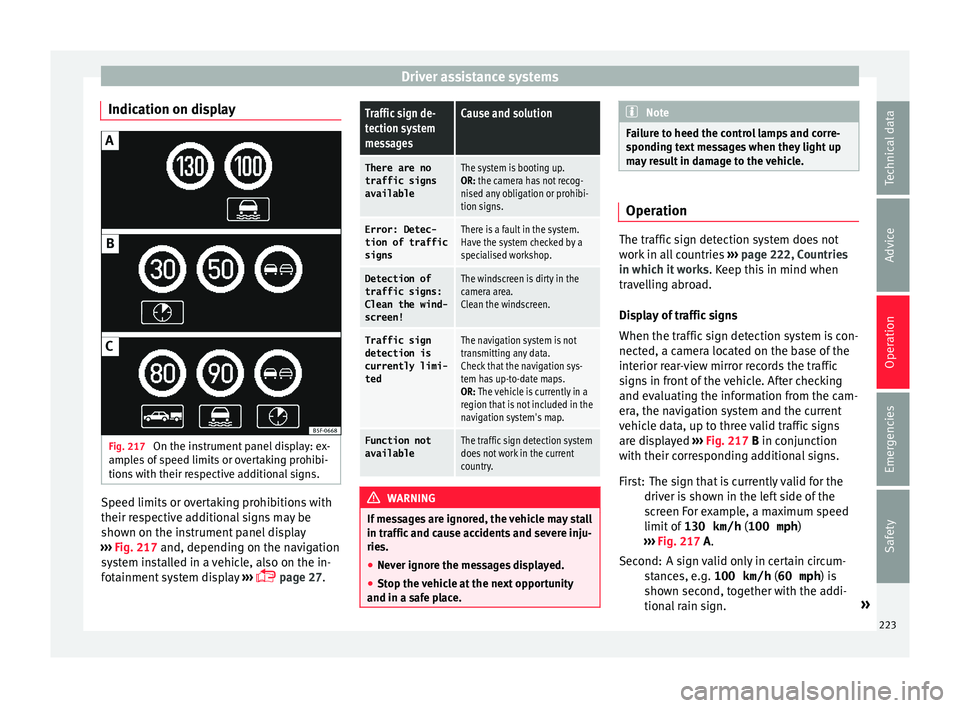
Indication on display Fig. 217
On the instrument panel display: ex-
amp l
e
s of speed limits or overtaking prohibi-
tions with their respective additional signs. Speed limits or overtaking prohibitions with
their r
e
s
pective additional signs may be
shown on the instrument panel display
››› Fig. 217 and, depending on the navigation
system installed in a vehicle, also on the in-
fotainment system display ›››
page 27.
Traffic sign de-
tection system
messagesCause and solution
There are no
traffic signs
availableThe system is booting up.
OR: the camera has not recog-
nised any obligation or prohibi-
tion signs.
Error: Detec-
tion of traffic
signsThere is a fault in the system.
Have the system checked by a
specialised workshop.
Detection of traffic signs:
Clean the wind-
screen!The windscreen is dirty in the
camera area.
Clean the windscreen.
Traffic sign
detection is
currently limi-
tedThe navigation system is not
transmitting any data.
Check that the navigation sys-
tem has up-to-date maps.
OR: The vehicle is currently in a
region that is not included in the
navigation system's map.
Function not
availableThe traffic sign detection system
does not work in the current
country. WARNING
If messages are ignored, the vehicle may stall
in traffic and c
ause accidents and severe inju-
ries.
● Never ignore the messages displayed.
● Stop the vehicle at the next opportunity
and in a safe p
lace. Note
Failure to heed the control lamps and corre-
spondin g t
ext messages when they light up
may result in damage to the vehicle. Operation
The traffic sign detection system does not
work
in al
l countries ››› page 222, Countries
in which it works . Keep this in mind when
travelling abroad.
Display of traffic signs
When the traffic sign detection system is con-
nected, a camera located on the base of the
interior rear-view mirror records the traffic
signs in front of the vehicle. After checking
and evaluating the information from the cam-
era, the navigation system and the current
vehicle data, up to three valid traffic signs
are displayed ›››
Fig. 217 B in conjunction
with their corresponding additional signs.
The sign that is currently valid for the
driver is shown in the left side of the
screen For example, a maximum speed
limit of 130 km/h (100 mph)
››› Fig. 217 A.
A sign valid only in certain circum-
stances, e.g. 100 km/h (60 mph) is
shown second, together with the addi-
tional rain sign. »
First:
Second:
223
Technical data
Advice
Operation
Emergencies
Safety
Page 228 of 324

Operation
WARNING
● Alw a
ys pay attention, also when looking
straight ahead, to traffic and the vehicle
surroundings. The assistance systems are not
a replacement for driver awareness. When in-
serting or removing the vehicle from a park-
ing space, or when performing similar ma-
noeuvres the driver always assumes the re-
sponsibility.
● Adapt your speed and driving style at all
times t
o suit visibility, weather, road and traf-
fic conditions.
● The ultrasound sensors have blind spots in
which ob
stacles and people are not regis-
tered. Pay special attention to children and
animals.
● Always keep visual control of the vehicle
surrou
ndings: use the mirrors for additional
help. CAUTION
Parking Aid functions may be negatively af-
fect ed b
y different factors that may lead to
damage to the vehicle or its immediate sur-
rounds:
● Under certain circumstances, the system
does not
detect or display certain objects:
– Objects such as chains, trailer draw bars,
fences, posts and thin trees.
– Objects that are located above the sen-
sors, such as protrusions in a wall. –
Ob j
ects with certain surfaces or struc-
tures, such as wire mesh fences or pow-
der snow.
● Certain surfaces of objects and garments
do not refl
ect the ultrasound sensors' sig-
nals. The system cannot detect, at least cor-
rectly, these objects or people wearing such
clothes.
● Ultrasound sensor signals may be affected
by e
xternal sound sources. In certain circum-
stances this may prevent them from detect-
ing people or objects.
● Please note that low obstacles detected by
the syst
em may no longer be registered by
the sensors as the car moves closer, so the
system will not give any further warning. In
certain circumstances, objects such as high
kerbs that could damage the bottom of the
vehicle are not detected either.
● If the first warning from the ParkPilot is ig-
nored, the v
ehicle could suffer considerable
damage.
● The knocks or damage on the radiator
grill
e, bumper, wheel arch and vehicle under-
body can adjust the orientation of the sen-
sors. This can affect the parking aid function.
Have the function checked by a specialised
workshop. Note
● In cer t
ain situations, the system can give a
warning even though there is no obstacle in
the detected area, e.g: –
with r ough or c
obbled floors or ground
with long grass;
– with external ultrasound sources, such as
cleaning vehicles or other vehicles;
– In downpours, intense snow or dense ex-
haust gases;
– if the registration plate (front or rear) is
not properly affixed to the bumper sur-
face;
– or in locations such as the brow of a hill.
● In order to guarantee good system opera-
tion, keep the ultr
asound sensors clean, free
of snow or ice, and do not cover them with
adhesives or other objects.
● If you use high-pressure or vapour equip-
ment to c
lean the ultrasound sensors, apply
it directly only very briefly and always from a
distance of more than 10 cm.
● Retrofitting of accessories to the vehicle,
such a
s a bicycle rack, may interfere with the
operation of the Parking Aid.
● In order to familiarise yourself with the sys-
tem, it i
s advised that you practice parking in
an area or car park that is free from traffic.
There must be good weather and light condi-
tions.
● The volume and tone of the warnings can
be modified, in addition t
o the indications
››› page 230.
● In vehicles without a driv
er information
system, these parameters can be modified in
a SEAT Official Service or in a specialised
workshop. 226