turn signal Seat Leon 5D 2016 User Guide
[x] Cancel search | Manufacturer: SEAT, Model Year: 2016, Model line: Leon 5D, Model: Seat Leon 5D 2016Pages: 324, PDF Size: 6.93 MB
Page 96 of 324
Emergencies
If you choose to change the engine compart-
ment l
amp
s yourself, remember that it is a
dangerous area ››› in Work in the engine
c omp
ar
tment on page 262.
Always use identical bulbs with the same
designation. The name can be found on the
base of the bulb holder.
Depending on how equipped the vehicle is,
there are different sets of headlights and tail
lights:
● Halogen headlights
● Full-LED main headlights*
● Halogen headlights with LED daytime run-
ning lights*
● Re
ar bulb light
● LED rear light*
Ful
l-LED headlight system*
Full-LED headlights handle all light functions
(daylight, side light, turn signal, dipped
beam and route light) with light emitting di-
odes (LEDs) as a light source.
Full-LED headlights are designed to last the
lifetime of the car and light bulbs cannot be
replaced. In case of headlight failure, go to
an authorised workshop to have it replaced. WARNING
● Tak e p
articular care when working on com-
ponents in the engine compartment if the en-
gine is warm. Risk of burns.
● Bulbs are highly sensitive to pressure. The
glas
s can break when you touch the bulb,
causing injury.
● When changing bulbs, please take care not
to injure
yourself on sharp edges, in particu-
lar on the headlight housing. CAUTION
● Remo v
e the ignition key before working on
the electric system. Otherwise, a short circuit
could occur.
● Switch off the lights and the parking light
before c
hanging a bulb.
● Take good care to avoid damaging any com-
ponents. For the sake of the environment
Please ask your specialist retailer how to dis-
pose of u
sed bulbs in the proper manner. Note
● Ple a
se check at regular intervals that all
lighting (especially the exterior lighting) on
your vehicle is functioning properly. This is
not only in the interest of your own safety,
but also that of all other road users. ●
Bef or
e changing a bulb, make sure you
have the correct new bulb.
● Do not touch the glass part of the bulb with
your bar
e hands, use a cloth or paper towel
instead, since the fingerprints left on the
glass will vaporise as a result of the heat gen-
erated by the bulb, they will be deposited on
the reflector and will impair its surface. 94
Page 97 of 324
Fuses and bulbs
Change the front bulbs Dip ped he
a
dlight bulbFig. 102
Dipped beam headlights. Fig. 103
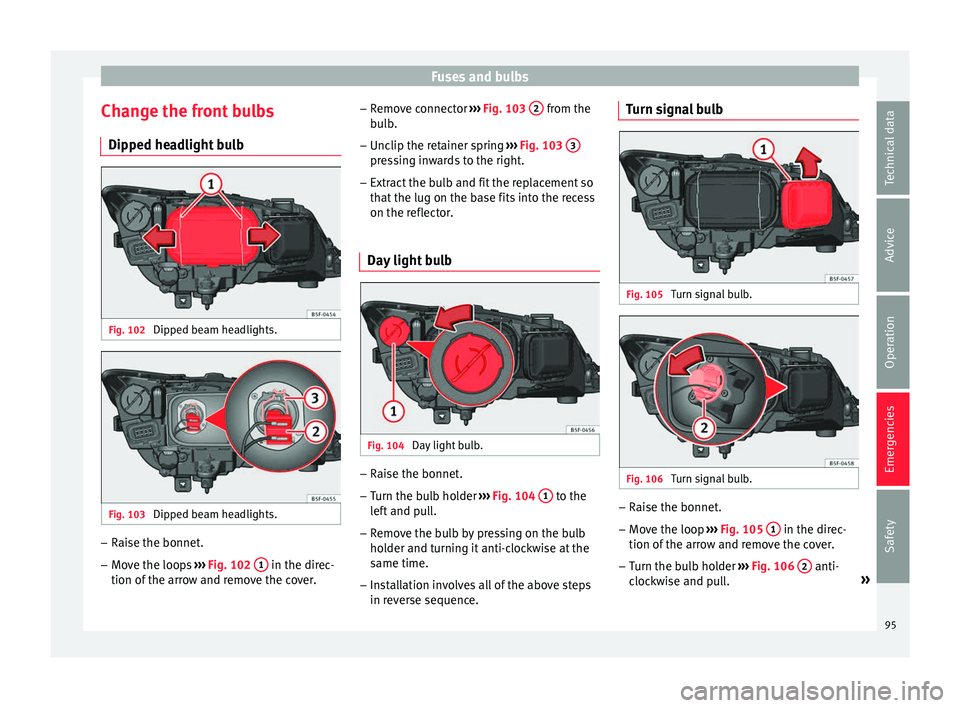
Dipped beam headlights. –
Raise the bonnet.
– Move the loops ››
›
Fig. 102 1 in the direc-
tion of the arr
o
w and remove the cover. –
Remov
e connector ››› Fig. 103 2 from the
b u
l
b.
– Unclip the retainer spring ›››
Fig. 103 3 pressing inwards to the right.
– Extract the bulb and fit the replacement so
th at
the lug on the b
ase fits into the recess
on the reflector.
Day light bulb Fig. 104
Day light bulb. –
Raise the bonnet.
– Turn the bulb holder ››
›
Fig. 104 1 to the
l ef
t
and pull.
– Remove the bulb by pressing on the bulb
holder and t
urning it anti-clockwise at the
same time.
– Installation involves all of the above steps
in rever
se sequence. Turn signal bulb
Fig. 105
Turn signal bulb. Fig. 106
Turn signal bulb. –
Raise the bonnet.
– Move the loop ››
›
Fig. 105 1 in the direc-
tion of the arr
o
w and remove the cover.
– Turn the bulb holder ›››
Fig. 106 2 anti-
c loc
k
wise and pull. »
95
Technical data
Advice
Operation
Emergencies
Safety
Page 99 of 324
Fuses and bulbs
Fig. 110
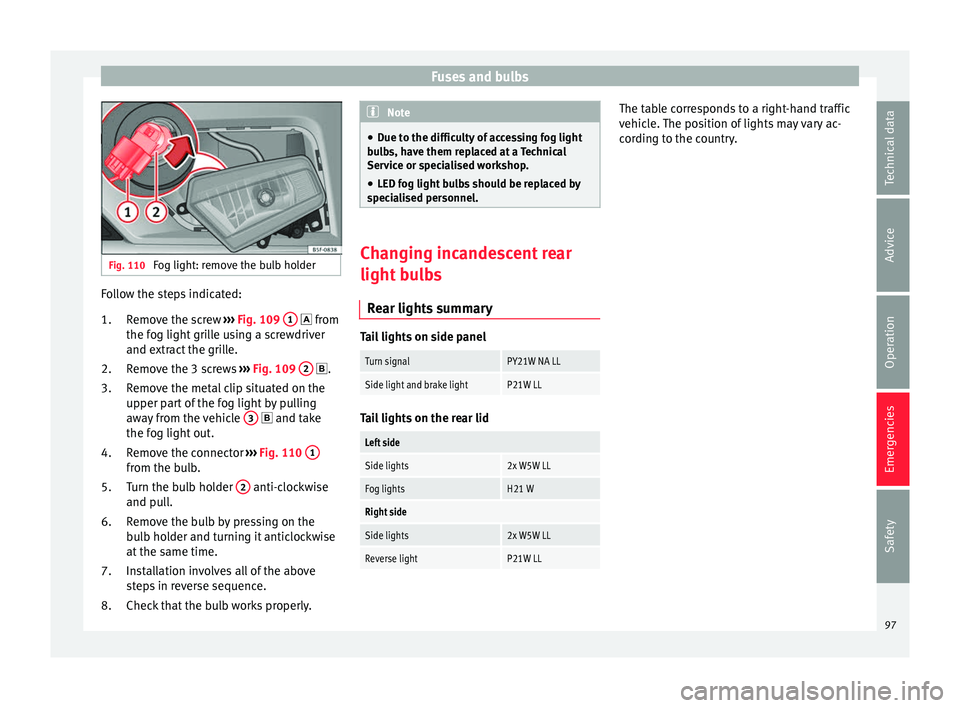
Fog light: remove the bulb holder Follow the steps indicated:
Remo
v
e the screw ››› Fig. 109 1 fr
om
the f og light
grille using a screwdriver
and extract the grille.
Remove the 3 screws ››› Fig. 109 2 .
R emo
v
e the metal clip situated on the
upper part of the fog light by pulling
away from the vehicle 3 and t
ake
the f og light
out.
Remove the connector ››› Fig. 110 1 from the bulb.
T
urn the b
u
lb holder 2 anti-clockwise
and p u
l
l.
Remove the bulb by pressing on the
bulb holder and turning it anticlockwise
at the same time.
Installation involves all of the above
steps in reverse sequence.
Check that the bulb works properly.
1.
2.
3.
4.
5.
6.
7.
8. Note
● Due to the difficulty of accessing fog light
bu l
bs, have them replaced at a Technical
Service or specialised workshop.
● LED fog light bulbs should be replaced by
speci
alised personnel. Changing incandescent rear
light b
u
lbs
Rear lights summary Tail lights on side panel
Turn signalPY21W NA LL
Side light and brake lightP21W LL
Tail lights on the rear lid
Left side
Side lights2x W5W LL
Fog lightsH21 W
Right side
Side lights2x W5W LL
Reverse lightP21W LL The table corresponds to a right-hand traffic
v
ehic
l
e. The position of lights may vary ac-
cording to the country.
97
Technical data
Advice
Operation
Emergencies
Safety
Page 118 of 324

Operation
Opening and closing C entr
a
l locking system
Description Read the additional information carefully
›› ›
page 10
The vehicle can be locked and unlocked via
the central locking system. There are several
methods, depending on the vehicle equip-
ment:
● key with remote control ››
›
page 118 ,
● lock on driver door (emergency opening
›››
page 10) or
● interior central locking switch ›››
page 119.
Unlocking one side of the vehicle only
When you lock the vehicle with the key, the
doors and the rear lid are locked. When you
open the door, you can either unlock only the
driver door, or all the vehicle doors. To select
the required option, use Easy Connect*
››› page 119.
Automatic locking (Auto Lock)*
The Auto Lock function locks the doors and
the rear lid when the vehicle exceeds a speed
of about 15 km/h (9 mph). The vehicle is unlocked again when the igni-
tion key i
s removed. Alternatively, the vehicle
can also be unlocked via the central locking
switch or by pulling one of the inside door
handles. The Auto Lock function can be
switched on and off on the sound system or
on the Easy Connect* system ››› page 119.
In the event of an accident in which the air-
bags inflate, the doors will be automatically
unlocked to facilitate access and assistance.
Anti-theft alarm system*
If the anti-theft alarm system senses interfer-
ence with the vehicle it triggers an audible
and visible alarm.
The anti-theft alarm system is automatically
switched on when locking the vehicle. It
switches off when the vehicle is unlocked
from a distance.
When the driver door is unlocked with the
key, you should switch on the ignition within
15 seconds. Otherwise the alarm will be trig-
gered. On some export versions, the alarm is
triggered immediately when you open a door.
To deactivate the alarm, press the button on the remote control key, or switch on the
ignition. Af
t
er a c
ertain time, the alarm will
automatically switch off.
Switch off the vehicle interior monitoring and
tow-away protection if you wish to prevent the alarm from being triggered accidentally
›››
page 126.
Turn signals
The turn signals will flash twice when the ve-
hicle is unlocked and once when the vehicle
is locked.
If it does not flash, this indicates that one of
the doors, the rear lid or the bonnet is not
closed correctly.
Accidental lock-out
The central locking system prevents you from
being locked out of the vehicle in the follow-
ing situations: ● If the driver door is open, the vehicle can-
not be lock
ed with the central locking switch
››› page 119.
Lock the vehicle with the remote control key,
when all the doors and the rear lid have been
closed. This prevents the accidental locking
of the vehicle. WARNING
Do not leave anyone (especially children) in
the v ehic
le if it is locked from the outside and
the anti-theft security system* is enabled, as
the doors and windows cannot then be
opened from the inside. Locked doors could
delay assistance in an emergency, potentially
putting lives at risk. 116
Page 120 of 324

Operation
The vehicle keys or new spare keys can be
o bt
ained fr
om a SEAT Official Service, a spe-
cialised workshop or an approved key service
qualified to create this kind of key.
New keys or spare keys must be synchron-
ised before use ››› page 123. CAUTION
All of the vehicle keys contain electronic com-
ponents. Pr ot
ect them from damage, impacts
and humidity. Note
● Only u
se the key button when you require
the corresponding function. Pushing the but-
ton unnecessarily could accidentally unlock
the vehicle or trigger the alarm. It is also pos-
sible even when you are outside the radius of
action.
● Key operation can be greatly influenced by
overl
apping radio signals close to the vehicle
working in the same range of frequencies, for
example, radio transmitters or mobile tele-
phones.
● Obstacles between the remote control and
the vehic
le, bad weather conditions and dis-
charged batteries can considerably reduce
the range of the remote control.
● If the buttons of the vehicle key are press-
ed ›››
Fig. 128 or ››› Fig. 129 or one of the cen-
tral locking buttons ››› page 119 is pressed
repeatedly in short succession, the central
locking briefly disconnects as protection against overloading. The vehicle is then un-
lock
ed. L
ock it if necessary. Unlocking/Locking by remote control
Read the additional information carefully
›› ›
page 10
The vehicle will be locked again automatical-
ly if you do not open one of the doors or the
rear lid within 30 seconds after unlocking the
car. This function prevents the vehicle from
remaining unlocked if the unlocking button is
pressed by mistake. This does not apply if
you press the button for at least one sec-
ond.
In v
ehic
les with a security central locking
feature (selective unlocking of side doors)
››› page 118, when the button is pressed
onc e, on
ly
the driver door and the fuel tank
flap are unlocked. When the button is press-
ed a second time, all the vehicle doors are
unlocked. WARNING
Observe the safety warnings ›››
in Descrip-
tion on pag e 116
. Note
● Do not u se the r
emote control key until the
vehicle is visible. ●
Other fu nction
s of the remote control key
››› page 128, Convenience opening/closing. Selective unlocking system
The selective unlocking system allows you to
only
u
nlock the driver door and the fuel tank
flap. All other doors and the rear lid remain
locked.
Unlocking the driver door and tank flap
– Press button on the remote control key
onc e
, or t
urn the key once to open.
Unlocking all the doors, the rear lid and the
tank flap simultaneously.
– Within 5 seconds, press button on the
r emot
e c
ontrol key twice, or turn the key to
open twice within 5 seconds.
The anti-theft security system* and the anti-
theft alarm* are immediately disabled if you
unlock only the driver door, without unlock-
ing the other doors.
In vehicles with Easy Connect*, you can pro-
gramme the security central locking system
directly ››› page 119.
118
Page 121 of 324

Opening and closing
Programming the central locking sys-
t em You can use Easy Connect* to select which
doors
ar
e unlocked with the central locking
system. Using the radio or the Easy Connect*
system, you can select whether the vehicle
automatically closes with the “Auto Lock”
programme at speeds of more than 15 km/h
(9 mph).
Programming the unlocking of the doors (ve-
hicles with Easy Connect)
– Select: control button Systems or Vehi-
cle systems > Vehicle settings >
Central locking > Unlocking doors .
Progr ammin
g the Auto Lock (vehicles with
radio)
– Select: SETUP button > control button
Central locking > Locking while
driving .
Pr ogr
ammin
g the Auto Lock (vehicles with
Easy Connect)
– Select: control button Systems or Vehi-
cle systems > Vehicle settings >
Locking while driving .
Unlocking doors You can c
hoose to un-
lock all the doors or only the driver door
when you unlock the vehicle. In all the op-
tions, the fuel tank flap is also unlocked. With the Driver
setting, when y
ou press the
button on the remote control key only the
door on the driv er's
s
ide is unlocked. If that
button is pressed twice, the rest of the doors
and the rear lid will be unlocked.
In vehicles with a conventional key, turn the
key in the door lock, in the direction of open-
ing, twice within 2 seconds.
If the button is pressed, all the vehicle
door s
ar
e locked. At the same time, a confir-
mation signal* is heard.
Auto Lock /Locking while driving . If
you select on, all the vehicle doors are
locked at speeds above 15 km/h (9 mph).
Central locking switch Read the additional information carefully
› ›
›
page 10
Please note the following when using the
central locking switch to lock your vehicle:
● It is not possible to open the doors or the
rear lid fr
om the outside (for safety reasons,
e.g. when stopped at traffic lights).
● The LED in the central locking switch lights
up when all the door
s are closed and locked.
● You can open the doors individually from
the inside b
y pulling the inside door handle. ●
In the event of
an accident in which the air-
bags inflate, doors locked from the inside will
be automatically unlocked to facilitate access
and assistance. WARNING
● The centr a
l locking switch also operates
when the ignition is switched off and auto-
matically locks all the vehicle doors when the
button is pressed.
● The central locking switch does not operate
if the v
ehicle is locked from the outside and
the anti-theft security system is switched on.
● Locked doors could delay assistance in an
emergency
, potentially putting lives at risk.
Do not leave anyone, especially children, in
the vehicle. Note
Your vehicle will lock automatically when it
re ac
hes a speed of about 15 km/h (9 mph)
(Auto Lock) ››› page 116. You can unlock the
vehicle again using button on the central
lock in
g switch. 119
Technical data
Advice
Operation
Emergencies
Safety
Page 124 of 324

Operation
one of the handles permanently activates, all
windo
w
s will close. Note
● If the v
ehicle battery has little or no charge,
or the vehicle key battery is almost or entire-
ly out of charge, you will probably not be able
to lock or unlock the vehicle with the Keyless
Access system. The vehicle can be unlocked
or locked manually ››› page 87.
● To control the proper locking of the vehicle,
the rele
ase function is disabled for approx. 2
seconds.
● If the message Keyless access system
faulty is di
splayed on the screen of the
dash panel, abnormalities may occur in the
operation of the Keyless Access system. Con-
tact a specialised workshop. SEAT recom-
mends visiting a SEAT dealership for this.
● Depending on the function set on the info-
tainment sy
stem for the mirrors, the exterior
mirrors will unfold and the surround lighting
will come on when unlocking the vehicle us-
ing the sensor surface on the driver and pas-
senger door handles ››› page 141.
● If there is no valid key inside the vehicle or
the syst
em fails to detect one, a warning will
display on the dash panel screen. This could
happen if any other radio frequency signal in-
terferes with the key signal (e.g. from a mo-
bile device accessory) or if the key is covered
by another object (e.g. an aluminium case). ●
If the sen sor
s are very dirty, e.g. have a lay-
er of salt, how the sensors on the door han-
dles operate may be affected. In this case,
clean the vehicle.
● If the vehicle is equipped with an automatic
gearbo
x, it may only be locked in the gear
stick is in position P. Anti-theft security system (Safelock)*
The following message is displayed on the in-
strument
p
anel to remind the driver that
when the vehicle is closed from the outside,
the anti-theft security system is switched on. Do not forget the Safelock.
Please see Instruction Manual . The
vehicle cannot be opened from inside. This
makes it more difficult for unauthorised per-
sons to break into the vehicle ››› in De-
s c
ription on p
age 116.
The anti-theft security system can be switch-
ed off each time the vehicle is locked:
● Turn the key a second time to the lock posi-
tion, in the door lock, w
ithin two seconds. If
necessary, remove the protective cover on
the driver door handle ›››
page 10 or else
● Press on the remote control key for a
sec ond time
w
ithin 2 seconds.
The flashing frequency of the diode in the
door sill immediately confirms the process.
Initially, the diode flashes in a fast sequence for a brief period, then it stops for approxi-
mately
30 seconds and, lastly continues
flashing slowly.
Replacing the battery Fig. 132
Vehicle key: opening the battery
c omp
ar
tment Fig. 133
Vehicle key: removing the battery SEAT recommends you ask a specialised
w
ork
shop t
o replace the battery.
122
Page 126 of 324

Operation
anti-clockwise for the right hand side
door s.
D e
activating the childproof lock
– Unlock the vehicle and open the door
whose chi
ldproof lock you want to deacti-
vate.
– With the door open, rotate the groove in
the door usin
g the ignition key, anti-clock-
wise for the left hand side doors ››› Fig. 134
and clockwise for the right hand side
doors.
Once the childproof lock is activated, the
door can only be opened from the outside.
The childproof lock can be activated or deac-
tivated by inserting the key in the groove
when the door is open, as described above.
Anti-theft alarm system* Des
cription The anti-theft alarm makes it more difficult to
br
e
ak
into the vehicle or steal it.
The anti-theft alarm is automatically turned
on when the vehicle is locked with the key.
● The turn signal light will flash twice on
opening and deactiv
ating the alarm. ●
The turn sign
al light will flash once on clos-
ing and activating the alarm.
When does the system trigger an alarm?
The anti-theft alarm siren will be triggered for
about 30 seconds accompanied by sound
and optical (flashing) warning signals and
will be repeated about ten times when the
vehicle is locked and the following unauthor-
ised actions are attempted:
● Opening a door that is mechanically un-
locked u
sing the vehicle key without switch-
ing on the ignition in the next 15 seconds (in
certain markets, such as the Netherlands,
there is no 15 second waiting time and the
alarm is activated immediately on opening
the door).
● A door is opened.
● The bonnet is opened.
● The rear lid is opened.
● When the ignition is switched on with a
non-authorised k
ey.
● When the vehicle battery is disconnected.
● Movement inside the vehicle (in vehicles
with interior monit
oring ››› page 126).
● When the vehicle is towed (in vehicles with
anti-tow sy
stem ››› page 126).
● When the vehicle is raised (in vehicles with
anti-to w sy
stem ››› page 126). ●
When the v ehic
le is transported on a ferry
or by rail (vehicles with an anti-tow system or
vehicle interior monitoring ››› page 126).
● When a trailer connected to the anti-theft
alarm sys
tem is disconnected.
How to turn OFF the alarm
Unlock the vehicle with the unlocking button
on the key or turn on the ignition with a valid
key. Note
● Aft er 28 d
ays, the indicator light will be
switched off to prevent the battery from ex-
hausting if the vehicle has been left parked
for a long period of time. The alarm system
remains activated.
● If, after the audible warning goes off, an-
other monitored ar
ea is accessed (e.g. the
rear lid is opened after a door has been
opened), the alarm is triggered again.
● The anti-theft alarm is not activated when
the vehic
le is locked from within using the
central locking button .
● If the driver door is unlocked mechanically
with the k ey
, only the driver door is unlocked,
the rest of the doors remain locked. Only
when the ignition has been turned on will the
other doors be available - but not unlocked -
and the central locking button will be activa-
ted. 124
Page 133 of 324
Lights and visibility
Lights and visibility Light s
Side light and dip
ped beam headlightRead the additional information carefully
›› ›
page 24
The legal requirements regarding the use of
vehicle lights in each country must be ob-
served.
The driver is personally responsible for the
correct use and adjustment of the lights in all
situations.
Audible warnings to advise the driver that
the lights have not been switched off
If the key is not in the ignition and the driver
door is open, an audible warning signal is
heard in the following cases: this is a remind-
er to turn off the lights.
● When the parking light is on ››
›
page 131.
● When the light switch is in position or
. WARNING
The side lights or daytime running lights are
not bright enough t
o illuminate the road
ahead and to ensure that other road users are
able to see you. ●
Alw a
ys use your dipped beam head lights if
it is raining or if visibility is poor. WARNING
If the headlights are set too high and not
u sed c orr
ectly, there is a risk of dazzling or
distracting other road users. This could result
in a serious accident.
● Always make sure that the headlights are
correctly
adjusted. Daytime running lights
The daytime running lights consist of individ-
ual
lights, int
e
grated in the front headlights.
With the daylight driving lights on, only these
lights switch on ››› .
The d a
ytime ru
nning lights switch on every
time the ignition is switched on, if the switch
is in positions or , according to the level
of exterior lighting.
When the light switch is in position , a
light sensor automatically switches dipped
beam on and off (including the control and
instrument lighting) or the daytime running
lights depending on the level of exterior
lighting. WARNING
● Never driv e w
ith daytime lights if the road
is not well lit due to weather or lighting con-
ditions. Daytime lights do not provide
enough light to illuminate the road properly
or be seen by other road users.
● The rear lights do not come on with the
daytime driv
ing light. A vehicle which does
not have the rear lights on may not be visible
to other drivers in the darkness, in the case
of heavy rain or in conditions of poor visibili-
ty. Turn signal and main beam lever
Read the additional information carefully
› ›
›
page 25
Push the lever all the way down to turn off
the corresponding function.
Convenience turn signals
For the convenience turn signals, move the
lever as far as possible upwards or down-
wards and release the lever. The turn signal
will flash three times.
The convenience turn signals are activated
and deactivated in the Easy Connect system
via the button and the
S
ETUP function
b utt
on ›
›› page 110. »
131
Technical data
Advice
Operation
Emergencies
Safety
Page 134 of 324
Operation
In vehicles that do not have the correspond-
in g menu, thi
s
function can be deactivated in
a specialised workshop. WARNING
Improper or lack of use of the turn signals, or
for g
etting to deactivate them can confuse
other road users. This could result in a seri-
ous accident.
● Always give warning when you are going to
chan
ge lane, overtake or when turning, acti-
vating the turn signal in good time.
● As soon as you have finished changing
lane, ov
ertaking or turning, switch the turn
signal off. WARNING
Incorrect use of the headlights may cause ac-
cident s
and serious injury, as the main beam
may distract or dazzle other drivers. Note
● If the c on
venience turn signals are operat-
ing (three flashes) and the other convenience
turn signals are switched on, the active part
stops flashing and only flashes once in the
new part selected.
● The turn signal only works when the igni-
tion is sw
itched on. The hazard warning
lights also work when the ignition is switch-
ed off. ●
If a tr ai
ler turn signal malfunctions, the
control lamp will stop flashing (trailer turn
signals) and the vehicle turn signal will flash
at double speed.
● The main beam headligh
ts can only be
switched on if the dipped beam headlights
are already on.
● In cold or damp weather conditions, the
headlight
s, tail lights and turn signals may
mist up inside temporarily. This is normal and
in no way effects the useful life of the vehicle
lighting system. Automatic dipped beam control
* The automatic dipped beam control is merely
int
ended a
s
an aid and is not able to recog-
nise all driving situations.
When the light switch is in position , the
vehicle lights and the instrument panel and
switch lighting switch on and off automatical-
ly in the following situations ››› in Daytime
ru nnin
g light
s on page 131:
Automatic switching
onAutomatic switching
off
The photo sensor detects
darkness, for example,
when driving through a
tunnel.When adequate lighting is
detected.
Automatic switching
onAutomatic switching
off
The rain sensor detects
rain and activates the
windscreen wipers.When the windscreen wip-
ers have been inactive for
a few minutes. WARNING
If the road is not well lit and other road users
cannot see the
vehicle well enough or at all,
accidents may occur.
● The automatic dipped beam control ( )
only sw
itches on the dipped beam when
there are no changes in brightness, and not,
for example when it is foggy. Main beam assist*
››
›
table on page 2
Main beam assist (Light Assist)
The main beam assist acts within the limits
of the system and depending on environmen-
tal and traffic conditions. Once switched on,
the system is activated as of a speed of
about 60 km/h (37 mph) and is deactivated
below about 30 km/h (18 mph) ››› .
When the sy s
t
em is activated and the camera
detects other vehicles that may be dazzled,
the main beam is automatically switched off.
Otherwise, the main beam is automatically
switched on.
132