lock Seat Leon 5D 2016 Workshop Manual
[x] Cancel search | Manufacturer: SEAT, Model Year: 2016, Model line: Leon 5D, Model: Seat Leon 5D 2016Pages: 324, PDF Size: 6.93 MB
Page 129 of 324

Opening and closing
Electric windows Openin g and c
lo
sing of the electric
windows* Fig. 136
Detail of the driver door: controls for
the w indo
w
s (5-door vehicle with front and
rear electric windows). Read the additional information carefully
› ›
›
page 13
The front and rear electric windows can be
operated by using the controls on the driver
door. The other doors each have a switch for
their own window.
Always close the windows fully if you park
the vehicle or leave it unattended ››› .
Y ou c
an u
se the electric windows for approx.
10 minutes after switching off the ignition if
neither the driver door nor the front passen-
ger door has been opened and the key has
not been removed from the ignition. Safety switch
* (only in 5-door
vehicles)
Safety switch 5 on the driver door can be
u sed t
o di
sable the electric window buttons
in the rear doors.
Safety switch not pressed: buttons on rear
doors are activated.
Safety switch pressed: buttons on rear doors
are deactivated.
The safety control symbol lights up in yel-
low if the buttons on the rear doors are
switched off. WARNING
Observe the safety warnings ›››
in Intro-
duction on pag e 87
.
● Incorrect use of the electric windows can
res
ult in injury.
● Never close the rear lid without observing
and ensurin
g it is clear, to do otherwise could
cause serious injury to you and third parties.
Make sure that no one is in the path of a win-
dow.
● The engine may accidentally be started and
be out of c
ontrol.
● If the ignition is switched on, the electric
equipment cou
ld be activated with risk of in-
jury, for example, in the electric windows.
● The doors can be locked using the remote
contro
l key. This could become an obstacle
for assistance in an emergency situation. ●
Theref or
e always take the key with you
when you leave the vehicle.
● The electric windows will work until the ig-
nition has
been switched off and one of the
front doors has been opened.
● If necessary, use the safety switch to disa-
ble the r
ear electric windows. Make sure that
they have been disabled. Note
If the window is not able to close because it
i s s
tiff or because of an obstruction, the win-
dow will automatically open again
››› page 127. If this happens, check why the
window could not be closed before attempt-
ing to close it again. Roll-back function
The roll-back function reduces the risk of in-
jur
y
when the el
ectric windows close.
● If a window is obstructed when closing au-
tomatic
ally, the window stops at this point
and lowers immediately ››› .
● Next, check why the window does not close
bef or
e att
empting it again.
● If you try within the following 10 seconds
and the window c
loses again with difficulty
or there is an obstruction, the automatic clos-
ing will stop working for 10 seconds. »
127
Technical data
Advice
Operation
Emergencies
Safety
Page 130 of 324

Operation
● If the w
indo
w is still obstructed, the win-
dow will stop at this point.
● If there is no obvious reason why the win-
dow cannot
be closed, try to close it again by
pulling the tab within ten seconds. The win-
dow closes with maximum force. The roll-
back function is now deactivated.
● If more than 10 seconds pass, the window
wil
l open fully when you operate one of the
buttons. One-touch closing is reactivated. WARNING
Observe the safety warnings ›››
in Opening
and clo s
ing of the electric windows* on
page 127.
● The roll-back function does not prevent fin-
gers
or other parts of the body getting
pinched against the window frame. Risk of
accident. Convenience opening/closing
Use the convenience opening/closing func-
tion t
o e
a
sily open/close all the windows and
the sliding/tilting sunroof* from the outside.
Convenience open function
– Press and hold button on the remote
c ontr
o
l key until all the windows and the
sliding/tilting sunroof* have reached the
desired position, or –
First
unlock the vehicle using button on
the r emot
e c
ontrol key and then keep the
key in the driver door lock until all the win-
dows and the sliding/tilting sunroof* have
reached the required position.
Convenience close function
– Press and hold button on the remote
c ontr
o
l key until all the windows and the
sliding/tilting sunroof* are closed ››› , or
– Keep the key in the driver door in the "lock"
po s
ition u
ntil all the windows and the slid-
ing/tilting sunroof* are closed.
Programming convenience opening in the
Easy Connect*
– Select: function button CAR > control but-
t on Vehicle systems
* > Vehicle set-
tings > Central locking > Open the
window by holding button down or
el se >
Front window on/off or else
Roof on/off *. WARNING
● Tak e c
are when closing the sliding/tilting
sunroof* and windows. There is a risk of suf-
fering injury.
● For safety reasons, you should only use the
remote c
ontrol open and close functions with-
in about 2 metres of the vehicle. To avoid in-
juries, always keep an eye on the windows
and the sliding/tilting sunroof* when press- ing the button to close them. The windows
st
op mo
ving as soon as the button is re-
leased. One-touch opening and closing*
One-touch opening and closing means you
do not h
av
e to hold down the button.
Buttons ››› Fig. 136 1 ,
2 ,
3 and
4 have
two po s
itions for opening windows and two
for closing them. This makes it easier to open
and close windows to the desired position.
One-touch closing
– Pull up the window button briefly up to the
second po s
ition. The window closes fully.
One-touch opening
– Push down the window button briefly up to
the second pos
ition. The window opens
fully.
Resetting one-touch opening and closing
The automatic open and close function will
not work if the battery has been temporarily
disconnected. The function can be restored
as follows:
– Close the window as far as it will go by lift-
ing and hol
ding the electric window switch.
128
Page 132 of 324

Operation
Convenience closing of the panoramic
s lidin
g s
unroofThe panoramic sliding sunroof can be
opened or clo
sed fr
om outside the vehicle
using the vehicle key:
● Keep the vehicle unlocking or locking but-
ton pre
ssed. The panoramic sliding sunroof
is adjusted or closes.
● Release the unlock or lock button to stop
the function.
D
uring convenience closing, the windows
and the panoramic sliding sunroof close at
the same time. Note
The rotary button of the panoramic sliding
su nr
oof remains in the last position selected
if the roof is closed using convenience clos-
ing from outside the vehicle, and will have to
be re-positioned the next time you drive. Roll-back function of the panoramic
s
lidin
g s
unroof and the sun blind*The anti-trap function reduces the risk of in-
jur
y
when openin
g and closing the panoram-
ic sliding sunroof and sun blind ››› . When
it enc
ou
nters an obstacle while closing, it
rolls back and opens again. ●
Check wh
y the panoramic sliding sunroof
or the sun blind does not close.
● Try and close them again.
● If the panoramic sliding sunroof or sun
blind is
still obstructed, it will stop at the cor-
responding position. Close it without the an-
ti-trap function.
Closing without the roll-back function
● The switch should be in the “closed posi-
tion” ›››
page 13
1 .
● Panoramic sliding sunroof: Within fiv
e sec
-
onds of triggering the anti-trap function, pull
the control all the way back ›››
page 13
(arrow 5 ) until the panoramic sliding sun-
r oof
c
loses fully.
● Sun blind: Within five sec
onds of triggering
the anti-trap function, press button
››› Fig. 137 2 until the sun blind closes fully.
● The panoramic sliding sunroof and sun
b lind c
lo
se without the anti-trap function.
● If the panoramic sliding sunroof still cannot
be closed,
visit a specialised workshop. WARNING
Closing the panoramic sliding sunroof or sun
blind w ithout
the anti-trap function can cause
serious injuries.
● Always close the panoramic sliding sunroof
caref
ully. ●
Nobody shou
ld be in the way of the panor-
amic sliding sunroof or sun blind, especially
when they are closed without the anti-trap
function.
● The anti-trap function does not prevent fin-
gers
or other parts of the body getting
pinched against the window frame and caus-
ing injury. Note
The anti-trap function is activated if the win-
do ws
and the panoramic sliding sunroof are
closed from the outside of the vehicle using
the ignition key for convenience closing
››› page 128.130
Page 137 of 324
Lights and visibility
● Activ
at
ed for any position of the rotary light
switch.
● When the car door is opened, the “Coming
Home” lighting come
s on. The headlights are
turned off 60 seconds after the vehicle door
is opened.
Deactivation
● If no door has been closed, they go out au-
tomatic
ally after 60 seconds.
● After the last door has been closed, the
headlights
will be switched off after the
“Coming Home” delay (as established in the
radio menu) has elapsed.
● On turning the light switch to position
›››
page 24.
● When the ignition is switched on (when
star
ting the engine).
Function “Leaving Home” The “Leaving Home” function is only availa-
b
l
e f
or vehicles with a light and rain sensor
(rotary light switch in position ).
This function may be connected/disconnec-
ted through the radio menu. The “Leaving
Home” function switch-off delay may also be
set (default: 30 sec).
Vehicle with
halogen
headlightsIn the “Leaving Home” function, the day-
time running lights (DRL), the rear side
lights and the licence plate lights are
switched on.
Vehicle with
full-LED
headlightsIn the “Leaving Home” function, the dip-
ped beams, the daytime running lights
(DRL), the rear side lights and the li-
cence plate lights are switched on. Activation
● When the vehicle is unlocked using the re-
mote c ontr
ol.
● The “Leaving Home” function is only activa-
ted when the r ot
ary light switch is in position
and the light sensor detects darkness.
Deactivation
● When the “Leaving Home” delay period
ends (def
ault: 30 sec).
● When the vehicle is locked using the re-
mote contr
ol.
● When the light control is switched into a
position other th
an .
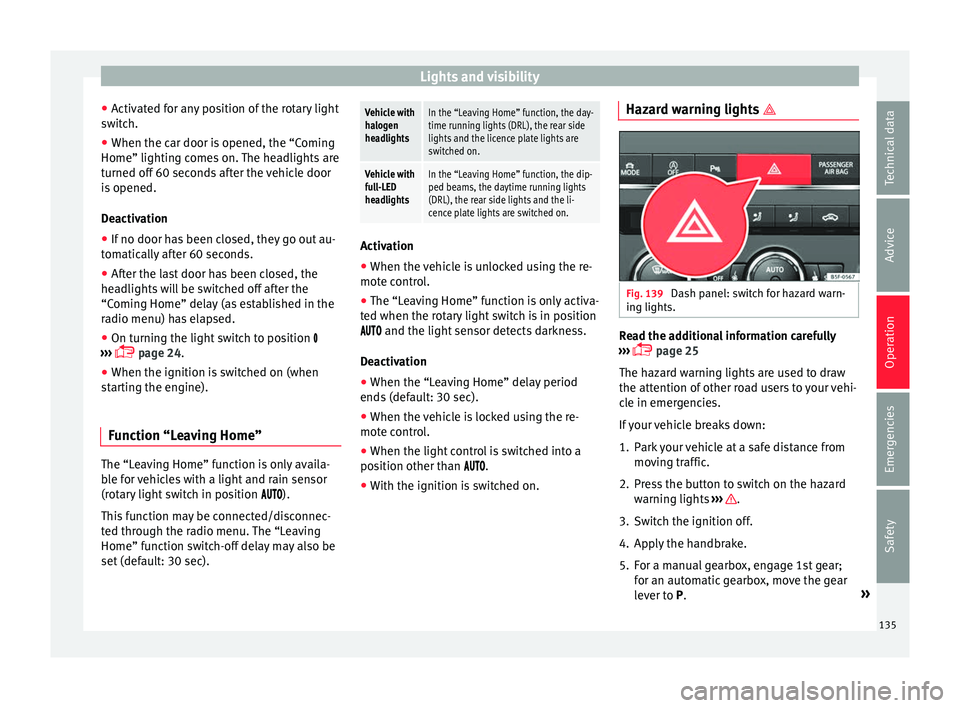
● With the ignition is switched on. Hazard warning lights
Fig. 139
Dash panel: switch for hazard warn-
in g lights. Read the additional information carefully
› ›
›
page 25
The hazard warning lights are used to draw
the attention of other road users to your vehi-
cle in emergencies.
If your vehicle breaks down:
1. Park your vehicle at a safe distance from movin
g traffic.
2. Press the button to switch on the hazard warning lights
››› .
3. Switch the ignition off.
4. Apply the handbrake.
5. For a manual gearbox, engage 1st gear; for an aut
om
atic gearbox, move the gear
lever to P. »
135
Technical data
Advice
Operation
Emergencies
Safety
Page 138 of 324

Operation
6. Use the warning triangle to draw the atten- tion of other r
o
ad users to your vehicle.
7. Always take the vehicle key with you when you le
ave the vehicle.
All turn signals flash simultaneously when
the hazard warning lights are switched on.
The two turn signal turn signal lamps
and the turn signal lamp in the switch will
flash at the same time. The simultaneous
hazard warning lights also work when the ig-
nition is switched off.
Emergency braking warning
If the vehicle brakes suddenly and continu-
ously at a speed of more than 80 km/h (50
mph), the brake light flashes several times
per second to warn the vehicles driving be-
hind. If you continue braking, the hazard
warning lights will come on automatically
when the vehicle comes to a standstill. They
switch off automatically when the vehicle
starts to move again. WARNING
● The risk of
an accident increases if your ve-
hicle breaks down. Always use the hazard
warning lights and a warning triangle to draw
the attention of other road users to your sta-
tionary vehicle.
● Due to the high temperatures that the cata-
lytic con
verter can reach, never park in an
area where the catalytic converter could come into contact with highly inflammable materi-
al
s, f
or example dry grass or spilt petrol. This
could start a fire. Note
● The b atter
y will run down if the hazard
warning lights are left on for a long time,
even if the ignition is switched off.
● The use of the hazard warning lights de-
scribed her
e is subject to the relevant statu-
tory requirements. Parking lights
When the parking light is switched on, (right
or l
ef
t
turn signal), the front side light and
the rear light on the corresponding side of
the vehicle stay lit. The parking lights can on-
ly be activated with the ignition switched off
and the turn signal and main beam lever in
the central position, before being triggered.
Parking light on both sides With the ignition switched off and the light
sw
it
c
h in position , when locking the vehi-
cle from the outside, the parking lights on
both sides of the vehicle light up. In doing
so, only the side lights of both headlights
light up, and additionally the tail lights will
do so partially. Motorway light* The motorway light is available on vehicles
equipped w
ith f
ull-LED lights.
The function is connected/disconnected via
the corresponding Easy Connect system
menu.
● Activation: when going abo
ve 110 km/h
(68 mph) for more than 30 seconds, the dip-
ped beam raises slightly to increase the driv-
er's visibility distance.
● Deactivation: when reduc in
g the speed of
the car below 100 km/h (62 mph), the dip-
ped beam returns to its normal position.
Driving abroad The light beam of the dipped beam lights is
a
symmetric: the s
ide of
the road on which
you are driving is lit more intensely.
When a car that is manufactured in a country
that drives on the right travels to a country
that drives on the left (or vice versa), it is nor-
mally necessary to cover part of the headlight
bulbs with stickers or to change the adjust-
ment of the headlights to avoid dazzling oth-
er drivers.
In such cases, the regulations specify certain
light values that must be complied with for
designated points of the light distribution.
This is known as “Tourist light”.
136
Page 140 of 324

Operation
is to provide the driver with a visual indica-
tion th at
he or she shou
ld activate the
dipped beam. WARNING
Heavy objects in the vehicle may mean that
the hea dlight
s dazzle and distract other driv-
ers. This could result in a serious accident.
● Adjust the light beam to the vehicle load
stat
us so that it does not blind other drivers. Interior and reading lights
1)
›› ›
table on page 2
Read the additional information carefully
››› page 26
Glove compartment and luggage compart-
ment lighting*
When opening and closing the glove com-
partment on the front passenger side and the
rear lid, the respective light will automatically
switch on and off. Footwell lighting*
The lights in the f
ootw
ell area below the dash
(driver and front passenger sides) will switch
on when the doors are opened and will de-
crease in intensity while driving. The intensity
of these lights can be adjusted using the ra-
dio menu (see Easy Connect > Light
Settings > Interior lighting
››› page 27). Note
The reading lights switch off when the vehi-
cl e i
s locked using a key or after several mi-
nutes if the key is removed from the ignition.
This prevents the battery from discharging. Visibility
S u
n
visors Fig. 141
Sun visor Options for adjusting driver and front pas-
sen
g
er s
un visors:
● Lower the sun visor towards the wind-
scr
een.
● The sun visor can be pulled out of its
mounting and t
urned towards the door
››› Fig. 141 1 .
● Swing the sun visor towards the door, lon-
git udin
al
ly backwards. 1)
Depending on the level of equipment fitted in the
vehic l
e, LEDs can be used for the following interior
lights: front courtesy light, rear courtesy light, foot-
well light and sun visor light.
138
Page 142 of 324
Operation
Windscreen wiper functionsWindscreen wiper performance in different sit-
uations
If the vehicle is at a
standstillThe activated position provision-
ally changes to the previous posi-
tion.
During automatic
wipe
The air conditioner comes on for
approximately 30 seconds in air
recirculation mode to prevent the
smell of the windscreen washer
fluid entering the inside the vehi-
cle.
For the interval wipe
Intervals between wipes depend
on the vehicle's speed. The high-
er the vehicle speed the shorter
the intervals. Heated windscreen washer jets
The he
atin
g on
ly thaws the frozen jets, it
does not thaw the water in the washer hoses.
When the ignition is switched on the heated
windscreen washer jets automatically adjust
the heat depending on the ambient tempera-
ture.
Headlight wash/wipe system
The headlight washers/wipers clean the
headlight lenses.
After the ignition is switched on, the first and
every fifth time the windscreen washer is
switched on, the headlights are also washed. Therefore, the windscreen wiper lever should
be pul
led towards the steering wheel when
the dipped beam or main beam are on. Any
incrusted dirt (such as insects) should be
cleaned regularly (e.g. when refuelling).
To ensure the headlight washers work cor-
rectly in winter, any snow which has got into
the bumper jet supports should be cleaned
away. If necessary, remove snow with an anti-
icing spray. Note
The wiper will try to wipe away any obstacles
that ar
e on the windscreen. The wiper will
stop moving if the obstacle blocks its path.
Remove the obstacle and switch the wiper
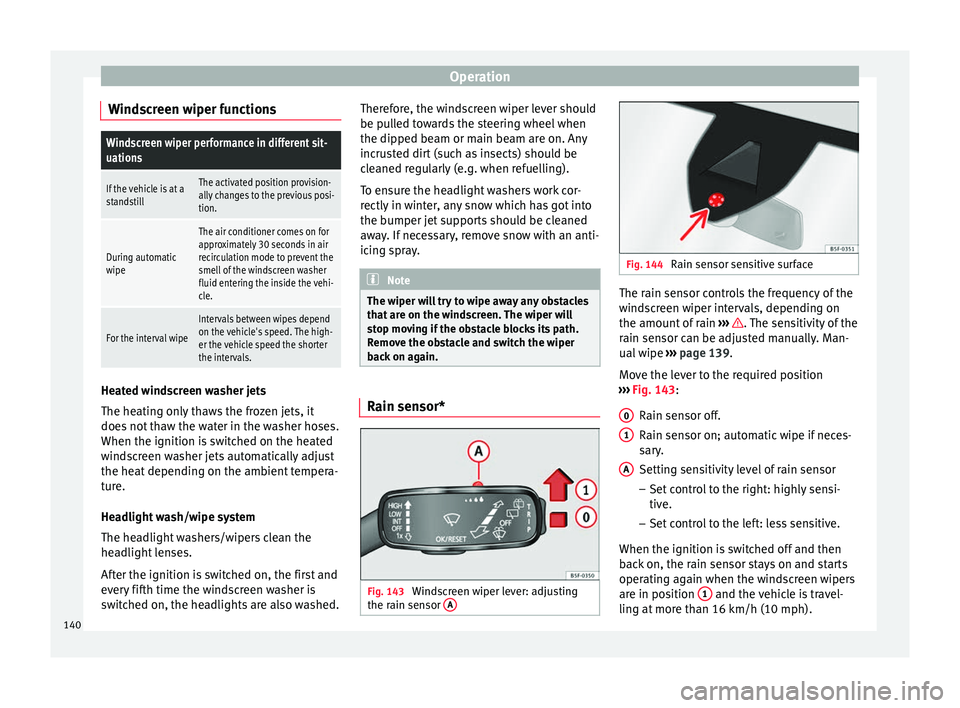
back on again. Rain sensor*
Fig. 143
Windscreen wiper lever: adjusting
the r ain sen
sor A Fig. 144
Rain sensor sensitive surface The rain sensor controls the frequency of the
w
ind
s
creen wiper intervals, depending on
the amount of rain ››› . The sensitivity of the
r ain sen
sor c
an be adjusted manually. Man-
ual wipe ››› page 139.
Move the lever to the required position
››› Fig. 143:
Rain sensor off.
Rain sensor on; automatic wipe if neces-
sary.
Setting sensitivity level of rain sensor
– Set control to the right: highly sensi-
tive.
– Set control to the left: less sensitive.
When the ignition is switched off and then
back on, the rain sensor stays on and starts
operating again when the windscreen wipers
are in position 1 and the vehicle is travel-
lin g at
mor
e than 16 km/h (10 mph).
0 1
A
140
Page 144 of 324
Operation
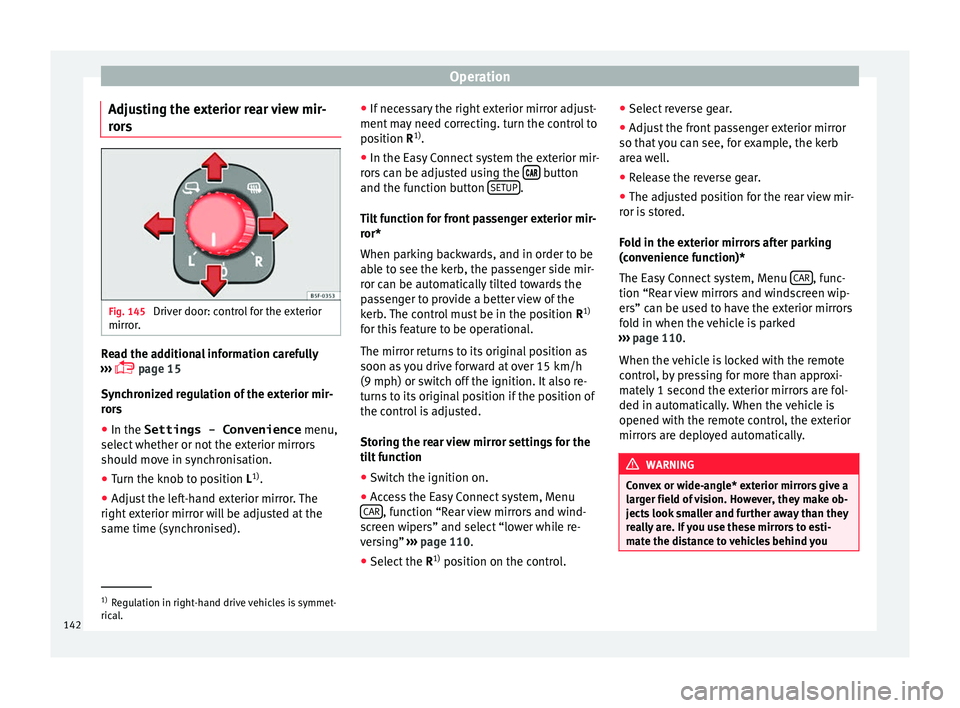
Adjusting the exterior rear view mir-
r or
s Fig. 145
Driver door: control for the exterior
mirr or
. Read the additional information carefully
› ›
›
page 15
Synchronized regulation of the exterior mir-
rors
● In the Settings - Convenience menu,
select whether or not
the exterior mirrors
should move in synchronisation.
● Turn the knob to position L 1)
.
● Adjust the left-hand exterior mirror. The
right ext
erior mirror will be adjusted at the
same time (synchronised). ●
If nece
ssary the right exterior mirror adjust-
ment may need correcting. turn the control to
position R 1)
.
● In the Easy Connect system the exterior mir-
rors
can be adjusted using the button
and the f u
nction b
utton SETUP .
Ti lt
f
unction for front passenger exterior mir-
ror*
When parking backwards, and in order to be
able to see the kerb, the passenger side mir-
ror can be automatically tilted towards the
passenger to provide a better view of the
kerb. The control must be in the position R1)
for this feature to be operational.
The mirror returns to its original position as
soon as you drive forward at over 15 km/h
(9 mph) or switch off the ignition. It also re-
turns to its original position if the position of
the control is adjusted.
Storing the rear view mirror settings for the
tilt function
● Switch the ignition on.
● Access the Easy Connect system, Menu
CAR , function “Rear view mirrors and wind-
s c
r
een wipers” and select “lower while re-
versing” ›››
page 110.
● Select the R1)
position on the c
ontrol.●
Select r
everse gear.
● Adjust the front passenger exterior mirror
so that
you can see, for example, the kerb
area well.
● Release the reverse gear.
● The adjusted position for the rear view mir-
ror is
stored.
Fold in the exterior mirrors after parking
(convenience function)*
The Easy Connect system, Menu CAR , func-
tion “R e
ar
view mirrors and windscreen wip-
ers” can be used to have the exterior mirrors
fold in when the vehicle is parked
››› page 110.
When the vehicle is locked with the remote
control, by pressing for more than approxi-
mately 1 second the exterior mirrors are fol-
ded in automatically. When the vehicle is
opened with the remote control, the exterior
mirrors are deployed automatically. WARNING
Convex or wide-angle* exterior mirrors give a
lar g
er field of vision. However, they make ob-
jects look smaller and further away than they
really are. If you use these mirrors to esti-
mate the distance to vehicles behind you 1)
Regulation in right-hand drive vehicles is symmet-
rical .
142
Page 146 of 324

Operation
Adjusting the front head restraints Read the additional information carefully
›› ›
page 14
Adjust the head restraint ›››
page 14 so
that as far as possible the top of the head re-
straint is level with the top of your head.
When this is not possible, try to get as close
as possible to this position.
Adjusting the rear head restraints Fig. 146
Rear centre head restraint: release
point . When transporting people in the back seat,
p
l
ac
e the head restraints of the occupied
seats at a minimum of the next socket up
››› . Adjusting the head restraints
– To set the head restraint higher, grasp the
side
s
with both hands and move it up-
wards, until you see it engage.
– To set the head restraint lower down, press
the 1
› ››
Fig. 146
b
utton and move it
downwards.
Removing the head restraint
To remove the head restraint, the correspond-
ing backrest must be partially folded forward. – Unlock the backrest ›››
page 147.
– Move the head restraint upwards until it ar-
rives
to the top.
– Press button 1
› ›
› Fig. 146
, while simulta-
neously pressing on the security hole 2 ›››
Fig. 146 with a fl at
screwdriver a maxi-
mum of 5 mm wide, and remove the head
restraint.
– Move the backrest until it engages properly
›› ›
.
Fittin g the he
a
d restraint
To mount the external head restraints, the
corresponding backrest must be partially fol-
ded forward.
– Unlock the backrest ›››
page 147.
– Insert the head restraint bars into the
guides u
ntil they perceptibly engage. It should not be possible to remove the head
res
traint from the backrest.
– Move the backrest until it engages properly
›››
.
WARNING
● Ple a
se observe the general notes
››› page 69.
● Remove the rear head restraints only when
it is
necessary for the placement of a child
seat ››› page 82. After removing a child seat,
remount the head restraint immediately.
Travelling with the head restraints removed
or improperly adjusted increases the risk of
severe injuries. Seat functions
Intr oduction WARNING
Inappropriate use of the seat functions can
cau se sev
ere injuries.
● Assume the proper sitting position before
your trip and rem
ain in it throughout. This al-
so applies to the other occupants.
● Always keep hands, fingers, feet and other
part
s of the body away from the operating ra-
dius and the adjustment of seats. 144
Page 148 of 324
Operation
The armrest can be moved backwards and
f or
w
ards.
Folding down the passenger seat
back
rest* 3 Applies to the model: LEON ST
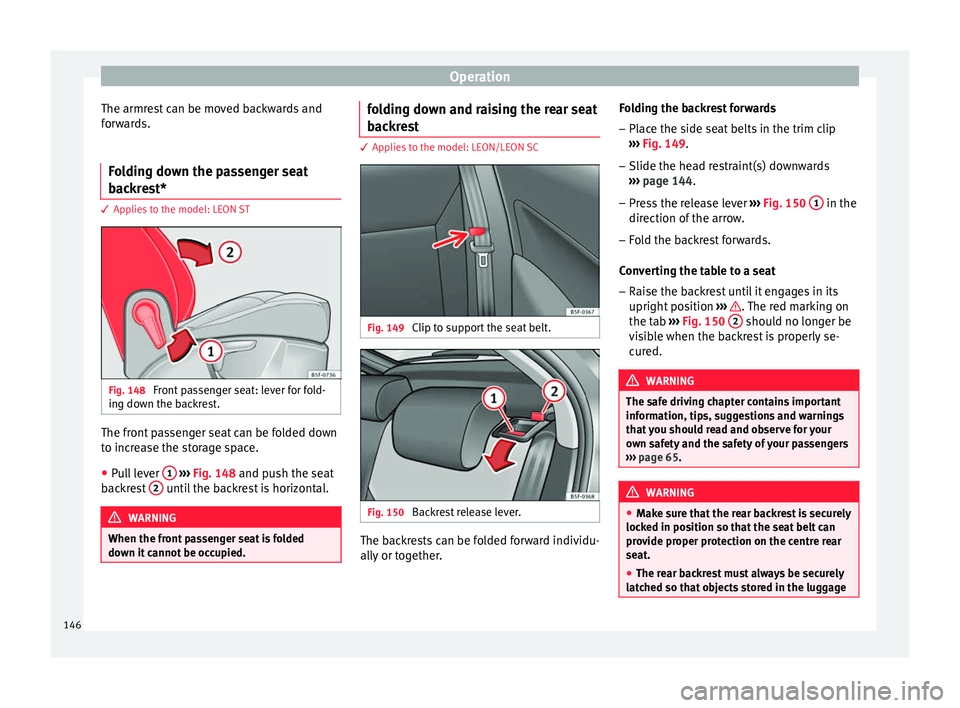
Fig. 148
Front passenger seat: lever for fold-
in g do
wn the b
ackrest. The front passenger seat can be folded down
t
o inc
r
ease the storage space.
● Pull lever 1
› ›
› Fig. 148
and push the seat
backrest 2 until the backrest is horizontal.
WARNING
When the front passenger seat is folded
down it c
annot be occupied. folding down and raising the rear seat
b
ac
k
rest 3 Applies to the model: LEON/LEON SC
Fig. 149
Clip to support the seat belt. Fig. 150
Backrest release lever. The backrests can be folded forward individu-
al
ly
or t
ogether. Folding the backrest forwards
– Place the side seat belts in the trim clip
›››
Fig. 149.
– Slide the head restraint(s) downwards
›››
page 144.
– Press the release lever ›››
Fig. 150 1 in the
dir ection of
the arr
ow.
– Fold the backrest forwards.
Conv
erting the table to a seat
– Raise the backrest until it engages in its
upright pos
ition ››› . The red marking on
the t ab
›
›
› Fig. 150 2 should no longer be
v i
s
ible when the backrest is properly se-
cured. WARNING
The safe driving chapter contains important
inform ation, tip
s, suggestions and warnings
that you should read and observe for your
own safety and the safety of your passengers
››› page 65. WARNING
● Mak e s
ure that the rear backrest is securely
locked in position so that the seat belt can
provide proper protection on the centre rear
seat.
● The rear backrest must always be securely
latc
hed so that objects stored in the luggage 146