sunroof Seat Leon 5D 2016 Owner's manual
[x] Cancel search | Manufacturer: SEAT, Model Year: 2016, Model line: Leon 5D, Model: Seat Leon 5D 2016Pages: 324, PDF Size: 6.93 MB
Page 7 of 324
Table of Contents
Table of Contents
The e s
senti
als . . . . . . . . . . . . . . . . . . . . . . . . 7
Exterior view . . . . . . . . . . . . . . . . . . . . . . . . . . . . 7
Exterior view . . . . . . . . . . . . . . . . . . . . . . . . . . . . 8
Interior view (left-hand drive) . . . . . . . . . . . . . . 9
How it works . . . . . . . . . . . . . . . . . . . . . . . . . . . . 10
Unlocking and locking . . . . . . . . . . . . . . . . . . . . 10
Before driving . . . . . . . . . . . . . . . . . . . . . . . . . . . 14
Airbags . . . . . . . . . . . . . . . . . . . . . . . . . . . . . . . . 16
Child seats . . . . . . . . . . . . . . . . . . . . . . . . . . . . . 19
Starting the vehicle . . . . . . . . . . . . . . . . . . . . . . 24
Lights and visibility . . . . . . . . . . . . . . . . . . . . . . 24
Easy Connect . . . . . . . . . . . . . . . . . . . . . . . . . . . 27
Driver information system . . . . . . . . . . . . . . . . . 30
Driving data . . . . . . . . . . . . . . . . . . . . . . . . . . . . 34
Cruise control . . . . . . . . . . . . . . . . . . . . . . . . . . . 39
Warning lamps . . . . . . . . . . . . . . . . . . . . . . . . . . 40
Gearbox lever . . . . . . . . . . . . . . . . . . . . . . . . . . . 42
Air conditioning . . . . . . . . . . . . . . . . . . . . . . . . . 45
Fluid Level control . . . . . . . . . . . . . . . . . . . . . . . 50
Emergencies . . . . . . . . . . . . . . . . . . . . . . . . . . . . 54
Fuses . . . . . . . . . . . . . . . . . . . . . . . . . . . . . . . . . . 54
Bulbs . . . . . . . . . . . . . . . . . . . . . . . . . . . . . . . . . . 55
Action in the event of a puncture . . . . . . . . . . . 55
Changing a wheel . . . . . . . . . . . . . . . . . . . . . . . 57
Snow chains . . . . . . . . . . . . . . . . . . . . . . . . . . . . 60
Emergency towing of the vehicle . . . . . . . . . . . 60
How to jump start . . . . . . . . . . . . . . . . . . . . . . . . 61
Changing the wiper blades . . . . . . . . . . . . . . . . 63
Safety . . . . . . . . . . . . . . . . . . . . . . . . . . . . . . . . 65
Safe driving . . . . . . . . . . . . . . . . . . . . . . . . . . . . 65
Safety first! . . . . . . . . . . . . . . . . . . . . . . . . . . . . . 65
Advice about driving . . . . . . . . . . . . . . . . . . . . . 65
Correct position for passengers . . . . . . . . . . . . 66
Pedal area . . . . . . . . . . . . . . . . . . . . . . . . . . . . . . 70 Seat belts
. . . . . . . . . . . . . . . . . . . . . . . . . . . . . . 71
Why wear a seat belt? . . . . . . . . . . . . . . . . . . . . 71
How to properly adjust your seatbelt . . . . . . . . 74
Seat belt tensioners . . . . . . . . . . . . . . . . . . . . . . 75
Airbag system . . . . . . . . . . . . . . . . . . . . . . . . . . 76
Brief introduction . . . . . . . . . . . . . . . . . . . . . . . . 76
Airbag safety instructions . . . . . . . . . . . . . . . . . 78
Deactivating airbags . . . . . . . . . . . . . . . . . . . . . 80
Transporting children safely . . . . . . . . . . . . . . . 82
Safety for children . . . . . . . . . . . . . . . . . . . . . . . 82
Child seats . . . . . . . . . . . . . . . . . . . . . . . . . . . . . 84
Emergencies . . . . . . . . . . . . . . . . . . . . . . . . . . 85
Self-help . . . . . . . . . . . . . . . . . . . . . . . . . . . . . . . 85
Vehicle tool kit anti-puncture kit* . . . . . . . . . . . 85
Tyre repair . . . . . . . . . . . . . . . . . . . . . . . . . . . . . . 85
Manual unlocking/locking . . . . . . . . . . . . . . . . . 87
Changing the windscreen wiper blades . . . . . . 87
Towing and tow-starting the vehicle . . . . . . . . . 88
Fuses and bulbs . . . . . . . . . . . . . . . . . . . . . . . . . 91
Fuses . . . . . . . . . . . . . . . . . . . . . . . . . . . . . . . . . . 91
Changing bulbs . . . . . . . . . . . . . . . . . . . . . . . . . 93
Change the front bulbs . . . . . . . . . . . . . . . . . . . 95
Changing incandescent rear light bulbs . . . . . . 97
Operation . . . . . . . . . . . . . . . . . . . . . . . . . . . . . 103
Controls and displays . . . . . . . . . . . . . . . . . . . . 103
General instrument panel . . . . . . . . . . . . . . . . . 102
Instruments and warning/control lamps . . . . . 104
Instruments . . . . . . . . . . . . . . . . . . . . . . . . . . . . 104
Control lamps . . . . . . . . . . . . . . . . . . . . . . . . . . . 109
Introduction to the Easy Connect system* . . . . 110
System settings (CAR)* . . . . . . . . . . . . . . . . . . . 110
Communications and multimedia . . . . . . . . . . . 111
Steering wheel controls* . . . . . . . . . . . . . . . . . . 111
Multimedia . . . . . . . . . . . . . . . . . . . . . . . . . . . . . 115 Opening and closing
. . . . . . . . . . . . . . . . . . . . . 116
Central locking system . . . . . . . . . . . . . . . . . . . . 116
Anti-theft alarm system* . . . . . . . . . . . . . . . . . . 124
Rear lid (luggage compartment) . . . . . . . . . . . . 126
Electric windows . . . . . . . . . . . . . . . . . . . . . . . . . 127
Panoramic sliding sunroof* . . . . . . . . . . . . . . . . 129
Lights and visibility . . . . . . . . . . . . . . . . . . . . . . 131
Lights . . . . . . . . . . . . . . . . . . . . . . . . . . . . . . . . . 131
Visibility . . . . . . . . . . . . . . . . . . . . . . . . . . . . . . . 138
Windscreen wiper and window wiper sys-
tems . . . . . . . . . . . . . . . . . . . . . . . . . . . . . . . . . . 139
Mirr
or . . . . . . . . . . . . . . . . . . . . . . . . . . . . . . . . . 141
Seats and head restraints . . . . . . . . . . . . . . . . . 143
Adjusting the seats and headrests . . . . . . . . . . 143
Seat functions . . . . . . . . . . . . . . . . . . . . . . . . . . 144
Transport and practical equipment . . . . . . . . . 148
Storage compartments . . . . . . . . . . . . . . . . . . . 148
Storing objects . . . . . . . . . . . . . . . . . . . . . . . . . . 151
Roof carrier . . . . . . . . . . . . . . . . . . . . . . . . . . . . . 160
Air conditioning . . . . . . . . . . . . . . . . . . . . . . . . . 163
Heating, ventilation and cooling . . . . . . . . . . . . 163
Driving . . . . . . . . . . . . . . . . . . . . . . . . . . . . . . . . 167
Ignition lock . . . . . . . . . . . . . . . . . . . . . . . . . . . . 167
Braking and parking . . . . . . . . . . . . . . . . . . . . . 172
Braking and stability systems . . . . . . . . . . . . . . 176
Manual gearbox . . . . . . . . . . . . . . . . . . . . . . . . . 179
Automatic gearbox/DSG automatic gear-
box* . . . . . . . . . . . . . . . . . . . . . . . . . . . . . . . . . . . 180
R
un-in and economical driving . . . . . . . . . . . . . 187
Engine management and exhaust gas purifica-
tion syst
em . . . . . . . . . . . . . . . . . . . . . . . . . . . . . 189
Driving tips . . . . . . . . . . . . . . . . . . . . . . . . . . . . . 191
Driver assistance systems . . . . . . . . . . . . . . . . . 191
Start-Stop system* . . . . . . . . . . . . . . . . . . . . . . . 191
Auto Hold Function* . . . . . . . . . . . . . . . . . . . . . . 194
Cruise control system (CCS)* . . . . . . . . . . . . . . . 195
Adaptive Cruise Control ACC* . . . . . . . . . . . . . . 196
5
Page 15 of 324

The essentials
● The bonnet c
an be opened. R
elease the
bonnet stay and secure it in the fixture de-
signed for this in the bonnet.
››› in Work in the engine compartment
on page 262
››› page 262 Electric windows*
Fig. 10
Detail of the driver door: controls for
the w indo
w
s. ●
Opening the window: Press the butt
on.
● C
losing the window: Pull the button.B
uttons on the driver door
Window on the fr
ont left door
Window on the front right door
Window on the rear left door (only 5-door
vehicles)
Window on the right rear door (only 5-
door vehicles)
Safety switch for deactivating the electric
window buttons on the rear doors (only 5-
door vehicles)
››› in Opening and closing of the elec-
tric windows* on page 127
››› page 127 Panoramic roof*
Fig. 11
On the interior roof lining: use the ro-
t ar y
button for opening and closing 1
2
3
4
5
Fig. 12
On the interior roof lining: press the
b utt
on and p
ull on it to raise and lower the
sunroof. ●
Opening: Turn the switch to position
› ›
›
Fig. 11 3 .
● Convenience position: Turn the switch to
po s
ition ›
›› Fig. 11 2 .
● Closing: Turn the switch to position
› ›
›
Fig. 11 1 .
● To tilt open: Push the switch to position
› ›
›
Fig. 12 4 . For an intermediate position,
ho l
d do
wn the switch until you reach the de-
sired position.
● Lowering: Pull the switch to position
›››
Fig. 12 5 . For an intermediate position,
ho l
d do
wn the switch until you reach the de-
sired position. » 13
Page 16 of 324
The essentials
››› in Opening or closing the panoramic
sliding sunroof on page 129
››› page 129 Before driving
M anua
l
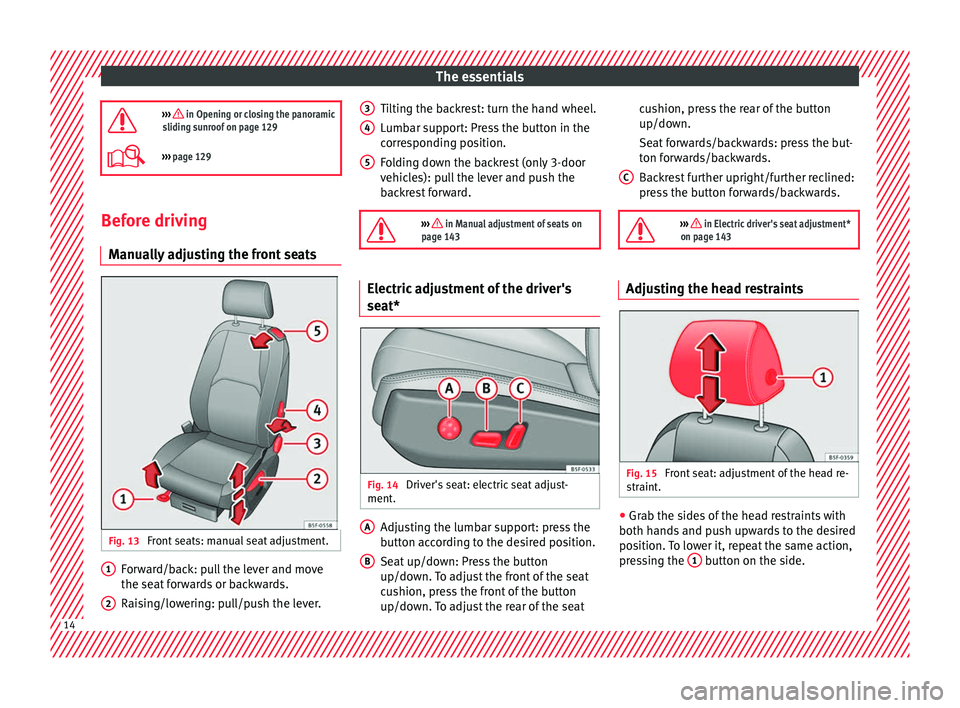
ly adjusting the front seats Fig. 13
Front seats: manual seat adjustment. Forward/back: pull the lever and move
the se
at
f
orwards or backwards.
Raising/lowering: pull/push the lever.
1 2 Tilting the backrest: turn the hand wheel.
L
umb
ar s
upport: Press the button in the
corresponding position.
Folding down the backrest (only 3-door
vehicles): pull the lever and push the
backrest forward.
››› in Manual adjustment of seats on
page 143 Electric adjustment of the driver's
se
at* Fig. 14
Driver's seat: electric seat adjust-
ment . Adjusting the lumbar support: press the
b
utt
on ac
cording to the desired position.
Seat up/down: Press the button
up/down. To adjust the front of the seat
cushion, press the front of the button
up/down. To adjust the rear of the seat
3 4
5
A
B cushion, press the rear of the button
up/do
wn.
Se at
forwards/backwards: press the but-
ton forwards/backwards.
Backrest further upright/further reclined:
press the button forwards/backwards.
››› in Electric driver's seat adjustment*
on page 143 Adjusting the head restraints
Fig. 15
Front seat: adjustment of the head re-
s tr
aint
. ●
Grab the sides of the head restraints with
both h and
s
and push upwards to the desired
position. To lower it, repeat the same action,
pressing the 1 button on the side.
C
14
Page 94 of 324
Emergencies
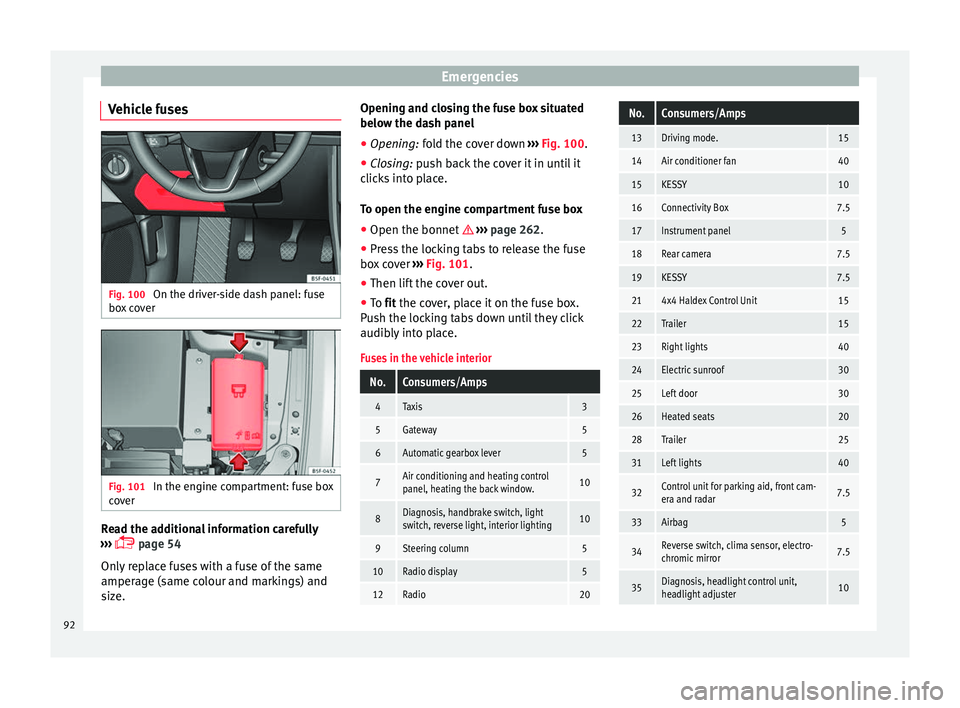
Vehicle fuses Fig. 100
On the driver-side dash panel: fuse
bo x
c
over Fig. 101
In the engine compartment: fuse box
c o
v
er Read the additional information carefully
› ›
›
page 54
Only replace fuses with a fuse of the same
amperage (same colour and markings) and
size. Opening and closing the fuse box situated
below the da
sh panel
● Opening: fold the cover down ››
› Fig. 100.
● Closing: push back the cover it in until it
clic
ks into place.
To open the engine compartment fuse box
● Open the bonnet ›››
page 262.
● Press the locking tabs to release the fuse
box c
over ››› Fig. 101.
● Then lift the cover out.
● To fit the cover, place it on the fuse box.
Pu
sh the locking tabs down until they click
audibly into place.
Fuses in the vehicle interior
No.Consumers/Amps
4Taxis3
5Gateway5
6Automatic gearbox lever5
7Air conditioning and heating control
panel, heating the back window.10
8Diagnosis, handbrake switch, light
switch, reverse light, interior lighting10
9Steering column5
10Radio display5
12Radio20
No.Consumers/Amps
13Driving mode.15
14Air conditioner fan40
15KESSY10
16Connectivity Box7.5
17Instrument panel5
18Rear camera7.5
19KESSY7.5
214x4 Haldex Control Unit15
22Trailer15
23Right lights40
24Electric sunroof30
25Left door30
26Heated seats20
28Trailer25
31Left lights40
32Control unit for parking aid, front cam-
era and radar7.5
33Airbag5
34Reverse switch, clima sensor, electro-
chromic mirror7.5
35Diagnosis, headlight control unit,
headlight adjuster10 92
Page 119 of 324
Opening and closing
Note
● Never l e
ave any valuable items in the vehi-
cle unattended. Even a locked vehicle is not a
safe.
● If the diode on the driver door sill lights up
for about 30 sec
onds when the vehicle is
locked, the central locking system or anti-
theft alarm* is not working properly. You
should have the fault repaired at a SEAT Offi-
cial Service or specialised workshop.
● The vehicle interior monitoring of the anti-
theft a
larm* system will only function as in-
tended if the windows and the sunroof* are
closed. Car key
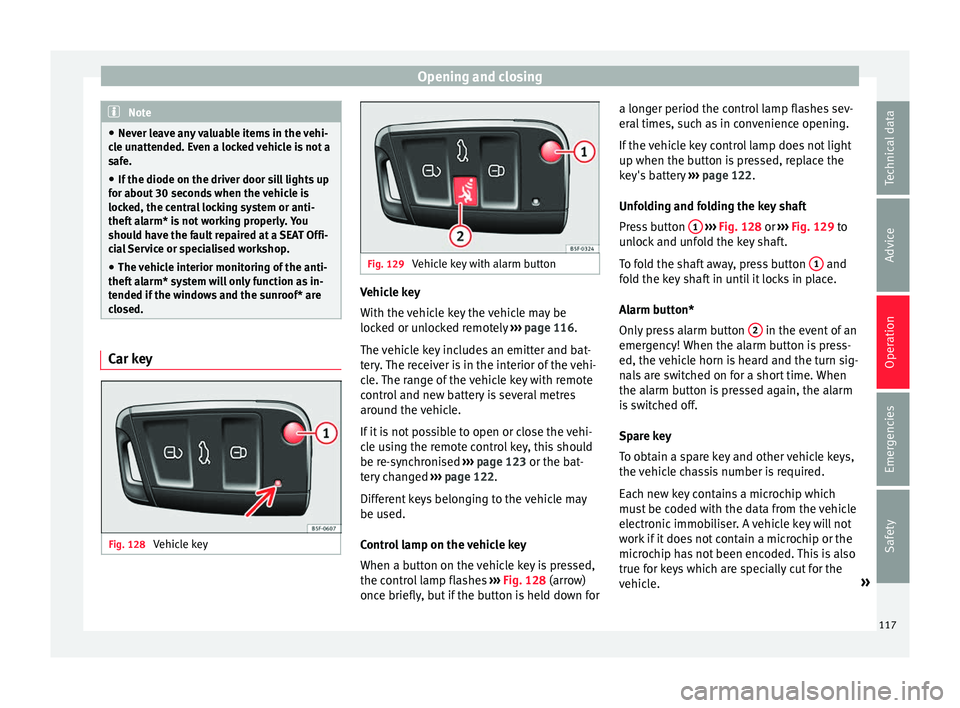
Fig. 128
Vehicle key Fig. 129
Vehicle key with alarm button Vehicle key
W
ith the
v
ehicle key the vehicle may be
locked or unlocked remotely ››› page 116.
The vehicle key includes an emitter and bat-
tery. The receiver is in the interior of the vehi-
cle. The range of the vehicle key with remote
control and new battery is several metres around the vehicle.
If it is not possible to open or close the vehi-
cle using the remote control key, this should
be re-synchronised ››› page 123 or the bat-
tery changed ››› page 122.
Different keys belonging to the vehicle may
be used.
Control lamp on the vehicle key
When a button on the vehicle key is pressed,
the control lamp flashes ››› Fig. 128 (arrow)
once briefly, but if the button is held down for a longer period the control lamp flashes sev-
eral time
s, such as in convenience opening.
If the vehicle key control lamp does not light
up when the button is pressed, replace the
key's battery ››› page 122.
Unfolding and folding the key shaft
Press button 1
› ››
Fig. 128
or ›
›› Fig. 129 to
unlock and unfold the key shaft.
To fold the shaft away, press button 1 and
f o
l
d the key shaft in until it locks in place.
Alarm button*
Only press alarm button 2 in the event of an
emer g
ency!
When the alarm button is press-
ed, the vehicle horn is heard and the turn sig-
nals are switched on for a short time. When
the alarm button is pressed again, the alarm
is switched off.
Spare key
To obtain a spare key and other vehicle keys,
the vehicle chassis number is required.
Each new key contains a microchip which
must be coded with the data from the vehicle
electronic immobiliser. A vehicle key will not
work if it does not contain a microchip or the
microchip has not been encoded. This is also
true for keys which are specially cut for the
vehicle. »
117
Technical data
Advice
Operation
Emergencies
Safety
Page 127 of 324

Opening and closing
●
If the v
ehicle battery is run down or flat
then the anti-theft alarm will not operate cor-
rectly.
● Vehicle monitoring remains active even if
the batter
y is disconnected or not working for
any reason.
● The alarm is triggered immediately if one of
the batter
y cables is disconnected while the
alarm system is active. Vehicle interior monitoring and anti-
to
w sy
stem* It is a monitoring or control function incorpo-
r
at
ed in the anti-thef
t alarm* which detects
unauthorised vehicle entry by means of ultra-
sound.
Activation
– It is automatically switched on when the
anti-theft al
arm is activated.
Deactivation – Open the vehicle with the key, either me-
chanic
ally or by pressing the button on
the r emot
e c
ontrol. The time period from
when the door is opened until the key is in-
serted in the contact should not exceed 15
seconds, otherwise the alarm will be trig-
gered. –
Pres
s the button on the remote control
tw ic
e.
The volumetric sensor and tilt sen-
sors will be deactivated. The alarm system
remains activated.
The vehicle interior monitoring and the anti-
tow system are automatically switched on
again next time the vehicle is locked.
The vehicle interior monitoring and anti-tow
sensor (tilt sensor) are automatically switch-
ed on when the anti-theft alarm is switched
on. In order to activate it, all the doors and
the rear lid must be closed.
If you wish to switch off the vehicle interior
monitoring and the anti-tow system, it must
be done each time that the vehicle is locked;
if not, they will be automatically switched on.
The vehicle interior monitoring and the anti-
tow system should be switched off if animals
are left inside the locked vehicle (otherwise,
their movements will trigger the alarm) or
when, for example, the vehicle is transported
or has to be towed with only one axle on the
ground.
False alarms
Interior monitoring will only operate correctly
if the vehicle is completely closed. Please ob-
serve related legal requirements.
The following cases may cause a false alarm: ● Open windows (partially or fully). ●
Panoramic/ti lting sunroof open (partially or
completely).
● Movement of objects inside the vehicle,
such a
s loose papers, items hanging from
the rear vision mirror (air fresheners), etc. Note
● If the v
ehicle is relocked and the alarm is
activated without the volumetric sensor func-
tion, relocking will activate the alarm with all
its functions, except the volumetric sensor.
This function is reactivated when the alarm is
switched on again, unless it is deliberately
switched off.
● If the alarm has been triggered by the volu-
metric sensor
, this will be indicated by a
flashing of the warning lamp on the driver
door when the vehicle is opened. The flash is
different to the flash indicating the alarm is
activated.
● The vibration of a mobile phone left inside
the vehic
le may cause the vehicle interior
monitoring alarm to trigger, as both sensors
react to movements and shakes inside the ve-
hicle.
● If on activating the alarm, any door or the
rear lid i
s open, only the alarm will be activa-
ted. The vehicle interior monitoring and the
anti-tow system will only be activated once
all the doors are closed (including the rear
lid). 125
Technical data
Advice
Operation
Emergencies
Safety
Page 130 of 324

Operation
● If the w
indo
w is still obstructed, the win-
dow will stop at this point.
● If there is no obvious reason why the win-
dow cannot
be closed, try to close it again by
pulling the tab within ten seconds. The win-
dow closes with maximum force. The roll-
back function is now deactivated.
● If more than 10 seconds pass, the window
wil
l open fully when you operate one of the
buttons. One-touch closing is reactivated. WARNING
Observe the safety warnings ›››
in Opening
and clo s
ing of the electric windows* on
page 127.
● The roll-back function does not prevent fin-
gers
or other parts of the body getting
pinched against the window frame. Risk of
accident. Convenience opening/closing
Use the convenience opening/closing func-
tion t
o e
a
sily open/close all the windows and
the sliding/tilting sunroof* from the outside.
Convenience open function
– Press and hold button on the remote
c ontr
o
l key until all the windows and the
sliding/tilting sunroof* have reached the
desired position, or –
First
unlock the vehicle using button on
the r emot
e c
ontrol key and then keep the
key in the driver door lock until all the win-
dows and the sliding/tilting sunroof* have
reached the required position.
Convenience close function
– Press and hold button on the remote
c ontr
o
l key until all the windows and the
sliding/tilting sunroof* are closed ››› , or
– Keep the key in the driver door in the "lock"
po s
ition u
ntil all the windows and the slid-
ing/tilting sunroof* are closed.
Programming convenience opening in the
Easy Connect*
– Select: function button CAR > control but-
t on Vehicle systems
* > Vehicle set-
tings > Central locking > Open the
window by holding button down or
el se >
Front window on/off or else
Roof on/off *. WARNING
● Tak e c
are when closing the sliding/tilting
sunroof* and windows. There is a risk of suf-
fering injury.
● For safety reasons, you should only use the
remote c
ontrol open and close functions with-
in about 2 metres of the vehicle. To avoid in-
juries, always keep an eye on the windows
and the sliding/tilting sunroof* when press- ing the button to close them. The windows
st
op mo
ving as soon as the button is re-
leased. One-touch opening and closing*
One-touch opening and closing means you
do not h
av
e to hold down the button.
Buttons ››› Fig. 136 1 ,
2 ,
3 and
4 have
two po s
itions for opening windows and two
for closing them. This makes it easier to open
and close windows to the desired position.
One-touch closing
– Pull up the window button briefly up to the
second po s
ition. The window closes fully.
One-touch opening
– Push down the window button briefly up to
the second pos
ition. The window opens
fully.
Resetting one-touch opening and closing
The automatic open and close function will
not work if the battery has been temporarily
disconnected. The function can be restored
as follows:
– Close the window as far as it will go by lift-
ing and hol
ding the electric window switch.
128
Page 131 of 324

Opening and closing
– Rel
e
ase the switch and then lift it again for
1 second. This will re-enable the automatic
function.
If you push (or pull) a button to the first
stage, the window will open (or close) until
you release the button. If you push or lift the
button briefly to the second stage, the win-
dow will open (one-touch opening) or close
(one-touch closing) automatically. If you op-
erate the button while the window is opening
or closing, it stops at this position.
Panoramic sliding sunroof* Opening or clo
sing the panoramic
sliding sunroof Read the additional information carefully
› ›
›
page 13
The panoramic sliding sunroof will only work
with the ignition on. It can be opened or
closed for a few minutes after the ignition
has been switched off, provided the driver
door and the front passenger door are not
opened. WARNING
Careless or uncontrolled use of the panoram-
ic s lidin
g sunroof can cause serious injuries. ●
Only open or c
lose the panoramic sliding
sunroof and the sun blind* when nobody is in
the way.
● The panoramic sliding sunroof can be oper-
ated for up t
o about ten minutes after the ig-
nition has been switched off, provided the
driver door and the front passenger door are
not opened. CAUTION
Check that when the rear lid is open, it does
not touc
h loads carried on the roof. When a
roof carrier is fitted, DO NOT open the panor-
amic roof*. Note
● Le av
es and other loose objects that accu-
mulate on the sun roof rails should be regu-
larly cleaned away either by hand or with a
vacuum.
● In case of a fault in the operation of the
panoramic
sliding sunroof, the anti-trap func-
tion will not operate correctly. Contact a spe-
cialised workshop. Opening and closing the sun blind*
3 Valid for vehicles: with sun blinds
Fig. 137
On the interior roof lining: switches
f or the s
u
n blind.
FunctionAction
Opening com-
pletely (automatic
function)Press button ››› Fig. 137 1 briefly.
Stop automatic
operationPress button 1 or button 2briefly.
To set the inter-
mediate positionPress button 1 or button 2 until
the correct position is set.
Closing complete-
ly (automatic
function)Press the button 2 briefly. Once the ignition has been switched off, you
c
an s ti
ll open or close the sun blind for a few
minutes provided the driver door and the
front passenger door are not opened.
129
Technical data
Advice
Operation
Emergencies
Safety
Page 132 of 324

Operation
Convenience closing of the panoramic
s lidin
g s
unroofThe panoramic sliding sunroof can be
opened or clo
sed fr
om outside the vehicle
using the vehicle key:
● Keep the vehicle unlocking or locking but-
ton pre
ssed. The panoramic sliding sunroof
is adjusted or closes.
● Release the unlock or lock button to stop
the function.
D
uring convenience closing, the windows
and the panoramic sliding sunroof close at
the same time. Note
The rotary button of the panoramic sliding
su nr
oof remains in the last position selected
if the roof is closed using convenience clos-
ing from outside the vehicle, and will have to
be re-positioned the next time you drive. Roll-back function of the panoramic
s
lidin
g s
unroof and the sun blind*The anti-trap function reduces the risk of in-
jur
y
when openin
g and closing the panoram-
ic sliding sunroof and sun blind ››› . When
it enc
ou
nters an obstacle while closing, it
rolls back and opens again. ●
Check wh
y the panoramic sliding sunroof
or the sun blind does not close.
● Try and close them again.
● If the panoramic sliding sunroof or sun
blind is
still obstructed, it will stop at the cor-
responding position. Close it without the an-
ti-trap function.
Closing without the roll-back function
● The switch should be in the “closed posi-
tion” ›››
page 13
1 .
● Panoramic sliding sunroof: Within fiv
e sec
-
onds of triggering the anti-trap function, pull
the control all the way back ›››
page 13
(arrow 5 ) until the panoramic sliding sun-
r oof
c
loses fully.
● Sun blind: Within five sec
onds of triggering
the anti-trap function, press button
››› Fig. 137 2 until the sun blind closes fully.
● The panoramic sliding sunroof and sun
b lind c
lo
se without the anti-trap function.
● If the panoramic sliding sunroof still cannot
be closed,
visit a specialised workshop. WARNING
Closing the panoramic sliding sunroof or sun
blind w ithout
the anti-trap function can cause
serious injuries.
● Always close the panoramic sliding sunroof
caref
ully. ●
Nobody shou
ld be in the way of the panor-
amic sliding sunroof or sun blind, especially
when they are closed without the anti-trap
function.
● The anti-trap function does not prevent fin-
gers
or other parts of the body getting
pinched against the window frame and caus-
ing injury. Note
The anti-trap function is activated if the win-
do ws
and the panoramic sliding sunroof are
closed from the outside of the vehicle using
the ignition key for convenience closing
››› page 128.130
Page 167 of 324

Air conditioning
and for that of passenger. Temperatures up
t o +22 °C
(+72 °F) ar
e shown with blue ar-
rows, and temperatures over +22 °C (+72 °F)
with red arrows.
To switch a function on or off, or to select a
submenu, you must press the corresponding
function button.
Function buttonFunction
Air condi-
tioning pro- fileAdjust the fan level in AUTO mode. You
can choose between low, medium and
high.
OFFClimatronic is switched off.
ONClimatronic is switched on.
SETUP
The air conditioning settings submenu
is opened. It is possible to make the fol-
lowing adjustments:
Function button Air conditioning profile
: to
adjust the level of the fan in AUTO
mode. You can choose between low, me-
dium and high.
Function button Automatic air recirculation
to switch on and off automatic air recir-
culation
››› page 166.
BACK
function button to close the
submenu.
Function
buttonFunction
Automatic
supplemen-
tary heating
Activate/deactivate the automatic acti-
vation of the supplementary heating for
colder countries (only for engines with
supplementary heating). With the option
deactivated, depending on the outside
temperature the heating may need more
time than normal to reach a comfortable
temperature. Air conditioning user instructions
The interior cooling system only works when
the en
gine i
s
running and fan is switched on.
The air conditioner operates most effectively
with the windows and the panoramic sliding
sunroof closed. However, if the vehicle has
heated up after standing in the sun for some
time, the air inside can be cooled more quick-
ly by opening the windows and the panoram-
ic sliding sunroof briefly.
Climatronic: change the temperature unit on
the screen of the radio or on the factory-fit-
ted navigation system
Changing the temperature display from Cel-
sius to Fahrenheit on radio or on the factory-
fitted navigation system is done using the
menu on the instrument panel
››› page 30. The cooling system cannot be activated
If the air conditionin
g system cannot be
switched on, this may be caused by the fol-
lowing:
● The engine is not running.
● The fan is switched off.
● The air conditioner fuse has blown.
● The outside temperature is lower than ap-
prox
imately +3°C (+38°F).
● The air conditioner compressor has been
temporari
ly switched off because the engine
coolant temperature is too high.
● Another fault in the vehicle. Have the air
conditioner chec
ked by a specialised work-
shop.
Special Characteristics
If the humidity and temperature outside the
vehicle are high, condensation can drip off
the evaporator in the cooling system and
form a pool underneath the vehicle. This is
normal and does not indicate a leak! Note
After starting the engine, any residual humid-
ity in the air c onditioner c
ould mist over the
windscreen. Switch on the defrost function as
soon as possible to clear the windscreen of
condensation. 165
Technical data
Advice
Operation
Emergencies
Safety