warning Seat Leon 5D 2017 Owner's manual
[x] Cancel search | Manufacturer: SEAT, Model Year: 2017, Model line: Leon 5D, Model: Seat Leon 5D 2017Pages: 332, PDF Size: 7.25 MB
Page 237 of 332

Driver assistance systems
signs in front of the vehicle. After checking
and ev aluatin
g the inf
ormation from the cam-
era, the navigation system and the current
vehicle data, up to three valid traffic signs
are displayed ››› Fig. 222 B in conjunction
with their corresponding additional signs.
The sign that is currently valid for the
driver is shown in the left side of the
screen For example, a maximum speed
limit of 130 km/h (100 mph)
››› Fig. 222 A.
A sign valid only in certain circum-
stances, e.g. 100 km/h (60 mph) is
shown second, together with the addi-
tional rain sign.
If the windscreen wiper is
working while you are driving, the signal
with the additional rain sign will be
shown first, on the left, as it is the one
that is applicable at the time.
A sign valid only with restrictions, e.g.
No overtaking at certain times, will be
displayed third ››› Fig. 222 C.
Speed warning
If the system detects that the permitted
speed is exceeded, it may warn the driver
with a “gong” and visually with a message
on the dash panel display.
The speed warning can be adjusted or deacti-
vated completely in the infotainment system
using the button and the
S
ET
TINGS and
First:
Second:
Additional sign:
Third:
Driver Assistance function buttons
› ›
›
page 33. The speed is adjusted in
steps of 5 km/h (3 mph) within a range of be-
tween 0 km/h (mph) and 20 km/h (12 mph)
above the maximum speed permitted.
Trailer mode
In vehicles equipped with a towing bracket
device from the factory and a trailer that is
electrically connected to the vehicle, it is pos-
sible to activate or deactivate the display of
specific traffic signs for vehicles with trailer,
such as speed limits or overtaking prohibi-
tions. Activation or deactivation is performed
on the infotainment system using the button and the
S
ET
TINGS and
Driv er As
s
istance function buttons
› ›
›
page 33.
For trailer mode, the display of speed limits
applicable to the type of trailer or to the legal
provisions can be adjusted. The speed is ad-
justed in steps of 10 km/h (5 mph) within a
range of between 60 km/h (40 mph) and
130 km/h (80 mph). If it is adjusted to a
speed greater than that which is permitted in
the country in question for driving with a
trailer, the system automatically displays the
usual speed limits, e.g. in Germany 80 km/h
(50 mph).
If the speed warning for the trailer is deacti-
vated, the system displays the speed limits
as if there were no trailer hitched. Limited operation
The traffic s
ign detection system has certain
limitations. The following cases may lead the
system to operate with limitations or not at
all:
● In the case of poor visibility, e.g. in snow,
rain, fog or int
ense mist.
● In cases of dazzling, e.g. caused by head-
on traffic or b
y the sun.
● When driving at high speeds.
● If the camera is covered or dirty.
● If the traffic signs are out of the camera's
field of
vision.
● If the traffic signs are partially or totally
cov
ered, e.g. by trees, snow, dirt or other ve-
hicles.
● In the case of traffic signs that do not fulfil
the regu
lations.
● In the case of damaged or bent traffic
signs.
● In the c
ase of variable messages on over-
head or g
antry signs (LED-based variable traf-
fic signs or other lighting units).
● If the maps on the navigation system are
not up-to-d
ate.
● In the case of adhesives affixed to vehicles
that depict
traffic signs, e.g. speed limits on
lorries.
235
Technical data
Advice
Operation
Emergencies
Safety
Page 238 of 332
Operation
Fatigue detection (break rec-
ommend ation)*
Intr oduction The Fatigue detection informs the driver
when their drivin
g beh
aviour shows signs of
fatigue. WARNING
Do not let the comfort afforded by the Fatigue
detection sy s
tem tempt you into taking any
risks when driving. Take regular breaks, suffi-
cient in length when making long journeys.
● The driver always assumes the responsibil-
ity of driv
ing to their full capacity.
● Never drive if you are tired.
● The system does not detect the tiredness of
the driver in al
l circumstances. Consult the in-
formation in the section ››› page 236, System
limitations.
● In some situations, the system may incor-
rectly int
erpret an intended driving manoeu-
vre as driver tiredness.
● No warning is given in the event of the ef-
fect c
alled microsleep!
● Please observe the indications on the in-
strument p
anel and act as is necessary. Note
● Fatigue det ection h
as been developed for
driving on motorways and well paved roads
only.
● If there is a fault in the system, have it
check
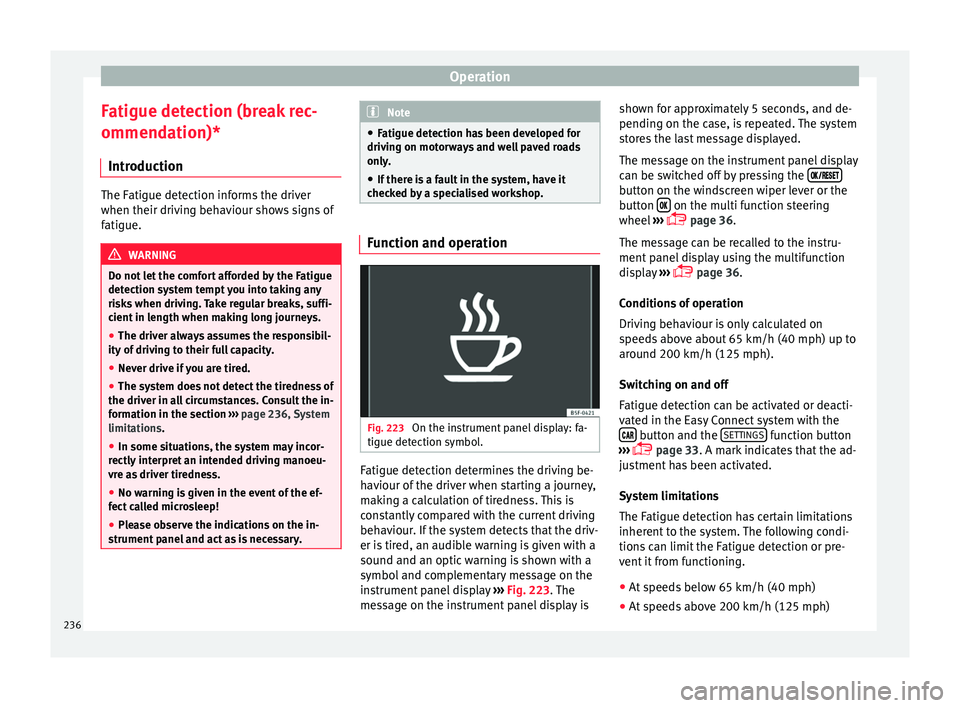
ed by a specialised workshop. Function and operation
Fig. 223
On the instrument panel display: fa-
tigue det ection symbo
l
. Fatigue detection determines the driving be-
h
av
iour of
the driver when starting a journey,
making a calculation of tiredness. This is
constantly compared with the current driving
behaviour. If the system detects that the driv-
er is tired, an audible warning is given with a
sound and an optic warning is shown with a
symbol and complementary message on the
instrument panel display ››› Fig. 223. The
message on the instrument panel display is shown for approximately 5 seconds, and de-
pending on the ca
se, is repeated. The system
stores the last message displayed.
The message on the instrument panel display
can be switched off by pressing the button on the windscreen wiper lever or the
b
utt
on on the multi function steering
wheel
›
›
› page 36.
The message can be recalled to the instru-
ment panel display using the multifunction
display ›››
page 36.
Conditions of operation
Driving behaviour is only calculated on
speeds above about 65 km/h (40 mph) up to
around 200 km/h (125 mph).
Switching on and off
Fatigue detection can be activated or deacti-
vated in the Easy Connect system with the button and the
S
ET
TINGS function button
› ›
›
page 33. A mark indicates that the ad-
justment has been activated.
System limitations
The Fatigue detection has certain limitations
inherent to the system. The following condi-
tions can limit the Fatigue detection or pre-
vent it from functioning.
● At speeds below 65 km/h (40 mph)
● At speeds above 200 km/h (125 mph)
236
Page 239 of 332

Driver assistance systems
● When c ornerin
g
● On r
oads in poor condition
● In unfavourable weather conditions
● When a sporty driving style is employed
● In the event of a serious distraction to the
driver
Fatigue det
ection will be restored when the
vehicle is stopped for more than 15 minutes,
when the ignition is switched off or when the
driver has unbuckled their seat belt and
opened the door.
In the event of slow driving during a long pe-
riod of time (below 65 km/h, 40 mph) the
system automatically re-establishes the tired-
ness calculation. When driving at a faster
speed the driving behaviour will be recalcula-
ted.
Parking aid
Relat
ed video Fig. 224
Safety General information
Assorted assistance systems – which vary
depending on the equipment
fitt
ed in the car
– will help you when parking or manoeu-
vring.
The rear parking aid is an audible assistant
that warns about obstacles located behind
the vehicle ››› page 238.
During parking, Parking System Plus assists
the driver by visually and audibly warning
them about obstacles detected in front and
behind the vehicle ››› page 239. WARNING
● Alw a
ys pay attention, also when looking
straight ahead, to traffic and the vehicle sur-
roundings. The assistance systems are not a
replacement for driver awareness. When in-
serting or removing the vehicle from a park-
ing space, or when performing similar ma-
noeuvres the driver always assumes the re-
sponsibility.
● Adapt your speed and driving style at all
times t
o suit visibility, weather, road and traf-
fic conditions.
● The ultrasound sensors have blind spots in
which ob
stacles and people are not regis-
tered. Pay special attention to children and
animals.
● Always keep visual control of the vehicle
surrou
ndings: use the mirrors for additional
help. CAUTION
Parking Aid functions may be negatively af-
fect ed b
y different factors that may lead to
damage to the vehicle or its immediate sur-
rounds:
● Under certain circumstances, the system
does not
detect or display certain objects:
– Objects such as chains, trailer draw bars,
fences, posts and thin trees.
– Objects that are located above the sen-
sors, such as protrusions in a wall.
– Objects with certain surfaces or struc-
tures, such as wire mesh fences or pow-
der snow.
● Certain surfaces of objects and garments
do not refl
ect the ultrasound sensors' sig-
nals. The system cannot detect, at least cor-
rectly, these objects or people wearing such
clothes.
● Ultrasound sensor signals may be affected
by e
xternal sound sources. In certain circum-
stances this may prevent them from detect-
ing people or objects.
● Please note that low obstacles detected by
the syst
em may no longer be registered by
the sensors as the car moves closer, so the
system will not give any further warning. In
certain circumstances, objects such as high
kerbs that could damage the bottom of the
vehicle are not detected either.
● If the first warning from the ParkPilot is ig-
nored, the v
ehicle could suffer considerable
damage. » 237
Technical data
Advice
Operation
Emergencies
Safety
Page 240 of 332
Operation
●
The knock s
or damage on the radiator
grille, bumper, wheel arch and vehicle under-
body can adjust the orientation of the sen-
sors. This can affect the parking aid function.
Have the function checked by a specialised
workshop. Note
● In c ert
ain situations, the system can give a
warning even though there is no obstacle in
the detected area, e.g:
–with rough or cobbled floors or ground
with long grass;
– with external ultrasound sources, such as
cleaning vehicles or other vehicles;
– In downpours, intense snow or dense ex-
haust gases;
– if the registration plate (front or rear) is
not properly affixed to the bumper sur-
face;
– or in locations such as the brow of a hill.
● In order to guarantee good system opera-
tion, keep the ultr
asound sensors clean, free
of snow or ice, and do not cover them with
adhesives or other objects.
● If you use high-pressure or vapour equip-
ment to c
lean the ultrasound sensors, apply
it directly only very briefly and always from a
distance of more than 10 cm.
● Retrofitting of accessories to the vehicle,
such a
s a bicycle rack, may interfere with the
operation of the Parking Aid. ●
In order t o f
amiliarise yourself with the sys-
tem, it is advised that you practice parking in
an area or car park that is free from traffic.
There must be good weather and light condi-
tions.
● The volume and tone of the warnings can
be modified, in addition t
o the indications
››› page 241.
● In vehicles without a driv
er information
system, these parameters can be modified in
a SEAT Official Service or in a specialised
workshop.
● Please observe information on towing a
trail
er ››› page 242.
● The display on the Easy Connect screen
shows
a slight time delay. Rear parking aid*
The rear Parking Aid assists the driver in
p
ark
in
g by means of audible warning
sounds.
Description
There are sensors integrated in the rear
bumper. When the sensors detect an obsta-
cle, you are alerted by audible warnings.
Make particularly sure that the sensors are
not covered by adhesives, residues and the
like, as this could affect the system's opera-
tion. Cleaning instructions ››› page 259. The approximate measurement range of the
rear sen
sors is:
side area0.60 m
central area1.60 m As you approach the obstacle, the time inter-
val
betw
een the audible warnings will be re-
duced. When you reach around 0.30 m the
warning will be constant: Do not continue to
move forward (or backward) ››› in General
inform ation on p
age 237, ››› in General in-
form ation on p
age 237 !
If you maintain separation from the obstacle,
the volume of the warning begins to reduce
after four seconds (does not affect the tone
of the constant warning).
Activating/Deactivating
When engaging reverse gear, the parking aid
is automatically switched on. This is con-
firmed with a short warning.
On disengaging reverse gear, the Parking Aid
system is disconnected immediately.
238
Page 241 of 332

Driver assistance systems
Parking aid plus* Fig. 225
Represented area. Parking system plus assists you audibly and
v
i
s
ually when parking.
There are sensors integrated in the front and
rear bumpers. When they detect an obstacle,
you are alerted by audible warnings and visu-
ally on the Easy Connect system.
In the event of danger of a frontal collision,
the audible warnings come from the front of
the vehicle, and in the event of the danger of
a rear-end collision they come from the rear.
Make particularly sure that the sensors are
not covered by adhesives, residues and the like, as this could affect the system's opera-
tion. Cle
aning instructions ››› page 259.
The approximate measurement range of the
sensors is:
1.20 m
0.60 m
1.60 m
0.60 m
As you approach the obstacle, the time inter-
val between the audible warnings will be re-
duced. When you reach around 0.30 m the
warning will be constant: do not continue to
move forward (or backward)!
If you maintain separation from the obstacle,
the volume of the warning begins to reduce
after four seconds (does not affect the tone
of the constant warning). A B
C
D Parking Aid operation
Fig. 226
Centre console: parking aid button. Manual connection of Parking Aid
● Press the butt
on
once.
Manual disconnection of Parking Aid
● Press the button
again.
Manual disconnection of Parking Aid display
(the audible sounds remain active)
● Press a button on the main menu of the fac-
tory
-assembled infotainment system.
● OR: press the BACK fu
nction button. »
239
Technical data
Advice
Operation
Emergencies
Safety
Page 243 of 332

Driver assistance systems
If the parking aid is switched off using the
b utt
on, the f
ollowing actions must be carried
out in order for it to automatically switch on:
● Switch off the ignition and switch it on
again.
● OR: ac
celerate above 10 km/h (6 mph) be-
for
e reducing speed below this number
again.
● OR: place the selector lever in position P
and then mov
e it from this position.
● OR: switch on and off the automatic activa-
tion in the Ea
sy Connect system menu.
The automatic activation with parking aid
miniature indication can be switched on and
off from the Easy Connect system menu
››› page 33:
● Switch the ignition on.
● Select: button and function button
SETTINGS > Parking and manoeu-
vring .
● Select the Automatic activation op-
tion. When the f
u
nction button check box is
activated , the function is on.
If the system has been activated automatical-
ly, an audible sound warning will only be giv-
en when obstacles in front are at a distance
of less than 50 cm. CAUTION
The automatic connection of the Parking Aid
only w
orks when you are driving slowly. If
driving style is not adapted to the circum-
stances, an accident and serious injury or
damage may be caused. Segments of the visual indication
Fig. 228
Parking Aid display on the Easy Con-
nect sy
s
tem screen. The distance of separation from the obstacle
c
an be e
s
timated using the segments around
the vehicle.
The optical indication of the segments works
as follows:
a white segment is dis-
played when the obstacle is not within
the vehicle's trajectory or the direction
of travel is in the opposite direction to
its location.
White segments: obstacles located in the
vehicl
e's trajectory and which are more
than 30 cm away from the vehicle are
displayed in yellow.
obstacles that are less than
30 cm away from the vehicle are dis-
played in red.
Moreover, with the SEAT Media System
Plus/Navi System radios, a yellow trail indi-
cates the vehicle's expected journey based
on the steering wheel angle.
Whenever the obstacle is located in the vehi-
cle’s direction of travel, the corresponding
audible warning will sound.
As the vehicle approaches an obstacle, the
segments are displayed closer to the vehicle.
When the penultimate segment is displayed,
this means that the vehicle has reached the
collision zone. In the collision zone, the ob-
stacles are represented in red, including
those out of the path. Do not continue to
move forward (or backward) ››› in General
inf orm
ation on p
age 237, ››› in General in-
f orm
ation on p
age 237 !
Adjusting the display and audible
warning
s The settings for the display and audible
w
arnin g
s are controlled via the Easy Con-
nect*. »
Yellow segments:
Red segments:
241
Technical data
Advice
Operation
Emergencies
Safety
Page 245 of 332

Driver assistance systems
the
button and the
S
ET
TINGS and
P ark
and m
anoeuvre function buttons.
● on
– permits
the u
se of the braking
while manoeuvring function.
● off – does not
permit the use of the
braking while manoeuvring function.
Temporary suppression of emergency brak-
ing
● When the function is deactivated with the
Brak in
g while manoeuvring button that appears
on the P ark
in
g System screen of the Easy
Connect system.
● Whenever any of the car doors, rear lid or
bonnet are opened.
R
ear Assist “Rear View Cam-
era”*
Rel
ated video Fig. 229
Safety Operating and safety warnings
WARNING
● The Re ar As
sist does not make it possible
to precisely calculate the distance from ob-
stacles (people, vehicles, etc.) and nor can it
overcome the system's own limits, hence us-
ing it may cause serious accidents and inju-
ries if used negligently or without due care.
The driver should be aware of his/her sur-
roundings at all times to ensure safe driving.
● The camera lens expands and distorts the
field of
vision and displays the objects on the
screen in a different, vague manner. The per-
ception of distances is also distorted by this
effect.
● Due to the screen resolution or insufficient
light condition
s, some items may be dis-
played in an unsatisfactory manner or not at
all. Take special care with thin posts, fences,
railings or trees that might not be displayed
on screen and could damage the vehicle.
● The rear assist has blind spots where it is
not pos
sible to represent people or objects
(small children, animals and certain objects
cannot be detected in its field of vision). Mon-
itor the vehicle's surrounding area at all
times.
● Keep the camera lens clean, free of ice and
snow
, and do not cover it.
● The system is not a replacement for driver
awar
eness. Supervise the parking operation
at all times, as well as the vehicle's surround-
ing area. Adapt your speed and driving style at all times to suit visibility, weather, road
and traffic
c
onditions.
● Do not be distracted from the traffic by
looking at
the screen.
● The images on the rear assist screen are
only tw
o-dimensional. Due to a lack of spatial
depth, protruding parts or holes in the road,
for example, are more difficult to detect or
may not be seen at all.
● Vehicle load modifies the representation of
the orientation lines
displayed. The width
represented by the lines diminishes with ve-
hicle load. Pay special attention to the vehi-
cle's surroundings when the inside of the ve-
hicle of the luggage compartment is carrying
a heavy load.
● In the following situations, the objects or
other vehic
les shown in the navigation sys-
tem display appear to be further away or
closer than they really are: Pay special atten-
tion:
– On moving from a horizontal plane to a
slope.
– On moving from a slope to a horizontal
plane.
– If the vehicle is heavily loaded at the
rear.
– When the vehicle approaches objects
that are not on the ground surface or are
jutting out from it. These objects may al-
so be outside the camera's angle of vi-
sion when reversing. » 243
Technical data
Advice
Operation
Emergencies
Safety
Page 247 of 332

Driver assistance systems
Parking and manoeuvring with the
r e
ar a
ssist Fig. 231
Display on the Easy Connect system
s c
r
een: orientation lines. Switching the system on and off
●
The rear assist will switch on when the igni-
tion i s
on or the en
gine running, on engaging
reverse gear (manual gearbox) or on chang-
ing the selector lever to the R position (auto-
matic gearbox).
● The system switches off 8 seconds after
diseng
aging reverse gear (manual gearbox)
or removing the selector lever from the R po-
sition (automatic gearbox). The system will
also disconnect immediately after the igni-
tion is switched off. ●
The camera w
ill stop transmitting images
above the speed of 15 km/h (9 mph) with re-
verse engaged.
In combination with the Parking System Plus
››› page 237, the camera image will cease to
be transmitted immediately when reverse
gear is disengaged or when the selector lever
is moved from the R position, and the optical
information provided by the Parking Aid sys-
tem will be displayed.
Also in combination with the system, the rear
assist image can also be concealed:
● By pressing one of the Infotainment system
button
s on the display.
● OR: By pressing the miniature vehicle that
appe
ars on the left of the screen (which
switches to the full-screen mode of the Park-
ing System Plus's optical system).
If you wish to display the rear assist image
again:
● Disengage reverse, or change the selector
lever's
position, engage reverse again or
move the selector lever to position R.
● OR: Press the RVC fu
nction button1)Meaning of the orientation lines
›››
Fig. 231
Side lines: extension of the vehicle (the
approximate width of the vehicle plus the
rear view mirrors) on the road surface.
End of the side lines: the area marked in
green ends approximately 2 m behind
the vehicle on the road surface.
Intermediate line: indicates a distance of
approximately 1 m behind the vehicle on
the road surface.
Red horizontal line: indicates a safe dis-
tance of approximately 40 cm at the rear
of the vehicle on the road surface.
Parking manoeuvre
● Place the vehicle in front of the parking
spac
e and engage reverse gear (manual
gearbox) or move the selector to the R posi-
tion (automatic gearbox).
● Reverse slowly, and turn the steering wheel
so that the s
ide orientation lines lead to-
wards the parking space.
● Guide the vehicle into the parking space so
that the s
ide orientation lines run parallel to
it. 1
2
3
4
1)
WARNING: the RVC function b
utton will only be ac-
tivated and available when the reverse gear is en-
gaged or the selector lever is set to position R.
245
Technical data
Advice
Operation
Emergencies
Safety
Page 248 of 332
Operation
Towing bracket device
T o
w
ing bracket device*
Introduction The towing bracket device fitted to your vehi-
cl
e, be it
factory-fitted or a genuine SEAT ac-
cessory, meets all the national technical and
legal requirements for towing.
Your vehicle is fitted with a 13-pin connector
for the electrical connection between the
trailer and the vehicle. If the trailer is equip-
ped with a 7-pin connector you can use the
corresponding adaptor, which is available as
a genuine SEAT accessory.
The maximum authorised towing load is
80 kg. WARNING
● Bef or
e each journey, make sure that the de-
tachable ball joint is properly fitted and se-
cured in its housing.
● If the detachable ball joint is not properly
fitted and secur
ed, do not use it.
● Do not use the towing bracket device for
tow
ing if it is damaged or has missing parts.
● Do not modify or adapt the towing device
connection.
● Never u
nhook the detachable ball joint
when the trail
er is hitched. CAUTION
Handle the detachable ball joint with care in
order t o av
oid damaging the bumper paint-
work. Note
Towing the vehicle with the detachable ball
joint ›
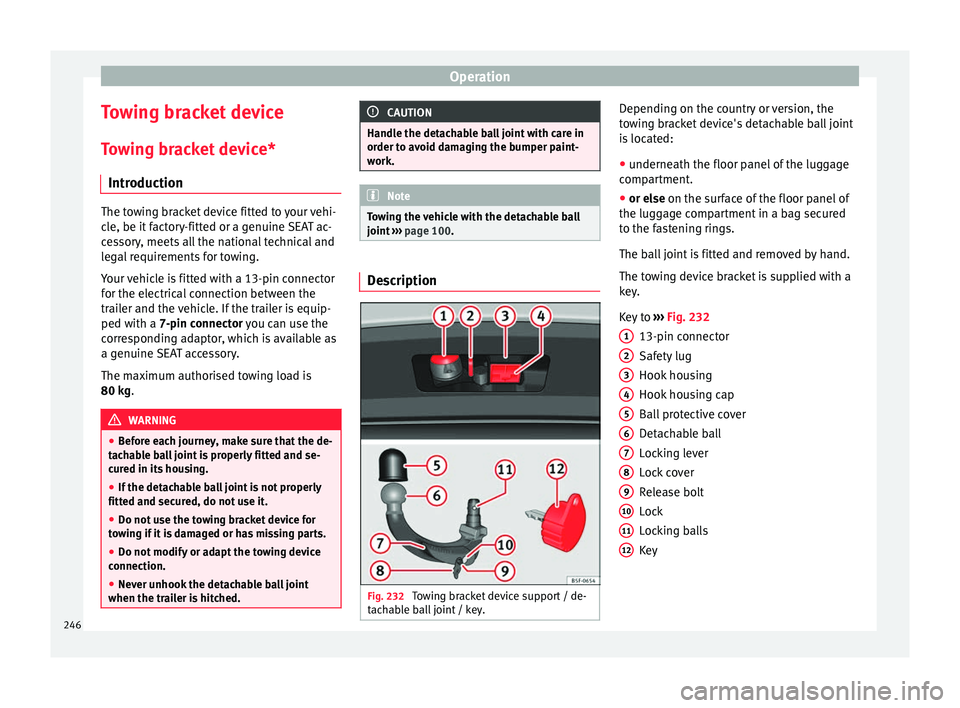
›› page 100. Description
Fig. 232
Towing bracket device support / de-
t ac h
able ball joint / key. Depending on the country or version, the
t
o
w
ing bracket device's detachable ball joint
is located:
● underneath the floor panel of the luggage
compar
tment.
● or else on the surf
ace of the floor panel of
the luggage compartment in a bag secured
to the fastening rings.
The ball joint is fitted and removed by hand.
The towing device bracket is supplied with a
key.
Key to ››› Fig. 232
13-pin connector
Safety lug
Hook housing
Hook housing cap
Ball protective cover
Detachable ball
Locking lever
Lock cover
Release bolt
Lock
Locking balls
Key
1 2
3
4
5
6
7
8
9
10
11
12
246
Page 250 of 332

Operation
Thus adjusted, the detachable ball is ready
f or in
s
tallation. CAUTION
The key cannot be removed or turned in the
st andb
y position. Assembling the detachable ball - Step
1
Fig. 236
Fitting the detachable ball / Release
bo lt
in the dep
loyed position. Fitting the detachable ball
● Remove the hook housing cap 4›››
Fig. 232 down w
ards.
● Set the detachable ball to its standby posi-
tion ›››
page 247.
● Grip the detachable ball from below
›
›› Fig. 236 and insert it into the hook hous- ing following the direction of arrow
1 until it
en g
ag
es audibly ››› .
L ev
er A turns
automatically in the direction
of arr
ow 2 upwards, and the release bolt
B moves outwards (the red and green part will
be
v
i
sible) ››› .
If l
ev
er A does not turn automatically or the
r el
e
ase bolt B does not come out, the de-
t ac
h
able ball should be removed by turning
the lever as far as possible downwards from
the housing cavity, and the detachable ball's
support surfaces and the cavity should then
be cleaned. WARNING
● When attac hin
g the detachable ball, keep
your hands well away from the reach of the
lever's rotation. There is a risk of injuring
your fingers!
● Never try to pull the lever upwards by force
to turn the k
ey. The detachable ball would not
be secured properly! Assembling the detachable ball - Step
2
Fig. 237
Locking the lock. Fig. 238
Placing the cover over the lock. Do not omit this first step
››
›
page 248, As-
sembling the detachable ball - Step 1 !
● Turn key A in the direction of arrow
1 un-
ti l the p
art of the key with the holes reaches
the bottom position ››› Fig. 237.
248