lights Seat Leon 5D 2017 Owner's Guide
[x] Cancel search | Manufacturer: SEAT, Model Year: 2017, Model line: Leon 5D, Model: Seat Leon 5D 2017Pages: 332, PDF Size: 7.25 MB
Page 115 of 332
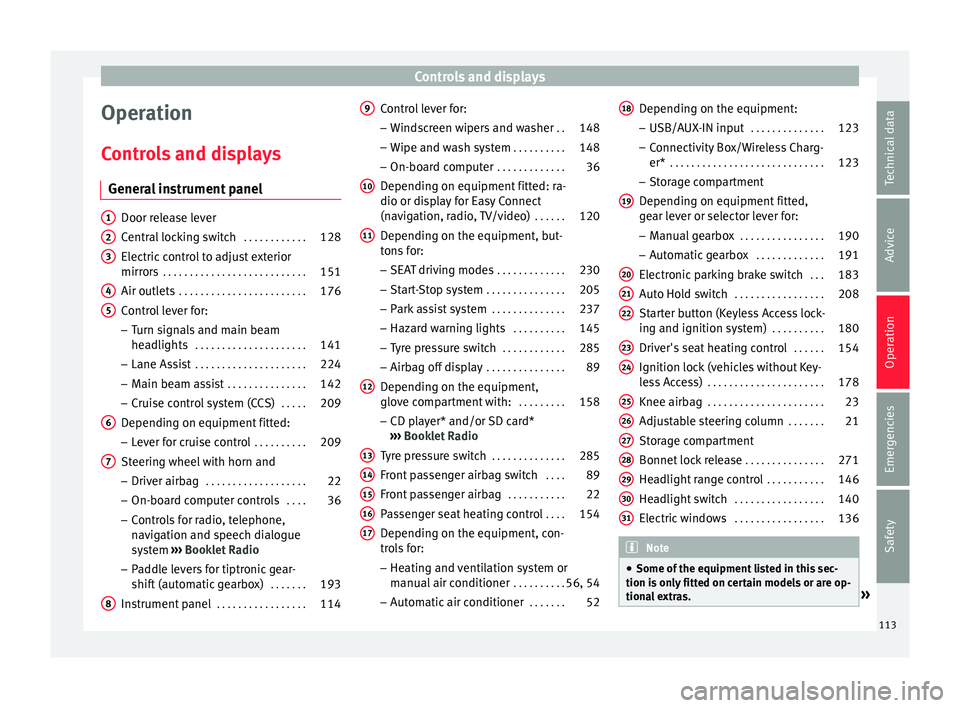
Controls and displays
Operation
C ontr
o
ls and displays
General instrument panel Door release lever
Centr
al
locking switch . . . . . . . . . . . .128
Electric control to adjust exterior
mirrors . . . . . . . . . . . . . . . . . . . . . . . . . . . 151
Air outl
ets . . . . . . . . . . . . . . . . . . . . . . . . 176
Control lever for:
– Turn s ign
als and main beam
headlights . . . . . . . . . . . . . . . . . . . . . 141
– Lane Ass i
st . . . . . . . . . . . . . . . . . . . . . 224
– Main beam a
ssist . . . . . . . . . . . . . . . 142
– Cruise c
ontrol system (CCS) . . . . .209
Depending on equipment fitted:
– Lev er f
or cruise control . . . . . . . . . .209
Steering wheel with horn and – Driver airbag . . . . . . . . . . . . . . . . . . . 22
– On-boar d c
omputer controls . . . .36
– Contro
ls for radio, telephone,
navigation and speech dialogue
system ›››
Booklet Radio
– Paddle levers for tiptronic gear-
shift (automatic gearbox) . . . . . . .193
Instrument panel . . . . . . . . . . . . . . . . . 114
1 2
3
4
5
6
7
8 Control lever for:
– Wind
s
creen wipers and washer . .148
– Wipe and wa
sh system . . . . . . . . . . 148
– On-board c
omputer . . . . . . . . . . . . . 36
Depending on equipment fitted: ra-
dio or disp
lay for Easy Connect
(navigation, radio, TV/video) . . . . . .120
Depending on the equipment, but-
tons
for:
– SEAT driving modes . . . . . . . . . . . . .230
– Star t
-Stop system . . . . . . . . . . . . . . . 205
– Park a
ssist system . . . . . . . . . . . . . . 237
– Hazard w
arning lights . . . . . . . . . .145
– Tyr
e pressure switch . . . . . . . . . . . .285
– Airbag off di
splay . . . . . . . . . . . . . . . 89
Depending on the equipment,
glov e c
ompartment with: . . . . . . . . .158
– CD pl a
yer* and/or SD card*
››› Booklet Radio
Tyre pressure switch . . . . . . . . . . . . . .285
Front passenger airbag switch . . . .89
Front passenger airbag . . . . . . . . . . .22
Passenger seat heating control . . . .154
Depending on the equipment, con-
tro l
s for:
– Heating and ventilation system or
manual air conditioner . . . . . . . . . .56, 54
– Autom atic
air conditioner . . . . . . .52
9
10
11
12
13
14
15
16
17 Depending on the equipment:
– USB/A UX
-IN inp
ut . . . . . . . . . . . . . . 123
– Connectivity
Box/Wireless Charg-
er* . . . . . . . . . . . . . . . . . . . . . . . . . . . . . 123
– Storag
e compartment
Depending on equipment fitted,
gear lever or selector lever for:
– Manual gearbox . . . . . . . . . . . . . . . . 190
– Automatic
gearbox . . . . . . . . . . . . . 191
Electronic parking brake switch . . .183
Auto Hold switch . . . . . . . . . . . . . . . . . 208
Starter button (Keyless Access lock-
ing and ignition sys
tem) . . . . . . . . . . 180
Driver's seat heating control . . . . . .154
Ignition lock (vehicles without Key-
les
s Access) . . . . . . . . . . . . . . . . . . . . . . 178
Knee airbag . . . . . . . . . . . . . . . . . . . . . . 23
Adjustable steering column . . . . . . .21
Storage compartment
Bonnet lock
release . . . . . . . . . . . . . . . 271
Headlight range control . . . . . . . . . . .146
Headlight switch . . . . . . . . . . . . . . . . . 140
Electric windows . . . . . . . . . . . . . . . . . 136 Note
● Some of the equipment li
sted in this sec-
tion is only fitted on certain models or are op-
tional extras. » 18
19
20
21
22
23
24
25
26
27
28
29
30
31
113
Technical data
Advice
Operation
Emergencies
Safety
Page 120 of 332

Operation
For vehicles with no coolant temperature
g aug
e, a c
ontrol lamp appears for high
coolant temperatures ››› page 274. Please
note ››› .
The c oo
l
ant temperature gauge only works
when the ignition is switched on ››› Fig. 124.
In order to avoid engine damage, please read
the following notes for the different tempera-
ture ranges.
Engine cold
If only the diodes in the lower part of the
scale light up, this indicates that the engine
has not yet reached operating temperature.
Avoid high revs and heavy acceleration and
do not make the engine work hard.
Normal temperature
If in normal operations, the diodes light up
until the central zone, it means that the en-
gine has reached operating temperature. At
high outside temperatures and when making
the engine work hard, the diodes may contin-
ue lighting up and reach the upper zone. This
is no cause for concern, provided the control
lamp does not light up on the instrument
panel digital display.
Heat range
When the diodes light up in the upper area of
the display and the control lamp appears on the instrument panel display, the coolant
temperat
ure is excessive ››› page 274. CAUTION
● To en s
ure a long useful life for the engine,
avoid high revs, driving at high speed and
making the engine work hard for approxi-
mately the first 15 minutes when the engine
is cold. The phase until the engine is warm al-
so depends on the outside temperature. If
necessary, use the engine oil temperature*
››› page 43 as a guide.
● Additional lights and other accessories in
front of
the air inlet reduce the cooling effect
of the coolant. At high outside temperatures
and high engine loads, there is a risk of the
engine overheating.
● The front spoiler also ensures proper distri-
bution of the c
ooling air when the vehicle is
moving. If the spoiler is damaged this can re-
duce the cooling effect, which could cause
the engine to overheat. Seek specialist assis-
tance. Fuel level - Petrol/Diesel
Fig. 125
Instrument panel: petrol/diesel
g aug
e The display
››
› Fig. 125
only works when the
ignition is switched on. When the display rea-
ches the reserve mark, the lower diode lights
up in red and the control lamp appears
››› page 114. When the fuel level is very low,
the lower diode flashes in red.
The fuel range is displayed on the instrument
panel ››› Fig. 122 3 .
The c ap
ac
ity of the fuel tank of your vehicle is
given in the Technical data section
››› page 58. CAUTION
Never run the fuel tank completely dry. An ir-
re gu
lar fuel supply could cause misfiring. In
this way the unburned fuel can reach the ex-
haust system, which could cause the catalytic
converter to overheat resulting in damage. 118
Page 121 of 332

Instruments and warning/control lamps
Fuel - Natural Gas level 3 Valid in vehicles equipped with natural gas engine
(GNC)
Fig. 126
Instrument panel: Natural gas gauge The gauges
››
› Fig. 126 and ››› Fig. 125 only
work when the ignition is on. When the dis-
play reaches the reserve mark, the lower LED
lights up in red and the control lamp ap-
pears. When the fuel level is very low, the
lower diode flashes in red.
● The green warning lamp ›››
Fig. 126 1 lights up when the vehicle is running in natu-
r
al
g
as operating mode.
● The green warning lamp 1 turns off
when the n at
ur
al gas is exhausted. The en-
gine changes to operate with petrol.
● The yellow control lamp lights up when
the re
serve level has been reached. Things to note
If the v
ehicle is left parked for a long time im-
mediately after refuelling, the natural gas lev-
el indicator may not accurately indicate the
same level shown after refuelling when the
vehicle is started up again. This is not due to
a leak in the system, but to a drop in pres-
sure in the gas tank for technical reasons af-
ter a cooling phase just after refuelling.
Control lamps
Warning and c
ontrol lamps Read the additional information carefully
› ›
›
page 47.
The control and warning lamps are indicators
of warnings, ››› , faults
››
› or certain func-
tion s.
Some c
ontrol and warning lamps come
on when the ignition is switched on, and
switch off when the engine starts running, or
while driving.
Depending on the model, additional text
messages may be viewed on the instrument
panel display. These may be purely informa-
tive or they may be advising of the need for
action ›››
page 114, Instruments.
Depending upon the equipment fitted in the
vehicle, instead of a warning lamp, some- times a symbol may be displayed on the in-
strument p
anel.
When certain control and warning lamps are
lit, an audible warning is also heard. WARNING
If the warning lamps and messages are ignor-
ed, the v ehic
le may stall in traffic, or may
cause accidents and severe injuries.
● Never ignore the warning lamps or text
mess
ages.
● Stop the vehicle safely as soon as possible.
● Park the vehicle away from traffic and en-
sure th
at there are no highly flammable ma-
terials under the vehicle that could come into
contact with the exhaust system (e.g. dry
grass, fuel).
● A faulty vehicle represents a risk of acci-
dent for the driv
er and for other road users. If
necessary, switch on the hazard warning
lamps and put out the warning triangle to ad-
vise other drivers.
● Before opening the bonnet, switch off the
engine and al
low it to cool.
● In any vehicle, the engine compartment is a
hazar
dous area and could cause severe inju-
ries ››› page 270. CAUTION
Failure to heed the control lamps and text
mes s
ages when they appear may result in
faults in the vehicle. 119
Technical data
Advice
Operation
Emergencies
Safety
Page 122 of 332
Operation
Introduction to the Easy
C onnect
sy
stem*
System settings (CAR)* CAR menu Read the additional information carefully
›› ›
page 33
To select the settings menus, depending on
the version, either press the Easy Connect
button and the SETTINGS
fu
nction b
ut-
ton, OR press the button, then Vehicle
and then the SETTINGS function button.
The actual number of menus available and
the name of the various options in these me-
nus will depend on the vehicle’s electronics
and equipment.
When the function button check box is activa-
ted , the function is active.
Pressing the menu button will always take
y ou t
o the l
ast menu used.
Any changes made using the settings menus
are automatically saved on closing those me-
nus.
Menu Vehicle set-
tingsPage
ESC system››› page 187
Menu Vehicle set-
tingsPage
Tyres››› page 283
Driver assistance››› table on page 33
Parking and manoeuvring››› page 237
Vehicle lights››› table on page 33
Mirrors and windscreen wipers››› table on page 33
Opening and closing››› table on page 33
Multifunction display››› table on page 33
Date and time››› table on page 33
Units››› table on page 33
Service››› page 115
Factory settings››› table on page 33 WARNING
Any distraction may lead to an accident, with
the risk of
injury. Operating the Easy Connect
system while driving could distract you from
traffic. 120
Page 128 of 332

Operation
Note
● Never l e
ave any valuable items in the vehi-
cle unattended. Even a locked vehicle is not a
safe.
● If the diode on the driver door sill lights up
for about 30 sec
onds when the vehicle is
locked, the central locking system or anti-
theft alarm* is not working properly. You
should have the fault repaired at a SEAT Offi-
cial Service or specialised workshop.
● The vehicle interior monitoring of the anti-
theft a
larm* system will only function as in-
tended if the windows and the sunroof* are
closed. Car key
Fig. 132
Vehicle key Fig. 133
Vehicle key with alarm button. Vehicle key
W
ith the
v
ehicle key the vehicle may be
locked or unlocked remotely ››› page 125.
The vehicle key includes an emitter and bat-
tery. The receiver is in the interior of the vehi-
cle. The range of the vehicle key with remote
control and new battery is several metres
around the vehicle.
If it is not possible to open or close the vehi-
cle using the remote control key, this should
be re-synchronised ››› page 132 or the bat-
tery changed ››› page 132.
Different keys belonging to the vehicle may
be used.
Control lamp on the vehicle key
When a button on the vehicle key is pressed,
the control lamp flashes ››› Fig. 132 (arrow)
once briefly, but if the button is held down for a longer period the control lamp flashes sev-
eral time
s, such as in convenience opening.
If the vehicle key control lamp does not light
up when the button is pressed, replace the
key's battery ››› page 132.
Unfolding and folding the key shaft
Press button 1
› ››
Fig. 132
or ›
›› Fig. 133 to
unlock and unfold the key shaft.
To fold the shaft away, press button 1 and
f o
l
d the key shaft in until it locks in place.
Alarm button*
Only press alarm button 2 in the event of an
emer g
ency!
When the alarm button is press-
ed, the vehicle horn is heard and the turn sig-
nals are switched on for a short time. When
the alarm button is pressed again, the alarm
is switched off.
Spare key
To obtain a spare key and other vehicle keys,
the vehicle chassis number is required.
Each new key contains a microchip which
must be coded with the data from the vehicle
electronic immobiliser. A vehicle key will not
work if it does not contain a microchip or the
microchip has not been encoded. This is also
true for keys which are specially cut for the
vehicle.
126
Page 130 of 332

Operation
Adjusting the central locking You can use Easy Connect* to select which
doors
ar
e unlocked with the central locking
system. Using the radio or the Easy Connect*
system, you can select whether the vehicle
automatically closes with the “Auto Lock”
programme at speeds of more than 15 km/h
(9 mph).
Programming the unlocking of the doors (ve-
hicles with Easy Connect)
– Select: button > SETTINGS
fu
nction
b
utton > Opening and closing > Cen-
tral locking > Unlocking doors .
Programming the Auto Lock (vehicles with
Easy Connect)
– Select: button > SETTINGS
fu
nction
b
utton > Opening and closing > Cen-
tral locking > Locking while
driving .
Programming the Auto Lock (vehicles with
radio)
– Select: SETUP button > control button
Central locking > Locking while
driving .
Un loc
k
ing doors
You can choose to unlock all the doors or
only the driver door when you unlock the vehicle. In all
the options, the fuel
tank flap
is also unlocked.
With the Driver setting, when you press the
button on the remote control key once, on-
ly the driver door is unlocked. If that button is
pressed twice, the rest of the doors and the
rear lid will be unlocked.
In vehicles with a conventional key, turn the
key in the door lock, in the direction of open-
ing, twice within 2 seconds.
If the button is pressed, all the vehicle
doors are locked. At the same time, a confir-
mation signal* is heard.
Auto Lock while driving
If you select on, all the vehicle doors are
locked at speeds above 15 km/h (9 mph).
Central locking switch Read the additional information carefully
› ›
›
page 15
Please note the following when using the
central locking switch to lock your vehicle:
● It is not possible to open the doors or the
rear lid fr
om the outside (for safety reasons,
e.g. when stopped at traffic lights).
● The LED in the central locking switch lights
up when all the door
s are closed and locked. ●
You can open the door
s individually from
the inside by pulling the inside door handle.
● In the event of an accident in which the air-
bags
inflate, doors locked from the inside will
be automatically unlocked to facilitate access
and assistance. WARNING
● The centr a
l locking switch also operates
when the ignition is switched off and auto-
matically locks all the vehicle doors when the
button is pressed.
● The central locking switch does not operate
if the v
ehicle is locked from the outside and
the anti-theft security system is switched on.
● Locked doors could delay assistance in an
emergency
, potentially putting lives at risk.
Do not leave anyone, especially children, in
the vehicle. Note
Your vehicle will lock automatically when it
re ac
hes a speed of about 15 km/h (9 mph)
(Auto Lock) ››› page 125. You can unlock the
vehicle again using the button on the cen-
tral locking switch. 128
Page 132 of 332

Operation
Unlocking the vehicle is confirmed with a
doub le
fl
ash of the indicator lights; locking
by a single flash.
If the vehicle is locked and then all doors and
the rear lid are closed leaving the last key
used inside the vehicle and none outside,
the vehicle will not lock immediately. All the
vehicle's indicator lights will flash four times.
The vehicle will lock after a few seconds if
you do not open any door or the rear lid.
The vehicle will lock again after a few sec-
onds if you unlock the vehicle but fail to open
any door or boot hatch.
Unlocking and opening the doors (Keyless-
Entry)
● Grip one of the front door handles. In doing
this, the sensor s
urface ››› Fig. 136 A (arrow)
on the h andl
e i
s touched and the vehicle un-
locks.
● Open the door.
On vehic
les with selective opening or info-
tainment system configuration, pulling the
door handle twice will unlock all doors.
On vehicles without a “Safe” security sys-
tem: shutting and locking doors (Keyless-Ex-
it)
● Switch the ignition off.
● Close the driver's door. ●
Touch (
once) the locking sensor surface B (arrow) on one of the front door handles. The
door th
at
i
s used must be closed.
On vehicles with a “Safe” security system:
shutting and locking doors (Keyless-Exit)
● Switch the ignition off.
● Close the driver's door.
● Touch (once) the sensor surface B (arrow)
on one of the fr
ont
door handles. The vehicle
locks with the “Safe” ››› page 131 system.
The door that is used must be closed.
● Touch (twice) the sensor surface B (arrow)
of one of
the fr
ont door handles to lock the
vehicle without activating the “Safe” security
system ››› page 131.
Unlocking and locking the boot hatch
When the vehicle is locked, the rear lid auto-
matically unlocks on opening if there is a val-
id vehicle key in the proximity ››› Fig. 135.
Open or close the rear lid normally.
After closing, the hatch locks automatically. If
the complete vehicle is unlocked, the rear lid
will not lock automatically after closing it.
What happens when locking the vehicle with
a second key
If there is a vehicle key inside the vehicle and
it is locked from the outside with a second
vehicle key, the key inside the vehicle is blocked for engine ignition
›››
page 178. In
order to enable engine ignition, the button
on the key inside the vehicle needs to be
pressed.
Automatically disabling sensors
If the vehicle is not locked or unlocked for a
long period of time, the proximity sensors on
the passenger doors are automatically disa-
bled.
If one of the sensor surfaces on the door han-
dles is often activated in an unusual manner
with the vehicle locked (e.g. by the branches
of a bush rubbing against it), all proximity
sensors are disabled for a certain period of
time.
Sensors will again be enabled:
● After a time.
● OR: if the vehicle is unlocked with the
butt
on on the key.
● OR: if the boot is opened.
● OR: if
the vehicle is unlocked manually with
the key
.
Keyless Access temporary disconnection
function*
You can deactivate the vehicle's Keyless Ac-
cess unlocking for a locking and unlocking
cycle.
130
Page 138 of 332

Operation
●
Alw a
ys close the rear lid properly. Risk of
accident or injury.
● The rear lid must not be opened when the
rever
se or rear fog lights are lit. This may
damage the tail lights.
● Do not close the rear lid by pushing it down
with y
our hand on the rear window. The glass
could smash. Risk of injury!
● Ensure the rear lid is locked after closing it.
If not, it m
ay open unexpectedly while driv-
ing.
● Closing the rear lid without observing and
ensurin
g it is clear could cause serious injury
to you and to third parties. Make sure that no
one is in the path of the rear lid.
● Never drive with the rear lid open or half-
closed, e
xhaust gases may penetrate into the
interior of the vehicle. Danger of poisoning!
● If you only open the rear lid, do not leave
the key in
side. The vehicle cannot be opened
if the key is left inside. Controls for the windows
Openin g and c
lo
sing of the electric
windows* Fig. 140
Detail of the driver door: controls for
the w indo
w
s (5-door vehicle with front and
rear electric windows). Read the additional information carefully
› ›
›
page 18
The front and rear electric windows can be
operated by using the controls on the driver
door. The other doors each have a switch for
their own window.
Always close the windows fully if you park
the vehicle or leave it unattended ››› .
Y ou c
an u
se the electric windows for approx.
10 minutes after switching off the ignition if
neither the driver door nor the front passen-
ger door has been opened and the key has
not been removed from the ignition. Safety switch
* (only in 5-door
vehicles)
The safety switch ››› Fig. 140 5 on the driver
door c an be u
sed t
o disable the electric win-
dow buttons on the rear doors.
● Safety switch not pressed : button
s on rear
doors are activated.
● Safety switch pressed : button
s on rear
doors are deactivated.
The safety control symbol lights up in yel-
low if the buttons on the rear doors are
switched off. WARNING
Observe the safety warnings ›››
in Intro-
duction on pag e 97
.
● Incorrect use of the electric windows can
res
ult in injury.
● Never close the rear lid without observing
and ensurin
g it is clear, to do otherwise could
cause serious injury to you and third parties.
Make sure that no one is in the path of a win-
dow.
● The engine may accidentally be started and
be out of c
ontrol.
● If the ignition is switched on, the electric
equipment cou
ld be activated with risk of in-
jury, for example, in the electric windows.
● The doors can be locked using the remote
contro
l key. This could become an obstacle
for assistance in an emergency situation. 136
Page 142 of 332

Operation
●
Nobody shou
ld be in the way of the panor-
amic sliding sunroof or sun blind, especially
when they are closed without the anti-trap
function.
● The anti-trap function does not prevent fin-
gers
or other parts of the body getting
pinched against the window frame and caus-
ing injury. Note
The anti-trap function is activated if the win-
do ws
and the panoramic sliding sunroof are
closed from the outside of the vehicle using
the ignition key for convenience closing
››› page 137. Lights and visibility
Light s
Side light and dip
ped beam headlight Read the additional information carefully
›› ›
page 30
The driver is personally responsible for the
correct use and adjustment of the lights in all
situations.
Audible warnings to advise the driver that
the lights have not been switched off
If the key is not in the ignition and the driver
door is open, an audible warning signal is
heard in the following cases: this is a remind-
er to turn off the lights.
● When the parking light is on ››
›
page 141.
● When the light switch is in position or
. WARNING
The side lights or daytime running lights are
not bright enough t
o illuminate the road
ahead and to ensure that other road users are
able to see you.
● Always use your dipped beam head lights if
it is
raining or if visibility is poor. WARNING
If the headlights are set too high and not
used c orr
ectly, there is a risk of dazzling or
distracting other road users. This could result
in a serious accident.
● Always make sure that the headlights are
correctly
adjusted. Note
The legal requirements regarding the use of
vehic l
e lights in each country must be ob-
served. Daytime running lights
The daytime running lights consist of individ-
ual
lights, int
e
grated in the front headlights.
With the daylight driving lights on, only these
lights switch on ››› .
The d a
ytime ru
nning lights switch on every
time the ignition is switched on, if the switch
is in positions or , according to the level
of exterior lighting.
When the light switch is in position , a
light sensor automatically switches dipped
beam on and off (including the control and
instrument lighting) or the daytime running
lights depending on the level of exterior
lighting.
140
Page 143 of 332

Lights and visibility
WARNING
● Never driv e w
ith daytime lights if the road
is not well lit due to weather or lighting con-
ditions. Daytime lights do not provide
enough light to illuminate the road properly
or be seen by other road users.
● The rear lights do not come on with the
daytime driv
ing light. A vehicle which does
not have the rear lights on may not be visible
to other drivers in the darkness, in the case
of heavy rain or in conditions of poor visibili-
ty. Turn signal and main beam lever
Read the additional information carefully
› ›
›
page 31
Push the lever all the way down to turn off
the corresponding function.
Convenience turn signals
For the one-touch signalling, when the igni-
tion is switched on, move the lever as far as
possible upwards or downwards and release
the lever. The turn signal will flash three
times.
One-touch signalling is activated and deacti-
vated in the Easy Connect system via the button and the function button SETTINGS >
Lights > One-touch signalling
› ›
›
page 33. In vehicles that do not have the correspond-
ing menu, this
function can be deactivated in
a specialised workshop. WARNING
Improper or lack of use of the turn signals, or
for g
etting to deactivate them can confuse
other road users. This could result in a seri-
ous accident.
● Always give warning when you are going to
chan
ge lane, overtake or when turning, acti-
vating the turn signal in good time.
● As soon as you have finished changing
lane, ov
ertaking or turning, switch the turn
signal off. WARNING
Incorrect use of the headlights may cause ac-
cident s
and serious injury, as the main beam
may distract or dazzle other drivers. Note
● If the c on
venience turn signals are operat-
ing (three flashes) and the other convenience
turn signals are switched on, the active part
stops flashing and only flashes once in the
new part selected.
● The turn signal only works when the igni-
tion is sw
itched on. The hazard warning
lights also work when the ignition is switch-
ed off. ●
If a tr ai
ler turn signal malfunctions, the
control lamp will stop flashing (trailer turn
signals) and the vehicle turn signal will flash
at double speed.
● The main beam headligh
ts can only be
switched on if the dipped beam headlights
are already on.
● In cold or damp weather conditions, the
headlight
s, tail lights and turn signals may
mist up inside temporarily. This is normal and
in no way effects the useful life of the vehicle
lighting system. Automatic dipped beam control
* The automatic dipped beam control is merely
int
ended a
s
an aid and is not able to recog-
nise all driving situations.
When the light switch is in position , the
vehicle lights and the instrument panel and
switch lighting switch on and off automatical-
ly in the following situations ››› in Daytime
ru nnin
g light
s on page 141:
Automatic switching
onAutomatic switching
off
The photo sensor detects
darkness, for example,
when driving through a
tunnel.When adequate lighting is
detected.» 141
Technical data
Advice
Operation
Emergencies
Safety