gearbox Seat Leon 5D 2017 Service Manual
[x] Cancel search | Manufacturer: SEAT, Model Year: 2017, Model line: Leon 5D, Model: Seat Leon 5D 2017Pages: 332, PDF Size: 7.25 MB
Page 209 of 332

Driver assistance systems
● The b att
er
y is very low.
● The steering wheel is overly turned or is be-
ing turned.
● If
there is a danger of misting.
● After engaging reverse gear.
● In case of a very steep gradient.
The indication
is shown on the instrument
panel display, and in addition, the driver in-
formation system* shows, .
The engine starts by itself
During a stopping phase the normal Start-
Stop mode can be interrupted in the follow-
ing situations: The engine restarts by itself
without involvement from the driver.
● The interior temperature differs from the
value select
ed on the air conditioner.
● Defrost function button activated
›››
page 52.
● The brake has been pressed several times
consec
utively.
● The battery is too low.
● High power consumption. Note
In vehicles with an automatic gearbox, if the
select or l
ever is placed in position D, N or S
after engaging reverse gear, the vehicle must
be driven at a speed faster than 10 km/h (6 mph) for the system to return to conditions in
which the en
gine c
an be stopped. Manually switching on/off the Start-
Stop sy
s
tem Fig. 201
Centre console: Start-Stop system
b utt
on. If you do not wish to use the system, you can
sw
it
c
h it off manually.
– To manually switch on/off the Start-Stop
syst
em, press the button. The button
symbol remains lit up yellow when the sys-
tem is switched off. Note
The system is automatically switched on each
time the engine i s
deliberately stopped dur-
ing a stopping phase. The engine will start
automatically. Driver messages on the instrument
p
anel
di
splay Start-Stop system deactivated.
Start the engine manually
This driv
er message is displayed when cer-
tain conditions are not met during the stop-
ping phase and the Start-Stop system cannot
restart the engine. The engine must be star-
ted manually.
Start-Stop system: Fault! Func-
tion not available There is a fault in the Start-Stop system. Take
the vehicle to a workshop to have the fault
repaired.
207
Technical data
Advice
Operation
Emergencies
Safety
Page 210 of 332

Operation
Auto Hold Function* D e
s
cription and operation Fig. 202
In the lower part of the centre con-
so l
e: Aut
o Hold function button. The control light of the
› ›
›
Fig. 202 button
remains on when the Auto Hold function is
connected.
Once connected, the Auto Hold function as-
sists the driver in keeping the vehicle station-
ary at repeated intervals or for a certain peri-
od of time with the engine running, for exam-
ple, when going up a slope, when stopped at
traffic lights or in heavy traffic with intermit-
tent stops.
When connected, the Auto Hold function au-
tomatically prevents the vehicle from rolling
when stationary without pressing the brake
pedal. After detecting that the vehicle is stationary
and the brake ped
al has been released, the
Auto Hold function holds the vehicle. The
driver can lift their foot off the brake pedal.
When the driver touches the accelerator ped-
al or accelerates slightly to continue driving,
the Auto Hold function releases the brake.
The vehicle moves according to the slope of
the road.
If the vehicle is stationary and one of the con-
ditions required by the Auto Hold function is
impaired, it disconnects itself and the but-
ton's control light goes out ››› Fig. 202. The
electronic parking brake connects automati-
cally, if necessary, to park the vehicle safe-
ly ››› .
C ondition
s
for keeping the vehicle stationary
with the Auto Hold function
● The driver door must be closed.
● The driver's seat belt must be fastened.
● The engine is running.
Switc
hing the Auto Hold function on and off
Press the button ››› . The control lamp on
the b utt
on g
oes out when the Auto Hold func-
tion is switched off. Automatically engaging and disengaging the
Auto Hol
d function
If the Auto Hold function was switched on
with the button before disengaging the ig-
nition, the function will remain on after the
ignition is re-engaged.
If the Auto Hold function was not switched
on, it will automatically remain off next time
the ignition is engaged.
The Auto Hold function is automatically
switched on if the following conditions are
met:
All conditions must be met at the same time
››› :
Manual gearboxAutomatic gearbox
1.The vehicle is kept stationary with the brake ped-
al on a flat surface or on a slope.
2.The engine rotates “correctly”.
Upon pressing the
clutch and accelerating
at the same time, the
brake releases gradu-
ally.Upon accelerating, the
brake releases gradu-
ally. 208
Page 211 of 332

Driver assistance systems
The Auto Hold function is automatically
t urned off
if
the following conditions are
met:
Manual gearboxAutomatic gearbox
1.
If any of the conditions mentioned on
››› page 208, Conditions for keeping the vehicle
stationary with the Auto Hold function are no lon- ger met.
2.If the engine is running irregularly or an anomalyis detected.
3.If the engine is turnedoff or stalls.If the engine is switch- ed off.
4.The clutch and the ac-
celerator are pressed at the same time.If the accelerator is pressed.
5.
If any of the tyres hasonly minimal contact
with the ground, e.g. in the case of axle articu- lation. WARNING
The smart technology incorporated into the
Auto Ho l
d function cannot defy the laws of
physics; it only works within the limits of the
system. The greater convenience provided by
the Auto Hold function should never tempt
you to take any risk that may compromise
safety.
● Never leave the vehicle running and with
the Auto Hol
d function switched on. ●
The Auto Ho l
d function cannot always keep
the vehicle stationary uphill or downhill or
stop it sufficiently, for example, on slippery
or frozen surfaces. Note
Before entering a car wash, always switch off
the Aut o Hol
d function, because if the elec-
tronic parking brake is automatically connec-
ted, it may cause damage. Cruise control system (CCS)*
Oper ation Fig. 203
Instrument panel display: CCS status
indic ation s. Read the additional information carefully
› ›
›
page 45
The cruise control system (CCS) is able to
maintain the set speed from 20 km/h (15
mph).
The CSS only reduces vehicle speed by ceas-
ing to accelerate, not by actively braking the
vehicle ››› .
C ontr
o
l lamp
When the warning lamp is lit, cruise con-
trol is active.
Several warning and control lamps light up
for a few seconds when the ignition is switch-
ed on, signalling that the function is being
verified. They will switch off after a few sec-
onds.
Displayed on the CCS screen
Status Fig. 203:
CCS temporarily switched off. The set
speed is displayed in small figures.
System error. Contact a specialised work-
shop.
CCS switched on. The speed memory is
empty.
The CCS is switched on. The set speed is
displayed in large figures. »
A B
C
D
209
Technical data
Advice
Operation
Emergencies
Safety
Page 217 of 332

Driver assistance systems
(18 and 150 mph) and to select the distance
r equir
ed w
ith regard to the vehicle in front.
The ACC will adapt the vehicle's cruise speed
at all times, maintaining a safe distance with
the vehicle in front based on its speed.
When driving behind another vehicle, the
ACC function reduces speed until it is the
same as that of the vehicle ahead and main-
tains the set distance between the vehicles.
If the vehicle ahead accelerates, the adaptive
cruise control also accelerates, going no
higher than the target speed programmed.
If the vehicle is equipped with automatic
gearbox, the ACC can brake the vehicle until
it stops completely if a vehicle in front of it
stops.
The distance programmed should be in-
creased when the road surface is wet.
Driver intervention prompt
During driving, the ACC is subject to certain
limitations inherent in the system. In other
words, in certain circumstances the driver will
have to adjust speed him or herself, as well
as the distance from other vehicles.
In this case, the instrument panel screen will
warn you to intervene by applying the brake
and a warning tone will be heard
››› page 216. WARNING
The intelligent technology in the ACC cannot
ov er
come the system's inherent limitations
or change the laws of physics. If used negli-
gently or involuntarily, it may cause serious
accidents and injuries. The system is not a re-
placement for driver awareness.
● Adapt your speed and safe distance to the
vehicl
e in front of you at all times to suit visi-
bility, weather, road and traffic conditions.
● Do not use the ACC when visibility is bad,
on steep r
oads, with several bends or in slip-
pery circumstances such as snow, ice, rain or
loose gravel, or on flooded roads.
● Never use the ACC when driving off-road or
on unpav
ed roads. The ACC has been de-
signed for use on paved roads only.
● The ACC does not react on approaching a
fixed o
bstacle, such as the tail of a traffic
jam, a damaged vehicle or a vehicle stopped
at the traffic lights.
● The ACC only reacts to people if a pedes-
trian monitorin
g system is available. In addi-
tion, the system does not react to animals or
vehicles crossing your path or approaching
head-on down the same lane.
● If the ACC does not reduce speed sufficient-
ly, brak
e the vehicle immediately by applying
the pedal.
● If you are driving using the spare wheel,
the ACC
system could automatically switch
off during the journey. Switch off the system
when starting off. ●
If the v
ehicle continues to move involuntar-
ily after a driver intervention prompt, brake
the vehicle by applying the pedal.
● If the dash panel displays a driv
er interven-
tion prompt, adjust the distance yourself.
● The driver should be ready to accelerate or
brake b
y him/herself at all times. CAUTION
If you have the sensation that the radar sen-
sor i s d
amaged, disconnect the ACC. This will
avoid possible damage. If this occurs have it
adjusted.
● Repairs to the radar sensor require special-
ist
knowledge and special tools. SEAT recom-
mends visiting a SEAT dealership for this pur-
pose. Note
● If the A C
C system does not work as descri-
bed in this chapter, do not use it until it has
been checked by a specialised workshop.
SEAT recommends visiting a SEAT dealership
for this purpose.
● Maximum speed with the ACC activated is
limited to 210 km/h (150 mph).
● When the A
CC is switched on, strange
noises
may be heard during automatic brak-
ing cause by the braking system. 215
Technical data
Advice
Operation
Emergencies
Safety
Page 220 of 332
Operation
Operating the Adaptive Cruise Control
A C
C Fig. 211
On the left of the steering column:
thir d l
ev
er for operating the Adaptive Cruise
Control. Fig. 212
On the left of the steering column:
thir d l
ev
er for operating the Adaptive Cruise
Control. When the Adaptive Cruise Control (ACC) is
c
onnect
ed, the gr
een control lamp will
light up on the instrument panel, and the programmed speed and ACC status will be
disp
layed ››› Fig. 209.
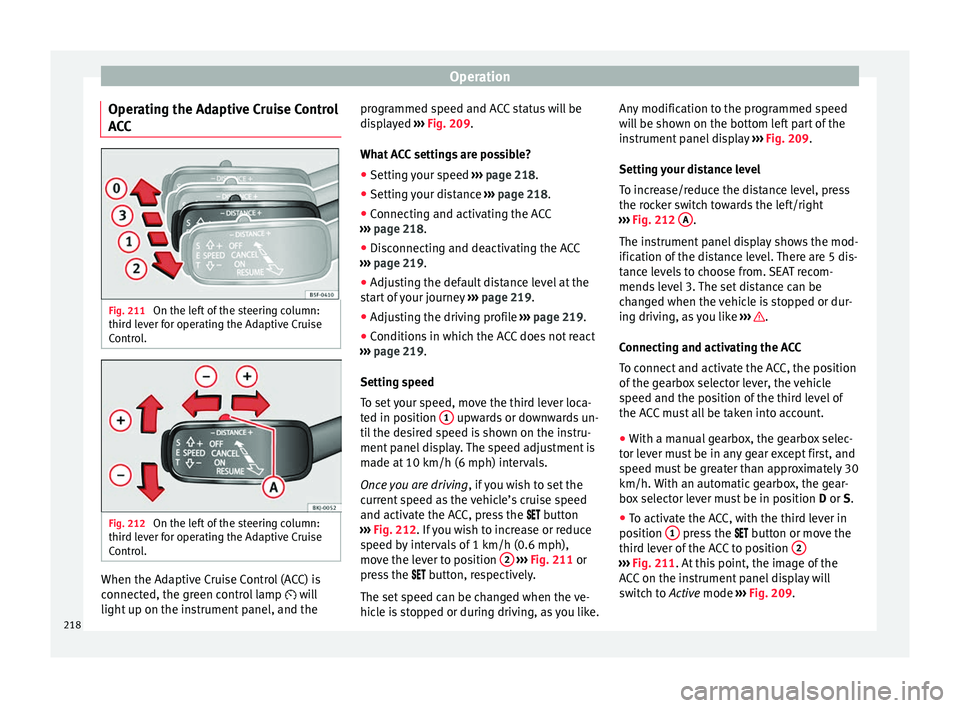
What ACC settings are possible? ● Setting your speed ›››
page 218.
● Setting your distance ›››
page 218.
● Connecting and activating the ACC
›››
page 218.
● Disconnecting and deactivating the ACC
›››
page 219.
● Adjusting the default distance level at the
star
t of your journey ››› page 219.
● Adjusting the driving profile ›››
page 219.
● Conditions in which the ACC does not react
›››
page 219.
Setting speed
To set your speed, move the third lever loca-
ted in position 1 upwards or downwards un-
ti l
the de
sired speed is shown on the instru-
ment panel display. The speed adjustment is
made at 10 km/h (6 mph) intervals.
Once you are driving , if you wish to set the
current speed as the vehicle’s cruise speed
and activate the ACC, press the button
››› Fig. 212. If you wish to increase or reduce
speed by intervals of 1 km/h (0.6 mph),
move the lever to position 2
›
››
Fig. 211 or
press the button, respectively.
The set speed can be changed when the ve-
hicle is stopped or during driving, as you like. Any modification to the programmed speed
wil
l be shown on the bottom left part of the
instrument panel display ››› Fig. 209.
Setting your distance level
To increase/reduce the distance level, press
the rocker switch towards the left/right
››› Fig. 212 A .
The in s
trument
panel display shows the mod-
ification of the distance level. There are 5 dis-
tance levels to choose from. SEAT recom-
mends level 3. The set distance can be
changed when the vehicle is stopped or dur-
ing driving, as you like ››› .
C onnectin
g and activ
ating the ACC
To connect and activate the ACC, the position
of the gearbox selector lever, the vehicle
speed and the position of the third level of
the ACC must all be taken into account.
● With a manual gearbox, the gearbox selec-
tor lev
er must be in any gear except first, and
speed must be greater than approximately 30
km/h. With an automatic gearbox, the gear-
box selector lever must be in position D or S.
● To activate the ACC, with the third lever in
position 1 press the
butt
on or mo
ve the
third lever of the ACC to position 2 ›››
Fig. 211. At thi s
point, the image of the
ACC on the instrument panel display will
switch to Active mode ››› Fig. 209.
218
Page 222 of 332
Operation
ACC: parking brake applied
The A C
C is deactivated if the parking brake is
applied. The ACC is available once again after
the parking brake is released.
ACC: currently not available.
Intervention of stability con-
trol
The message for the driver is displayed when
the electronic stability control (ESC) inter-
venes. In this case, the ACC is automatically
switched off. ACC: Take action!
The message for the driver is displayed if,
when the vehicle starts up on a hill with a
mild slope, the vehicle rolls back even al-
though the ACC is activated. Apply the brake
to stop the vehicle from moving/colliding
with another vehicle. ACC: speed limit
The message for the driver is displayed if, in
vehicles with manual gearbox, the current
speed is too low for the ACC mode.
The speed to be stored must be at least
30 km/h (18 mph). The speed limiter
switches off if the speed falls below 20 km/h
(12 mph). ACC: available as of the 2nd
gear The ACC is operational as of the 2nd gear
(manual g
earbox).
ACC: engine speed
The message for the driver is displayed if,
when the ACC accelerates or brakes, the driv-
er does not shift up or down a gear in time,
which means exceeding or not reaching the
permissible engine speed. The ACC switches
itself off. A buzzer warning is heard. ACC: clutch pressed
Vehicles with a manual gearbox: pressing the
clutch pedal for longer abandons control
mode. Door open
Vehicles with automatic gearbox: the ACC
cannot be activated with the vehicle station-
ary and the door open. WARNING
There is a danger of rear collision when the
minimum dis t
ance to the vehicle in front is
exceeded and the speed difference between
both vehicles is so great that a speed reduc-
tion by the ACC will not suffice. In this case
the brake pedal should be applied immedi-
ately.
● The ACC may not be able to detect all situa-
tions pr
operly.
● “Stepping” on the accelerator may cause
the ACC
not to intervene in braking. Driver braking will have priority over intervention by
the speed c
ontr
ol or adaptive cruise control.
● Always be ready to use the brakes!
● Observe country-specific provisions gov-
erning ob
ligatory minimum distances be-
tween vehicles. Note
● The pr ogrammed s
peed is erased once the
ignition or the ACC are switched off.
● When the traction control system (ASR) is
deactivat
ed during acceleration or else the
ESC is activated in Sport* Mode
( ››› page 120), the ACC switches off automati-
cally.
● In vehicles with the Start-Stop system, the
engine swit
ches off automatically during the
ACC stopping phase and restarts automatical-
ly to begin driving. 220
Page 224 of 332
Operation
Special driving situations Fig. 214
(A) Vehicle on a bend. (B) Motorcy-
c li
s
t ahead out of range of the radar sensor. Fig. 215
(C) Vehicle changing lanes. (D) One
v ehic
l
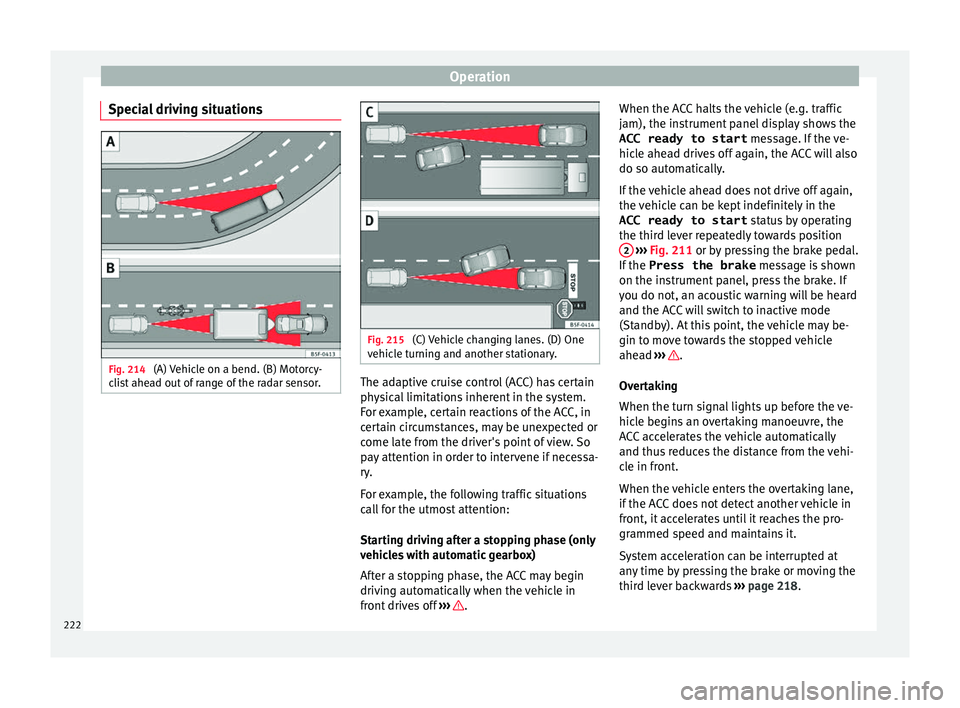
e turning and another stationary. The adaptive cruise control (ACC) has certain
ph
y
s
ical limitations inherent in the system.
For example, certain reactions of the ACC, in
certain circumstances, may be unexpected or
come late from the driver's point of view. So
pay attention in order to intervene if necessa-
ry.
For example, the following traffic situations
call for the utmost attention:
Starting driving after a stopping phase (only
vehicles with automatic gearbox)
After a stopping phase, the ACC may begin
driving automatically when the vehicle in
front drives off ››› .When the ACC halts the vehicle (e.g. traffic
j
am), the in
s
trument panel display shows the
ACC ready to start message. If the ve-
hicle ahead drives off again, the ACC will also
do so automatically.
If the vehicle ahead does not drive off again,
the vehicle can be kept indefinitely in the
ACC ready to start status by operating
the third lever repeatedly towards position 2
› ››
Fig. 211
or b
y pressing the brake pedal.
If the Press the brake message is shown
on the instrument panel, press the brake. If
you do not, an acoustic warning will be heard
and the ACC will switch to inactive mode
(Standby). At this point, the vehicle may be-
gin to move towards the stopped vehicle
ahead ››› .
Ov er
t
aking
When the turn signal lights up before the ve-
hicle begins an overtaking manoeuvre, the
ACC accelerates the vehicle automatically
and thus reduces the distance from the vehi-
cle in front.
When the vehicle enters the overtaking lane,
if the ACC does not detect another vehicle in
front, it accelerates until it reaches the pro-
grammed speed and maintains it.
System acceleration can be interrupted at
any time by pressing the brake or moving the
third lever backwards ››› page 218.
222
Page 232 of 332

Operation
SEAT Drive Profile* Intr oduction SEAT Drive Profile enables the driver to
choo
se betw
een four profiles or modes, Nor-
mal , Sport , Eco and Individual , that
modify the behaviour of various vehicle func-
tions, providing different driving experiences.
In the FR and X-PERIENCE models equipped
with dynamic chassis control, the Comfort
profile is also available.
In the Leon Cupra model the four profiles are Comfort , Sport, Cupra and Individual .
The Individual profile can be configured
according to personal preferences. The other
profiles are fixed.
Description Depending on the equipment fitted in the ve-
hic
l
e,
SEAT Drive Profile can operate on the
following functions: Engine
Depending on the pr
ofile selected, the en-
gine responds more spontaneously or more
in harmony with the movements of the accel-
erator. Additionally, when Eco mode is selec-
ted, the Start-stop function is automatically
activated.
In vehicles with automatic transmission, the
gear change points are modified to position
them in lower or higher engine speed ranges.
Additionally, the Eco 1)
mode activates the In-
ertia function, enabling consumption to be
further reduced.
In manual gearbox vehicles, Eco1)
mode cau-
ses the gear change recommendation indica-
tions that appear on the instrument panel to
vary, facilitating more efficient driving.
Dynamic chassis control (DCC)
DCC continuously adapts the shock absorb-
ers to the condition of the road and current
driving conditions, according to the pre-set
programme.
In the event of a fault in the DCC, the follow-
ing message is displayed on the instrument
screen Fault: damping setting .Address
Pow
er steering becomes more robust in
Sport mode to enable a sportier driving
style. In the Leon Cupra the power steering
becomes more robust in Cupra mode.
Air conditioning
In vehicles with Climatronic, this can operate
in eco 1)
mode, especially restricting fuel con-
sumption.
Adaptive Cruise Control (ACC) 2)
According to the active driving profile, the ac-
celeration gradient of the adaptive cruise
control varies.
Electronic self-locking differential 2)
The self-locking differential adapts its behav-
iour depending on the driving profile chosen.
Normal mode or Cupra mode can be selected
to prioritise improved traction in sport driv-
ing. 1)
In the Leon Cupra model, Ec o
mode is selected
through the Individual profile.
2) Applies to the Leon Cupra model.
230
Page 247 of 332

Driver assistance systems
Parking and manoeuvring with the
r e
ar a
ssist Fig. 231
Display on the Easy Connect system
s c
r
een: orientation lines. Switching the system on and off
●
The rear assist will switch on when the igni-
tion i s
on or the en
gine running, on engaging
reverse gear (manual gearbox) or on chang-
ing the selector lever to the R position (auto-
matic gearbox).
● The system switches off 8 seconds after
diseng
aging reverse gear (manual gearbox)
or removing the selector lever from the R po-
sition (automatic gearbox). The system will
also disconnect immediately after the igni-
tion is switched off. ●
The camera w
ill stop transmitting images
above the speed of 15 km/h (9 mph) with re-
verse engaged.
In combination with the Parking System Plus
››› page 237, the camera image will cease to
be transmitted immediately when reverse
gear is disengaged or when the selector lever
is moved from the R position, and the optical
information provided by the Parking Aid sys-
tem will be displayed.
Also in combination with the system, the rear
assist image can also be concealed:
● By pressing one of the Infotainment system
button
s on the display.
● OR: By pressing the miniature vehicle that
appe
ars on the left of the screen (which
switches to the full-screen mode of the Park-
ing System Plus's optical system).
If you wish to display the rear assist image
again:
● Disengage reverse, or change the selector
lever's
position, engage reverse again or
move the selector lever to position R.
● OR: Press the RVC fu
nction button1)Meaning of the orientation lines
›››
Fig. 231
Side lines: extension of the vehicle (the
approximate width of the vehicle plus the
rear view mirrors) on the road surface.
End of the side lines: the area marked in
green ends approximately 2 m behind
the vehicle on the road surface.
Intermediate line: indicates a distance of
approximately 1 m behind the vehicle on
the road surface.
Red horizontal line: indicates a safe dis-
tance of approximately 40 cm at the rear
of the vehicle on the road surface.
Parking manoeuvre
● Place the vehicle in front of the parking
spac
e and engage reverse gear (manual
gearbox) or move the selector to the R posi-
tion (automatic gearbox).
● Reverse slowly, and turn the steering wheel
so that the s
ide orientation lines lead to-
wards the parking space.
● Guide the vehicle into the parking space so
that the s
ide orientation lines run parallel to
it. 1
2
3
4
1)
WARNING: the RVC function b
utton will only be ac-
tivated and available when the reverse gear is en-
gaged or the selector lever is set to position R.
245
Technical data
Advice
Operation
Emergencies
Safety
Page 272 of 332
Advice
Engine compartment Chec k
in
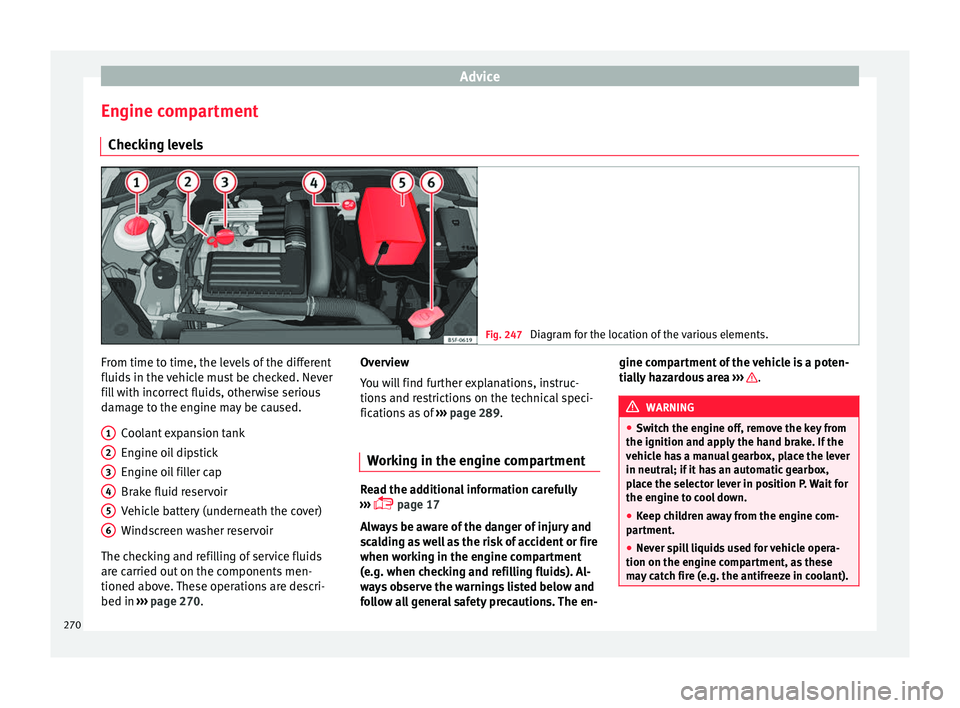
g levels Fig. 247
Diagram for the location of the various elements. From time to time, the levels of the different
fluid
s
in the
vehicle must be checked. Never
fill with incorrect fluids, otherwise serious
damage to the engine may be caused.
Coolant expansion tank
Engine oil dipstick
Engine oil filler cap
Brake fluid reservoir
Vehicle battery (underneath the cover)
Windscreen washer reservoir
The checking and refilling of service fluids
are carried out on the components men-
tioned above. These operations are descri-
bed in ››› page 270.
1 2
3
4
5
6 Overview
Y
ou w
i
ll find further explanations, instruc-
tions and restrictions on the technical speci-
fications as of ››› page 289.
Working in the engine compartment Read the additional information carefully
›› ›
page 17
Always be aware of the danger of injury and
scalding as well as the risk of accident or fire
when working in the engine compartment
(e.g. when checking and refilling fluids). Al-
ways observe the warnings listed below and
follow all general safety precautions. The en- gine compartment of the vehicle is a poten-
tia
l
ly hazardous area ››› .
WARNING
● Swit c
h the engine off, remove the key from
the ignition and apply the hand brake. If the
vehicle has a manual gearbox, place the lever
in neutral; if it has an automatic gearbox,
place the selector lever in position P. Wait for
the engine to cool down.
● Keep children away from the engine com-
partment
.
● Never spill liquids used for vehicle opera-
tion on the engine comp
artment, as these
may catch fire (e.g. the antifreeze in coolant). 270