light Seat Leon 5D 2017 Service Manual
[x] Cancel search | Manufacturer: SEAT, Model Year: 2017, Model line: Leon 5D, Model: Seat Leon 5D 2017Pages: 332, PDF Size: 7.25 MB
Page 109 of 332

Fuses and bulbs
Fig. 111
Fog light: remove the bulb holder Follow the steps indicated:
Remo
v
e the screw ››› Fig. 110 1 fr
om
the f og light
grille using a screwdriver
and extract the grille.
Remove the 3 screws ››› Fig. 110 2 .
R emo
v
e the metal clip situated on the
upper part of the fog light by pulling
away from the vehicle 3 and e
xtract
the f og light
.
Remove the connector ››› Fig. 111 1 from the bulb.
T
urn the b
u
lb holder 2 anti-clockwise
and p u
l
l.
Remove the bulb by pressing on the
bulb holder and turning it anticlockwise
at the same time.
Installation involves all of the above
steps in reverse sequence.
Check that the bulb works properly.
1.
2.
3.
4.
5.
6.
7.
8. Note
● Due to the difficulty of accessing fog light
bu l
bs, have them replaced at a Technical
Service or specialised workshop.
● LED fog lights should only be replaced by
speci
alised personnel. Changing incandescent rear
light b
u
lbs
Rear lights summary Tail lights on side panel
Turn signalPY21W NA LL
Side light and brake lightP21W LL
Tail lights on the rear lid
Left side
Side lights2x W5W LL
Fog lightsH21 W
Right side
Side lights2x W5W LL
Reverse lightP21W LL The table corresponds to a right-hand traffic
v
ehic
l
e. The position of lights may vary ac-
cording to the country.
107
Technical data
Advice
Operation
Emergencies
Safety
Page 110 of 332

Emergencies
Rear bulbs (in the side panel) Fig. 112
Luggage compartment: location of
the bo lt
sec
uring the tail light unit. Remove
the rear light unit from side panel. Fig. 113
Retaining tabs on reverse side of tail
light. –
Check which of the bulbs is defective.
– Open the rear lid.
– Remove the cover by prying the flat side of
a s c
r
ewdriver into the recess and remove
the cover from the opening ››› Fig. 112 1 .
– Carefully loosen the screw located behind
the c o
v
er with a screwdriver, turning it anti-
clockwise (arrows) ››› Fig. 112 2 .
– Tilt the light in the direction of the arrows
unti
l
it comes out of its housing (positions
3 and
4 )
››
› Fig. 112
.
– Remove the bulb holder ›››
Fig. 113 unlock-
ing the retaining tabs 1 .
– Change the damaged bulb.
– To refit follow the steps in reverse order,
tak
in
g special care when fitting the bulb
holder. The securing tabs must click into
place. CAUTION
Take care when removing the rear light unit to
mak e s
ure there is no damage to the paint-
work or any of its components. Note
Make sure you have a soft cloth ready to
pl ac
e under the glass on the rear light unit, to
avoid any scratches. 108
Page 111 of 332

Fuses and bulbs
Rear light bulbs (in the rear lid) Fig. 114
Remove the cover from the boot lid
and det ac
h the b
ulb holder. Fig. 115
Position of the bulbs in the bulb
hol der The rear lid must be open to change the
b
u
l
bs.
– Remove the rear lid cover in the direction
indicated ›
›› Fig. 114 .
– Unlock the retaining tabs A of the bulb
ho l
der
, following the direction of arrows 1 and
2
› ›
› Fig. 114
.
– Remove the bulb holder, moving it in the
direction of arr
ow 3
› ›
› Fig. 114 .
– Lightly press the defective bulb into the
bul
b holder 1 , then turn it to the left
2 and remove it
››
›
Fig. 115.
– Fit the new bulb, pressing it into the bulb
holder and t
urn it to the right as far as it
will go.
– Use a cloth to remove any fingerprints from
the glas
s part of the bulb.
– Check that the new bulb works properly. –
Reins
tall the bulb holder, making sure that
locking clips A
› ››
Fig. 114
are properly
clipped on.
– Replace the cover of the rear lid lining.
Rear LED light bulb (in the rear lid) Fig. 116
Remove the cover from the rear lid Fig. 117
Remove the bulb holder. » 109
Technical data
Advice
Operation
Emergencies
Safety
Page 112 of 332
Emergencies
The rear lid must be open to change the
b u
l
bs.
– Remove the rear lid cover in the direction
indicated ›
›› Fig. 116.
– Turn the reverse lights bulb holder anti-
clock
wise in the direction of the arrow 1›››
Fig. 117.
– Remove the bulb holder from its housing
2 .
– Change the defective bulb and reinstall the
bu
l
b holder in its housing, following these
instructions in reverse order.
– Check that the new bulb works properly.
Changing number plate light bulbs Fig. 118
In the rear bumper: number plate
light . Fig. 119
Number plate light: Remove the bulb
hol der
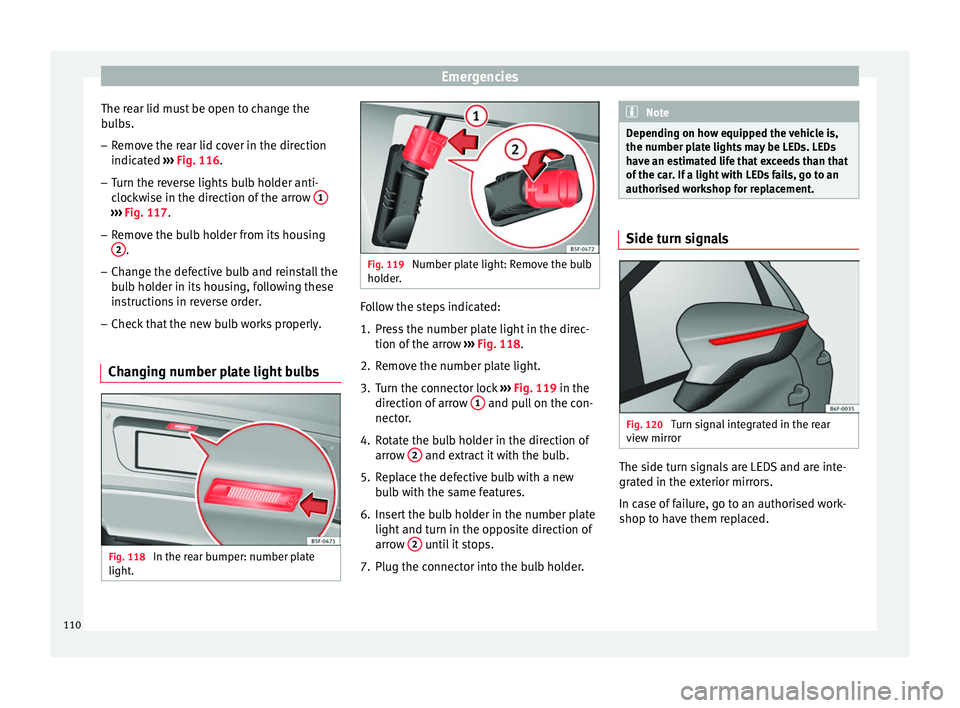
. Follow the steps indicated:
1. Press the number plate light in the direc-
tion of the arr
o
w ››› Fig. 118.
2. Remove the number plate light.
3. Turn the connector lock ›››
Fig. 119 in the
direction of arrow 1 and pull on the con-
nect or
.
4.
Rotate the bulb holder in the direction of
arrow 2 and extract it with the bulb.
5. Replace the defective bulb with a new bu
l
b with the same features.
6. Insert the bulb holder in the number plate light and turn in the op
posite direction of
arrow 2 until it stops.
7. Plug the connector into the bulb holder. Note
Depending on how equipped the vehicle is,
the number pl at
e lights may be LEDs. LEDs
have an estimated life that exceeds than that
of the car. If a light with LEDs fails, go to an
authorised workshop for replacement. Side turn signals
Fig. 120
Turn signal integrated in the rear
v iew mirr
or The side turn signals are LEDS and are inte-
gr
at
ed in the e
xterior mirrors.
In case of failure, go to an authorised work-
shop to have them replaced.
110
Page 115 of 332
Controls and displays
Operation
C ontr
o
ls and displays
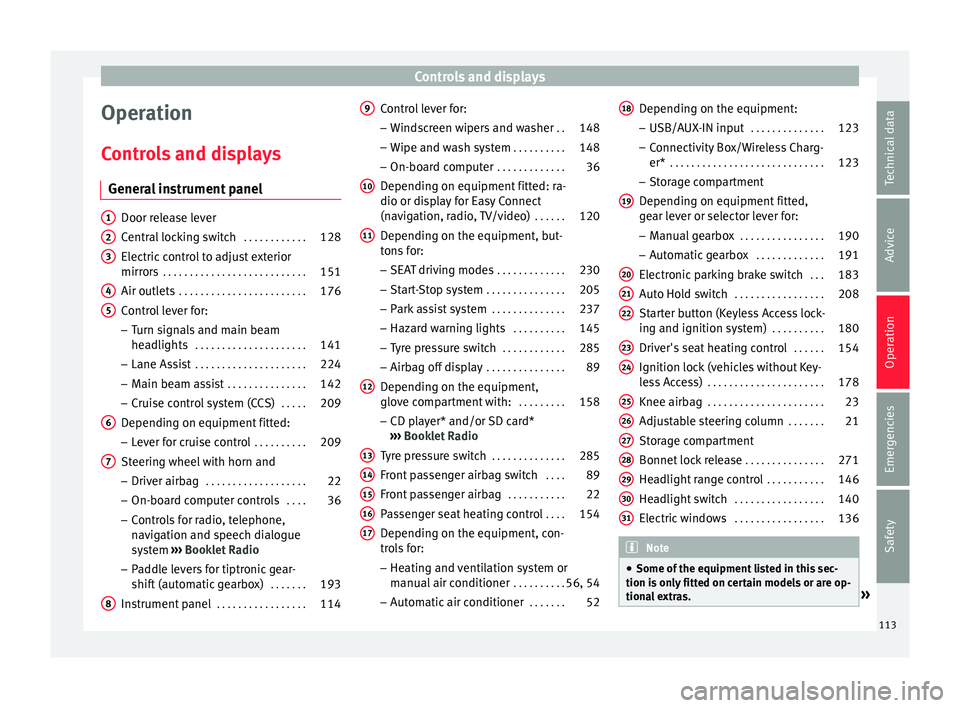
General instrument panel Door release lever
Centr
al
locking switch . . . . . . . . . . . .128
Electric control to adjust exterior
mirrors . . . . . . . . . . . . . . . . . . . . . . . . . . . 151
Air outl
ets . . . . . . . . . . . . . . . . . . . . . . . . 176
Control lever for:
– Turn s ign
als and main beam
headlights . . . . . . . . . . . . . . . . . . . . . 141
– Lane Ass i
st . . . . . . . . . . . . . . . . . . . . . 224
– Main beam a
ssist . . . . . . . . . . . . . . . 142
– Cruise c
ontrol system (CCS) . . . . .209
Depending on equipment fitted:
– Lev er f
or cruise control . . . . . . . . . .209
Steering wheel with horn and – Driver airbag . . . . . . . . . . . . . . . . . . . 22
– On-boar d c
omputer controls . . . .36
– Contro
ls for radio, telephone,
navigation and speech dialogue
system ›››
Booklet Radio
– Paddle levers for tiptronic gear-
shift (automatic gearbox) . . . . . . .193
Instrument panel . . . . . . . . . . . . . . . . . 114
1 2
3
4
5
6
7
8 Control lever for:
– Wind
s
creen wipers and washer . .148
– Wipe and wa
sh system . . . . . . . . . . 148
– On-board c
omputer . . . . . . . . . . . . . 36
Depending on equipment fitted: ra-
dio or disp
lay for Easy Connect
(navigation, radio, TV/video) . . . . . .120
Depending on the equipment, but-
tons
for:
– SEAT driving modes . . . . . . . . . . . . .230
– Star t
-Stop system . . . . . . . . . . . . . . . 205
– Park a
ssist system . . . . . . . . . . . . . . 237
– Hazard w
arning lights . . . . . . . . . .145
– Tyr
e pressure switch . . . . . . . . . . . .285
– Airbag off di
splay . . . . . . . . . . . . . . . 89
Depending on the equipment,
glov e c
ompartment with: . . . . . . . . .158
– CD pl a
yer* and/or SD card*
››› Booklet Radio
Tyre pressure switch . . . . . . . . . . . . . .285
Front passenger airbag switch . . . .89
Front passenger airbag . . . . . . . . . . .22
Passenger seat heating control . . . .154
Depending on the equipment, con-
tro l
s for:
– Heating and ventilation system or
manual air conditioner . . . . . . . . . .56, 54
– Autom atic
air conditioner . . . . . . .52
9
10
11
12
13
14
15
16
17 Depending on the equipment:
– USB/A UX
-IN inp
ut . . . . . . . . . . . . . . 123
– Connectivity
Box/Wireless Charg-
er* . . . . . . . . . . . . . . . . . . . . . . . . . . . . . 123
– Storag
e compartment
Depending on equipment fitted,
gear lever or selector lever for:
– Manual gearbox . . . . . . . . . . . . . . . . 190
– Automatic
gearbox . . . . . . . . . . . . . 191
Electronic parking brake switch . . .183
Auto Hold switch . . . . . . . . . . . . . . . . . 208
Starter button (Keyless Access lock-
ing and ignition sys
tem) . . . . . . . . . . 180
Driver's seat heating control . . . . . .154
Ignition lock (vehicles without Key-
les
s Access) . . . . . . . . . . . . . . . . . . . . . . 178
Knee airbag . . . . . . . . . . . . . . . . . . . . . . 23
Adjustable steering column . . . . . . .21
Storage compartment
Bonnet lock
release . . . . . . . . . . . . . . . 271
Headlight range control . . . . . . . . . . .146
Headlight switch . . . . . . . . . . . . . . . . . 140
Electric windows . . . . . . . . . . . . . . . . . 136 Note
● Some of the equipment li
sted in this sec-
tion is only fitted on certain models or are op-
tional extras. » 18
19
20
21
22
23
24
25
26
27
28
29
30
31
113
Technical data
Advice
Operation
Emergencies
Safety
Page 116 of 332

Operation
●
A separ at
e Instructions Manual is enclosed
if the vehicle is equipped with a factory-fitted
radio, CD player, AUX IN connection or navi-
gation system. ●
The arran g
ement of switches and controls
on right-hand drive models* may be slightly
different from the layout shown in ›››
page 112. However, the symbols used to
identif y
the controls are the same. Instruments and warning/control lamps
Ins trument
s
View of instrument panel Fig. 122
Instrument panel, on dash panel. Details of the instruments
››
›
Fig. 122: Rev counter (with the engine ru nning, in
hundreds of revolutions per minute).
1 The beginning of the red zone of the rev
c
ou
nt
er indicates the maximum speed in
any gear after running-in and with the
114
Page 120 of 332

Operation
For vehicles with no coolant temperature
g aug
e, a c
ontrol lamp appears for high
coolant temperatures ››› page 274. Please
note ››› .
The c oo
l
ant temperature gauge only works
when the ignition is switched on ››› Fig. 124.
In order to avoid engine damage, please read
the following notes for the different tempera-
ture ranges.
Engine cold
If only the diodes in the lower part of the
scale light up, this indicates that the engine
has not yet reached operating temperature.
Avoid high revs and heavy acceleration and
do not make the engine work hard.
Normal temperature
If in normal operations, the diodes light up
until the central zone, it means that the en-
gine has reached operating temperature. At
high outside temperatures and when making
the engine work hard, the diodes may contin-
ue lighting up and reach the upper zone. This
is no cause for concern, provided the control
lamp does not light up on the instrument
panel digital display.
Heat range
When the diodes light up in the upper area of
the display and the control lamp appears on the instrument panel display, the coolant
temperat
ure is excessive ››› page 274. CAUTION
● To en s
ure a long useful life for the engine,
avoid high revs, driving at high speed and
making the engine work hard for approxi-
mately the first 15 minutes when the engine
is cold. The phase until the engine is warm al-
so depends on the outside temperature. If
necessary, use the engine oil temperature*
››› page 43 as a guide.
● Additional lights and other accessories in
front of
the air inlet reduce the cooling effect
of the coolant. At high outside temperatures
and high engine loads, there is a risk of the
engine overheating.
● The front spoiler also ensures proper distri-
bution of the c
ooling air when the vehicle is
moving. If the spoiler is damaged this can re-
duce the cooling effect, which could cause
the engine to overheat. Seek specialist assis-
tance. Fuel level - Petrol/Diesel
Fig. 125
Instrument panel: petrol/diesel
g aug
e The display
››
› Fig. 125
only works when the
ignition is switched on. When the display rea-
ches the reserve mark, the lower diode lights
up in red and the control lamp appears
››› page 114. When the fuel level is very low,
the lower diode flashes in red.
The fuel range is displayed on the instrument
panel ››› Fig. 122 3 .
The c ap
ac
ity of the fuel tank of your vehicle is
given in the Technical data section
››› page 58. CAUTION
Never run the fuel tank completely dry. An ir-
re gu
lar fuel supply could cause misfiring. In
this way the unburned fuel can reach the ex-
haust system, which could cause the catalytic
converter to overheat resulting in damage. 118
Page 121 of 332

Instruments and warning/control lamps
Fuel - Natural Gas level 3 Valid in vehicles equipped with natural gas engine
(GNC)
Fig. 126
Instrument panel: Natural gas gauge The gauges
››
› Fig. 126 and ››› Fig. 125 only
work when the ignition is on. When the dis-
play reaches the reserve mark, the lower LED
lights up in red and the control lamp ap-
pears. When the fuel level is very low, the
lower diode flashes in red.
● The green warning lamp ›››
Fig. 126 1 lights up when the vehicle is running in natu-
r
al
g
as operating mode.
● The green warning lamp 1 turns off
when the n at
ur
al gas is exhausted. The en-
gine changes to operate with petrol.
● The yellow control lamp lights up when
the re
serve level has been reached. Things to note
If the v
ehicle is left parked for a long time im-
mediately after refuelling, the natural gas lev-
el indicator may not accurately indicate the
same level shown after refuelling when the
vehicle is started up again. This is not due to
a leak in the system, but to a drop in pres-
sure in the gas tank for technical reasons af-
ter a cooling phase just after refuelling.
Control lamps
Warning and c
ontrol lamps Read the additional information carefully
› ›
›
page 47.
The control and warning lamps are indicators
of warnings, ››› , faults
››
› or certain func-
tion s.
Some c
ontrol and warning lamps come
on when the ignition is switched on, and
switch off when the engine starts running, or
while driving.
Depending on the model, additional text
messages may be viewed on the instrument
panel display. These may be purely informa-
tive or they may be advising of the need for
action ›››
page 114, Instruments.
Depending upon the equipment fitted in the
vehicle, instead of a warning lamp, some- times a symbol may be displayed on the in-
strument p
anel.
When certain control and warning lamps are
lit, an audible warning is also heard. WARNING
If the warning lamps and messages are ignor-
ed, the v ehic
le may stall in traffic, or may
cause accidents and severe injuries.
● Never ignore the warning lamps or text
mess
ages.
● Stop the vehicle safely as soon as possible.
● Park the vehicle away from traffic and en-
sure th
at there are no highly flammable ma-
terials under the vehicle that could come into
contact with the exhaust system (e.g. dry
grass, fuel).
● A faulty vehicle represents a risk of acci-
dent for the driv
er and for other road users. If
necessary, switch on the hazard warning
lamps and put out the warning triangle to ad-
vise other drivers.
● Before opening the bonnet, switch off the
engine and al
low it to cool.
● In any vehicle, the engine compartment is a
hazar
dous area and could cause severe inju-
ries ››› page 270. CAUTION
Failure to heed the control lamps and text
mes s
ages when they appear may result in
faults in the vehicle. 119
Technical data
Advice
Operation
Emergencies
Safety
Page 122 of 332
Operation
Introduction to the Easy
C onnect
sy
stem*
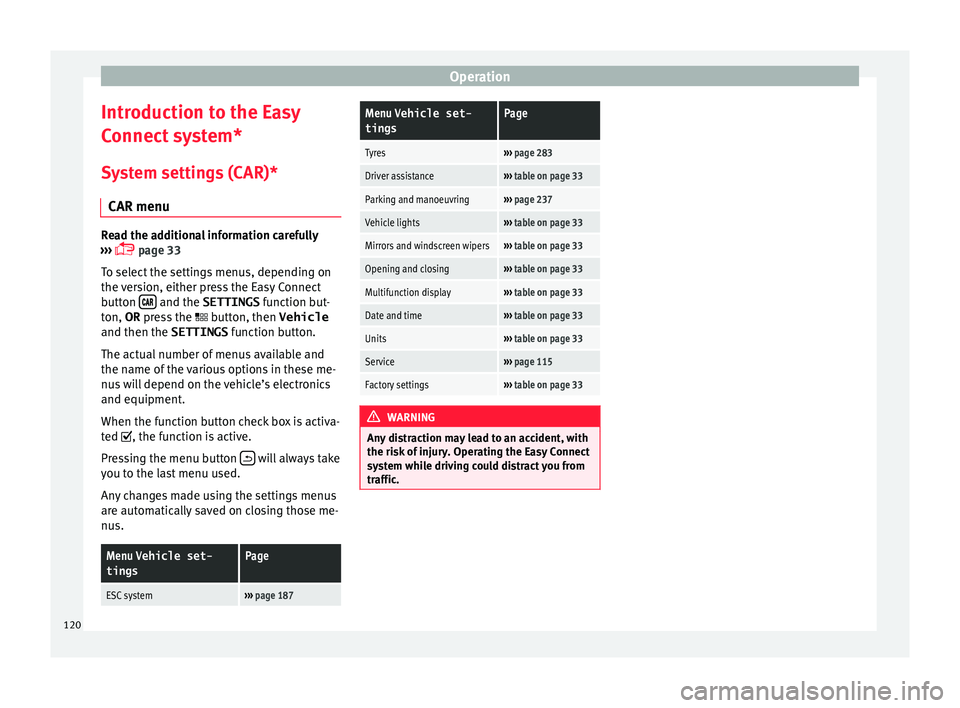
System settings (CAR)* CAR menu Read the additional information carefully
›› ›
page 33
To select the settings menus, depending on
the version, either press the Easy Connect
button and the SETTINGS
fu
nction b
ut-
ton, OR press the button, then Vehicle
and then the SETTINGS function button.
The actual number of menus available and
the name of the various options in these me-
nus will depend on the vehicle’s electronics
and equipment.
When the function button check box is activa-
ted , the function is active.
Pressing the menu button will always take
y ou t
o the l
ast menu used.
Any changes made using the settings menus
are automatically saved on closing those me-
nus.
Menu Vehicle set-
tingsPage
ESC system››› page 187
Menu Vehicle set-
tingsPage
Tyres››› page 283
Driver assistance››› table on page 33
Parking and manoeuvring››› page 237
Vehicle lights››› table on page 33
Mirrors and windscreen wipers››› table on page 33
Opening and closing››› table on page 33
Multifunction display››› table on page 33
Date and time››› table on page 33
Units››› table on page 33
Service››› page 115
Factory settings››› table on page 33 WARNING
Any distraction may lead to an accident, with
the risk of
injury. Operating the Easy Connect
system while driving could distract you from
traffic. 120
Page 128 of 332

Operation
Note
● Never l e
ave any valuable items in the vehi-
cle unattended. Even a locked vehicle is not a
safe.
● If the diode on the driver door sill lights up
for about 30 sec
onds when the vehicle is
locked, the central locking system or anti-
theft alarm* is not working properly. You
should have the fault repaired at a SEAT Offi-
cial Service or specialised workshop.
● The vehicle interior monitoring of the anti-
theft a
larm* system will only function as in-
tended if the windows and the sunroof* are
closed. Car key
Fig. 132
Vehicle key Fig. 133
Vehicle key with alarm button. Vehicle key
W
ith the
v
ehicle key the vehicle may be
locked or unlocked remotely ››› page 125.
The vehicle key includes an emitter and bat-
tery. The receiver is in the interior of the vehi-
cle. The range of the vehicle key with remote
control and new battery is several metres
around the vehicle.
If it is not possible to open or close the vehi-
cle using the remote control key, this should
be re-synchronised ››› page 132 or the bat-
tery changed ››› page 132.
Different keys belonging to the vehicle may
be used.
Control lamp on the vehicle key
When a button on the vehicle key is pressed,
the control lamp flashes ››› Fig. 132 (arrow)
once briefly, but if the button is held down for a longer period the control lamp flashes sev-
eral time
s, such as in convenience opening.
If the vehicle key control lamp does not light
up when the button is pressed, replace the
key's battery ››› page 132.
Unfolding and folding the key shaft
Press button 1
› ››
Fig. 132
or ›
›› Fig. 133 to
unlock and unfold the key shaft.
To fold the shaft away, press button 1 and
f o
l
d the key shaft in until it locks in place.
Alarm button*
Only press alarm button 2 in the event of an
emer g
ency!
When the alarm button is press-
ed, the vehicle horn is heard and the turn sig-
nals are switched on for a short time. When
the alarm button is pressed again, the alarm
is switched off.
Spare key
To obtain a spare key and other vehicle keys,
the vehicle chassis number is required.
Each new key contains a microchip which
must be coded with the data from the vehicle
electronic immobiliser. A vehicle key will not
work if it does not contain a microchip or the
microchip has not been encoded. This is also
true for keys which are specially cut for the
vehicle.
126