ignition Seat Leon 5D 2017 Repair Manual
[x] Cancel search | Manufacturer: SEAT, Model Year: 2017, Model line: Leon 5D, Model: Seat Leon 5D 2017Pages: 332, PDF Size: 7.25 MB
Page 185 of 332

Driving
“My Beat” Function Fig. 194
Related video For vehicles with a convenience key there is
the “My
B
eat” function. This feature provides
an additional indication of the vehicle igni-
tion system.
When accessing the vehicle, e.g. by opening
the doors with the remote control, the START ENGINE STOP button flashes, calling at-
t ention t
o the r
elevant starter system button.
Upon switching the ignition on/off, the light
of the START ENGINE STOP button flashes. With
the en gine sw
it
ched off, after a few seconds,
the STOP ENGINE START button stops flashing
and g oe
s
out.
With the engine running, the START ENGINE STOP button light stays on, indi-
c atin
g th
at the engine is running. The time
that lapses between the moment the user
starts the engine with the START ENGINE STOPbutton and the lighting changes from flash-
in
g t
o fi
xed will depend on specific engine
size characteristics. Upon switching the igni-
tion off with the START ENGINE STOP button, it
s t
ar
ts flashing again. In vehicles
with the St
art-Stop system, the
“My Beat” function also offers additional in-
formation:
● When the engine stops during the Stop
phase, the light
of the START ENGINE STOP but-
t on s
t
ays on, since, even though the engine
is off, the Start-Stop system is active.
● When the engine cannot be stated again
with the St
art-Stop system, ››› page 205, and
needs to be started manually, the START ENGINE STOP button flashes to indicate
thi s
f
act.
Braking and parking Electronic
parking brake* Fig. 195
In the lower part of the centre con-
so le: el
ectronic parking brake button. The electronic parking brake replaces the
h
andbr
ak
e.
Activating the electronic parking brake
The electronic parking brake can be activated
whenever the vehicle is at a standstill, even
when the ignition is switched off. Activate it
whenever you leave or park the vehicle.
● Pull and hold the ›››
Fig. 195 button.
● The parking brake is activated when the
contro
l light of the ››› Fig. 195 button (arrow)
and the red control light of the display in
the dash panel are on.
● Release the button.
Rele
asing the electronic parking brake
● Switch the ignition on.
● Press the button ›››
Fig. 195. At the same
time step hard on the brake pedal or, if the
engine is running, press the accelerator ped-
al slightly.
● The control light of the ›››
Fig. 195 button
(arrow) and the red control light of the dis-
play in the dash panel go out.
Automatic release of the electronic parking
brake on starting the engine
The electronic parking brake is automatically
switched off when starting if, after the driv-
er's door is closed and the driver's seat belt »
183
Technical data
Advice
Operation
Emergencies
Safety
Page 187 of 332

Driving
The handbrake should be applied firmly to
pr ev
ent
the vehicle from accidentally rolling
away.
Always apply the handbrake when you leave
your vehicle and when you park.
Applying the handbrake
– Pull the handbrake lever up firmly
›››
Fig. 196.
Releasing the handbrake
– Pull the lever up slightly and press the re-
lea
se knob in the direction of the arrow
››› Fig. 196 and guide the handbrake lever
down fully ››› .
A lw
a
ys pull the handbrake all the way up, so
there is less risk of driving off with it still en-
gaged ››› .
The h andbr
ak
e warning lamp lights up
when the handbrake is applied and the igni-
tion switched on. The warning lamp turns off
when the handbrake is released.
If you drive faster than 6 km/h (4 mph) with
the handbrake on, the following message*
will appear on the instrument panel: HAND-
BRAKE ON. You will also hear an audible
warning. WARNING
● Never u se the h
andbrake to stop the vehi-
cle when it is in motion. The braking distance is considerably longer, because braking is
only
ap
plied to the rear wheels. Risk of acci-
dent!
● If the handbrake is only partially released,
this w
ill cause the rear brakes to overheat,
which can impair the function of the brake
system and could lead to an accident. This al-
so causes premature wear on the rear brake
pads. CAUTION
Always apply the handbrake before you leave
the vehic
le. Put it in 1st gear as well. Parking
The handbrake should always be firmly ap-
p
lied when the
v
ehicle is parked.
Always note the following points when park-
ing the vehicle: – Use the brake pedal to stop the vehicle.
– Apply the handbrake.
– Put it in 1st gear.
– Switch the engine off and remove the key
from the ignition. T
urn the steering wheel
slightly to engage the steering lock.
– Never leave a vehicle key in the vehicle. Additional notes on parking the vehicle on
gradient
s:
Turn the steering wheel so that the vehicle
rolls against the kerb if it started to roll.
● If the vehicle is parked facing downhil
l,
turn the front wheels so that they point to-
wards the kerb .
● If the vehicle is parked facing uphill
, turn
the front wheels so that they point away from
the kerb.
● Secure the vehicle as usual by applying the
handbrak
e firmly and putting it in 1st gear. WARNING
● Tak e me
asures to reduce the risk of injury
when you leave your vehicle unattended.
● Never park where the hot exhaust system
coul
d ignite inflammable materials, such as
dry grass, low bushes, spilt fuel etc.
● Never allow vehicle occupants to remain in
the vehic
le when it is locked. They would be
unable to open the vehicle from the inside,
and could become trapped in the vehicle in
an emergency. In the event of an emergency,
locked doors will delay assistance to vehicle
occupants.
● Never leave children alone in the vehicle.
They cou
ld set the vehicle in motion, for ex-
ample, by releasing the handbrake or the
gearbox lever. » 185
Technical data
Advice
Operation
Emergencies
Safety
Page 193 of 332

Driving
WARNING
If the gear is changed down inappropriately
by sel
ecting a gear that is too low, you may
lose control of the vehicle, causing an acci-
dent and serious injuries. CAUTION
When travelling at high speeds or at high en-
gine speed s, sel
ecting a gear that is too low
can cause considerable damage to the clutch
and the gearbox. This can also occur if the
clutch pedal is pressed and held and it does
not engage. CAUTION
To prevent damage and avoid premature
we ar
, please observe the following:
● Do not rest your hand on the gear lever
while driv
ing. The pressure applied by your
hand is transmitted to the gearbox selector
forks.
● Always ensure that the vehicle is complete-
ly st
opped before engaging the reverse gear.
● Always press the clutch to the floor when
chan
ging gears.
● Never hold the vehicle “on the clutch” on
hill
s with the engine on. Automatic gearbox/DSG auto-
m
atic
g
earbox*
Introduction Your vehicle is equipped with an electronical-
ly c
ontr
olled manual gearbox. Torque be-
tween the engine and the gearbox is trans-
mitted via two independent clutches. They re-
place the torque converter found on conven-
tional automatic gearboxes and allow for
smooth, uninterrupted acceleration of the ve-
hicle.
The tiptronic system allows the driver to
change gears manually if desired
››› page 193, Engaging gears with the trip-
tonic mode*.
Selector lever positions Read the additional information carefully
› ›
›
page 50
The selector lever position engaged is high-
lighted on the display in the instrument clus-
ter. With the selector lever in the manual
gearbox positions G, D, E and S, the engaged
gear is also indicated on the display.
P – Parking lock
When the selector lever is in this position,
the driven wheels are locked mechanically. The parking lock must be engaged only when
the vehic
le is stationary ››› .
The int erloc
k
button (the button on the selec-
tor lever handle) must be pressed in and si-
multaneously the brake pedal must be de-
pressed before moving the selector lever ei-
ther in or out of position P.
R – Reverse gear
Reverse gear must be engaged only when the
vehicle is stationary and the engine is idling
››› .
T o mo
v
e the selector lever to position R, the
interlock button must be pressed in and at
the same time the brake pedal must be de-
pressed. The reverse lights come on when
the selector lever is in the R position with the
ignition on.
N – Neutral (idling)
With the selector lever in this position, the
gear is in neutral.
D/S – Permanent drive (forward) position
The selector lever in the D/S position enables
the gears to be controlled in normal mode (D)
or Sport (S) mode. To select Sport mode (S),
move the selector lever backwards. Moving
the lever again will select normal mode (D).
The selected driving mode is shown on the
instrument panel display. »
191
Technical data
Advice
Operation
Emergencies
Safety
Page 194 of 332
Operation
In norm al mode
(D), the g
e arbox automatical-
ly selects the best gear ratio. This depends
on the engine load, the road speed and the
dynamic gear control programme (DCP).
Sport mode (S) must be selected for a sporty
driving style. This setting makes use of the
engine's maximum power output. When ac-
celerating the gear shifts will be noticeable.
Press the brake pedal to move the selector
lever from N to D/S when the vehicle is sta-
tionary or at speeds below 3 km/h (2 mph)
››› .
Under c er
t
ain circumstances (e.g. when driv-
ing in mountains) it can be advantageous to
switch temporarily to tiptronic mode
››› page 193, in order to manually select gear
ratios to suit the driving conditions. WARNING
● Tak e c
are not to accidentally press the ac-
celerator pedal when the vehicle is stopped.
The vehicle could otherwise start moving im-
mediately (in some cases even if the parking
brake is engaged) resulting in the risk of an
accident.
● Never move the selector lever to R or P
when driving. F
ailure to follow this instruc-
tion could result in an accident.
● With selector lever in any position (except
P) the vehic
le must always be held with the
foot brake when the engine is running. This is
because an automatic gearbox still transmits power even at idling speed, and the vehicle
tend
s
to “creep”. The accelerator pedal must
on no account be pressed inadvertently when
a gear is engaged with the vehicle stationary.
The vehicle could otherwise start moving im-
mediately (in some cases even if the parking
brake is engaged) resulting in the risk of an
accident.
● While you are selecting a gear and the vehi-
cle i
s stopped with the engine running, do
not accelerate. Failure to follow this instruc-
tion could result in an accident.
● As a driver you should never leave your ve-
hicle if
the engine is running and a gear is en-
gaged. If you have to leave your vehicle while
the engine is running, you must apply the
handbrake and engage the parking lock (P).
● To avoid accidents, apply the handbrake
and put the sel
ector lever in position P before
opening the bonnet and working on the vehi-
cle with the engine running. Please always
observe the important safety warnings
››› page 270, Working in the engine compart-
ment. Note
● If the sel ect
or lever is moved accidentally
to N when driving, release the accelerator and
let the engine speed drop to idling before se-
lecting gear range D or S again.
● Should the power supply to the selector
lever be int
errupted in position P, the selector
lever will be locked. If this should happen the
manual release can be used ›››
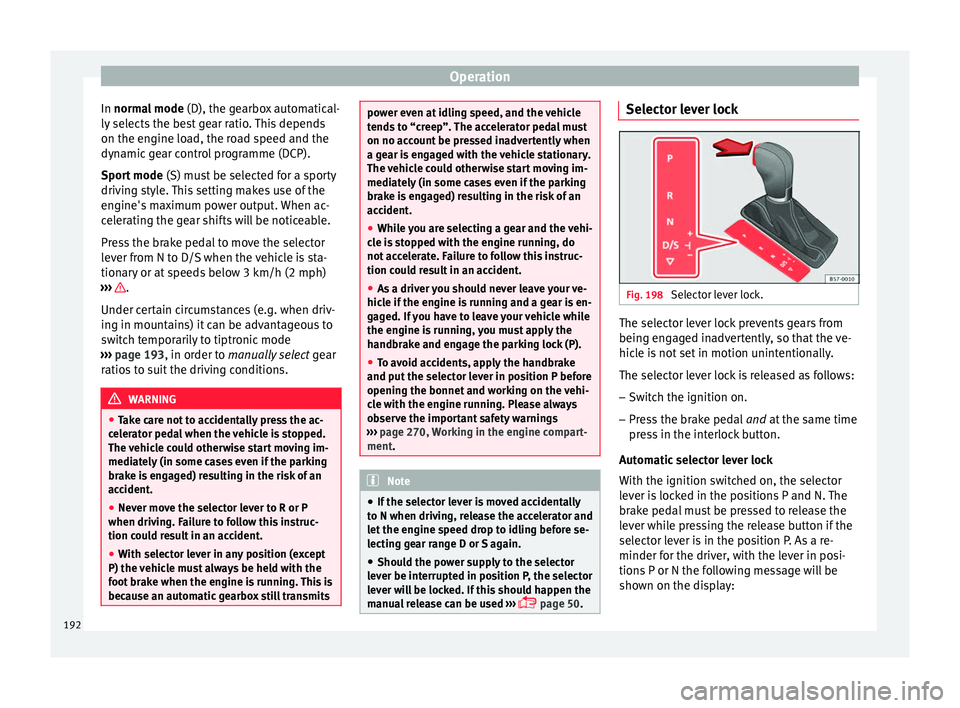
page 50. Selector lever lock
Fig. 198
Selector lever lock. The selector lever lock prevents gears from
bein g en
g
aged inadvertently, so that the ve-
hicle is not set in motion unintentionally.
The selector lever lock is released as follows:
– Switch the ignition on.
– Press the brake pedal and at
the same time
press in the interlock button.
Automatic selector lever lock
With the ignition switched on, the selector
lever is locked in the positions P and N. The
brake pedal must be pressed to release the
lever while pressing the release button if the
selector lever is in the position P. As a re-
minder for the driver, with the lever in posi-
tions P or N the following message will be
shown on the display:
192
Page 195 of 332

Driving
When stationary, apply footbrake
while selecting a gear.
L ev
el
lock only engages with the vehicle sta-
tionary and at speeds of up to 5 km/h
(3 mph). At speeds of over 5 km/h (3 mph)
the lever lock is automatically deactivated in
position N.
The selector lever lock is not engaged if the
selector lever is moved quickly through posi-
tion N (e.g. when shifting from R to D). This
makes it possible, for instance, to rock the
vehicle “backwards and forwards” if it is
stuck. The selector lever lock engages auto-
matically if the brake pedal is not depressed
and the lever is in position N for more than
about two seconds.
Interlock button
The interlock button on the selector lever
handle prevents the driver from inadvertently
engaging certain gears. Press the button in
to disengage the selector lever lock. The se-
lector lever positions in which the interlock
button has to be pressed are shown in the il-
lustration, highlighted in colour ››› Fig. 198.
Safety interlock for ignition key
If the vehicle does not have electronic brak-
ing, and depending on the country, once the
ignition has been turned off, the key may be
removed only if the gear selector is in posi- tion P. While the key is not in the ignition, the
selector l
ever is locked in position P. Note
● If the sel ect
or lever lock does not engage,
there is a fault. The transmission is interrup-
ted to prevent the vehicle from accidentally
moving. Follow the procedure below in order
for the selector lever lock to engage again:
–With a 6-speed gearbox: press the brake
pedal and release it again.
– With a 7-speed gearbox: press the brake
pedal. Move the selector lever to posi-
tion P or N and subsequently engage a
gear.
● Despite a gear being engaged, the vehicle
does not
move forwards or back. Proceed to
the next mode:
– When the vehicle does not move in the
required direction, the system may not
have the gear range correctly engaged.
Press the brake pedal and engage the
gear range again.
– If the vehicle still does not move in the
required direction, there is a system mal-
function. Seek specialist assistance and
have the system checked. Engaging gears with the triptonic
mode*
Fig. 199
Centre console: changing gear with
tiptr onic Fig. 200
Steering wheel: automatic gearbox
l ev
er
s The tiptronic gives the driver the option to
c
h
an
ge gears manually. »
193
Technical data
Advice
Operation
Emergencies
Safety
Page 203 of 332

Driving
(2.5 miles), when fuel consumption will re-
t urn t
o a norm
al level.
Check tyre pressure
Always make sure the tyres are inflated to the
correct pressures ››› page 280 to save fuel. If
the pressure is below half bar, fuel consump-
tion may increase by 5%. Due to the greater
rolling resistance, under-inflation also increa-
ses tyre wear and impairs handling.
Do not use winter tyres all year round as they
increase fuel consumption by up to 10%.
Avoid carrying unnecessary loads
Given that every kilo of extra weight will in-
crease the fuel consumption, it is advisable
to always check the luggage compartment to
make sure that no unnecessary loads are be-
ing transported.
Since the luggage rack increases the aerody-
namic drag of the vehicle, you should remove
it when not needed. At speeds of 100-120
km/h (62-75 mph), this will save 12% of fuel.
Save electrical energy
The engine drives the alternator, thereby gen-
erating electricity. This implies that any in-
crease in power consumption also increases
fuel consumption! For this reason, switch off
any unneeded electrical devices. Devices that
use a lot of electricity includes the blower at a high setting, the rear window heating or
the seat he
ating*.
Power management This sy
stem helps to ensure reliable
starting The power management controls the distribu-
tion of el
ectric
al energy and thus helps to en-
sure that there is always enough power avail-
able to start the engine.
If a vehicle with a conventional electrical sys-
tem is left parked for a long time, the battery
will gradually lose its charge because certain
electrical devices, such as the electronic
gearbox lock continues to draw current even
when the ignition is off. In some cases there
may not be enough power available to start
the engine.
Your vehicle is equipped with an intelligent
power management system to control the
distribution of electrical energy. This signifi-
cantly improves reliability when starting the
engine, and also prolongs the useful life of
the battery.
The main functions incorporated in the power
management system are battery diagnosis,
residual current management and dynamic
power management. Battery diagnosis
The batt
er
y diagnosis function constantly
registers the condition of the battery. Sen-
sors detect the battery voltage, battery cur-
rent and battery temperature. This enables
the system to calculate the current power lev-
el and charge condition of the battery.
Residual current management
The residual current management reduces
power consumption while the vehicle is
parked. It controls the supply of power to the
various electrical devices while the ignition is
switched off. The system takes the battery di-
agnosis data into consideration.
Depending on the power level of the battery,
switch off the individual electrical devices
one after the other to prevent the battery
from losing too much charge and to ensure
that the engine can be started reliably.
Dynamic power management
While the vehicle is moving, this function dis-
tributes the available power to the various
electrical devices and systems according to
their requirements. The power management
ensures that on-board systems do not con-
sume more electrical power than the alterna-
tor can supply, and thus maintains the maxi-
mum possible battery power level. »
201
Technical data
Advice
Operation
Emergencies
Safety
Page 204 of 332

Operation
Note
● Neither is the po
wer management system
able to overcome the given physical limits.
Please remember that the power and useful
life of the battery are limited.
● When there is a risk that the vehicle will
not st
art, the alternator power failure or low
battery charge level warning lamp will be
shown ››› page 119. Flat battery
Starting ability has first priority.
Shor
t
trip
s, city traffic and low temperatures
all place a heavy load on the battery. In these
conditions a large amount of power is con-
sumed, but only a small amount is supplied.
The situation is also critical if electrical devi-
ces are in use when the engine is not run-
ning. In this case power is consumed when
none is being generated.
In these situations you will be aware that the
power management system is intervening to
control the distribution of electrical power.
When the vehicle is parked for long periods
If you do not drive your vehicle for a period of
several days or weeks, the power manage-
ment will gradually shut off the electrical de-
vices one by one or reduce the amount of cur-
rent they are using. This limits the amount of power consumed and helps to ensure relia-
ble s
tarting even after a long period. Some
convenience functions, such as remote vehi-
cle opening, may not be available under cer-
tain circumstances. These functions will be
restored when you switch on the ignition and
start the engine.
With the engine switched off
For example, if you listen to the sound sys-
tem with the engine switched off the battery
will run down.
If the energy consumption means there is a
risk that the engine will not start, a text will
appear in vehicles with a driver information
system*.
This driver indicator tells you that you must
start the engine so that the battery can re-
charge.
When the engine is running
Although the alternator generates electrical
power, the battery can still become dis-
charged while the vehicle is being driven.
This can occur when a lot of power is being
consumed but only a small amount supplied,
especially if the battery is not fully charged
initially.
To restore the necessary energy balance, the
system will then temporarily shut off the elec-
trical devices that are using a lot of power, or
reduce the current they are consuming. Heat- ing systems in particular use a large amount
of electric
al power. If you notice, for instance,
that the seat heating* or the rear window
heater is not working, they may have been
temporarily switched off or regulated to a
lower heat output. These systems will be
available again as soon as sufficient electri-
cal power is available.
You may also notice that the engine runs at a
slightly faster idling speed when necessary.
This is quite normal, and no cause for con-
cern. The increased idling speed allows the
alternator to meet the greater power require-
ment and charge the battery at the same
time.
Engine management and emis-
sion contr
ol system
Introduction WARNING
● Bec au
se of the high temperatures which
can occur in the exhaust purification system
(catalytic converter or diesel particulate fil-
ter), do not park the vehicle where the ex-
haust can come into contact with flammable
materials under the car (e.g. on grass or at
the forest edge). Fire hazard! 202
Page 205 of 332

Driving
●
Do not ap p
ly wax underneath the vehicle
around the area of the exhaust system: Fire
hazard! Note
While the control lamps , , or r
e-
m ain lit, ther
e may be engine problems, fuel
consumption may increase and the engine
may lose power. Catalytic converter
3 App
lies to vehicles with petrol engine
The
vehicle must only be used with unleaded
petrol, otherwise the catalytic converter will
be irreparably damaged.
Never drive until the tank is empty; an irregu-
lar supply of fuel can cause faulty combus-
tion. In these cases, unburned fuel reaches
the exhaust system, which can overheat and
damage the catalytic converter.
Diesel particulate filter 3 App
lies to vehicles with diesel engine
The die
sel engine particulate filter eliminates
most of the soot from the exhaust gas sys-
tem. Under normal driving conditions, the fil-
ter cleans itself. The diesel particulate filter is
cleaned automatically without need for indi-
cation by the warning lamp . This may benoticed because the engine idle speed in-
cr
e
ases and an odour may be detected.
If automatic filter purification cannot be car-
ried out (because only short trips are taken,
for example), soot will accumulate on the fil-
ter and the Diesel particulate filter warning
lamp will switch on.
Facilitate the automatic filter cleaning proc-
ess by driving in the following manner: drive
for approximately 15 minutes at a minimum
speed of 60 km/h (37 mph) in 4th or 5th gear
(automatic gearbox: gear S). Maintain the en-
gine speed at approximately 2,000 rpm. The
rise in temperature causes the soot on the fil-
ter to burn. On completion of the cleaning
the warning lamp will switch off. If the warn-
ing lamp does not switch off, go immediately
to a specialised workshop to rectify the prob-
lem.
Engine management* This warning lamp monitors the engine man-
ag
ement
sy
stem for petrol engines.
The warning lamp (Electronic Power Con-
trol) lights up when the ignition is switched
on while system operation is being verified. It
should go out once the engine is started.
If there is a fault in the electronic engine
management system while you are driving,
this warning lamp will light up. Take the vehi- cle to a specialised workshop as soon as
poss
ible and have the engine checked.
Emission control system* Control lamp
flashe
s:
When there is misfiring that can damage the
catalytic converter. Reduce speed and drive
carefully to the nearest specialised workshop
to have the engine checked.
The control lamp lights up:
If a fault has developed during driving which
has reduced the quality of the exhaust gas
(e.g. lambda probe fault). Reduce speed and
drive carefully to the nearest specialised
workshop to have the engine checked.
Engine pre-heating/fault system* The warning lamp lights up to show that the
glo
w p
lug
s are preheating the diesel engine.
The control lamp lights up
If the control lamp lights up when the en-
gine is started it means that the glow plugs
are preheating. The engine can be started
straight away when the lamp switches off. »
203
Technical data
Advice
Operation
Emergencies
Safety
Page 207 of 332

Driver assistance systems
rough tracks and uneven terrain as much as
po s
s
ible. WARNING
● Ev en w
ith four-wheel drive, you should al-
ways adjust your speed to suit the condi-
tions. Do not let the extra safety features
tempt you into taking any risks when driving.
Risk of accident!
● The braking capability of your vehicle is
limited by
the tyres' grip. It is therefore no
different from a car without four-wheel drive.
So do not be tempted to drive too fast on firm
or slippery roads just because the vehicle
still has good acceleration in these condi-
tions. Risk of accident!
● On wet roads bear in mind that the front
wheels m
ay start to “aquaplane” and lose
contact with the road if the car is driven too
fast. If this should happen, there will be no
sudden increase in engine speed to warn the
driver, as occurs with a front-wheel drive car.
For this reason you should always choose a
driving speed suitable for the road condi-
tions. Risk of accident! Driver assistance systems
St ar
t
-Stop System*
Description and operation The Start-Stop system helps save fuel and re-
duce C
O
2 emi
ssions.
In Start-Stop mode, the engine will automati-
cally switch off when the vehicle stops or is
stopping; for example when stopping at traf-
fic lights. The ignition remains switched on
during the stopping phase. The engine auto-
matically switches back on when required. In
this situation, the light of the START ENGINE STOP button stays on
1)
.
As soon a
s
the ignition is switched on, the
Start-Stop function is automatically activa-
ted.
Further information about the Start-Stop sys-
tem can be found in the Easy Connect sys-
tem: by pressing the button in the Vehi-
cle status menu.
B a
s
ic requirements for the Start-Stop mode
● The driver door must be closed.
● The driver must have their seat belt fas-
tened. ●
The bonnet mus
t be closed.
● The engine must have reached a minimum
servic
e temperature.
● The reverse gear must not be engaged.
● The vehicle must not be on a very steep
slope. WARNING
● Never sw it
ch the engine off until the vehi-
cle is stationary. The brake servo and power
steering functions will not be completely cov-
ered under warranty. More force may also be
needed to turn the steering wheel or to brake.
As you cannot steer and brake in the normal
manner, there is a greater risk of accidents
and serious injury.
● Never remove the key from the ignition if
the vehic
le is in motion. Otherwise, the steer-
ing could lock making it impossible to steer
the vehicle.
● To avoid injury, make sure that the Start-
Stop sys
tem is switched off when working in
the engine compartment ››› page 207. CAUTION
The Start-Stop system must always be
swit c
hed off when driving through flooded
areas ››› page 207. 1)
Only in vehicles with Keyless Access.
205
Technical data
Advice
Operation
Emergencies
Safety
Page 210 of 332

Operation
Auto Hold Function* D e
s
cription and operation Fig. 202
In the lower part of the centre con-
so l
e: Aut
o Hold function button. The control light of the
› ›
›
Fig. 202 button
remains on when the Auto Hold function is
connected.
Once connected, the Auto Hold function as-
sists the driver in keeping the vehicle station-
ary at repeated intervals or for a certain peri-
od of time with the engine running, for exam-
ple, when going up a slope, when stopped at
traffic lights or in heavy traffic with intermit-
tent stops.
When connected, the Auto Hold function au-
tomatically prevents the vehicle from rolling
when stationary without pressing the brake
pedal. After detecting that the vehicle is stationary
and the brake ped
al has been released, the
Auto Hold function holds the vehicle. The
driver can lift their foot off the brake pedal.
When the driver touches the accelerator ped-
al or accelerates slightly to continue driving,
the Auto Hold function releases the brake.
The vehicle moves according to the slope of
the road.
If the vehicle is stationary and one of the con-
ditions required by the Auto Hold function is
impaired, it disconnects itself and the but-
ton's control light goes out ››› Fig. 202. The
electronic parking brake connects automati-
cally, if necessary, to park the vehicle safe-
ly ››› .
C ondition
s
for keeping the vehicle stationary
with the Auto Hold function
● The driver door must be closed.
● The driver's seat belt must be fastened.
● The engine is running.
Switc
hing the Auto Hold function on and off
Press the button ››› . The control lamp on
the b utt
on g
oes out when the Auto Hold func-
tion is switched off. Automatically engaging and disengaging the
Auto Hol
d function
If the Auto Hold function was switched on
with the button before disengaging the ig-
nition, the function will remain on after the
ignition is re-engaged.
If the Auto Hold function was not switched
on, it will automatically remain off next time
the ignition is engaged.
The Auto Hold function is automatically
switched on if the following conditions are
met:
All conditions must be met at the same time
››› :
Manual gearboxAutomatic gearbox
1.The vehicle is kept stationary with the brake ped-
al on a flat surface or on a slope.
2.The engine rotates “correctly”.
Upon pressing the
clutch and accelerating
at the same time, the
brake releases gradu-
ally.Upon accelerating, the
brake releases gradu-
ally. 208