phone Seat Leon SC 2013 MEDIA SYSTEM TOUCH - COLOUR
[x] Cancel search | Manufacturer: SEAT, Model Year: 2013, Model line: Leon SC, Model: Seat Leon SC 2013Pages: 56, PDF Size: 2.47 MB
Page 38 of 56
37PHONE mode*Indications and icons of the active calldisplayMeaningPress to silence the microphone during a call.Press to reactivate the microphone function.
With the private mode activated the active audio and micro-phone become that of the mobile phone connected to thehands-free. When it is deactivated, the audio reverts to thecar-kit of the vehicle.
D
⇒ Fig. 26Display of the number of the contact you are speaking to orthe name of the contact stored.
Note
Some Nokia models disconnect when private mode is activated during acall.
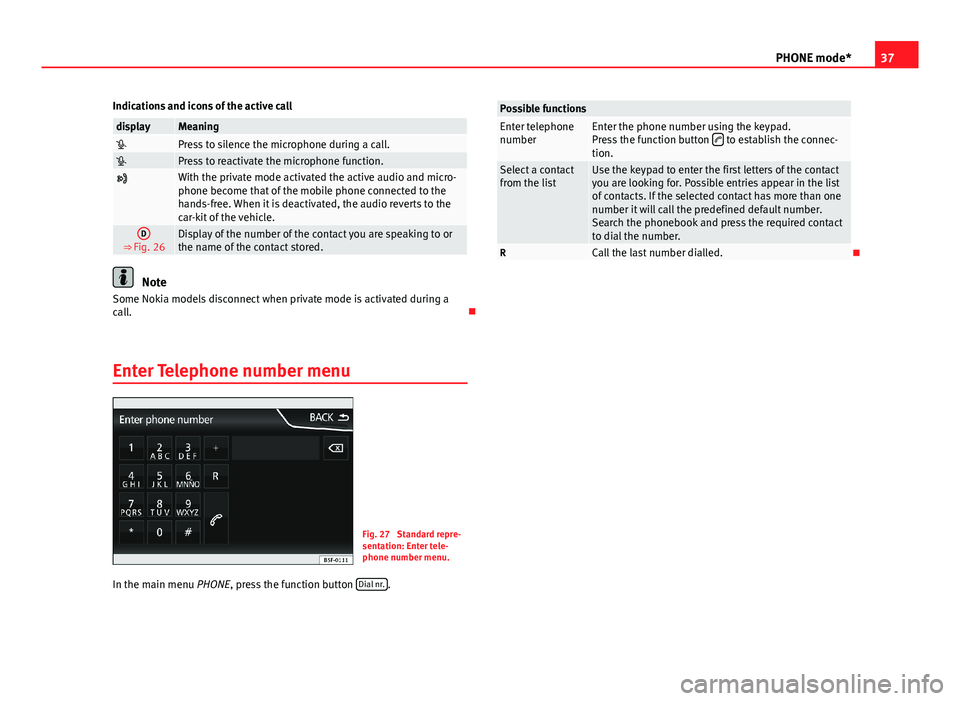
Enter Telephone number menu
Fig. 27
Standard repre-sentation: Enter tele-phone number menu.
In the main menu PHONE, press the function button Dial nr..
Possible functionsEnter telephonenumberEnter the phone number using the keypad.Press the function button to establish the connec-tion.
Select a contactfrom the listUse the keypad to enter the first letters of the contactyou are looking for. Possible entries appear in the listof contacts. If the selected contact has more than onenumber it will call the predefined default number.Search the phonebook and press the required contactto dial the number.
RCall the last number dialled.
Page 39 of 56
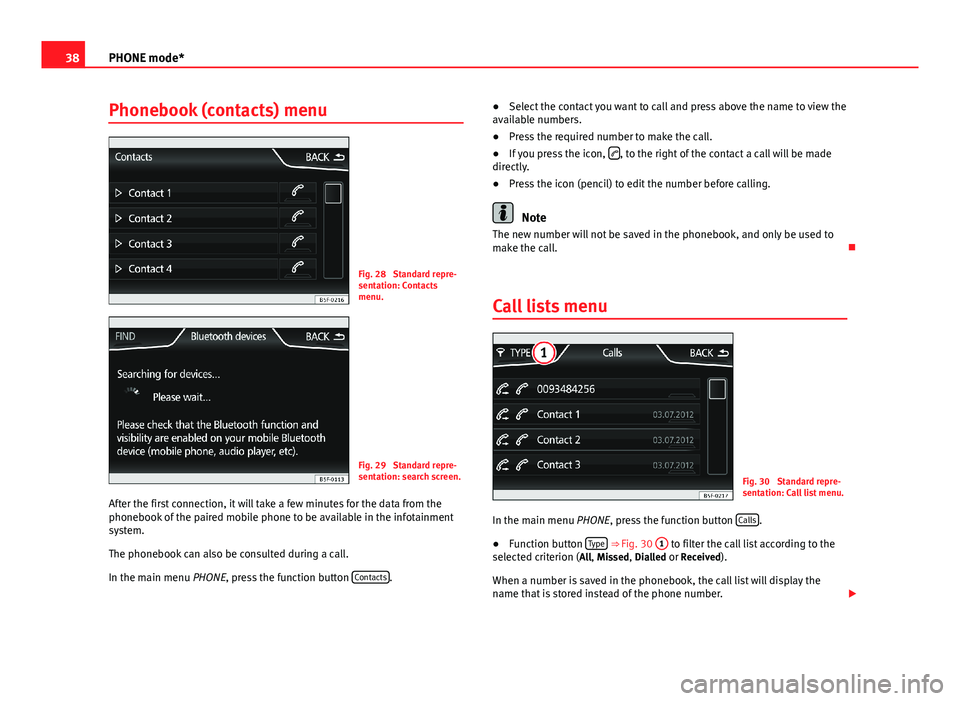
38PHONE mode*Phonebook (contacts) menuFig. 28
Standard repre-sentation: Contactsmenu.
Fig. 29
Standard repre-sentation: search screen.
After the first connection, it will take a few minutes for the data from thephonebook of the paired mobile phone to be available in the infotainmentsystem.
The phonebook can also be consulted during a call.
In the main menu PHONE, press the function button Contacts.
●Select the contact you want to call and press above the name to view theavailable numbers.●
Press the required number to make the call.
●
If you press the icon, , to the right of the contact a call will be madedirectly.
●
Press the icon (pencil) to edit the number before calling.
Note
The new number will not be saved in the phonebook, and only be used tomake the call.
Call lists menu
Fig. 30
Standard repre-sentation: Call list menu.
In the main menu PHONE, press the function button Calls.
●
Function button Type ⇒ Fig. 30
1
to filter the call list according to theselected criterion (All, Missed, Dialled or Received).
When a number is saved in the phonebook, the call list will display thename that is stored instead of the phone number.
Page 40 of 56
39PHONE mode*Possible displays in the Calls menudisplayMeaningMissed: shows the numbers of calls that have been receivedbut not answered.
Dialled: shows the numbers that have been dialled using themobile phone and phone manager of the infotainment sys-tem.Received: shows the numbers of the calls received by the mo-bile phone and telephone manager of the infotainment sys-tem and that have been answered.
Note
The call list display will depend on the mobile phone used.
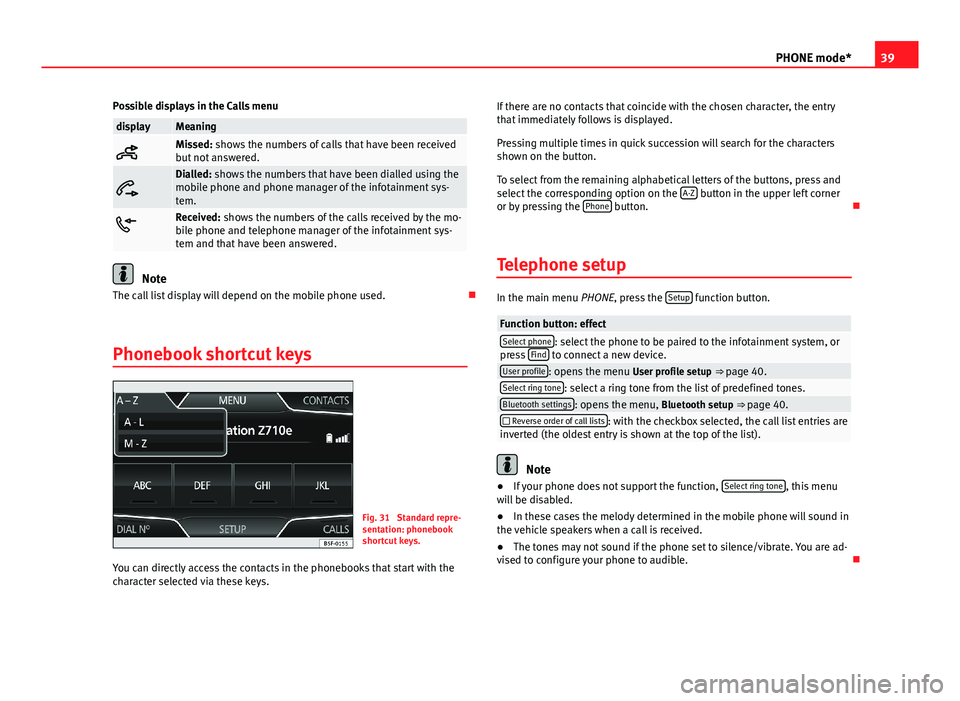
Phonebook shortcut keys
Fig. 31
Standard repre-sentation: phonebookshortcut keys.
You can directly access the contacts in the phonebooks that start with thecharacter selected via these keys.
If there are no contacts that coincide with the chosen character, the entrythat immediately follows is displayed.
Pressing multiple times in quick succession will search for the charactersshown on the button.
To select from the remaining alphabetical letters of the buttons, press andselect the corresponding option on the A-Z button in the upper left corneror by pressing the Phone button.
Telephone setup
In the main menu PHONE, press the Setup function button.
Function button: effectSelect phone: select the phone to be paired to the infotainment system, orpress Find to connect a new device.User profile: opens the menu User profile setup ⇒ page 40.Select ring tone: select a ring tone from the list of predefined tones.Bluetooth settings: opens the menu, Bluetooth setup ⇒ page 40. Reverse order of call lists: with the checkbox selected, the call list entries areinverted (the oldest entry is shown at the top of the list).
Note
●If your phone does not support the function, Select ring tone, this menuwill be disabled.●
In these cases the melody determined in the mobile phone will sound inthe vehicle speakers when a call is received.
●
The tones may not sound if the phone set to silence/vibrate. You are ad-vised to configure your phone to audible.
Page 41 of 56
40PHONE mode*Bluetooth setup
In the PHONE main menu, press the function button Setup and then pressBluetooth setup.
Function button: effect Bluetooth: press to switch off the Bluetooth in the system.Visibility: activate and deactivate the Bluetooth “visibility” of the infotain-ment system using the function button . To link a mobile phone to theinfotainment system the visibility must be activated. With the settingAt start-up, visibility is disabled after a certain time. If you have a Bluetoothaudio device active and playing, the visibility is automatically set to “notvisible”.
Name: when you open this option it opens a keyboard, with which you canmodify the default name of the device.My devices: shows the devices linked to the system. In this menu connection/disconnection of the required profiles of theBluetooth device connections can be managed.When pressing a device a new screen will open with the availableprofiles.When a profile is pressed the system connects to this profile.If it is already connected to a profile it will disconnect the selectedprofile.
Find: looks for Bluetooth devices that are switched on and visible withinthe working radius of the infotainment system. The working radius is ap-proximately 10 metres.
A2DP Bluetooth audio: function button that activates and deactivates theuse of the radio as the Bluetooth receiver of the audio source.
User profile setup
In the main menu PHONE, press the function button Setup and then pressUser profile.
Function button: effectMemory in use: Displays the number of total contacts downloaded that con-tain at least one phone number, maximum of 2000 phones.Sort by: determine the order sequence of the phonebook entries, by sur-name, first name, or by first name, surname.Import contacts: press to import the phonebook of the telephone connected,or to update a phonebook that has already been imported.
Note
Some telephones require a restart to download the last contacts addedagain.
Page 52 of 56
IndexA
Air Conditioning . . . . . . . . . . . . . . . . . . . . . . . . . 44
Air Conditioning menu . . . . . . . . . . . . . . . . . . . . 44
AM . . . . . . . . . . . . . . . . . . . . . . . . . . . . . . . . . . . . 49
Automatic station storing . . . . . . . . . . . . . . . . . 15
Autostore . . . . . . . . . . . . . . . . . . . . . . . . . . . . . . 15
AUX . . . . . . . . . . . . . . . . . . . . . . . . . . . . . . . . 28, 49AUX-IN multimedia socket . . . . . . . . . . . . . . 28External audio source . . . . . . . . . . . . . . . . . 28
AUX-IN . . . . . . . . . . . . . . . . . . . . . . . . . . . . . . . . . 28
AUX-IN multimedia socket
See: AUX . . . . . . . . . . . . . . . . . . . . . . . . . . . . 28
B
Back . . . . . . . . . . . . . . . . . . . . . . . . . . . . . . . . . . 26
Balance . . . . . . . . . . . . . . . . . . . . . . . . . . . . . . . . 47
Base volumeChange . . . . . . . . . . . . . . . . . . . . . . . . . . . . . . 9Mute . . . . . . . . . . . . . . . . . . . . . . . . . . . . . . . . 9
Bass . . . . . . . . . . . . . . . . . . . . . . . . . . . . . . . . . . 47
Bluetooth . . . . . . . . . . . . . . . . . . . . . . . . . . . . . . 34
Bluetooth audio (external audio source) . . . . . 25
BT audio . . . . . . . . . . . . . . . . . . . . . . . . . . . . . . . 25
C
CAR . . . . . . . . . . . . . . . . . . . . . . . . . . . . . . . . . . . 41
CAR menu . . . . . . . . . . . . . . . . . . . . . . . . . . . . . . 41
CD modeSee: MEDIA . . . . . . . . . . . . . . . . . . . . . . . . . . 24
Controls . . . . . . . . . . . . . . . . . . . . . . . . . . . . . . . . . 6
D
Delayed switch-off . . . . . . . . . . . . . . . . . . . . . . . . 8
E
Explosion: places of riskTelephone . . . . . . . . . . . . . . . . . . . . . . . . . . . 32
External audio sourceBluetooth audio . . . . . . . . . . . . . . . . . . . . . . 25See: AUX . . . . . . . . . . . . . . . . . . . . . . . . . . . . 28
F
Fader . . . . . . . . . . . . . . . . . . . . . . . . . . . . . . . . . . 47
FM . . . . . . . . . . . . . . . . . . . . . . . . . . . . . . . . . . . . 49
Forward . . . . . . . . . . . . . . . . . . . . . . . . . . . . . . . . 26
Function buttonssee: Function buttons . . . . . . . . . . . . . . . . . . 9
Function buttons (softkeys) . . . . . . . . . . . . . . . . . 9
Function buttons (virtual buttons) . . . . . . . . . . . 8
I
Introduction . . . . . . . . . . . . . . . . . . . . . . . . . . . . . 4
M
Main menuMEDIA . . . . . . . . . . . . . . . . . . . . . . . . . . . . . . 22RADIO . . . . . . . . . . . . . . . . . . . . . . . . . . . . . . 12System . . . . . . . . . . . . . . . . . . . . . . . . . . . . . 45
MDIError messages . . . . . . . . . . . . . . . . . . . . . . . 30Faults . . . . . . . . . . . . . . . . . . . . . . . . . . . . . . 30
MEDIA . . . . . . . . . . . . . . . . . . . . . . . . . . . . . . . . . 20Audio data CD . . . . . . . . . . . . . . . . . . . . . . . . 20AUX-IN multimedia socket . . . . . . . . . . . . . . 28back . . . . . . . . . . . . . . . . . . . . . . . . . . . . . . . . 26Bit rate . . . . . . . . . . . . . . . . . . . . . . . . . . . . . 20Bluetooth audio . . . . . . . . . . . . . . . . . . . . . . 25CD mode . . . . . . . . . . . . . . . . . . . . . . . . . . . . 24changing the media source . . . . . . . . . . . . . 23changing tracks . . . . . . . . . . . . . . . . . . . . . . 26Display information . . . . . . . . . . . . . . . . . . . 22forward . . . . . . . . . . . . . . . . . . . . . . . . . . . . . 26instructions . . . . . . . . . . . . . . . . . . . . . . . . . . 20Main menu . . . . . . . . . . . . . . . . . . . . . . . . . . 22MP3 files . . . . . . . . . . . . . . . . . . . . . . . . . . . . 20Playing order . . . . . . . . . . . . . . . . . . . . . . . . 21Playlists . . . . . . . . . . . . . . . . . . . . . . . . . . . . . 20Requirements . . . . . . . . . . . . . . . . . . . . . . . . 20
51Index
Page 53 of 56
selecting tracks . . . . . . . . . . . . . . . . . . . . . . 26Setup . . . . . . . . . . . . . . . . . . . . . . . . . . . . . . . 27Unreadable CD . . . . . . . . . . . . . . . . . . . . . . . 24USB . . . . . . . . . . . . . . . . . . . . . . . . . . . . . . . . 20WMA files . . . . . . . . . . . . . . . . . . . . . . . . . . . 20
Medium wave . . . . . . . . . . . . . . . . . . . . . . . . . . . 49
Memory card (SD card) . . . . . . . . . . . . . . . . . . . 24
Midrange . . . . . . . . . . . . . . . . . . . . . . . . . . . . . . . 47
Multimedia . . . . . . . . . . . . . . . . . . . . . . . . . . . . . 28
Multimedia interfaceUSB/AUX-IN . . . . . . . . . . . . . . . . . . . . . . . . . 28
Mute . . . . . . . . . . . . . . . . . . . . . . . . . . . . . . . . . . . 9
MW . . . . . . . . . . . . . . . . . . . . . . . . . . . . . . . . . . . 49
O
Operating instructionscheckboxes . . . . . . . . . . . . . . . . . . . . . . . . . . . 9function buttons . . . . . . . . . . . . . . . . . . . . . . . 9Unit buttons . . . . . . . . . . . . . . . . . . . . . . . . . . 9
P
Phone . . . . . . . . . . . . . . . . . . . . . . . . . . . . . . . . . 31
Introduction . . . . . . . . . . . . . . . . . . . . . . . . . 31
PHONEBluetooth setup . . . . . . . . . . . . . . . . . . . . . . 40Call lists menu . . . . . . . . . . . . . . . . . . . . . . . 38Enter number . . . . . . . . . . . . . . . . . . . . . . . . 37Function buttons . . . . . . . . . . . . . . . . . . . . . 36Linking and connecting to the infotainmentsystem . . . . . . . . . . . . . . . . . . . . . . . . . . . . 32Main menu . . . . . . . . . . . . . . . . . . . . . . . . . . 35
Phonebook menu . . . . . . . . . . . . . . . . . . . . . 38Places with risk of explosion . . . . . . . . . . . . 32Places with special regulations . . . . . . . . . . 32Setup . . . . . . . . . . . . . . . . . . . . . . . . . . . . . . . 39
Places with special regulations . . . . . . . . . . . . . 32
Pop-up window . . . . . . . . . . . . . . . . . . . . . . . . . . . 9
Q
Quick reference guide . . . . . . . . . . . . . . . . . . . . . 4
R
Radio . . . . . . . . . . . . . . . . . . . . . . . . . . . . . . . . . . 12
RADIOfrequency bands . . . . . . . . . . . . . . . . . . . . . 14Main menu . . . . . . . . . . . . . . . . . . . . . . . . . . 12radio data services RDS . . . . . . . . . . . . . . . . 15radio text . . . . . . . . . . . . . . . . . . . . . . . . . . . . 16scan function (SCAN) . . . . . . . . . . . . . . . . . . 14selecting, adjusting and storing a station . 14station name and automatic station track-ing . . . . . . . . . . . . . . . . . . . . . . . . . . . . . . . 15Stored station buttons . . . . . . . . . . . . . . . . . 13
RDS . . . . . . . . . . . . . . . . . . . . . . . . . . . . . . . . . . . 49TP (Traffic Program) . . . . . . . . . . . . . 16, 17, 18
RequirementsCDs . . . . . . . . . . . . . . . . . . . . . . . . . . . . . . . . 20Memory cards . . . . . . . . . . . . . . . . . . . . . . . . 20SD cards . . . . . . . . . . . . . . . . . . . . . . . . . . . . 20
Requirements foradapter (MDI) . . . . . . . . . . . . . . . . . . . . . . . . 29external data media (MDI) . . . . . . . . . . . . . . 29
Rotary/push knobs . . . . . . . . . . . . . . . . . . . . . . . 9
Rotary push knobs . . . . . . . . . . . . . . . . . . . . . . . . 8
S
Safety notes . . . . . . . . . . . . . . . . . . . . . . . . . . . . . 4
SCANsee scan function . . . . . . . . . . . . . . . . . . . . . 14
Scan function (SCAN)Radio mode . . . . . . . . . . . . . . . . . . . . . . . . . 14
SD card . . . . . . . . . . . . . . . . . . . . . . . . . . . . . . . . 24
SETUP
see: "Setup (SETUP)" . . . . . . . . . . . . . . . . . . 45
Setup (SETUP) . . . . . . . . . . . . . . . . . . . . . . . . . . . 45Bluetooth setup . . . . . . . . . . . . . . . . . . . . . . 45Date and Time . . . . . . . . . . . . . . . . . . . . . . . 45factory settings . . . . . . . . . . . . . . . . . . . . . . . 45language . . . . . . . . . . . . . . . . . . . . . . . . . . . . 45screen setup . . . . . . . . . . . . . . . . . . . . . . . . . 45sound . . . . . . . . . . . . . . . . . . . . . . . . . . . . . . 47system . . . . . . . . . . . . . . . . . . . . . . . . . . . . . . 45units . . . . . . . . . . . . . . . . . . . . . . . . . . . . . . . 45volume distribution . . . . . . . . . . . . . . . . . . . 47
Sound distribution (Balance/Fader) . . . . . . . . . 47
Sound setup . . . . . . . . . . . . . . . . . . . . . . . . . . . . 47
Sound (treble/midrange/bass) . . . . . . . . . . . . . 47
Station searchsee scan function . . . . . . . . . . . . . . . . . . . . . 14
Switch-on volume . . . . . . . . . . . . . . . . . . . . . . . . 47
Switching off . . . . . . . . . . . . . . . . . . . . . . . . . . . . . 8
Switching on . . . . . . . . . . . . . . . . . . . . . . . . . . . . . 8
Symbols used in this manual . . . . . . . . . . . . . . . 9
52Index