change time Seat Leon SC 2013 User Guide
[x] Cancel search | Manufacturer: SEAT, Model Year: 2013, Model line: Leon SC, Model: Seat Leon SC 2013Pages: 339, PDF Size: 4.8 MB
Page 87 of 339
85
Introduction to the Easy Connect system*
When the menu appears, choose the desired option.
Pressing the menu button
will always take you to the last menu used.
MenuSubmenuPossible settingDescription
Measurements
unit settings
Distance
a)–SpeedTemperatureVolumeFuel consumptiona)
Data not available at the time of going to print
Any changes made using the settings menus are automatically saved on
closing those menus.
WARNING
Any distraction may lead to an accident, with the risk of injury. Operating
the Easy Connect system while driving could distract you from traffic.
Service information
– Switch the ignition on.
– Switch on the Easy Connect system.
– Press the Easy Connect button
.
– Press the Setup
function button.
– Press the Service
function button to display the information
about service inspections. Pressing the menu button
will always take you to the last menu used.
MenuSubmenuPossible settingDescription
Service–
Chassis number,
date of next SEAT
service inspection,
date of next oil
change service.
⇒ page 61
WARNING
Any distraction may lead to an accident, with the risk of injury. Operating
the Easy Connect system while driving could distract you from traffic.
Restoring default settings
– Switch the ignition on.
– Switch on the Easy Connect system.
– Press the Easy Connect button
.
– Press the Setup
function button.
– Press the Factory settings
function button to open the Factory set-
tings menu.
Pressing the menu button
will always take you to the last menu used.
Safety FirstOperating instructionsPractical TipsTechnical specifications
Page 91 of 339
89
Opening and closing
Vehicle key
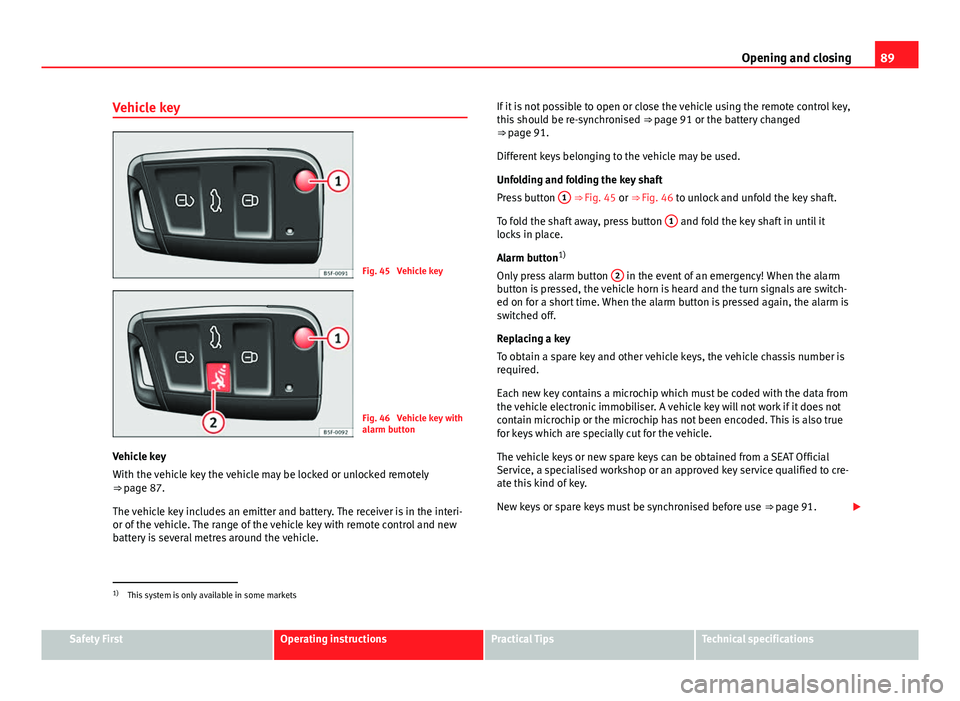
Fig. 45 Vehicle key
Fig. 46 Vehicle key with
alarm button
Vehicle key
With the vehicle key the vehicle may be locked or unlocked remotely
⇒ page 87.
The vehicle key includes an emitter and battery. The receiver is in the interi-
or of the vehicle. The range of the vehicle key with remote control and new
battery is several metres around the vehicle. If it is not possible to open or close the vehicle using the remote control key,
this should be re-synchronised
⇒ page 91 or the battery changed
⇒ page 91.
Different keys belonging to the vehicle may be used.
Unfolding and folding the key shaft
Press button 1
⇒ Fig. 45 or ⇒
Fig. 46 to unlock and unfold the key shaft.
To fold the shaft away, press button 1
and fold the key shaft in until it
locks in place.
Alarm button 1)
Only press alarm button 2
in the event of an emergency! When the alarm
button is pressed, the vehicle horn is heard and the turn signals are switch-
ed on for a short time. When the alarm button is pressed again, the alarm is
switched off.
Replacing a key
To obtain a spare key and other vehicle keys, the vehicle chassis number is
required.
Each new key contains a microchip which must be coded with the data from
the vehicle electronic immobiliser. A vehicle key will not work if it does not
contain microchip or the microchip has not been encoded. This is also true
for keys which are specially cut for the vehicle.
The vehicle keys or new spare keys can be obtained from a SEAT Official
Service, a specialised workshop or an approved key service qualified to cre-
ate this kind of key.
New keys or spare keys must be synchronised before use ⇒ page 91.
1)
This system is only available in some markets
Safety FirstOperating instructionsPractical TipsTechnical specifications
Page 99 of 339
97
Opening and closing
will trigger the alarm) or when, for example, the vehicle is transported or
has to be towed with only one axle on the ground.
False alarms
The interior monitoring only operates correctly if the vehicle is completely
closed. Please observe legal requirements when doing so.
The following cases may cause a false alarm:
● opened windows (partially or fully)
● panoramic/tilting sunroof open (partially or completely).
● movement of objects inside the vehicle, such as loose papers, items
hanging from the rear vision mirror (air fresheners), etc.
Note
● If the vehicle is relocked and the alarm is activated without the volumet-
ric sensor function, relocking will activate the alarm with all its functions,
except the volumetric sensor. This function is reactivated when the alarm is
switched on again, unless it is deliberately switched off.
● If the alarm has been triggered by the volumetric sensor, this will be in-
dicated by a flashing of the warning lamp on the driver door when the vehi-
cle is opened. The flash is different to the flash indicating the alarm is acti-
vated.
● The vibration of a mobile phone left inside the vehicle may cause the ve-
hicle interior monitoring alarm to trigger, as both sensors react to move-
ments and shakes inside the vehicle.
● If on activating the alarm, any door or the rear lid is open, only the alarm
will be activated. The vehicle interior monitoring and the anti-tow system
will only be activated once all the doors are closed (including the rear lid). Deactivating the vehicle interior monitoring and tow-away
protection
1)
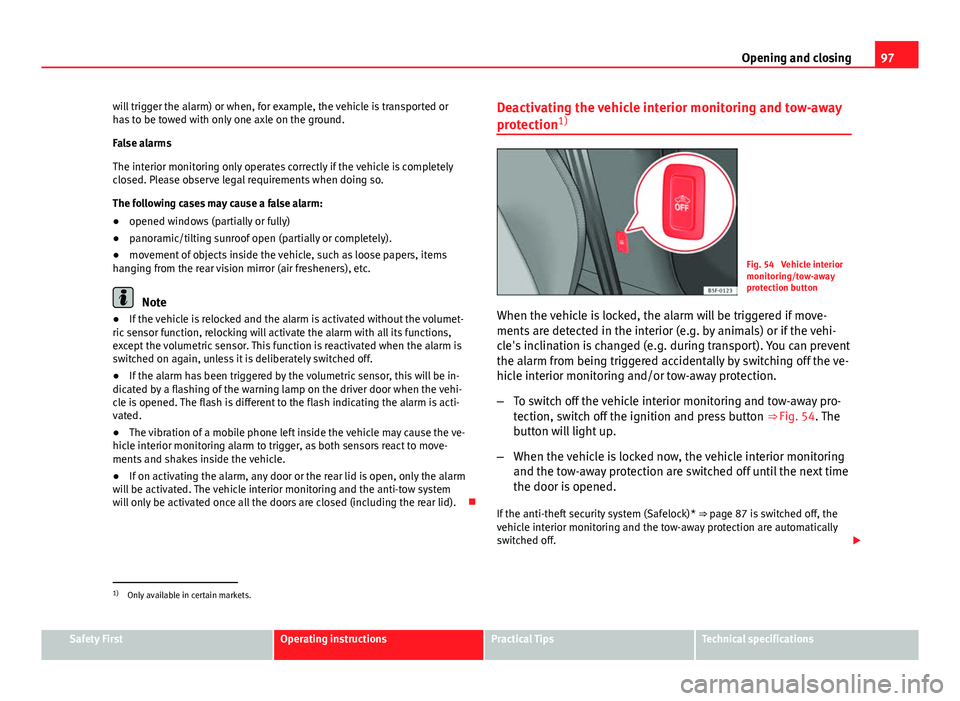
Fig. 54 Vehicle interior
monitoring/tow-away
protection button
When the vehicle is locked, the alarm will be triggered if move-
ments are detected in the interior (e.g. by animals) or if the vehi-
cle's inclination is changed (e.g. during transport). You can prevent
the alarm from being triggered accidentally by switching off the ve-
hicle interior monitoring and/or tow-away protection.
– To switch off the vehicle interior monitoring and tow-away pro-
tection, switch off the ignition and press button ⇒ Fig. 54. The
button will light up.
– When the vehicle is locked now, the vehicle interior monitoring
and the tow-away protection are switched off until the next time
the door is opened.
If the anti-theft security system (Safelock)* ⇒ page 87 is switched off, the
vehicle interior monitoring and the tow-away protection are automatically
switched off.
1)
Only available in certain markets.
Safety FirstOperating instructionsPractical TipsTechnical specifications
Page 112 of 339
110Lights and visibility
WARNING
If the warning lamps and messages are ignored, the vehicle may stall in
traffic, or may cause accidents and severe injuries.
● Never ignore the warning lamps or text messages.
● Stop the vehicle safely as soon as possible.
● Park the vehicle at a suitable distance away from the traffic ensuring
that the exhaust system is not in contact with inflammable material, for
example, dry grass, fuel, oil, etc.
● A faulty vehicle represents a risk of accident for the driver and for oth-
er road users. If necessary, switch on the hazard warning lamps and put
out the warning triangle to advise other drivers.
CAUTION
Failure to heed the control lamps and text messages when they appear may
result in faults in the vehicle.
Turn signal and main beam lever*
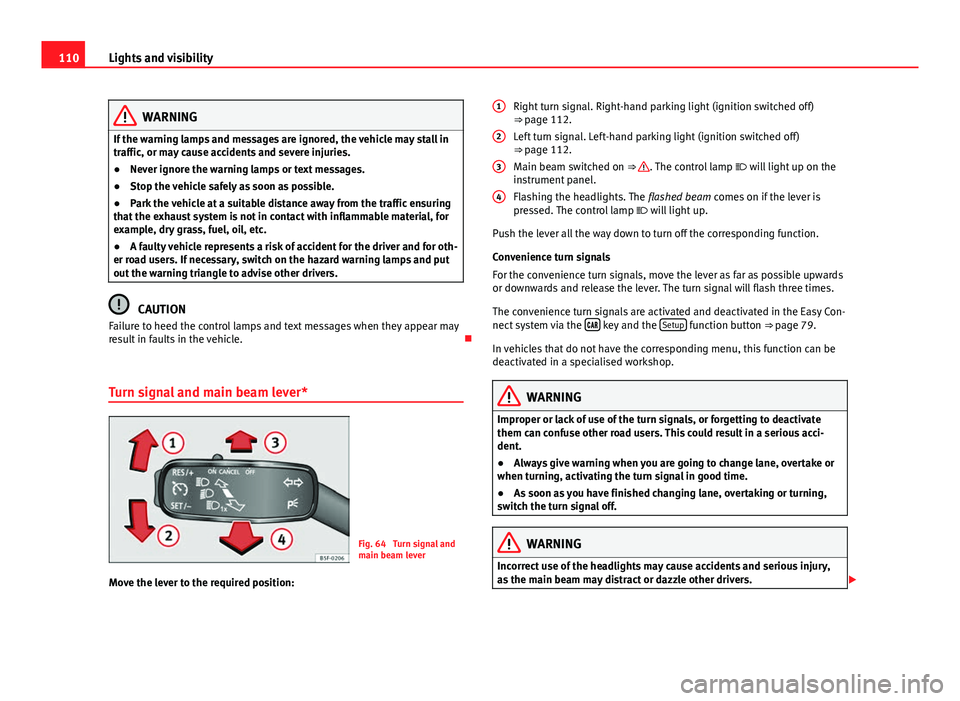
Fig. 64 Turn signal and
main beam lever
Move the lever to the required position: Right turn signal. Right-hand parking light (ignition switched off)
⇒ page 112.
Left turn signal. Left-hand parking light (ignition switched off)
⇒ page 112.
Main beam switched on ⇒
. The control lamp
will light up on the
instrument panel.
Flashing the headlights. The flashed beam comes on if the lever is
pressed. The control lamp will light up.
Push the lever all the way down to turn off the corresponding function.
Convenience turn signals
For the convenience turn signals, move the lever as far as possible upwards
or downwards and release the lever. The turn signal will flash three times.
The convenience turn signals are activated and deactivated in the Easy Con-
nect system via the
key and the Setup function button ⇒ page 79.
In vehicles that do not have the corresponding menu, this function can be
deactivated in a specialised workshop.
WARNING
Improper or lack of use of the turn signals, or forgetting to deactivate
them can confuse other road users. This could result in a serious acci-
dent.
● Always give warning when you are going to change lane, overtake or
when turning, activating the turn signal in good time.
● As soon as you have finished changing lane, overtaking or turning,
switch the turn signal off.
WARNING
Incorrect use of the headlights may cause accidents and serious injury,
as the main beam may distract or dazzle other drivers.
1
2
3
4
Page 115 of 339
113
Lights and visibility
WARNING
If the road is not well lit and other road users cannot see the vehicle well
enough or at all, accidents may occur.
● The automatic dipped beam control ( ) only switches on the dip-
ped beam when there are no changes in brightness, and not, for example
when it is foggy.
● Never drive with daytime lights if the road is not well lit due to weath-
er or lighting conditions. Daytime lights do not provide enough light to
illuminate the road properly or be seen by other road users.
● The rear lights do not come on with the daytime driving light. A vehi-
cle which does not have the rear lights on may not be visible to other
drivers in the darkness, in the case of heavy rain or in conditions of poor
visibility.
Note
In cold or damp weather conditions, the headlights, tail lights and turn sig-
nals may mist up inside temporarily. This is normal and in no way effects
the useful life of the vehicle lighting system. Hazard warning lights
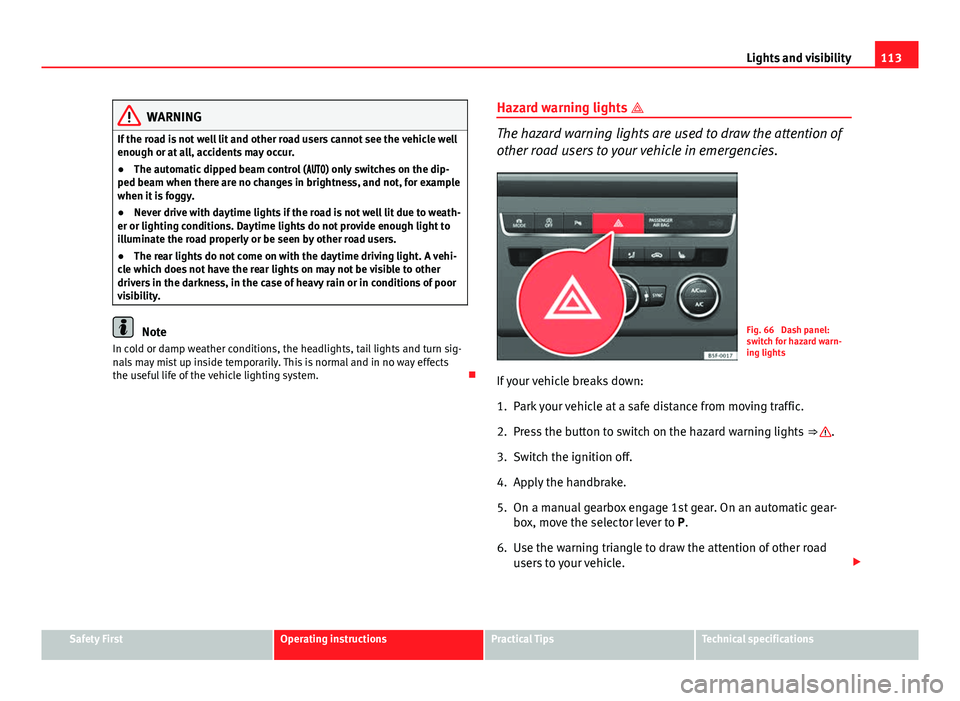
The hazard warning lights are used to draw the attention of
other road users to your vehicle in emergencies.
Fig. 66 Dash panel:
switch for hazard warn-
ing lights
If your vehicle breaks down:
1. Park your vehicle at a safe distance from moving traffic.
2. Press the button to switch on the hazard warning lights ⇒
.
3. Switch the ignition off.
4. Apply the handbrake.
5. On a manual gearbox engage 1st gear. On an automatic gear- box, move the selector lever to P.
6. Use the warning triangle to draw the attention of other road users to your vehicle.
Safety FirstOperating instructionsPractical TipsTechnical specifications
Page 117 of 339
115
Lights and visibility
Switching the main beam assist on and off
effectuse
Activate:
– Switch the ignition on and turn the light switch to position
.
– From the base position, move the main beam and turn signal
lever forwards ⇒ page 110. When the warning lamp is dis-
played on the instrument panel display, the main beam assist is
switched on.
To
switch
system off:
– Switch off the ignition.
– OR: Turn the light switch to a different position to
⇒ page 111.
– OR: with main beam on, move the main beam and turn signal
lever backwards.
– OR: Move the main beam and turn signal lever forwards to
manually switch main beam on. The main beam assist will then
be deactivated.
Malfunctions
The following conditions may prevent the main beam headlight control from
turning off the headlights in time or from turning off altogether:
● In poorly lit towns with highly reflective signs.
● Other insufficiently lit road users (such as pedestrians or cyclists).
● On tight bends and steep slopes (bumps) and when oncoming vehicles
are partially obscured.
● When the drivers of other oncoming vehicles (such as a truck) can see
over a guard rail in the centre of the road.
● If the camera is damaged or the power supply is cut off.
● In fog, snow and heavy rain.
● With dust and sand turbulence.
● With loose gravel in the field of vision of the camera.
● When the field of vision of the camera is misted up, dirty or covered by
stickers, snow, ice...
WARNING
The convenience features of the main beam assist should not encourage
the taking of risks. The system is not a replacement for driver concentra-
tion.
● You are always in control of the main beam and adapting it to the
light, visibility and traffic conditions.
● It is possible that the main beam headlight control does not recog-
nise all driving situations and is limited under certain circumstances.
● When the field of vision of the camera is dirty, covered or damaged,
operation of the main beam control may be affected. This also applies
when changes are made to the vehicle lighting system, for example, if
additional headlights are installed.
CAUTION
To avoid affecting the operation of the system, take the following points in-
to consideration:
● Clean the field of vision of the camera regularly and make sure it is free
of snow and ice.
● Do not cover the field of vision of the camera.
● Check that the windscreen is not damaged in the area of the field of vi-
sion of the camera.
Note
Main beam and headlight flasher can be turned on and off manually at any
time with the turn signal and main beam lever ⇒ page 110.
Adjusting the headlights
The light beam of the dipped beam lights is asymmetric: the side of the
road on which you are driving is lit more intensely.
Safety FirstOperating instructionsPractical TipsTechnical specifications
Page 118 of 339
116Lights and visibility
When a car that is manufactured in a country that drives on the right travels
to a country that drives on the left (or vice versa), it is normally necessary to
cover part of the headlight bulbs with stickers or to change the adjustment
of the headlights to avoid dazzling other drivers.
In such cases, the regulations specify certain light values that must be com-
plied with for designated points of the light distribution. This is known as
“Tourist light”.
The light distribution that the halogen and full-LED headlights of the SEAT
Leon range have, allows the specific “tourist light” values to be met without
the need for stickers or changes in the settings.
Note
“Tourist light” is only allowed temporarily. If you are planning a long stay in
a country that drives on the other side, you should take the vehicle to an
Authorised Technical Service to change the headlights.
Coming home “function”
This function may be connected/disconnected through the radio menu. The
“Coming Home” and/or “Leaving Home” delay functions may also be set
(default: 30 sec.).
Vehicle with halo-
gen headlightsIn the “Coming Home” function, the daytime running
lights (DRL), the rear side lights and the licence plate
lights are turned on.
Vehicle with full-
LED headlightsIn the “Coming Home” function, the dipped beams
and the daytime running lights (DRL), the rear side
lights and the licence plate lights are switched on.
Automatic “Coming Home” activation*
For vehicles with a light and rain sensor (rotary light switch in position ). ●
Switch off the engine and remove the key from the ignition with the rota-
ry light switch in position ⇒ Fig. 65.
● The automatic “Coming Home” function is only active when the light
sensor detects darkness.
● When the car door is opened, the “Coming Home” lighting comes on.
Activation “Coming Home” manual
For vehicles with a light and rain sensor (rotary light switch without position
).
● Switch off the engine and remove the key from the ignition.
● Activate the headlight flashers for approximately 1 second.
● Activated for any position of the rotary light switch.
● When the car door is opened, the “Coming Home” lighting comes on.
The headlights are turned off 60 seconds after the vehicle door is opened.
Deactivation
● If no door has been closed, they go out automatically after 60 seconds.
● After the last door has been closed, the headlights will be switched off
after the “Coming Home” delay (as established in the radio menu).
● On turning the light switch to position ⇒ Fig. 65 .
● When the ignition is switched on (when starting the engine).
Leaving Home “function”
The “Leaving Home” function is only available for vehicles with a light and
rain sensor (rotary light switch in position ).
This function may be connected/disconnected through the radio menu. The
“Leaving Home” delay may also be set (default: 30 sec.).
Page 124 of 339
122Lights and visibility
Windscreen wiper functions
Windscreen wiper performance in different situations:If the vehicle is at a stand-
still:The activated position provisionally changes
to the previous position.
During the automatic wipe:
The air conditioner comes on for approxi-
mately 30 seconds in air recirculation mode
to prevent the smell of the windscreen wash-
er fluid entering the inside the vehicle.
For the interval wipe:The intervals between wipes vary according
to the speed of the vehicle. The higher the
vehicle speed the shorter the intervals.
Heated windscreen washer jets
The heating only thaws the frozen jets, it does not thaw the water in the
washer hoses. The heated windscreen washer jets automatically adjust the
heat depending on the ambient temperature, when the ignition is switched
on.
Headlight wash/wipe system
The headlight washers/wipers clean the headlight lenses.
After the ignition is switched on, the first and every fifth time the wind-
screen washer is switched on, the headlights are also washed. Therefore,
the windscreen wiper lever should be pulled towards the steering wheel
when the dipped beam or main beam are on. Any incrusted dirt (such as in-
sects) should be cleaned regularly (e.g. when refuelling).
To ensure the headlight washers work correctly in winter, any snow which
has got into the bumper jet supports should be cleaned away. If necessary,
remove snow with an anti-icing spray.
Note
The wiper will try to wipe away any obstacles that are on the windscreen.
The wiper will stop moving if the obstacle blocks its path. Remove the ob-
stacle and switch the wiper back on again.
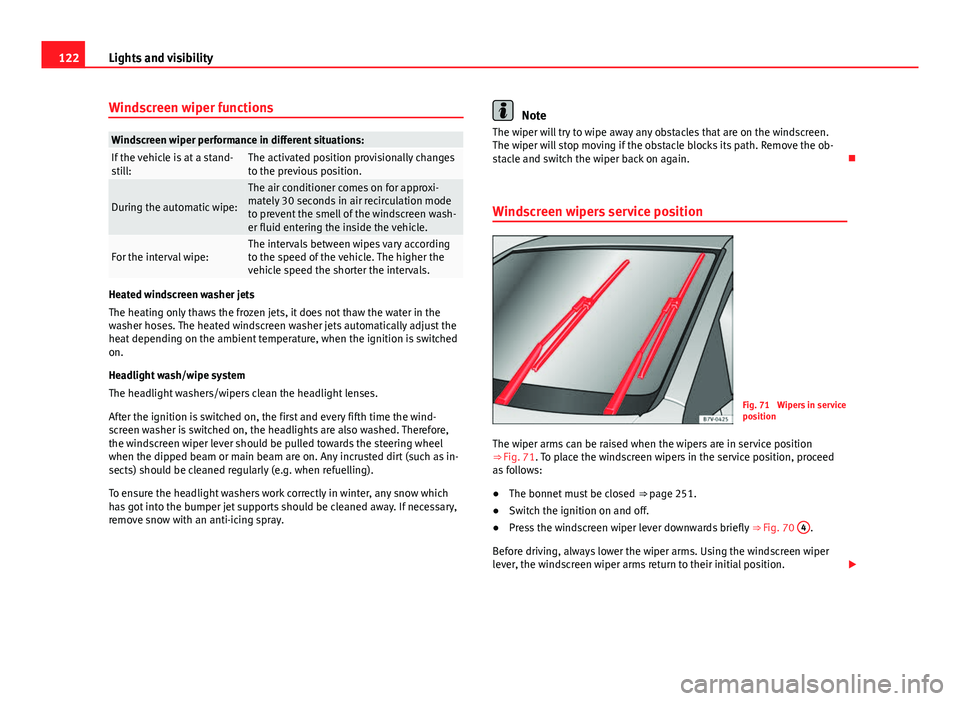
Windscreen wipers service position
Fig. 71 Wipers in service
position
The wiper arms can be raised when the wipers are in service position
⇒ Fig. 71. To place the windscreen wipers in the service position, proceed
as follows:
● The bonnet must be closed ⇒ page 251.
● Switch the ignition on and off.
● Press the windscreen wiper lever downwards briefly ⇒ Fig. 70 4
.
Before driving, always lower the wiper arms. Using the windscreen wiper
lever, the windscreen wiper arms return to their initial position.
Page 153 of 339
151
Seats and storage
Applies to the model: LEON ST
Securing the cross bars and roof carrier system
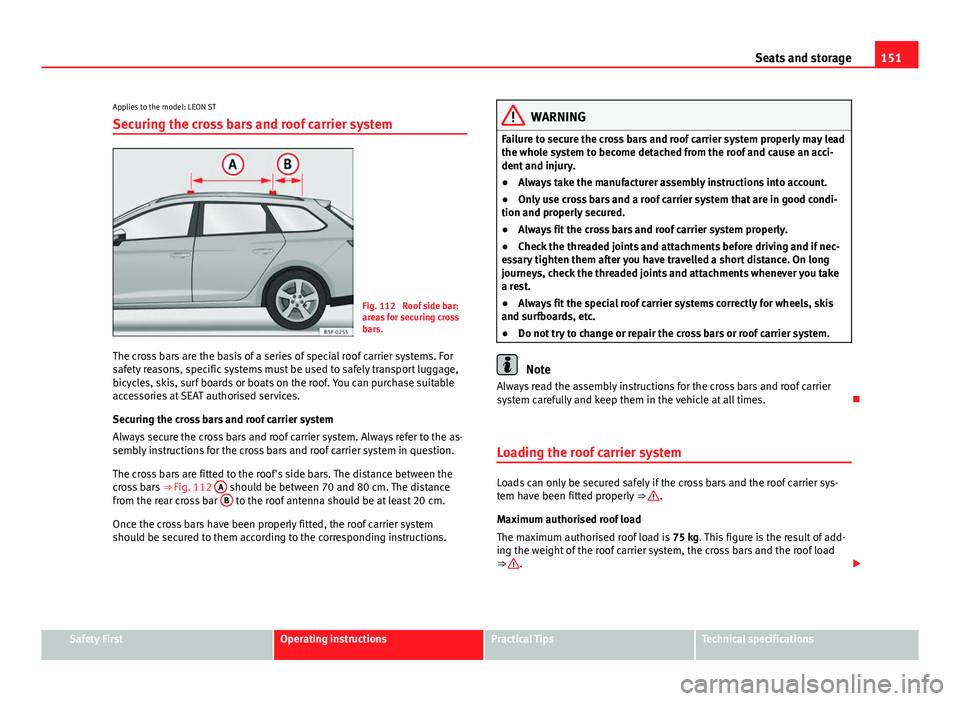
Fig. 112 Roof side bar:
areas for securing cross
bars.
The cross bars are the basis of a series of special roof carrier systems. For
safety reasons, specific systems must be used to safely transport luggage,
bicycles, skis, surf boards or boats on the roof. You can purchase suitable
accessories at SEAT authorised services.
Securing the cross bars and roof carrier system
Always secure the cross bars and roof carrier system. Always refer to the as-
sembly instructions for the cross bars and roof carrier system in question.
The cross bars are fitted to the roof's side bars. The distance between the
cross bars ⇒ Fig. 112 A
should be between 70 and 80 cm. The distance
from the rear cross bar B to the roof antenna should be at least 20 cm.
Once the cross bars have been properly fitted, the roof carrier system
should be secured to them according to the corresponding instructions.
WARNING
Failure to secure the cross bars and roof carrier system properly may lead
the whole system to become detached from the roof and cause an acci-
dent and injury.
● Always take the manufacturer assembly instructions into account.
● Only use cross bars and a roof carrier system that are in good condi-
tion and properly secured.
● Always fit the cross bars and roof carrier system properly.
● Check the threaded joints and attachments before driving and if nec-
essary tighten them after you have travelled a short distance. On long
journeys, check the threaded joints and attachments whenever you take
a rest.
● Always fit the special roof carrier systems correctly for wheels, skis
and surfboards, etc.
● Do not try to change or repair the cross bars or roof carrier system.
Note
Always read the assembly instructions for the cross bars and roof carrier
system carefully and keep them in the vehicle at all times.
Loading the roof carrier system
Loads can only be secured safely if the cross bars and the roof carrier sys-
tem have been fitted properly ⇒ .
Maximum authorised roof load
The maximum authorised roof load is 75 kg. This figure is the result of add-
ing the weight of the roof carrier system, the cross bars and the roof load
⇒
.
Safety FirstOperating instructionsPractical TipsTechnical specifications
Page 155 of 339
153
Air conditioning
Air conditioning Heating, ventilation, cooling
Introduction
Viewing Climatronic information
On the screen of Climatronic control unit and on the screen of the factory-
fitted Easy Connect system, the theoretical values of the temperature zones
are shown.
The unit of temperature measurement can be changed in the Easy Connect
system.
Dust and pollen filter
The dust and pollen filter with its activated charcoal cartridge serves as a
barrier against impurities in the air taken into the vehicle interior.
The dust and pollen filter must be changed regularly so that air conditioner
performance is not adversely affected.
If the filter loses efficiency prematurely due to use in areas with very high
levels of air pollution, the filter must be changed more frequently than sta-
ted in the Service Schedule.
Additional information and warnings:
● Easy Connect system
● Seat functions
● Windscreen wipers and washers
● Caring for and cleaning the vehicle exterior
WARNING
Reduced visibility through the windows increases the risk of serious acci-
dents.
● Always ensure that all windows are free of ice and snow, and that
they are not fogged, so as to maintain good visibility of everything out-
side.
● The maximum heat output required to defrost windows as quickly as
possible is only available when the engine has reached its normal run-
ning temperature. Only drive when you have good visibility.
● Always ensure that you use the heating system, fresh air system, air
conditioner and the heated rear window to maintain good visibility to the
outside.
● Never leave the air recirculation on for a long period of time. If the
cooling system is switched off and air recirculation mode switched on,
the windows can mist over very quickly, considerably limiting visibility.
● Switch air recirculation mode off when it is not required.
WARNING
Stuffy or used air will increase fatigue and reduce driver concentration
possibly resulting in a serious accident.
● Never leave the fresh air fan turned off or use the air recirculation for
long periods of time; the air in the vehicle interior will not be refreshed.
Safety FirstOperating instructionsPractical TipsTechnical specifications