gearbox Seat Leon SC 2013 Owner's Guide
[x] Cancel search | Manufacturer: SEAT, Model Year: 2013, Model line: Leon SC, Model: Seat Leon SC 2013Pages: 339, PDF Size: 4.8 MB
Page 178 of 339
176Driving
Note
● If the selector lever lock does not engage, there is a fault. The transmis-
sion is interrupted to prevent the vehicle from accidentally moving. Follow
the procedure below in order for the selector lever lock to engage again:
–With a 6-speed gearbox: press the brake pedal and release it again.
– With a 7-speed gearbox: press the brake pedal. Move the selector lev-
er to position P or N and subsequently engage a gear.
● Despite a gear being engaged, the vehicle does not move forwards or
back. Proceed to the next mode:
–When the vehicle does not move in the required direction, the system
may not have the gear range correctly engaged. Press the brake pedal
and engage the gear range again.
– If the vehicle still does not move in the required direction, there is a
system malfunction. Seek specialist assistance and have the system
checked.
Driving tips
The gearbox changes gear ratios automatically as the vehi-
cle moves.
The engine can only start with the selector lever in the position P or
N. At low temperatures, below -10 °C (50 °F), the engine can only
start with the selector lever in the position P.
Starting the vehicle
– Press and hold the brake pedal.
– Press and hold the interlock button (the button in the selector
lever handle), move the selector lever to the desired position,
for instance D ⇒ page 173, and release the interlock button. –
Wait for the gearbox to engage the gear (a slight movement can
be felt).
– Release the brake and press the accelerator ⇒
.
Stopping briefly
– Apply the foot brake to hold the vehicle when stationary (for in-
stance at traffic lights). Do not press the accelerator.
Stopping/Parking
If the driver door is opened and the selector lever is not in position
P, the vehicle could move. Driver message: Gear change: selector
lever in drive position! will be displayed. Additionally, a buzzer will sound.
– Press and hold the brake pedal ⇒
.
– Apply the handbrake.
– Move the selector lever to position P.
Holding the car on a hill
– Always apply the brake pedal firmly to prevent the vehicle from
“moving backwards; if necessary, apply the handbrake” ⇒
.
Do not try to stop the vehicle “rolling back” by increasing the
engine speed when a gear is engaged (pressing the accelera-
tor) ⇒
.
Moving off uphill in vehicles without Hill start assistant*
– Apply the handbrake.
– Once you have engaged a gear press the accelerator carefully
and disengage the handbrake.
Page 179 of 339
177
Driving
Moving off uphill in vehicles with Hill start assistant*
– Once you have engaged a gear, release the footbrake and press
the accelerator ⇒ page 168, Hill driving assistant*.
Driving down hills: In some situations (on mountain roads or when towing a
trailer or caravan) it can be advantageous to switch temporarily to the man-
ual gearbox programme so that the gear ratios can be selected manually to
suit the driving conditions ⇒
.
On level ground it is sufficient to move the selector lever to position P. On
slopes, first engage the parking brake and then put the selection lever into
the P position. This avoids overloading the locking mechanism and it will be
easier to move the selector lever from position P.
WARNING
● As a driver you should never leave your vehicle if the engine is run-
ning and a gear is engaged. If you have to leave your vehicle while the
engine is running, you must apply the handbrake and engage the parking
lock P.
● If the engine is running and a gear is engaged (D/S or R) or the vehi-
cle is in tiptronic mode, you will need to hold the car with the footbrake.
Otherwise, the car will creep forwards as the power transmission is not
fully interrupted even when the engine is idling.
● Take care not to accidentally press the accelerator pedal when the ve-
hicle is stopped. The vehicle could otherwise start moving immediately
(in some cases even if the parking brake is engaged) resulting in the risk
of an accident.
● While you are selecting a gear and the vehicle is stopped with the en-
gine running, do not accelerate. Failure to do so could result in an acci-
dent.
● Never move the selector lever to R or P when driving: this could result
in an accident!
WARNING (Continued)
● Before you drive down a steep gradient, reduce your speed and use
tiptronic to select a low gear.
● Never allow the brake to rub and do not use the brake pedal too often
or for long periods. Constant braking causes overheating in the brakes.
This could significantly reduce braking power, increase braking distance
or even result in the total failure of the brake system.
● To avoid rolling back on gradients always hold the vehicle with the
footbrake or handbrake if you have to stop.
CAUTION
● If you stop the vehicle on a gradient, do not attempt to stop it from roll-
ing by depressing the accelerator when a gear has been selected. This
could cause overheating and damage the automatic gearbox. Apply the
handbrake firmly or press the brake pedal in order to prevent the vehicle
from rolling back.
● If you allow the car to roll with the selector lever in position N with the
engine switched off, the automatic gearbox will be damaged as it will not be
lubricated.
● In certain driving situations or traffic conditions, such as frequently
starting, prolonged “creeping” of the vehicle or traffic jams with continuous
stoppages, the gearbox could overheat causing damage! If the warning
lamp lights up, stop the vehicle as soon as possible and wait for the
gearbox to cool ⇒ page 181.
● In certain driving situations or traffic conditions, such as frequently
starting, prolonged “creeping” of the vehicle or traffic jams with continuous
stoppages, the gearbox could overheat causing damage! If the warning
lamp lights up, stop the vehicle as soon as possible and wait for the
gearbox to cool ⇒ page 182.
Safety FirstOperating instructionsPractical TipsTechnical specifications
Page 180 of 339
178Driving
Downhill speed control*
The downhill speed control function helps the driver when
driving down steep gradients.
Downhill speed control is activated when the selector lever is in D/S and
the driver applies the foot brake. The automatic gearbox automatically en-
gages a lower gear that is suitable for the slope. The downhill speed control
function attempts to maintain the speed at which the vehicle was travelling
when the foot brake was applied (subject to the laws of physics and techni-
cal drive limitations). It may be necessary to adjust the speed again using
the foot brake in certain situations. Given that the downhill speed control
can only change down to 3rd gear, on very steep descents the tiptronic
mode may be required. In this case, manually reduce the tiptronic to 2nd or
1st gear to use the engine brake and reduce the charge on the brakes.
Downhill speed control is deactivated as soon as the road levels out again
or you press the accelerator pedal.
On vehicles with cruise control system* ⇒ page 184, downhill speed con-
trol is activated when you set a cruising speed.
WARNING
The downhill speed control cannot defy the laws of physics. Therefore,
speed cannot be maintained constant in all situations. Always be pre-
pared to use the brakes!
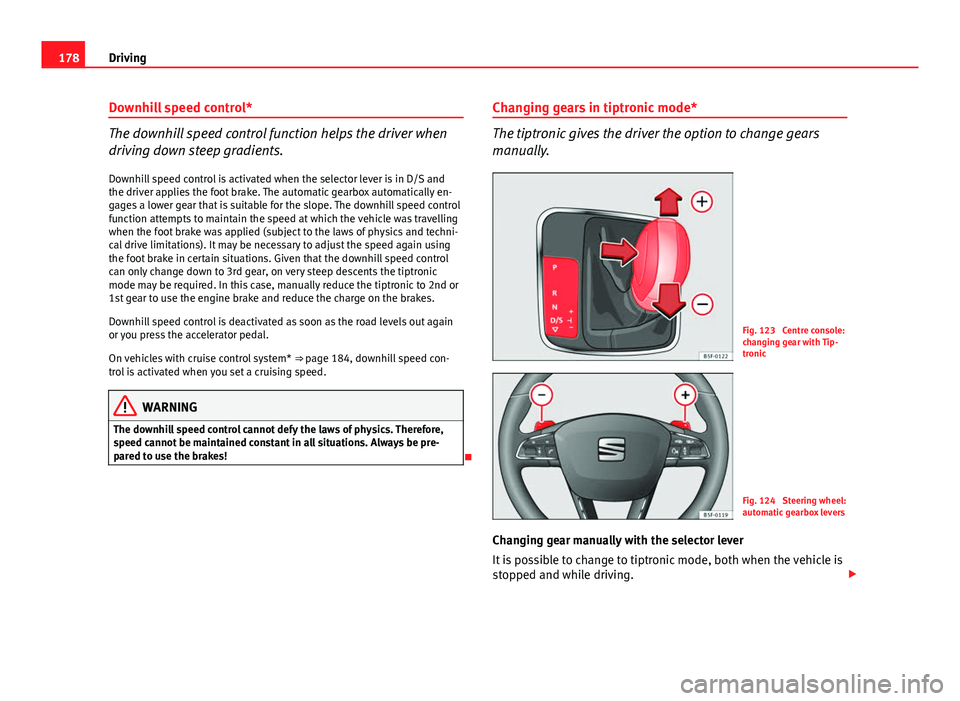
Changing gears in tiptronic mode*
The tiptronic gives the driver the option to change gears
manually.
Fig. 123 Centre console:
changing gear with Tip-
tronic
Fig. 124 Steering wheel:
automatic gearbox levers
Changing gear manually with the selector lever
It is possible to change to tiptronic mode, both when the vehicle is
stopped and while driving.
Page 181 of 339
179
Driving
– To switch to tiptronic mode, move the selector lever from posi-
tion D/S to the right. As soon as the change is made, the selec-
tor lever will be shown in the position G (i.e. G4 means that 4th
gear is engaged) on the instrument panel display.
– Move the selector lever forwards +
to select a higher gear
⇒ Fig. 123.
– Move the selector lever backwards -
to select a lower gear.
Changing gear manually with the gearshift paddles*
The gearshift paddles can be used when the selector lever is in the
position D/S or G.
– Press the gearshift paddle +
to select a higher gear
⇒ Fig. 124.
– Press the gearshift paddle -
to select a lower gear.
– With the selector lever in position D/S, if no paddle is operated
during a short period of time, the gearbox control system
switches back to automatic mode. To switch to permanent man-
ual gear change using the gearshift paddles, move the selector
lever from position D/S to the right.
When accelerating, the gearbox automatically shifts up into the next gear
shortly before the maximum engine speed is reached.
If you select a lower gear, the automatic gearbox will not shift down until
there is no risk of overrevving the engine.
When the kick-down feature is used, the gearbox shifts down to a lower
gear, depending on road speed and engine speed. Kick-down feature
The kick-down feature allows maximum acceleration to be
reached.
When the accelerator pedal is pressed right down past the point of resist-
ance at full throttle, the gearbox will shift down to a lower gear, depending
on road speed and engine speed. The upshift to the next higher gear is de-
layed until the engine reaches maximum rpm.
WARNING
Please note that if the road surface is slippery or wet, the kick-down fea-
ture could cause the driving wheels to spin, which could result in skid-
ding.
Launch Control Programme 1)
The Launch control programme enables maximum accelera-
tion.
Important: the engine must have reached operating temperature
and the steering wheel must not be turned.
The engine speed for “launch control” is different in petrol and die-
sel engines. To use the launch-control you must disconnect the an-
ti-slip regulation (ASR) through the Easy Connect system in the
menu ⇒ page 79. The warning lamp will stay switched on or will
1)
Valid for vehicles: with Launch Control/6-Speed DSG with diesel engines superior to 125
kW and petrol engines superior to 140 kW.
Safety FirstOperating instructionsPractical TipsTechnical specifications
Page 182 of 339
180Driving
flash slowly depending on whether or not the vehicle has a driver
information system* 1)
.
– When the engine is running, switch off the traction control
(ASR) 1)
2)
.
– Move the selector lever to position “S” or tiptronic, or select the
driving mode Sport from the SEAT Drive Mode* ⇒ page 211.
– Press the brake pedal firmly with your left foot and hold it down
for at least one second.
– With your right foot, press the accelerator down to the full throt-
tle or kick-down position. The engine speed will stabilise at ap-
prox. 3200 rpm (petrol engine) or approx. 2000 rpm (diesel en-
gine).
– Take your left foot off the brake pedal.
WARNING
● Always adapt your driving style to the traffic conditions.
● Only use the “Launch control programme” when road and traffic con-
ditions permit, and make sure the way in which you drive and accelerate
the vehicle does not inconvenience or endanger other road users.
WARNING (Continued)
● Make sure that the ESC remains switched on. Please note that when
the ASR and ESC are deactivated, the wheels may start to spin, causing
the vehicle to lose grip. Risk of accident!
● After putting the vehicle into gear, the “sport” mode of the ESC
should be deactivated again by briefly pressing the
OFF
button.
Note
● After using the “Launch control programme”, the gearbox temperature
may have increased considerably. In this case, the programme could be dis-
abled for several minutes. The programme can be used again after the cool-
ing phase.
● Accelerating with the “Launch control programme” places a heavy load
on all parts of the vehicle. This can result in increased wear and tear.
Inertia mode
The inertia mode enables the kinetic energy of the vehicle to be
harnessed enabling certain stretches to be driven without using
the accelerator. This enables fuel to be saved. Use the inertia mode
to “let the vehicle roll” before, for example, arriving in a town.
Switching on inertia mode
Important: selector lever must be in position D, gradients below
12 %.
1)
On vehicles with the driver information system, the ESC lamp lights up permanently and
the corresponding text message Stability control deactivated (temporary) appears on the in-
strument panel to indicate the deactivation status.
2) Vehicles without driver information system: the warning lamp flashes slowly/Vehicles with
driver information system: the warning lamp stays on.
Page 183 of 339
181
Driving
– Select Eco mode ⇒ page 211 once in SEAT Drive Mode*.
– Take your foot off the accelerator.
The driver message Inertia will be displayed. At speeds higher
than 20 km/h (12 mph), the gearbox will automatically disengage
and the vehicle will roll freely, without the effect of the engine
brake. While the vehicle rolls, the engine runs at idling speed.
Stopping inertia mode
– Press the brake or the accelerator pedal.
To make use of the braking force and switch off the engine again,
simply press the brake pedal briefly.
Applying both the inertia mode (= prolonged section with less energy) and
the switching off using inertia (= shorter section without the need for fuel)
facilitates improved fuel consumption and emission balance.
WARNING
● If the inertia mode has been switched on, take into account, when ap-
proaching an obstacle and releasing the accelerator pedal, that the vehi-
cle will not decelerate in the usual manner: risk of accident!
● When using inertia mode while travelling down hills, the vehicle can
increase speed: risk of accident!
● If other users drive your vehicle, warn them about inertia mode.
Note
● Inertia mode is only available in eco driving mode (SEAT Drive Mode*).
● The driver message Inertia is only displayed with the current consump-
tion. In inertia mode the gear will no longer be displayed (for example: “E”
will appear in place of “E7”).
● On downhill sections with gradients above 15 %, the inertia mode will
automatically be switched off temporarily.
Backup programme
A backup programme is in place if a fault should occur in the
control system.
If all the positions of the selector lever are shown over a light background
on the instrument panel display, there is a system fault and the automatic
gearbox will operate in with the backup programme. When the backup pro-
gramme is activated, it is possible to drive the vehicle, however, at low
speeds and within a selected range of gears. In some cases driving in re-
verse gear may not be possible .
CAUTION
If the gearbox operates with the backup programme, take the vehicle to a
specialised workshop and have the fault repaired without delay.
Clutch
Clutch overheated! Stop the vehicle!
The clutch has overheated and could be damaged. In order to prevent the
temperature from increasing again and so that the clutch is cooled, stop the
Safety FirstOperating instructionsPractical TipsTechnical specifications
Page 184 of 339
182Driving
vehicle and wait for the gearbox to cool down with the selector lever in posi-
tion P and the engine running at idling speed. If the warning does not
switch off, do not continue driving. Seek specialist assistance. Failure to do
so could cause considerable damage to the gearbox. When the warning
switches off, the fault should be corrected by a specialised workshop with-
out delay.
Faults in the gearbox
Gearbox: Fault! Stop the vehicle and place the lever in the position P.
There is a fault in the gearbox. Stop the vehicle in a safe place and do not
continue driving. Seek specialist assistance. Overheated clutch! Stop the vehicle!
The clutch has overheated and could be damaged. Stop the vehicle and
wait for the gearbox to cool with the engine at idling speed and the selector
lever in position P. When the warning lamp and the driver message switch
off, have the fault corrected by a specialised workshop without delay. If the
warning lamp and the driver message do not switch off, do not continue
driving. Seek specialist assistance. Gearbox: System fault! You may continue driving.
Have the fault corrected by a specialised workshop without delay. Gearbox: System fault! You can continue driving with restrictions. Re-
verse gear disabled.
Take the vehicle to a specialised workshop and have the fault repaired with-
out delay. Gearbox: System fault! You can continue driving in D until switching off
the engine Stop the vehicle in a safe place well away from moving traffic. Seek special-
ist assistance.
Gearbox: too hot. Adapt your driving accordingly
Continue driving at moderate speeds. When the warning lamp switches off,
you can continue driving in a normal manner. Gearbox: press the brake and engage a gear again.
If the fault was caused by a gearbox with a high temperature, this driver
message will be displayed when the gearbox has cooled again.
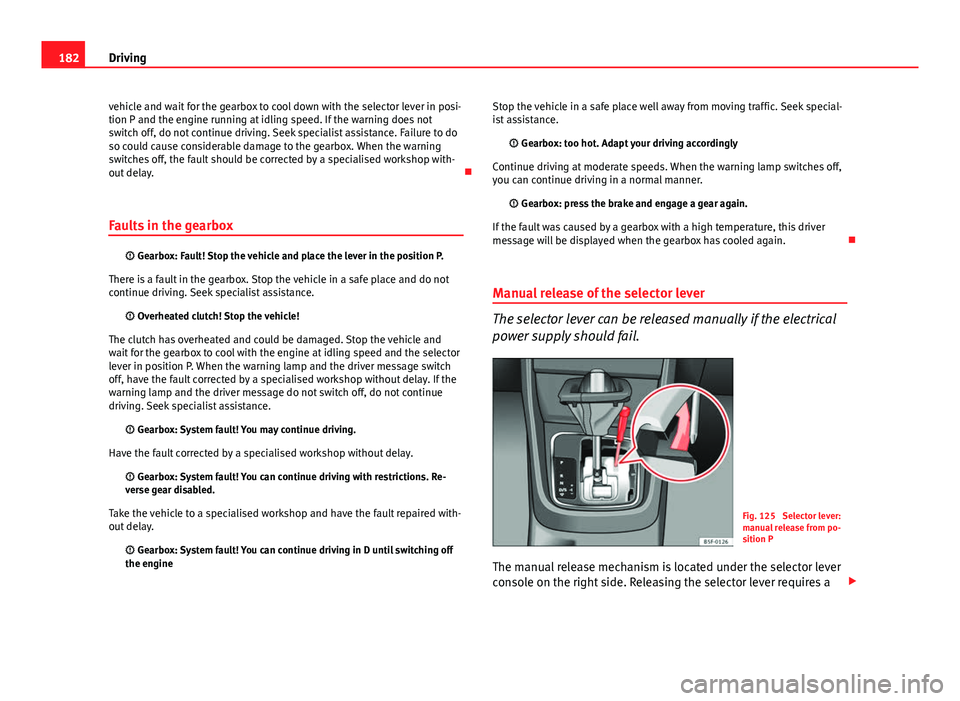
Manual release of the selector lever
The selector lever can be released manually if the electrical
power supply should fail.
Fig. 125 Selector lever:
manual release from po-
sition P
The manual release mechanism is located under the selector lever
console on the right side. Releasing the selector lever requires a
Page 185 of 339
183
Driving
certain degree of practical skill. We therefore advise you to obtain
professional assistance.
A screwdriver will be needed to carry out the manual release. Use
the flat part of the screwdriver blade ⇒ page 274.
Removing the cover from the selector lever
– Apply the handbrake ⇒
to ensure that the car does not
move.
– Carefully pull the corners of the selector lever boot and fold up
the selector lever boot (inside out) by hand.
Releasing the selector lever
– Using a screwdriver, press and hold the yellow unlocking tab
sideways ⇒ Fig. 125.
– Now press the interlock button on the selector lever A
and
move the selector lever to position N.
– After carrying out the manual release, attach the selector lever
boot on the gearbox console again.
If the power supply should ever fail (discharged battery, etc.) and the vehi-
cle has to be pushed or towed, the selector lever must first be moved to po-
sition N. This is possible after operating the manual release mechanism.
WARNING
The selector lever may be moved out of position P only when the hand-
brake is firmly applied. If this does not work, secure the vehicle with the
brake pedal. On a slope the vehicle could otherwise start to move inad-
vertently after shifting the selector lever out of position P - accident risk!
Safety FirstOperating instructionsPractical TipsTechnical specifications
Page 191 of 339
189
Driver assistance systems
Adaptive cruise control (ACC)*
Introduction
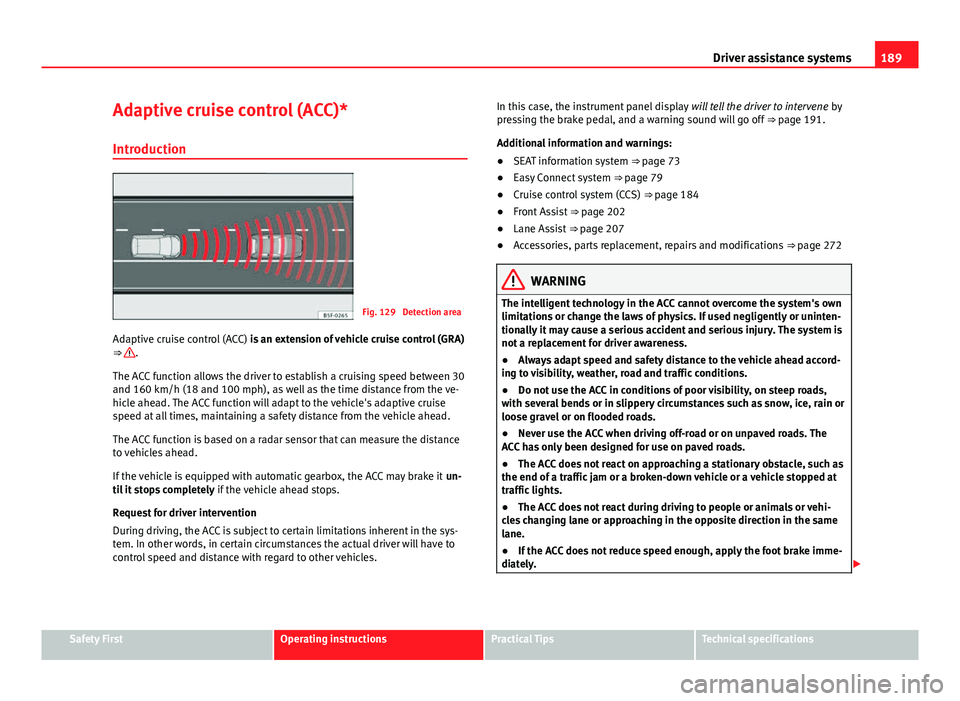
Fig. 129 Detection area
Adaptive cruise control (ACC) is an extension of vehicle cruise control (GRA)
⇒
.
The ACC function allows the driver to establish a cruising speed between 30
and 160 km/h (18 and 100 mph), as well as the time distance from the ve-
hicle ahead. The ACC function will adapt to the vehicle's adaptive cruise
speed at all times, maintaining a safety distance from the vehicle ahead.
The ACC function is based on a radar sensor that can measure the distance
to vehicles ahead.
If the vehicle is equipped with automatic gearbox, the ACC may brake it un-
til it stops completely if the vehicle ahead stops.
Request for driver intervention
During driving, the ACC is subject to certain limitations inherent in the sys-
tem. In other words, in certain circumstances the actual driver will have to
control speed and distance with regard to other vehicles. In this case, the instrument panel display
will tell the driver to intervene by
pressing the brake pedal, and a warning sound will go off ⇒ page 191.
Additional information and warnings:
● SEAT information system ⇒ page 73
● Easy Connect system ⇒ page 79
● Cruise control system (CCS) ⇒ page 184
● Front Assist ⇒ page 202
● Lane Assist ⇒ page 207
● Accessories, parts replacement, repairs and modifications ⇒ page 272
WARNING
The intelligent technology in the ACC cannot overcome the system's own
limitations or change the laws of physics. If used negligently or uninten-
tionally it may cause a serious accident and serious injury. The system is
not a replacement for driver awareness.
● Always adapt speed and safety distance to the vehicle ahead accord-
ing to visibility, weather, road and traffic conditions.
● Do not use the ACC in conditions of poor visibility, on steep roads,
with several bends or in slippery circumstances such as snow, ice, rain or
loose gravel or on flooded roads.
● Never use the ACC when driving off-road or on unpaved roads. The
ACC has only been designed for use on paved roads.
● The ACC does not react on approaching a stationary obstacle, such as
the end of a traffic jam or a broken-down vehicle or a vehicle stopped at
traffic lights.
● The ACC does not react during driving to people or animals or vehi-
cles changing lane or approaching in the opposite direction in the same
lane.
● If the ACC does not reduce speed enough, apply the foot brake imme-
diately.
Safety FirstOperating instructionsPractical TipsTechnical specifications
Page 195 of 339
193
Driver assistance systems
Using the adaptive cruise control (ACC)
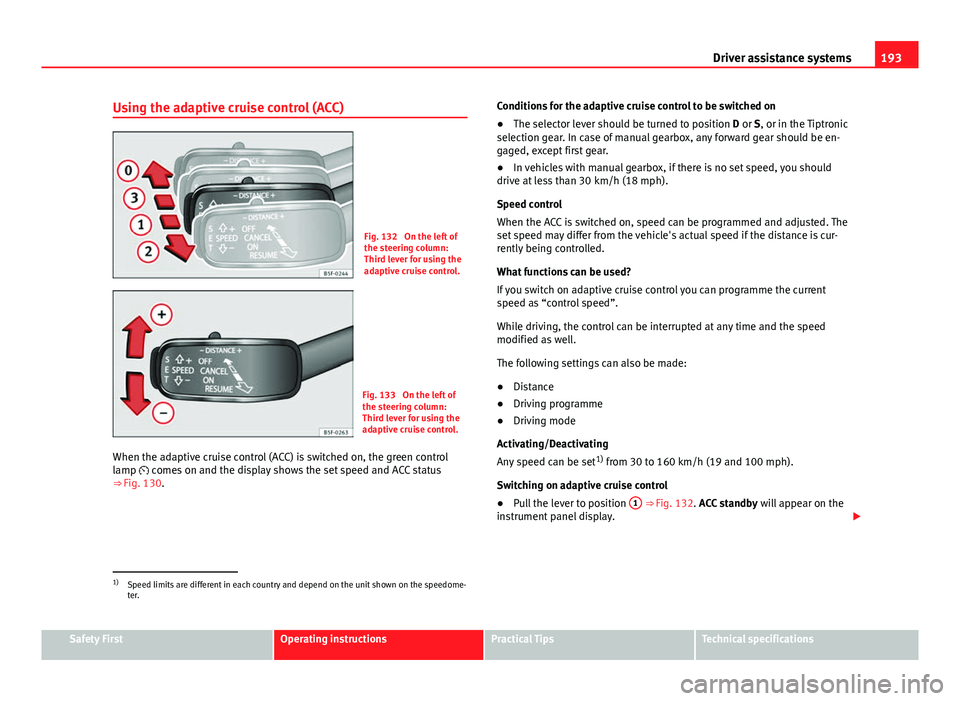
Fig. 132 On the left of
the steering column:
Third lever for using the
adaptive cruise control.
Fig. 133 On the left of
the steering column:
Third lever for using the
adaptive cruise control.
When the adaptive cruise control (ACC) is switched on, the green control
lamp comes on and the display shows the set speed and ACC status
⇒ Fig. 130. Conditions for the adaptive cruise control to be switched on
●
The selector lever should be turned to position D or S, or in the Tiptronic
selection gear. In case of manual gearbox, any forward gear should be en-
gaged, except first gear.
● In vehicles with manual gearbox, if there is no set speed, you should
drive at less than 30 km/h (18 mph).
Speed control
When the ACC is switched on, speed can be programmed and adjusted. The
set speed may differ from the vehicle's actual speed if the distance is cur-
rently being controlled.
What functions can be used?
If you switch on adaptive cruise control you can programme the current
speed as “control speed”.
While driving, the control can be interrupted at any time and the speed
modified as well.
The following settings can also be made:
● Distance
● Driving programme
● Driving mode
Activating/Deactivating
Any speed can be set 1)
from 30 to 160 km/h (19 and 100 mph).
Switching on adaptive cruise control
● Pull the lever to position 1
⇒ Fig. 132. ACC standby
will appear on the
instrument panel display.
1)
Speed limits are different in each country and depend on the unit shown on the speedome-
ter.
Safety FirstOperating instructionsPractical TipsTechnical specifications