warning light Seat Leon SC 2013 Owner's Guide
[x] Cancel search | Manufacturer: SEAT, Model Year: 2013, Model line: Leon SC, Model: Seat Leon SC 2013Pages: 339, PDF Size: 4.8 MB
Page 116 of 339
114Lights and visibility
7. Always take the vehicle key with you when you leave the vehi-
cle.
Switch on the hazard warning lights to warn other road users, for example:
● reaching the tail end of a traffic jam,
● there is an emergency
● your vehicle breaks down due to a technical fault,
● you are towing another vehicle or your vehicle is being towed.
All turn signals flash simultaneously when the hazard warning lights are
switched on. The two turn signal turn signal lamps and the turn signal
lamp in the switch will flash at the same time. The hazard warning lights
also work when the ignition is switched off.
Emergency braking warning
If the vehicle is braked suddenly and continuously at a speed of more than
80 km/h (50 mph), the brake light flashes several times per second to warn
vehicles driving behind. If you continue braking, the hazard warning lights
will come on automatically when the vehicle comes to a standstill. They
switch off automatically when the vehicle starts to move again.
WARNING
● The risk of an accident increases if your vehicle breaks down. Always
use the hazard warning lights and a warning triangle to draw the atten-
tion of other road users to your stationary vehicle.
● Never park where the catalytic converter could come into contact with
inflammable materials under the vehicle, for example dry grass or spilt
petrol. This could start a fire!
Note
● The battery will run down if the hazard warning lights are left on for a
long time, even if the ignition is switched off.
● The use of the hazard warning lights described here is subject to the rel-
evant statutory requirements.
Main beam assist*
Main beam assist (Light Assist)
The main beam assist begins operating (within the limits of the system and
depending on the environmental and traffic conditions) starting at a speed
of 60 km/h (37 mph), when it switches on automatically, and then deacti-
vates again below 30 km/h (18 mph) ⇒
. This is managed via a camera
situated on the base of the interior mirror.
The main beam assist generally detects illuminated areas and deactivates
the main beam when passing through a town, for example.
Page 117 of 339
115
Lights and visibility
Switching the main beam assist on and off
effectuse
Activate:
– Switch the ignition on and turn the light switch to position
.
– From the base position, move the main beam and turn signal
lever forwards ⇒ page 110. When the warning lamp is dis-
played on the instrument panel display, the main beam assist is
switched on.
To
switch
system off:
– Switch off the ignition.
– OR: Turn the light switch to a different position to
⇒ page 111.
– OR: with main beam on, move the main beam and turn signal
lever backwards.
– OR: Move the main beam and turn signal lever forwards to
manually switch main beam on. The main beam assist will then
be deactivated.
Malfunctions
The following conditions may prevent the main beam headlight control from
turning off the headlights in time or from turning off altogether:
● In poorly lit towns with highly reflective signs.
● Other insufficiently lit road users (such as pedestrians or cyclists).
● On tight bends and steep slopes (bumps) and when oncoming vehicles
are partially obscured.
● When the drivers of other oncoming vehicles (such as a truck) can see
over a guard rail in the centre of the road.
● If the camera is damaged or the power supply is cut off.
● In fog, snow and heavy rain.
● With dust and sand turbulence.
● With loose gravel in the field of vision of the camera.
● When the field of vision of the camera is misted up, dirty or covered by
stickers, snow, ice...
WARNING
The convenience features of the main beam assist should not encourage
the taking of risks. The system is not a replacement for driver concentra-
tion.
● You are always in control of the main beam and adapting it to the
light, visibility and traffic conditions.
● It is possible that the main beam headlight control does not recog-
nise all driving situations and is limited under certain circumstances.
● When the field of vision of the camera is dirty, covered or damaged,
operation of the main beam control may be affected. This also applies
when changes are made to the vehicle lighting system, for example, if
additional headlights are installed.
CAUTION
To avoid affecting the operation of the system, take the following points in-
to consideration:
● Clean the field of vision of the camera regularly and make sure it is free
of snow and ice.
● Do not cover the field of vision of the camera.
● Check that the windscreen is not damaged in the area of the field of vi-
sion of the camera.
Note
Main beam and headlight flasher can be turned on and off manually at any
time with the turn signal and main beam lever ⇒ page 110.
Adjusting the headlights
The light beam of the dipped beam lights is asymmetric: the side of the
road on which you are driving is lit more intensely.
Safety FirstOperating instructionsPractical TipsTechnical specifications
Page 120 of 339
118Lights and visibility
WARNING
Heavy objects in the vehicle may mean that the headlights dazzle and
distract other drivers. This could result in a serious accident.
● Adjust the light beam to the vehicle load status so that it does not
blind other drivers.
Interior and reading lights 1)
Button/
Positioneffect
Switches interior lights off.
Switches interior lights on.
Switches door contact control on (central position).
The interior lights come on automatically when the vehicle is
unlocked, a door is opened or the key is removed from the ig-
nition.
The lights go off a few seconds after all the doors are closed,
the vehicle is locked or the ignition is switched on.
Turning the reading light on and off
Glove compartment and luggage compartment lighting*
When opening and closing the glove compartment on the front passenger
side and the rear lid, the respective light will automatically switch on and
off. Footwell lighting*
The lights in the footwell area below the dash (driver and front passenger
sides) will switch on when the doors are opened and will decrease in inten-
sity while driving. The intensity of these lights can be adjusted using the ra-
dio menu (see Easy Connect > Adjusting Lighting > Interior lighting
⇒ page 82).
Ambient light*
The ambient light in the door panel changes colour (white or red) depend-
ing on the driving mode. The intensity of these lights can be adjusted using
the radio menu (see Easy Connect > Adjusting Lights > Interior lighting
⇒ page 82).
Note
The reading lights switch off when the vehicle is locked using a key or after
several minutes if the key is removed from the ignition. This prevents the
battery from discharging.
Sun protection equipment Introduction
WARNING
Folded sun blinds can reduce visibility.
● Always store sun blinds and visors in their housing when not in use.
1)
Depending on the level of equipment fitted in the vehicle, LEDs can be used for the follow-
ing interior lights: front courtesy light, rear courtesy light, footwell light and sun visor light.
Page 122 of 339
120Lights and visibility
Windscreen wiper and rear wiper systems
Introduction
Additional information and warnings:
● Changing wheels round
● Heating, ventilation, cooling
● Caring for and cleaning the vehicle exterior
WARNING
If the water from the windscreen washer does not contain enough anti-
freeze, it may freeze on the windscreen and rear window, reducing for-
ward and rear visibility.
● In winter, ensure the windscreen washer contains enough anti-freeze.
● In cold conditions, you should not use the wash/wipe system unless
you have warmed the windscreen with the ventilation system. The anti-
freeze could freeze on the windscreen and reduce visibility.
WARNING
Worn or dirty wiper blades reduce visibility and increase the risk of acci-
dent and serious injury.
● Always replace damaged or worn blades or blades which do not clean
the windscreen correctly.
CAUTION
In icy conditions, always check that the wiper blades are not frozen to the
glass before using the wipers. In cold weather, it may help to leave the vehi-
cle parked with the wipers in service position ⇒ page 122. Control lamp
lights upPossible causeSolution
Windscreen wiper fluid level
too lowTop up the windscreen wiper
reservoir as soon as possible
⇒ page 124.
Several warning and control lamps should light up for a few seconds when
the ignition is switched on, signalling that the function is being verified.
They will switch off after a few seconds.
CAUTION
Failure to heed the control lamps and text messages when they appear may
result in faults in the vehicle.
Page 126 of 339
124Lights and visibility
● Damaged blades: A film of water on the damaged blades may lengthen
the activation time, reduce the washing intervals or result in a fast and con-
tinuous wipe.
● Insects: insects on the sensor may trigger the windscreen washer.
● Salt on roads: in winter, salt spread in the roads may cause an extra
long wipe when the windscreen is almost dry.
● Dirt: dry dust, wax, coating on glass (Lotus effect) or traces of detergent
(car wash) may reduce the effectiveness of the rain sensor or make it react
more slowly, later or not at all.
● Cracked windscreen: the impact of a stone will trigger a single wipe cy-
cle with the rain sensor on. Next the rain sensor detects the reduction in the
sensitive surface area and adapts accordingly. The behaviour of the sensor
will vary with the size of the damage caused by the stone.
WARNING
The rain sensor may not detect enough rain to switch on the wipers.
● If necessary, switch on the wipers manually when water on the wind-
screen obstructs visibility.
Note
● Clean the sensitive surface of the rain sensor regularly and check the
blades for damage ⇒ Fig. 73 (arrow).
● To remove wax and coatings, we recommend a window cleaner contain-
ing alcohol. Checking and topping up the windscreen washer reservoir
with water
Fig. 74 In the engine
compartment: wind-
screen washer reservoir
top
Check the water level in the windscreen washer reservoir regularly and top
up as required.
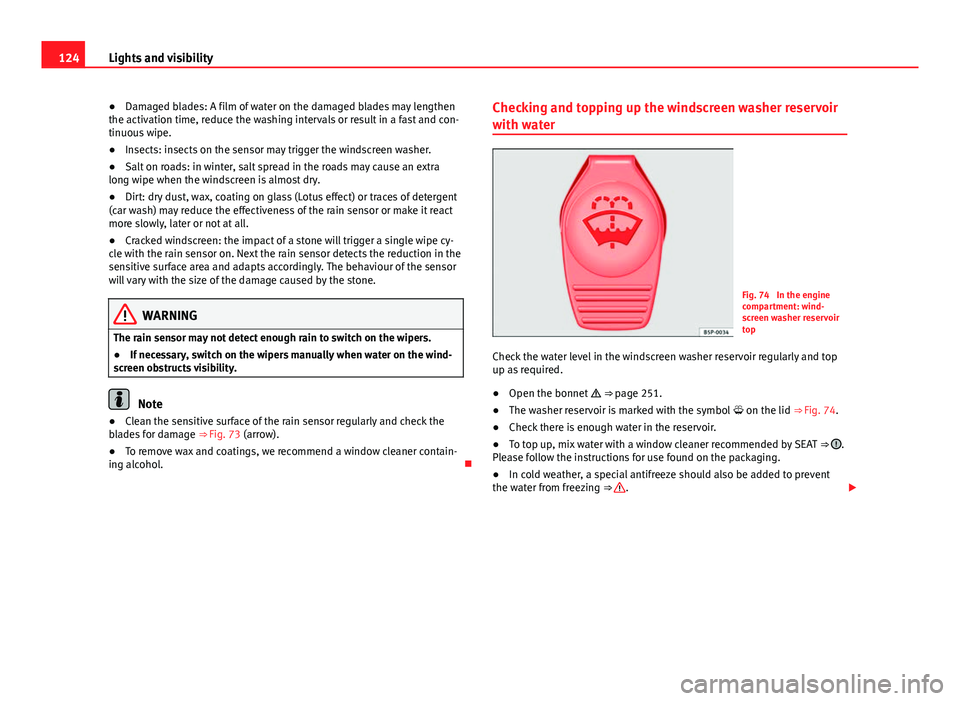
● Open the bonnet
⇒ page 251.
● The washer reservoir is marked with the symbol on the lid
⇒ Fig. 74.
● Check there is enough water in the reservoir.
● To top up, mix water with a window cleaner recommended by SEAT
⇒
.
Please follow the instructions for use found on the packaging.
● In cold weather, a special antifreeze should also be added to prevent
the water from freezing ⇒
.
Page 127 of 339
125
Lights and visibility
Recommended windscreen wipers
● For the hottest seasons we recommend summer G 052 184 A1 for clear
glass. Proportions of the mixture in the washer fluid tank: 1:100 (1 part con-
centrate per 100 parts water).
● All year round, G 052 164 A2 for clear glass. Approximate proportion of
the winter mixture, up to -18 °C (0 °F): 1:2 (1 part concentrate per 2 parts
water); otherwise, a 1:4 proportion of mixture in the washer fluid tank.
Reservoir capacity
The reservoir holds approximately 3 - 4 litres; in vehicles with headlight
washer, it is approximately 3 -6 litres.
WARNING
Never mix an unsuitable antifreeze or other similar additives with the
windscreen washer water. A greasy layer may be formed on the wind-
screen which will impair visibility.
● Use clean water with a window cleaner recommended by SEAT.
● If necessary, add a suitable antifreeze to the water in the reservoir.
CAUTION
● Do not mix cleaning products recommended by SEAT with other prod-
ucts. This could lead to flocculation and may block the windscreen washer
jets.
● When topping up service fluids, make absolutely certain that you fill the
fluids into the correct reservoirs. Using the wrong fluids could cause serious
malfunctions and engine damage! Rear vision mirror
Adjusting the exterior mirrors
Fig. 75 Driver door: con-
trol for the exterior mirror
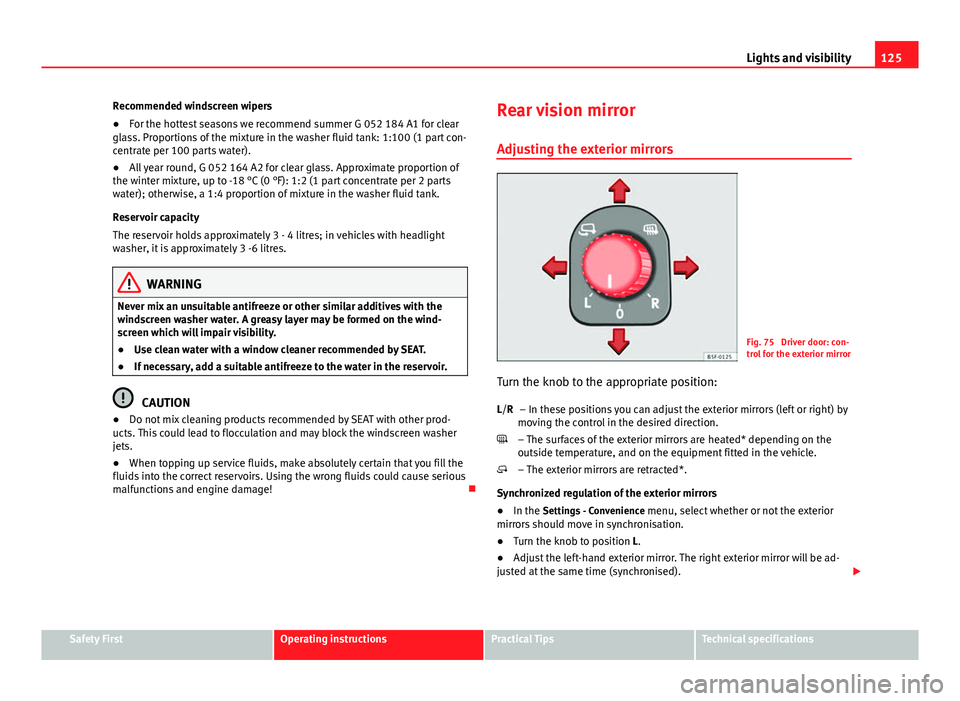
Turn the knob to the appropriate position: – In these positions you can adjust the exterior mirrors (left or right) by
moving the control in the desired direction.
– The surfaces of the exterior mirrors are heated* depending on the
outside temperature, and on the equipment fitted in the vehicle.
– The exterior mirrors are retracted*.
Synchronized regulation of the exterior mirrors
● In the Settings - Convenience menu, select whether or not the exterior
mirrors should move in synchronisation.
● Turn the knob to position L.
● Adjust the left-hand exterior mirror. The right exterior mirror will be ad-
justed at the same time (synchronised).
L/R
Safety FirstOperating instructionsPractical TipsTechnical specifications
Page 128 of 339
126Lights and visibility
● If necessary the right exterior mirror adjustment may need correcting.
Turn the knob to position R.
● In the Easy Connect system the exterior mirrors can be adjusted using
the CAR
button and the function button SETUP.
Tilt function for front passenger exterior mirror*
The mirror can automatically tilt slightly to provide a better view of the kerb
when parking backwards. The control must be in the position R for this fea-
ture to be operational.
The mirror returns to its original position as soon as you drive forwards at
over 15 km/h (10 mph) or switch off the ignition. It also returns to its origi-
nal position if the position of the control is adjusted.
Storing the settings of the passenger's exterior mirror for the tilt function
● Switch the ignition on.
● On the control, select position R.
● Select reverse gear.
● Adjust the front passenger exterior mirror so that you can see, for exam-
ple, the kerb area.
● Disengage the reverse gear.
● The rear view mirror setting is stored.
WARNING
Convex or wide-angle* exterior mirrors give a larger field of vision. How-
ever, they make objects look smaller and further away than they really
are. If you use these mirrors to estimate the distance to vehicles behind
you when changing lane, you could misjudge the distance. Risk of acci-
dent!
CAUTION
● If one of the mirror housings is knocked out of position (e.g. when park-
ing), the mirrors must first be fully retracted with the electric control. Do not
readjust the mirror housing by hand, as this will interfere with the mirror ad-
juster function.
● Before washing the vehicle in an automatic car wash, please make sure
to retract the exterior mirrors to prevent them from being damaged. Electri-
cally retractable exterior mirrors must not be folded in or out by hand. Al-
ways use the electrical power control.
Note
If the electrical adjustment should fail to operate, both of the mirrors can be
adjusted by hand by lightly pressing the edge of the mirror glass.
Anti-dazzle rear vision mirrors
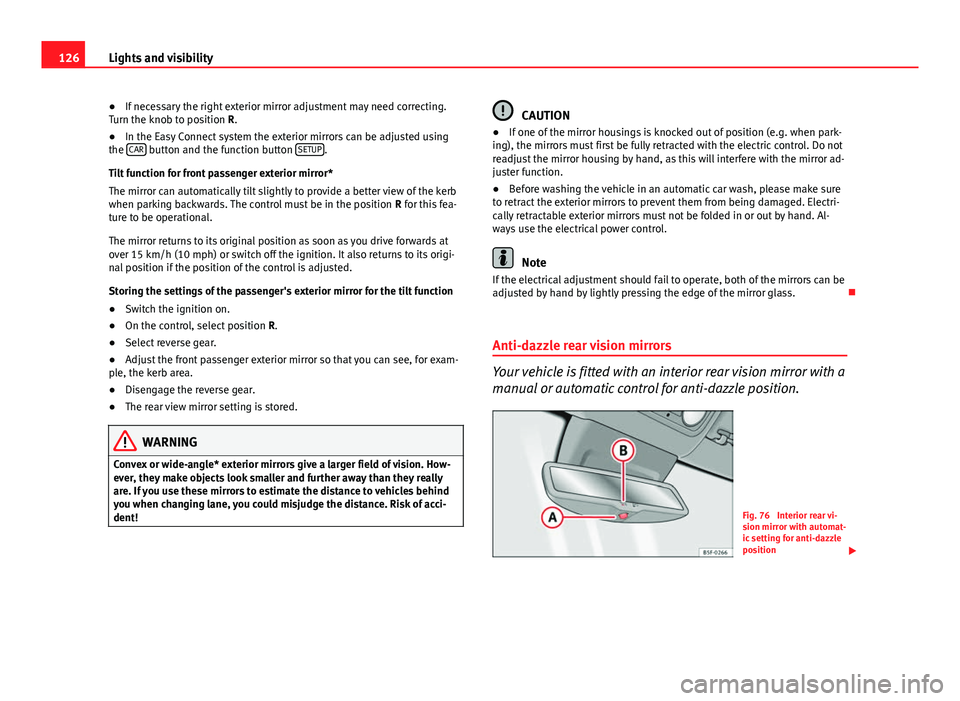
Your vehicle is fitted with an interior rear vision mirror with a
manual or automatic control for anti-dazzle position.
Fig. 76 Interior rear vi-
sion mirror with automat-
ic setting for anti-dazzle
position
Page 129 of 339
127
Lights and visibility
Interior rear vision mirror with manual setting for anti-dazzle
position
– Position the small lever of the lower edge of the mirror to face
towards the rear.
Anti-dazzle rear vision mirror with automatic setting*
– Press the button A
. Warning lamp B will light up. The interior
mirror will darken automatically when bright light (e.g. from the
headlights of a following vehicle) shines on its.
WARNING
In the event that an automatic anti-dazzle rear vision mirror breaks, an
electrolyte fluid may leak. This could cause irritation to the skin, eyes
and respiratory organs. If you come into contact with this liquid, it must
be rinsed with large quantities of water. If necessary, get medial help.
CAUTION
In the event that an automatic anti-dazzle rear vision mirror breaks, an elec-
trolyte fluid may leak. This liquid attacks plastic surfaces. Clean the liquid
with a wet sponge as soon as possible.
Note
● If the light incident in the interior rear vision mirror is obstructed (e.g.
with the sun blind*), the anti-dazzle rear vision mirror with automatic set-
ting will not operate perfectly.
● When the interior lights are on or reverse gear engaged, the rear vision
mirrors do not darken with automatic adjustment for anti-dazzle position.
Safety FirstOperating instructionsPractical TipsTechnical specifications
Page 137 of 339
135
Seats and storage
Other storage compartments
You will find more object holders, compartments and supports in other
parts of the vehicle:
● In the top of the glove compartment in vehicles that do not have a CD
reader. The load must not exceed 1.2 kg.
● In the centre console under the centre armrest*.
● In the driver side panel there is a removable box for access to fuses and
relays. The load of the compartment should not exceed 0.2 kg.
● Coat hooks in the pillar B ⇒
.
● Other storage compartments are found in the rear seat, to the left and
the right of the seats.
WARNING
● Please make sure that any items of clothing hanging from the coat
hooks do not obstruct your view to the rear.
● The coat hooks should only be used for lightweight clothing. Do not
leave any heavy or sharp objects in the pockets.
● Do not use clothes hangers to hang up the clothing, as this could in-
terfere with the function of the head-protection airbags.
Power sockets
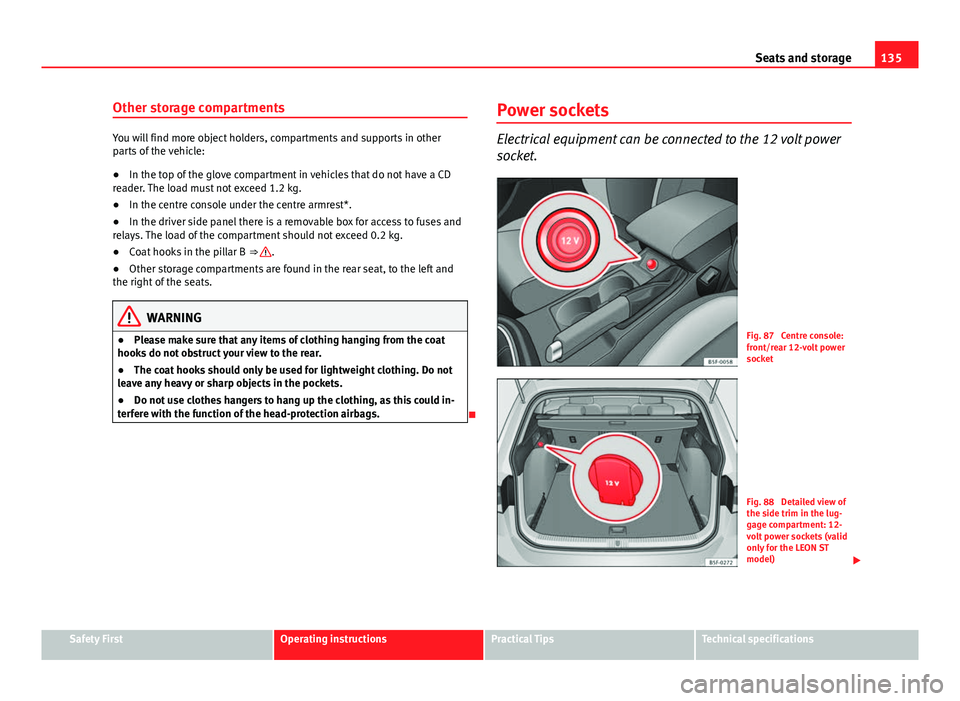
Electrical equipment can be connected to the 12 volt power
socket.
Fig. 87 Centre console:
front/rear 12-volt power
socket
Fig. 88 Detailed view of
the side trim in the lug-
gage compartment: 12-
volt power sockets (valid
only for the LEON ST
model)
Safety FirstOperating instructionsPractical TipsTechnical specifications
Page 148 of 339
146Seats and storage
In order to use the fastening rings, they must be lifted beforehand 1)
.
WARNING
If unsuitable or damaged belts or retaining straps are used, they could
break in the event of braking or an accident. Objects could then be
launched across the passenger compartment and cause serious or fatal
injuries.
● Always use belts or retaining straps that are suitable and in a good
condition.
● Fasten the belts and straps to the fastening rings safely.
● Objects in the luggage compartment that are unsecured could move
suddenly and modify the handling of the vehicle.
● Secure all objects, small and light.
● The maximum tensile load of the fastening ring should never be ex-
ceeded for securing objects.
● Never secure a child seat to the fastening rings.
Note
● The maximum tensile load that the fastening rings can support is 3.5
kN.
● Belts and securing systems for the appropriate load can be obtained
from specialised dealerships. SEAT recommends visiting a SEAT dealership
for this. Retaining hooks
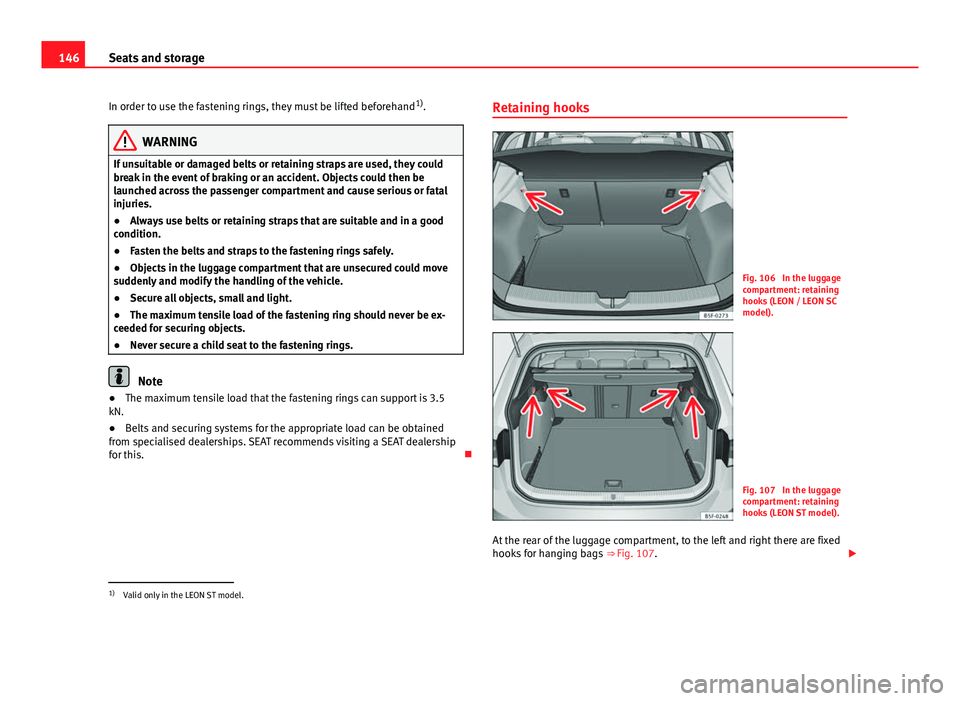
Fig. 106 In the luggage
compartment: retaining
hooks (LEON / LEON SC
model).
Fig. 107 In the luggage
compartment: retaining
hooks (LEON ST model).
At the rear of the luggage compartment, to the left and right there are fixed
hooks for hanging bags ⇒ Fig. 107.
1)
Valid only in the LEON ST model.