belt Seat Leon SC 2013 Workshop Manual
[x] Cancel search | Manufacturer: SEAT, Model Year: 2013, Model line: Leon SC, Model: Seat Leon SC 2013Pages: 339, PDF Size: 4.8 MB
Page 154 of 339
152Seats and storage
Make sure you know the weight of the roof carrier system, the cross bars
and the roof load; weigh them if necessary. Never exceed the maximum au-
thorised roof load.
However, if you are using cross bars and a roof carrier system with a lower
load rating you will not be able to carry the maximum roof load. In this case,
you can only load the roof carrier to the weight limit listed in the fitting in-
structions.
Distributing a load
Uniformly distribute loads and secure them correctly ⇒
.
Check attachments.
Once the cross bars and roof carrier system have been fitted, check bolted
joins and the attachments after you have travelled a short distance and
then regularly.
WARNING
Exceeding the maximum authorised roof load can result in accidents and
considerable vehicle damage.
● Never exceed the indicated roof load, the authorised load on the
axles or the vehicle's authorised maximum load.
● Do not exceed the load capacity of the cross bars and roof carrier sys-
tem, even if the maximum roof load has not been exceeded.
● Always secure heavy items as far forward as possible and distribute
the vehicle load uniformly.
WARNING
If the load is loose and is not properly secured it could fall from the roof
carrier system and cause accidents and injury.
● Always use belts or retaining straps that are suitable and in a good
condition.
● Secure the load properly.
Page 171 of 339
169
Driving
countries with general speed limits, or if a particular speed should not be
exceeded when winter tyres are fitted etc.
Note
● Please bear in mind that, even with the speed warning function, it is still
important to keep an eye on the vehicle speed with the speedometer and to
observe the legal speed limits.
● The speed limit warning function in the version for several countries
warns you at a speed of 120 km/h (80 mph). This is a factory-set speed lim-
it.
Setting speed limit warning
You can use the radio or the Easy Connect* to set, alter or
cancel the speed limit warning.
Vehicles with radio
– Select: SETUP
button > control button
Driver assistant > Speed
warning.
Vehicles with Easy Connect
– Select: Systems control button or Vehicle systems > Driver assis-
tant > Speed warning.
The warning limit can be set from 30 to 240 km/h (20 to 150 mph). The ad-
justment is done in 10 km/h (mph) intervals. Start-Stop system*
Description and operation
The Start-Stop system helps save fuel and reduce CO 2 emissions.
In Start-Stop mode, the engine will automatically switch off when the vehi-
cle stops, when stopping at traffic lights for example. The ignition remains
switched on during the stopping phase. The engine automatically switches
back on when required.
As soon as the ignition is switched on, the Start-Stop function is automati-
cally activated.
Basic requirements for the Start-Stop mode
● The driver door must be closed.
● The driver must have their seat belt fastened.
● The bonnet must be closed.
● The vehicle must have travelled at more than 4 km/h since the last stop.
● The vehicle cannot be towing a trailer.
WARNING
● Never switch the engine off until the vehicle is stationary. The brake
servo and power steering functions will not be completely covered under
warranty. More force may also be needed to turn the steering wheel or to
brake. As you cannot steer and brake in the normal manner, there is a
greater risk of accidents and serious injury.
● Never remove the key from the ignition if the vehicle is in motion.
Otherwise, the steering could lock making it impossible to steer the vehi-
cle.
Safety FirstOperating instructionsPractical TipsTechnical specifications
Page 196 of 339
194Driver assistance systems
Programming speed and switching on control
● To store the current speed press the button SET
⇒ Fig. 133.
● Automatic gearbox: to switch on stationary vehicle control, step on the
brake pedal.
Switching off the adaptive cruise control
● Move the lever to position 0
until it engages. The text
ACC: off will be
displayed.
Altering speed
● To increase or decrease speed, gradually briefly press the lever up/down
⇒ Fig. 133.
Any change in the stored speed is shown on the bottom left of the instru-
ment panel display.
Adjusting the distance level
The distance according to the speed of the vehicle in front can be adjusted
to 5 levels on the Easy Connect system ⇒ page 80.
When the road is wet a greater distance from the vehicle in front should be
selected than when the road is dry.
The following distances can be preselected:
● Very short
● Short
● Media
● Long
● Very long
The Easy Connect system can be used to adjust the level of distance appli-
cable when the ACC is switched on by means of the button
and the func-
tion buttons and Driver Assistance ⇒ page 80. Setting the driving programme
In vehicles with driving mode selection (SEAT Drive Mode), the profile selec-
ted may influence acceleration behaviour
⇒ page 211.
The following driving programmes can be selected:
● Normal
● Sport
● Eco
In vehicles without SEAT Drive Mode, acceleration behaviour can be influ-
enced by selecting a driving programme on the Easy Connect system using
button
and the function buttons and Driver Assistance ⇒ page 80.
The following conditions may cause the ACC not to react:
● If the accelerator is pressed down.
● If there is no gear selected
● If the ESC is controlling.
● If the driver unbuckles his/her seat belt.
● If several brake lights on the vehicle or trailer have electrical faults.
● If the vehicle is reversing.
● If you are driving at a speed above approx. 160 km/h (100 mph).
WARNING
There is danger of a rear-end collision if the minimum distance from the
vehicle ahead is exceeded and the speed difference between both vehi-
cles is so great that speed reduction by the ACC is insufficient. In this
case, brake immediately with the brake pedal.
● The ACC might not detect all situations correctly.
Page 199 of 339
197
Driver assistance systems
Message texts
ACC not available
The system cannot continue to guarantee safe vehicle detection so it is
switched off. The sensor has lost its setting or is damaged. Take the vehicle
to a specialised workshop to have the fault repaired.
ACC: not available at the moment. Sensor without visibility
ACC and Front Assist: not available at the moment. Sensor without
visibility
This message for the driver is displayed if the visibility of the radar's sensor
is impaired, e.g., by leaves, snow, heavy mist or dirt. Clean the sensor.
ACC: not available at the moment. Gradient too steep
The maximum slope has been exceeded, hence it cannot be guaranteed
that the adaptive cruise control will operate safely. The adaptive cruise con-
trol cannot be activated
ACC: only available in D, S or M
Select the position of the selector lever D/S or M.
ACC: parking brake applied
The adaptive cruise control is deactivated if the parking brake is applied.
The adaptive cruise control is available again if the parking brake is re-
leased.
ACC: not available at the moment. Stabilisation control intervention
The message for the driver is shown when the electronic stabilisation con-
trol (ESC) intervenes. In this case, the adaptive cruise control will automati-
cally be switched off.
ACC: Intervene!
The message for the driver is shown if, when you start up on a gentle slope,
the vehicle moves backwards even although the ACC is switched on. Step on the brake pedal to prevent the vehicle from moving/crashing into anoth-
er vehicle.
ACC: speed limit
The message for the driver is shown in vehicles with manual gearbox if the
current speed is too low for ACC mode.
The speed you wish to store must be at least 30 km/h. The cruise control
system switches off if the speed falls below 20 km/h.
ACC: available as of the 2nd gear
The adaptive cruise control is operational as of the 2nd gear (manual gear-
box).
ACC: engine speed
The message for the driver is shown if, when the adaptive cruise control ac-
celerates or brakes, the driver does not go up or down a gear in time, which
would mean either exceeding or not reaching the admissible rpm. The adap-
tive cruise control will then be switched off. A warning buzzer goes off.
ACC: clutch pressed down
Vehicles with a manual gearbox: press the clutch pedal for longer to exit
control.
Three white dots appear if a setting made with the control lever cannot be
executed. For example, the adaptive cruise control cannot be switched on in
a stationary vehicle when the driver's seatbelt is not fastened.
Door open
Vehicles with automatic gearbox: the adaptive cruise control cannot be
switched on in a stationary vehicle with the door open.
Safety FirstOperating instructionsPractical TipsTechnical specifications
Page 216 of 339
214Driver assistance systems
display ⇒ Fig. 145. The message on the instrument panel display is shown
for about 5 seconds, and depending on the case, is repeated. The system
stores the last message displayed.
The message on the instrument panel display can be switched off by press-
ing the
button on the windscreen wiper lever or the button on the
multi function steering wheel ⇒ page 73.
The message can be recalled to the instrument panel display using the mul-
tifunction display ⇒ page 73.
Conditions of operation
Driving behaviour is only calculated on speeds above about 65 km/h (40
mph) up to around 200 km/h (125 mph).
Switching on and off
Tiredness detection can be activated or deactivated in the Easy Connect
system with the button
and the function button
⇒ page 79. A mark
indicates that the adjustment has been activated.
System limitations
The Tiredness detection has certain limitations inherent to the system. The
following conditions can limit the Tiredness detection or prevent it from
functioning.
● At speeds below 65 km/h (40 mph)
● At speeds above 200 km/h (125 mph)
● When cornering
● On roads in poor condition
● In unfavourable weather conditions
● When a sporty driving style is employed
● In the event of a serious distraction to the driver
Tiredness detection will be restored when the vehicle is stopped for more
than 15 minutes, when the ignition is switched off or when the driver has
unbuckled their seat belt and opened the door. In the event of slow driving during a long period of time (below 65 km/h (40
mph) the system automatically re-establishes the tiredness calculation.
When driving at a faster speed the driving behaviour will be recalculated.
Tyre monitoring systems Introduction
Additional information and warnings:
● SEAT information system ⇒ page 73
● Caring for and cleaning the vehicle exterior ⇒ page 238
● Wheels and tyres ⇒ page 265
● Accessories, parts replacement, repairs and modifications ⇒ page 272
WARNING
Unsuitable handling of the wheels and tyres may lead to sudden tyre
pressure losses, to tread separation or even to a blow-out.
● Check tyre pressures regularly and ensure they are maintained at the
pressures indicated. Tyre pressure that is too low could cause overheat-
ing, resulting in tread detachment or even burst tyres.
● Tyre pressure should be that indicated on the label when the tyres are
cold at all times ⇒ page 307.
● Regularly check the cold inflation pressure of the tyres. If necessary,
change the tyre pressure of the vehicle tyres while they are cold.
● Regularly check your tyres for damage and wear.
● Never exceed the maximum permitted speed or loads specified for the
type of tyre fitted on your vehicle.
Page 230 of 339
228Intelligent technology
To restore the necessary energy balance, the system will then temporarily
shut off the electrical components that are using a lot of power, or reduce
the current they are consuming. Heating systems in particular use a large
amount of electrical power. If you notice, for instance, that the seat heating*
or the heated rear window is not working, they may have been temporarily
switched off or regulated to a lower heat output. These systems will be
available again as soon as sufficient electrical power is available.
You may also notice that the engine runs at a slightly faster idling speed.
This is quite normal, and no cause for concern. The increased idling speed
allows the alternator to meet the greater power requirement and charge the
battery at the same time.
Information recorded in the control units
Your vehicle is fitted at the factory with a series of electronic control units
responsible for the engine and gearbox management. In addition, the con-
trol units supervise the correct performance of the exhaust gas system and
the airbag systems.
Therefore, while the vehicle is being driven, these electronic control units
are continuously analysing the vehicle data. In the event of faults or devia-
tions from the theoretical values, only this data is stored. Generally, the in-
strument panel warning lamps indicate whether there are any malfunctions.
This data can only be read and analysed using special equipment.
The storing of the data allows specialised workshops to detect and repair
faults. Stored data may include:
● Important data about the engine and gearbox
● Speed
● Direction of travel ●
Braking force
● Seat belt check
The vehicle control units never record conversations held by passengers in
the vehicle.
If the control unit records an accident with airbag activation, the system
may automatically send a signal. This will depend on the network operator.
Normally, transmission is only possible in areas with sufficient coverage.
Event Data Recorder
The vehicle is not fitted with an event data recorder.
An event data recorder temporarily stores the vehicle information. There-
fore, in the event of accident, it is possible to obtain detailed information
about how the accident occurred. For example, in vehicles with airbag sys-
tems, data relating to speed of impact, seat belt status, seat positions and
airbag activation times may be stored. The volume of data depends on the
manufacturer.
Event data recorders can only be mounted with authorisation from the vehi-
cle owner and, in some countries, they are governed by local legislation.
Reprogramming control units
On the whole, all the data required for the component management is stor-
ed in the control units. The programming of certain convenience functions,
such as the turn signal convenience mode, individual door opening and dis-
play indications can be modified using special equipment at the workshop.
If the convenience functions are reprogrammed, the Instruction Manual in-
formation and descriptions will not coincide with the modified functions.
Therefore, SEAT recommends that any changes are recorded in the “Other
workshop notes section” of the Service Plan.
You can find out about possible reprogramming at your SEAT Official Serv-
ice.
Page 245 of 339
243
Care and cleaning
sponge. If the stains are difficult to remove, a washing paste can be applied
directly onto the stain and worked into the fabric. The surface will then have
to be wiped with clear water to remove any residue left by the paste. To do
so, use a damp cloth or sponge and then dab the stain with an absorbent
cloth.
Remove chocolate or make-up stains with a cleaning paste (for e.g., soft
soap). Then remove the soap with water (wet sponge).
A spirit-based cleaner can be used to remove grease, oil, lipstick or ball
point pen. Then dab the dissolved grease or colour particles off with an ab-
sorbent cloth or similar. You may also have to treat the stain once more us-
ing washing paste and water.
If the covers or textile trim panels are badly soiled we recommend that you
have them cleaned by a professional cleaning company with a shampoo
and spray.
Note
Open Velcro fasteners on clothes can damage the seat upholstery. Make
sure that Velcro fasteners are closed.
Natural leather
SEAT does everything possible to preserve the genuine qual-
ities of this natural product. General information
Our range of leathers is large. The main type used is nappa in various forms,
that is, leather with a smooth surface in various different colours.
The amount of dye used determines the appearance and properties of leath-
er. If the leather is left in a more natural state, it retains its typical natural
napped appearance and confers excellent all-weather properties to the
seats. Fine veins, healed scars, insect bites, wrinkles and a subtle variation in shading remain visible; these are the characteristic features of genuine
natural leather.
Natural napped leather does not have a protective surface coating of dye. It
is therefore somewhat more prone to damage. This should be borne in mind
if children or pets often travel in the car, or if there are other factors that
could lead to damage.
Types of leather with a coloured surface coating are likely to be more resist-
ant to damage. This has a great advantage for day-to-day use. However, this
means that the typical natural characteristics of the surface are less appa-
rent, though this does not affect quality.
Cleaning and care
Due to the natural properties of the specially selected hides employed, the
finished leather has a certain sensitivity to grease and dirt, etc. so a degree
of care is required in everyday use and when looking after the leather. Dark
clothing (especially if damp or incorrectly dyed) may stain leather uphols-
tery. Dust and grit in the pores and seams can scratch and damage the sur-
face. Therefore leather should be cleaned at regular intervals, depending on
the actual amount of use. When they have been in use for a certain time,
your car seats will acquire a typical and unmistakable patina. This is charac-
teristic for leather as a natural product and is a sign of genuine quality.
To maintain the value of natural leather you should note the following
points:CAUTION
● Avoid exposing leather to direct sunlight for long periods, otherwise it
may tend to lose some of its colour. If the car is left for a prolonged period
in the bright sun, it is best to cover the leather.
● Sharp-edged objects on clothing, such as belts, zip fasteners, rivets or
similar, can also leave permanent scratches and rough marks on the surface
of the leather.
Safety FirstOperating instructionsPractical TipsTechnical specifications
Page 247 of 339
245
Care and cleaning
CAUTION
On no account use solvents (such as petrol, turpentine), wax polish, shoe
cream or similar materials.
Cleaning Alcantara upholstery
Removing dust and dirt
– Moisten a cloth just a little and wipe down the seat covers.
Removing stains
– Moisten a cloth with lukewarm water or diluted white spirits.
– Dab at the stain. Start at the outside and work inwards.
– Dry the area you have cleaned with a soft cloth.
Do not use leather cleaning products on Alcantara seat covers.
You may use a suitable shampoo on dust and dirt.
Dust and grit in the pores and seams can scratch and damage the surface. If
the car is left standing in the sun for long periods, Alcantara leather should
be protected against direct sunlight to prevent it from fading. However,
slight colour variations will arise in normal use.
CAUTION
● Do not use solvents, wax polish, shoe cream, stain removers, leather
cleaning products or any similar products on Alcantara.
● To avoid damage, stubborn stains should be removed by a specialised
workshop.
● On no account use brushes, hard sponges or similar utensils. Seat belts
–
Keep the seat belts clean.
– For cleaning, use a mild solution of soap and water.
– Check the condition of the seat belts at regular intervals.
The retract function may not operate properly in very dirty belts. Make sure
that the inertia reel seat belts are completely dry before allowing them to
retract.
CAUTION
● Do not remove the seat belts from the vehicle to clean them.
● Do not use chemical cleaning agents on the seat belts, as this can dam-
age the webbing. Ensure that the seat belts do not come into contact with
corrosive fluids.
● If you find any damage to the belt webbing, belt fittings, the belt retrac-
tor or the buckle, the belt in question must be replaced by a specialised
workshop.
Safety FirstOperating instructionsPractical TipsTechnical specifications
Page 254 of 339
252Checking and refilling levels
WARNING (Continued)
● Protect face, hands and arms by covering the cap with a large, thick
rag to protect against escaping coolant and steam.
● If it is necessary to work in the engine compartment while the engine
is running, the rotating components (for example, poly-V belt, alternator,
radiator fan) and the high voltage ignition system are an additional haz-
ard.
● Observe the following additional warnings if work on the fuel system
or the electrical system is necessary:
–Always disconnect the battery from the on-board network.
– Do not smoke.
– Never work near naked flames.
– Always keep an approved fire extinguisher immediately available.
CAUTION
When changing or topping up service fluids, make absolutely certain that
you fill the fluids into the correct reservoirs. Using the wrong fluids could
cause serious malfunctions and engine damage!
For the sake of the environment
Inspect the ground underneath your vehicle regularly so that any leaks are
detected at an early stage. If you find spots of oil or other fluids, have your
vehicle inspected at the workshop.
Note
On right-hand drive vehicles* some of the containers/reservoirs mentioned
below are located on the other side of the engine compartment. Opening the bonnet
The bonnet is released from inside the vehicle.
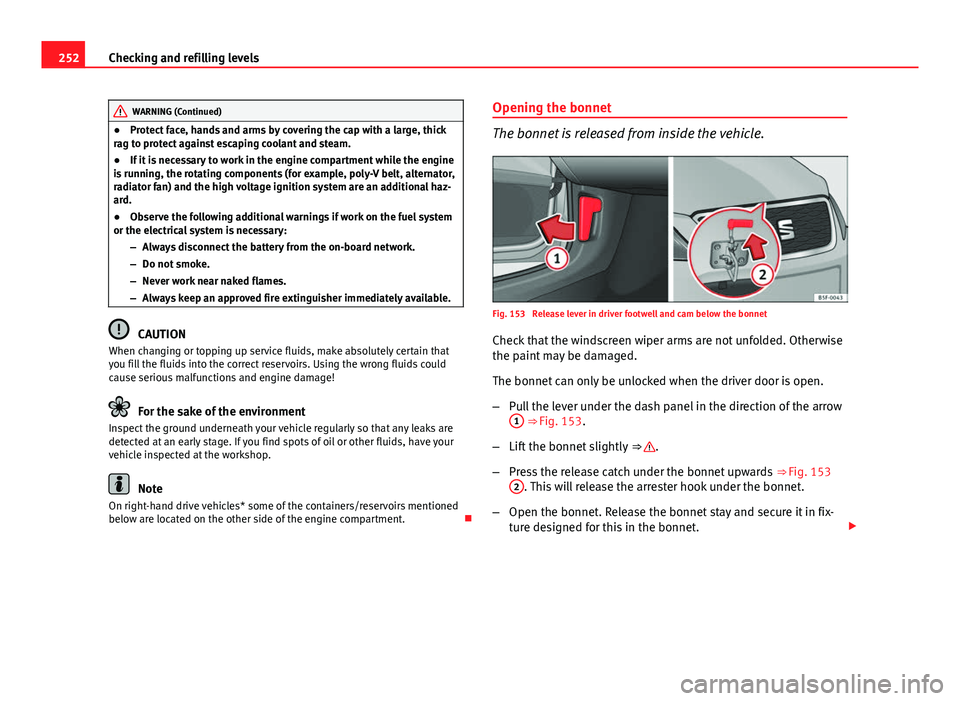
Fig. 153 Release lever in driver footwell and cam below the bonnet
Check that the windscreen wiper arms are not unfolded. Otherwise
the paint may be damaged.
The bonnet can only be unlocked when the driver door is open.
– Pull the lever under the dash panel in the direction of the arrow
1
⇒ Fig. 153.
– Lift the bonnet slightly ⇒
.
– Press the release catch under the bonnet upwards ⇒ Fig. 153
2
. This will release the arrester hook under the bonnet.
– Open the bonnet. Release the bonnet stay and secure it in fix-
ture designed for this in the bonnet.
Page 328 of 339
Balanced (wheels) . . . . . . . . . . . . . . . . . . . . . . 265
Ball coupling . . . . . . . . . . . . . . . . . . . . . . . . . . . 235
Battery . . . . . . . . . . . . . . . . . . . . . . . . . . . . . . . . 260Assisted starting . . . . . . . . . . . . . . . . . . . . 283
Charge Level . . . . . . . . . . . . . . . . . . . . . . . . 226
Charging . . . . . . . . . . . . . . . . . . . . . . . . . . . 261
Disconnecting/Connecting . . . . . . . . . . . . 260
Power Management . . . . . . . . . . . . . . . . . . 226
Replacement . . . . . . . . . . . . . . . . . . . . . . . . 262
Winter conditions . . . . . . . . . . . . . . . . . . . . 260
Before starting the vehicle . . . . . . . . . . . . . . . . . 8
Bench seat . . . . . . . . . . . . . . . . . . . . . . . . . . . . 138
Biodiesel . . . . . . . . . . . . . . . . . . . . . . . . . . . . . . 247
Brakes . . . . . . . . . . . . . . . . . . . . . . . . . . . . . . . . 224 Brake fluid . . . . . . . . . . . . . . . . . . . . . . . . . 259
Brake servo . . . . . . . . . . . . . . . . . . . . . . . . . 224
New brake pads . . . . . . . . . . . . . . . . . . . . . 224
Braking Brake assist system . . . . . . . . . . . . . . . . . . 222
Hill driving assistant . . . . . . . . . . . . . . . . . 168
C
Carbon components: Cleaning . . . . . . . . . . . . 241
Care . . . . . . . . . . . . . . . . . . . . . . . . . . . . . . . . . . 238
Care of vehicle . . . . . . . . . . . . . . . . . . . . . . . . . 238
Care (paint care) . . . . . . . . . . . . . . . . . . . . . . . . 240
Catalytic converter . . . . . . . . . . . . . . . . . . . . . . 230
CD-ROM player (navigation) . . . . . . . . . . . . . . 134
Central locking Anti-theft alarm . . . . . . . . . . . . . . . . . . . . . . 95
Central locking switch . . . . . . . . . . . . . . . . . 94 Electric windows . . . . . . . . . . . . . . . . . . . . . 103
Programming . . . . . . . . . . . . . . . . . . . . . . . . 93
Remote control key . . . . . . . . . . . . . . . . . . . . 92
Selective unlocking system . . . . . . . . . . . . . 92
Sliding/tilting sunroof . . . . . . . . . . . . . . . . 103
Central locking system . . . . . . . . . . . . . . . . . . . . 87 Manual locking in an emergency . . . . . . . . 99
Rear lid . . . . . . . . . . . . . . . . . . . . . . . . . . . . 100
Cetane number (Diesel fuel) . . . . . . . . . . . . . . 247
Changing Windscreen and rear window wiper blades . .263
Changing a bulb . . . . . . . . . . . . . . . . . . . . . . . . 293 Bulb sizes . . . . . . . . . . . . . . . . . . . . . . . . . . 293
Changing gear Engaging gears (manual gearbox) . . . . . . 172
Manual gearbox . . . . . . . . . . . . . . . . . . . . . 172
Changing main headlight main beam . . . . . . . . . . . . . . . . . . . . . . . . . 296
turn signal . . . . . . . . . . . . . . . . . . . . . . . . . . 296
Changing main headlight bulbs daylight bulb . . . . . . . . . . . . . . . . . . . . . . . 295
Dipped beam . . . . . . . . . . . . . . . . . . . . . . . 295
Changing the battery of the vehicle key . . . . . . . . . . . . . . . . . . . . . 91
Chassis number . . . . . . . . . . . . . . . . . . . . . . . . 305
Child-proof lock Electric windows . . . . . . . . . . . . . . . . . . . . . 102
Child safety . . . . . . . . . . . . . . . . . . . . . . . . . . . . . 48
Child seat Categorisation in groups . . . . . . . . . . . . . . . 50
Group 1 . . . . . . . . . . . . . . . . . . . . . . . . . . . . . 51
Group 2 . . . . . . . . . . . . . . . . . . . . . . . . . . . . . 51 Group 3 . . . . . . . . . . . . . . . . . . . . . . . . . . . . . 51
Groups 0 and 0+ . . . . . . . . . . . . . . . . . . . . . . 50
Safety notes . . . . . . . . . . . . . . . . . . . . . . . . . 48
Securing . . . . . . . . . . . . . . . . . . . . . . . . . . . . 53
Child seats . . . . . . . . . . . . . . . . . . . . . . . . . . . . . 50 ISOFIX system . . . . . . . . . . . . . . . . . . . . . . . . 55
on the front passenger seat . . . . . . . . . . . . . 32
Top Tether system . . . . . . . . . . . . . . . . . 55, 56
City emergency braking function . . . . . . . . . . . 206
Cleaning . . . . . . . . . . . . . . . . . . . . . . . . . . . . . . 238 Alcantara . . . . . . . . . . . . . . . . . . . . . . . . . . . 245
Carbon components . . . . . . . . . . . . . . . . . . 241
Display/Easy Connect control panel . . . . . 242
Exhaust pipe . . . . . . . . . . . . . . . . . . . . . . . . 242
Leather . . . . . . . . . . . . . . . . . . . . . . . . . . . . 243
Plastic parts . . . . . . . . . . . . . . . . . . . . 240, 242
Radio display . . . . . . . . . . . . . . . . . . . . . . . 242
Rims . . . . . . . . . . . . . . . . . . . . . . . . . . . . . . 241
Seat belts . . . . . . . . . . . . . . . . . . . . . . . . . . 245
Trim parts . . . . . . . . . . . . . . . . . . . . . . . . . . 242
Trims . . . . . . . . . . . . . . . . . . . . . . . . . . . . . . 240
Washing the vehicle . . . . . . . . . . . . . . . . . . 238
Windows . . . . . . . . . . . . . . . . . . . . . . . . . . . 241
Windscreen and rear window wiper blades . .263
Cleaning/De-icing the windows . . . . . . . . . . . 241
Cleaning the rims . . . . . . . . . . . . . . . . . . . . . . . 241
Cleaning the upholstery Natural leather . . . . . . . . . . . . . . . . . . . . . . 244
Closing Bonnet . . . . . . . . . . . . . . . . . . . . . . . . . . . . 253
Panoramic sliding sunroof . . . . . . . . . . . . . 106
Panoramic sunroof . . . . . . . . . . . . . . . . . . . 106
Windows . . . . . . . . . . . . . . . . . . . . . . . . . . . 102
326 Index