warning Seat Leon SC 2013 Workshop Manual
[x] Cancel search | Manufacturer: SEAT, Model Year: 2013, Model line: Leon SC, Model: Seat Leon SC 2013Pages: 339, PDF Size: 4.8 MB
Page 69 of 339
67
Instruments and warning/control lamps
Trip recorder
Fig. 40 Instrument pan-
el: Odometer and reset
button
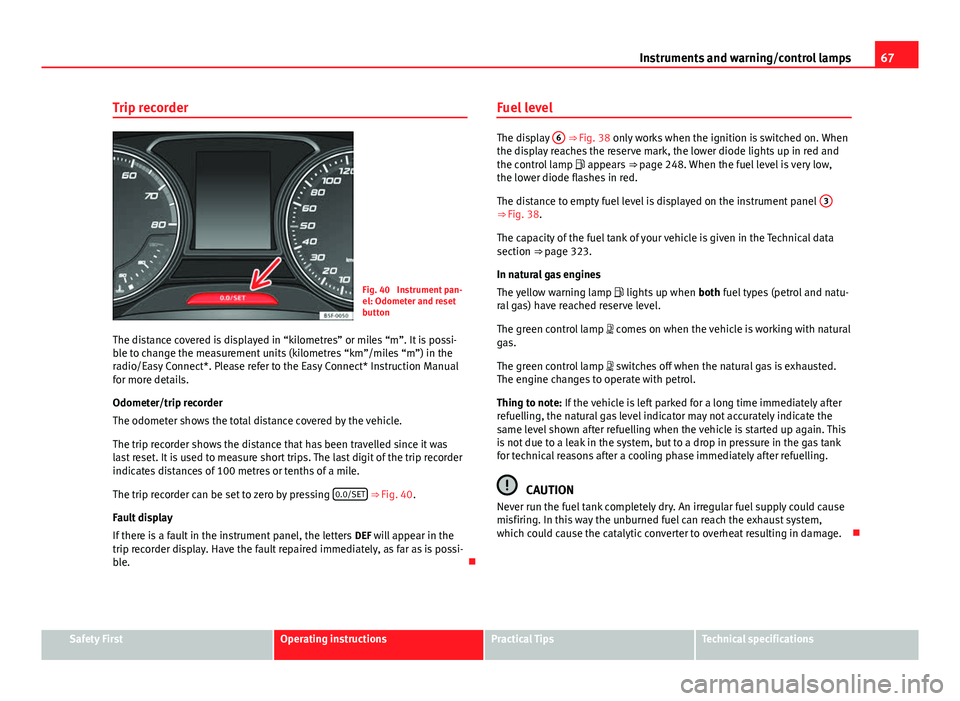
The distance covered is displayed in “kilometres” or miles “m”. It is possi-
ble to change the measurement units (kilometres “km”/miles “m”) in the
radio/Easy Connect*. Please refer to the Easy Connect* Instruction Manual
for more details.
Odometer/trip recorder
The odometer shows the total distance covered by the vehicle.
The trip recorder shows the distance that has been travelled since it was
last reset. It is used to measure short trips. The last digit of the trip recorder
indicates distances of 100 metres or tenths of a mile.
The trip recorder can be set to zero by pressing 0.0/SET
⇒ Fig. 40.
Fault display
If there is a fault in the instrument panel, the letters DEF will appear in the
trip recorder display. Have the fault repaired immediately, as far as is possi-
ble. Fuel level
The display
6 ⇒ Fig. 38 only works when the ignition is switched on. When
the display reaches the reserve mark, the lower diode lights up in red and
the control lamp appears ⇒ page 248. When the fuel level is very low,
the lower diode flashes in red.
The distance to empty fuel level is displayed on the instrument panel 3
⇒ Fig. 38.
The capacity of the fuel tank of your vehicle is given in the Technical data
section ⇒ page 323.
In natural gas engines
The yellow warning lamp
lights up when both fuel types (petrol and natu-
ral gas) have reached reserve level.
The green control lamp comes on when the vehicle is working with natural
gas.
The green control lamp switches off when the natural gas is exhausted.
The engine changes to operate with petrol.
Thing to note: If the vehicle is left parked for a long time immediately after
refuelling, the natural gas level indicator may not accurately indicate the
same level shown after refuelling when the vehicle is started up again. This
is not due to a leak in the system, but to a drop in pressure in the gas tank
for technical reasons after a cooling phase immediately after refuelling.
CAUTION
Never run the fuel tank completely dry. An irregular fuel supply could cause
misfiring. In this way the unburned fuel can reach the exhaust system,
which could cause the catalytic converter to overheat resulting in damage.
Safety FirstOperating instructionsPractical TipsTechnical specifications
Page 70 of 339
68Instruments and warning/control lamps
Coolant temperature gauge
For vehicles with no coolant temperature gauge, a control lamp appears for
high coolant temperatures ⇒ page 257. Take into account the ⇒ .
The coolant temperature gauge 2
⇒ Fig. 38 only works when the ignition is
switched on. In order to avoid engine damage, please read the following
notes for the different temperature ranges.
Engine cold
If only the diodes in the lower part of the scale light up, this indicates that
the engine has not yet reached operating temperature. Avoid high revs and
heavy acceleration and do not make the engine work hard.
Normal temperature
If in normal operations, the diodes light up until the central zone, it means
that the engine has reached operating temperature. At high outside temper-
atures and when making the engine work hard, the diodes may continue
lighting up and reach the upper zone. This is no cause for concern, provided
the control lamp does not light up on the instrument panel digital dis-
play.
Heat range
When the diodes light up in the upper area of the display and the control
lamp appears on the instrument panel display, the coolant temperature
is excessive ⇒ page 257.
CAUTION
● To ensure a long useful life for the engine, avoid high revs, driving at
high speed and making the engine work hard for approx. the first 15 mi-
nutes when the engine is cold. The phase until the engine is warm also de-
pends on the outside temperature. If necessary, use the engine oil tempera-
ture* as a guide ⇒ page 77
● Additional lights and other accessories in front of the air inlet reduce the
cooling effect of the coolant. At high outside temperatures and high engine
loads, there is a risk of the engine overheating.
● The front spoiler also ensures proper distribution of the cooling air when
the vehicle is moving. If the spoiler is damaged this can reduce the cooling
effect, which could cause the engine to overheat. Seek specialist assis-
tance.
Gear-change indicator
This additional indicator function can help to save fuel.
Fig. 41 Instrument pan-
el: Gear-change indicator
(manual gearbox)
Page 71 of 339
69
Instruments and warning/control lamps
To familiarise yourself with the gear-change indicator, we recommend driv-
ing in the normal way to start with. A gear change will be recommended if
the gear you are in is not the most economical choice.
If no gear-change is recommended, you are already in the most economical
gear.
Vehicles with a manual gearbox
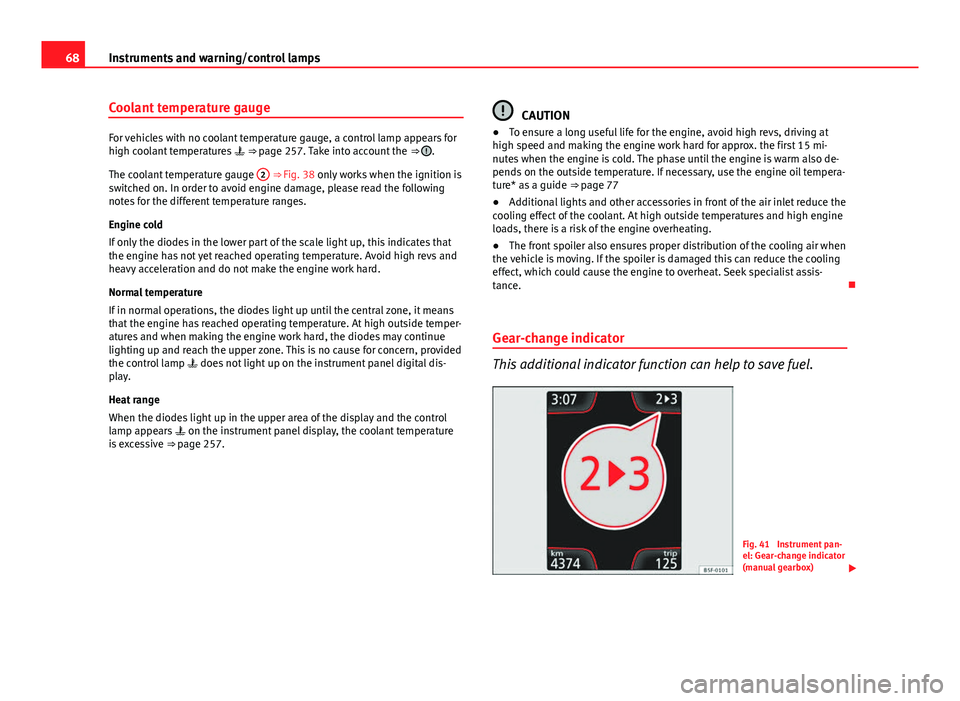
The following display symbols ⇒ Fig. 41 mean:
● Change to a higher gear: The suggested gear appears to the right of
the current gear when a higher gear is recommended.
● Change to a lower gear: The suggested gear appears to the left of the
current gear when a lower gear is recommended.
The gear recommendation may occasionally skip a gear (2nd 4th).
Vehicles with an automatic gearbox*
The display is only visible in tiptronic mode ⇒ page 178
The following display symbols mean:
● Shifting up a gear
● Shifting down a gear
CAUTION
The gear-change indicator is intended to help save fuel. It is not intended to
recommend the right gear for all driving situations. In certain situations, on-
ly the driver can choose the correct gear (for instance when overtaking, driv-
ing up a steep gradient or towing a trailer).
Note
The display disappears from the instrument panel when you press the
clutch pedal. Control lamps
Control and warning lamps
The control and warning lamps are indicators of warnings, ⇒ , faults ⇒ or certain functions. Some control and warning lamps come on when the ig-
nition is switched on, and switch off when the engine starts running, or
while driving.
Depending on the model, additional text messages may be viewed on the
instrument panel display. These may be purely informative or they may be
advising of the need for action ⇒ page 61, Instruments.
Depending upon the equipment fitted in the vehicle, instead of a warning
lamp, sometimes a symbol may be displayed on the instrument panel.
When certain control and warning lamps are lit, an audible warning is also
heard.
Red symbols
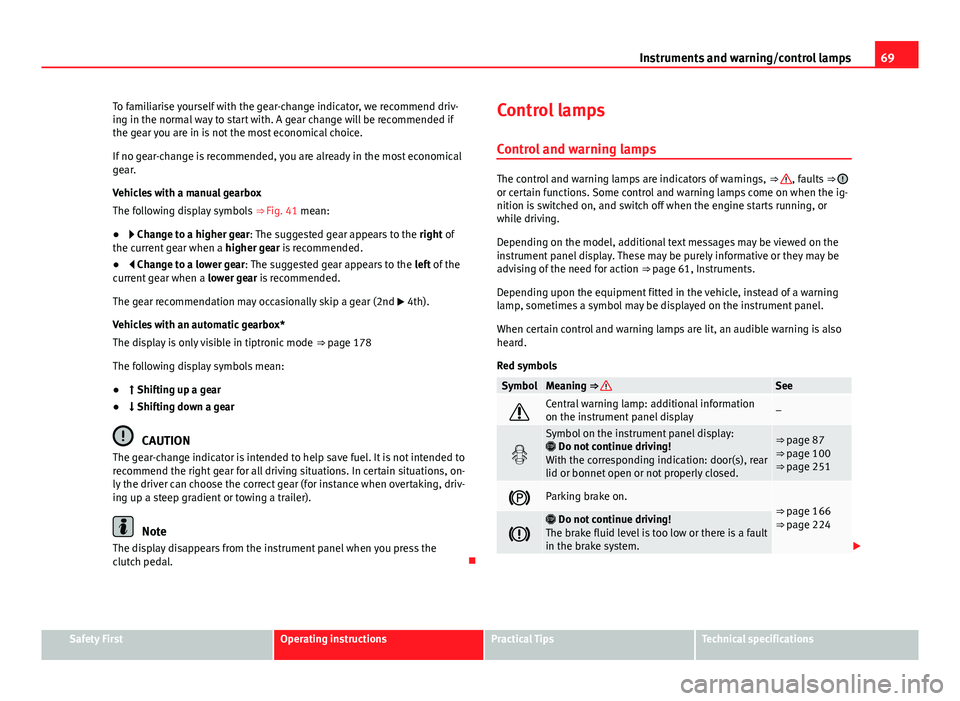
SymbolMeaning ⇒ See
Central warning lamp: additional information
on the instrument panel display–
Symbol on the instrument panel display:
Do not continue driving!
With the corresponding indication: door(s), rear
lid or bonnet open or not properly closed.⇒ page 87
⇒ page 100
⇒ page 251
Parking brake on.⇒ page 166
⇒ page 224
Do not continue driving!
The brake fluid level is too low or there is a fault
in the brake system.
Safety FirstOperating instructionsPractical TipsTechnical specifications
Page 72 of 339
70Instruments and warning/control lamps
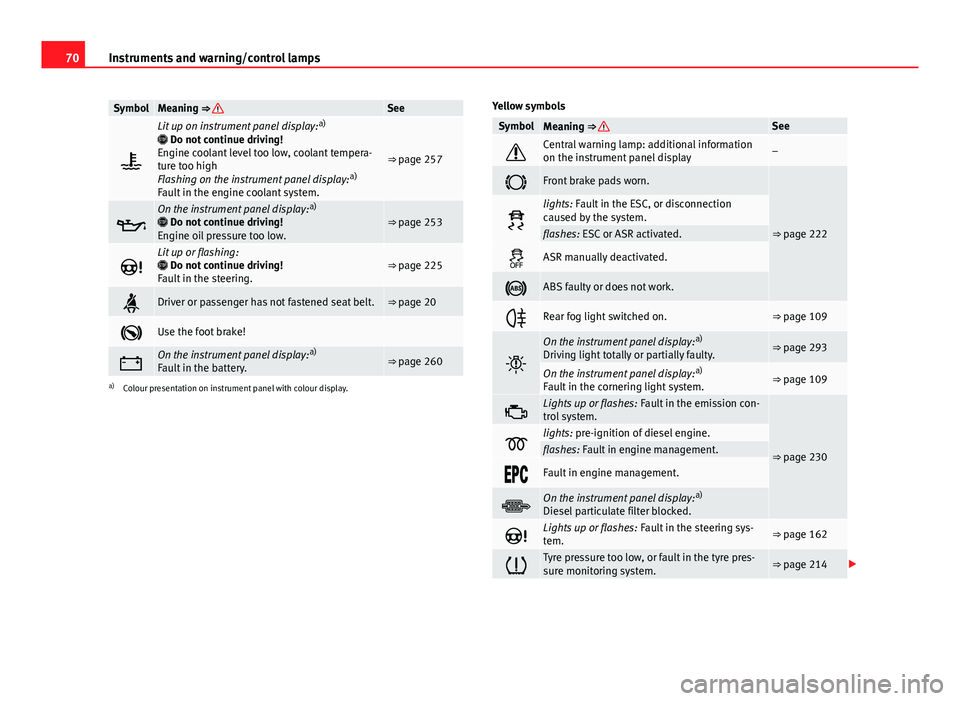
SymbolMeaning ⇒ See
Lit up on instrument panel display: a)
Do not continue driving!
Engine coolant level too low, coolant tempera-
ture too high
Flashing on the instrument panel display: a)
Fault in the engine coolant system.
⇒ page 257
On the instrument panel display: a)
Do not continue driving!
Engine oil pressure too low.⇒ page 253
Lit up or flashing:
Do not continue driving!
Fault in the steering.⇒ page 225
Driver or passenger has not fastened seat belt.⇒ page 20
Use the foot brake!
On the instrument panel display: a)
Fault in the battery.⇒ page 260
a) Colour presentation on instrument panel with colour display. Yellow symbols
SymbolMeaning ⇒ See
Central warning lamp: additional information
on the instrument panel display–
Front brake pads worn.
⇒ page 222
lights: Fault in the ESC, or disconnection
caused by the system.
flashes: ESC or ASR activated.
ASR manually deactivated.
ABS faulty or does not work.
Rear fog light switched on.⇒ page 109
On the instrument panel display:
a)
Driving light totally or partially faulty.⇒ page 293
On the instrument panel display: a)
Fault in the cornering light system.⇒ page 109
Lights up or flashes: Fault in the emission con-
trol system.
⇒ page 230lights: pre-ignition of diesel engine.flashes: Fault in engine management.
Fault in engine management.
On the instrument panel display: a)
Diesel particulate filter blocked.
Lights up or flashes: Fault in the steering sys-
tem.⇒ page 162
Tyre pressure too low, or fault in the tyre pres-
sure monitoring system.⇒ page 214
Page 73 of 339
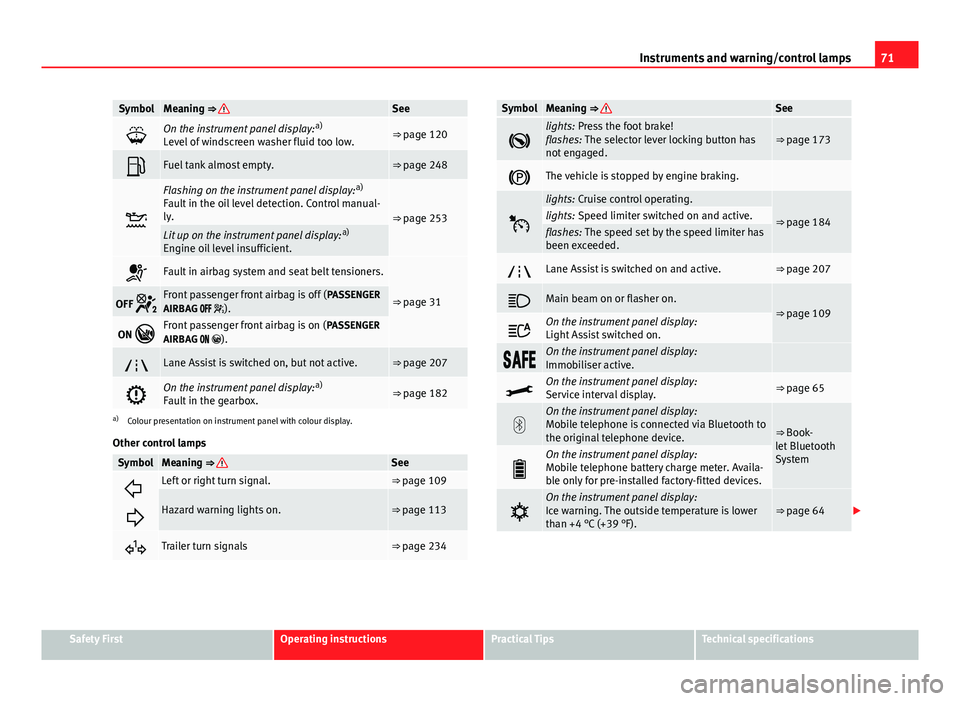
71
Instruments and warning/control lamps
SymbolMeaning ⇒ See
On the instrument panel display: a)
Level of windscreen washer fluid too low.⇒ page 120
Fuel tank almost empty.⇒ page 248
Flashing on the instrument panel display: a)
Fault in the oil level detection. Control manual-
ly.
⇒ page 253Lit up on the instrument panel display: a)
Engine oil level insufficient.
Fault in airbag system and seat belt tensioners.
⇒ page 31OFF Front passenger front airbag is off ( PASSENGER
AIRBAG ).
ON Front passenger front airbag is on ( PASSENGER
AIRBAG ).
Lane Assist is switched on, but not active.⇒ page 207
On the instrument panel display: a)
Fault in the gearbox.⇒ page 182
a) Colour presentation on instrument panel with colour display.
Other control lamps
SymbolMeaning ⇒ See
Left or right turn signal.⇒ page 109
Hazard warning lights on.⇒ page 113
Trailer turn signals⇒ page 234
SymbolMeaning ⇒ See
lights: Press the foot brake!
flashes: The selector lever locking button has
not engaged.⇒ page 173
The vehicle is stopped by engine braking.
lights: Cruise control operating.
⇒ page 184lights: Speed limiter switched on and active.flashes: The speed set by the speed limiter has
been exceeded.
Lane Assist is switched on and active.⇒ page 207
Main beam on or flasher on.⇒ page 109
On the instrument panel display:
Light Assist switched on.
On the instrument panel display:
Immobiliser active.
On the instrument panel display:
Service interval display.⇒ page 65
On the instrument panel display:
Mobile telephone is connected via Bluetooth to
the original telephone device.
⇒ Book-
let Bluetooth
System
On the instrument panel display:
Mobile telephone battery charge meter. Availa-
ble only for pre-installed factory-fitted devices.
On the instrument panel display:
Ice warning. The outside temperature is lower
than +4 °C (+39 °F).⇒ page 64
Safety FirstOperating instructionsPractical TipsTechnical specifications
Page 74 of 339
72Instruments and warning/control lamps
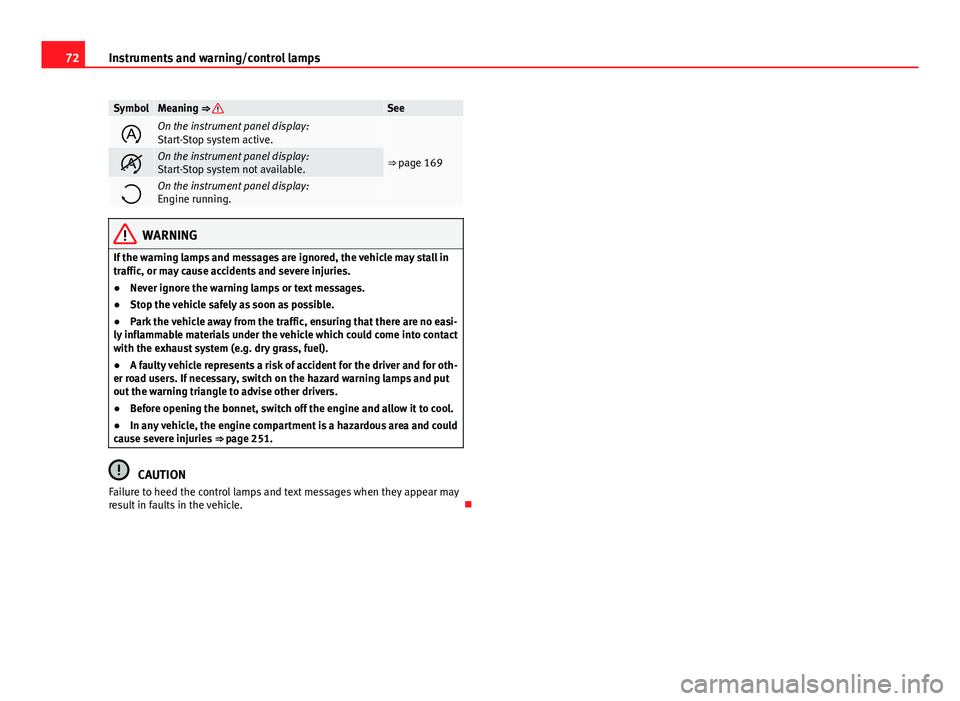
SymbolMeaning ⇒ See
On the instrument panel display:
Start-Stop system active.
⇒ page 169On the instrument panel display:
Start-Stop system not available.
On the instrument panel display:
Engine running.
WARNING
If the warning lamps and messages are ignored, the vehicle may stall in
traffic, or may cause accidents and severe injuries.
● Never ignore the warning lamps or text messages.
● Stop the vehicle safely as soon as possible.
● Park the vehicle away from the traffic, ensuring that there are no easi-
ly inflammable materials under the vehicle which could come into contact
with the exhaust system (e.g. dry grass, fuel).
● A faulty vehicle represents a risk of accident for the driver and for oth-
er road users. If necessary, switch on the hazard warning lamps and put
out the warning triangle to advise other drivers.
● Before opening the bonnet, switch off the engine and allow it to cool.
● In any vehicle, the engine compartment is a hazardous area and could
cause severe injuries ⇒ page 251.
CAUTION
Failure to heed the control lamps and text messages when they appear may
result in faults in the vehicle.
Page 75 of 339
73
Driver information system
Driver information system Information system
Introduction
With the ignition switched on, it is possible to read the different functions of
the display by scrolling through the menus.
In vehicles with multifunction steering wheel, the multifunction display can
only be operated with the multifunction steering wheel buttons.
The number of menus displayed on the instrument panel will vary according
to the vehicle electronics and equipment.
A specialised workshop will be able to programme or modify additional
functions, according to the vehicle equipment. SEAT recommends visiting a
SEAT Official Service.
Some menu options can only be read when the vehicle is at a standstill.
As long as a priority 1 warning is displayed, it will not be possible to read
the menus. Some warning messages can be confirmed and made to disap-
pear with the windscreen wiper lever button or the multifunction steering
wheel button.
Additional information and warnings:
● Easy Connect system ⇒ page 79
● Driver assistance systems ⇒ page 184
● Radio or navigation system ⇒ Booklet Radio or ⇒ Booklet Navigation
system
WARNING
Any distraction may lead to an accident, with the risk of injury.
● Do not read the instrument panel display menus when driving.
Overview of the menu structure
Driving data ⇒ page 75
■ Vehicle status
■ MFD from departure
■ MFD from refuelling
■ MFD total calculation
Assist systems ⇒ table on page 75
■ Activate/deactivate Lane Assist
■ Reverse (optional)
Navigation ⇒ Booklet Navigation system Audio ⇒ Booklet Radio or ⇒ Booklet Navigation systemTelephone ⇒ Booklet Bluetooth systemVehicle ⇒ table on page 75
Safety FirstOperating instructionsPractical TipsTechnical specifications
Page 77 of 339
75
Driver information system
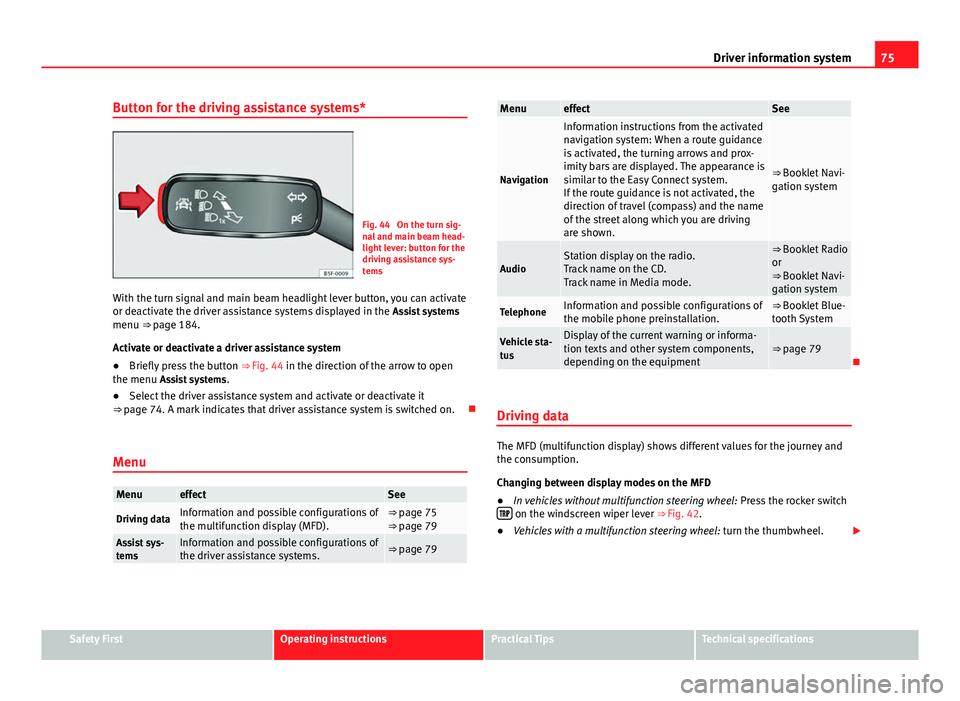
Button for the driving assistance systems*
Fig. 44 On the turn sig-
nal and main beam head-
light lever: button for the
driving assistance sys-
tems
With the turn signal and main beam headlight lever button, you can activate
or deactivate the driver assistance systems displayed in the Assist systems
menu ⇒ page 184.
Activate or deactivate a driver assistance system
● Briefly press the button ⇒ Fig. 44 in the direction of the arrow to open
the menu Assist systems .
● Select the driver assistance system and activate or deactivate it
⇒ page 74. A mark indicates that driver assistance system is switched on.
Menu
MenueffectSee
Driving dataInformation and possible configurations of
the multifunction display (MFD).⇒ page 75
⇒ page 79
Assist sys-
temsInformation and possible configurations of
the driver assistance systems.⇒ page 79
MenueffectSee
Navigation
Information instructions from the activated
navigation system: When a route guidance
is activated, the turning arrows and prox-
imity bars are displayed. The appearance is
similar to the Easy Connect system.
If the route guidance is not activated, the
direction of travel (compass) and the name
of the street along which you are driving
are shown.
⇒ Booklet Navi-
gation system
AudioStation display on the radio.
Track name on the CD.
Track name in Media mode.⇒ Booklet Radio
or
⇒ Booklet Navi-
gation system
TelephoneInformation and possible configurations of
the mobile phone preinstallation.⇒ Booklet Blue-
tooth System
Vehicle sta-
tusDisplay of the current warning or informa-
tion texts and other system components,
depending on the equipment⇒ page 79
Driving data
The MFD (multifunction display) shows different values for the journey and
the consumption.
Changing between display modes on the MFD
● In vehicles without multifunction steering wheel: Press the rocker switch
on the windscreen wiper lever ⇒ Fig. 42.
● Vehicles with a multifunction steering wheel: turn the thumbwheel.
Safety FirstOperating instructionsPractical TipsTechnical specifications
Page 79 of 339
77
Driver information system
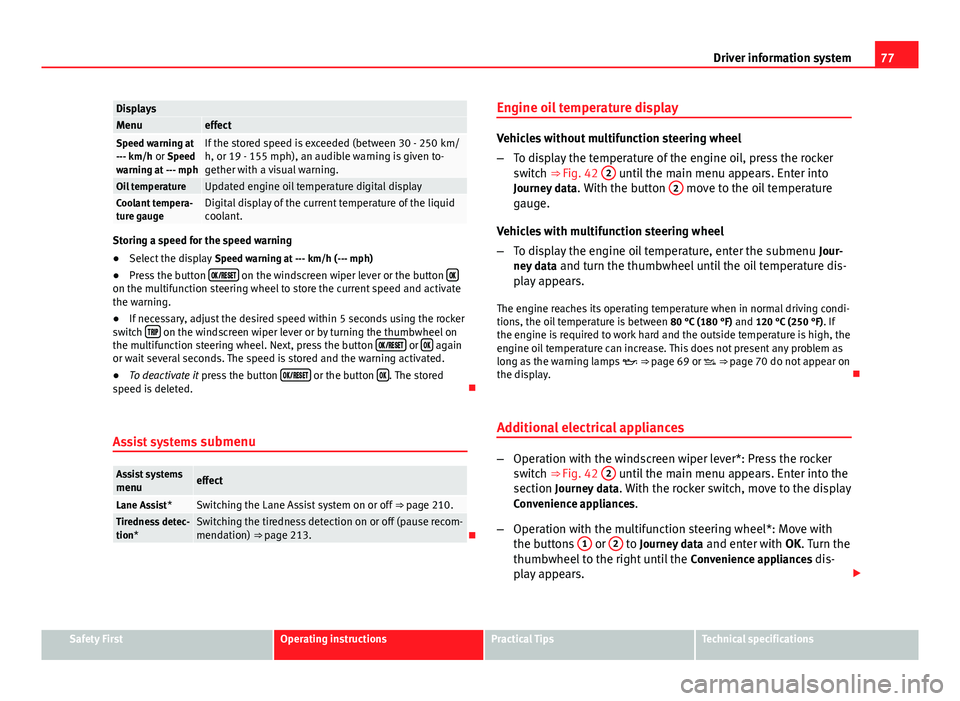
DisplaysMenueffectSpeed warning at
--- km/h or Speed
warning at --- mphIf the stored speed is exceeded (between 30 - 250 km/
h, or 19 - 155 mph), an audible warning is given to-
gether with a visual warning.
Oil temperatureUpdated engine oil temperature digital displayCoolant tempera-
ture gaugeDigital display of the current temperature of the liquid
coolant.
Storing a speed for the speed warning
● Select the display Speed warning at --- km/h (--- mph)
● Press the button
on the windscreen wiper lever or the button on the multifunction steering wheel to store the current speed and activate
the warning.
●
If necessary, adjust the desired speed within 5 seconds using the rocker
switch
on the windscreen wiper lever or by turning the thumbwheel on
the multifunction steering wheel. Next, press the button or again
or wait several seconds. The speed is stored and the warning activated.
● To deactivate it press the button
or the button . The stored
speed is deleted.
Assist systems submenu
Assist systems
menueffect
Lane Assist*Switching the Lane Assist system on or off ⇒ page 210.Tiredness detec-
tion*Switching the tiredness detection on or off (pause recom-
mendation) ⇒ page 213.Engine oil temperature display
Vehicles without multifunction steering wheel
–
To display the temperature of the engine oil, press the rocker
switch ⇒ Fig. 42 2
until the main menu appears. Enter into
Journey data . With the button 2 move to the oil temperature
gauge.
Vehicles with multifunction steering wheel
– To display the engine oil temperature, enter the submenu Jour-
ney data and turn the thumbwheel until the oil temperature dis-
play appears.
The engine reaches its operating temperature when in normal driving condi-
tions, the oil temperature is between 80 °C (180 °F) and 120 °C (250 °F). If
the engine is required to work hard and the outside temperature is high, the
engine oil temperature can increase. This does not present any problem as
long as the warning lamps ⇒ page 69 or ⇒ page 70 do not appear on
the display.
Additional electrical appliances
– Operation with the windscreen wiper lever*: Press the rocker
switch ⇒ Fig. 42 2 until the main menu appears. Enter into the
section Journey data . With the rocker switch, move to the display
Convenience appliances.
– Operation with the multifunction steering wheel*: Move with
the buttons 1
or 2 to Journey data
and enter with OK. Turn the
thumbwheel to the right until the Convenience appliances dis-
play appears.
Safety FirstOperating instructionsPractical TipsTechnical specifications
Page 81 of 339
79
Introduction to the Easy Connect system*
Introduction to the Easy Connect system* System settings (CAR)*Introduction
To select the settings menus, press the Easy Connect button and the
Setup function button.
The actual number of menus available and the name of the various options
in these menus will depend on the vehicle’s electronics and equipment.
Additional information and warnings:
● Driver assistance systems ⇒ page 184
WARNING
Any distraction may lead to an accident, with the risk of injury. Operating
the Easy Connect system while driving could distract you from traffic.
CAR menu (Setup) settings
– Switch the ignition on.
– Switch on the Easy Connect system.
– Press the Easy Connect button
.
– Press the Setup
function button to open the main Vehicle set-
tings menu . Pressing the menu button will always take you to the last menu
used.
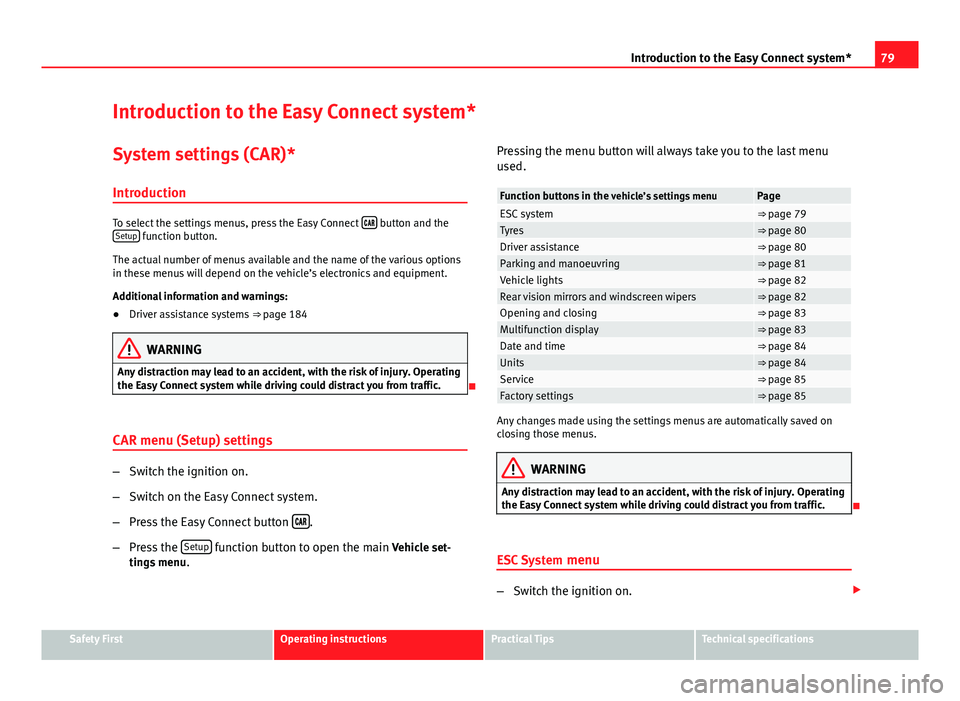
Function buttons in the
vehicle’s settings menuPageESC system⇒ page 79Tyres⇒ page 80Driver assistance⇒ page 80Parking and manoeuvring⇒ page 81Vehicle lights⇒ page 82Rear vision mirrors and windscreen wipers⇒ page 82Opening and closing⇒ page 83Multifunction display⇒ page 83Date and time⇒ page 84Units⇒ page 84Service⇒ page 85Factory settings⇒ page 85
Any changes made using the settings menus are automatically saved on
closing those menus.
WARNING
Any distraction may lead to an accident, with the risk of injury. Operating
the Easy Connect system while driving could distract you from traffic.
ESC System menu
–Switch the ignition on.
Safety FirstOperating instructionsPractical TipsTechnical specifications