turn signal Seat Leon SC 2013 Owner's manual
[x] Cancel search | Manufacturer: SEAT, Model Year: 2013, Model line: Leon SC, Model: Seat Leon SC 2013Pages: 339, PDF Size: 4.8 MB
Page 10 of 339
8Safe driving
passengers are sitting in a correct position and use this equipment proper-
ly.
Therefore, information is provided about why this equipment is so impor-
tant, how it protects you, what you have to consider when using it and how
you and your passengers can achieve the greatest possible benefit from the
safety equipment fitted. This manual includes important warnings that you
and your passengers should note in order to reduce the risk of injury.
Safety is everyone's business!
Before starting every trip
The driver is always responsible for the safety of the passen-
gers and the safe operation of the vehicle.
For your own safety and the safety of your passengers, always note
the following points before every trip:
– Make sure that the vehicle's lights and turn signals are working
properly.
– Check tyre pressure.
– Ensure that all windows provide a clear and good view of the
surroundings.
– Make sure all luggage is secured ⇒ page 17.
– Make sure that no objects can interfere with the pedals.
– Adjust front seat, head restraint and rear vision mirrors properly
according to your size. –
Ensure that the passengers in the rear seats always have the
head restraints in the in-use position ⇒ page 15
– Instruct passengers to adjust the head restraints according to
their height.
– Protect children with appropriate child seats and properly ap-
plied seat belts ⇒ page 48.
– Assume the correct sitting position. Instruct your passengers al-
so to assume a proper sitting position. ⇒ page 10.
– Fasten your seat belt securely. Instruct your passengers also to
fasten their seat belts properly. ⇒ page 20.
What affects driving safety?
Driving safety is largely determined by your driving style
and the personal behaviour of all vehicle occupants.
As a driver, you are responsible for yourself and your passengers.
When your concentration or driving safety is affected by any cir-
cumstance, you endanger yourself as well as others on the road
⇒
, for this reason:
– Always pay attention to traffic and do not get distracted by pas-
sengers or telephone calls.
– Never drive when your driving ability is impaired (e.g. by medi-
cation, alcohol, drugs).
– Observe traffic laws and speed limits.
Page 36 of 339
34Airbag system
Control lamp
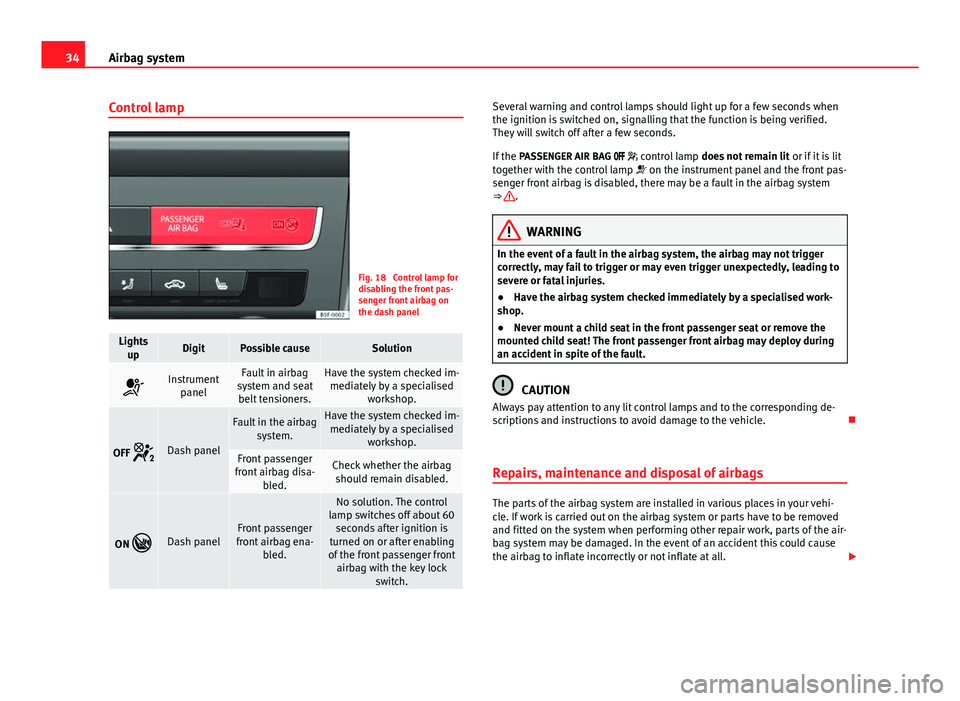
Fig. 18 Control lamp for
disabling the front pas-
senger front airbag on
the dash panel
Lights
upDigitPossible causeSolution
Instrument panelFault in airbag
system and seat belt tensioners.Have the system checked im- mediately by a specialised workshop.
OFF Dash panel
Fault in the airbag
system.Have the system checked im-mediately by a specialised workshop.
Front passenger
front airbag disa- bled.Check whether the airbagshould remain disabled.
ON Dash panelFront passenger
front airbag ena- bled.
No solution. The control
lamp switches off about 60 seconds after ignition is
turned on or after enabling
of the front passenger front airbag with the key lock switch.
Several warning and control lamps should light up for a few seconds when
the ignition is switched on, signalling that the function is being verified.
They will switch off after a few seconds.
If the PASSENGER AIR BAG control lamp does not remain lit or if it is lit
together with the control lamp on the instrument panel and the front pas-
senger front airbag is disabled, there may be a fault in the airbag system
⇒
.
WARNING
In the event of a fault in the airbag system, the airbag may not trigger
correctly, may fail to trigger or may even trigger unexpectedly, leading to
severe or fatal injuries.
● Have the airbag system checked immediately by a specialised work-
shop.
● Never mount a child seat in the front passenger seat or remove the
mounted child seat! The front passenger front airbag may deploy during
an accident in spite of the fault.
CAUTION
Always pay attention to any lit control lamps and to the corresponding de-
scriptions and instructions to avoid damage to the vehicle.
Repairs, maintenance and disposal of airbags
The parts of the airbag system are installed in various places in your vehi-
cle. If work is carried out on the airbag system or parts have to be removed
and fitted on the system when performing other repair work, parts of the air-
bag system may be damaged. In the event of an accident this could cause
the airbag to inflate incorrectly or not inflate at all.
Page 61 of 339
59
Controls and displays
Operating instructions Controls and displays
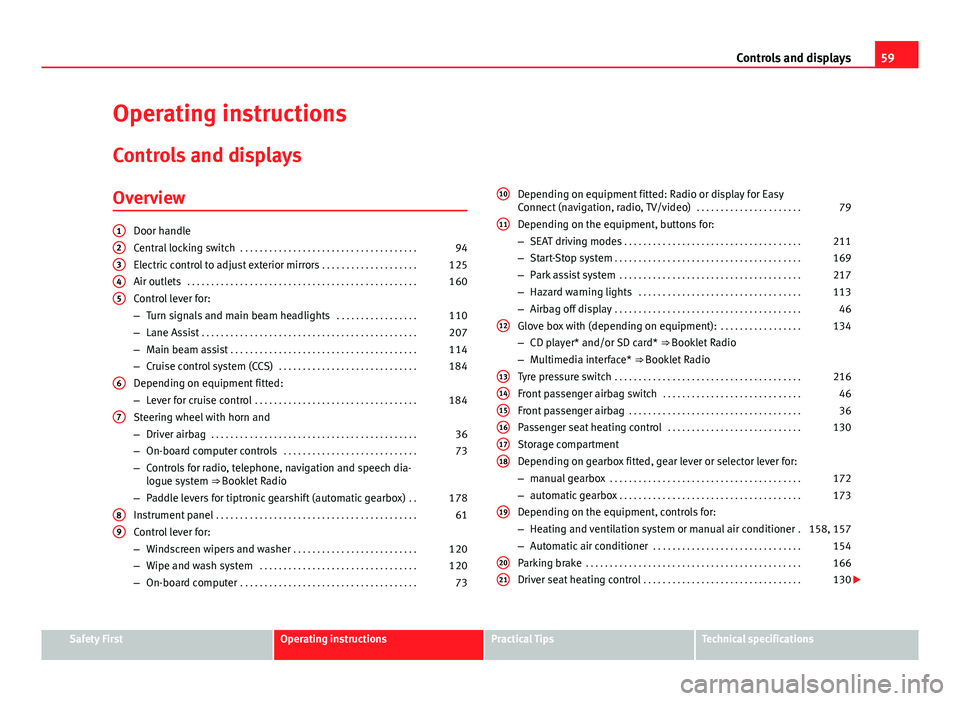
Overview
Door handle
Central locking switch . . . . . . . . . . . . . . . . . . . . . . . . . . . . . . . . . . . . . 94
Electric control to adjust exterior mirrors . . . . . . . . . . . . . . . . . . . .125
Air outlets . . . . . . . . . . . . . . . . . . . . . . . . . . . . . . . . . . . . . . . . . . . . . . . . 160
Control lever for:
– Turn signals and main beam headlights . . . . . . . . . . . . . . . . .110
– Lane Assist . . . . . . . . . . . . . . . . . . . . . . . . . . . . . . . . . . . . . . . . . . . . . 207
– Main beam assist . . . . . . . . . . . . . . . . . . . . . . . . . . . . . . . . . . . . . . . 114
– Cruise control system (CCS) . . . . . . . . . . . . . . . . . . . . . . . . . . . . . 184
Depending on equipment fitted:
– Lever for cruise control . . . . . . . . . . . . . . . . . . . . . . . . . . . . . . . . . . 184
Steering wheel with horn and
– Driver airbag . . . . . . . . . . . . . . . . . . . . . . . . . . . . . . . . . . . . . . . . . . . 36
– On-board computer controls . . . . . . . . . . . . . . . . . . . . . . . . . . . . 73
– Controls for radio, telephone, navigation and speech dia-
logue system ⇒ Booklet Radio
– Paddle levers for tiptronic gearshift (automatic gearbox) . .178
Instrument panel . . . . . . . . . . . . . . . . . . . . . . . . . . . . . . . . . . . . . . . . . . 61
Control lever for:
– Windscreen wipers and washer . . . . . . . . . . . . . . . . . . . . . . . . . . 120
– Wipe and wash system . . . . . . . . . . . . . . . . . . . . . . . . . . . . . . . . . 120
– On-board computer . . . . . . . . . . . . . . . . . . . . . . . . . . . . . . . . . . . . . 73
12345
6
7
89
Depending on equipment fitted: Radio or display for Easy
Connect (navigation, radio, TV/video)
. . . . . . . . . . . . . . . . . . . . . .79
Depending on the equipment, buttons for:
– SEAT driving modes . . . . . . . . . . . . . . . . . . . . . . . . . . . . . . . . . . . . . 211
– Start-Stop system . . . . . . . . . . . . . . . . . . . . . . . . . . . . . . . . . . . . . . . 169
– Park assist system . . . . . . . . . . . . . . . . . . . . . . . . . . . . . . . . . . . . . . 217
– Hazard warning lights . . . . . . . . . . . . . . . . . . . . . . . . . . . . . . . . . . 113
– Airbag off display . . . . . . . . . . . . . . . . . . . . . . . . . . . . . . . . . . . . . . . 46
Glove box with (depending on equipment): . . . . . . . . . . . . . . . . .134
– CD player* and/or SD card* ⇒ Booklet Radio
– Multimedia interface* ⇒ Booklet Radio
Tyre pressure switch . . . . . . . . . . . . . . . . . . . . . . . . . . . . . . . . . . . . . . . 216
Front passenger airbag switch . . . . . . . . . . . . . . . . . . . . . . . . . . . . . 46
Front passenger airbag . . . . . . . . . . . . . . . . . . . . . . . . . . . . . . . . . . . . 36
Passenger seat heating control . . . . . . . . . . . . . . . . . . . . . . . . . . . . 130
Storage compartment
Depending on gearbox fitted, gear lever or selector lever for:
– manual gearbox . . . . . . . . . . . . . . . . . . . . . . . . . . . . . . . . . . . . . . . . 172
– automatic gearbox . . . . . . . . . . . . . . . . . . . . . . . . . . . . . . . . . . . . . . 173
Depending on the equipment, controls for:
– Heating and ventilation system or manual air conditioner .158, 157
– Automatic air conditioner . . . . . . . . . . . . . . . . . . . . . . . . . . . . . . . 154
Parking brake . . . . . . . . . . . . . . . . . . . . . . . . . . . . . . . . . . . . . . . . . . . . . 166
Driver seat heating control . . . . . . . . . . . . . . . . . . . . . . . . . . . . . . . . . 130
10
11
12
131415161718
19
2021
Safety FirstOperating instructionsPractical TipsTechnical specifications
Page 73 of 339
71
Instruments and warning/control lamps
SymbolMeaning ⇒ See
On the instrument panel display: a)
Level of windscreen washer fluid too low.⇒ page 120
Fuel tank almost empty.⇒ page 248
Flashing on the instrument panel display: a)
Fault in the oil level detection. Control manual-
ly.
⇒ page 253Lit up on the instrument panel display: a)
Engine oil level insufficient.
Fault in airbag system and seat belt tensioners.
⇒ page 31OFF Front passenger front airbag is off ( PASSENGER
AIRBAG ).
ON Front passenger front airbag is on ( PASSENGER
AIRBAG ).
Lane Assist is switched on, but not active.⇒ page 207
On the instrument panel display: a)
Fault in the gearbox.⇒ page 182
a) Colour presentation on instrument panel with colour display.
Other control lamps
SymbolMeaning ⇒ See
Left or right turn signal.⇒ page 109
Hazard warning lights on.⇒ page 113
Trailer turn signals⇒ page 234
SymbolMeaning ⇒ See
lights: Press the foot brake!
flashes: The selector lever locking button has
not engaged.⇒ page 173
The vehicle is stopped by engine braking.
lights: Cruise control operating.
⇒ page 184lights: Speed limiter switched on and active.flashes: The speed set by the speed limiter has
been exceeded.
Lane Assist is switched on and active.⇒ page 207
Main beam on or flasher on.⇒ page 109
On the instrument panel display:
Light Assist switched on.
On the instrument panel display:
Immobiliser active.
On the instrument panel display:
Service interval display.⇒ page 65
On the instrument panel display:
Mobile telephone is connected via Bluetooth to
the original telephone device.
⇒ Book-
let Bluetooth
System
On the instrument panel display:
Mobile telephone battery charge meter. Availa-
ble only for pre-installed factory-fitted devices.
On the instrument panel display:
Ice warning. The outside temperature is lower
than +4 °C (+39 °F).⇒ page 64
Safety FirstOperating instructionsPractical TipsTechnical specifications
Page 77 of 339
75
Driver information system
Button for the driving assistance systems*
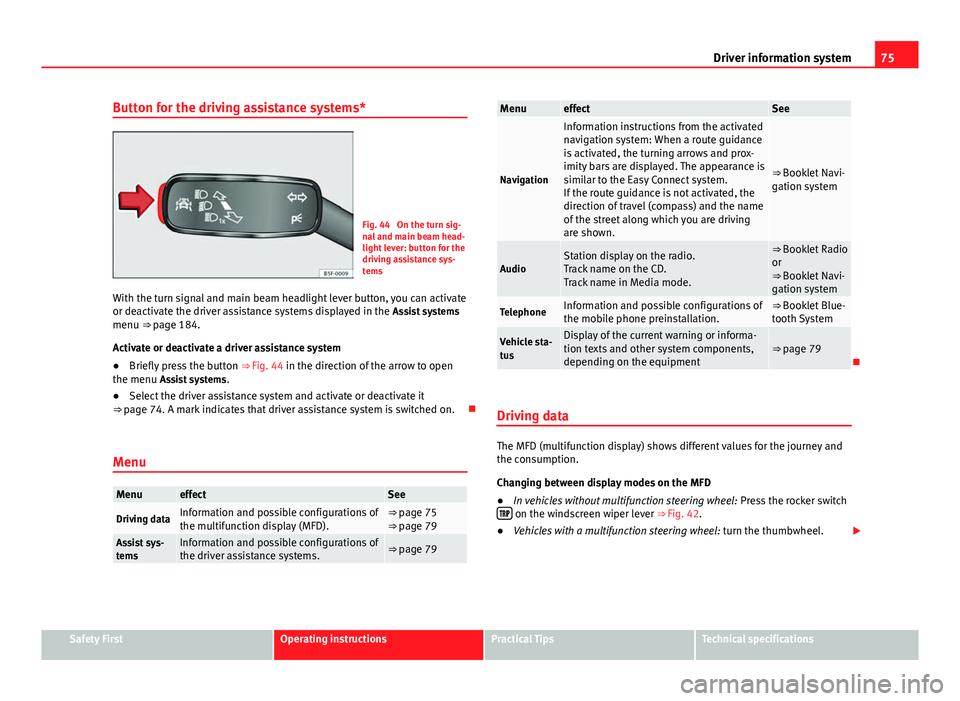
Fig. 44 On the turn sig-
nal and main beam head-
light lever: button for the
driving assistance sys-
tems
With the turn signal and main beam headlight lever button, you can activate
or deactivate the driver assistance systems displayed in the Assist systems
menu ⇒ page 184.
Activate or deactivate a driver assistance system
● Briefly press the button ⇒ Fig. 44 in the direction of the arrow to open
the menu Assist systems .
● Select the driver assistance system and activate or deactivate it
⇒ page 74. A mark indicates that driver assistance system is switched on.
Menu
MenueffectSee
Driving dataInformation and possible configurations of
the multifunction display (MFD).⇒ page 75
⇒ page 79
Assist sys-
temsInformation and possible configurations of
the driver assistance systems.⇒ page 79
MenueffectSee
Navigation
Information instructions from the activated
navigation system: When a route guidance
is activated, the turning arrows and prox-
imity bars are displayed. The appearance is
similar to the Easy Connect system.
If the route guidance is not activated, the
direction of travel (compass) and the name
of the street along which you are driving
are shown.
⇒ Booklet Navi-
gation system
AudioStation display on the radio.
Track name on the CD.
Track name in Media mode.⇒ Booklet Radio
or
⇒ Booklet Navi-
gation system
TelephoneInformation and possible configurations of
the mobile phone preinstallation.⇒ Booklet Blue-
tooth System
Vehicle sta-
tusDisplay of the current warning or informa-
tion texts and other system components,
depending on the equipment⇒ page 79
Driving data
The MFD (multifunction display) shows different values for the journey and
the consumption.
Changing between display modes on the MFD
● In vehicles without multifunction steering wheel: Press the rocker switch
on the windscreen wiper lever ⇒ Fig. 42.
● Vehicles with a multifunction steering wheel: turn the thumbwheel.
Safety FirstOperating instructionsPractical TipsTechnical specifications
Page 90 of 339
88Opening and closing
To deactivate the alarm, press the button
on the remote control key, or
switch on the ignition. After a certain time, the alarm will automatically
switch off.
Switch off the vehicle interior monitoring and tow-away protection if you
wish to prevent the alarm from being triggered accidentally ⇒ page 97.
Turn signals
The turn signals will flash twice when the vehicle is unlocked and once
when the vehicle is locked.
If the signals do not flash, this indicates that one of the doors, the rear lid or
the bonnet is not closed correctly.
Accidental lock-out
The central locking system prevents you from being locked out of the vehi-
cle in the following situations:
● If the driver door is open, the vehicle cannot be locked with the central
locking switch ⇒ page 94.
Lock the vehicle with the remote control key, when all the doors and the rear
lid have been closed. This prevents the accidental locking of the vehicle.
WARNING
Do not leave anyone (especially children) in the vehicle if it is locked from
the outside and the anti-theft security system* is enabled, as the doors
and windows cannot then be opened from the inside. Locked doors could
delay assistance in an emergency, potentially putting lives at risk.
Note
● Never leave any valuable items in the vehicle unattended. Even a locked
vehicle is not a safe.
● If the diode on the driver door sill lights up for about 30 seconds when
the vehicle is locked, the central locking system or anti-theft alarm* is not
working properly. You should have the fault repaired at a SEAT Official Serv-
ice or specialised workshop.
● The vehicle interior monitoring of the anti-theft alarm* system will only
function as intended if the windows and the sunroof* are closed.
Page 91 of 339
89
Opening and closing
Vehicle key
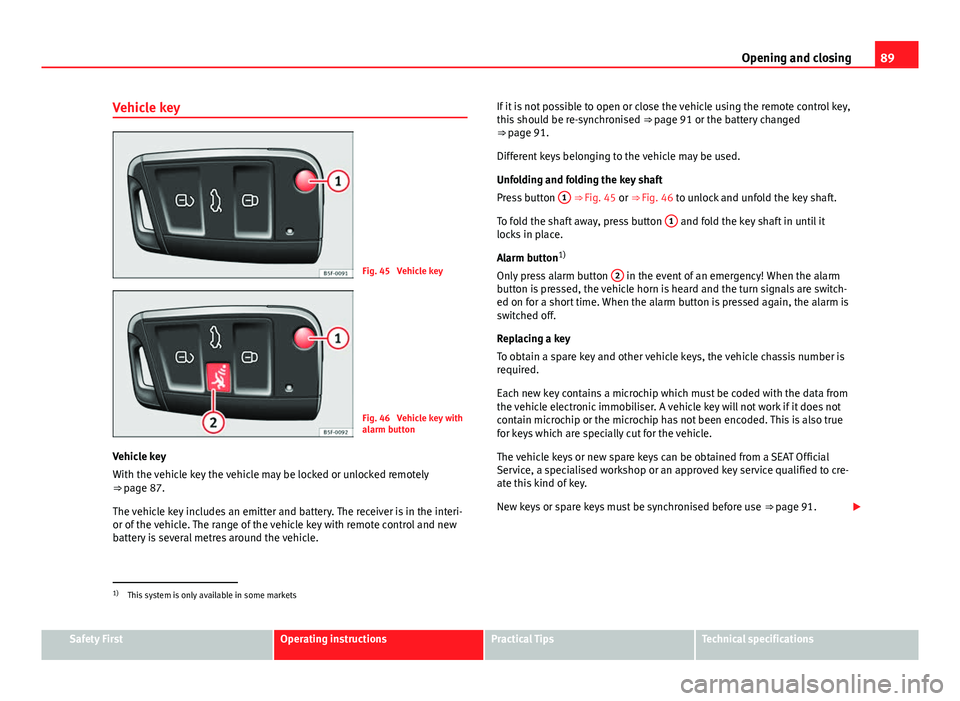
Fig. 45 Vehicle key
Fig. 46 Vehicle key with
alarm button
Vehicle key
With the vehicle key the vehicle may be locked or unlocked remotely
⇒ page 87.
The vehicle key includes an emitter and battery. The receiver is in the interi-
or of the vehicle. The range of the vehicle key with remote control and new
battery is several metres around the vehicle. If it is not possible to open or close the vehicle using the remote control key,
this should be re-synchronised
⇒ page 91 or the battery changed
⇒ page 91.
Different keys belonging to the vehicle may be used.
Unfolding and folding the key shaft
Press button 1
⇒ Fig. 45 or ⇒
Fig. 46 to unlock and unfold the key shaft.
To fold the shaft away, press button 1
and fold the key shaft in until it
locks in place.
Alarm button 1)
Only press alarm button 2
in the event of an emergency! When the alarm
button is pressed, the vehicle horn is heard and the turn signals are switch-
ed on for a short time. When the alarm button is pressed again, the alarm is
switched off.
Replacing a key
To obtain a spare key and other vehicle keys, the vehicle chassis number is
required.
Each new key contains a microchip which must be coded with the data from
the vehicle electronic immobiliser. A vehicle key will not work if it does not
contain microchip or the microchip has not been encoded. This is also true
for keys which are specially cut for the vehicle.
The vehicle keys or new spare keys can be obtained from a SEAT Official
Service, a specialised workshop or an approved key service qualified to cre-
ate this kind of key.
New keys or spare keys must be synchronised before use ⇒ page 91.
1)
This system is only available in some markets
Safety FirstOperating instructionsPractical TipsTechnical specifications
Page 95 of 339
93
Opening and closing
Unlocking all the doors, the rear lid and the tank flap
simultaneously.
– Within 5 seconds, press button
on the remote control key
twice, or turn the key to open twice within 5 seconds.
The anti-theft security system* and the anti-theft alarm* are immediately
disabled if you unlock only the driver door, without unlocking the other
doors.
In vehicles with Easy Connect*, you can programme the security central
locking system directly ⇒ page 93.
Programming the central locking system
You can use Easy Connect* to select which doors are unlocked with
the central locking system. Using the radio or the Easy Connect*
system, you can select whether the vehicle automatically closes
with the “Auto Lock” programme at speeds of more than 15 km/h
(10 mph).
Programming the unlocking of the doors (vehicles with Easy
Connect)
– Select: control button Systems or Vehicle systems > Vehicle set-
tings > Central locking > Unlocking doors.
Programming the Auto Lock (vehicles with radio)
– Select: SETUP
button > control button
Central locking > Locking
while driving. Programming the Auto Lock (vehicles with Easy Connect)
–
Select: control button Systems or Vehicle systems > Vehicle set-
tings > Locking while driving.
Unlocking the doors - You can programme the system to unlock all the doors
or only the driver door when you unlock the vehicle. In all the options, the
fuel tank flap is also unlocked.
With the setting, Driver, all the doors and the rear lid are unlocked if button
on the remote control key is pressed twice.
With this setting, you can continue to unlock all the vehicle doors. To do so,
press button
on the remote control key
twice. Or, in vehicles with a con-
ventional key, turn the key to open in the door lock twice within 2 seconds.
If the button
is pressed, all the vehicle doors are locked. At the same
time, a confirmation signal is heard 1)
.
Auto Lock/Locking while driving - If you select on, all the vehicle doors are
locked at speeds above 15 km/h (10 mph).
1)
This function is not available on all export versions.
Safety FirstOperating instructionsPractical TipsTechnical specifications
Page 97 of 339
95
Opening and closing
Valid for vehicles: with 5 doors Childproof lock
The childproof lock prevents the rear doors from being
opened from the inside. This system prevents minors from
opening a door accidentally while the vehicle is running.
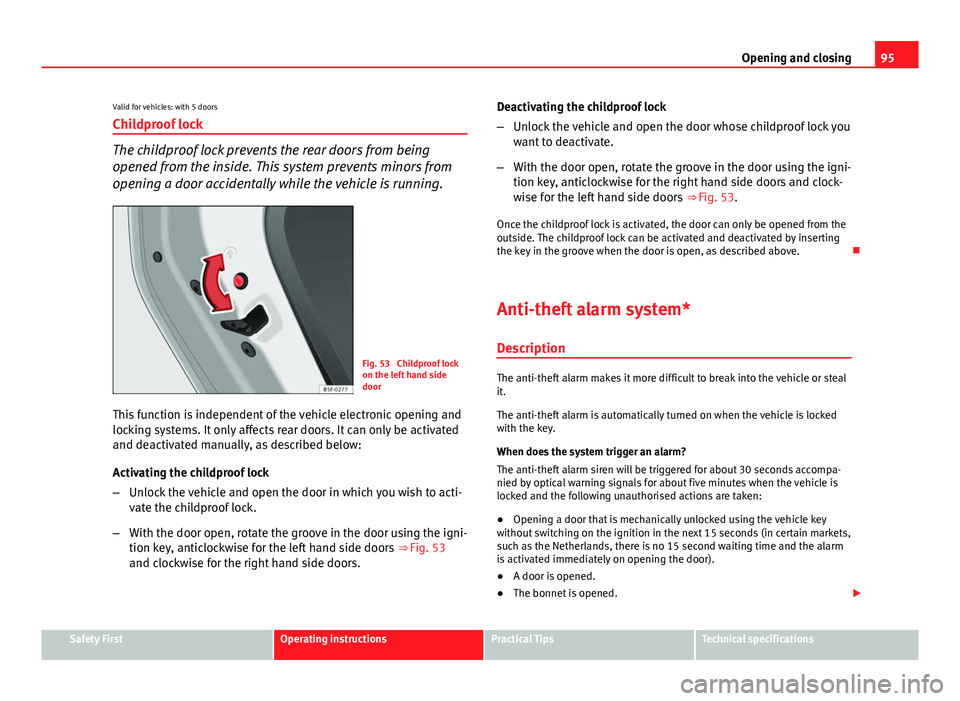
Fig. 53 Childproof lock
on the left hand side
door
This function is independent of the vehicle electronic opening and
locking systems. It only affects rear doors. It can only be activated
and deactivated manually, as described below:
Activating the childproof lock
– Unlock the vehicle and open the door in which you wish to acti-
vate the childproof lock.
– With the door open, rotate the groove in the door using the igni-
tion key, anticlockwise for the left hand side doors ⇒ Fig. 53
and clockwise for the right hand side doors. Deactivating the childproof lock
–
Unlock the vehicle and open the door whose childproof lock you
want to deactivate.
– With the door open, rotate the groove in the door using the igni-
tion key, anticlockwise for the right hand side doors and clock-
wise for the left hand side doors ⇒ Fig. 53.
Once the childproof lock is activated, the door can only be opened from the
outside. The childproof lock can be activated and deactivated by inserting
the key in the groove when the door is open, as described above.
Anti-theft alarm system* DescriptionThe anti-theft alarm makes it more difficult to break into the vehicle or steal
it.
The anti-theft alarm is automatically turned on when the vehicle is locked
with the key.
When does the system trigger an alarm?
The anti-theft alarm siren will be triggered for about 30 seconds accompa-
nied by optical warning signals for about five minutes when the vehicle is
locked and the following unauthorised actions are taken:
● Opening a door that is mechanically unlocked using the vehicle key
without switching on the ignition in the next 15 seconds (in certain markets,
such as the Netherlands, there is no 15 second waiting time and the alarm
is activated immediately on opening the door).
● A door is opened.
● The bonnet is opened.
Safety FirstOperating instructionsPractical TipsTechnical specifications
Page 111 of 339
109
Lights and visibility
Lights and visibility
Lights Introduction
The legal requirements regarding the use of vehicle lights in each country
must be observed.
The driver is personally responsible for the correct use and adjustment of
the lights in all situations.
Additional information and warnings:
● Information system ⇒ page 73
● Changing bulbs ⇒ page 293
WARNING
If the headlights are regulated too high and the main beam is not used
correctly, there is a risk of dazzling or distracting other road users. This
could result in a serious accident.
● Always make sure that the headlights are correctly adjusted.
● Never use the main beam or headlight flasher when it can dazzle oth-
er drivers.
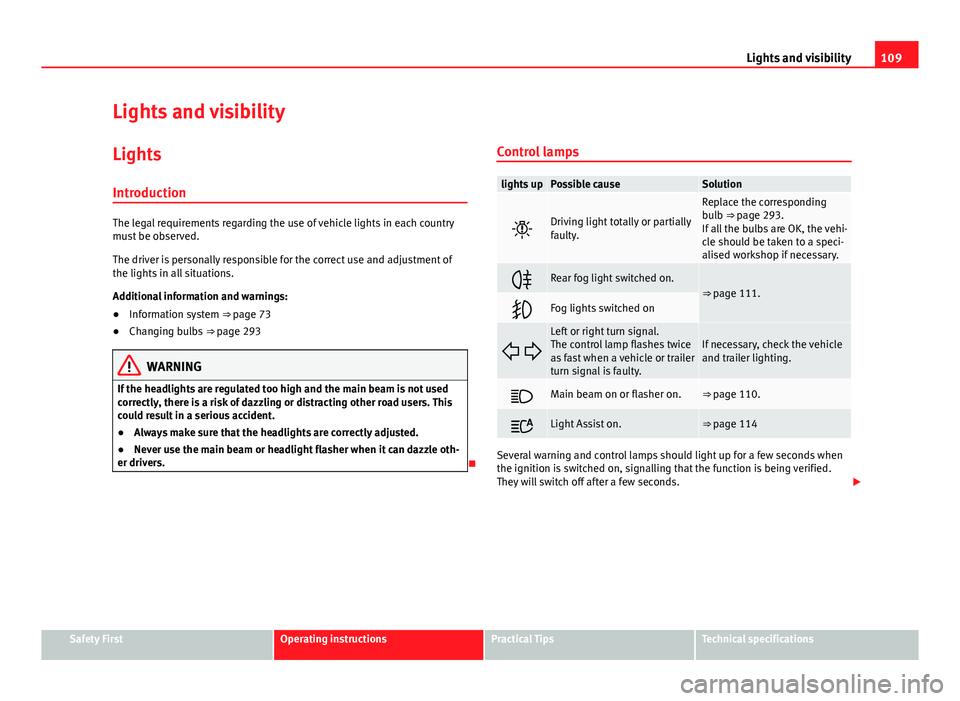
Control lamps
lights upPossible causeSolution
Driving light totally or partially
faulty.
Replace the corresponding
bulb ⇒ page 293.
If all the bulbs are OK, the vehi-
cle should be taken to a speci-
alised workshop if necessary.
Rear fog light switched on.⇒ page 111.
Fog lights switched on
Left or right turn signal.
The control lamp flashes twice
as fast when a vehicle or trailer
turn signal is faulty.If necessary, check the vehicle
and trailer lighting.
Main beam on or flasher on.⇒ page 110.
Light Assist on.⇒ page 114
Several warning and control lamps should light up for a few seconds when
the ignition is switched on, signalling that the function is being verified.
They will switch off after a few seconds.
Safety FirstOperating instructionsPractical TipsTechnical specifications