change time Seat Leon SC 2014 User Guide
[x] Cancel search | Manufacturer: SEAT, Model Year: 2014, Model line: Leon SC, Model: Seat Leon SC 2014Pages: 284, PDF Size: 5.85 MB
Page 82 of 284
Operation
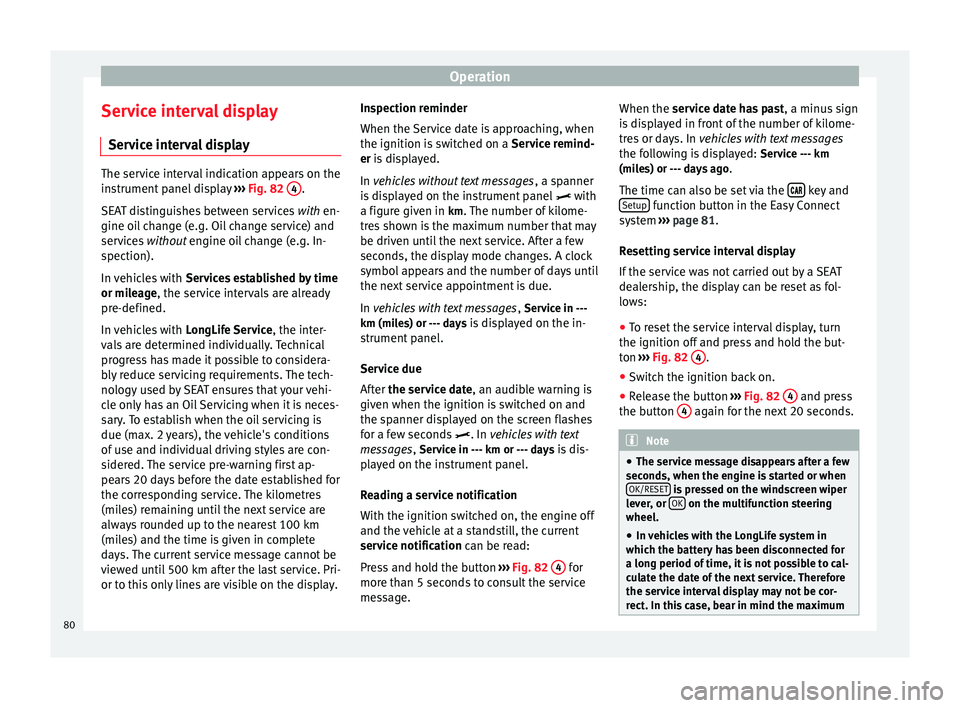
Service interval display Service interval display The service interval indication appears on the
instrument panel display
››› Fig. 82 4 .
SEAT distinguishes between services with en-
gine oi l
change (e.g. Oil change service) and
services without
engine oil change (e.g. In-
spection).
In vehicles with Services established by time
or mileage, the service intervals are already
pr e-defined.
In
vehicles with LongLife Service , the inter-
vals are determined individually. Technical
progress has made it possible to considera-
bly reduce servicing requirements. The tech-
nology used by SEAT ensures that your vehi-
cle only has an Oil Servicing when it is neces-
sary. To establish when the oil servicing is
due (max. 2 years), the vehicle's conditions
of use and individual driving styles are con-
sidered. The service pre-warning first ap-
pears 20 days before the date established for
the corresponding service. The kilometres
(miles) remaining until the next service are
always rounded up to the nearest 100 km
(miles) and the time is given in complete
days. The current service message cannot be
viewed until 500 km after the last service. Pri-
or to this only lines are visible on the display. Inspection reminder
When the Service date is approaching, when
the ignition is switched on a
Service remind-
er is displayed.
In vehicles without text messages , a s
panner
is displayed on the instrument panel with
a figure giv
en in km. The number of kilome-
tres shown is the maximum number that may
be driven until the next service. After a few
seconds, the display mode changes. A clock
symbol appears and the number of days until
the next service appointment is due.
In vehicles with text messages , Serv
ice in ---
km (miles) or --- days is displayed on the in- strument panel.
Service due
After the service date, an audible warning is
given when the ignition i
s switched on and
the spanner displayed on the screen flashes
for a few seconds . In
vehicles with text
messages, Service in --- km or --- days is dis-
played on the instrument panel.
Reading a service notification
With the ignition switched on, the engine off
and the vehicle at a standstill, the current
service notification
can be read:
Press and hold the button ››› Fig. 82 4 for
more than 5 seconds to consult the service
message. When the service date has past
, a minus sign
is displayed in front of the number of kilome-
tres or days. In vehicles with text messages
the following is displayed: Service --- km
(miles) or --- days ago .
The time can also be set via the key and
Setup function button in the Easy Connect
system ››› page 81 .
R e
setting service interval display
If the service was not carried out by a SEAT
dealership, the display can be reset as fol-
lows:
● To reset the service interval display, turn
the ignition off and press and hold the but-
ton ››› Fig. 82 4 .
● Switch the ignition back on.
● Release the button ››› Fig. 82 4 and press
the button 4 again for the next 20 seconds.
Note
● The service message disappears after a few
seconds, when the engine is started or when OK/RESET is pressed on the windscreen wiper
lever, or OK on the multifunction steering
wheel.
● In vehicles with the LongLife system in
which the battery has been disconnected for
a long period of time, it is not possible to cal-
culate the date of the next service. Therefore
the service interval display may not be cor- rect. In this case, bear in mind the maximum 80
Page 83 of 284
Introduction to the Easy Connect system*
service intervals permitted in the
››› Book-
let Maintenance Programme. Introduction to the Easy
Connect system*
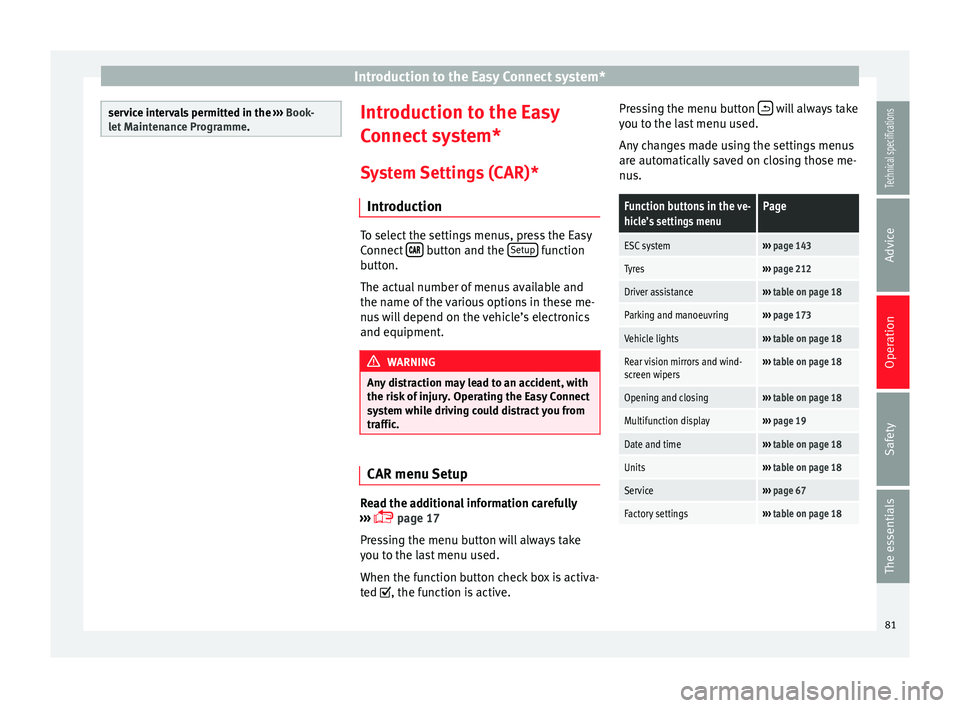
System Settings (CAR)* Introduction To select the settings menus, press the Easy
Connect
button and the
Setup function
button.
The actual number of menus available and
the name of the various options in these me-
nus will depend on the vehicle’s electronics
and equipment. WARNING
Any distraction may lead to an accident, with
the risk of injury. Operating the Easy Connect
system while driving could distract you from
traffic. CAR menu Setup
Read the additional information carefully
››› page 17
Pressing the menu button will always take
you to the last menu used.
When the function button check box is activa-
ted , the function is active. Pressing the menu button
will always take
you to the last menu used.
Any changes made using the settings menus
are automatically saved on closing those me-
nus.Function buttons in the ve-
hicle’s settings menuPage
ESC system››› page 143
Tyres››› page 212
Driver assistance››› table on page 18
Parking and manoeuvring››› page 173
Vehicle lights››› table on page 18
Rear vision mirrors and wind-
screen wipers››› table on page 18
Opening and closing››› table on page 18
Multifunction display››› page 19
Date and time››› table on page 18
Units››› table on page 18
Service››› page 67
Factory settings››› table on page 18 81
Technical specifications
Advice
Operation
Safety
The essentials
Page 85 of 284
Opening and closing
Note
● Never leave any valuable items in the vehi-
cle unattended. Even a locked vehicle is not a
safe.
● If the diode on the driver door sill lights up
for about 30 seconds when the vehicle is
locked, the central locking system or anti-
theft alarm* is not working properly. You
should have the fault repaired at a SEAT Offi-
cial Service or specialised workshop.
● The vehicle interior monitoring of the anti-
theft alarm* system will only function as in-
tended if the windows and the sunroof* are
closed. Car key
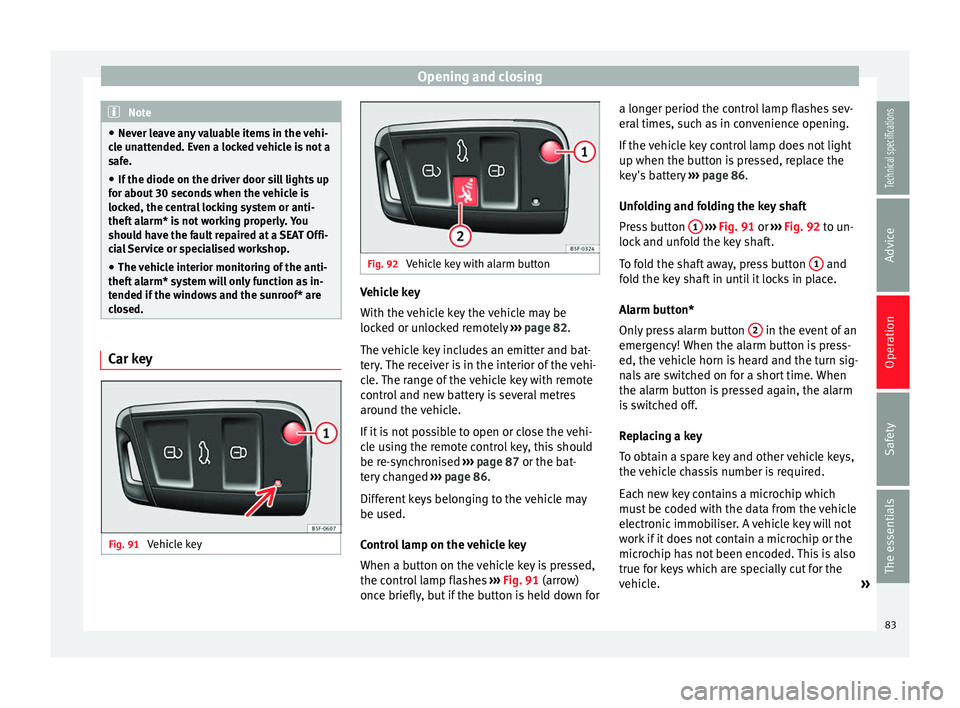
Fig. 91
Vehicle key Fig. 92
Vehicle key with alarm button Vehicle key
With the vehicle key the vehicle may be
locked or unlocked remotely
››› page 82.
The vehicle key includes an emitter and bat-
tery. The receiver is in the interior of the vehi-
cle. The range of the vehicle key with remote
control and new battery is several metres
around the vehicle.
If it is not possible to open or close the vehi-
cle using the remote control key, this should
be re-synchronised ››› page 87 or the bat-
tery changed ››› page 86 .
Diff er
ent keys belonging to the vehicle may
be used.
Control lamp on the vehicle key
When a button on the vehicle key is pressed,
the control lamp flashes ››› Fig. 91 (arrow)
once briefly
, but if the button is held down for a longer period the control lamp flashes sev-
eral times, such as in convenience opening.
If the vehicle key control lamp does not light
up when the button is pressed, replace the
key's battery
››› page 86.
Unfo
lding and folding the key shaft
Press button 1
››› Fig. 91 or
›
›› Fig. 92
to un-
lock and unfold the key shaft.
To fold the shaft away, press button 1 and
fold the key shaft in until it locks in place.
Alarm button*
Only press alarm button 2 in the event of an
emergency! When the alarm button is press-
ed, the vehicle horn is heard and the turn sig-
nals are switched on for a short time. When
the alarm button is pressed again, the alarm
is switched off.
Replacing a key
To obtain a spare key and other vehicle keys,
the vehicle chassis number is required.
Each new key contains a microchip which
must be coded with the data from the vehicle
electronic immobiliser. A vehicle key will not
work if it does not contain a microchip or the
microchip has not been encoded. This is also
true for keys which are specially cut for the
vehicle. »
83
Technical specifications
Advice
Operation
Safety
The essentials
Page 88 of 284
Operation
Instruction Manual. The vehicle cannot be
opened from inside. This makes it more diffi-
cult for unauthorised persons to break into
the vehicle ››› in Description on page 82.
The anti-theft security system can be switch-
ed off each time the vehicle is locked:
● Turn the key a second time to the lock posi-
tion, in the door lock, for the next two sec-
ond s. If necessary, remove the protective cov-
er on the driver door handle ››› page 227 or
else
● Press on the remote control key for a
second time for the following 2 seconds.
The fl a
shing frequency of the diode in the
door sill immediately confirms the process.
Initially, the diode flashes in a fast sequence
for a brief period, then it stops for approxi-
mately 30 seconds and, lastly continues
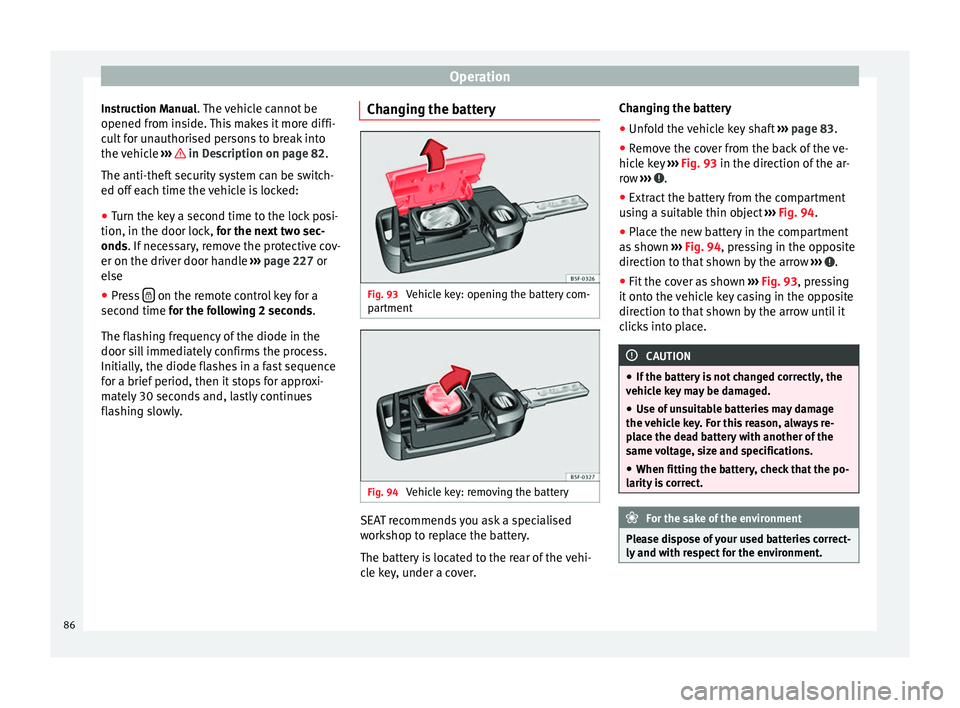
flashing slowly. Changing the battery Fig. 93
Vehicle key: opening the battery com-
partment Fig. 94
Vehicle key: removing the battery SEAT recommends you ask a specialised
workshop to replace the battery.
The battery is located to the rear of the vehi-
cle key, under a cover.Changing the battery
● Unfold the vehicle key shaft ››› page 83.
● Remove the cover from the back of the ve-
hicle key ››› Fig. 93 in the direction of the ar-
r o
w ››› .
● Extract the battery from the compartment
using a suitable thin object ››› Fig. 94 .
● Plac
e the new battery in the compartment
as shown ››› Fig. 94
, pressing in the opposite
direction to that shown by the arrow ››› .
● Fit the cover as shown ››› Fig. 93 , pressing
it onto the vehicle key casing in the opposite
direction to that shown by the arrow until it
clicks into place. CAUTION
● If the battery is not changed correctly, the
vehicle key may be damaged.
● Use of unsuitable batteries may damage
the vehicle key. For this reason, always re-
place the dead battery with another of the
same voltage, size and specifications.
● When fitting the battery, check that the po-
larity is correct. For the sake of the environment
Please dispose of your used batteries correct-
ly and with respect for the environment. 86
Page 91 of 284
Opening and closing
their movements will trigger the alarm) or
when, for example, the vehicle is transported
or has to be towed with only one axle on the
ground.
False alarms
Interior monitoring will only operate correctly
if the vehicle is completely closed. Please ob-
serve related legal requirements.
The following cases may cause a false alarm:
● Open windows (partially or fully).
● Panoramic/tilting sunroof open (partially or
completely).
● Movement of objects inside the vehicle,
such as loose papers, items hanging from
the rear vision mirror (air fresheners), etc. Note
● If the vehicle is relocked and the alarm is
activated without the volumetric sensor func-
tion, relocking will activate the alarm with all
its functions, except the volumetric sensor.
This function is reactivated when the alarm is
switched on again, unless it is deliberately
switched off.
● If the alarm has been triggered by the volu-
metric sensor, this will be indicated by a
flashing of the warning lamp on the driver
door when the vehicle is opened. The flash is
different to the flash indicating the alarm is
activated. ●
The vibration of a mobile phone left inside
the vehicle may cause the vehicle interior
monitoring alarm to trigger, as both sensors
react to movements and shakes inside the ve-
hicle.
● If on activating the alarm, any door or the
rear lid is open, only the alarm will be activa-
ted. The vehicle interior monitoring and the
anti-tow system will only be activated once
all the doors are closed (including the rear
lid). Deactivating the vehicle interior
monitoring and tow-away protection*
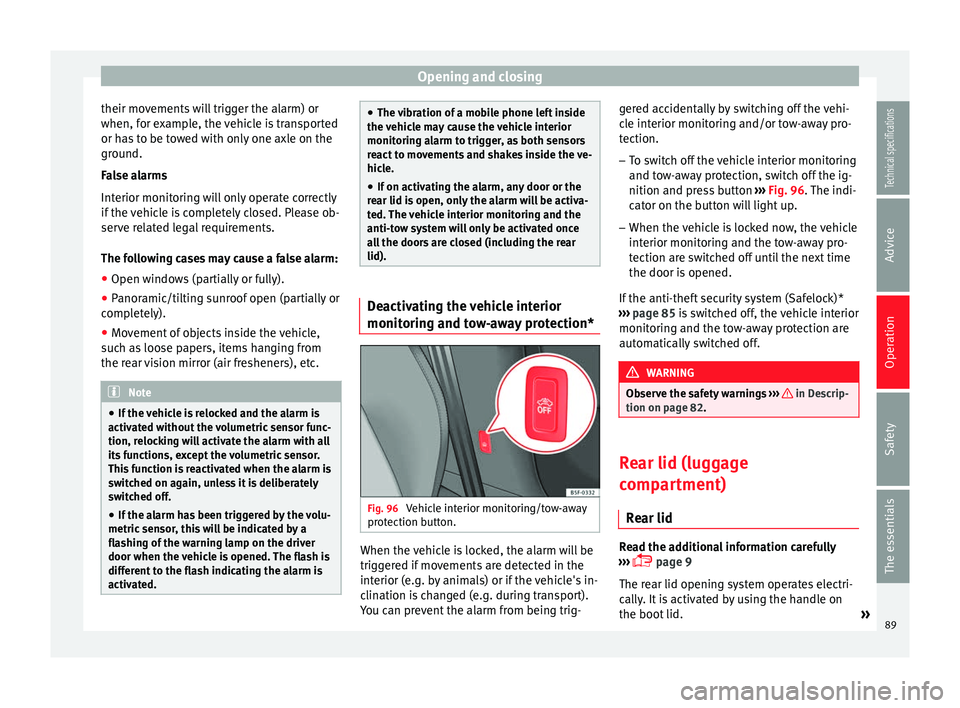
Fig. 96
Vehicle interior monitoring/tow-away
protection button. When the vehicle is locked, the alarm will be
triggered if movements are detected in the
interior (e.g. by animals) or if the vehicle's in-
clination is changed (e.g. during transport).
You can prevent the alarm from being trig-gered accidentally by switching off the vehi-
cle interior monitoring and/or tow-away pro-
tection.
– To switch off the vehicle interior monitoring
and tow-away protection, switch off the ig-
nition and press button ››› Fig. 96 . The indi-
c at
or on the button will light up.
– When the vehicle is locked now, the vehicle
interior monitoring and the tow-away pro-
tection are switched off until the next time
the door is opened.
If the anti-theft security system (Safelock)*
››› page 85 is switched off, the vehicle interior
monitorin
g and the tow-away protection are
automatically switched off. WARNING
Observe the safety warnings ››› in Descrip-
tion on page 82. Rear lid (luggage
compartment)
Rear lid Read the additional information carefully
››› page 9
The rear lid opening system operates electri-
cally. It is activated by using the handle on
the boot lid. »
89
Technical specifications
Advice
Operation
Safety
The essentials
Page 92 of 284
Operation
To change the locking / unlocking status,
press the button or the button
1›››
page 9
on the remote control key.
A w arnin
g appears on the instrument panel
display if the rear lid is open or not properly
closed.* An audible warning is also given if
the rear lid is open when the car is driven
faster than 6 km/h*. WARNING
Observe the safety warnings ››› in Intro-
duction on page 227.
● Alw
ays close the rear lid properly. Risk of
accident or injury.
● The rear lid must not be opened when the
reverse or rear fog lights are lit. This may
damage the tail lights.
● Do not close the rear lid by pushing it down
with your hand on the rear window. The glass
could smash. Risk of injury!
● Ensure the rear lid is locked after closing it.
If not, it may open unexpectedly while driv-
ing.
● Closing the rear lid without observing and
ensuring it is clear could cause serious injury
to you and to third parties. Make sure that no
one is in the path of the rear lid.
● Never drive with the rear lid open or half-
closed, exhaust gases may penetrate into the
interior of the vehicle. Danger of poisoning!
● If you only open the rear lid, do not leave
the key inside. The vehicle cannot be opened
if the key is left inside. Tailgate automatic lock
Where the vehicle has been locked by press-
ing the
button on the remote control with
the rear lid open, the rear lid will lock auto-
matically when closed.
The automatic tailgate locking time extension
function can be activated. Where this func-
tion is activated and once the rear lid has
been unlocked by pressing the button on
the remote control key ››› page 84, the rear lid
can be re-opened for a certain length of time.
Where required, the automatic tailgate lock-
ing time extension function can be activated
or deactivated at an Authorised SEAT Service,
which will provide all the necessary informa-
tion.
Before the vehicle locks automatically, there
is a risk of intruders getting into the vehicle.
Therefore, we recommend you always lock
the vehicle by pressing the button on the
remote control or by using the central locking
button. Electric windows
Opening and closing of the electric
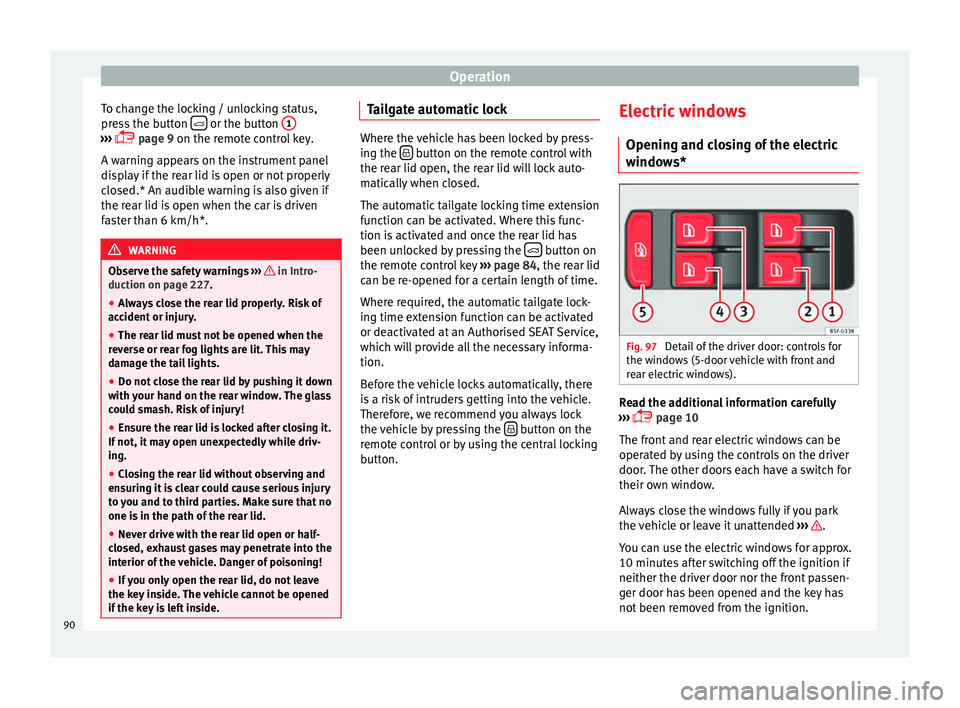
windows* Fig. 97
Detail of the driver door: controls for
the windows (5-door vehicle with front and
rear electric windows). Read the additional information carefully
››› page 10
The front and rear electric windows can be
operated by using the controls on the driver
door. The other doors each have a switch for
their own window.
Always close the windows fully if you park
the vehicle or leave it unattended ››› .
You can use the electric windows for approx.
10 minutes after switching off the ignition if
neither the driver door nor the front passen-
ger door has been opened and the key has
not been removed from the ignition.
90
Page 97 of 284
Lights and visibility
●
Always use your dipped beam head lights if
it is raining or if visibility is poor. WARNING
If the headlights are set too high and not
used correctly, there is a risk of dazzling or
distracting other road users. This could result
in a serious accident.
● Always make sure that the headlights are
correctly adjusted. Daytime driving light
The daytime driving lights consist of individu-
al lights, integrated in the front headlights.
With the daylight driving lights on, only these
lights switch on
››› .
The daytime driving lights switch on every
time the ignition is switched on, if the switch
is in positions or , according to the level
of exterior lighting.
When the light switch is in position , a
light sensor automatically switches dipped
beam on and off (including the control and
instrument lighting) or the daytime driving
lights depending on the level of exterior
lighting. WARNING
● Never drive with daytime lights if the road
is not well lit due to weather or lighting con-
ditions. Daytime lights do not provide
enough light to illuminate the road properly
or be seen by other road users.
● The rear lights do not come on with the
daytime driving light. A vehicle which does
not have the rear lights on may not be visible
to other drivers in the darkness, in the case
of heavy rain or in conditions of poor visibili-
ty. Turn signal and main beam lever
Read the additional information carefully
››› page 15
Push the lever all the way down to turn off
the corresponding function.
Convenience turn signals
For the convenience turn signals, move the
lever as far as possible upwards or down-
wards and release the lever. The turn signal
will flash three times.
The convenience turn signals are activated
and deactivated in the Easy Connect system
via the key and the
Setup function button
››› page 81 . In
v ehicles that do not have the correspond-
ing menu, this function can be deactivated in
a specialised workshop. WARNING
Improper or lack of use of the turn signals, or
forgetting to deactivate them can confuse
other road users. This could result in a seri-
ous accident.
● Always give warning when you are going to
change lane, overtake or when turning, acti-
vating the turn signal in good time.
● As soon as you have finished changing
lane, overtaking or turning, switch the turn
signal off. WARNING
Incorrect use of the headlights may cause ac-
cidents and serious injury, as the main beam
may distract or dazzle other drivers. Note
● The turn signal only works when the igni-
tion is switched on. The hazard warning
lights also work when the ignition is switch-
ed off.
● If a trailer turn signal malfunctions, the
control lamp will stop flashing (trailer turn
signals) and the vehicle turn signal will flash
at double speed.
● The main beam headlights can only be
sw
itched on if the dipped beam headlights
are already on. » 95
Technical specifications
Advice
Operation
Safety
The essentials
Page 98 of 284
Operation
Note
In cold or damp weather conditions, the
headlights, tail lights and turn signals may
mist up inside temporarily. This is normal and
in no way effects the useful life of the vehicle
lighting system. Automatic dipped beam control
The automatic dipped beam control is merely
intended as an aid and is not able to recog-
nise all driving situations.
When the light switch is in position , the
vehicle lights and the instrument panel and
switch lighting switch on and off automatical-
ly in the following situations
››› in Daytime
driving light on page 95:Automatic switching
onAutomatic switching
off
The photo sensor detects
darkness, for example,
when driving through a
tunnel.When adequate lighting is
detected.
The rain sensor detects
rain and activates the
windscreen wipers.When the windscreen wip-
ers have been inactive for
a few minutes. WARNING
If the road is not well lit and other road users
cannot see the vehicle well enough or at all,
accidents may occur.
● The automatic dipped beam control ( )
only switches on the dipped beam when
there are no changes in brightness, and not,
for example when it is foggy. Main beam assist*
Main beam assist (Light Assist)
The main beam assist operates, within the
limits of the system and depending on the
environmental and traffic conditions, as of a
speed of 60 km/h (37 mph) when it switches
on automatically, and is then deactivated
again below 30 km/h (18 mph)
››› . This is
managed via a camera situated on the base
of the interior mirror.
The main beam assist generally detects illu-
minated areas and deactivates the main
beam when passing through a town, for ex-
ample. Switching the main beam assist on and off
Func-
tionAction
Acti-
vate:
– Switch the ignition on and turn the light
switch to position .
– From the base position, move the main
beam and turn signal lever forwards
››› page 95. When the warning lamp
is dis-
played on the instrument panel display, the
main beam assist is switched on.
To
switch
system off:
– Switch off the ignition.
– OR: turn the light switch to a different posi-
tion to
››› page 94.
– OR: with main beam on, move the main
beam and turn signal lever backwards.
– OR: move the main beam and turn the sig-
nal lever forwards to manually switch the
main beam on. The main beam assist will then
be deactivated. Malfunctions
The following conditions may prevent the
main beam headlight control from turning off
the headlights in time or from turning off al-
together:
● In poorly lit towns with highly reflective
signs.
● Other insufficiently lit road users (such as
pedestrians or cyclists).
● On tight bends and steep slopes (bumps)
and when oncoming vehicles are partially ob-
scured.
96
Page 99 of 284
Lights and visibility
● When the drivers of other oncoming vehi-
cles (such as a truck) can see over a guard
rail in the centre of the road.
● If the camera is damaged or the power sup-
ply is cut off.
● In fog, snow and heavy rain.
● With dust and sand turbulence.
● With loose gravel in the field of vision of
the camera.
● When the field of vision of the camera is
misted up, dirty or covered by stickers, snow,
ice, etc. WARNING
The convenience features of the main beam
assist should not encourage the taking of
risks. The system is not a replacement for
driver concentration.
● You are always in control of the main beam
and adapting it to the light, visibility and traf-
fic conditions.
● It is possible that the main beam headlight
control does not recognise all driving situa-
tions and is limited under certain circumstan-
ces.
● When the field of vision of the camera is
dirty, covered or damaged, operation of the
main beam control may be affected. This also
applies when changes are made to the vehi- cle lighting system, for example, if additional
headlights are installed.
CAUTION
To avoid affecting the operation of the sys-
tem, take the following points into considera-
tion:
● Clean the field of vision of the camera regu-
larly and make sure it is free of snow and ice.
● Do not cover the field of vision of the cam-
era.
● Check that the windscreen is not damaged
in the area of the field of vision of the camera. Note
Main beam and headlight flasher can be
turned on and off manually at any time with
the turn signal and main beam lever
››› page 95. Fog lights
The warning lamps
or also show, on the
light switch or instrument panel, when the
fog lights are on. ●
Switching on front fog lights* : pull the
light switch to the first point 1 , from posi-
tions ,
or .
● Switching on the rear fog light
: com-
pletely pull the light switch 2 from position
,
or .
● To switch off the fog lights, press the light
switch or turn it to position
.
Cornering lights* 1) When turning slowly or on very tight bends,
the cornering lights are activated automati-
cally. The cornering lights may be integrated
in the fog lights and are switched on only at
speeds of less than 40 km/h (25 mph).
When reverse gear is engaged, the cornering
lights on both sides of the vehicle switch on,
in order to better illuminate the area for park-
ing.
Coming home “function” This function may be connected/disconnec-
ted through the radio menu. The “Coming
Home” and/or “Leaving Home” delay time
may also be set (default: 30 sec).
»1)
This function is not available on vehicles equipped
with full-LED headlights. 97
Technical specifications
Advice
Operation
Safety
The essentials
Page 103 of 284
Lights and visibility
Dynamic headlight range control
The control is not mounted in vehicles with
dynamic headlight range control. The head-
light range is automatically adjusted accord-
ing to the vehicle load status when they are
switched on.
Instrument panel lighting
With the ignition on and without light activa-
tion, the instrument panel lighting remains
activated in daytime light conditions. The
lighting is reduced as the exterior light di-
minishes. In some cases, e.g. when driving
through a tunnel without the function
active, the instrument panel lighting may
even switch off. The objective of this function
is to provide the driver with a visual indica-
tion that he or she should activate the dip-
ped beam. WARNING
Heavy objects in the vehicle may mean that
the headlights dazzle and distract other driv-
ers. This could result in a serious accident.
● Adjust the light beam to the vehicle load
status so that it does not blind other drivers. Interior and reading lights
1) Read the additional information carefully
››› page 16
Glove compartment and luggage
compartment lighting*
When opening and closing the glove com-
partment on the front passenger side and the
rear lid, the respective light will automatically
switch on and off.
Footwell lighting*
The lights in the footwell area below the dash
(driver and front passenger sides) will switch
on when the doors are opened and will de-
crease in intensity while driving. The intensity
of these lights can be adjusted using the ra-
dio menu (see Easy Connect > Adjusting Light-
ing > Interior lighting ›››
page 17).
Ambient light*
The ambient light in the door panel changes
colour (white or red) depending on the driv-
ing mode. The intensity of these lights can be
adjusted using the radio menu (see Easy Con-
nect > Adjusting Lights > Interior lighting
››› page 17
). Note
The reading lights switch off when the vehi-
cle is locked using a key or after several mi-
nutes if the key is removed from the ignition.
This prevents the battery from discharging. Visibility
Sun visors Fig. 101
Sun visor Options for adjusting driver and front
passenger sun visors:
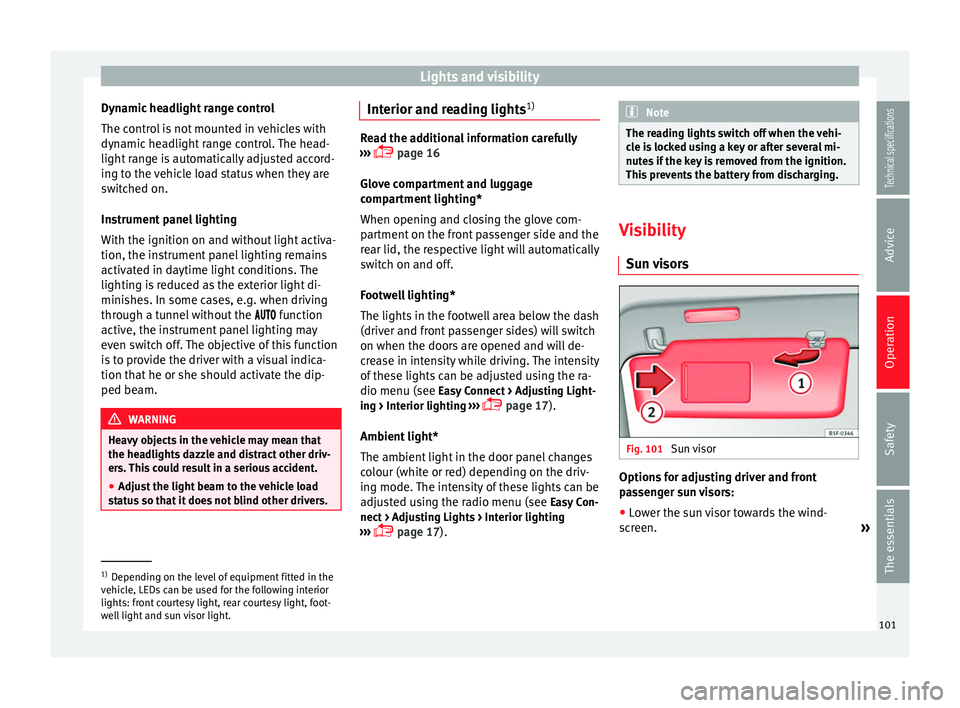
● Lower the sun visor towards the wind-
screen. »1)
Depending on the level of equipment fitted in the
vehicle, LEDs can be used for the following interior
lights: front courtesy light, rear courtesy light, foot-
well light and sun visor light. 101Technical specifications
Advice
Operation
Safety
The essentials