lane assist Seat Leon SC 2014 User Guide
[x] Cancel search | Manufacturer: SEAT, Model Year: 2014, Model line: Leon SC, Model: Seat Leon SC 2014Pages: 284, PDF Size: 5.85 MB
Page 168 of 284
Operation
in braking, such as in work areas or if there
are metal rails.
●
If the operation of the City Emergency brak-
ing function is impaired, for example, by dirt
or because the radar sensor has lost its set-
tings, the system may issue unnecessary
warnings and intervene inopportunely in the
braking.
● During driving, the City Emergency braking
function does not react to people or animals
or vehicles crossing your path or which ap-
proach you head-on in the same lane. Note
● When the City Emergency braking function
causes a braking, the brake pedal is “hard-
er”.
● Automatic interventions on the brakes by
the City Emergency braking function may be
interrupted by pressing the clutch, accelera-
tor or moving the wheel.
● The City Emergency braking function can
brake the vehicle until it stops completely.
However, the brake system does not halt the
vehicle permanently. Use the foot brake!
● If several inopportune intervenes occur,
switch off the Front Assist and with it the City
Emergency braking function. Take it to a spe-
cialised workshop, SEAT recommends visiting
a SEAT dealership.
● If numerous unnecessary interventions oc-
cur, the City Emergency braking function may
switch off automatically. Lane Assist system*
Introduction WARNING
The intelligent technology in the Lane Assist
system cannot change the limits imposed by
the laws of physics and by the very nature of
the system. Careless or uncontrolled use of
the Lane Assist system may cause accidents
and injury. The system is not a replacement
for driver awareness.
● Always adapt your speed and the distance
to the vehicles ahead in line with visibility,
weather conditions, the condition of the road
and the traffic situation.
● Always keep your hands on the steering
wheel so it can be turned at any time.
● The Lane Assist system does not detect all
road markings. The road surfaces, road struc-
tures or objects in poor condition can be in-
correctly detected as road markings under
certain circumstances by the Lane Assist sys-
tem. In such situations, switch the Lane As-
sist system off immediately.
● Please observe the indications on the in-
strument panel and act as is necessary.
● Always pay attention to the vehicle's sur-
roundings.
● When the area of vision of the camera be-
comes dirty, covered or is damaged, the Lane
Assist system function can be affected. CAUTION
In order to avoid influencing the operation of
the system, the following points must be tak-
en into account:
● Regularly clean the area of vision of the
camera and keep it in a clean state, without
snow or ice.
● Do not cover the area of vision of the cam-
era.
● Check that the area of vision of the wind-
screen camera is not damaged. Note
● The Lane Assist system has been exclusive-
ly developed for driving on paved roads only.
● If the Lane Assist system does not work as
described in this chapter, do not use it and
contact a specialised workshop.
● If there is a fault in the system, have it
checked by a specialised workshop. 166
Page 169 of 284
Driver assistance systems
Indication on the display and warning
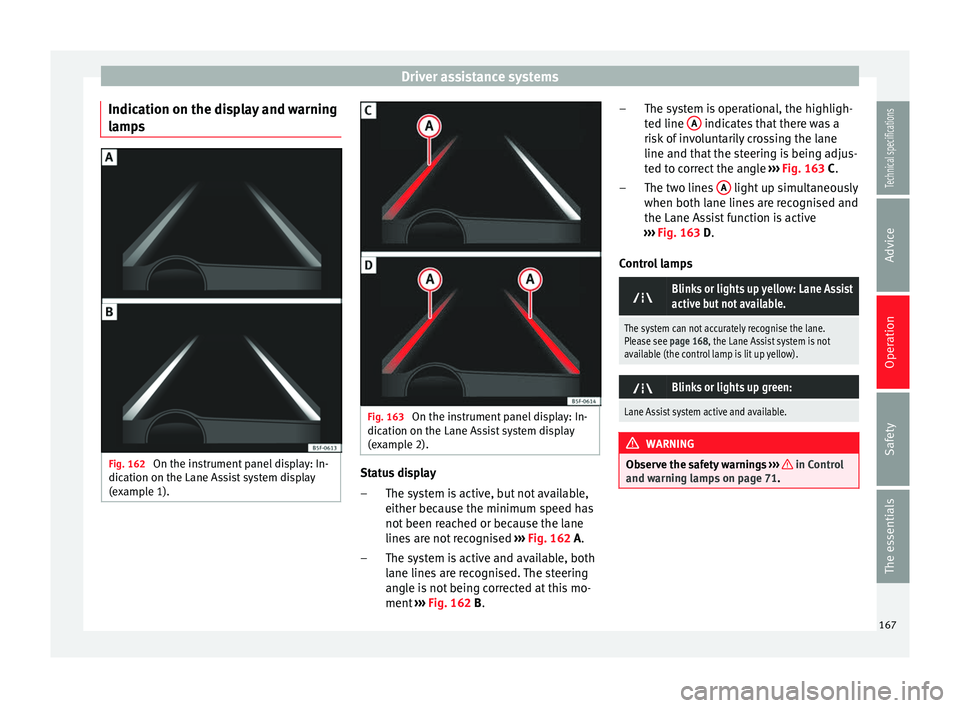
lamps Fig. 162
On the instrument panel display: In-
dication on the Lane Assist system display
(example 1). Fig. 163
On the instrument panel display: In-
dication on the Lane Assist system display
(example 2). Status display
The system is active, but not available,
either because the minimum speed has
not been reached or because the lane
lines are not recognised ››› Fig. 162
A.
The system is active and available, both
lane lines are recognised. The steering
angle is not being corrected at this mo-
ment ››› Fig. 162 B
.
–
– The system is operational, the highligh-
ted line
A indicates that there was a
risk of involuntarily crossing the lane
line and that the steering is being adjus-
ted to correct the angle ››› Fig. 163
C
.
The two lines A light up simultaneously
when both lane lines are recognised and
the Lane Assist function is active
››› Fig. 163
D
.
Control lamps
Blinks or lights up yellow: Lane Assist
active but not available.
The system can not accurately recognise the lane.
Please see page 168, the Lane Assist system is not
available (the control lamp is lit up yellow).
Blinks or lights up green:
Lane Assist system active and available.
WARNING
Observe the safety warnings ››› in Control
and warning lamps on page 71. –
–
167
Technical specifications
Advice
Operation
Safety
The essentials
Page 170 of 284
Operation
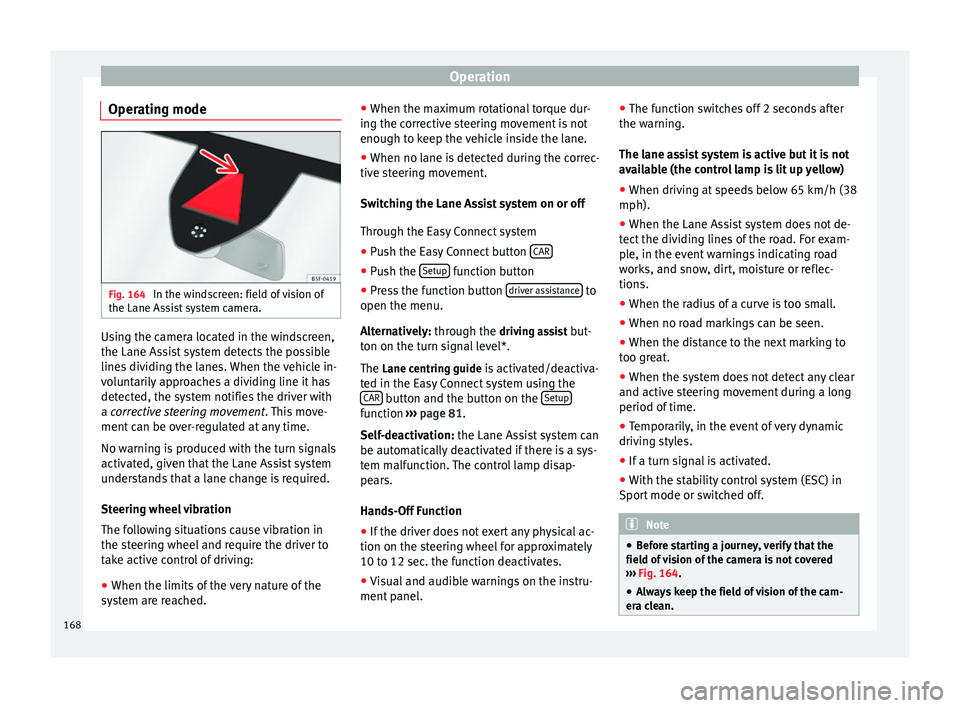
Operating mode Fig. 164
In the windscreen: field of vision of
the Lane Assist system camera. Using the camera located in the windscreen,
the Lane Assist system detects the possible
lines dividing the lanes. When the vehicle in-
voluntarily approaches a dividing line it has
detected, the system notifies the driver with
a
corrective steering movement
.
Thi s move-
ment can be over-regulated at any time.
No warning is produced with the turn signals
activated, given that the Lane Assist system
understands that a lane change is required.
Steering wheel vibration
The following situations cause vibration in
the steering wheel and require the driver to
take active control of driving:
● When the limits of the very nature of the
system are reached. ●
When the maximum rotational torque dur-
ing the corrective steering movement is not
enough to keep the vehicle inside the lane.
● When no lane is detected during the correc-
tive steering movement.
Switching the Lane Assist system on or off
Through the Easy Connect system
● Push the Easy Connect button CAR ●
Push the Setup function button
● Press the function button driver assistance to
open the menu.
Alternatively: through the driv
in
g assist but-
ton on the turn signal level*.
The Lane centring guide is activated/deactiva- ted in the Easy Connect system using the CAR button and the button on the
Setup function
››› page 81 .
Self -de
activation:
the Lane Assist system can
be automatically deactivated if there is a sys-
tem malfunction. The control lamp disap-
pears.
Hands-Off Function
● If the driver does not exert any physical ac-
tion on the steering wheel for approximately
10 to 12 sec. the function deactivates.
● Visual and audible warnings on the instru-
ment panel. ●
The function switches off 2 seconds after
the warning.
The lane assist system is active but it is not
available (the control lamp is lit up yellow)
● When driving at speeds below 65 km/h (38
mph).
● When the Lane Assist system does not de-
tect the dividing lines of the road. For exam-
ple, in the event warnings indicating road
works, and snow, dirt, moisture or reflec-
tions.
● When the radius of a curve is too small.
● When no road markings can be seen.
● When the distance to the next marking to
too great.
● When the system does not detect any clear
and active steering movement during a long
period of time.
● Temporarily, in the event of very dynamic
driving styles.
● If a turn signal is activated.
● With the stability control system (ESC) in
Sport mode or switched off. Note
● Before starting a journey, verify that the
field of vision of the camera is not covered
››› Fig. 164.
● Alw
ays keep the field of vision of the cam-
era clean. 168
Page 171 of 284
Driver assistance systems
Switching off the Lane Assist system
in the following situations Due to the limits of the Lane Assist system,
switch it off in the following situations:
● When more attention is required of the
driver
● When driving in a sporty style
● In unfavourable weather conditions
● On roads in poor condition
● In areas of road works Note
The Lane Assist system deactivates when
driving below 60 km/h (40 mph). SEAT driving modes (SEAT Drive
Profile)*
Introduction SEAT Drive Profile enables the driver to
choose between four profiles or modes,
Nor-
mal , Sport
, Eco
and Individual
, that modify the
behaviour of various vehicle functions, pro-
viding different driving experiences. In the FR and X-PERIENCE models equipped
with dynamic chassis control and Navi Sys-
tem Plus, the
Comfort profile is also availa-
b l
e.
In the Leon Cupra model the four profiles are Comfort, Sport, Cupra and Individual.
The Individual profile can be configured ac-
cor
ding to personal preferences. The other
profiles are fixed.
Description Depending on the equipment fitted in the ve-
hicle, SEAT Drive Profile can operate on the
following functions:
Engine
Depending on the profile selected, the en-
gine responds more spontaneously or more
in harmony with the movements of the accel-
erator. Additionally, when
Eco
mode is selec-
ted, the Start-stop function is automatically
activated.
In vehicles with automatic transmission, the
gear change points are modified to position
them in lower or higher engine speed ranges.
Additionally, the Eco1)
mode activates the In- ertia function, enabling consumption to be
further reduced.
In manual gearbox vehicles,
Eco1)
mode cau-
ses the gear change recommendation indica-
tions that appear on the instrument panel to
vary, facilitating more efficient driving.
Dynamic chassis control (DCC)
DCC continuously adapts the shock absorb-
ers to the condition of the road and current
driving conditions, according to the pre-set
programme.
In the event of a fault in the DCC, the follow-
ing message is displayed on the instrument
screen Fault: damping setting.
Address
Power steering becomes more robust in Sport
mode to enable a sportier driving style. In the
Leon Cupra the power steering becomes
more robust in Cupra mode.
Air conditioning
In vehicles with Climatronic, this can operate
in eco 1)
mode, especially restricting fuel con-
sumption. »1)
In the Leon Cupra model, Eco mode is selected
through the Individual profile.
169
Technical specifications
Advice
Operation
Safety
The essentials
Page 187 of 284
Care and maintenance
Camera sensors and lenses ●
Use a small brush to remove snow and a
de-icer spray to remove ice.
● Clean the sensors with a solvent-free prod-
uct and a soft, dry cloth.
● Moisten the camera lens using a standard
alcohol-based glass cleaning agent and
clean the lens with a dry cloth. In the active
lane assist*, the area in front of the lens is
norm al
ly cleaned with the windscreen wash-
er. CAUTION
● When you clean the vehicle with a pressure
washer:
–Stay a suitable distance from the sensors
on the front and rear bumpers.
– Do not clean the camera lenses or sur-
rounding area with the pressure washer.
● Never use warm or hot water to remove
snow and ice from the reverse camera lens,
as it could crack the lens.
● Never use abrasive cleaning agents on the
lens. Care and polishing
Care
Waxing protects the paintwork. It is time to
apply a
coat of good wax when water no lon- ger forms droplets
and rolls off the clean
paintwork.
Even if a wax solution is used regularly in the
vehicle washing tunnel, it is advisable to pro-
tect the paint with a hard wax coating at least
twice a year.
In the summer, you will find it is much easier
to remove dead insects (which accumulate
on the bumper and the front of the bonnet) if
the car has been treated with care products
recently .
P o
lishing
Polishing is only necessary if the paint has
lost its shine, and the gloss cannot be
brought back by putting on wax.
If the polish does not contain wax, a wax
product should be applied after polishing. CAUTION
● Do not use polishes and hard wax on pain-
ted parts with a matt finish or on plastic
parts.
● Do not apply paint polishes to the side trim
that runs around the panoramic roof and ends
on the windscreen. However, it can be treated
with hard wax. Trims
In respect for the environment, the silver-
plated trims on the body are made of pure
aluminium (they do not contain chrome).
Dirt or marks on the trim mouldings should
be removed with a cleaning product with a
neutr
a
l PH (do not use a chrome cleaner).
Body polish is also unsuitable for use on trim
mouldings. The intensive cleaning fluids of-
ten used before the car goes into a car wash
may contain alkaline substances, which can
cause dull or milky patches when they dry
out.
SEAT Official Services carry stocks of cleaning
products which have been tested for use on
your vehicle and are not harmful to the envi-
ronment.
Plastic parts Plastic parts are cleaned with a power wash-
er. If this is not sufficient, plastic parts
should only be treated with a special solvent-
free
plastic cleaning agent
. Do not
u
se paint-
work cleaners, polishes or wax on plastic
parts.
185
Technical specifications
Advice
Operation
Safety
The essentials
Page 275 of 284
Index
G
Gas Pre-heating . . . . . . . . . . . . . . . . . . . . . . . . . . . . 129
Gas filtration system Diesel particulate filter . . . . . . . . . . . . . . . . . . . 141
Gear-change indicator . . . . . . . . . . . . . . . . . . . . . . 74
Gearbox DSG see Automatic gearbox . . . . . . . . . . . . . . . . . . . 132
Ge arbo
x lever . . . . . . . . . . . . . . . . . . . . . . . . . . . . . 24
Gear change . . . . . . . . . . . . . . . . . . . . . . . . . . . . . . 24
Gear engaged . . . . . . . . . . . . . . . . . . . . . . . . . . . . . 24
Gear recommendation . . . . . . . . . . . . . . . . . . . . . . 74
Gearshift paddles (automatic gearbox) . . . . . . . 135
General overview of the engine compartment . . 198
Glass Cleaning/De-icing . . . . . . . . . . . . . . . . . . . . . . 186
Glove box . . . . . . . . . . . . . . . . . . . . . . . . . . . . . . . 112
Glove compartment lighting . . . . . . . . . . . . . . . . 101
Glow plug system control lamp . . . . . . . . . . . . . . . . . . . . . . . . . . . . 71
H Handbrake . . . . . . . . . . . . . . . . . . . . . . . . . . . . . . 131 warning lamp . . . . . . . . . . . . . . . . . . . . . . . . . . 131
Hazard warning lights . . . . . . . . . . . . . . . . . . . 15, 99
Head-on collisions and the laws of physics . . . . . 45
Head-protection airbags . . . . . . . . . . . . . . . . . . . . 53 description . . . . . . . . . . . . . . . . . . . . . . . . . . . . . 53
safety instructions . . . . . . . . . . . . . . . . . . . . . . . 53
Headlight range control . . . . . . . . . . . . . . . . . . . . 100
Headlights Changing a bulb . . . . . . . . . . . . . . . . . . . . . . . . 233
Driving abroad . . . . . . . . . . . . . . . . . . . . . . . . . 100
Headlight washers . . . . . . . . . . . . . . . . . . . . . . 103
Head restraints . . . . . . . . . . . . . . . . . . . . . . . . . . . . 12 Adjustment . . . . . . . . . . . . . . . . . . . . . . . . . . . . 107 Headrests . . . . . . . . . . . . . . . . . . . . . . . . . . . . . . . . 12
Adjustment . . . . . . . . . . . . . . . . . . . . . . . . . . . . 107
Heated exterior mirrors . . . . . . . . . . . . . . . . . . . . . . . . . 104
Heated rear window . . . . . . . . . . . . . . . . . . . . . 27, 29
Heating and fresh air . . . . . . . . . . . . . . . . . . . . . . . 29
Hill driving assistant . . . . . . . . . . . . . . . . . . . . . . 147
Horn . . . . . . . . . . . . . . . . . . . . . . . . . . . . . . . . . . . . 65
How to jump start description . . . . . . . . . . . . . . . 223
I Identification plate . . . . . . . . . . . . . . . . . . . . . . . . 241
Identifying letters of engine . . . . . . . . . . . . . . . . 241
Ignition . . . . . . . . . . . . . . . . . . . . . . . . . . . . . 14, 129
Ignition lock . . . . . . . . . . . . . . . . . . . . . . . . . 14, 129
Importance of the correct adjustment of head re- straints . . . . . . . . . . . . . . . . . . . . . . . . . . . . . . . . 41
Inertia mode . . . . . . . . . . . . . . . . . . . . . . . . . . . . . 138
Information on emissions . . . . . . . . . . . . . . . . . . 241
Inspection service . . . . . . . . . . . . . . . . . . . . . . . . 200
Instrument cluster . . . . . . . . . . . . . . . . . . . . . . . . . 66
Instrument panel . . . . . . . . . . . . . . . . . . . . . . . 22, 66 Display . . . . . . . . . . . . . . . . . . . . . . . . . . . . . 66, 67
Instruments . . . . . . . . . . . . . . . . . . . . . . . . . . . . . 66
Lamps . . . . . . . . . . . . . . . . . . . . . . . . . . . . . . . . . 71
Service interval display . . . . . . . . . . . . . . . . . . . 80
Instrument panel lighting . . . . . . . . . . . . . . . . . . 100
Instrument panel on-screen messages Front Assist monitoring system . . . . . . . . . . . . 162
Interior lights . . . . . . . . . . . . . . . . . . . . . . . . . . . . . 16
Interior monitoring . . . . . . . . . . . . . . . . . . . . . . . . . 89
Interior view . . . . . . . . . . . . . . . . . . . . . . . . . . . . . . . 7
ISOFIX . . . . . . . . . . . . . . . . . . . . . . . . . . . . . . . . 59, 61
ISOFIX system . . . . . . . . . . . . . . . . . . . . . . . . . . . . . 59 J
Jack . . . . . . . . . . . . . . . . . . . . . . . . . . . . . . . . . . . . 220 Mounting points . . . . . . . . . . . . . . . . . . . . . . . . 219
Jump leads . . . . . . . . . . . . . . . . . . . . . . . . . . . . . . 223
Jump starting . . . . . . . . . . . . . . . . . . . . . . . . . . . . 223
K
Key Driver messages (mechanical contact) . . . . . . 129
Unlock/Lock . . . . . . . . . . . . . . . . . . . . . . . . . . . . 84
Keys Assign key . . . . . . . . . . . . . . . . . . . . . . . . . . . . . . 83
Car key . . . . . . . . . . . . . . . . . . . . . . . . . . . . . . . . . 83
Changing the battery (vehicle key) . . . . . . . . . . 86
Locking/Unlocking . . . . . . . . . . . . . . . . . . . . . . 227
Remote control . . . . . . . . . . . . . . . . . . . . . . . . . . 83
Spare key . . . . . . . . . . . . . . . . . . . . . . . . . . . . . . 83
Kick-down Manual gearbox . . . . . . . . . . . . . . . . . . . . . . . . 171
Kick-down feature Automatic gearbox . . . . . . . . . . . . . . . . . . . . . . 137
Knee airbag see Airbag system . . . . . . . . . . . . . . . . . . . . . . . 52
L
Lamps Audib
le warnings . . . . . . . . . . . . . . . . . . . . . . . . 71
Control lamps . . . . . . . . . . . . . . . . . . . . . . . . . . . 71
Warning lamps . . . . . . . . . . . . . . . . . . . . . . . . . . 71
Lane Assist . . . . . . . . . . . . . . . . . . . . . . . . . . . . . . 166 Cleaning the camera area . . . . . . . . . . . . . . . . 185
Lane Assist system see Lane Assist . . . . . . . . . . . . . . . . . . . . . . . . . 166
Lau nc
h Control Programme (automatic gearbox) 137
Leather Care Natural leather . . . . . . . . . . . . . . . . . . . . . . . . . 188
273