door lock Seat Leon SC 2014 Owner's Guide
[x] Cancel search | Manufacturer: SEAT, Model Year: 2014, Model line: Leon SC, Model: Seat Leon SC 2014Pages: 284, PDF Size: 5.85 MB
Page 95 of 284
Opening and closing
●
Only open or close the panoramic sliding
sunroof and the sun blind* when nobody is in
the way.
● The panoramic sliding sunroof can be oper-
ated for up to about ten minutes after the ig-
nition has been switched off, provided the
driver door and the front passenger door are
not opened. CAUTION
Check that when the rear lid is open, it does
not touch loads carried on the roof. When a
roof carrier is fitted, DO NOT open the panor-
amic roof*. Note
● Leaves and other loose objects that accu-
mulate on the sun roof rails should be regu-
larly cleaned away either by hand or with a
vacuum.
● In case of a fault in the operation of the
panoramic sliding sunroof, the anti-trap func-
tion will not operate correctly. Visit a special-
ised workshop. Opening and closing the sun blind*
3 Valid for vehicles: with sun blinds
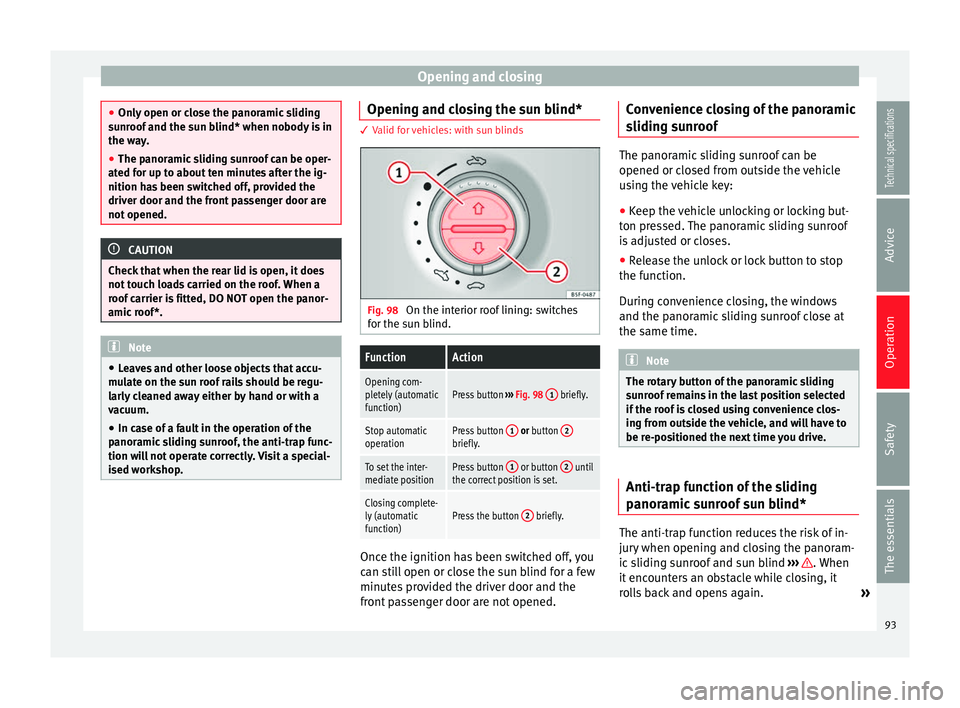
Fig. 98
On the interior roof lining: switches
for the sun blind.FunctionAction
Opening com-
pletely (automatic
function)Press button ››› Fig. 98 1 briefly.
Stop automatic
operationPress button 1 or button 2briefly.
To set the inter-
mediate positionPress button 1 or button 2 until
the correct position is set.
Closing complete-
ly (automatic
function)Press the button 2 briefly. Once the ignition has been switched off, you
can still open or close the sun blind for a few
minutes provided the driver door and the
front passenger door are not opened.Convenience closing of the panoramic
sliding sunroof The panoramic sliding sunroof can be
opened or closed from outside the vehicle
using the vehicle key:
● Keep the vehicle unlocking or locking but-
ton pressed. The panoramic sliding sunroof
is adjusted or closes.
● Release the unlock or lock button to stop
the function.
During convenience closing, the windows
and the panoramic sliding sunroof close at
the same time. Note
The rotary button of the panoramic sliding
sunroof remains in the last position selected
if the roof is closed using convenience clos-
ing from outside the vehicle, and will have to
be re-positioned the next time you drive. Anti-trap function of the sliding
panoramic sunroof sun blind*
The anti-trap function reduces the risk of in-
jury when opening and closing the panoram-
ic sliding sunroof and sun blind
››› . When
it encounters an obstacle while closing, it
rolls back and opens again. »
93
Technical specifications
Advice
Operation
Safety
The essentials
Page 100 of 284
OperationVehicle with
halogen
headlightsIn the “Coming Home” function, the day-
time running lights (DRL), the rear side
lights and the licence plate lights are
turned on.
Vehicle with
full-LED
headlightsIn the “Coming Home” function, the dip-
ped beams and the daytime running
lights (DRL), the rear side lights and the
licence plate lights are switched on.
Automatic* activation of “Coming Home”
For vehicles with a light and rain sensor (rota-
ry light switch in position
).
● Sw it
ch off the engine and remove the key
from the ignition with the rotary light switch
in position ›››
page 15.
● The automatic “Coming Home” function is
only active when the light sensor detects
darkness.
● When the car door is opened, the “Coming
Home” lighting comes on.
Manual “Coming Home” activation
For vehicles with a light and rain sensor (rota-
ry light switch without position ).
● Switch off the engine and remove the key
from the ignition.
● Activate the headlight flashers for approxi-
mately 1 second.
● Activated for any position of the rotary light
switch. ●
When the car door is opened, the “Coming
Home” lighting comes on. The headlights are
turned off 60 seconds after the vehicle door
is opened.
Deactivation
● If no door has been closed, they go out au-
tomatically after 60 seconds.
● After the last door has been closed, the
headlights will be switched off after the
“Coming Home” delay (as established in the
radio menu) has elapsed.
● On turning the light switch to position
››› page 15.
● When the ignition i s
switched on (when
starting the engine).
“Leaving Home” function The “Leaving Home” function is only availa-
ble for vehicles with a light and rain sensor
(rotary light switch in position
).
This function may be connected/disconnec-
ted through the radio menu. The “Leaving
Home” function switch-off delay may also be
set (default: 30 sec).
Vehicle with
halogen
headlightsIn the “Leaving Home” function, the day-
time running lights (DRL), the rear side
lights and the licence plate lights are
switched on.
Vehicle with
full-LED
headlightsIn the “Leaving Home” function, the dip-
ped beams, the daytime running lights
(DRL), the rear side lights and the li-
cence plate lights are switched on. Activation
● When the vehicle is unlocked using the re-
mote control.
● The “Leaving Home” function is only activa-
ted when the rotary light switch is in position
and the light sensor detects darkness.
Deactivation
● When the “Leaving Home” delay period
ends (default: 30 sec).
● When the vehicle is locked using the re-
mote control.
● When the light control is switched into a
position other than .
● With the ignition is switched on.
98
Page 103 of 284
Lights and visibility
Dynamic headlight range control
The control is not mounted in vehicles with
dynamic headlight range control. The head-
light range is automatically adjusted accord-
ing to the vehicle load status when they are
switched on.
Instrument panel lighting
With the ignition on and without light activa-
tion, the instrument panel lighting remains
activated in daytime light conditions. The
lighting is reduced as the exterior light di-
minishes. In some cases, e.g. when driving
through a tunnel without the function
active, the instrument panel lighting may
even switch off. The objective of this function
is to provide the driver with a visual indica-
tion that he or she should activate the dip-
ped beam. WARNING
Heavy objects in the vehicle may mean that
the headlights dazzle and distract other driv-
ers. This could result in a serious accident.
● Adjust the light beam to the vehicle load
status so that it does not blind other drivers. Interior and reading lights
1) Read the additional information carefully
››› page 16
Glove compartment and luggage
compartment lighting*
When opening and closing the glove com-
partment on the front passenger side and the
rear lid, the respective light will automatically
switch on and off.
Footwell lighting*
The lights in the footwell area below the dash
(driver and front passenger sides) will switch
on when the doors are opened and will de-
crease in intensity while driving. The intensity
of these lights can be adjusted using the ra-
dio menu (see Easy Connect > Adjusting Light-
ing > Interior lighting ›››
page 17).
Ambient light*
The ambient light in the door panel changes
colour (white or red) depending on the driv-
ing mode. The intensity of these lights can be
adjusted using the radio menu (see Easy Con-
nect > Adjusting Lights > Interior lighting
››› page 17
). Note
The reading lights switch off when the vehi-
cle is locked using a key or after several mi-
nutes if the key is removed from the ignition.
This prevents the battery from discharging. Visibility
Sun visors Fig. 101
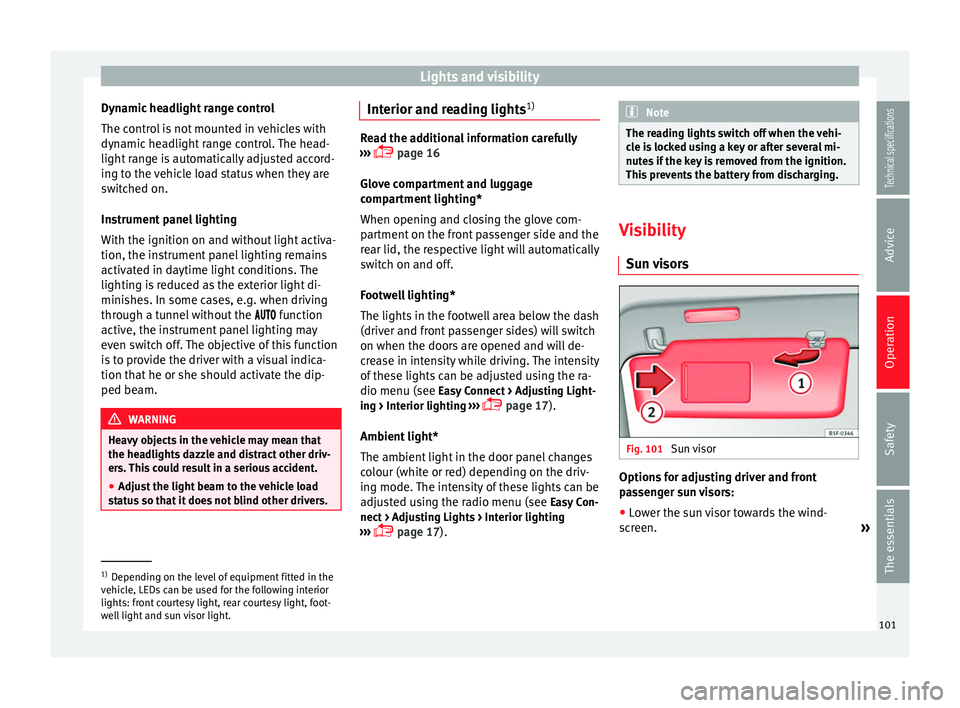
Sun visor Options for adjusting driver and front
passenger sun visors:
● Lower the sun visor towards the wind-
screen. »1)
Depending on the level of equipment fitted in the
vehicle, LEDs can be used for the following interior
lights: front courtesy light, rear courtesy light, foot-
well light and sun visor light. 101Technical specifications
Advice
Operation
Safety
The essentials
Page 116 of 284
Operation
Storing objects Loading the luggage compartment All luggage and other loose objects must be
safely secured in the luggage compartment.
Unsecured objects which shift back and forth
could impair the driving safety or driving
characteristics of the vehicle by shifting the
centre of gravity.
– Distribute the load evenly in the luggage
compartment.
– Place heavy objects as far forward as possi-
ble in the luggage compartment.
– Place the heavy objects first.
– Secure heavy objects to the fitted fastening
rings ›››
page 119 . WARNING
● Loose luggage and other objects in the lug-
gage compartment could cause serious inju-
ries.
● Always stow objects in the luggage com-
partment and secure them on the fastening
rings.
● Use suitable straps to secure heavy ob-
jects.
● During sudden manoeuvres or accidents,
loose objects can be thrown forward, injuring
vehicle occupants or passers-by. This in-
creased risk of injury will be further increased if a loose object is struck by an inflating air-
bag. If this happens, objects may shoot out-
ward like a missile. Risk of fatal injury.
●
Please note that the centre of gravity may
shift when transporting heavy objects; this
may affect vehicle handling and lead to an ac-
cident. Therefore, it is essential to adjust
your speed and driving style accordingly, to
avoid accidents.
● Never exceed the allowed axle weights or
allowed maximum weight. If said weights are
exceeded, the driving characteristics of the
vehicle may change, leading to accidents, in-
juries and damage to the vehicle.
● Never leave your vehicle unattended, espe-
cially when the rear lid is open. Children
could climb into the luggage compartment,
closing the door behind them; they will be
trapped and run the risk of death.
● Never allow children to play in or around
the vehicle. Close and lock all the doors and
rear lid when you leave the vehicle. Before
you lock the vehicle, make sure that there are
no adults or children in the vehicle. Note
● Air circulation in the vehicle helps reduce
fogging of the windows. Used air escapes
through ventilation slits in the side trim of
the luggage compartment. Ensure that the
ventilation slots are never covered.
● Straps for securing the load to the fasten-
ing rings are commercially available. Luggage compartment cover
3 Applies to the model: LEON/LEON SC
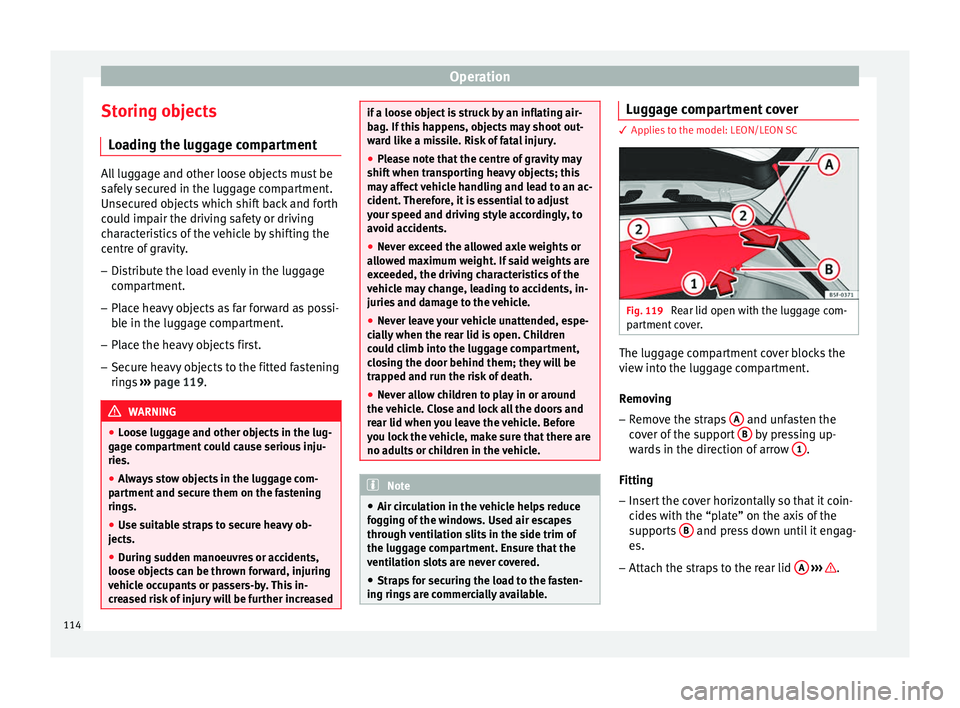
Fig. 119
Rear lid open with the luggage com-
partment cover. The luggage compartment cover blocks the
view into the luggage compartment.
Removing
– Remove the straps A and unfasten the
cover of the support B by pressing up-
wards in the direction of arrow 1 .
Fitting
– Insert the cover horizontally so that it coin-
cides with the “plate” on the axis of the
supports B and press down until it engag-
es.
– Attach the straps to the rear lid A
››› .
114
Page 131 of 284
Driving
Driving Ignition lock Switching on the ignition and starting
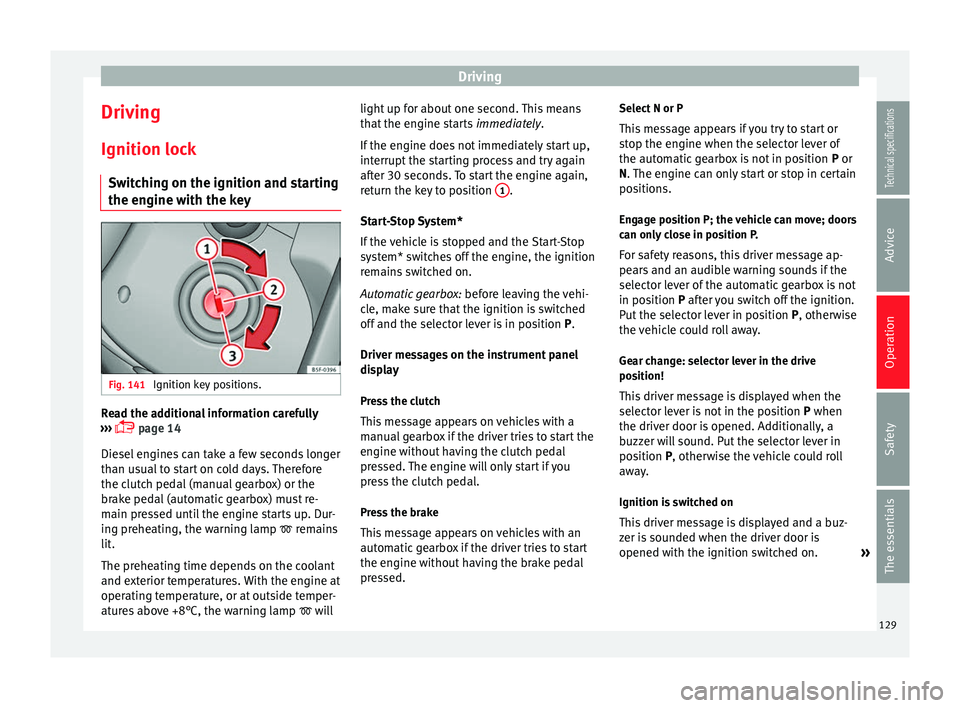
the engine with the key Fig. 141
Ignition key positions. Read the additional information carefully
››› page 14
Diesel engines can take a few seconds longer
than usual to start on cold days. Therefore
the clutch pedal (manual gearbox) or the
brake pedal (automatic gearbox) must re-
main pressed until the engine starts up. Dur-
ing preheating, the warning lamp remains
lit.
The preheating time depends on the coolant
and exterior temperatures. With the engine at
operating temperature, or at outside temper-
atures above +8°C, the warning lamp will light up for about one second. This means
that the engine starts
immediately.
If the engine does not immediately start up,
interrupt the starting process and try again
after 30 seconds. To start the engine again,
return the key to position 1 .
Start-Stop System*
If the vehicle is stopped and the Start-Stop
system* switches off the engine, the ignition
remains switched on.
Automatic gearbox: before leaving the vehi-
cle, make sure that the ignition is switched
off and the selector lever is in position P.
Driv er me
ssages on the instrument panel
display
Press the clutch
This message appears on vehicles with a
manual gearbox if the driver tries to start the
engine without having the clutch pedal
pressed. The engine will only start if you
press the clutch pedal.
Press the brake
This message appears on vehicles with an
automatic gearbox if the driver tries to start
the engine without having the brake pedal
pressed. Select N or P
This message appears if you try to start or
stop the engine when the selector lever of
the automatic gearbox is not in position P or
N. The engine can only start or stop in certain
po
sitions.
Engage position P; the vehicle can move; doors
can only close in position P.
For safety reasons, this driver message ap-
pears and an audible warning sounds if the
selector lever of the automatic gearbox is not
in position P after you switch off the ignition.
P
ut the selector lever in position P, otherwise
the vehicle could roll away.
Gear change: selector lever in the drive
position! This driver message is displayed when the
selector lever is not in the position P when
the driver door i
s opened. Additionally, a
buzzer will sound. Put the selector lever in
position
P, otherwise the vehicle could roll
away.
Ignition is switched on
This driver message is displayed and a buz-
zer is sounded when the driver door is
opened with the ignition switched on. »
129
Technical specifications
Advice
Operation
Safety
The essentials
Page 134 of 284
Operation
● Secure the vehicle as usual by applying the
handbrake firmly and putting it in 1st gear. WARNING
● Take measures to reduce the risk of injury
when you leave your vehicle unattended.
● Never park where the hot exhaust system
could ignite inflammable materials, such as
dry grass, low bushes, spilt fuel etc.
● Never allow vehicle occupants to remain in
the vehicle when it is locked. They would be
unable to open the vehicle from the inside,
and could become trapped in the vehicle in
an emergency. In the event of an emergency,
locked doors will delay assistance to vehicle
occupants.
● Never leave children alone in the vehicle.
They could set the vehicle in motion, for ex-
ample, by releasing the handbrake or the
gearbox lever.
● Depending on weather conditions, it may
become extremely hot or cold inside the vehi-
cle. This can be fatal. Manual gearbox
Changing gears Read the additional information carefully
››› page 24
In some countries the clutch pedal must be
fully pressed down for the engine to start. Selecting reverse gear
● Engage reverse gear only when the vehicle
is stopped.
Changing down gears
While driving, changing down a gear must al-
ways be done gradually, i.e. to the gear di-
rectly below and when the engine speed is
not too high ››› . Changing down while by-
passing one or various gears at high speeds
or at high engine speeds can damage the
clutch and the gearbox, even if the clutch
pedal remains depressed ››› .
WARNING
When the engine is running, the vehicle will
start to move as soon as a gear is engaged
and the clutch released. This is also the case
with the electro-mechanical parking brake
switched on.
● Never engage reverse gear when the vehi-
cle is moving. WARNING
If the gear is changed down inappropriately
by selecting a gear that is too low, you may
lose control of the vehicle, causing an acci-
dent and serious injuries. CAUTION
When travelling at high speeds or at high en-
gine speeds, selecting a gear that is too low can cause considerable damage to the clutch
and the gearbox. This can also occur if the
clutch pedal is pressed and held and it does
not engage.
CAUTION
To prevent damage and avoid premature
wear, please observe the following:
● Do not rest your hand on the gear lever
while driving. The pressure applied by your
hand is transmitted to the gearbox selector
forks.
● Always ensure that the vehicle is complete-
ly stopped before engaging the reverse gear.
● Always press the clutch to the floor when
changing gears.
● Never hold the vehicle “on the clutch” on
hills with the engine on. Automatic gearbox/DSG
automatic gearbox*
Introduction Your vehicle is equipped with an electronical-
ly controlled manual gearbox. Torque be-
tween the engine and the gearbox is trans-
mitted via two independent clutches. They re-
place the torque converter found on conven-
tional automatic gearboxes and allow for
132
Page 138 of 284
Operation
When accelerating, the gearbox automatical-
ly shifts up into the next gear shortly before
the maximum engine speed is reached.
If you select a lower gear, the automatic gear-
box will not shift down until there is no risk of
overrevving the engine.
When the kick-down feature is used, the
gearbox shifts down to a lower gear, depend-
ing on road speed and engine speed.
Driving tips The gearbox changes gear ratios automatical-
ly as the vehicle moves.
The engine can only start with the selector
lever in the position P or N. At low tempera-
tures, below -10°C (50°F), the engine can on-
ly start with the selector lever in the position
P.
Starting the vehicle
– Press and hold the brake pedal.
– Press and hold the interlock button (the
button on the selector lever handle), move
the selector lever to the desired position,
for instance D
› ››
page 133, and release the
interlock button.
– Wait for the gearbox to engage the gear (a
slight movement can be felt). –
Release the brake and press the accelerator
››› .
Stopping briefly – Apply the foot brake to hold the vehicle
briefly when stationary (for instance at traf-
fic lights). Do not press the accelerator.
Stopping/Parking
If the driver door is opened and the selector
lever is not in position P, the vehicle could
move. The driver message will be: Gear
change: selector lever in the drive position!. Additionally, a buzzer will sound.
– Press and hold the brake pedal ››› .
– Apply the handbrake.
– Move the selector lever to position P.
Holding the car on a hill – Always apply the brake pedal firmly to pre-
v ent
the vehicle from “moving backwards;
if necessary, apply the handbrake” ››› .
Do not
try to stop the vehicle “rolling back”
b
y increasing the engine speed when a
gear is engaged (pressing the accelerator)
››› .
Moving off uphill in vehicles without Hill
start assistant* – Apply the handbrake. –
Once you have engaged a gear press the
accelerator carefully and disengage the
handbrake.
Moving off uphill in vehicles with Hill start
assistant* – Once you have engaged a gear, release the
footbrake and press the accelerator
››› page 147, Hill driving assistant*.
Driving down hills: in some situations (on
mountain roads or when towing a trailer or
caravan) it can be advantageous to switch
temporarily to the manual gearbox pro-
gramme so that the gear ratios can be selec-
ted manually to suit the driving conditions
››› .
On level ground it is sufficient to move the
selector lever to position P. On slopes, first
engage the parking brake and then put the
selection lever into the P position. This
avoids overloading the locking mechanism
and it will be easier to move the selector lev-
er from position P. WARNING
Observe the safety warnings ››› in Selector
lever positions on page 133.
● Never allow the brake to rub and do not use
the brake pedal too often or for long periods.
Constant braking causes overheating in the 136
Page 150 of 284
Operation
Note
The Official Service or a specialist workshop
can tell you if your vehicle is equipped with
this system. Start-Stop system*
Description and operation The Start-Stop system helps save fuel and re-
duce CO
2 emissions.
In Start-Stop mode, the engine will automati-
cally switch off when the vehicle stops, when
stopping at traffic lights for example. The ig-
nition remains switched on during the stop-
ping phase. The engine automatically
switches back on when required.
As soon as the ignition is switched on, the
Start-Stop function is automatically activa-
ted.
Basic requirements for the Start-Stop mode ● The driver door must be closed.
● The driver must have their seat belt fas-
tened.
● The bonnet must be closed.
● The vehicle must have travelled at more
than 4 km/h (2 mph) since the last stop.
● The vehicle cannot be towing a trailer. WARNING
● Never switch the engine off until the vehi-
cle is stationary. The brake servo and power
steering functions will not be completely cov-
ered under warranty. More force may also be
needed to turn the steering wheel or to brake.
As you cannot steer and brake in the normal
manner, there is a greater risk of accidents
and serious injury.
● Never remove the key from the ignition if
the vehicle is in motion. Otherwise, the steer-
ing could lock making it impossible to steer
the vehicle.
● To avoid injury, make sure that the Start-
Stop system is switched off when working in
the engine compartment ››› page 149. CAUTION
The Start-Stop system must always be
switched off when driving through flooded
areas ››› page 149. Stop/Start the engine
Vehicles with a manual gearbox
– When the vehicle is stopped, put it into
neutral and release the clutch pedal. The
engine will switch off. The warning lamp
will appear on the instrument panel dis-
play. –
When the clutch pedal is pressed the en-
gine will start up again. The warning lamp
will switch off.
Vehicles with an automatic gearbox
– Use the foot brake to bring the vehicle to a
stop and keep the brake pedal pressed
down with your foot. The engine will switch
off. The warning lamp will appear in the
di s
play.
– When you take your foot off the brake pedal
the engine will start up again. The warning
lamp will switch off.
Additional information related to the
automatic gearbox
The engine stops when the selector lever is in
the positions P, D, N and S, in addition to
when in manual mode. With the selector lev-
er in position P, the engine will also remain
switched off when you take your foot off the
brake pedal. In order to start the engine up
again the accelerator must be pressed, or an-
other gear engaged or the brake released.
If the selector lever is placed in position R
during the stopping phase, the engine will
start up again.
Change from position D to P to prevent the
engine from accidentally starting when
changing and passing by position R.
148
Page 172 of 284
Operation
Ambient lighting
The ambient lighting guides located in the in-
terior front door panels of the Leon FR and
the Leon Cupra change colour from white to
red depending on the driving mode selected.
Adaptive Cruise Control (ACC) 1)
According to the active driving profile, the ac-
celeration gradient of the adaptive cruise
control varies.
Electronic self-locking differential 1)
The self-locking differential adapts its behav-
iour depending on the driving profile chosen.
Normal mode or Cupra mode can be selected
to prioritise improved traction in sport driv-
ing. Setting driving mode Fig. 165
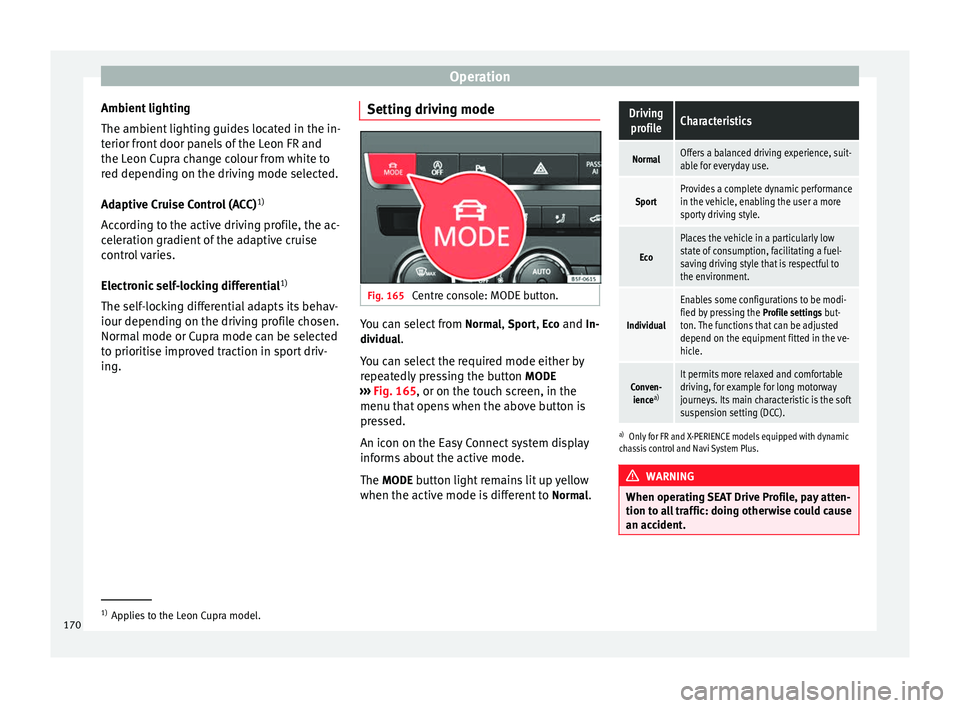
Centre console: MODE button. You can select from
Normal
, Sport
, Eco
and In-
dividual .
You can select the required mode either by
repeatedly pressing the button MODE
››› Fig. 165 , or on the touch screen, in the
menu th at
opens when the above button is
pressed.
An icon on the Easy Connect system display
informs about the active mode.
The MODE
button light remains lit up yellow
when the active mode is different to Normal
.
Driving
profileCharacteristics
NormalOffers a balanced driving experience, suit-
able for everyday use.
SportProvides a complete dynamic performance
in the vehicle, enabling the user a more
sporty driving style.
Eco
Places the vehicle in a particularly low
state of consumption, facilitating a fuel-
saving driving style that is respectful to
the environment.
Individual
Enables some configurations to be modi-
fied by pressing the Profile settings but-
ton. The functions that can be adjusted
depend on the equipment fitted in the ve-
hicle.
Conven- ience a)It permits more relaxed and comfortable
driving, for example for long motorway
journeys. Its main characteristic is the soft
suspension setting (DCC).
a)
Only for FR and X-PERIENCE models equipped with dynamic
chassis control and Navi System Plus. WARNING
When operating SEAT Drive Profile, pay atten-
tion to all traffic: doing otherwise could cause
an accident. 1)
Applies to the Leon Cupra model.
170
Page 196 of 284
Advice
least 30 seconds before starting the engine.
When you then start the engine it may take
longer than normal (up to one minute) to
start firing. This is because air needs to be
bled from the fuel system while starting.
For the sake of the environment
Do not overfill the fuel tank, it may cause the
fuel to overflow if it becomes warm. Note
Diesel vehicles are fitted with a protective de-
vice that prevents the insertion of the wrong
fuel hose 1)
. It is only possible to refuel with
Diesel nozzles.
● If the pump nozzle is worn, damaged, or if
it is very small, it is possible that it will not
be able to open the protective device. Before
trying to insert the pump nozzle by turning it,
try a different pump or request specialist
help.
● If you fill the tank from a reserve fuel canis-
ter, the protective device will not open. One
way to resolve this is to pour the fuel in very
slowly. Refuelling with natural gas
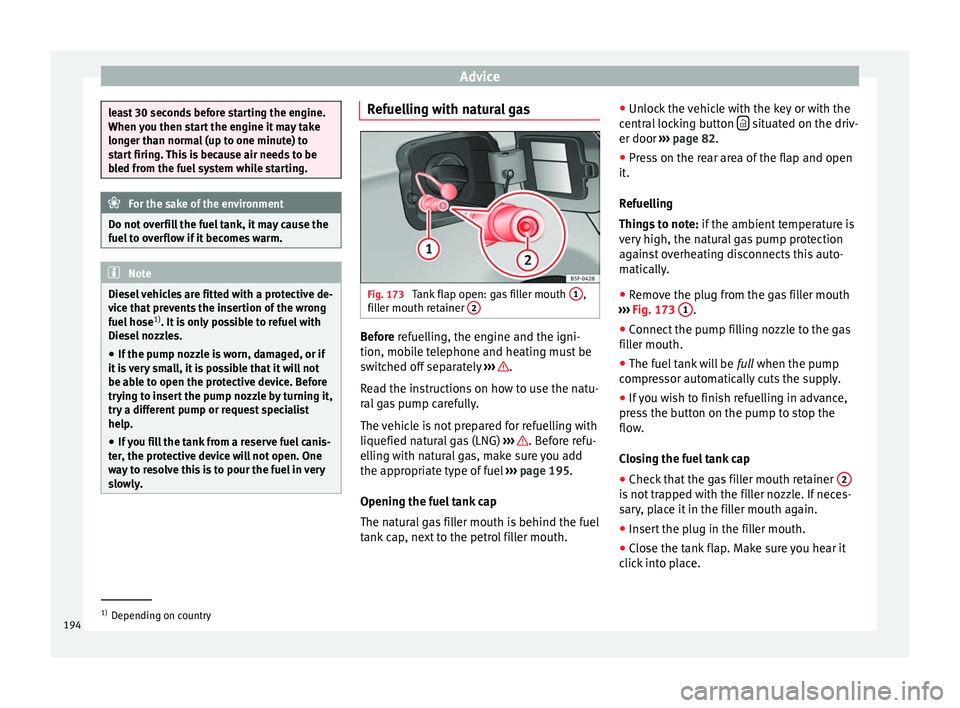
Fig. 173
Tank flap open: gas filler mouth 1 ,
filler mouth retainer 2 Before refuelling, the engine and the igni-
tion, mobile telephone and heating must be
switched off separately
››› .
Read the instructions on how to use the natu-
ral gas pump carefully.
The vehicle is not prepared for refuelling with
liquefied natural gas (LNG) ››› . Before refu-
elling with natural gas, make sure you add
the appropriate type of fuel ››› page 195.
Opening the fuel tank cap
The natural gas filler mouth is behind the fuel
tank cap, next to the petrol filler mouth. ●
Unlock the vehicle with the key or with the
central locking button situated on the driv-
er door ››› page 82 .
● Pr e
ss on the rear area of the flap and open
it.
Refuelling
Things to note: if the ambient temperature is
very high, the natural gas pump protection
against overheating disconnects this auto-
matically.
● Remove the plug from the gas filler mouth
››› Fig. 173 1 .
● Connect the pump filling nozzle to the gas
filler mouth.
● The fuel tank will be full when the pump
c ompr
essor automatically cuts the supply.
● If you wish to finish refuelling in advance,
press the button on the pump to stop the
flow.
Closing the fuel tank cap
● Check that the gas filler mouth retainer 2 is not trapped with the filler nozzle. If neces-
sary, place it in the filler mouth again.
●
Insert the plug in the filler mouth.
● Close the tank flap. Make sure you hear it
click into place. 1)
Depending on country
194