gearbox Seat Leon SC 2014 Owner's Guide
[x] Cancel search | Manufacturer: SEAT, Model Year: 2014, Model line: Leon SC, Model: Seat Leon SC 2014Pages: 284, PDF Size: 5.85 MB
Page 142 of 284
Operation
Gearbox: press the brake and engage a
gear again.
If the fault was caused by a gearbox with a
high temperature, this driver message will be
displayed when the gearbox has cooled
again.
Run-in and economical driving Running in the engine A new vehicle should be run in over a dis-
tance of 1500 km (1000 miles). For the first
1,000 km the engine speed should not ex-
ceed 2/3 of the maximum permissible engine
speed. In doing so, do not accelerate at full
throttle and do not drive with a trailer! From
1000 to 1500 km (600 to 1000 miles) you
can gradually increase the engine rpm and
road speed.
During its first few hours of running, the in-
ternal friction in the engine is greater than
later on when all the moving parts have bed-
ded down.
How the vehicle is driven for the first 1,500
km influences the future engine perform-
ance. Subsequently, also drive at a moderate
rate, especially when the engine is still cold:
this will lead to less engine wear and tear
and will prolong its useful life. You should also avoid driving with the engine
speed too
low
. Change down to a lower gear
when the en
gine no longer runs “smoothly”.
If the engine revs too much, cut fuel injection
to protect the engine.
Environmental friendliness Environmental protection is a top priority in
the design, choice of materials and manufac-
ture of your new SEAT.
Constructive measures to encourage
recycling
● Joints and connections designed for easy
dismantling
● Modular construction to facilitate disman-
tling
● Increased use of single-grade materials.
● Plastic parts and elastomers are marked in
accordance with ISO 1043, ISO 11469 and
ISO 1629.
Choice of materials
● Use of recycled materials.
● Use of compatible plastics in the same part
if its components are not easily separated.
● Use of recycled materials and/or materials
originating from renewable sources. ●
Reduction of volatile components, includ-
ing odour, in plastic materials.
● Use of CFC-free coolants.
Ban on heavy metals, with the exceptions
dictated by law (Annex II of ELV Directive
2000/53/EC): cadmium, lead, mercury, hexa-
v al
ent chromium.
Manufacturing methods
● Reduction of the quantity of thinner in the
protective wax for cavities.
● Use of plastic film as protection during ve-
hicle transport.
● Use of solvent-free adhesives.
● Use of CFC-free coolants in cooling sys-
tems.
● Recycling and energy recovery from resi-
dues (RDF).
● Improvement in the quality of waste water.
● Use of systems for the recovery of residual
heat (thermal recovery, enthalpy wheels,
etc.).
● The use of water-soluble paints.
140
Page 143 of 284
Driving
Exhaust gas filtration system Catalytic converter
Applies to vehicles with petrol engine:
the
vehicle must only be used with unleaded pet-
rol, otherwise the catalytic converter will be
irreparably damaged.
Never drive until the tank is empty; an irregu-
lar supply of fuel can cause faulty combus-
tion. In these cases, unburned fuel reaches
the exhaust system, which can overheat and
damage the catalytic converter.
Diesel particulate filter
Applies to vehicles with diesel engine: the
diesel engine particulate filter eliminates
most of the soot from the exhaust gas sys-
tem. Under normal driving conditions, the fil-
ter cleans itself. The diesel particulate filter is
cleaned automatically without need for indi-
cation by the warning lamp . This may be
noticed because the engine idle speed in-
creases and an odour may be detected.
If automatic filter purification cannot be car-
ried out (because only short trips are taken,
for example), soot will accumulate on the fil-
ter and the Diesel particulate filter warning
lamp will switch on.
Facilitate the automatic filter cleaning proc-
ess by driving in the following manner: drive
for approximately 15 minutes at a minimum
speed of 60 km/h in 4th or 5th gear (auto- matic gearbox: gear S). Maintain the engine
speed at approximately 2,000 rpm. The rise
in temperature causes the soot on the filter
to burn. On completion of the cleaning the
warning lamp will switch off. If the warning
lamp does not switch off, go immediately to a
specialised workshop to rectify the problem.
WARNING
● Because of the high temperatures which
can occur in the exhaust gas control system
(catalytic converter or diesel particulate fil-
ter), do not park the vehicle where the ex-
haust can come into contact with flammable
materials under the car (e.g. on grass or at
the forest edge). Fire hazard!
● Do not apply wax underneath the vehicle
around the area of the exhaust system: Fire
hazard! Driving through flooded roads
To prevent damage to the vehicle when driv-
ing through water, for example, along a floo-
ded road, please observe the following:
● The water should never come above the
lower edge of the bodywork.
● Drive at pedestrian speed. WARNING
After driving through water, mud, sludge,
etc., the braking effect can be delayed slight-
ly due to moisture build-up on the discs and
brake pads. Applying the brakes carefully
several times will remove the moisture and
restore the full braking effect. CAUTION
● Driving through flooded areas may severely
damage vehicle components such as the en-
gine, transmission, running gear or electrical
system.
● Whenever driving through water, the Start-
Stop system* must be switched off
››› page 148. Note
● Check the depth of the water before enter-
ing the flooded zone.
● Do not stop in the water, drive in reverse, or
stop the engine in any situation.
● Note that vehicles travelling in the opposite
direction may splash water that could exceed
the maximum permitted water height for your
vehicle.
● Avoid driving through salt water (corro-
sion). 141Technical specifications
Advice
Operation
Safety
The essentials
Page 144 of 284
Operation
Economical and environmentally
friendly driving Fuel consumption, environmental pollution
and wear to the engine, brakes and tyres de-
pends largely on driving style. Fuel consump-
tion can be reduced by 10-15% with an eco-
nomical driving style and proper anticipation
of traffic conditions. The following section
gives you some tips on lessening the impact
on the environment and reducing your oper-
ating costs at the same time.
Active cylinder management (ACT
®
)*
Depending on vehicle equipment, the active
cylinder management (ACT ®
) may automati-
cally deactivate some of the engine cylinders
if the driving situation does not require too
much power. When it is switched off, no fuel
is injected into these cylinders, hence total
fuel consumption may be reduced. The num-
ber of active cylinders can be seen on the in-
strument panel display ›››
page 74.
Foresight when driving
Acceleration causes the vehicle to consume
more fuel. If you think ahead when driving,
you will need to brake less and thus acceler-
ate less. Wherever possible, let the car roll
slowly to a stop, with a gear engaged (for in-
stance when you can see that the next traffic
lights are red). This takes advantage of the
engine braking effect, reducing wear on the brakes and tyres. Emissions and fuel con-
sumption will drop to zero due to the overrun
fuel cut-off.
Changing gear to save energy
An effective way of saving is to change
in ad-
vance to a higher gear. Running the engine at
high rpm in the lo w
er gears uses an unneces-
sary amount of fuel.
Manual gearbox : shift up from first to second
gear as soon as possible. In any case, we rec-
ommend that you change to a higher gear
upon reaching 2,000 rpm. Choosing the right
gear enables fuel savings. Select the highest
possible gear appropriate for the driving sit-
uation (the engine should continue function-
ing with cyclical regularity).
Automatic gearbox : accelerate gradually and
without reaching the “kick-down” position.
Avoid driving at high speed
Avoid travelling at top speed, whenever pos-
sible. Fuel consumption, emission of harmful
gases and noise pollution multiply dispropor-
tionately as speed is increased. Driving at
moderate speeds will help to save fuel.
Reduce idling time
In vehicles with the Start-Stop system idling
is automatically reduced. In vehicles without
the Start-Stop system it is worth switching off
the engine, for example, at level crossings and at traffic lights that remain red for long
periods of time. When an engine has reached
operating temperature, and depending on
the cylinder capacity, keeping it switched off
for a minimum of about 5 seconds already
saves more than the amount of fuel necessa-
ry for restarting.
The engine takes a long time to warm up
when it is idling. Mechanical wear and pollu-
tant emissions are also especially high dur-
ing this initial warm-up phase. It is therefore
best to drive off immediately after starting
the engine. Avoid running the engine at high
speed.
Regular maintenance
Regular servicing helps in saving fuel even
before the engine is started. A well-serviced
engine gives you the benefit of
improved fuel
efficiency as well as maximum reliability and
an enhanc
ed resale value. A badly serviced
engine can consume up to 10% more fuel
than necessary.
Avoid short journeys
The engine and catalytic converter need to
reach their optimal operating temperature in
order to minimise fuel consumption and
emissions.
A cold engine consumes a disproportionate
amount of fuel. The engine reaches its work-
ing temperature after about four kilometres
142
Page 149 of 284
Driver assistance systems
Low brake fluid level
Malfunctions can occur in the brake system if
the brake fluid level is too low. The brake flu-
id level is monitored electronically.
Brake servo
The brake servo increases the pressure you
apply to the brake pedal. It works only when
the engine is running. WARNING
● Apply the brakes heavily to clean the brake
system only in a suitable traffic situation. Do
not put other road users in danger: there is
risk of causing an accident.
● Ensure the vehicle does not move while in
neutral, when the engine is stopped. Failure
to follow this instruction could result in an
accident.
● If the brake fluid loses its viscosity and is
subjected to heavy use, vapour bubbles can
form in the brake system. This reduces the ef-
ficiency of the brakes. CAUTION
● Never let the brakes “drag” by leaving your
foot on the pedal when it is not necessary to
brake. This overheats the brakes, resulting in
longer stopping distances and greater wear.
● Before driving down a long, steep gradient,
it is advisable to reduce speed and select a
lower gear. This makes use of engine braking and relieves the brakes. If you still have to
use the brakes, it is better to brake firmly at
intervals than to apply the brakes continu-
ously.
Note
● If the brake servo is out of action, for exam-
ple when the car is being towed, you will
have to press the brake pedal considerably
harder than normal to make up for the lack of
servo assistance.
● If you wish to equip the vehicle with acces-
sories such as a front spoiler or wheel covers,
it is important that the flow of air to the front
wheels is not obstructed, otherwise the
brakes can overheat. Hill driving assistant*
This function is only included in vehicles with
ESC.
The hill driving assistant helps the driver to
move off and upward on a hill when the vehi-
cle is stationary.
The system maintains brake pressure for ap-
proximately two seconds after the driver
takes his foot off the brake pedal to prevent
the vehicle from lurching backward when it is
started. During these 2 seconds, the driver
has enough time to release the clutch pedal
and accelerate without the vehicle moving
and without having to use the handbrake,making start-up easier, more comfortable
and safer.
These are the basic operation conditions:
● being on a ramp or hill/slope,
● doors closed,
● vehicle completely stationary,
● engine running and foot on the brake,
● besides having a gear engaged or being in
neutral for manual gear change and with the
selector lever at position S,
D or R for an au-
tomatic gearbox.
This system is also active when reversing up-
hill. WARNING
● If you do not start the vehicle immediately
after taking your foot off the brake pedal, the
vehicle may start to roll back under certain
conditions. Depress the brake pedal or use
the hand brake immediately.
● If the engine stalls, depress the brake ped-
al or use the hand brake immediately.
● When following a line of traffic uphill, if you
want to prevent the vehicle from rolling back
accidentally when starting off, hold the brake
pedal down for a few seconds before starting
off. » 147
Technical specifications
Advice
Operation
Safety
The essentials
Page 150 of 284
Operation
Note
The Official Service or a specialist workshop
can tell you if your vehicle is equipped with
this system. Start-Stop system*
Description and operation The Start-Stop system helps save fuel and re-
duce CO
2 emissions.
In Start-Stop mode, the engine will automati-
cally switch off when the vehicle stops, when
stopping at traffic lights for example. The ig-
nition remains switched on during the stop-
ping phase. The engine automatically
switches back on when required.
As soon as the ignition is switched on, the
Start-Stop function is automatically activa-
ted.
Basic requirements for the Start-Stop mode ● The driver door must be closed.
● The driver must have their seat belt fas-
tened.
● The bonnet must be closed.
● The vehicle must have travelled at more
than 4 km/h (2 mph) since the last stop.
● The vehicle cannot be towing a trailer. WARNING
● Never switch the engine off until the vehi-
cle is stationary. The brake servo and power
steering functions will not be completely cov-
ered under warranty. More force may also be
needed to turn the steering wheel or to brake.
As you cannot steer and brake in the normal
manner, there is a greater risk of accidents
and serious injury.
● Never remove the key from the ignition if
the vehicle is in motion. Otherwise, the steer-
ing could lock making it impossible to steer
the vehicle.
● To avoid injury, make sure that the Start-
Stop system is switched off when working in
the engine compartment ››› page 149. CAUTION
The Start-Stop system must always be
switched off when driving through flooded
areas ››› page 149. Stop/Start the engine
Vehicles with a manual gearbox
– When the vehicle is stopped, put it into
neutral and release the clutch pedal. The
engine will switch off. The warning lamp
will appear on the instrument panel dis-
play. –
When the clutch pedal is pressed the en-
gine will start up again. The warning lamp
will switch off.
Vehicles with an automatic gearbox
– Use the foot brake to bring the vehicle to a
stop and keep the brake pedal pressed
down with your foot. The engine will switch
off. The warning lamp will appear in the
di s
play.
– When you take your foot off the brake pedal
the engine will start up again. The warning
lamp will switch off.
Additional information related to the
automatic gearbox
The engine stops when the selector lever is in
the positions P, D, N and S, in addition to
when in manual mode. With the selector lev-
er in position P, the engine will also remain
switched off when you take your foot off the
brake pedal. In order to start the engine up
again the accelerator must be pressed, or an-
other gear engaged or the brake released.
If the selector lever is placed in position R
during the stopping phase, the engine will
start up again.
Change from position D to P to prevent the
engine from accidentally starting when
changing and passing by position R.
148
Page 151 of 284
Driver assistance systems
Note
● You can control whether the engine should
switch off or not by reducing or increasing the
brake force applied. While the vehicle re-
mains stopped, the engine will not stop if the
brake pedal is slightly pressed, in traffic jams
with frequent stopping and starting for exam-
ple. As soon as strong pressure is applied to
the brake pedal, the engine will stop.
● In vehicles with manual gearbox, during
the stopping phases the brake pedal must re-
main depressed to prevent the vehicle from
moving.
● If the engine “stalls” in vehicles with man-
ual gearbox, it can be directly started up
again by immediately pressing the clutch
pedal. General notes
The system can interrupt the Start-Stop mode
frequently for different reasons.
The engine does not switch off
Before the stopping phase, the system veri-
fies whether certain conditions are met. The
engine
does not
sw
it ch off, in the following
situations for example:
● The engine has not yet reached the mini-
mum required temperature for the Start-Stop
mode. ●
The interior temperature selected for the air
conditioner has not yet been reached.
● The interior temperature is very high/low.
● Defrost function button activated
››› page 26.
● The park
ing aid* is switched on.
● The battery is very low.
● The steering wheel is overly turned or is be-
ing turned.
● If there is a danger of misting.
● After engaging reverse gear.
● In case of a very steep gradient.
The indication is shown on the instrument
panel display, and in addition, the driver in-
formation system* shows, .
The engine starts by itself
During a stopping phase the normal Start-
Stop mode can be interrupted in the follow-
ing situations: The engine restarts by itself
without involvement from the driver.
● The interior temperature differs from the
value selected on the air conditioner.
● Defrost function button activated
››› page 26.
● The brak
e has been pressed several times
consecutively.
● The battery is too low.
● High power consumption. Note
In vehicles with an automatic gearbox, if the
selector lever is placed in position D, N or S
after engaging reverse gear, the vehicle must
be driven at a speed faster than 10 km/h (5
mph) for the system to return to conditions in
which the engine can be stopped. Manually switching on/off the Start-
Stop system
Fig. 147
Centre console: Start-Stop system
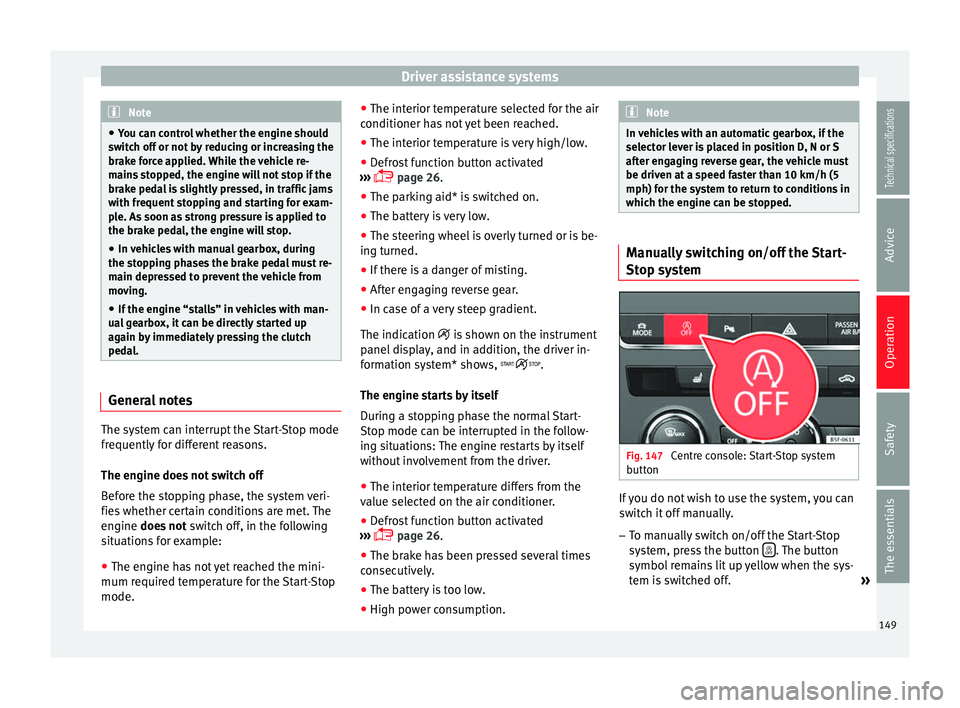
button If you do not wish to use the system, you can
switch it off manually.
– To manually switch on/off the Start-Stop
system, press the button . The button
symbol remains lit up yellow when the sys-
tem is switched off. »
149
Technical specifications
Advice
Operation
Safety
The essentials
Page 153 of 284
Driver assistance systems
System error. Contact a specialised work-
shop.
CCS switched on. The speed memory is
empty.
The CCS is switched on. The set speed is
displayed in large figures. WARNING
Observe the safety warnings ››› in Control
and warning lamps on page 71. Operating the cruise control system*
Read the additional information carefully
››› page 21
The value indicated in the table in brackets
(in mph, miles per hour) only refers to instru-
ment panels with indications in miles.
Changing gear in CCS mode
The CCS decelerates as soon as the clutch
pedal is pressed, intervening again automati-
cally after a gear is engaged.
Travelling down hills with the CCS
When travelling down hills the CCS cannot
maintain a constant speed. Slow the vehicle
down using the brake pedal and reduce
gears if required. B C
D Automatic off
The cruise control system (CCS) is switched
off automatically or temporarily:
●
If the system detects a fault that could af-
fect the working order of the CCS.
● If you press and maintain the accelerator
pedal for a certain time, driving faster than
the stored speed.
● If the dynamic driving control systems in-
tervene (e.g. ASR or ESC).
● If the airbag is triggered.
Adaptive Cruise Control ACC* Introduction Fig. 149
Detection area. The adaptive cruise control (ACC)
is an exten-
sion of the normal cruise control system
(CCS)
›
›› .
The ACC function allows the driver to estab-
lish a cruise speed of between 30 and 160
km/h (18 and 100 mph), as well as the tem-
porary distance required with regard to the
vehicle in front. The ACC function will adapt
the vehicle's cruise speed at all times, main-
taining a safe distance with the vehicle in
front.
The ACC function is based on a radar sensor
that can measure the distance to the vehicles
in front.
If the vehicle is equipped with automatic
gearbox, the ACC can brake the vehicle until
it stops completely if a vehicle in front of it
stops.
Driver intervention prompt
During driving, the ACC is subject to certain
limitations inherent in the system. In other
words, in certain circumstances the driver will
have to adjust speed him or herself, as well
as the distance from other vehicles.
In this case, the instrument panel screen will
warn you to intervene by applying the brake
and a warning tone will be heard
››› page 153 .
»
151Technical specifications
Advice
Operation
Safety
The essentials
Page 156 of 284
Operation
ACC operation may be affected by a strong ra-
dar reverse reflection. This may occur, for ex-
ample, in a closed car park or due to the
presence of metallic objects (e.g. rails on the
road or sheets used in road works).
The area in front of and around the radar sen-
sor should not be covered with adhesives,
additional or similar headlights, as this may
negatively affect ACC operation.
If structural modifications are made to the ve-
hicle, for example, if the suspension is low-
ered or the front spoiler is modified, ACC op-
eration may be affected. So structural modifi-
cations should only be made by specialised
workshops. SEAT recommends visiting a SEAT
dealership for this purpose.
If work is done incorrectly on the front of the
vehicle, the radar sensor could be damaged
or lose its settings, and ACC operation may
be affected. So repair work should only be
made by specialised workshops. SEAT recom-
mends visiting a SEAT dealership for this pur-
pose. CAUTION
If you have the sensation that the radar sen-
sor is damaged or has lost its settings, dis-
connect the ACC. This will avoid possible
damage. If this occurs have it adjusted. ● The sensor may become damaged or lose
its settings when knocked, for example, dur- ing a parking manoeuvre. This may compro-
mise the system's efficacy or disconnect it.
●
Repairs to the radar sensor require special-
ist knowledge and special tools. SEAT recom-
mends visiting a SEAT dealership for this pur-
pose.
● Clean away the snow with a brush and the
ice preferably with a solvent-free de-icer
spray. Operating the Adaptive Cruise Control
ACC
Fig. 152
On the left of the steering column:
third lever for operating the Adaptive Cruise
Control. Fig. 153
On the left of the steering column:
third lever for operating the Adaptive Cruise
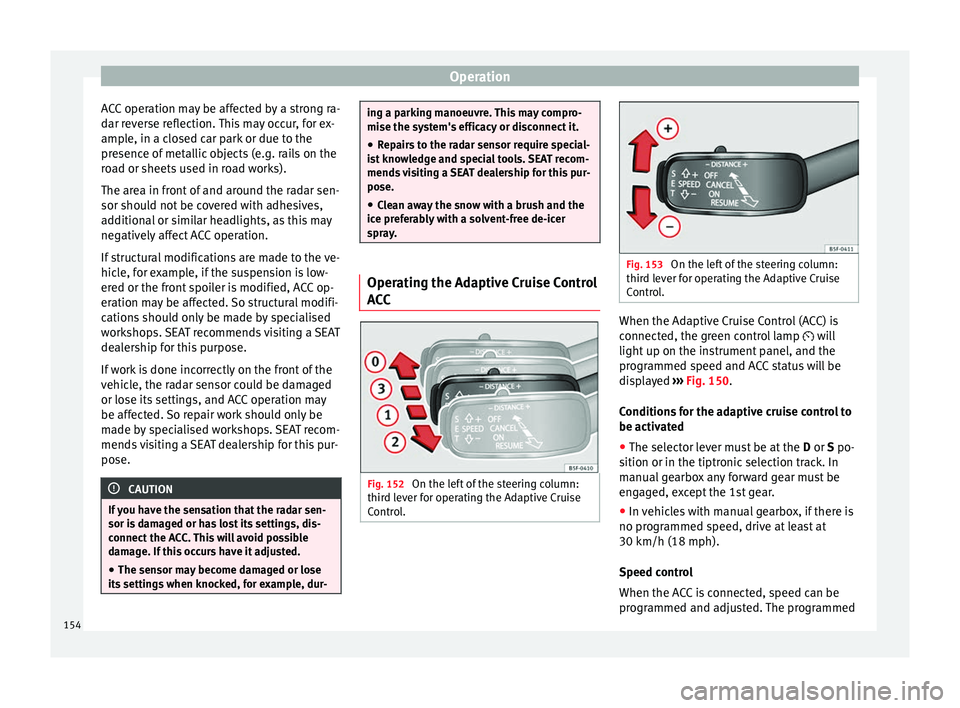
Control. When the Adaptive Cruise Control (ACC) is
connected, the green control lamp will
light up on the instrument panel, and the
programmed speed and ACC status will be
displayed
››› Fig. 150 .
C ondition
s for the adaptive cruise control to
be activated
● The selector lever must be at the D or S po-
sition or in the tiptronic selection track. In
manual gearbox any forward gear must be
engaged, except the 1st gear.
● In vehicles with manual gearbox, if there is
no programmed speed, drive at least at
30 km/h (18 mph).
Speed control
When the ACC is connected, speed can be
programmed and adjusted. The programmed
154
Page 157 of 284
Driver assistance systems
speed must be different from the speed at
which the vehicle travels if the distance is be-
ing adjusted at the time.
What functions can be operated?
If you activate the ACC the current speed can
be programmed as the “control speed”.
During driving, control can be operated at
any time and the speed also modified.
The following settings can also be adjusted:
● Distance.
● Driving Programme.
● Driving style.
Activating/Deactivating
Any speed 1)
between 30 and 160 km/h (19
and 100 mph) can be adjusted.
Activating the ACC
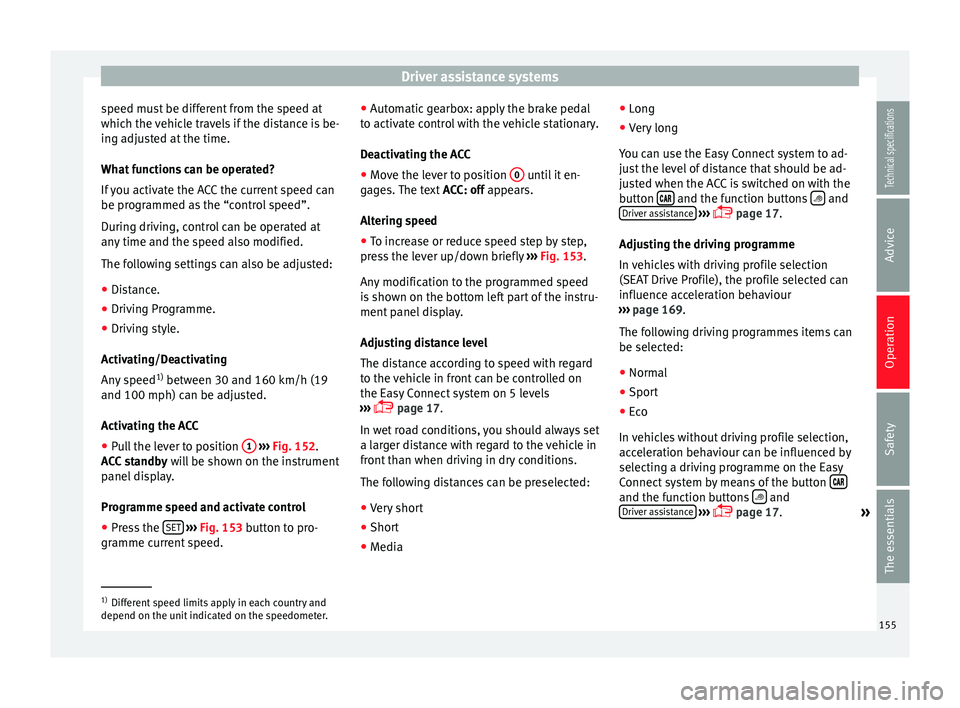
● Pull the lever to position 1
››› Fig. 152 .
A C
C standby will be shown on the instrument
panel display.
Programme speed and activate control
● Press the SET
››› Fig. 153 button to pro-
gramme current speed. ●
Automatic gearbox: apply the brake pedal
to activate control with the vehicle stationary.
Deactivating the ACC
● Move the lever to position 0 until it en-
gages. The text ACC: off appears.
A lt
ering speed
● To increase or reduce speed step by step,
press the lever up/down briefly ››› Fig. 153.
Any
modification to the programmed speed
is shown on the bottom left part of the instru-
ment panel display.
Adjusting distance level
The distance according to speed with regard
to the vehicle in front can be controlled on
the Easy Connect system on 5 levels
››› page 17.
In wet
road conditions, you should always set
a larger distance with regard to the vehicle in
front than when driving in dry conditions.
The following distances can be preselected:
● Very short
● Short
● Media ●
Long
● Very long
You can use the Easy Connect system to ad-
just the level of distance that should be ad-
justed when the ACC is switched on with the
button and the function buttons
and
Driver assistance
›››
page 17.
Adjusting the driving programme
In vehicles with driving profile selection
(SEAT Drive Profile), the profile selected can
influence acceleration behaviour
››› page 169 .
The f o
llowing driving programmes items can
be selected:
● Normal
● Sport
● Eco
In vehicles without driving profile selection,
acceleration behaviour can be influenced by
selecting a driving programme on the Easy
Connect system by means of the button and the function buttons
and
Driver assistance
›››
page 17.
»1)
Different speed limits apply in each country and
depend on the unit indicated on the speedometer. 155
Technical specifications
Advice
Operation
Safety
The essentials
Page 158 of 284
Operation
The following conditions may lead the ACC
not to react:
● If the accelerator is pressed.
● If there is no gear engaged.
● If the ESC is controlling.
● If the driver is not wearing his/her seat
belt.
● If several brake lights of the vehicle or elec-
trically connected trailer are damaged.
● If the vehicle is reversing.
● Driving faster than 160 km/h (100 mph). WARNING
There is a danger of rear collision when the
minimum distance to the vehicle in front is
exceeded and the speed difference between
both vehicles is so great that a speed reduc-
tion by the ACC will not suffice. In this case
the brake pedal should be applied immedi-
ately.
● The ACC may not be able to detect all situa-
tions properly.
● “Stepping” on the accelerator may cause
the ACC not to intervene in braking. Driver
braking will have priority over intervention by
the speed control or adaptive cruise control.
● Always be ready to use the brakes!
● Observe country-specific provisions gov-
erning obligatory minimum distances be-
tween vehicles. Note
● The programmed speed is erased once the
ignition or the ACC are switched off.
● When the traction control system (ASR) is
deactivated during acceleration or else the
ESC is activated in Sport* Mode ( ››› page 81),
the ACC switches off automatically.
● In vehicles with the Start-Stop system, the
engine switches off automatically during the
ACC stopping phase and restarts automatical-
ly to begin driving. Vehicles with an automatic gearbox
If the vehicle is equipped with automatic
gearbox, the ACC can brake the vehicle until
it stops completely if a vehicle in front of it
stops.
The ACC will still be available for a few sec-
onds. The vehicle will restart by itself if the
vehicle in front moves (traffic jam assistant).
Disconnection criteria
The ACC will switch off if the driver applies
the brake pedal or the driver's door is
opened.
If the vehicle in front remains stationary for
more than 3 seconds, the ACC will also
switch off for safety reasons.
In this case the
driver should take control and apply the
brake. In the latter case, when the ACC is switched
off with the vehicle stationary, the vehicle
has to be braked by the pedal, since al-
though the car is idling it can move, as there
is a gear engaged.
Restarting the vehicle with the ACC manually
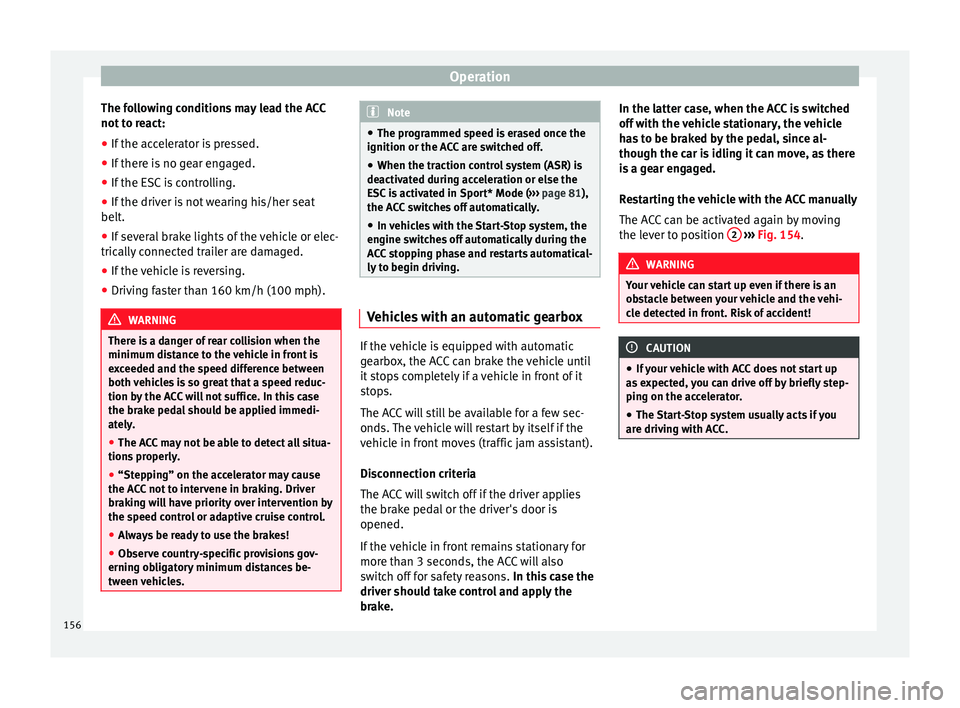
The ACC can be activated again by moving
the lever to position
2
››› Fig. 154 . WARNING
Your vehicle can start up even if there is an
obstacle between your vehicle and the vehi-
cle detected in front. Risk of accident! CAUTION
● If your vehicle with ACC does not start up
as expected, you can drive off by briefly step-
ping on the accelerator.
● The Start-Stop system usually acts if you
are driving with ACC. 156