wheel Seat Leon SC 2014 Owner's Guide
[x] Cancel search | Manufacturer: SEAT, Model Year: 2014, Model line: Leon SC, Model: Seat Leon SC 2014Pages: 284, PDF Size: 5.85 MB
Page 80 of 284
Operation
until the main menu appears. Enter into the
section Journey data
.
W ith the rocker
switch, move to the display Convenience ap-
pliances.
– Operation with the multifunction steering
wheel*: Move with the buttons 1 or
2 to
Journey data and enter with OK
. Turn the
thumb
wheel to the right until the Conven-
ience appliances display appears.
In addition, a scale will inform you of the cur-
rent sum of all the additional appliances.
Saving tips Tips on how to save fuel will be displayed in
certain conditions that contribute to in-
creased consumption. Following these tips
could reduce the fuel consumption of your
vehicle. The displays appear automatically
and will only be shown with the efficiency
programme. After a time, the saving tips will
disappear automatically.
– If you wish to hide a saving tip immediately
after it appears, press any button on the
windscreen wiper lever*/multifunction
steering wheel*. Note
● If you hide a saving tip, it will reappear af-
ter you switch the ignition on again. ●
The saving tips do not appear in all situa-
tions, but rather with a large separation of
time. Timer*
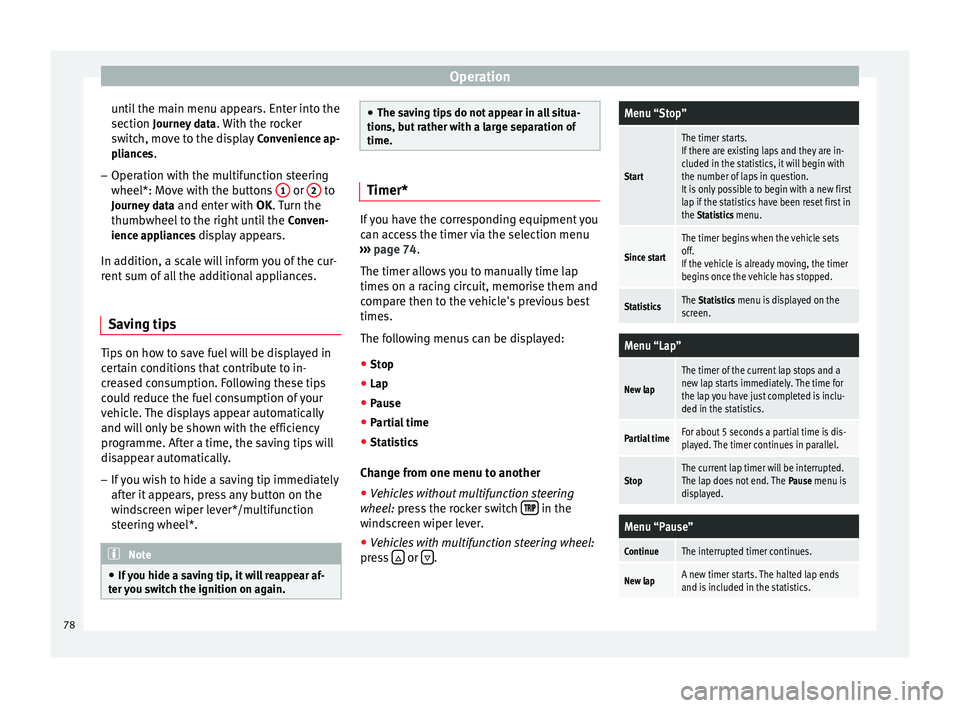
If you have the corresponding equipment you
can access the timer via the selection menu
››› page 74.
The timer al lo
ws you to manually time lap
times on a racing circuit, memorise them and
compare then to the vehicle's previous best
times.
The following menus can be displayed:
● Stop
● Lap
● Pause
● Partial time
● Statistics
Change from one menu to another ● Vehicles without multifunction steering
wheel: press the rocker switch in the
windscreen wiper lever.
● Vehicles with multifunction steering wheel:
press or
.
Menu “Stop”
Start
The timer starts.
If there are existing laps and they are in-
cluded in the statistics, it will begin with
the number of laps in question.
It is only possible to begin with a new first
lap if the statistics have been reset first in
the Statistics menu.
Since start
The timer begins when the vehicle sets
off.
If the vehicle is already moving, the timer
begins once the vehicle has stopped.
StatisticsThe Statistics menu is displayed on the
screen.
Menu “Lap”
New lap
The timer of the current lap stops and a
new lap starts immediately. The time for
the lap you have just completed is inclu-
ded in the statistics.
Partial timeFor about 5 seconds a partial time is dis-
played. The timer continues in parallel.
StopThe current lap timer will be interrupted.
The lap does not end. The Pause menu is
displayed.
Menu “Pause”
ContinueThe interrupted timer continues.
New lapA new timer starts. The halted lap ends
and is included in the statistics. 78
Page 82 of 284
Operation
Service interval display Service interval display The service interval indication appears on the
instrument panel display
››› Fig. 82 4 .
SEAT distinguishes between services with en-
gine oi l
change (e.g. Oil change service) and
services without
engine oil change (e.g. In-
spection).
In vehicles with Services established by time
or mileage, the service intervals are already
pr e-defined.
In
vehicles with LongLife Service , the inter-
vals are determined individually. Technical
progress has made it possible to considera-
bly reduce servicing requirements. The tech-
nology used by SEAT ensures that your vehi-
cle only has an Oil Servicing when it is neces-
sary. To establish when the oil servicing is
due (max. 2 years), the vehicle's conditions
of use and individual driving styles are con-
sidered. The service pre-warning first ap-
pears 20 days before the date established for
the corresponding service. The kilometres
(miles) remaining until the next service are
always rounded up to the nearest 100 km
(miles) and the time is given in complete
days. The current service message cannot be
viewed until 500 km after the last service. Pri-
or to this only lines are visible on the display. Inspection reminder
When the Service date is approaching, when
the ignition is switched on a
Service remind-
er is displayed.
In vehicles without text messages , a s
panner
is displayed on the instrument panel with
a figure giv
en in km. The number of kilome-
tres shown is the maximum number that may
be driven until the next service. After a few
seconds, the display mode changes. A clock
symbol appears and the number of days until
the next service appointment is due.
In vehicles with text messages , Serv
ice in ---
km (miles) or --- days is displayed on the in- strument panel.
Service due
After the service date, an audible warning is
given when the ignition i
s switched on and
the spanner displayed on the screen flashes
for a few seconds . In
vehicles with text
messages, Service in --- km or --- days is dis-
played on the instrument panel.
Reading a service notification
With the ignition switched on, the engine off
and the vehicle at a standstill, the current
service notification
can be read:
Press and hold the button ››› Fig. 82 4 for
more than 5 seconds to consult the service
message. When the service date has past
, a minus sign
is displayed in front of the number of kilome-
tres or days. In vehicles with text messages
the following is displayed: Service --- km
(miles) or --- days ago .
The time can also be set via the key and
Setup function button in the Easy Connect
system ››› page 81 .
R e
setting service interval display
If the service was not carried out by a SEAT
dealership, the display can be reset as fol-
lows:
● To reset the service interval display, turn
the ignition off and press and hold the but-
ton ››› Fig. 82 4 .
● Switch the ignition back on.
● Release the button ››› Fig. 82 4 and press
the button 4 again for the next 20 seconds.
Note
● The service message disappears after a few
seconds, when the engine is started or when OK/RESET is pressed on the windscreen wiper
lever, or OK on the multifunction steering
wheel.
● In vehicles with the LongLife system in
which the battery has been disconnected for
a long period of time, it is not possible to cal-
culate the date of the next service. Therefore
the service interval display may not be cor- rect. In this case, bear in mind the maximum 80
Page 102 of 284
Operation
Motorway lights* The motorway light is available on vehicles
equipped with full-LED lights.
The function is connected/disconnected via
the corresponding Easy Connect system
menu.
●
Activation: when going above 110 km/h for
mor e th
an 30 seconds, the dipped beam rai-
ses slightly to increase the distance of visibil-
ity of the driver.
● Deactivation: when reducing the speed of
the c ar belo
w 100 km/h, the dipped beam re-
turns to its normal position.
Driving abroad The light beam of the dipped beam lights is
asymmetric: the side of the road on which
you are driving is lit more intensely.
When a car that is manufactured in a country
that drives on the right travels to a country
that drives on the left (or vice versa), it is nor-
mally necessary to cover part of the headlight
bulbs with stickers or to change the adjust-
ment of the headlights to avoid dazzling oth-
er drivers.
In such cases, the regulations specify certain
light values that must be complied with for designated points of the light distribution.
This is known as “Tourist light”.
The light distribution that the halogen and
full-LED headlights of the SEAT Leon range
have allows the specific “tourist light” values
to be met without the need for stickers or
changes in the settings.
Note
“Tourist light” is only allowed temporarily. If
you are planning a long stay in a country that
drives on the other side, you should take the
vehicle to an Authorised Technical Service to
change the headlights. Headlight range control, lighting of
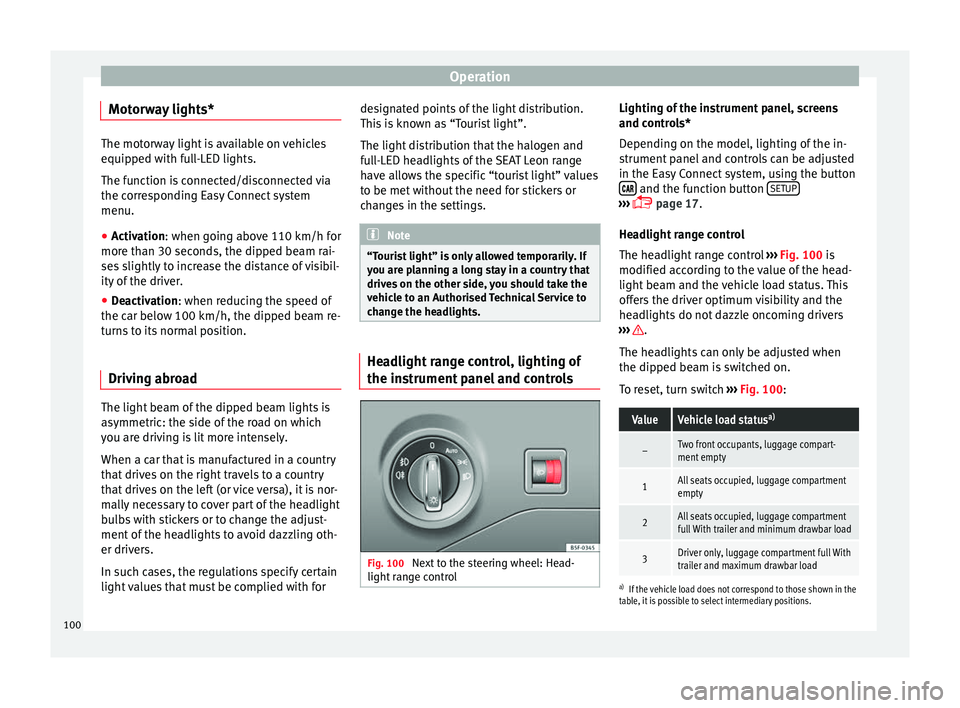
the instrument panel and controls
Fig. 100
Next to the steering wheel: Head-
light range control Lighting of the instrument panel, screens
and controls*
Depending on the model, lighting of the in-
strument panel and controls can be adjusted
in the Easy Connect system, using the button
and the function button
SETUP ›››
page 17
.
He a
dlight range control
The headlight range control ››› Fig. 100 is
modified acc
ording to the value of the head-
light beam and the vehicle load status. This
offers the driver optimum visibility and the
headlights do not dazzle oncoming drivers
››› .
The headlights can only be adjusted when
the dipped beam is switched on.
To reset, turn switch ››› Fig. 100 :
ValueVehicle load status a)
–Two front occupants, luggage compart-
ment empty
1All seats occupied, luggage compartment
empty
2All seats occupied, luggage compartment
full With trailer and minimum drawbar load
3Driver only, luggage compartment full With
trailer and maximum drawbar load
a)
If the vehicle load does not correspond to those shown in the
table, it is possible to select intermediary positions.
100
Page 105 of 284
Lights and visibility
Windscreen wiper functionsWindscreen wiper performance in different sit-
uations
If the vehicle is at a
standstillThe activated position provision-
ally changes to the previous posi-
tion.
During automatic
wipe
The air conditioner comes on for
approximately 30 seconds in air
recirculation mode to prevent the
smell of the windscreen washer
fluid entering the inside the vehi-
cle.
For the interval wipe
Intervals between wipes depend
on the vehicle's speed. The high-
er the vehicle speed the shorter
the intervals. Heated windscreen washer jets
The heating only thaws the frozen jets, it
does not thaw the water in the washer hoses.
The heated windscreen washer jets automati-
cally adjust the heat depending on the ambi-
ent temperature, when the ignition is switch-
ed on.
Headlight wash/wipe system
The headlight washers/wipers clean the
headlight lenses.
After the ignition is switched on, the first and
every fifth time the windscreen washer is
switched on, the headlights are also washed. Therefore, the windscreen wiper lever should
be pulled towards the steering wheel when
the dipped beam or main beam are on. Any
incrusted dirt (such as insects) should be
cleaned regularly (e.g. when refuelling).
To ensure the headlight washers work cor-
rectly in winter, any snow which has got into
the bumper jet supports should be cleaned
away. If necessary, remove snow with an anti-
icing spray.
Note
The wiper will try to wipe away any obstacles
that are on the windscreen. The wiper will
stop moving if the obstacle blocks its path.
Remove the obstacle and switch the wiper
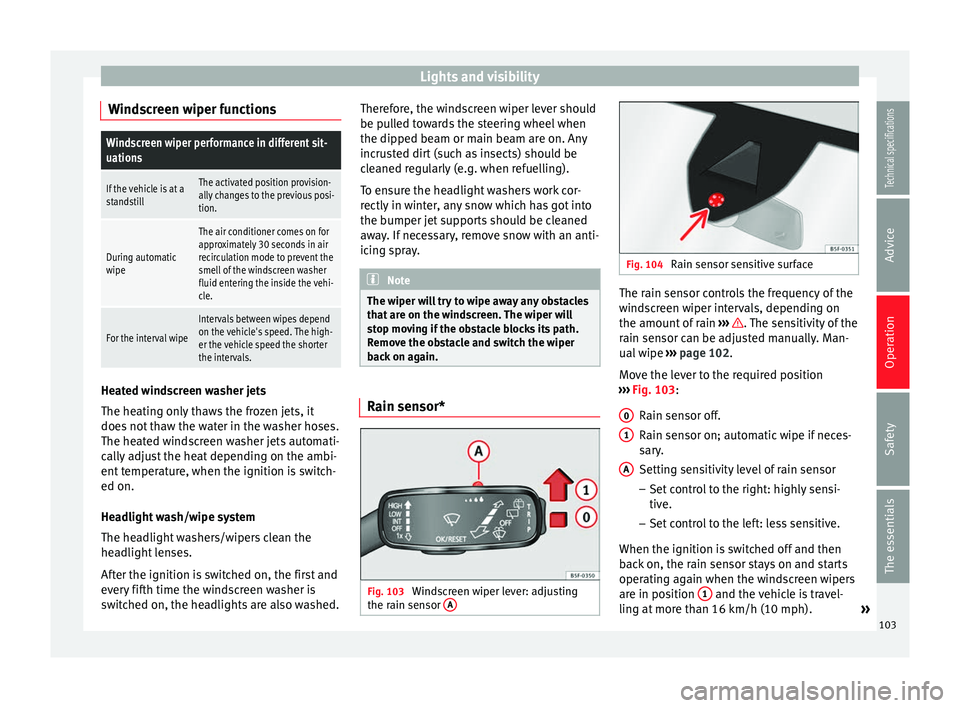
back on again. Rain sensor*
Fig. 103
Windscreen wiper lever: adjusting
the rain sensor A Fig. 104
Rain sensor sensitive surface The rain sensor controls the frequency of the
windscreen wiper intervals, depending on
the amount of rain
››› . The sensitivity of the
rain sensor can be adjusted manually. Man-
ual wipe ››› page 102 .
Mo v
e the lever to the required position
››› Fig. 103:
Rain sen
sor off.
Rain sensor on; automatic wipe if neces-
sary.
Setting sensitivity level of rain sensor
– Set control to the right: highly sensi-
tive.
– Set control to the left: less sensitive.
When the ignition is switched off and then
back on, the rain sensor stays on and starts
operating again when the windscreen wipers
are in position 1 and the vehicle is travel-
ling at more than 16 km/h (10 mph). »
0 1
A
103
Technical specifications
Advice
Operation
Safety
The essentials
Page 121 of 284
Transport and practical equipment
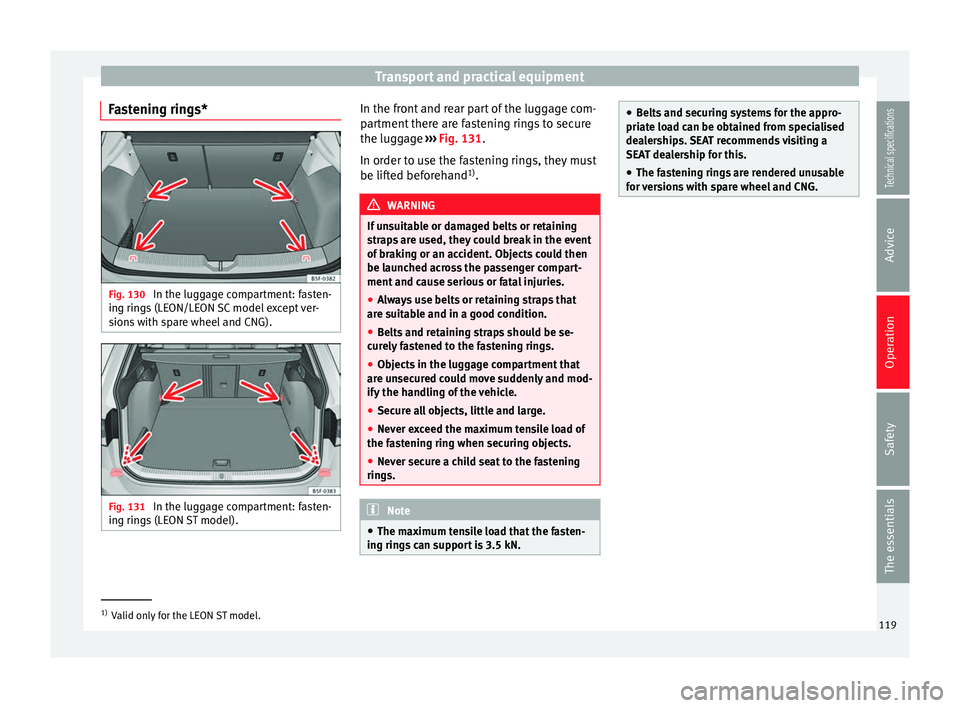
Fastening rings* Fig. 130
In the luggage compartment: fasten-
ing rings (LEON/LEON SC model except ver-
sions with spare wheel and CNG). Fig. 131
In the luggage compartment: fasten-
ing rings (LEON ST model). In the front and rear part of the luggage com-
partment there are fastening rings to secure
the luggage
››› Fig. 131 .
In or der t
o use the fastening rings, they must
be lifted beforehand 1)
. WARNING
If unsuitable or damaged belts or retaining
straps are used, they could break in the event
of braking or an accident. Objects could then
be launched across the passenger compart-
ment and cause serious or fatal injuries.
● Always use belts or retaining straps that
are suitable and in a good condition.
● Belts and retaining straps should be se-
curely fastened to the fastening rings.
● Objects in the luggage compartment that
are unsecured could move suddenly and mod-
ify the handling of the vehicle.
● Secure all objects, little and large.
● Never exceed the maximum tensile load of
the fastening ring when securing objects.
● Never secure a child seat to the fastening
rings. Note
● The maximum tensile load that the fasten-
ing rings can support is 3.5 kN. ●
Belts and securing systems for the appro-
priate load can be obtained from specialised
dealerships. SEAT recommends visiting a
SEAT dealership for this.
● The fastening rings are rendered unusable
for versions with spare wheel and CNG. 1)
Valid only for the LEON ST model.
119
Technical specifications
Advice
Operation
Safety
The essentials
Page 123 of 284
Transport and practical equipment
Hook the net bag next to the load threshold
● Secure the short net hooks to the fastening
rings ››› Fig. 135 1
››› . The bag zip should
be facing upwards.
● Secure the straps in the bag hooks 2 .
Removing the net bag
The hooked up net bag is taut ››› .
● Remove the hooks and the net bag straps
from the fastening rings and from the bag
hooks.
● Store the net bag in the luggage compart-
ment. WARNING
To secure the elastic net bag on the fastening
rings it must be stretched out. Once hooked
up it is taut. If the net bag is hooked up or un-
hooked incorrectly the hooks could cause in-
juries.
● Always secure the net hooks properly so
that they do not suddenly release from the
fastening rings when hooking or unhooking
them.
● On hooking or unhooking them, protect
your eyes and face in case the hooks are re-
leased suddenly.
● Always hook up the net bag hooks in the
described order. If a hook is unexpectedly re-
leased the risk of injury is increased. Luggage compartment variable floor
3 Applies to the model: LEON ST
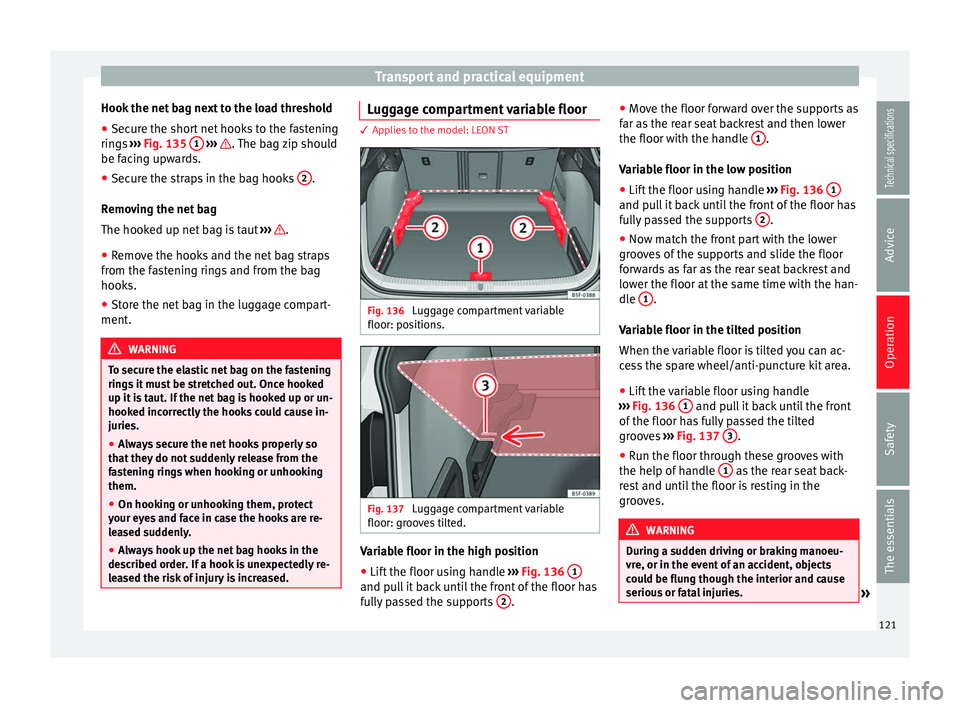
Fig. 136
Luggage compartment variable
floor: positions. Fig. 137
Luggage compartment variable
floor: grooves tilted. Variable floor in the high position
● Lift the floor using handle ››› Fig. 136 1 and pull it back until the front of the floor has
fully passed the supports
2 .●
Move the floor forward over the supports as
far as the rear seat backrest and then lower
the floor with the handle 1 .
Variable floor in the low position
● Lift the floor using handle ››› Fig. 136 1 and pull it back until the front of the floor has
fully passed the supports
2 .
● Now match the front part with the lower
grooves of the supports and slide the floor
forwards as far as the rear seat backrest and
lower the floor at the same time with the han-
dle 1 .
Variable floor in the tilted position
When the variable floor is tilted you can ac-
cess the spare wheel/anti-puncture kit area.
● Lift the variable floor using handle
››› Fig. 136 1 and pull it back until the front
of the floor has fully passed the tilted
grooves ››› Fig. 137 3 .
● Run the floor through these grooves with
the help of handle 1 as the rear seat back-
rest and until the floor is resting in the
grooves. WARNING
During a sudden driving or braking manoeu-
vre, or in the event of an accident, objects
could be flung though the interior and cause
serious or fatal injuries. » 121Technical specifications
Advice
Operation
Safety
The essentials
Page 125 of 284
Transport and practical equipment
Securing the crossbars and the roof
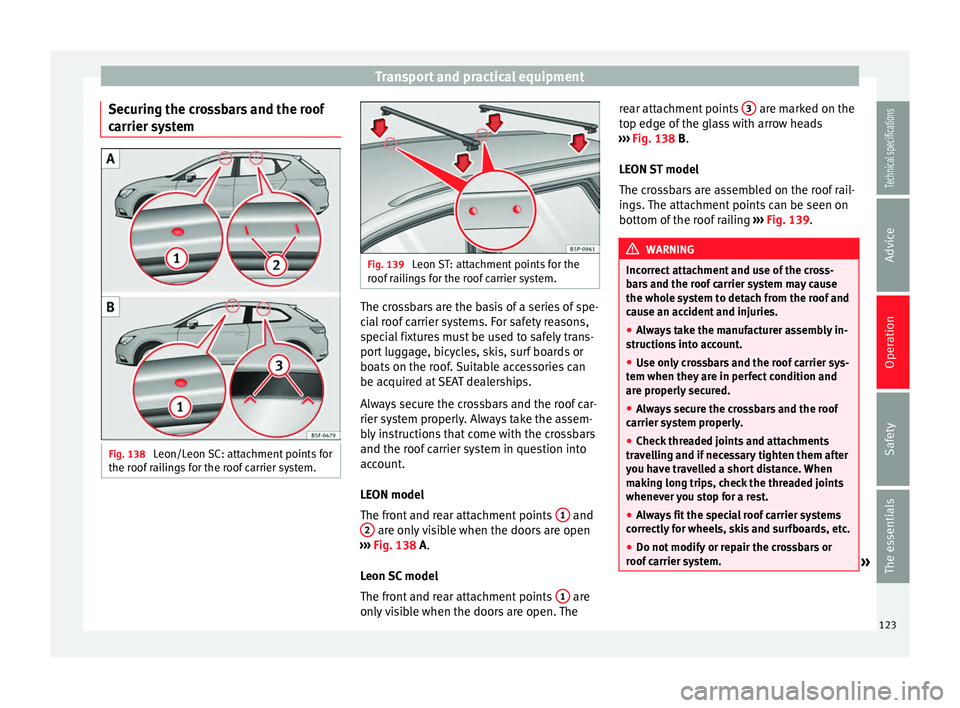
carrier system Fig. 138
Leon/Leon SC: attachment points for
the roof railings for the roof carrier system. Fig. 139
Leon ST: attachment points for the
roof railings for the roof carrier system. The crossbars are the basis of a series of spe-
cial roof carrier systems. For safety reasons,
special fixtures must be used to safely trans-
port luggage, bicycles, skis, surf boards or
boats on the roof. Suitable accessories can
be acquired at SEAT dealerships.
Always secure the crossbars and the roof car-
rier system properly. Always take the assem-
bly instructions that come with the crossbars
and the roof carrier system in question into
account.
LEON model
The front and rear attachment points
1 and
2 are only visible when the doors are open
››› Fig. 138
A.
Leon SC model
The front and rear attachment points 1 are
only visible when the doors are open. The rear attachment points
3 are marked on the
top edge of the glass with arrow heads
››› Fig. 138
B
.
LEON ST model
The crossbars are assembled on the roof rail-
ings. The attachment points can be seen on
bottom of the roof railing ››› Fig. 139. WARNING
Incorrect attachment and use of the cross-
bars and the roof carrier system may cause
the whole system to detach from the roof and
cause an accident and injuries.
● Always take the manufacturer assembly in-
structions into account.
● Use only crossbars and the roof carrier sys-
tem when they are in perfect condition and
are properly secured.
● Always secure the crossbars and the roof
carrier system properly.
● Check threaded joints and attachments
travelling and if necessary tighten them after
you have travelled a short distance. When
making long trips, check the threaded joints
whenever you stop for a rest.
● Always fit the special roof carrier systems
correctly for wheels, skis and surfboards, etc.
● Do not modify or repair the crossbars or
roof carrier system. » 123
Technical specifications
Advice
Operation
Safety
The essentials
Page 129 of 284
Air conditioning
● The air conditioner compressor has been
temporarily switched off because the engine
coolant temperature is too high.
● Another fault in the vehicle. Have the air
conditioner checked by a specialised work-
shop. Special Characteristics
If the humidity and temperature outside the
vehicle are high,
condensation
can drip off
the ev
aporator in the cooling system and
form a pool underneath the vehicle. This is
normal and does not indicate a leak! Note
After starting the engine, any residual humid-
ity in the air conditioner could mist over the
windscreen. Switch on the defrost function as
soon as possible to clear the windscreen of
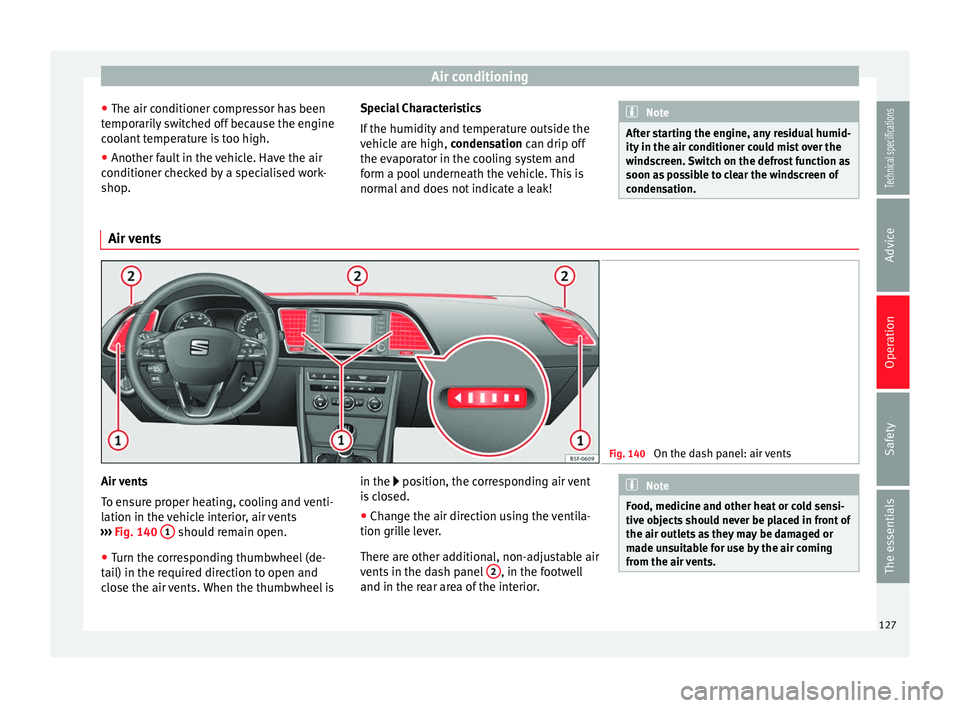
condensation. Air vents
Fig. 140
On the dash panel: air vents Air vents
To ensure proper heating, cooling and venti-
lation in the vehicle interior, air vents
››› Fig. 140 1 should remain open.
● Turn the corresponding thumbwheel (de-
tail) in the required direction to open and
close the air vents. When the thumbwheel is in the
position, the corresponding air vent
i
s closed.
● Change the air direction using the ventila-
tion grille lever.
There are other additional, non-adjustable air
vents in the dash panel 2 , in the footwell
and in the rear area of the interior. Note
Food, medicine and other heat or cold sensi-
tive objects should never be placed in front of
the air outlets as they may be damaged or
made unsuitable for use by the air coming
from the air vents. 127
Technical specifications
Advice
Operation
Safety
The essentials
Page 132 of 284
Operation
WARNING
● Never run the engine in confined spaces, as
the exhaust gases are poisonous. CAUTION
Avoid high engine speeds, full throttle and
extreme load conditions until the engine has
reached its normal operating temperature,
otherwise this can damage the engine. For the sake of the environment
Do not warm up the engine by idling it. You
should drive off as soon as you start the en-
gine. This will help avoid unnecessary ex-
haust emissions. Note
● If it is difficult to turn the ignition key to
the position 1 , turn the steering wheel to
both sides to release the steering lock.
● When starting from cold, the engine may be
a little noisy for the first few seconds until oil
pressure has built up in the hydraulic valve
lifters. This is quite normal, and no cause for
concern.
● If the vehicle battery is disconnected and
reconnected, the key must remain in the posi-
tion 1 for around 5 seconds before starting
up.
● Vehicles with automatic gearbox: after
switching off the ignition, you can only re-
move the ignition key if the selector lever is in position “P” (parking lock). Next, the se-
lector lever is locked.
Switching off the engine with the key
Switching off the engine
– Stop the vehicle.
– Turn the ignition key to position 1 ›››
Fig. 141.
En g
aging the steering wheel lock
In vehicles with automatic gearbox, the igni-
tion key can only be removed when the selec-
tor lever is in position P.
– Remo
ve the key from the ignition in posi-
tion 1
››› Fig. 141
›
›› .
– Turn the steering wheel until you hear it en-
gage.
Possible vehicle theft is prevented with the
steering lock engaged. WARNING
● Never switch the engine off until the vehi-
cle is stationary. The brake servo and power
steering functions will not be completely cov-
ered under warranty. More force may also be
needed to turn the steering wheel or to brake.
As you cannot steer and brake in the normal
manner, there is a greater risk of accidents
and serious injury. ●
Never remove the key from the ignition if
the vehicle is in motion. Otherwise, the steer-
ing could suddenly lock, making it impossible
to steer the vehicle: risk of accident!
● Always take the key with you when you
leave the vehicle. This is particularly impor-
tant if there are children in the vehicle, as
they might otherwise be able to start the en-
gine or use power-operated equipment (e.g.
the electric windows), which could cause in-
juries. CAUTION
If the engine has been running under high
load for a long time, there is a risk of heat
building up in the engine compartment after
it has been switched off; this could cause en-
gine damage. For this reason, you should idle
the engine for approximately 2 minutes be-
fore you switch it off. Note
● After the engine is switched off the radiator
fan may run on for up to 10 minutes, even if
the ignition is switched off. It is also possible
that the fan turns itself on once more if the
coolant temperature increases due to the
heat accumulated in the engine compartment
or due to its prolonged exposure to solar ra-
diation.
● If the vehicle is stopped and the Start-Stop
system* switches off the engine, the ignition 130
Page 133 of 284
Driving
remains switched on. Make sure that the igni-
tion is switched off before leaving the
vehicle, otherwise the battery could dis-
charge.
Braking and parking
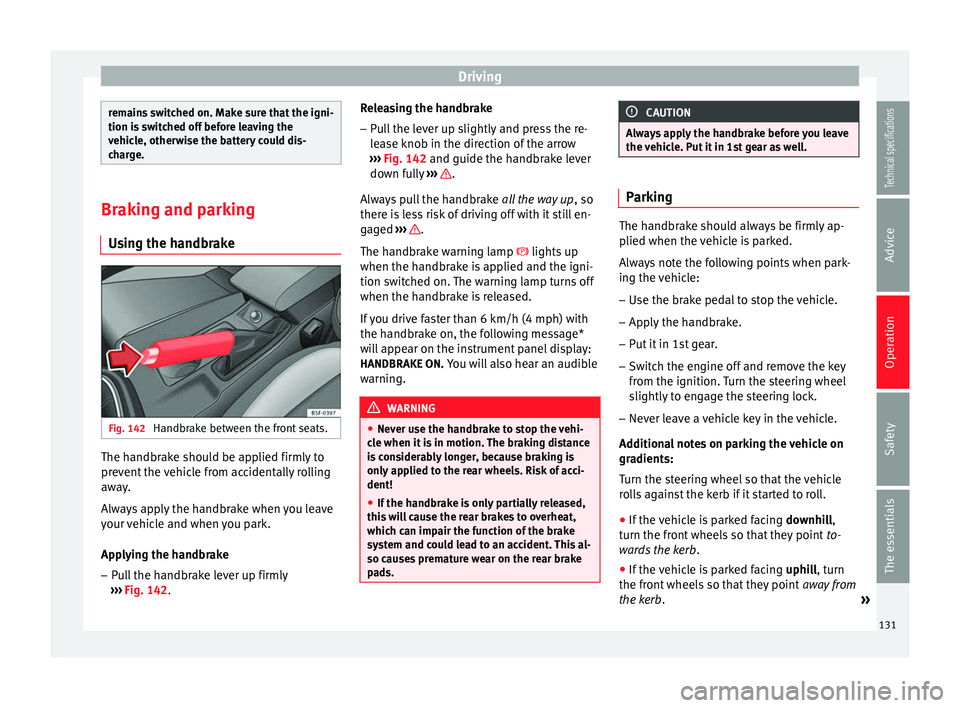
Using the handbrake Fig. 142
Handbrake between the front seats. The handbrake should be applied firmly to
prevent the vehicle from accidentally rolling
away.
Always apply the handbrake when you leave
your vehicle and when you park.
Applying the handbrake
– Pull the handbrake lever up firmly
››› Fig. 142 . R
el easing the handbrake
– Pull the lever up slightly and press the re-
lease knob in the direction of the arrow
››› Fig. 142 and guide the handbrake lever
down f
ully ››› .
Always pull the handbrake all the way up, so
there is less risk of driving off with it still en-
gaged ››› .
The handbrake warning lamp lights up
when the handbrake is applied and the igni-
tion switched on. The warning lamp turns off
when the handbrake is released.
If you drive faster than 6 km/h (4 mph) with
the handbrake on, the following message*
will appear on the instrument panel display: HANDBRAKE ON. You will also hear an audible
warning. WARNING
● Never use the handbrake to stop the vehi-
cle when it is in motion. The braking distance
is considerably longer, because braking is
only applied to the rear wheels. Risk of acci-
dent!
● If the handbrake is only partially released,
this will cause the rear brakes to overheat,
which can impair the function of the brake
system and could lead to an accident. This al-
so causes premature wear on the rear brake
pads. CAUTION
Always apply the handbrake before you leave
the vehicle. Put it in 1st gear as well. Parking
The handbrake should always be firmly ap-
plied when the vehicle is parked.
Always note the following points when park-
ing the vehicle:
– Use the brake pedal to stop the vehicle.
– Apply the handbrake.
– Put it in 1st gear.
– Switch the engine off and remove the key
from the ignition. Turn the steering wheel
slightly to engage the steering lock.
– Never leave a vehicle key in the vehicle.
Additional notes on parking the vehicle on
gradients:
Turn the steering wheel so that the vehicle
rolls against the kerb if it started to roll. ● If the vehicle is parked facing downhill,
turn the front wheels so that they point to-
wards the kerb .
● If the vehicle is parked facing uphill
, turn
the fr ont
wheels so that they point away from
the kerb
. »
131
Technical specifications
Advice
Operation
Safety
The essentials