mirror Seat Leon SC 2014 Owner's manual
[x] Cancel search | Manufacturer: SEAT, Model Year: 2014, Model line: Leon SC, Model: Seat Leon SC 2014Pages: 284, PDF Size: 5.85 MB
Page 5 of 284
Table of Contents
Table of Contents
The essentials . . . . . . . . . . . . . . . . . . . . . . . . 5
Exterior view . . . . . . . . . . . . . . . . . . . . . . . . . . . . 5
Interior view . . . . . . . . . . . . . . . . . . . . . . . . . . . . 7
How it works . . . . . . . . . . . . . . . . . . . . . . . . . . . . 9
Unlocking and locking . . . . . . . . . . . . . . . . . . . . 9
Before driving . . . . . . . . . . . . . . . . . . . . . . . . . . . 11
Starting the vehicle . . . . . . . . . . . . . . . . . . . . . . 14
Lights and visibility . . . . . . . . . . . . . . . . . . . . . . 15
Easy Connect . . . . . . . . . . . . . . . . . . . . . . . . . . . 17
Driver information system . . . . . . . . . . . . . . . . . 19
Cruise control . . . . . . . . . . . . . . . . . . . . . . . . . . . 21
Warning lamps . . . . . . . . . . . . . . . . . . . . . . . . . . 22
Gearbox lever . . . . . . . . . . . . . . . . . . . . . . . . . . . 24
Air conditioning . . . . . . . . . . . . . . . . . . . . . . . . . 26
Level control . . . . . . . . . . . . . . . . . . . . . . . . . . . . 31
Action in the event of a puncture . . . . . . . . . . . 33
Emergency towing of the vehicle . . . . . . . . . . . 35
Safety . . . . . . . . . . . . . . . . . . . . . . . . . . . . . . . . 37
Safe driving . . . . . . . . . . . . . . . . . . . . . . . . . . . . 37
Safety first! . . . . . . . . . . . . . . . . . . . . . . . . . . . . . 37
Advice about driving . . . . . . . . . . . . . . . . . . . . . 37
Sitting position for vehicle occupants . . . . . . . 38
Pedal area . . . . . . . . . . . . . . . . . . . . . . . . . . . . . . 42
Seat belts . . . . . . . . . . . . . . . . . . . . . . . . . . . . . . 43
The reasons why we should wear seat belts . . 43
How to properly adjust your seatbelt . . . . . . . . 46
Seat belt tensioners . . . . . . . . . . . . . . . . . . . . . . 47
Airbag system . . . . . . . . . . . . . . . . . . . . . . . . . . 48
Brief introduction . . . . . . . . . . . . . . . . . . . . . . . . 48
Airbag overview . . . . . . . . . . . . . . . . . . . . . . . . . 50
Deactivating airbags . . . . . . . . . . . . . . . . . . . . . 54
Transporting children safety . . . . . . . . . . . . . . . 56
Safety for children . . . . . . . . . . . . . . . . . . . . . . . 56
Child seats . . . . . . . . . . . . . . . . . . . . . . . . . . . . . 58 Operation
. . . . . . . . . . . . . . . . . . . . . . . . . . . . . 65
Controls and displays . . . . . . . . . . . . . . . . . . . . 65
Overview . . . . . . . . . . . . . . . . . . . . . . . . . . . . . . . 64
Instruments and warning/control lamps . . . . . 66
Instruments . . . . . . . . . . . . . . . . . . . . . . . . . . . . 66
Control lamps . . . . . . . . . . . . . . . . . . . . . . . . . . . 71
Driver information system . . . . . . . . . . . . . . . . . 72
Information system . . . . . . . . . . . . . . . . . . . . . . 72
Driving data . . . . . . . . . . . . . . . . . . . . . . . . . . . . 76
Speed warning function . . . . . . . . . . . . . . . . . . . 79
Service interval display . . . . . . . . . . . . . . . . . . . 80
Introduction to the Easy Connect system* . . . . 81
System Settings (CAR)* . . . . . . . . . . . . . . . . . . . 81
Opening and closing . . . . . . . . . . . . . . . . . . . . . 82
Central locking system . . . . . . . . . . . . . . . . . . . . 82
Anti-theft alarm system* . . . . . . . . . . . . . . . . . . 87
Rear lid (luggage compartment) . . . . . . . . . . . . 89
Electric windows . . . . . . . . . . . . . . . . . . . . . . . . . 90
Panoramic sliding sunroof* . . . . . . . . . . . . . . . . 92
Lights and visibility . . . . . . . . . . . . . . . . . . . . . . 94
Lights . . . . . . . . . . . . . . . . . . . . . . . . . . . . . . . . . 94
Visibility . . . . . . . . . . . . . . . . . . . . . . . . . . . . . . . 101
Windscreen wiper and window wiper systems . 102
Rear vision mirror . . . . . . . . . . . . . . . . . . . . . . . . 104
Seats and head restraints . . . . . . . . . . . . . . . . . 106
Adjusting the seats and headrests . . . . . . . . . . 106
Seat functions . . . . . . . . . . . . . . . . . . . . . . . . . . 107
Transport and practical equipment . . . . . . . . . 111
Storage compartments . . . . . . . . . . . . . . . . . . . 111
Storing objects . . . . . . . . . . . . . . . . . . . . . . . . . . 114
Roof carrier . . . . . . . . . . . . . . . . . . . . . . . . . . . . . 122
Air conditioning . . . . . . . . . . . . . . . . . . . . . . . . . 124
Heating, ventilation and cooling . . . . . . . . . . . . 124
Driving . . . . . . . . . . . . . . . . . . . . . . . . . . . . . . . . 129
Ignition lock . . . . . . . . . . . . . . . . . . . . . . . . . . . . 129
Braking and parking . . . . . . . . . . . . . . . . . . . . . 131
Manual gearbox . . . . . . . . . . . . . . . . . . . . . . . . . 132 Automatic gearbox/DSG automatic gearbox* . 132
Run-in and economical driving . . . . . . . . . . . . . 140
Driver assistance systems
. . . . . . . . . . . . . . . . . 143
Braking and stability systems . . . . . . . . . . . . . . 143
Start-Stop system* . . . . . . . . . . . . . . . . . . . . . . . 148
Cruise control system (CCS)* . . . . . . . . . . . . . . . 150
Adaptive Cruise Control ACC* . . . . . . . . . . . . . . 151
Monitoring system Front Assist* . . . . . . . . . . . . 161
Lane Assist system* . . . . . . . . . . . . . . . . . . . . . . 166
SEAT driving modes (SEAT Drive Profile)* . . . . . 169
Tiredness detection (break recommendation)* 172
Parking aid . . . . . . . . . . . . . . . . . . . . . . . . . . . . . 173
Towing bracket device . . . . . . . . . . . . . . . . . . . . 177
Trailer towing . . . . . . . . . . . . . . . . . . . . . . . . . . . 177
Advice . . . . . . . . . . . . . . . . . . . . . . . . . . . . . . . . 182
Care and maintenance . . . . . . . . . . . . . . . . . . . . 182
Accessories and modifications to the vehicle . 182
Care and cleaning . . . . . . . . . . . . . . . . . . . . . . . 183
Vehicle exterior care . . . . . . . . . . . . . . . . . . . . . . 183
Care of the vehicle interior . . . . . . . . . . . . . . . . . 187
Intelligent technology . . . . . . . . . . . . . . . . . . . . 190
Electro-mechanical steering . . . . . . . . . . . . . . . 190
Progressive steering . . . . . . . . . . . . . . . . . . . . . 190
Four-wheel drive . . . . . . . . . . . . . . . . . . . . . . . . . 191
Power Management . . . . . . . . . . . . . . . . . . . . . . 191
Checking and refilling levels . . . . . . . . . . . . . . . 193
Refuelling . . . . . . . . . . . . . . . . . . . . . . . . . . . . . . 193
Fuel . . . . . . . . . . . . . . . . . . . . . . . . . . . . . . . . . . . 195
Bonnet . . . . . . . . . . . . . . . . . . . . . . . . . . . . . . . . 198
Engine oil . . . . . . . . . . . . . . . . . . . . . . . . . . . . . . 200
Cooling system . . . . . . . . . . . . . . . . . . . . . . . . . . 203
Brake fluid . . . . . . . . . . . . . . . . . . . . . . . . . . . . . 204
Windscreen washer reservoir . . . . . . . . . . . . . . 204
Battery . . . . . . . . . . . . . . . . . . . . . . . . . . . . . . . . . 205
Wheels . . . . . . . . . . . . . . . . . . . . . . . . . . . . . . . . 208
Wheels and tyres . . . . . . . . . . . . . . . . . . . . . . . . 208
Tyre monitoring systems . . . . . . . . . . . . . . . . . . 212
3
Page 15 of 284
The essentials
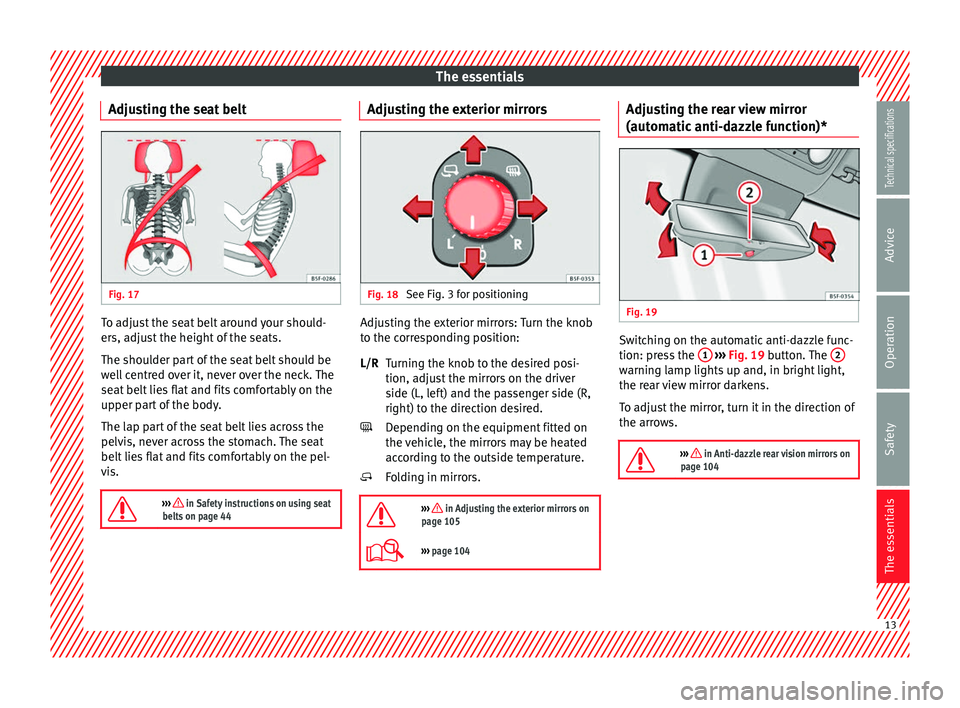
Adjusting the seat belt Fig. 17
To adjust the seat belt around your should-
ers, adjust the height of the seats.
The shoulder part of the seat belt should be
well centred over it, never over the neck. The
seat belt lies flat and fits comfortably on the
upper part of the body.
The lap part of the seat belt lies across the
pelvis, never across the stomach. The seat
belt lies flat and fits comfortably on the pel-
vis.
››› in Safety instructions on using seat
belts on page 44 Adjusting the exterior mirrors
Fig. 18
See Fig. 3 for positioning Adjusting the exterior mirrors: Turn the knob
to the corresponding position:
Turning the knob to the desired posi-
tion, adjust the mirrors on the driver
side (L, left) and the passenger side (R,
right) to the direction desired.
Depending on the equipment fitted on
the vehicle, the mirrors may be heated
according to the outside temperature.
Folding in mirrors.
››› in Adjusting the exterior mirrors on
page 105
››› page 104 L/R
Adjusting the rear view mirror
(automatic anti-dazzle function)*
Fig. 19
Switching on the automatic anti-dazzle func-
tion: press the
1
››› Fig. 19 button. The 2 warning lamp lights up and, in bright light,
the rear view mirror darkens.
To adjust the mirror, turn it in the direction of
the arrows.
››› in Anti-dazzle rear vision mirrors on
page 104 13
Technical specifications
Advice
Operation
Safety
The essentials
Page 20 of 284
The essentialsMenuSubmenuPossible settingDescription
ESC system–Activation of the Electronic Stability Programme (ESC)›››
page 143
TyresTyre pressure monitoringTyre pressure storing (Calibration)››› page 212
Winter tyresActivation and deactivation of the speed warning. Setting the speed warning value››› page 215
Driver assistance
ACC (adaptive cruise control)Activation/deactivation: Gear programme, temporary distance from the vehicle in front (dis-
tance level)››› page 151
Front Assist (monitoring system)Activation/deactivation: monitoring system, pre-warning, distance warning display››› page 161
City emergency braking functionActivation/deactivation of the City emergency braking function.››› page 165
Lane Assist (system warning you if you
leave the lane)Activation/deactivation: Lane Assists, Lane Centring Assist››› page 166
Tiredness detectionActivation/deactivation››› page 172
Parking and manoeu-
vringParkPilotAutomatically activate, front volume, front sound settings, rear volume, rear sound settings,
adjust volume››› page 173
Vehicle lights
Vehicle interior lightingInstrument and control lighting, ambient door lighting, footrest lighting››› page 101
Coming home/Leaving home functionStart time for “Coming home” function, start time for “Leaving home” function››› page 97
››› page 98
Motorway lightActivation/deactivation››› page 100
Mirrors/windscreen wip-
ersRear vision mirrorsSynchronised regulation, lower the rear-view mirror when reversing, fold in after parking››› page 13
››› page 104
Windscreen wipersAutomatic windscreen wipers, wipe when reversing››› page 16
Opening and closingRadio-operated remote controlConvenience open function››› page 91
Central locking systemUnlocking doors, automatic locking/unlocking, audible confirmation››› page 82 18
Page 39 of 284
Safe driving
Safety
Safe driving Safety first! WARNING
● This manual contains important informa-
tion about the operation of the vehicle, both
for the driver and the passengers. The other
sections of the on-board documentation also
contain further information that you should
be aware of for your own safety and for the
safety of your passengers.
● Ensure that the on-board documentation is
kept in the vehicle at all times. This is espe-
cially important when lending or selling the
vehicle to another person. Advice about driving
Before starting every trip For your own safety and the safety of your
passengers, always note the following points
before every trip:
– Make sure that the vehicle's lights and turn
signals are working properly.
– Check tyre pressure. –
Ensure that all windows provide a clear and
good view of the surroundings.
– Make sure all luggage is secured
››› page 114 .
– Mak
e sure that no objects can interfere
with the pedals.
– Adjust front seat, head restraint and rear vi-
sion mirrors properly according to your
size.
– Ensure that the passengers in the rear
seats always have the head restraints in
the in-use position ››› page 41.
– Instruct passengers to adjust the head re-
straints according to their height.
– Protect children with appropriate child
seats and properly applied seat belts
››› page 56.
– Ass
ume the correct sitting position. Instruct
your passengers also to assume a proper
sitting position. ››› page 38.
– Fasten your seat belt securely. Instruct your
passengers also to fasten their seat belts
properly. ››› page 43.
What
affects driving safety? As a driver, you are responsible for yourself
and your passengers. When your concentra-
tion or driving safety is affected by any cir-cumstance, you endanger yourself as well as
others on the road
››› , for this reason:
– Always pay attention to traffic and do not
get distracted by passengers or telephone calls.
– Never drive when your driving ability is im-
paired (e.g. by medication, alcohol, drugs).
– Observe traffic laws and speed limits.
– Always reduce your speed as appropriate
for road, traffic and weather conditions.
– When travelling long distances, take
breaks regularly - at least every two hours.
– If possible, avoid driving when you are tired
or stressed. WARNING
When driving safety is impaired during a trip,
the risk of injury and accidents increases. Safety equipment
Never put your safety or the safety of your
passengers in danger. In the event of an acci-
dent, the safety equipment may reduce the
risk of injury. The following list includes most
of the safety equipment in your SEAT:
● Three-point seat belts
● belt tension limiters for the front and rear
side seats, »
37
Technical specifications
Advice
Operation
Safety
The essentials
Page 67 of 284
Controls and displays
Operation
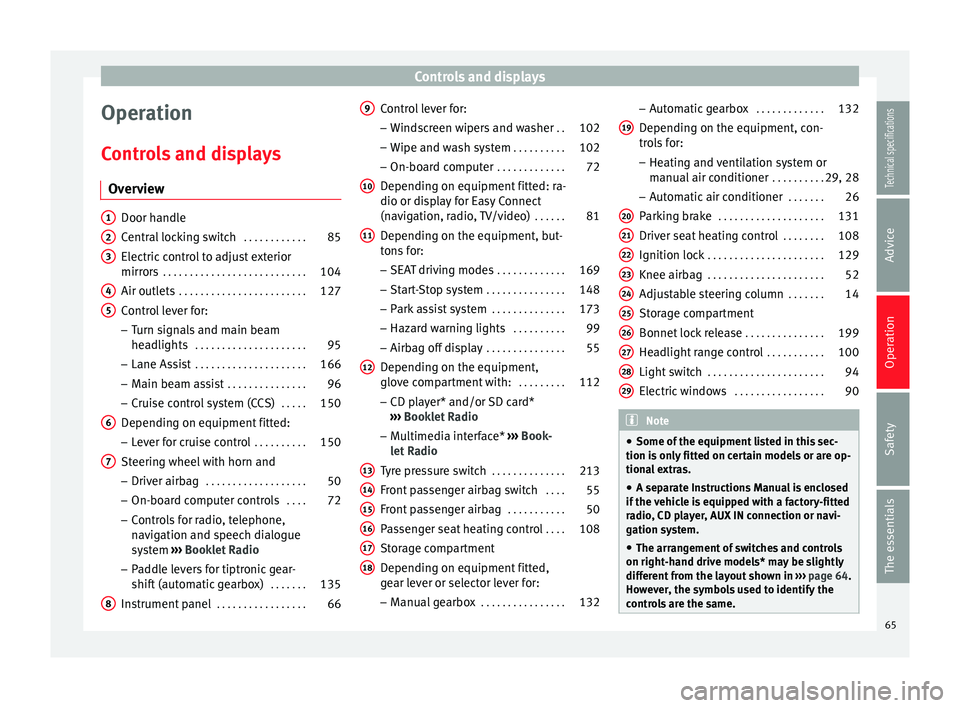
Controls and displays Overview Door handle
Central locking switch
. . . . . . . . . . . .85
Electric control to adjust exterior
mirrors . . . . . . . . . . . . . . . . . . . . . . . . . . . 104
Air outlets . . . . . . . . . . . . . . . . . . . . . . . . 127
Control lever for:
– Turn signals and main beam
headlights . . . . . . . . . . . . . . . . . . . . . 95
– Lane Assist . . . . . . . . . . . . . . . . . . . . . 166
– Main beam assist . . . . . . . . . . . . . . . 96
– Cruise control system (CCS) . . . . .150
Depending on equipment fitted:
– Lever for cruise control . . . . . . . . . .150
Steering wheel with horn and – Driver airbag . . . . . . . . . . . . . . . . . . . 50
– On-board computer controls . . . .72
– Controls for radio, telephone,
navigation and speech dialogue
system ›››
Booklet Radio
– Paddle levers for tiptronic gear-
shift (automatic gearbox) . . . . . . .135
Instrument panel . . . . . . . . . . . . . . . . . 66
1 2
3
4
5
6
7
8 Control lever for:
– Windscreen wipers and washer . .102
– Wipe and wash system . . . . . . . . . .102
– On-board computer . . . . . . . . . . . . .72
Depending on equipment fitted: ra-
dio or display for Easy Connect
(navigation, radio, TV/video) . . . . . .81
Depending on the equipment, but-
tons for:
– SEAT driving modes . . . . . . . . . . . . .169
– Start-Stop system . . . . . . . . . . . . . . . 148
– Park assist system . . . . . . . . . . . . . .173
– Hazard warning lights . . . . . . . . . .99
– Airbag off display . . . . . . . . . . . . . . . 55
Depending on the equipment,
glove compartment with: . . . . . . . . .112
– CD player* and/or SD card*
››› Booklet Radio
– Multimedia interface* ››› Book-
let Radio
Tyre pressure switch . . . . . . . . . . . . . .213
Front passenger airbag switch . . . .55
Front passenger airbag . . . . . . . . . . .50
Passenger seat heating control . . . .108
Storage compartment
Depending on equipment fitted,
gear lever or selector lever for:
– Manual gearbox . . . . . . . . . . . . . . . . 132
9
10
11
12
13
14
15
16
17
18 –
Automatic gearbox . . . . . . . . . . . . .132
Depending on the equipment, con-
trols for: – Heating and ventilation system or
manual air conditioner . . . . . . . . . .29, 28
– Automatic air conditioner . . . . . . .26
Parking brake . . . . . . . . . . . . . . . . . . . . 131
Driver seat heating control . . . . . . . .108
Ignition lock . . . . . . . . . . . . . . . . . . . . . . 129
Knee airbag . . . . . . . . . . . . . . . . . . . . . . 52
Adjustable steering column . . . . . . .14
Storage compartment
Bonnet lock release . . . . . . . . . . . . . . .199
Headlight range control . . . . . . . . . . .100
Light switch . . . . . . . . . . . . . . . . . . . . . . 94
Electric windows . . . . . . . . . . . . . . . . . 90 Note
● Some of the equipment listed in this sec-
tion is only fitted on certain models or are op-
tional extras.
● A separate Instructions Manual is enclosed
if the vehicle is equipped with a factory-fitted
radio, CD player, AUX IN connection or navi-
gation system.
● The arrangement of switches and controls
on right-hand drive models* may be slightly
different from the layout shown in ››› page 64.
However, the symbols used to identify the
controls are the same. 19
20
21
22
23
24
25
26
27
28
29
65Technical specifications
Advice
Operation
Safety
The essentials
Page 83 of 284
Introduction to the Easy Connect system*
service intervals permitted in the
››› Book-
let Maintenance Programme. Introduction to the Easy
Connect system*
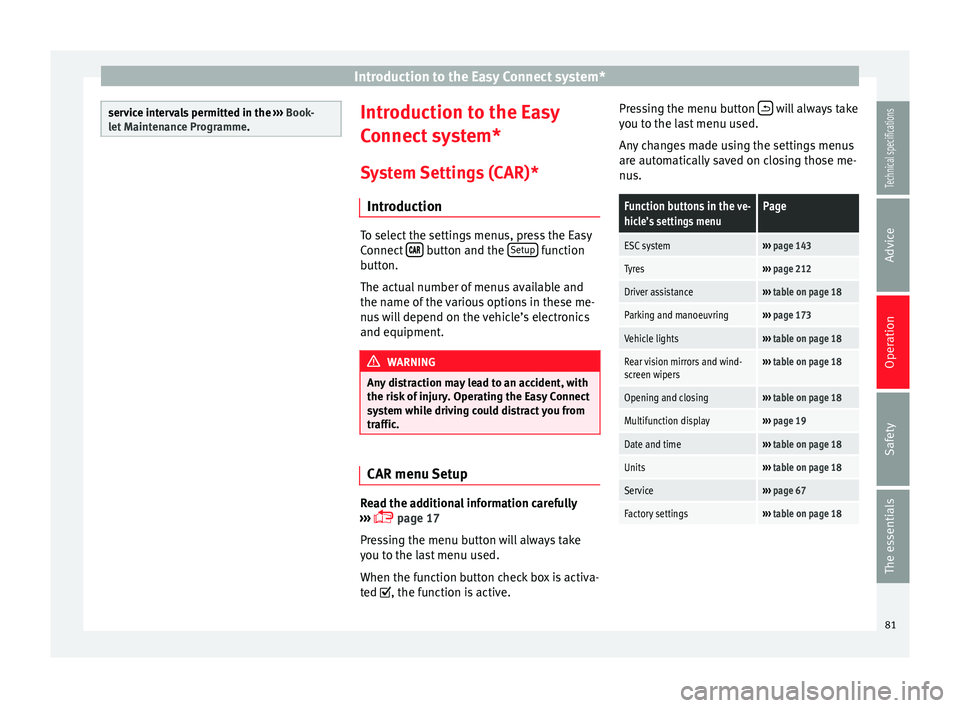
System Settings (CAR)* Introduction To select the settings menus, press the Easy
Connect
button and the
Setup function
button.
The actual number of menus available and
the name of the various options in these me-
nus will depend on the vehicle’s electronics
and equipment. WARNING
Any distraction may lead to an accident, with
the risk of injury. Operating the Easy Connect
system while driving could distract you from
traffic. CAR menu Setup
Read the additional information carefully
››› page 17
Pressing the menu button will always take
you to the last menu used.
When the function button check box is activa-
ted , the function is active. Pressing the menu button
will always take
you to the last menu used.
Any changes made using the settings menus
are automatically saved on closing those me-
nus.Function buttons in the ve-
hicle’s settings menuPage
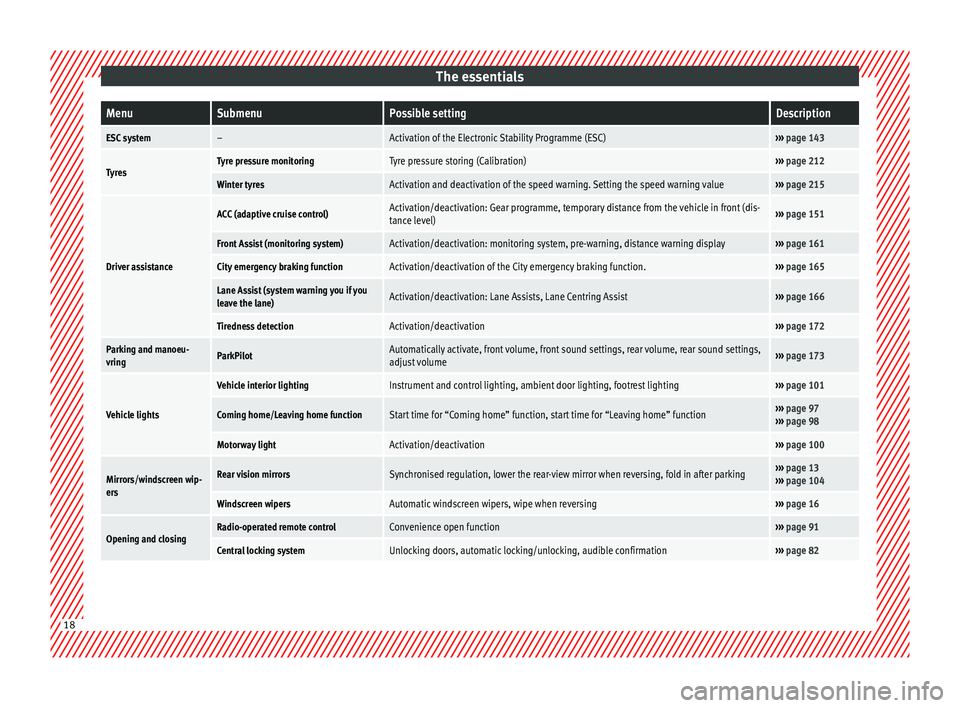
ESC system››› page 143
Tyres››› page 212
Driver assistance››› table on page 18
Parking and manoeuvring››› page 173
Vehicle lights››› table on page 18
Rear vision mirrors and wind-
screen wipers››› table on page 18
Opening and closing››› table on page 18
Multifunction display››› page 19
Date and time››› table on page 18
Units››› table on page 18
Service››› page 67
Factory settings››› table on page 18 81
Technical specifications
Advice
Operation
Safety
The essentials
Page 91 of 284
Opening and closing
their movements will trigger the alarm) or
when, for example, the vehicle is transported
or has to be towed with only one axle on the
ground.
False alarms
Interior monitoring will only operate correctly
if the vehicle is completely closed. Please ob-
serve related legal requirements.
The following cases may cause a false alarm:
● Open windows (partially or fully).
● Panoramic/tilting sunroof open (partially or
completely).
● Movement of objects inside the vehicle,
such as loose papers, items hanging from
the rear vision mirror (air fresheners), etc. Note
● If the vehicle is relocked and the alarm is
activated without the volumetric sensor func-
tion, relocking will activate the alarm with all
its functions, except the volumetric sensor.
This function is reactivated when the alarm is
switched on again, unless it is deliberately
switched off.
● If the alarm has been triggered by the volu-
metric sensor, this will be indicated by a
flashing of the warning lamp on the driver
door when the vehicle is opened. The flash is
different to the flash indicating the alarm is
activated. ●
The vibration of a mobile phone left inside
the vehicle may cause the vehicle interior
monitoring alarm to trigger, as both sensors
react to movements and shakes inside the ve-
hicle.
● If on activating the alarm, any door or the
rear lid is open, only the alarm will be activa-
ted. The vehicle interior monitoring and the
anti-tow system will only be activated once
all the doors are closed (including the rear
lid). Deactivating the vehicle interior
monitoring and tow-away protection*
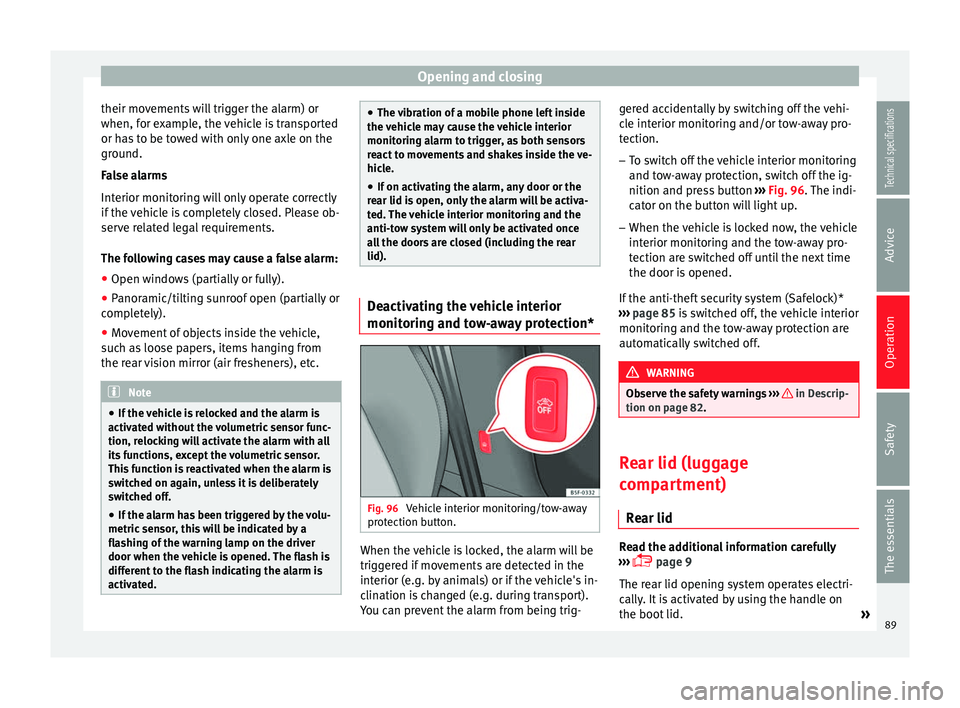
Fig. 96
Vehicle interior monitoring/tow-away
protection button. When the vehicle is locked, the alarm will be
triggered if movements are detected in the
interior (e.g. by animals) or if the vehicle's in-
clination is changed (e.g. during transport).
You can prevent the alarm from being trig-gered accidentally by switching off the vehi-
cle interior monitoring and/or tow-away pro-
tection.
– To switch off the vehicle interior monitoring
and tow-away protection, switch off the ig-
nition and press button ››› Fig. 96 . The indi-
c at
or on the button will light up.
– When the vehicle is locked now, the vehicle
interior monitoring and the tow-away pro-
tection are switched off until the next time
the door is opened.
If the anti-theft security system (Safelock)*
››› page 85 is switched off, the vehicle interior
monitorin
g and the tow-away protection are
automatically switched off. WARNING
Observe the safety warnings ››› in Descrip-
tion on page 82. Rear lid (luggage
compartment)
Rear lid Read the additional information carefully
››› page 9
The rear lid opening system operates electri-
cally. It is activated by using the handle on
the boot lid. »
89
Technical specifications
Advice
Operation
Safety
The essentials
Page 98 of 284
Operation
Note
In cold or damp weather conditions, the
headlights, tail lights and turn signals may
mist up inside temporarily. This is normal and
in no way effects the useful life of the vehicle
lighting system. Automatic dipped beam control
The automatic dipped beam control is merely
intended as an aid and is not able to recog-
nise all driving situations.
When the light switch is in position , the
vehicle lights and the instrument panel and
switch lighting switch on and off automatical-
ly in the following situations
››› in Daytime
driving light on page 95:Automatic switching
onAutomatic switching
off
The photo sensor detects
darkness, for example,
when driving through a
tunnel.When adequate lighting is
detected.
The rain sensor detects
rain and activates the
windscreen wipers.When the windscreen wip-
ers have been inactive for
a few minutes. WARNING
If the road is not well lit and other road users
cannot see the vehicle well enough or at all,
accidents may occur.
● The automatic dipped beam control ( )
only switches on the dipped beam when
there are no changes in brightness, and not,
for example when it is foggy. Main beam assist*
Main beam assist (Light Assist)
The main beam assist operates, within the
limits of the system and depending on the
environmental and traffic conditions, as of a
speed of 60 km/h (37 mph) when it switches
on automatically, and is then deactivated
again below 30 km/h (18 mph)
››› . This is
managed via a camera situated on the base
of the interior mirror.
The main beam assist generally detects illu-
minated areas and deactivates the main
beam when passing through a town, for ex-
ample. Switching the main beam assist on and off
Func-
tionAction
Acti-
vate:
– Switch the ignition on and turn the light
switch to position .
– From the base position, move the main
beam and turn signal lever forwards
››› page 95. When the warning lamp
is dis-
played on the instrument panel display, the
main beam assist is switched on.
To
switch
system off:
– Switch off the ignition.
– OR: turn the light switch to a different posi-
tion to
››› page 94.
– OR: with main beam on, move the main
beam and turn signal lever backwards.
– OR: move the main beam and turn the sig-
nal lever forwards to manually switch the
main beam on. The main beam assist will then
be deactivated. Malfunctions
The following conditions may prevent the
main beam headlight control from turning off
the headlights in time or from turning off al-
together:
● In poorly lit towns with highly reflective
signs.
● Other insufficiently lit road users (such as
pedestrians or cyclists).
● On tight bends and steep slopes (bumps)
and when oncoming vehicles are partially ob-
scured.
96
Page 104 of 284
Operation
● The sun visor can be pulled out of its
mounting and turned towards the door
››› Fig. 101 1 .
● Swing the sun visor towards the door, lon-
gitudinally backwards.
Vanity mirror light
There may be a vanity mirror, with a cover, on
the rear of the sun visor. When the cover is
opened 2 a light comes on.
The lamp goes out when the vanity mirror
cover is closed or the sun visor is pushed
back up. WARNING
Folded sun blinds can reduce visibility.
● Always store sun blinds and visors in their
housing when not in use. Note
The light above the sun visor automatically
switches off after a few minutes in certain
conditions. This prevents the battery from
discharging. Sun blind*
3 Applies to the model: LEON ST
Fig. 102
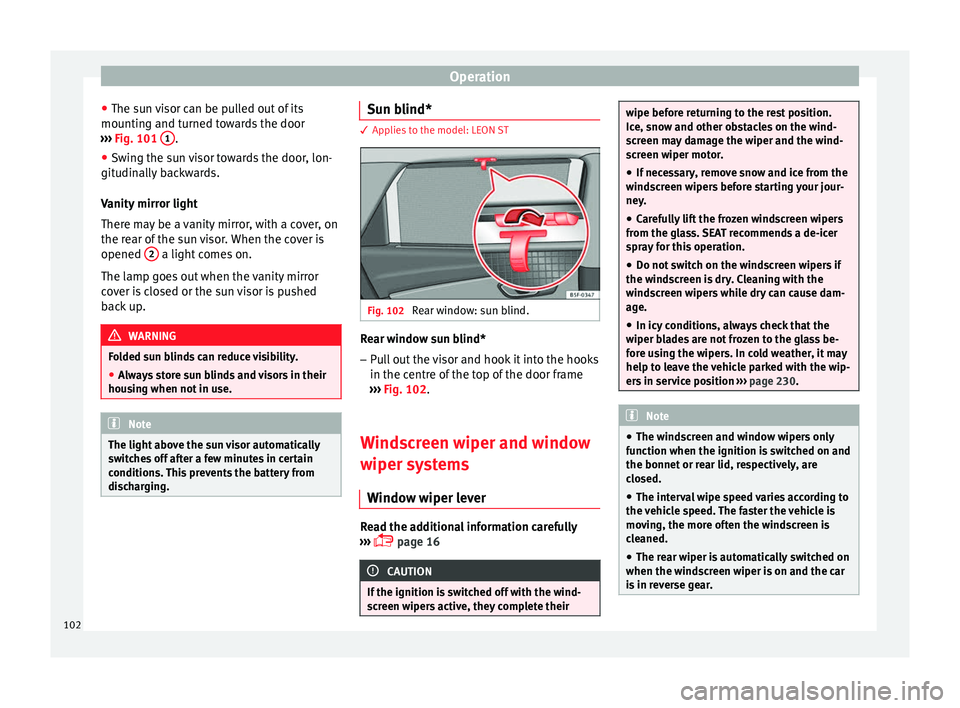
Rear window: sun blind. Rear window sun blind*
– Pull out the visor and hook it into the hooks
in the centre of the top of the door frame
››› Fig. 102 .
W ind
screen wiper and window
wiper systems
Window wiper lever Read the additional information carefully
››› page 16 CAUTION
If the ignition is switched off with the wind-
screen wipers active, they complete their wipe before returning to the rest position.
Ice, snow and other obstacles on the wind-
screen may damage the wiper and the wind-
screen wiper motor.
● If necessary, remove snow and ice from the
windscreen wipers before starting your jour-
ney.
● Carefully lift the frozen windscreen wipers
from the glass. SEAT recommends a de-icer
spray for this operation.
● Do not switch on the windscreen wipers if
the windscreen is dry. Cleaning with the
windscreen wipers while dry can cause dam-
age.
● In icy conditions, always check that the
wiper blades are not frozen to the glass be-
fore using the wipers. In cold weather, it may
help to leave the vehicle parked with the wip-
ers in service position ››› page 230. Note
● The windscreen and window wipers only
function when the ignition is switched on and
the bonnet or rear lid, respectively, are
closed.
● The interval wipe speed varies according to
the vehicle speed. The faster the vehicle is
moving, the more often the windscreen is
cleaned.
● The rear wiper is automatically switched on
when the windscreen wiper is on and the car
is in reverse gear. 102
Page 106 of 284
Operation
Rain sensor modified behaviour
Possible causes of faults and mistaken read-
ings on the sensitive surface ››› Fig. 104 of
the r ain sen
sor include:
● Damaged blades: a film of water on the
damaged blades may lengthen the activation
time, reduce the washing intervals or result
in a fast and continuous wipe.
● Insects: insects on the sensor may trigger
the windscreen wiper.
● Salt on roads: in winter, salt spread in the
roads may cause an extra long wipe when the
windscreen is almost dry.
● Dirt: dry dust, wax, coating on glass (Lotus
effect) or traces of detergent (car wash) may
reduce the effectiveness of the rain sensor or
make it react more slowly, later or not at all.
● Cracked windscreen: the impact of a stone
will trigger a single wipe cycle with the rain
sensor on. Next the rain sensor detects the
reduction in the sensitive surface area and
adapts accordingly. The behaviour of the sen-
sor will vary with the size of the damage
caused by the stone. WARNING
The rain sensor may not detect enough rain
to switch on the wipers.
● If necessary, switch on the wipers manually
when water on the windscreen obstructs visi-
bility. Note
● Clean the sensitive surface of the rain sen-
sor regularly and check the blades for dam-
age ››› Fig. 104 (arrow).
● To r
emove wax and coatings, we recom-
mend a window cleaner containing alcohol. Rear vision mirror
Anti-dazzle rear vision mirrors Read the additional information carefully
››› page 13
Your vehicle is fitted with an interior rear vi-
sion mirror with a manual or automatic* con-
trol for anti-dazzle position.
Interior rear vision mirror with manual
setting for anti-dazzle position – Position the small lever of the lower edge
of the mirror to face towards the rear. WARNING
In the event that an automatic anti-dazzle
rear vision mirror breaks, an electrolyte fluid
may leak. This could cause irritation to the
skin, eyes and respiratory organs. If you
come into contact with this liquid, it must be
rinsed with large quantities of water. If neces-
sary, get medial help. CAUTION
In the event that an automatic anti-dazzle
rear vision mirror breaks, an electrolyte fluid
may leak. This liquid attacks plastic surfaces.
Clean it with a wet sponge as soon as possi-
ble. Note
● If the light incident in the interior rear vi-
sion mirror is obstructed (e.g. with the sun
blind*, the anti-dazzle rear vision mirror with
automatic setting will not operate perfectly.
● When the interior lights are on or reverse
gear engaged, the rear vision mirrors do not
darken with automatic adjustment for anti-
dazzle position. Adjusting the exterior mirrors
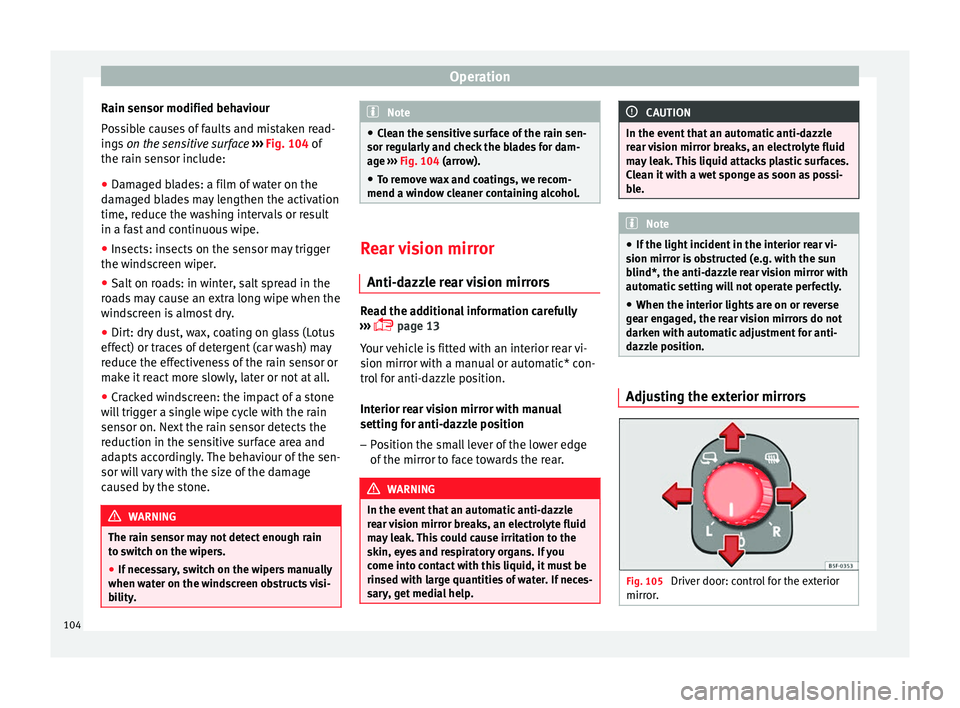
Fig. 105
Driver door: control for the exterior
mirror. 104